All posts by Sreenivas Makam

Contiv – Policy based networking for Containers

Contiv is an Open source project driven primarily by Cisco for policy based networking, storage and cluster management for containerized applications. In this blog, I will focus on how Contiv does policy based Container networking. In the next blog, I will cover some hands-on stuff that I tried with Contiv.

Container Policy

Policies have become critical to control the business logic in a Cloud environment. There are 2 ways to describe policy. In imperative model, policy is defined in terms of how the end goal is achieved. For example, we specify the filters and actions with Openflow protocol that achieves end goal of packet handling and this is an example of imperative model. In declarative model, policy is defined in terms of the end goal and it gives flexibility to the end-system to implement the policy in different ways. Congress and Opflex are examples of declarative policy model. With declarative model, it is possible to specify the policy in terms of business logic without specifying implementation detail. For example, the business logic can say that web container should not talk to database container. The implementation of this business logic can be achieved by having an iptables rule or by having a hardware tcam rule to block specific ports. In a cloud computing world, policies can be defined for compute, storage and networking. Both Containers and VM needs policies to implement business logic. Following are examples of some policies that can be applied to applications deployed in Cloud using either VMs or Containers:

  • Authorization policy – Specifies tenants and their privileges.
  • Resource usage policy – Specifies resource constraints for tenants, containers and VMs.
  • Application access policy – Specifies containers that can communicate to each other and containers that are exposed to outside world.

Contiv Networking

Contiv Networking project provides policy based networking for Docker Containers. Following are some details on Contiv Networking:

Continue reading Contiv – Policy based networking for Containers
Openstack Deployment using Containers

I recently saw the Openstack self-healing demo from CoreOS team using Tectonic(Stackanetes project) and I kind of felt that the boundary between Containers and VMs are blurring. In this blog, I discuss the usecase of deploying Openstack using Containers.

We typically think of Openstack as a VM Orchestration tool. Openstack is composed of numerous services and deploying Openstack as one monolithic blob is pretty complex and difficult to maintain. The demo described showed how Containers simplify Openstack deployment. This is a great example of using Microservices architecture to simplify infrastructure deployment.

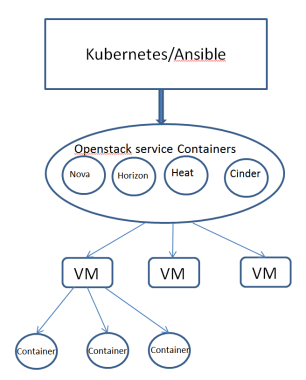
Following diagram shows the Openstack deployment model using Containers. The diagram below shows how Openstack service containers deploys user VM. The user VMs deployed using Openstack can run Containers as well..

vm_container1.PNG

Following are some notes on the architecture:

  • Openstack services like Nova, Heat, Horizon are containerized using Openstack Kolla project as Docker Containers. Some Openstack services like Nova is composed of multiple Containers.
  • Infrastructure components like Ceph, Openvswitch, Mongodb are also deployed as Containers.
  • For Container deployment, Openstack natively uses Ansible. Kubernetes can also be used for Orchestration.
  • Using Containers for Openstack service containers gives all the build, ship and deploy advantages of Containers.
  • Using orchestration solution like Kubernetes gives all the resiliency and deployment advantages for Openstack services.

This work also shows how Containers and VMs can work closely with each other for lot of use-cases. There are other Openstack projects like Magnum and Kuryr where there is an intersection between Containers and VMs. Magnum project deals with Container orchestration using Openstack and Kuryr project deals with doing Container networking using Openstack Neutron.

References:

Opensource Meetup Presentation

I did a presentation on CoreOS and Service Discovery in Opensource Meetup group last week. Following are related slides and demo recording.

CoreOS Overview and Current Status

Slides:

CoreOS HA Demo recording:

Scripts used are available here.

Service Discovery using etcd, Consul and Kubernetes

Slides:

Consul Service Discovery Demo:

Following are the commands to start Consul Container, Registrator Container and 3 Container services.

docker run -d -p 8500:8500 -p 192.168.0.1:53:8600/udp -p 8400:8400 gliderlabs/consul-server -node myconsul -bootstrap
docker run -d -v /var/run/docker.sock:/tmp/docker.sock --net=host gliderlabs/registrator -internal consul://localhost:8500

docker run -d -p :80 -e "SERVICE_80_NAME=http" -e "SERVICE_80_ID=http1" -e "SERVICE_80_CHECK_HTTP=true" -e "SERVICE_80_CHECK_HTTP=/" --name=nginx1 nginx
docker run -d -p :80 -e "SERVICE_80_NAME=http" -e "SERVICE_80_ID=http2" -e "SERVICE_80_CHECK_HTTP=true" -e "SERVICE_80_CHECK_HTTP=/" --name=nginx2 nginx
docker run -ti smakam/myubuntu:v3 bash

Service Discovery with Consul

In a Microservices architecture, Services are dynamic, distributed and present in large numbers. It is needed to have a good Service discovery solution to address this dynamic problem. In this blog, I will cover basics of Service discovery and using Consul to do Service discovery.

What is Service discovery?

Service discovery should provide the following:

  1. Discovery – Services need to discover each other to get IP address and port detail to communicate with other services in the cluster.
  2. Health check – Only healthy services should participate in handling traffic, unhealthy services need to be dynamically pruned out.
  3. Load balancing – Traffic destined to a particular service should be dynamically load balanced to all instances providing the particular service.

Following are the critical components of Service discovery:

Continue reading Service Discovery with Consul

Microservices Infrastructure using Mantl

Mantl is an Open source project from Cisco and it provides an integrated solution to deploy distributed Microservices. Any company deploying Microservices has to integrate different components before the solution becomes production ready. Mantl makes it easier by integrating the different components and providing the glue software that integrates the components. In this blog, I will cover the following:

  • Distributed Microservice infrastructure components and the need for Mantl.
  • Mantl Architecture.
  • Mantl installation using Vagrant
  • Mantl installation using AWS public cloud

Microservices infrastructure

Following are typical components in Container based Microservices infrastructure:

Continue reading Microservices Infrastructure using Mantl

Baremetal cloud using Packet

Typical Opensource demo applications comes packaged as a Vagrant application which starts a bunch of VMs and does automatic provisioning. I have a Windows machine with Virtualbox and VMWare player installed. Since Virtualbox does not support nested virtualization with 64 bit VMs(More details can be found in my previous blogs on Virtualbox and VMWare player), I use VMWare player to try out demo applications that needs 64 bit VMs. The demo applications typically run on Linux, so running them on Windows with Virtualbox is ruled out. I was recently trying this Mantl project for deploying distributed microservices and I found that it was very slow to run in VMWare player with nested virtualization. I tried to run the application in AWS and I found that AWS does not support nested virtualization(More details can be found here). Then I tried out Google cloud. Even though Google cloud supports nested virtualization, hardware virtualization is disabled on the guest VMs and this prevents running 64 bit VMs inside Google cloud VMs. After I ran out of these options, I stumbled upon the possibility of using baremetal cloud. I used baremetal cloud from Packet and it worked great for my usecase mentioned above. Though this is not a typical use case, I was very happy with the performance and the possibilities that this provides. In this blog, I will share the use cases for baremetal cloud and my experiences with using Packet service.

Bare metal cloud Use case

Typical cloud providers like Amazon, Google, Digitalocean, Microsoft rent out VMs as part of their compute offering. These VMs run on top of a hypervisor. Though the user is guaranteed a specific performance, these VMs share the same resources with other VMs running on the same host machine. With bare metal cloud, the cloud provider hosts machines that the user can rent which is not shared with anyone. Cloud providers provide different configurations for bare metal and the user can choose based on their performance needs and the costing is based on the performance provided by the bare metal server. Following are some advantages that bare metal cloud provides:

Continue reading Baremetal cloud using Packet

Docker Security – part 4(Container image)

This is the fourth part of my Docker security series. In this blog, I will cover ways to secure Container images. Following are the other parts (1, 2, 3).

Docker image signing:

The most critical part with Docker is the Container image as ultimately the platform is being used to develop and deploy Container images. Docker Container images can be stored either in public or private registry. It is needed to sign Container images so that the client knows that image is coming from a trusted source and that it is not tampered with. Content publisher takes care of signing Container image and pushing it into the registry.
Following are some details on Docker content trust:

  • The Docker content trust is an implementation of the Notary open source project. The Notary open source project is based on The Update Framework (TUF) project.
  • Docker content trust is enabled with “export DOCKER_CONTENT_TRUST=1”. As of Docker version 1.10, content trust is not enabled by default. In later releases, this will be changed to enable Content trust by default.
  • When content trust is enabled, we can pull only signed images. When image is pushed, we need to enter tagging key.
  • When content trust is not enabled, both signed and unsigned images can be pulled.

Continue reading Docker Security – part 4(Container image)

Docker Security – part 3(Engine access)

This is the third part of my Docker security series. In this blog, we will cover ways to securely access Docker engine. Following are the other parts (1, 2, 4)

Docker engine access:

Docker engine runs as a daemon and by default listens on the Unix socket, “unix:///var/
run/docker.sock”. In Ubuntu distributions, Docker start options are specified in “/etc/default/docker”. To allow Docker API and client to access Docker engine remotely, we need to expose Docker daemon using http socket. This can be done by:

DOCKER_OPTS="-D -H unix:///var/run/docker.sock -H
tcp://192.168.56.101:2376" -> add this to /etc/default/docker
Sudo service docker restart -> Restart Docker daemon

Exposing Docker daemon using http is not a good practice and it is needed to secure the connection using https. Similar to the way web browsers trust the web server using https and TLS, Docker client can establish a secure connection to Docker engine that provides confidentiality, authentication as well as integrity. There are two options: first option is for client to verify server identity and in second option both client and server verify each other’s identity. Certificates establish the identity of a server. For commercial purposes, Certificates can be purchased from third-party sources like Verisign. For testing purposes, we can generate certificates using Openssl as described below. The procedure below is based on the steps detailed here.

Server side authentication:

Continue reading Docker Security – part 3(Engine access)

Docker Security – part 2(Docker Engine)

This is the second part of my Docker security series. In this blog, we will cover security features around Docker engine. Following are the other parts(1, 3, 4)

Namespaces:

Docker makes use of the following Linux kernel Namespaces to achieve Container isolation:

  • pid namespace
  • mount namespace
  • network namespace
  • ipc namespace
  • UTS namespace

To illustrate the five namespaces mentioned above, let’s create two Ubuntu containers:

docker run -ti --name ubuntu1 -v /usr:/ubuntu1 ubuntu bash
docker run -ti --name ubuntu2 -v /usr:/ubuntu2 ubuntu bash

PID namespace:

Continue reading Docker Security – part 2(Docker Engine)

Docker Security – part 1(Overview)

There is a general perception that Containers, especially Docker Containers, are insecure. It is true that Containers are not as secure as VM since all Containers in a single machine share the same kernel and compromising one Container can cause host level compromise or compromise with other Containers. There are many ways to harden Containers and the Docker team has put in a lot of effort to make Docker Containers secure. Docker release 1.10 introduces new security features like seccomp profiles, user namespace, authorization plugin that further enhances Docker security.

In this four part blog series on Docker security, I will cover the following:

  • The first part will cover overview of Docker Security and its different components.
  • The second part will focus on Docker engine security and associated Linux kernel capabilities.
  • The third part will focus on secure access to Docker engine.
  • The fourth part will focus on Container image security.

To better understand Docker security, I have classified Docker security into the following categories as shown in the picture below:

Continue reading Docker Security – part 1(Overview)