Objective
AI agents do not all need the same kind of access. Some applications use a shared set of permissions rather than permissions tied to an individual person. Others must limit each request to what the signed-in user may see or do. An autonomous agent or background service needs its own authority to carry out approved tasks without a person being present.
The goal of this post is to explain when each of these approaches fits, how it works, and how to test both allowed and denied actions. I then connect these product needs to three technical choices: shared API keys, OAuth delegated user access, and OAuth service access. I use a working marketplace application to illustrate all three: support investigations, buyer and seller order access, and automated simulated payouts. The central question is whose authority the client is using when it calls a tool.
Video Walkthrough
The video follows the support, buyer/seller and payout flows described below.
For a more detailed, hands-on treatment, see my AI Agents for Production course. The GitHub repository contains the source code and setup instructions to run the marketplace application.
One Marketplace, Three Access Needs
The examples use my Marketplace Support Lab, which has buyers, sellers, support users, and operators. Buyers purchase products; sellers fulfill order lines; operators manage simulated settlement. A support assistant investigates orders, payouts, and policies through MCP tools.
The same marketplace application is exposed through three MCP endpoints, each serving a different access need. The support web application’s HTTP configuration uses the support endpoint to investigate records across customers with shared application permissions. A buyer or seller uses ChatGPT to access the order endpoint, which restricts results to their own records. A scheduled Python worker calls the payout endpoint to release eligible simulated payouts under its own service identity and permissions. The worker is a background service, not a signed-in user.
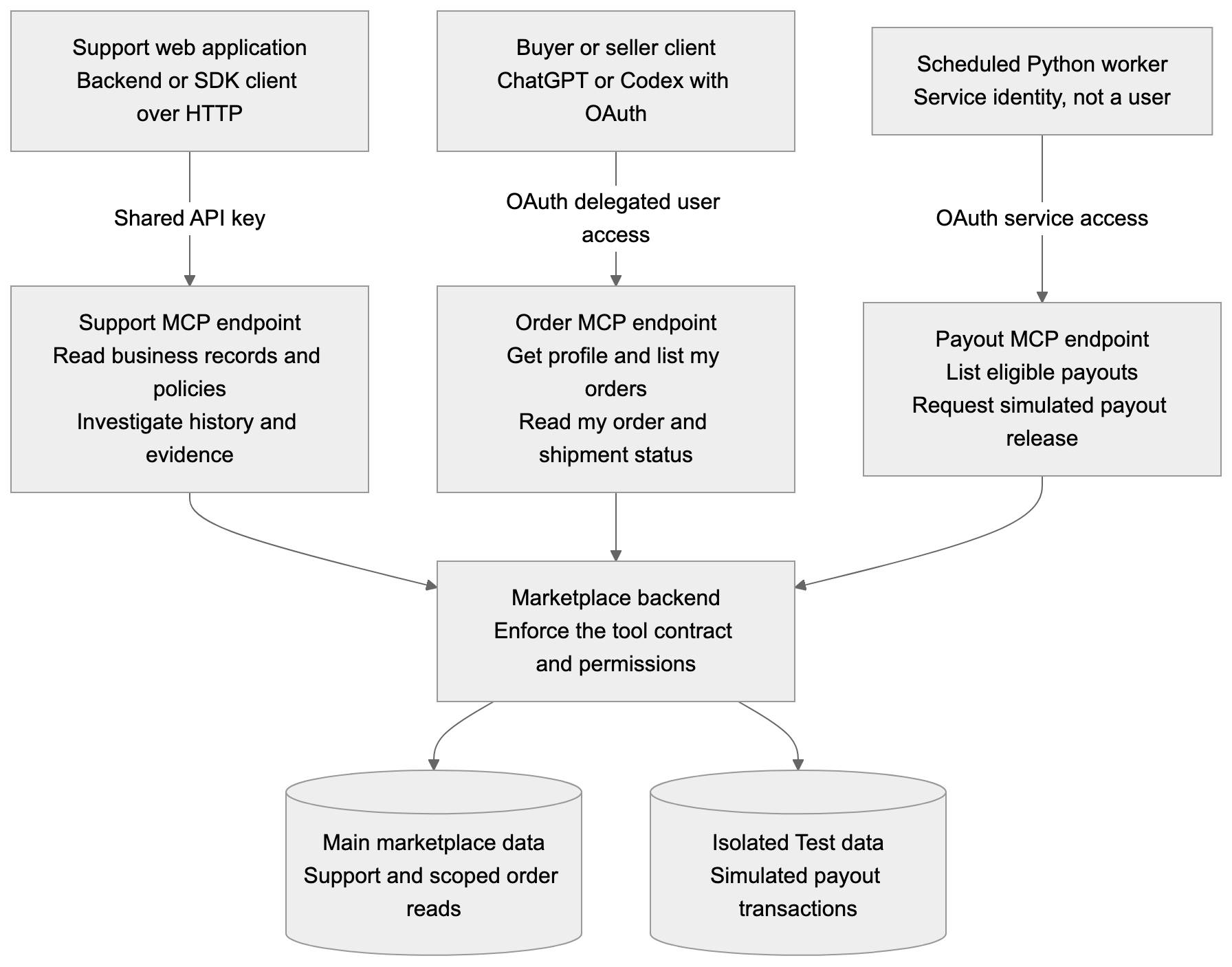
The three examples provide a practical way to choose an access pattern.
| Product need | Marketplace example | Technical choice in this experiment |
|---|---|---|
| Shared application permissions | Support investigations across exposed marketplace records | Shared API key |
| Permissions of the signed-in person | A buyer or seller asking about their own orders | OAuth delegated user access |
| Authority for independent background work | A scheduled simulated-payout worker | OAuth service access using client credentials |
Decide Who Can Do What
Before choosing a credential, I need to know who is requesting access and what they should be allowed to do. Authentication establishes the caller’s identity; authorization enforces the permitted access. OAuth provides an authorization framework, while the identity provider handles the user’s sign-in. OAuth framework.
For this experiment, Keycloak supplies both the human login experience and the OAuth authorization server. Its role is different from the MCP adapter and marketplace backend.
| Component | Its responsibility in this implementation |
|---|---|
| Client | Obtain the appropriate credential, call tools, and present returned results |
| Keycloak | Authenticate users or registered services and issue authorized tokens |
| MCP server | Expose tools, validate incoming credentials, check required scopes, and create a trusted identity context |
| Marketplace backend | Resolve the account or service policy and enforce ownership, business rules, and permitted actions |
| Database | Execute the backend’s filtered queries and atomic transactions; it does not inspect the caller’s OAuth token |
A valid token is the beginning of an access decision. A token for a buyer does not authorize every order query. A token for the payout service does not authorize every seller or amount.
Pattern 1: Shared Access for Support Investigations
When I Would Use It
A support application may need a consistent set of investigation permissions across its callers, without scoping every request to an individual support employee. I used a shared API key for that fixed integration. The shared-key wrapper is a custom integration, rather than MCP’s standard OAuth authorization flow. It is simple to configure, but holders of the same key are not distinguished as separate people.
In my original marketplace support integration, the assistant needs broad read access to investigate business questions. The remote HTTP MCP client sends a configured key, and the server compares it with its configured value before allowing tool requests.
The underlying tool contract is still restricted: the support tools are curated investigation reads, rather than unrestricted database or payout execution.
How It Works
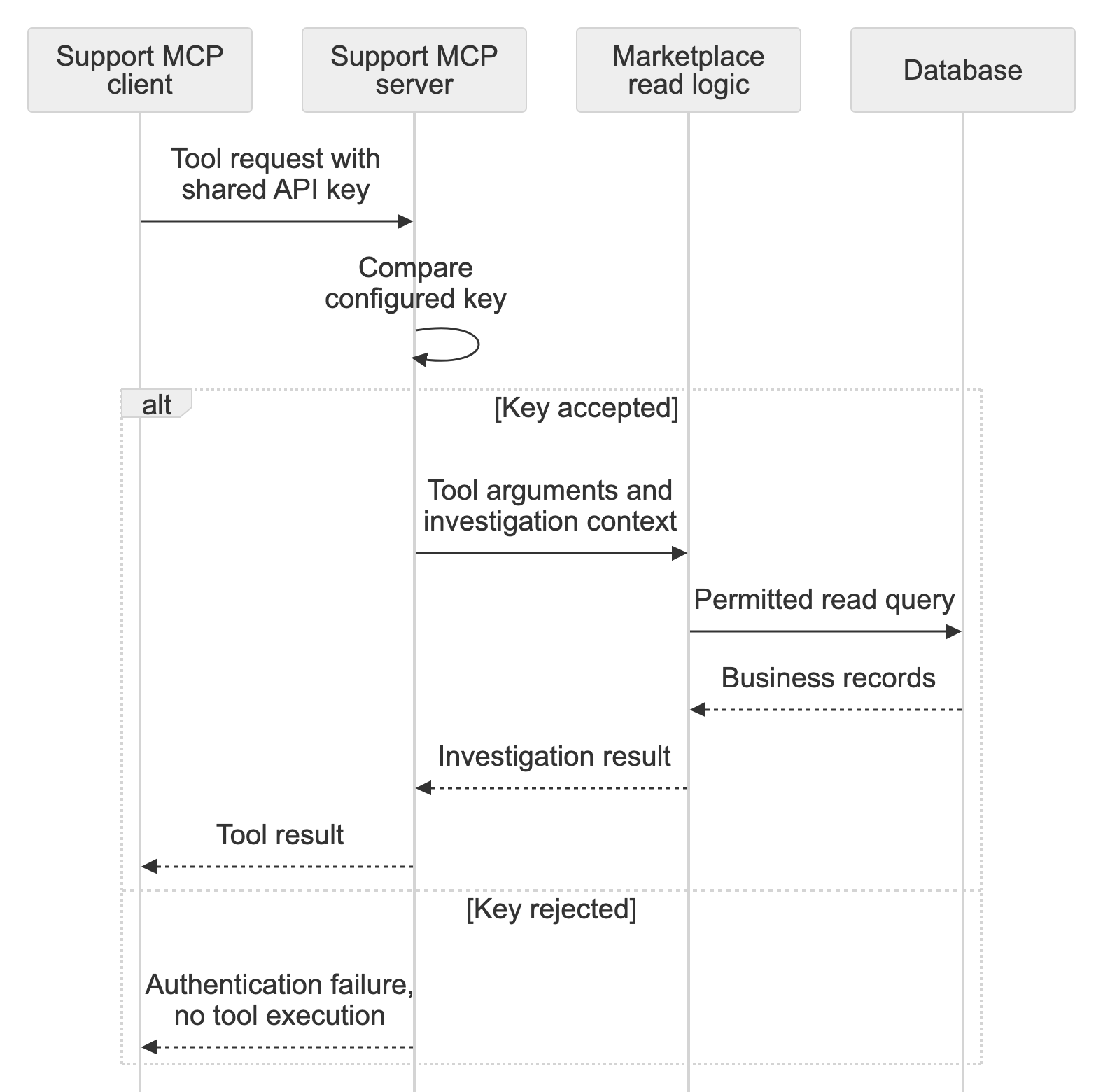
There is no identity provider in this path. The key is configured on the server and client.
A shared API key can be mapped to a service identity, but this implementation does not pass a caller identity to the marketplace backend.
How I Tested It
I tested the support MCP server over HTTP with a client that supplied the shared API key. The local support web application currently uses subprocess MCP, so this was a separate HTTP test. I did not use ChatGPT for this path because its custom MCP connection cannot supply a custom API key.
Pattern 2: Personal Access for Buyers and Sellers
When I Would Use It
A customer-facing assistant needs to respect the person asking the question. A buyer should only receive their own orders, and a seller should only receive the lines they fulfill. This requires access tied to the signed-in person’s permissions; in this experiment, I used OAuth delegated access.
I tested this through ChatGPT connected to the new order MCP endpoint. Signing into ChatGPT does not establish a marketplace account. The marketplace connection has its own Keycloak sign-in and authorization step.
How It Works
The buyer or seller signs in through Keycloak, grants ChatGPT access, and views the results in ChatGPT. The order MCP server tells ChatGPT where to start this sign-in flow.
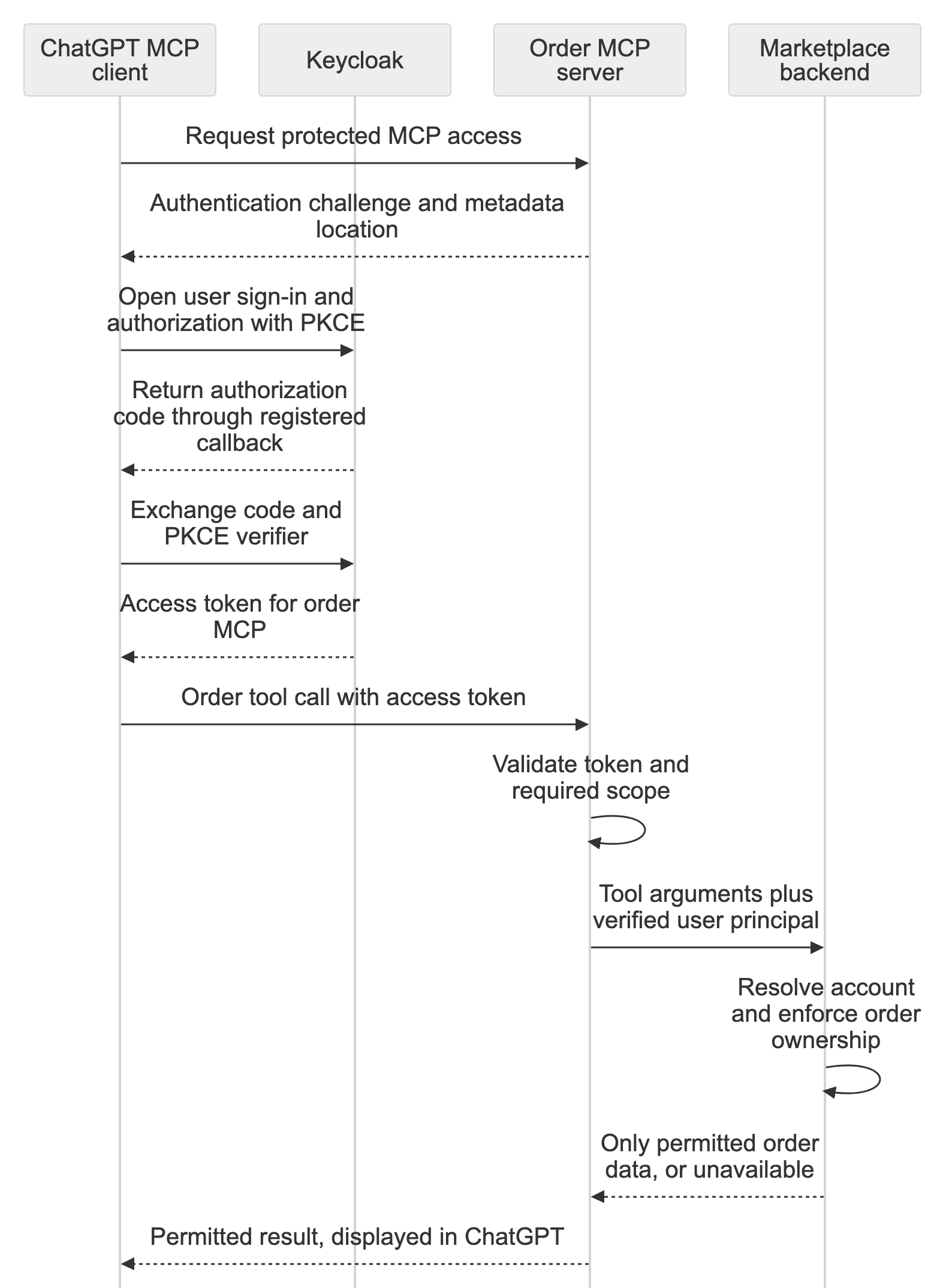
After sign-in, ChatGPT sends an access token with each order request, and the MCP server validates it. The marketplace enforces the connected account’s permissions, so naming a different buyer or seller in the prompt cannot expand access.
How I Tested It
In ChatGPT’s web interface and Codex, my own buyer order succeeded, while another buyer’s order returned “Order unavailable for this account” from the backend. Separate seller checks returned only that seller’s own order lines. The client can present the backend’s denial message so the user understands that the requested order is unavailable, without exposing another account’s data.
Pattern 3: Independent Authority for Automatic Payouts
When I Would Use It
In the first two marketplace examples, a person initiates the request: a support user investigates an issue, or a buyer or seller asks about an order. Pattern Three covers agent-driven work, where an agent or background service proactively starts an approved task under its own authority, without a person making each request.
The marketplace originally required an operator to release payouts. Here, a scheduled payout worker takes over that task and automatically requests eligible payouts under the marketplace’s business rules. The operator enables automatic mode, but the worker initiates each scheduled run using its own service permissions.
I added a dedicated payout MCP endpoint and registered a separate Keycloak service client. The worker uses the OAuth client-credentials grant to obtain a service access token directly from Keycloak, without a browser login for each scheduled run.
An agent could use the same identity and permissions to choose approved recovery actions after payout failures. This demonstration uses simulated payouts rather than a real payment provider.
How It Works
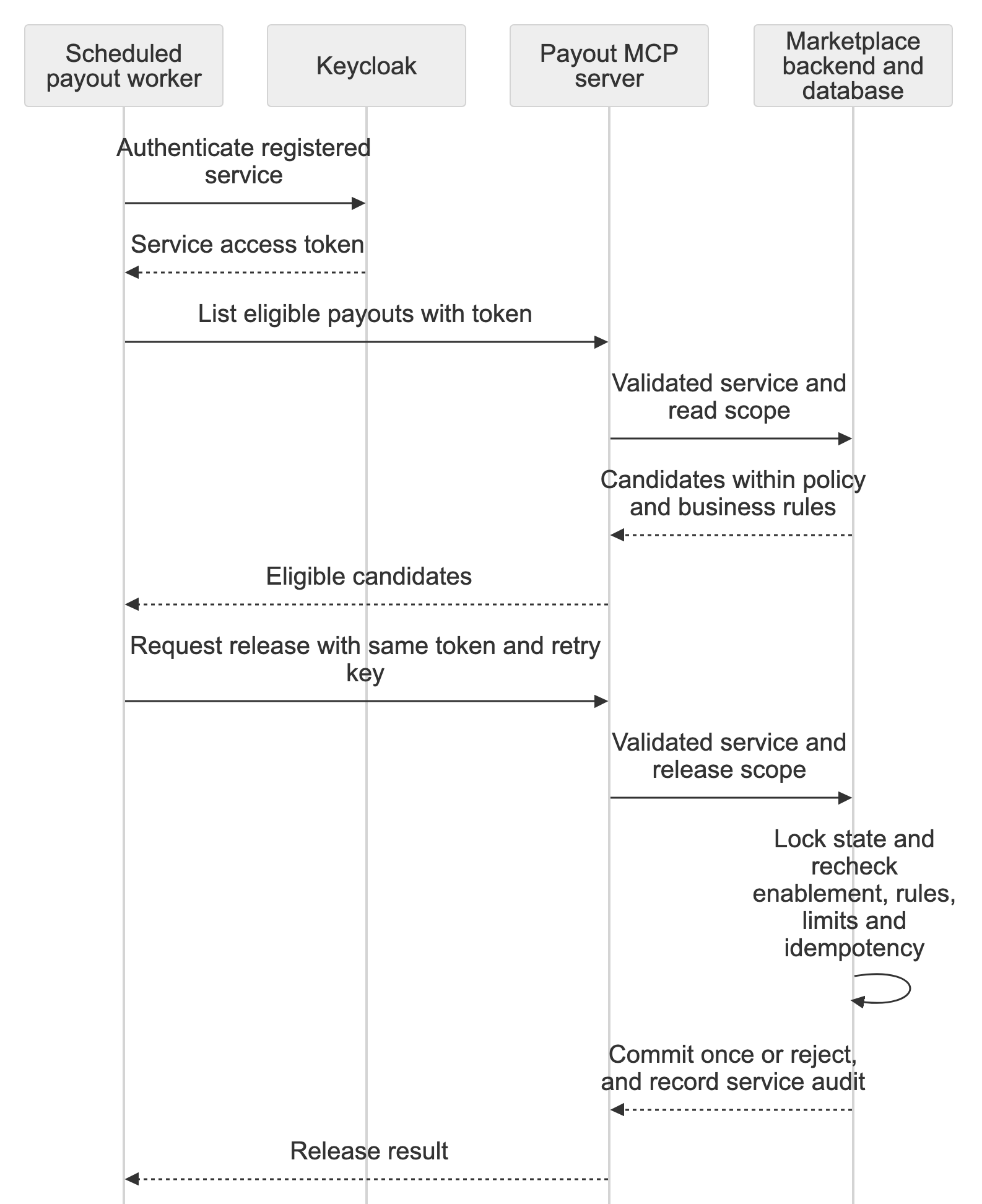
The payout endpoint has two tools: list eligible payouts and request payout release. Backend policy binds the exact service identity and limits the per-payout amount and the total amount and number of payouts per run.
For this demo, the same payout policy covers all marketplace sellers, with limits of ₹10,000 per payout, ₹20,000 per run, and ten payouts per run. A payout must also have confirmed delivery, a completed 24-hour hold on the demo clock, no blocking return, and a positive payable amount.
An operator-only Admin setting controls automatic payouts in the Test workspace. It defaults off. The managed worker wakes every 60 real seconds, but a backend gate prevents releases while disabled. When enabled, the ordinary manual payout command is blocked, so scheduled settlement has one intended execution path.
Appearing in the eligible list does not guarantee payment: the backend checks the payout rules again before releasing it. If the same release request is retried, its retry key lets the backend return the earlier result without paying again.
How I Tested It
I bought products from all three sellers, completed delivery, and advanced the demo clock by 24 hours. With automatic payouts enabled, the worker released eligible payouts; a second run and retries did not pay again.
I also checked that the backend blocks payouts when the delivery hold has not passed, a return is active, automation is disabled, the token lacks release permission, or an amount limit is exceeded. The worker does not advance the demo clock itself.
What the Backend Actually Receives
The comparison became clearer when I stopped treating the token as the business API. The credential is checked at the MCP boundary; the internal handoff contains the context the business logic needs.
| Pattern | Credential presented to MCP | Handoff to marketplace logic |
|---|---|---|
| Existing support connection | Shared API key | Tool arguments and general investigation context; no caller principal in this implementation |
| Buyer or seller connection | User-delegated access token | Verified user principal, resolved to the marketplace account |
| Payout worker | Service access token | Verified service principal, checked against payout policy |
The key or access token is checked at the MCP boundary. For OAuth requests, MCP passes a verified user or service identity to marketplace logic, which enforces that identity’s permissions and the business rules.
Our existing shared-key path passes only tool arguments and investigation context, with no caller identity.
Where Enterprise Authorization and Workload Federation Fit
These approaches build on the same user and service identity needs we have already seen. They change how access is authorized or credentials are obtained, while the backend continues to enforce permissions.
Enterprise-managed authorization is an enterprise variation of the user-access pattern in Pattern Two. The caller is still acting for a person, but the organization centrally controls which MCP servers that person may access and under what conditions. Instead of each employee separately granting access to each server, the company identity provider applies organizational policy, and an identity assertion is exchanged for an MCP access token. This is a different authorization flow, not just a different login page. The marketplace would still map the verified person to an account and enforce that account’s permissions.
Workload identity federation applies to the service-identity case in Pattern Three. The payout worker still acts under its own authority, without a person signing in for each run; what changes is how it proves its identity and obtains credentials. Rather than maintaining a separate long-lived service secret, a federated workload can use an identity already trusted from its runtime environment to obtain short-lived credentials. The receiving MCP server must trust that credential, and the backend must still enforce payout eligibility and amount limits. Federation changes the credential path, not the service’s permitted business actions.
Neither enterprise-managed authorization nor workload identity federation was implemented in this demo.
Running Locally and in the Cloud
I ran the marketplace and Keycloak locally. Keycloak handles sign-in and issues the OAuth tokens. ngrok gives ChatGPT an HTTPS route to the local order MCP endpoint and Keycloak login. The payout worker runs locally and does not need the public tunnel.
In a cloud deployment, the application would normally have its own reachable HTTPS endpoints, so the laptop’s ngrok tunnel would no longer be needed. Keycloak could run in the cloud, or another compatible identity provider could take its place. The roles remain the same: the provider issues tokens, MCP validates them, and marketplace logic enforces permissions. The shared-key support path does not use Keycloak.
Lessons Learned
The useful comparison is whose authority reaches the backend.
- Choose whose authority the tool call represents. Shared integration access, delegated user access, and independent service access solve different needs.
- Enforce permissions in the backend. Use the identity verified from the credential, not a buyer or service name supplied in a prompt.
- Test both allowed and denied actions. Check tool results and persisted state; a model-written refusal alone does not prove that access was blocked.
- Recheck payouts and make retries safe. All sellers follow the same eligibility and amount limits. Check the rules again before release, and prevent repeated requests from paying twice.
- Connect enterprise options to the same identity needs. Enterprise-managed authorization extends the user-access case, while workload federation changes how a service obtains credentials. Backend permission checks remain necessary.
Acknowledgements
I used OpenAI Codex to help implement the experiment, prepare and run the automated checks, and develop this article. I also tested the marketplace flows interactively. The payout worker itself does not use an LLM.
References
Protocol and Identity
- MCP HTTP authorization: resource discovery, access tokens, and transport scope.
- OAuth client-credentials extension: machine-to-machine access; support depends on the client and server.
- Enterprise-managed authorization: centralized enterprise access and identity assertions.
- OAuth authorization framework: delegated and client-credentials grants.
- OAuth protected-resource metadata: discovering authorization-server information for a resource.
- MCP security best practices: token-audience boundaries and token-passthrough restrictions.
Tools and Implementation
- ChatGPT authentication: supported client authentication and the restriction on custom API keys.
- Keycloak OIDC endpoints: authorization, token, and signing-key endpoints.
- Workload identity federation: an enterprise/cloud extension to the credential story, not implemented in this experiment.
- Marketplace Support Lab: the marketplace application, now including OAuth order access and service-authorized simulated payouts on main. Automatic payouts are disabled by default and can be enabled by an operator in the Test workspace.

