Objective
I started this series with safety, security and values, then showed how I evaluate those qualities in models and agents. In the third article, I looked at how teams set governance requirements, assign owners, approve policies and decide what evidence to collect.
How can we turn those governance requirements into an entity model and use it to govern a deployed agent? I mapped the requirements to records that connect an agent and its owner to the policies approved for each deployment and the evidence collected afterward. I then built an offline prototype around those relationships. Using the Marketplace Assistant, I walk through discovery and registration, policy approval, deployment and evidence review.
What Is the AI Governance Entity Model?
The entity model describes the types of information a team needs to govern an AI system and how they relate. Each type is an entity. A record captures a particular instance: Agent Definition is an entity type, and the saved definition of the Marketplace Assistant is one record of that type. I use seven record types to answer four questions.
What is the agent allowed to do? The Agent Definition records who owns the agent, its purpose, its tools and its checks. For this record, I drew on the A2A Agent Card for how an agent advertises its capabilities and interfaces, and on Sekuire’s draft governance specification for identity and declared permissions. The Agent Policy allows a refund-status lookup and prohibits issuing a refund. Privacy adds a separate requirement. The order service returns only the refund status to the model. The customer’s email and billing address stay in the order service.
Which rules apply across applications? The Infrastructure Policy sets shared requirements, such as the daily budget. The Common Infrastructure Check Catalog defines reusable ways to check them.
What went into production? Release History preserves what was approved together. Deployment identifies the release, policy versions and configuration assigned to a particular environment.
What did the checks find? An Evidence Run records the observations and results for one deployment revision.
How the Eight Governance Areas Map to the Entity Model
For each governance area, the table asks a question about the Marketplace Assistant and identifies the entity types that hold the answer. For example, to find out who owns the assistant, look at its Agent Definition.
| Governance area | Question about the Marketplace Assistant | Which entity types hold the answer? |
|---|---|---|
| Ownership and inventory | Who is accountable for the assistant running in production? | The Deployment links to the version of the Agent Definition used in production. That Agent Definition names the accountable owner. |
| Purpose and acceptable risk | Can support staff check refund status or also issue a refund? | The Agent Definition describes the intended work. The Agent Policy specifies permitted actions and when to hand a task to a person. |
| Identity and access | Whose orders can it read? Can its service identity change an order? | The Agent Policy selects the permission and attempted-write checks defined in the Agent Definition. The Evidence Run records their results. |
| Data privacy and lifecycle | Where do the order service and tracing service handle data, and when should they delete it? | The Infrastructure Policy sets region and retention limits. The Deployment records each data handler’s settings. The Evidence Run records what the checks found. |
| Behavioral assurance | What should the assistant say if the order lookup fails? | The Agent Definition describes the lookup-failure check. The Agent Policy selects it. The Evidence Run records the outcome. |
| Release approval | Which code, prompt and model were approved together? | Release History preserves the approved combination. The Deployment identifies which release is in use. |
| Runtime limits | Did the assistant stay within its daily model budget? | The Infrastructure Policy sets the daily budget and selects a check from the Common Infrastructure Check Catalog. The Evidence Run records observed spend against that limit. |
| Periodic review | Who decided the deployment could continue, and when is it due for review again? | The review decision references the Evidence Run for the Deployment and records the reviewer and next evaluation date. |
A single entity type can help answer questions across several governance areas. A general AI application such as a document summarizer can reuse shared rules for model access, data handling and spend. The Marketplace Assistant also needs agent-specific records for its actions, tools and handoffs.
How the Governance Entities Connect
Start with Deployment in the diagram. Look above it to see which release and policies were assigned. Follow the link below it to see what the checks found for that deployment revision.
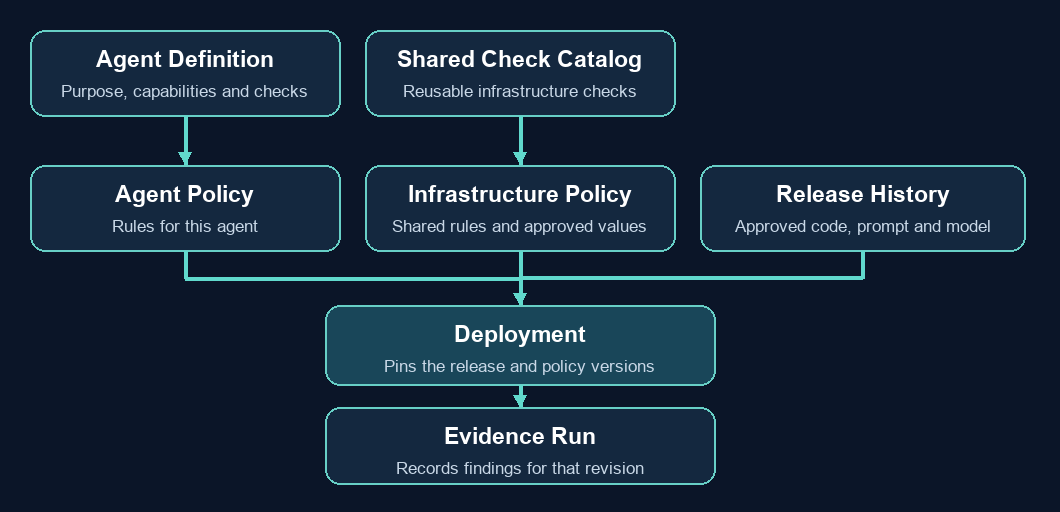
Agent Definition and Agent Policy. The definition describes the owner, purpose, tools and capabilities. It also defines checks the owner can reuse. The policy says which outcomes are required and selects the checks. For read-only order access, one check inspects the service identity’s permissions. Another asks for a change to a synthetic order and checks both that the write was denied and that the record stayed unchanged. The offline prototype supplies simulated observations for these tests.
Common Infrastructure Check Catalog and Infrastructure Policy. The catalog describes how to perform a shared check and what counts as a pass. The policy supplies the approved value. A platform team can reuse the same spending calculation for deployments with different budgets.
Release History and Deployment. A release preserves what was approved, including the code, prompt, model and tools. A deployment identifies which release and policy revisions apply in an environment. Approving a new infrastructure policy makes it available for assignment. A reviewer can still trace the existing deployment to its previously assigned revision.
Evidence Run. Each run identifies the deployment revision, the checks used, what they observed and how each rule was graded. A separate review decision records what the person responsible decided to do with those results.
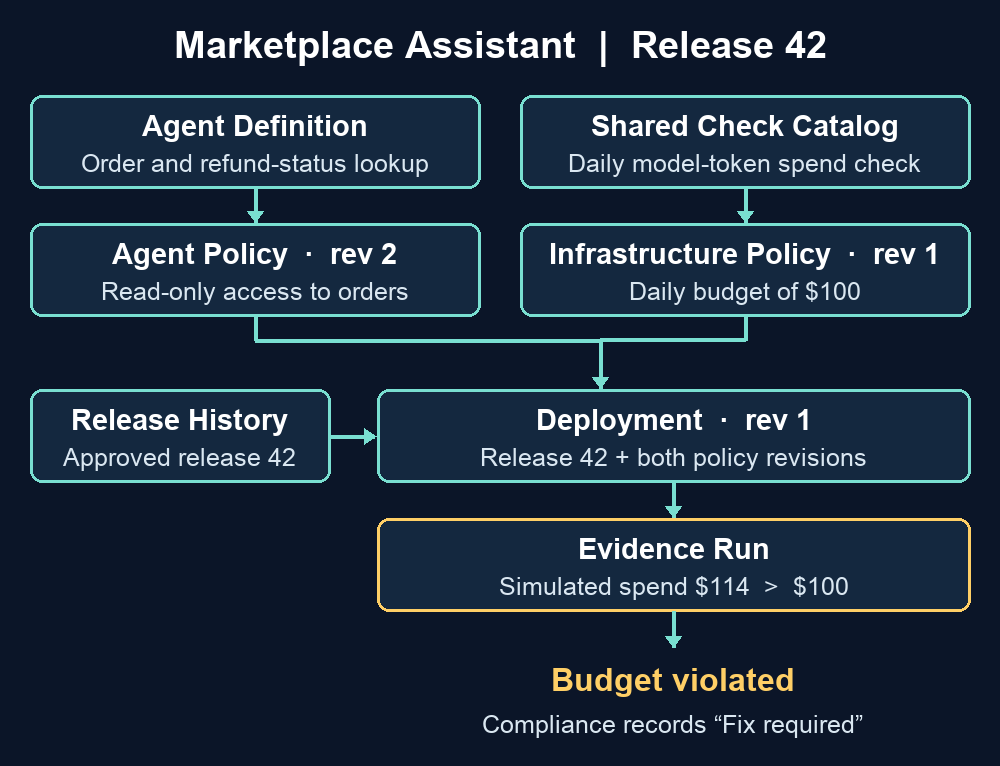
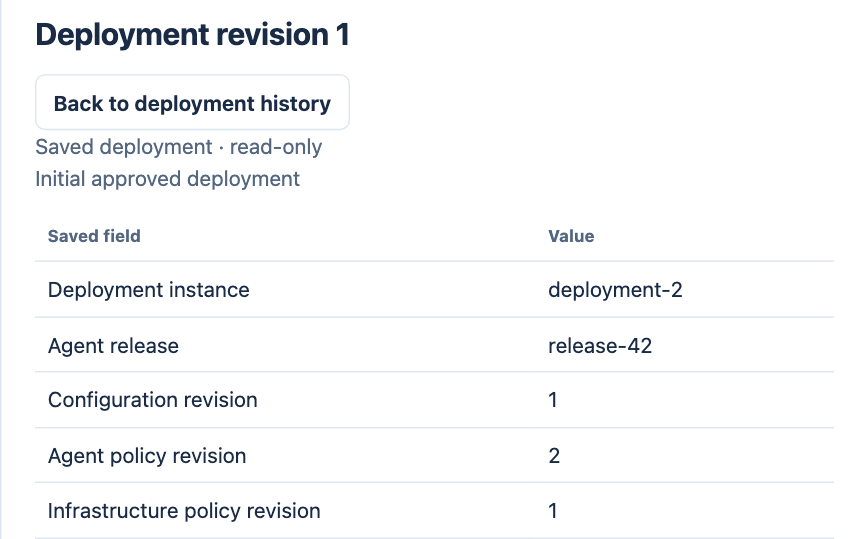
I’ll use release 42 of the Marketplace Assistant to show how the seven governance entities fit together. Its Agent Definition lists order lookup and refund-status lookup. Its Agent Policy requires read-only access and selects the checks for that restriction. The Infrastructure Policy sets a $100 daily model-token budget and selects the spending check from the Common Infrastructure Check Catalog. Release History preserves what went into release 42. Deployment revision 1 ties that release to agent policy revision 2 and infrastructure policy revision 1. When the Evidence Run records $114 in simulated spend, the reviewer can trace the finding to the exact deployment and budget that applied.
Goal of the Prototype
I built this prototype to make AI governance easier to understand by showing the steps a team follows, who owns each decision, and how the team uses evidence to decide whether an agent can keep running. Follow the Marketplace Assistant with three questions in mind. How does a discovered agent become a registered agent with an accountable owner? Who sets the shared infrastructure rules, who defines the agent’s own policy, and who approves the versions assigned to its deployment? Once the agent is deployed, what evidence helps the reviewer decide whether it can continue or needs a fix?
The prototype runs offline. All its data is simulated, including the deployment settings, gateway usage and tool responses. It makes no live calls to gateways, cloud providers, proxies, tools or models. Connecting the prototype to a team’s tools and cloud providers would let the same workflow use evidence from a real deployment. For example, the budget check could compare the assistant’s actual model usage and cost, reported by its gateway or cloud provider, with the spending limit assigned to that deployment.
The Prototype Walkthrough: Six Steps and Role Handoffs
You can follow the six steps in the video walkthrough above. Three roles share the work. The Compliance Owner sets shared requirements and makes approval decisions. The Agent Owner defines the agent and proposes its policy. The Demo Admin prepares discovery candidates and simulated observations. The diagram and the six steps below follow the Marketplace Assistant through the prototype in the order you use it. Each step identifies the role to select and the action to take.
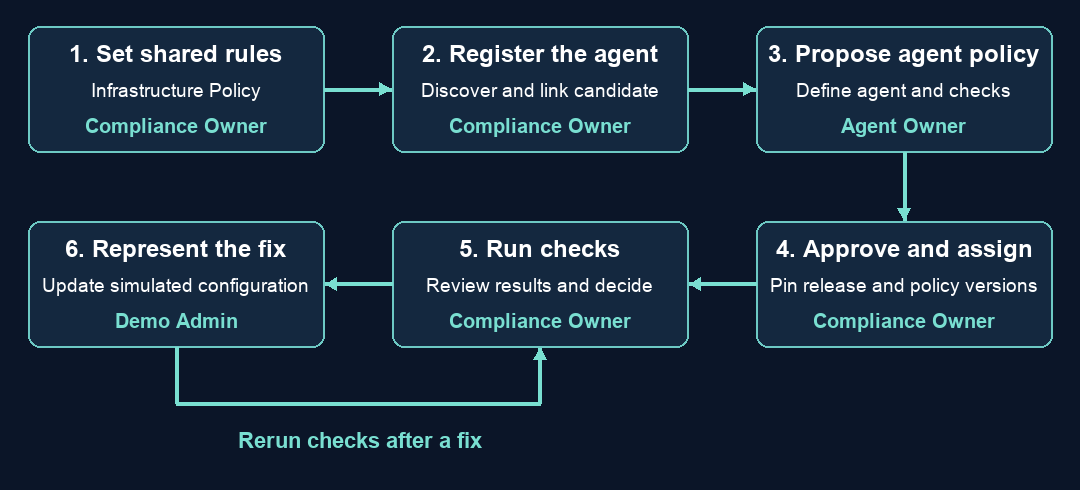
- Set the shared Infrastructure Policy. As Compliance Owner, open the approved production policy. Inspect the shared checks and their parameters, including the $100 daily model-token budget. This baseline can apply to several agents.
- Discover and register the agent. In the same workspace, open the discovery list. Select the Marketplace Assistant and link it to an entry in the Agent Registry. The candidate now has a registered identity and an accountable owner. In a live environment, a team could find the agent in a registry or read its published A2A Agent Card at a known location.
- Define the agent, its checks and its policy. Switch to Agent Owner. Review and save the Agent Definition, including order lookup, refund-status lookup and the checks for permitted actions. Select the required checks in the Agent Policy. Saving the policy submits that revision to Compliance.
- Approve and assign the deployment. Switch to Compliance Owner. Review and approve the Agent Policy. On Deployment, approve the release and assign the exact agent and infrastructure policy versions. The resulting deployment revision is what the checks will assess.
- Run evidence checks and record a decision. Open Evidence for that deployment revision. Inspect each required rule’s result: Met, Violated or Unverified. Record Fix required if a rule fails or lacks sufficient evidence. Continue approval requires current evidence that every required rule is met.
- Correct the finding and rerun the checks. In production, the Agent Owner would fix an agent issue and the infrastructure owner would fix a platform issue. In the prototype, switch to Demo Admin to represent the correction in the simulated deployment. Switch back to Compliance Owner, rerun the checks and compare the new result with the retained finding. For each additional agent, start again at discovery and reuse the shared policy where it applies.
What Happens When an Evidence Check Fails?
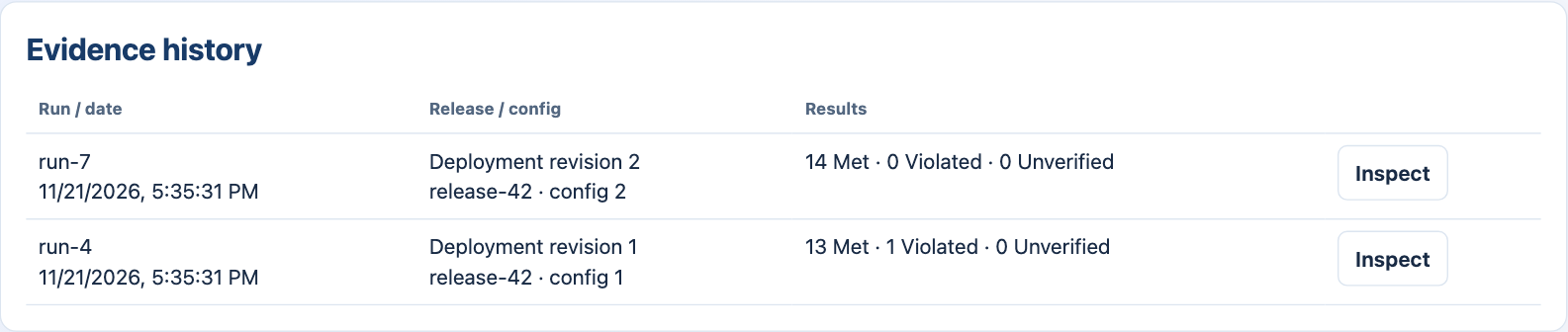
In the first run, the shared spending check adds up the assistant’s model-token usage for the day. It uses the assistant’s attribution reference so another agent’s usage stays out of the total. The simulated gateway data adds up to $114 against a $100 budget. Thirteen rules are met and one is violated. The Compliance Owner records Fix required.
After the Compliance Owner records Fix required, the responsible team investigates the overage, reduces actual model-token spending and collects fresh usage data to check it against the approved $100 daily budget. In the prototype, the Demo Admin represents that correction by changing the simulated daily spend from $114 to $90 and saving the deployment configuration. This creates deployment revision 2 with the same release and policies. The Compliance Owner can now rerun the check against the same $100 limit.
| Evidence | Deployment revision | Daily model-token spend | Budget check | Review decision |
|---|---|---|---|---|
| First run | 1 | $114 against $100 | Violated | Fix required |
| Fresh run | 2 | $90 against $100 | Met | Continue approval |
Back in Compliance, the reviewer runs the checks again. All 14 required rules are now met. The reviewer records Continue approval and schedules the next evaluation. Opening the first run still shows why the earlier deployment revision needed attention.
A spending check can flag an overage after the charge. A hard cap needs a control that acts before the charge. The same question applies to refunds. An agent gateway can check who may invoke the assistant. A model gateway can restrict its model calls. A runtime guardrail can block a proposed refund tool call, and the backend API can check authorization before issuing money.
Summary
The prototype ties each evidence result to a deployment, its approved policies and the rule the reviewer needs to investigate. The Compliance Owner traced the $114 spend to the $100 daily budget and verified the fix when fresh evidence showed $90. In the next article, I’ll compare how five enterprise AI governance platforms support this work and how far their controls reach.
Acknowledgements
I used OpenAI Codex to help prepare the article, run the offline prototype walkthrough and capture the example records and results.
References
- The preceding chapter introduces the eight governance areas and the Marketplace example. Understanding AI and Agentic Governance
- The A2A Agent Card informed the discovery fields for advertised skills and interfaces. Agent2Agent Protocol Specification
- Sekuire’s draft governance specification informed the treatment of agent identity, permissions and audit information. The seven-record model in this article is my illustrative design. Open Agent Governance Specification draft


2 thoughts on “AI Governance in Action”