This link captures the slides on “Docker Security Overview as of release 1.12” that I presented at Docker Meetup, Bangalore on July 9, 2016.
Category Archives: Containers & Kubernetes
Mesos DC/OS Hands-On
In this blog, I will cover some of the hands-on stuff that I tried with Opensource DC/OS. I created DC/OS cluster using Vagrant and deployed multi-instance nginx webserver using Marathon. For Mesos FAQ, please refer to my previous blog.
I followed the instructions here to create DC/OS Vagrant cluster.
Pre-requisites
I tried DC/OS Vagrant cluster in my Windows machine. Virtualbox and Vagrant needs to be installed before-hand.
Setting up cluster
Following are the instructions that I used to setup the cluster:
Mesos and Mesosphere – FAQ
The most popular Container Orchestration solutions available in the market are Kubernetes, Swarm and Mesos. I have used Kubernetes and Swarm, but never got a chance to use Mesos or DC/OS. There were a bunch of questions I had about Mesos and DC/OS and I never got the time to explore that. Recently, I saw the announcement about Mesosphere opensourcing DC/OS and I found this as a perfect opportunity for me to try out Opensource DC/OS. In this blog, I have captured the answers to questions I had regarding Mesos and DC/OS. In the next blog, I will cover some hands-on that I did with Opensource DC/OS.
What is the relationship between Apache Mesos, Opensource DC/OS and Enterprise DC/OS?
Apache Mesos is the Opensource distributed orchestrator for Container as well as non-Container workloads. Both Opensource DC/OS and Enterprise DC/OS are built on top of Apache Mesos. Opensource DC/OS adds Service discovery, Universe package for different frameworks, CLI and GUI support for management and Volume support for persistent storage. Enterprise DC/OS adds enterprise features around security, performance, networking, compliance, monitoring and multi-team support that the Opensource DC/OS project does not include. Complete list of differences between Opensource and Enterprise DC/OS are captured here.
What does Mesosphere do and how it is related to Apache Mesos?
Mesosphere company has products that are built on top of Apache Mesos. Lot of folks working in Mesosphere contribute to both Apache Mesos and Opensource DC/OS. Mesosphere has the following products currently:
- DC/OS Enterprise – Orchestration solution
- Velocity- CI, CD solution
- Infinity – Big data solution
Why DC/OS is called OS?
Sometimes folks get confused thinking Mesos being a Container optimized OS like CoreOS, Atomic. Mesos is not a Container optimized OS. Similar to the way Desktop OS provides resource management in a single host, DC/OS provides cluster management across entire cluster. Mesos master(including first level scheduler) and agent are perceived as kernel components and user space components include frameworks, user space applications, dns and load balancers. The kernel provides primitives for the frameworks.
What are Mesos frameworks and why they are needed?
Looking inside Container Images
This blog is a continuation of my previous blog on Container standards. In this blog, we will look inside a Container image to understand the filesystem and manifest files that describes the Container. We will cover Container images in Docker, APPC and OCI formats. As mentioned in previous blog, these Container images will converge into OCI format in the long run.
I have picked two Containers for this blog: “nginx”which is a standard webserver and “smakam/hellocounter” which is a Python web application.
Docker format:
To see Container content in Docker format, do the following:
docker save nginx > nginx.tar
tar -xvf nginx.tar
Following files are present:
- manifest.json – Describes filesystem layers and name of json file that has the Container properties.
- <id>.json – Container properties
- <layer directory> – Each “layerid” directory contains json file describing layer property and filesystem associated with that layer. Docker stores Container images as layers to optimize storage space by reusing layers across images.
Following are some important Container properties that we can see in the JSON file:
Container Standards
In this blog, I will cover some of the standardization effort that is happening in the Containers area. I will cover some history, current status and also mention how the future looks like. In the next blog, we will look inside ACI and OCI Container images.
Container Standards
Lot of developments in Container area are done as Open source projects. That still does not automatically mean that these projects will become standards. Following are the areas where Container standardization is important:
- Container image format – Describes how an application is packaged into a Container. The application can be an executable from any programming language. As you would know, Containers packages an application along with all its application dependencies.
- Container runtime – Describes the environment(namespaces, cgroups etc) necessary to run the Container and the APIs that Container runtime should support.
- Image signing – Describes how to create Container image digest and to sign these so that Container images can be trusted.
- Image discovery – Describes alternate approaches to discover Container images other than using registry.
- Container Networking – This is a pretty complex area and it describes ways to network Containers in same host and across hosts. There are different implementations based on the use-case.
Having common Container standards would allow things like this:
Docker 1.11 release presentation at Bangalore meetup
This link captures the slides on Docker release 1.11 release that I presented at Docker Meetup, Bangalore on June 4, 2016.
Docker macvlan and ipvlan network plugins
This is a continuation of my previous blog on macvlan and ipvlan Linux network drivers. Docker has added support for macvlan and ipvlan drivers and its currently in experimental mode as of Docker release 1.11.
Example used in this blog
In this example, we will use Docker macvlan and ipvlan network plugins for Container communication across hosts. To illustrate macvlan and ipvlan concepts and usage, I have created the following example.
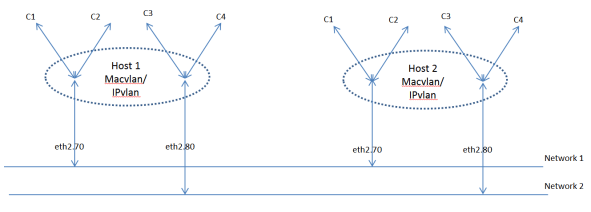
Following are details of the setup:
Macvlan and ipvlan in CoreOS
This is a continuation of my previous blog on macvlan and ipvlan Linux network drivers. In this blog, I will cover usage of macvlan and ipvlan network plugins with CoreOS Rkt Container runtime and CNI(Container network interface).
Rkt and CNI
Rkt is another Container runtime similar to Docker. CNI is Container networking standard proposed by CoreOS and few other companies. CNI exposes standard APIs that network plugins needs to implement. CNI supports plugins like ptp, bridge, macvlan, ipvlan and flannel. IPAM can be managed by a second level plugin that CNI plugin calls.
Pre-requisites
We can either use multi-node CoreOS cluster or a single node CoreOS for the macvlan example used in this blog. I have created three CoreOS cluster using Vagrant. Following is the cloud-config user-data that I used.
macvlan and ipvlan config
Following is the relevant section of Cloud-config for macvlan:
- path: "/etc/rkt/net.d/20-lannet.conf"
    permissions: "0644"
    owner: "root"
    content: |
      {
        "name": "lannet",
        "type": "macvlan",
        "master": "eth0",
        "ipam": {
          "type": "host-local",
          "subnet": "20.1.1.0/24"
        }
      }
In the above cloud-config, we specify the properties of macvlan plugin that includes the parent interface over which macvlan will reside. We use IPAM type as “host-local” here, this means IP address will be assigned from within the range “20.1.1.0/24” as specified in the configuration. The macvlan type defaults to “bridge”.
Following is the relevant section of cloud-config for ipvlan:
Macvlan and IPvlan basics
Macvlan and ipvlan are Linux network drivers that exposes underlay or host interfaces directly to VMs or Containers running in the host. In this blog, I will cover basics of macvlan and ipvlan, compare macvlan and ipvlan to Linux bridge and sub-interfaces and also show how to create these interfaces in Linux system. In the next set of blogs, I will cover how macvlan and ipvlan interfaces are used in Docker and CoreOS.
VM and Container networking
When running a baremetal server, host networking can be straightforward with few ethernet interfaces and a default gateway providing external connectivity. When we run multiple VMs in a host, it is needed to provide connectivity between VMs within the host and across hosts. On an average, the number of VMs in a single host does not exceed 15-20. When running Containers in a host, the number of Containers in a single host can easily exceed 100. It is needed to have sophisticated mechanism to interconnect Containers. Broadly, there are two ways for Containers or VMs to communicate to each other. In Underlay network approach, VMs or Containers are directly exposed to host network. Bridge, macvlan and ipvlan network drivers are examples of this approach. In Overlay network approach, there is an additional level of encapsulation like VXLAN, NVGRE between the Container/VM network and the underlay network.
Linux Bridge
Linux Bridge acts like a regular hardware switch with learning and also supports protocols like STP for loop prevention. In linux bridge implementation, VMs or Containers will connect to bridge and bridge will connect to outside world. For external connectivity, we would need to use NAT. The following picture shows 2 Containers connected to a Linux bridge with ethx interface providing external connectivity.
Experimental Docker with Docker machine
Docker Experimental channel is used to release experimental Docker features so that Docker users can try the new features and provide feedback. It is nice to use the experimental Docker in a test environment rather than upgrading Docker in the main development machine. The preferred approach is to use docker-machine and create a VM with experimental Docker. In this blog, I will describe the approach that I use to create docker-machine with experimental Docker VM. For basics of Docker machine, please refer to my blog on Docker machine.
Following are the steps needed to build the experimental boot2docker ISO and copy it to the docker-machine default location:
git clone https://github.com/boot2docker/boot2docker.git
cd boot2docker
docker build -t my-boot2docker-img -f Dockerfile.experimental .
docker run --rm my-boot2docker-img > boot2docker.iso
mv boot2docker.iso ~/.docker/machine/cache/boot2docker.iso
We need to specify Docker experimental release location in Dockerfile.experimental. In this case, it is https://experimental.docker.com/builds/Linux/x86_64/docker-latest.
Following command will start a Docker machine in Virtualbox with experimental Docker:
docker-machine create -d virtualbox exp
Following is the experimental Docker version running in my host:
$ docker --version
Docker version 1.11.0-dev, build 6c2f438, experimental
Installing custom software in boot2Docker image:
I had a recent usecase where I needed boot2docker to have ipvsadm installed. Package manager is not available in boot2docker. Other than installing ipvsadm, I had to copy few libraries. Following is my boot2docker.experimental file that I used for this usecase:
FROM boot2docker/boot2docker
MAINTAINER Sreenivas Makam ""

#DESCRIPTION use the latest experimental build of Docker

RUN apt-get update && apt-get install -y ipvsadm
RUN cp /sbin/ipvsadm $ROOTFS/sbin/
RUN cp /lib/x86_64-linux-gnu/libnl-genl-3.so.200 /rootfs/lib/libnl-genl-3.so.200
RUN cp /lib/x86_64-linux-gnu/libnl-3.so.200 /rootfs/lib/libnl-3.so.200
RUN cp /lib/x86_64-linux-gnu/libpopt.so.0 /rootfs/lib/libpopt.so.0

#get the latest experimental docker
RUN cd $ROOTFS/usr/local/bin && curl -fL -O https://experimental.docker.com/builds/Linux/x86_64/docker-1.12.0-rc4.tgz && tar -xvzf docker-1.12.0-rc4.tgz --strip-components=1 && chmod +x $ROOTFS/usr/local/bin/docker* && rm docker-1.12.0-rc4.tgz

RUN echo "" >> $ROOTFS/etc/motd
RUN echo "  WARNING: this is an experimental.docker.com build, not a release." >> $ROOTFS/etc/motd
RUN echo "" >> $ROOTFS/etc/motd

RUN /make_iso.sh
CMD ["cat", "boot2docker.iso"]
Issue faced:
I was not able to use custom Docker image with docker-machine version 0.8.0-rc1. I could not find an option to prevent docker-machine from downloading latest Docker image. I have opened an issue here. The only workaround I found was to copy boot2docker image to ~/.docker/machine/cache/ , remove internet connection and then create docker-machine host.

