Objective
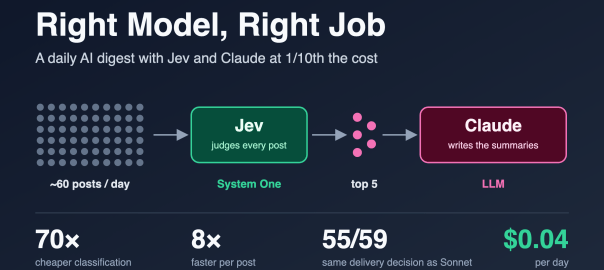
The goal of this post is to show, with real numbers from a working system, how to pick the right model for each step of an AI workflow:
- Where a decision model like Jev fits, and where an LLM is still the right tool.
- How much that split saves compared to using an LLM for everything, on cost and on speed.
- How to check that the cheaper model is good enough, by comparing its decisions against a strong LLM on the same inputs.
- How to run it on a schedule in the cloud, using either Claude Code routines or GitHub Actions, and what each one is like to operate.
The example is a daily AI blog digest I built for myself. I used Jev, TypeSafe’s decision model, to judge every post, and Claude only to summarize the few that made the cut. The whole run costs about four cents a day. The pattern applies to any workflow that judges a lot of items and writes about a few.
The code is on GitHub: smakam/ai-blog-digest.
The Use Case
I follow around two dozen AI blogs through Feedly: frontier labs, research groups, a few people whose writing I trust, and some general tech and startup news. On a typical day that is 60 new posts. Maybe five of them are worth my time. The problem is not reading; it is deciding what to read.
So I built a small daily job that does the deciding for me. The requirements were short:
- Input: my Feedly subscriptions, exported as OPML. Only posts from the last day or so.
- Classify each post on two questions: is it about AI, and is it worth reading?
- Summarize only the best posts, 4–5 lines each: what it is, why it matters, the key takeaway.
- Deliver one Telegram message a day at 7 AM: top picks with summaries, a few more as plain links.
- Never send the same post twice, and never fail silently.
- Run in the cloud, without my laptop on.
One detail shaped the classifier: the worthiness judgment is about content only. Who wrote the post is not an input (there is a hook for an author boost later, but it is off).
The Question I Wanted to Answer
Can a purpose-built decision model replace an LLM for the high-volume, low-glamour part of an AI workflow, and what do you actually give up?
A digest is a good test case because it has a very lopsided shape:
- Classification runs on every post. About 60 a day, each one a full article that has to be read in full.
- Generation runs on almost nothing. Five summaries a day.
If you use one LLM for both, you pay LLM prices for the 55 posts you throw away. That is where nearly all the cost goes.
System One and System Two: Picking the Right Model for Each Job
TypeSafe describes Jev as a System One model. It does not generate text. You give it some state (here, the post’s title and text) and a set of typed questions, and it returns typed answers with probabilities:
- a noul (yes/no) returns the probability of yes;
- a score places the state on an ordered scale you describe in words and returns the expected level plus a probability per level;
- a choice picks one option from a set.
I think of the LLM as the System Two side of this system (that is my framing, not TypeSafe’s): slower, more expensive, and the right tool when you need language out, not a decision.
| Job | Volume | What it needs | Model |
|---|---|---|---|
| Is this post about AI? How worthwhile is it? | Every post (~60/day) | A calibrated decision, fast and cheap | Jev (System One) |
| Summarize the best posts | Top 5/day | Fluent, specific writing | Claude Haiku 4.5 (LLM) |
I used Haiku 4.5 for summaries because it is the cheapest Claude model and the summaries are short. The summarizer is a single model ID in the config, so Claude Sonnet or Opus can be dropped in when you want richer summaries. I ran Sonnet 5 for part of the testing; the cost difference is in the table further down.
Both are reached through OpenRouter, so one API key covers the whole pipeline. Jev uses OpenRouter’s Decisions API rather than chat completions. I call it through TypeSafe’s official Python SDK with the base URL pointed at OpenRouter, so moving to TypeSafe’s native API later is a base-URL and key change.
How It Works
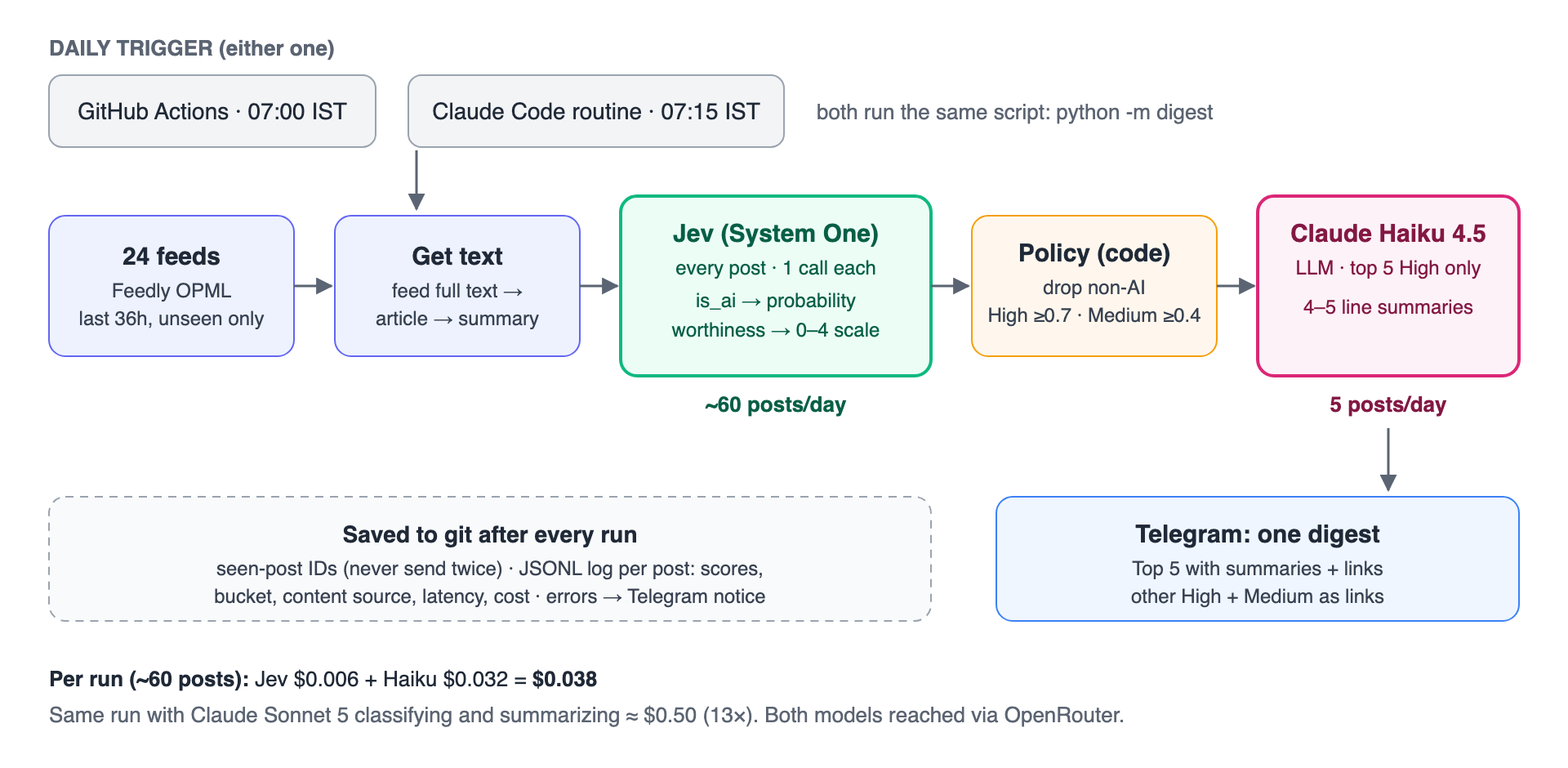
- Fetch. Parse the OPML, fetch every feed, and keep posts from the last 36 hours that haven’t been processed before. (36 rather than 24, so a late or skipped run doesn’t lose posts; the seen-post record prevents repeats.)
- Get the text. Use the full text from the feed if it’s there, otherwise fetch the article and extract the main text, otherwise fall back to the title and feed summary. On a typical day, 62 of 64 posts had full text.
- Classify with Jev. One call per post, two questions. Text is capped at about 20K tokens because Jev’s context is 32K.
- Apply the policy in code. This is deliberately not in the model (details below).
- Summarize the top 5 High posts with Claude Haiku 4.5.
- Send one Telegram message, save the seen-post record and a per-post log, and send a short notice if anything failed.
The Classification Criteria
This is the actual question and rubric Jev gets. The whole “prompt engineering” for the classifier fits on one screen.
Is it about AI? (noul)
Is this blog post primarily about artificial intelligence: machine learning, LLMs, generative AI, AI agents, AI infrastructure, AI research, or AI products? Embodied AI, robotics, self-driving hardware, and humanoids count as NO.
With the two outcomes described as: yes means the post’s main subject is AI/ML software, models, research, tooling, or products; no means it is not mainly about AI, or it is about robotics or embodied AI.
So embodied AI, robotics, self-driving hardware, humanoids, and anything else where the AI lives in a physical machine are classified as no. Any other topic is also classified as no. I specifically called out embodied AI and Robotics as these were in my feedly.
How worthwhile is it? (score, lowest to highest)
How worthwhile is this post for an experienced AI engineer who wants technical insight and significant launches, not news noise? Judge the content only.
| Level | Description |
|---|---|
| 0 | Not worth reading: funding or acquisition news, listicles, prompt-tip posts, generic opinion or hype pieces, pricing changes, marketing fluff. |
| 1 | Low value: minor feature updates, shallow news recaps, or thin commentary with no technical substance. |
| 2 | Moderate: a tutorial on known techniques, a modest product update, or informed commentary with some concrete specifics. |
| 3 | High value: architecture detail, agent infrastructure, LLMOps practice, or a significant product launch (a new model, a new agent or developer framework, a major platform capability). |
| 4 | Exceptional: genuinely new technical insight, such as original research results, deep architecture write-ups, or first-hand engineering lessons. |
Jev returns a probability-weighted level, so a post can land at 2.8 rather than exactly 3. I divide by 4 to get a 0–1 worthiness score.
The call itself is short:
from typesafe_sdk import Noul, Score, TypeSafeClientclient = TypeSafeClient(api_key=OPENROUTER_API_KEY, base_url="https://openrouter.ai/api", model="jev-1.13")result = client.system_one( state={"title": post.title, "text": post.text[:80_000]}, questions={"is_ai": IS_AI, "worthiness": WORTHINESS},)is_ai = result.nouls["is_ai"].noul # e.g. 0.97worthiness = result.scores["worthiness"].score / 4 # e.g. 0.75
No JSON parsing, no “respond only with…”, no retries because the model added a sentence before the JSON. The answer is typed.
What the Script Does on Top of Jev
Jev answers the questions. The decisions stay in code, where they are easy to see and change:
- Drop non-AI posts:
is_aibelow 0.5. - Bucket the rest by worthiness, with configurable thresholds:
| Bucket | Default threshold | What happens |
|---|---|---|
| High | ≥ 0.7 | Top 5 get a summary and link; the rest are listed as links |
| Medium | 0.4 to 0.7 | Title and link |
| Low | < 0.4 | Not delivered (but logged) |
- Cap summaries at five. That keeps the digest to one Telegram message and caps LLM cost. High posts beyond the fifth are still delivered, as links.
- Never send twice. Seen-post IDs are saved after each successful delivery. Posts Jev failed on are not marked seen, so the next run retries them.
- Never fail silently. A broken feed, a Jev error, a summary error, or a failed delivery sends a short notice to Telegram.
- Log every post with title, URL, source, both scores, bucket, where the text came from, latency, and cost. That log is what made the cost and quality comparisons below possible.
What It Costs
All numbers below come from real runs on my 24 feeds, priced by OpenRouter’s usage.cost field, not estimated from token counts.
Classification: Jev vs Claude Sonnet 5
I gave Jev and Claude Sonnet 5 exactly the same 59 posts, the same two questions, and the same rubric, and ran both through the same policy.
| Jev | Claude Sonnet 5 | |
|---|---|---|
| Price (per million tokens) | $0.042 input, output free | $2 input, $10 output |
| Cost for 59 posts | $0.006 | $0.41 |
| Cost per 1,000 posts | ~$0.10 | ~$6.95 |
| Median latency per post | 0.34 s | 2.6 s |
That is about 70× cheaper and 8× faster for the classification step.
Sonnet is a mid-tier model; a larger model would widen the gap. Cheaper LLMs narrow it but do not close it: from list prices, I estimate Gemini 3.5 Flash-Lite at around $0.06 for the same run (I did not measure this one), still roughly 10× Jev. And with a general-purpose LLM you also own the output format, the parsing, and the calibration.
The Whole Pipeline
| Setup | Classify | Summarize (5 posts) | Per run | Per month |
|---|---|---|---|---|
| Jev + Claude Haiku 4.5 (what I run) | $0.006 | $0.032 | $0.038 | ~$1.15 |
| Jev + Claude Sonnet 5 | $0.006 | $0.088 | $0.094 | ~$2.80 |
| Claude Sonnet 5 for both | $0.41 | $0.088 | ~$0.50 | ~$15 |
So the split gives roughly 13× savings end to end, and 70× on the step that runs on every post.
At my volume these are small numbers; nobody will notice $15 a month. The point is the shape. Classification scales with how much you read; generation scales with how much you keep. If this were 10,000 posts a day for a team or a product, classification is the line that grows, and it is the line Jev takes off the bill.
How I Checked the Quality
Cheap is only interesting if the answers are good. I didn’t have hand-labeled data on day one, so I used Sonnet as a reference point. It is not ground truth, but it is a strong model reading the same text with the same rubric.
On the same 59 posts:
| Agreement | Result |
|---|---|
| Is it AI? | 58 / 59 |
| Delivered or not (High/Medium vs dropped) | 55 / 59 |
| Same bucket (High / Medium / Low / Not AI) | 50 / 59 |
Bucket by bucket (rows are Jev, columns are Sonnet):
| High | Medium | Low | Not AI | |
|---|---|---|---|---|
| High | 7 | 1 | 1 | 0 |
| Medium | 3 | 3 | 3 | 0 |
| Low | 0 | 0 | 8 | 0 |
| Not AI | 0 | 0 | 1 | 32 |
The nine disagreements split into two kinds.
Four were near-misses. Posts that Jev scored between 0.53 and 0.69 and Sonnet put at High, or a funding story both of them dropped under different labels. Part of this is mechanical: Sonnet almost always picked a whole level (0, 0.25, 0.5, 0.75, 1), while Jev returns a probability-weighted position anywhere in between. Anything near a threshold will flip.
Five were real differences, and in every one Sonnet was the stricter judge. Jev put two Gemini product launches at High where Sonnet said Medium or Low, and put a Claude Code release note and two startup-news pieces at Medium where Sonnet said Low. You could argue either side on the launches (my own rubric counts “major platform capabilities” as High). On release notes and business news, Sonnet was closer to what I asked for.
The practical reading: Jev is slightly more permissive, and it never dropped anything Sonnet rated High. The worst case is a couple of extra links in the Medium list, not a missed post. If I want Jev closer to Sonnet, raising the Medium threshold from 0.4 to about 0.5 would catch some of it. I am going to decide that after a week of my own manual review, not from one day.
This was one day and 59 posts. I would not treat it as a benchmark. It was enough to convince me the cheap model is not trading away the part I care about.
Scheduling: Claude Code Routines vs GitHub Actions
The requirement was to run in the cloud with my laptop closed. I set up two options and ran the identical script on both, so any difference is the runtime, not the digest.
| GitHub Actions | Claude Code routine | |
|---|---|---|
| What runs the job | GitHub runs python -m digest directly | A Claude session (Haiku 4.5) reads a short instruction and runs the same command |
| Schedule | cron, 07:00 IST | cron, 07:15 IST |
| Secrets | Repository secrets | Cloud environment variables |
| Where state is saved | Commits to main | Commits to its own claude/digest-routine branch |
| Cost to run | Free within Actions minutes | Uses some of your Claude plan |
| Debugging | Job log | Session transcript |
| Runtime (script only) | ~26 s | ~28–41 s, plus about a minute of session start-up |
What Worked Well
Both delivered the same digest. Each run’s data cost was identical ($0.038) because both call the same models. GitHub Actions needed nothing beyond a workflow file and three secrets. The routine was easy to create and, once configured, followed its instructions exactly: it didn’t try to fix anything or peek at secrets, and it reported failures clearly.
What You Give Up with the Routine
With GitHub Actions, the schedule starts the script directly. With a routine, the schedule starts a Claude session, and Claude reads my instructions and then runs the script. That extra step is useful when a job needs judgment, but here the job is a fixed command, so the agent adds a moving part (and some Claude usage) without adding anything the digest needs. The routine’s cloud environment also has constraints that GitHub Actions doesn’t:
- GitHub access is scoped to the configured repo. One of my feeds was a GitHub releases feed; from the routine it returned
403with “sessions are bound to their configured repositories.” - Some sites block its outbound IP. One feed’s host served a CAPTCHA page to the routine instead of the feed.
- State needs a home. Each run starts on a fresh machine, so anything not pushed back to git is gone. By default routines can only push to
claude/branches, which turned out to be a nice constraint: the routine keeps its state on its own branch and never touchesmain. - A missing secret can’t notify you. My first routine run failed because the keys were in a different environment, and with no Telegram token it couldn’t report that to Telegram. It was visible only in the session transcript.
My Recommendation
For a fixed script on a schedule, GitHub Actions is the simpler and more predictable choice. Reach for a routine when the job actually benefits from an agent: when it needs to read something and decide what to do, not just run a command. I am running both for a week to measure reliability properly, but I expect Actions to be the one I keep.
Lessons Learned Along the Way
A few general notes that weren’t about models at all:
- Feedly exports aren’t all public feeds. Nine of the 31 feeds in my export failed on the first fetch outside Feedly. Three were
feedproxy.feedly.comURLs that only work inside Feedly, five had moved, and one was just slow. Check every feed before you trust an OPML file. - Cap and check LLM output length. Every summary request sets a hard output limit (
max_tokens) so a runaway response can’t blow up cost or the Telegram message. My first summaries asked for “4–5 lines” but came back around 8 lines and hit the limit (400 tokens at the time), so they were cut off mid-word. Two changes fixed it: a tighter prompt (“4–5 short sentences, 90 words at most”, with the limit lowered to 250 tokens to match), and trimming any reply that still hits the limit back to its last complete sentence. The trimming needed its own fix: a summary cut inside “2.66x” ended in “2.” and looked complete. - Decision models are not perfectly deterministic at the boundary. The same post, with identical text, scored 0.6975 in one run and 0.705 in another, either side of the 0.7 threshold. Small, but visible if you compare runs.
- Strip what an unattended agent doesn’t need. When I created the routine through the API, it attached every connector on my account by default, including Gmail and Drive. A job that reads arbitrary web pages has no business holding my email. I removed them all.
- Log everything you’ll want to compare. A JSONL line per post (scores, bucket, content source, latency, cost) turned every question in this post into a one-line query.
Summary
The lesson is simple: use the right model for the right job.
Most AI workflows have a high-volume judging step and a low-volume generating step. An LLM can do both, but you pay generation-model prices to make decisions, and with a general-purpose LLM you also get free-form output to parse. A System One model like Jev is built for the judging: typed answers, probabilities you can threshold in code, about 70× cheaper and 8× faster than Sonnet in my test, and in agreement with Sonnet on what to deliver for 55 of 59 posts. The LLM then does what it is uniquely good at, on the handful of posts that earned it.
For my digest that meant about four cents a day instead of fifty. At a larger scale, it is the difference between a feature you can afford to run on everything and one you ration.
Acknowledgements
This post was written with the help of Claude Opus 5.5 in Claude Code, which also helped me build the digest and run the cost and quality comparisons described here.
References
Code
- smakam/ai-blog-digest: the full project
- digest/classify.py: the Jev questions and worthiness rubric
- digest/scoring.py: thresholds and bucketing policy
- tools/compare_classifiers.py: the Jev vs LLM comparison
- .github/workflows/digest.yml: the GitHub Actions schedule
- docs/routine-prompt.md: the Claude Code routine’s instructions
Jev and TypeSafe
- Introducing System One Models & Jev: TypeSafe AI blog
- Jev on OpenRouter: OpenRouter documentation
- TypeSafe SDK with OpenRouter: OpenRouter documentation
Scheduling
- Claude Code in the cloud and routines: Claude Code documentation
- Scheduled workflows: GitHub Actions documentation

