Tag Archives: llm

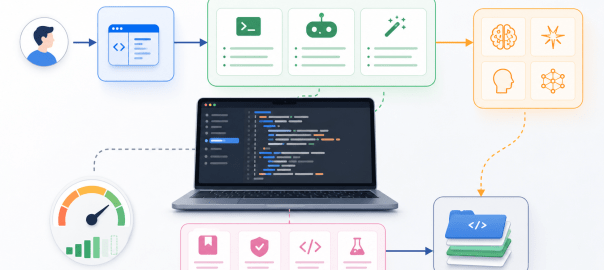
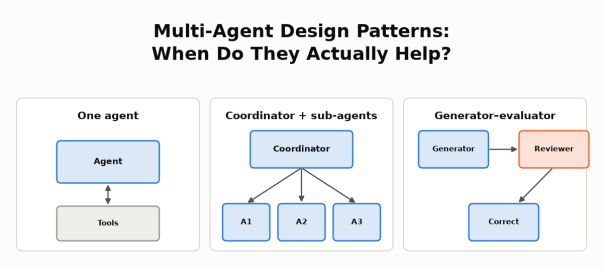
Multi-Agent Design Patterns: When Do They Actually Help? Three small diagrams: one agent with tools; a coordinator with three sub-agents; a generator, reviewer and correction flow.

Multi-Agent Design Patterns: When Do They Actually Help?

Objective

The goal of this post is to show, with real numbers from a working system, how to decide whether an agentic system should be a single agent or multiple agents working together.

I’ve read about cases where multi-agent systems helped, for example:

I wanted to know whether any of these patterns would help my own marketplace support agent: an AI agent that answers support staff’s questions about orders, payouts, refunds and policies in a small simulated marketplace, using read-only SQL and policy search. More details are in the use case below. This post walks through the patterns, how I looked for one that fits a support agent, the two designs I tested, and what I found.

On my agent:

  • Splitting the work across seller agents did not help. A coordinator agent with three seller agents gave the same answers as one agent with parallel tools, but took longer and cost about 2.5Γ— more.
  • A reviewer agent did help, but only when it was a stronger model. GPT-5.4 reviewing GPT-5 nano’s answers removed every incorrect answer at about half the cost of running GPT-5.4 alone. When nano reviewed nano, nothing improved.

The lesson: As per my understanding, multi-agent helps in two situations below, there can be more.

  • The work splits into independent pieces that can run in parallel, each with its own context. When the steps are mostly sequential, or one query already covers the work, extra agents don’t help.
  • A second agent can see what the first one can’t.

Agent Design Patterns

Before comparing design patterns, it helps to ask one question: who controls the next step, the code or the model?

  • Workflow: in a workflow, code defines the path.
  • Agent: an agent’s model decides the next step, such as which tool to call.
  • Combinations: real systems often combine code-controlled and model-controlled steps. For example, code fixes the order of the steps, while agents decide how to carry out each one.

More model calls, different models or parallel tool calls don’t by themselves make a system multi-agent.

These are the patterns I considered:

PatternTypeHow it flowsExample
Workflow (chaining, routing, parallel steps)WorkflowCode defines each stepMy model-routing posts: classify the question, then send it to a cheap or strong model
Single agent with toolsAgentOne model loop decides which tool to call nextMy support agent: catalog β†’ SQL β†’ policy search β†’ answer
Coordinator with sub-agentsMulti-agentEach agent works autonomously: a coordinator agent splits the task, sub-agents work in parallel in their own contexts, and the coordinator combines the resultsAnthropic’s research system; LangChain’s language comparison
Generator–evaluatorWorkflow + agentsCode fixes the order (draft β†’ review β†’ revise if needed); a generator agent drafts and an evaluator agent checksCognition’s reviewer; Anthropic’s verification subagent
HandoffWorkflow + agentsCode defines which specialist agents exist and who can hand off to whom; an agent decides when to hand the conversation over, and the specialist takes overA triage agent hands a refund request to a refunds agent, which continues with the user
Independent agents across systemsMulti-agent across organizationsAgents owned by different organizations exchange tasks and results over a protocol such as A2AA marketplace’s support agent asks a payment provider’s agent to investigate a failed payout

Why add agents at all? Anthropic’s January 2026 post on when to use multi-agent systems gives three reasons:

  • context protection: keep irrelevant detail out of an agent’s context
  • parallelization: investigate independent parts at the same time
  • specialization: focused tools and prompts

It also warns that multi-agent systems typically use 3–10Γ— more tokens, and advises starting with the simplest approach that works.

Three examples show when splitting pays off:

  • Anthropic’s research system: a lead agent breaks a research question into parts, several research agents search in parallel, each in its own context, and the lead agent combines their findings.
  • OpenAI’s Navier–Stokes proof: on the order of 10,000 agents worked in groups, each trying a different variant or approach, and Codex shared the best findings across groups. They reached a proposed proof of the 90-year-old Millennium Prize problem in 88 hours, using about 130 billion output tokens, and a separate Lean step verified it. Mathematicians have not yet accepted it.
  • LangChain’s language comparison: for “Compare Python, JavaScript, and Rust for web development”, a coordinator sends each language to its own agent, which researches it with about 2,000 tokens of language-specific material. The coordinator then combines the three results.
    • Separate agents: 5 model calls and about 9K tokens.
    • Handoffs: passing control from one agent to the next takes 7+ calls and about 14K tokens, because the steps run one after another.
    • One agent holding all three languages’ material: about 15K tokens.

LangChain credits the 67% fewer tokens to “context isolation”.

All three have the same shape: independent pieces of work, each needing its own context, combined at the end. Cognition’s reviewer is a different idea: a second agent with fresh context checks the first agent’s work.

Not everyone finds that more agents help. Google’s research on scaling agent systems finds the benefit depends on how well the task decomposes, and a 2026 paper found single agents outperform multi-agent systems on multi-hop reasoning when both get the same thinking budget.

The Use Case

The agent is an internal customer support agent I built over a small simulated marketplace with buyers, sellers, orders, shipments, seller payouts, returns, refunds and versioned policies. Support staff ask it questions in plain English. It answers by calling read-only tools (a data catalog, SQL over the business data, order history and a policy-document search) and cites the evidence it used. It runs on the OpenAI Agents SDK behind a LiteLLM gateway.

I use two models: GPT-5 nano, the lower-cost model, and GPT-5.4, the stronger one. More background on the agent is in my model routing posts.

Looking for a Multi-Agent Fit

My first idea was a SQL agent and a RAG agent: one for the business data, one for the policy documents. It didn’t make sense.

  • The two are mostly sequential. The records SQL finds decide which policy to look up: which payout, which date, which return.
  • Combining contexts adds complexity. Splitting them means passing one agent’s findings to the other, then combining both into one answer, with nothing gained.
  • SQL and documents are tools, not separate jobs. One agent can use both.

The second idea looked more promising: one agent per seller. When payouts don’t go through, each seller can have different reasons: an item not yet delivered, a hold that hasn’t passed, an active return, a failed provider attempt. Investigating each seller separately looked like independent branches, the parallelization case. That became the first experiment.

The second experiment came from a different observation. In my earlier evaluations, nano’s wrong answers often had the right evidence available but drew the wrong conclusion. A second agent checking the work seemed worth testing.

Experiment 1: A Coordinator With Seller Agents

The task was a single investigation: “Investigate all sellers’ payouts, explain supported reasons, include paid and zero-due controls, and summarize unpaid totals by seller.” A fixed test dataset had 3 sellers and 11 payouts covering seven outcomes:

  • not delivered
  • under the 24-hour hold
  • active return
  • eligible but not yet released
  • failed provider attempt
  • fully refunded (nothing due)
  • paid

I compared two designs, both using GPT-5.4 and the same five read-only tools:

  • One agent with parallel tool calls allowed. This is not multi-agent: it’s a single agent that can run several tool calls at the same time.
  • A coordinator agent with three seller agents. Each seller agent has its own tool loop and context. The coordinator delegates, then combines their findings.
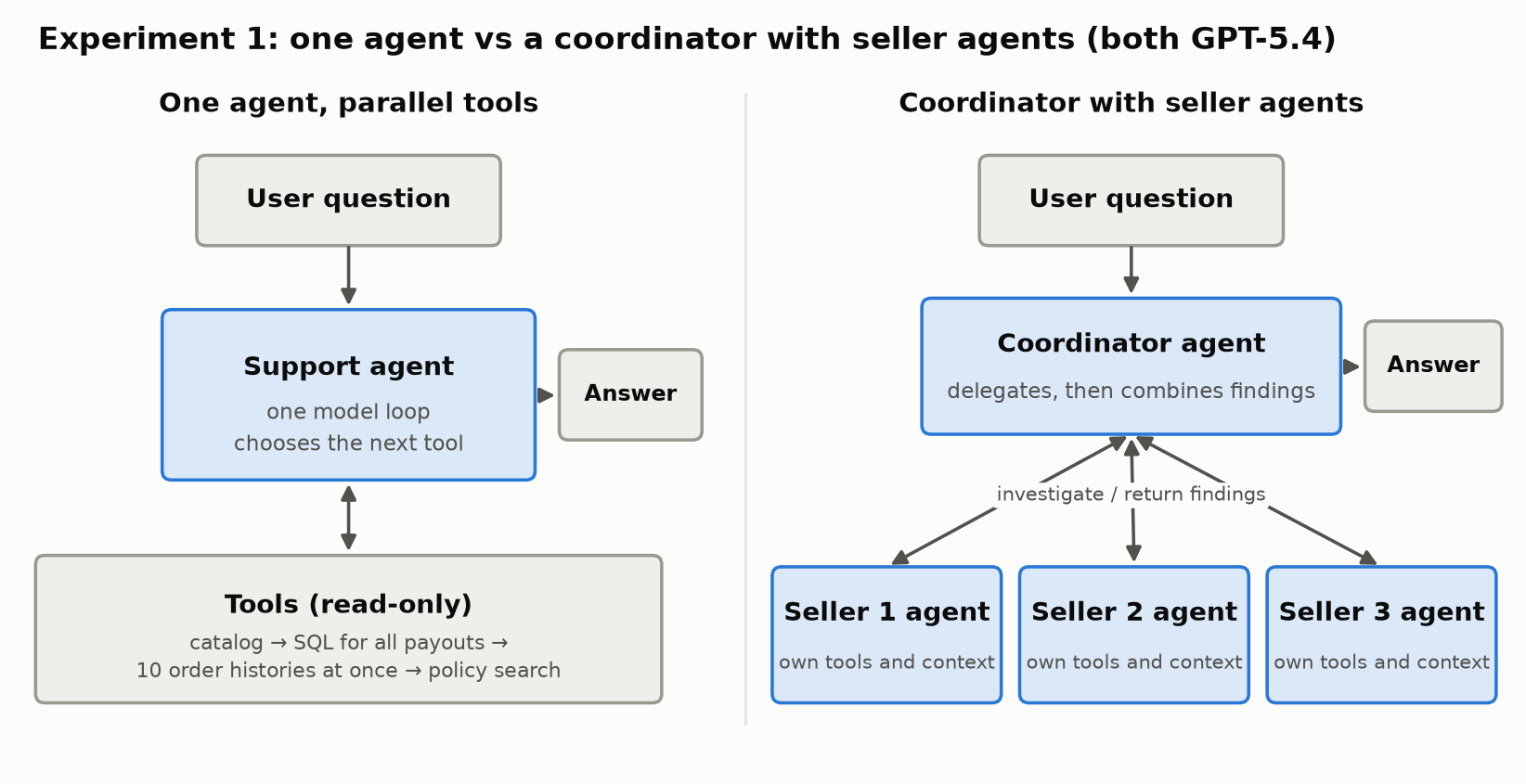
Two designs side by side. Left: one support agent, a single model loop that chooses the next tool, calls read-only tools: catalog, SQL for all payouts, ten order histories at once, then policy search, and returns the answer. Right: a coordinator agent receives the question, delegates to three seller agents that each have their own tools and context and return findings, then combines the findings into the answer.
The same investigation, done by one agent with parallel tools or by a coordinator with three seller agents.

Each design ran three times, in rotated order. An LLM reviewer checked every answer against the expected payouts, sellers and amounts. Here are the averages; one coordinator run did not complete, and its recorded usage is included.

DesignMean timeMean cost (cache-adjusted)Mean model requests
One agent, parallel tools82.0 s$0.1626.0
Coordinator + 3 seller agents108.1 s$0.40119.7

The answers were equally right on the business facts: every payout covered, the right seller and order, correct amounts and totals. The difference was time and cost. The coordinator design used about 3Γ— the model requests and cost about 2.5Γ— more.

The reasons are visible in the traces:

  • One query covered every seller. The single agent found all the payouts with one SQL query, so there was no heavy independent branch to hand off. Each seller’s investigation was small.
  • The single agent already worked in parallel. After finding the order IDs, it fetched 10 order histories at once in two of the three runs. Parallel tool calls gave concurrency without extra agents.
  • Sub-agents add overhead: each one repeats the instructions and catalog lookup, then packages its findings and evidence for the coordinator, which then has to combine them.

This is the opposite of LangChain’s language example. There, each language needs its own research and its own context; here, one query already held everything.

The limits matter. This was one task, three runs and three sellers, all under a common payout policy, and I didn’t give both designs equal budgets. With many more sellers, or seller-specific policies that need real independent investigation, sub-agents might pay off. Not shown here is the honest conclusion, not “sub-agents never help”.

Experiment 2: The Generator–Evaluator Pattern

The second design adds a reviewer. Anthropic calls this pattern evaluator-optimizer; I’ll call it generator–evaluator.

  1. A generator agent (nano) drafts the answer with tools.
  2. A reviewer agent sees the question, the draft and the full evidence the generator used. It has no answer key, and in this experiment no tools. It returns “no changes needed” or specific feedback.
  3. If the reviewer flags problems, a correction agent (nano) revises the answer once, with tools available.

The application controls the order of the steps; the generator and correction agents run their own tool loops.
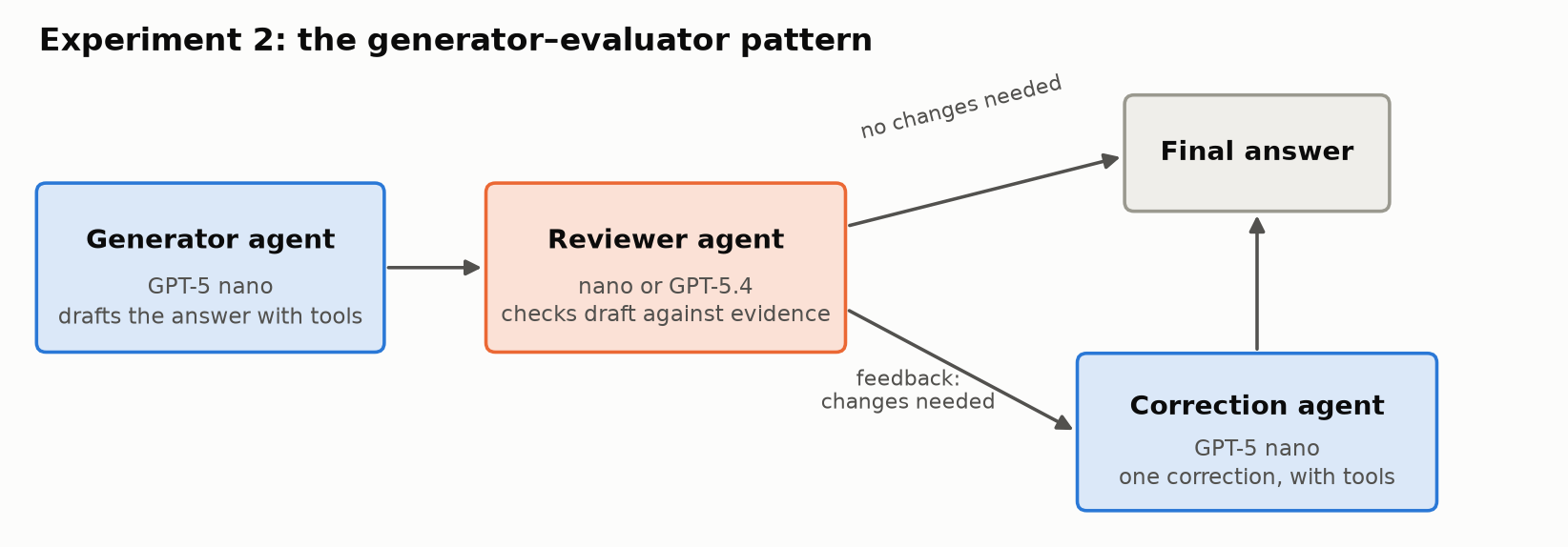
A left-to-right flow. A generator agent (GPT-5 nano) drafts the answer with tools and passes it to a reviewer agent (nano or GPT-5.4), which checks the draft against the evidence. If no changes are needed, the draft becomes the final answer. If changes are needed, feedback goes to a correction agent (GPT-5 nano), which makes one correction with tools and produces the final answer.
The generator–evaluator flow: draft, review, and at most one correction.

I ran it on the same 18 support cases I use for regression testing: order lookups, current and historical policy, payout eligibility, refund histories, reconciliation, an ambiguous name and a request the agent must refuse. Two cases are short follow-up conversations, giving 20 answers in total. An LLM reviewer graded every final answer against the expected results, separately from the reviewer agent’s own verdict. These grades are not human-adjudicated.

How it unfolded. I first ran it on 8 hard cases, with GPT-5.4 reviewing nano’s answers. Results moved from 3 correct / 3 partial / 2 incorrect to 5 / 3 / 0. It looked as if the pattern worked.

But was it the pattern, or a stronger model doing the reviewing? So I tested nano reviewing nano on the same 8 cases. It asked for no changes, and nothing improved. Then I ran both reviewers across all 18 cases:

DesignCorrect / partial / incorrectEstimated cost
One agent: nano11 / 4 / 3$0.037
Nano generator + nano reviewer11 / 4 / 3$0.053
Nano generator + GPT-5.4 reviewer14 / 4 / 0$0.582
One agent: GPT-5.417 / 1 / 0$1.210

Costs are model-usage estimates at uncached list prices, including nano’s drafts and the review and correction calls.
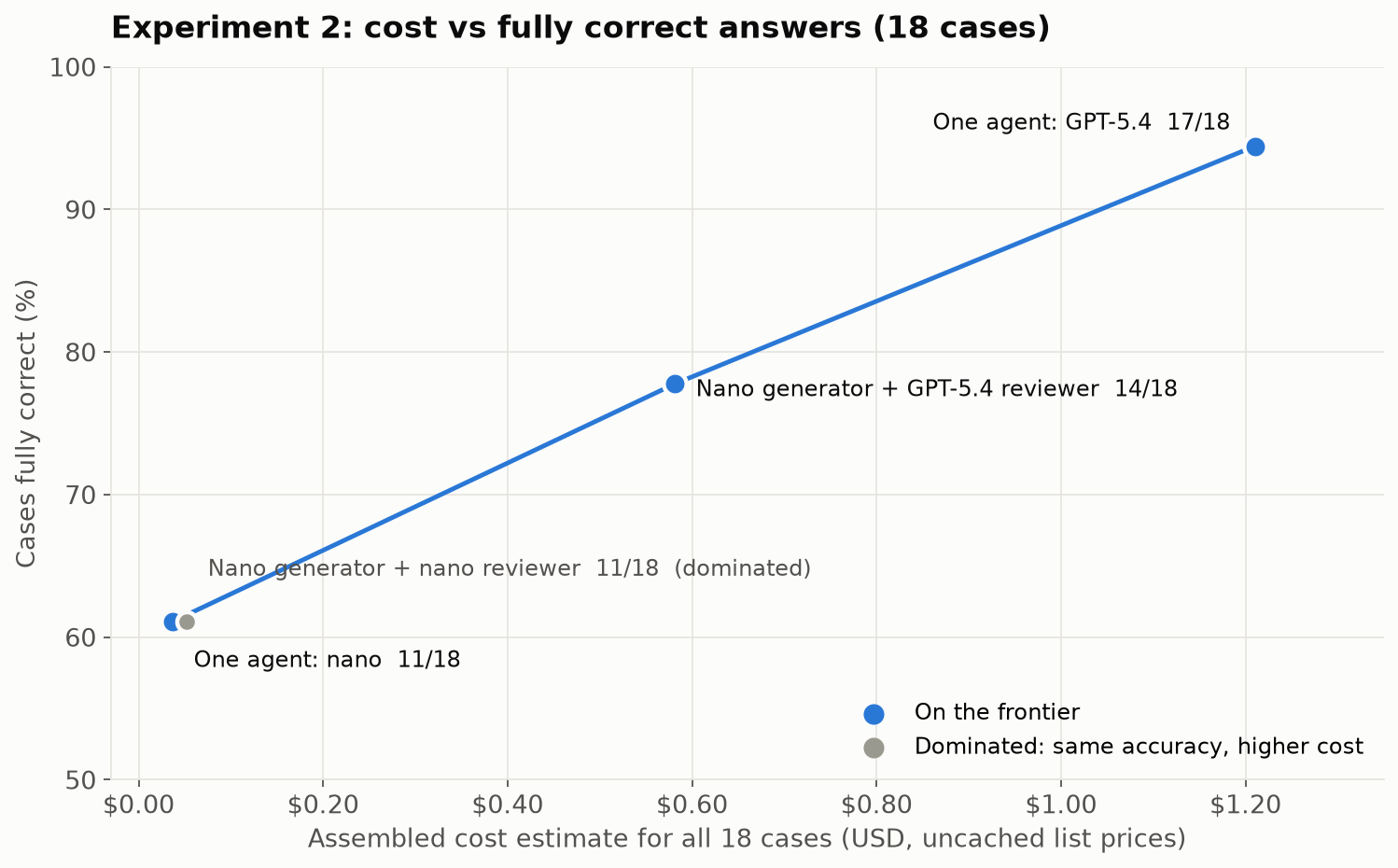
Scatter chart of cost against fully correct cases for the four designs. One agent nano: 11 of 18 at $0.037. Nano generator plus nano reviewer: 11 of 18 at $0.053, marked as dominated. Nano generator plus GPT-5.4 reviewer: 14 of 18 at $0.58. One agent GPT-5.4: 17 of 18 at $1.21. A line connects the three non-dominated designs.
Same-model review added cost without changing results. A stronger reviewer moved nano most of the way toward GPT-5.4 at about half its cost.

What the results show:

  • A reviewer can only catch what it can see. Across all 18 cases, nano as reviewer asked for three corrections, and none changed a grade. It shares the generator’s blind spots.
  • The stronger reviewer removed all three incorrect answers. Three answers became correct and one improved from incorrect to partial. The total came in about 52% below running GPT-5.4 alone, with three fewer fully correct answers.
  • Detection isn’t correction. GPT-5.4 asked for 13 corrections, and 4 answers improved. Several times nano was told what evidence was missing and still didn’t fetch it.
  • The gain comes from the reviewer’s capability. The pattern is how you spend that capability selectively: GPT-5.4 reads and judges nano’s work instead of doing all of it.

On a cost-versus-accuracy chart, nano reviewing nano is dominated: the same accuracy as nano alone, at higher cost. The useful choices are nano alone, nano with a GPT-5.4 reviewer, and GPT-5.4 alone. Which one is right depends on your accuracy bar and budget.

The limits: one pass over 18 known cases, and LLM-reviewer grades. This doesn’t show that self-review never works; it shows it didn’t work here.

When Multiple Agents Make Sense Across Systems

The experiments above looked at splitting one application’s work across agents. Multiple agents also make sense when the work crosses a boundary between systems, especially systems owned by different companies. The marketplace and a payment provider are two systems run by two different companies. The marketplace’s support agent could ask the provider’s agent to investigate a failed payout. Each side keeps its own tools, data and permissions, and they exchange only the task and the result.

That’s what the A2A (Agent2Agent) protocol is for: delegating work to an agent you don’t control. Google introduced it, and it’s now an open project under the Linux Foundation. Inside your own system, tools exposed through function calls or MCP are usually enough. I haven’t implemented A2A here, so I’m not claiming a measured benefit.

Lessons Learned

  • Look for independent branches, not tools. SQL and document search were mostly sequential, so separate agents would only have added a context-merging step.
  • One good query can beat a team. When a single bulk query covered every seller, sub-agents added time, cost and model calls without better answers.
  • Parallel tools give you concurrency without extra agents. The single agent fetched ten order histories at once, though it still had to find the orders first.
  • A reviewer is only as good as what it can see. Same-model review found nothing. A stronger reviewer removed every incorrect answer, which makes review a way to spend a strong model only where it matters.
  • Detection isn’t correction. Specific feedback helped most, but the correction agent didn’t always fetch the evidence it was told was missing.

A Checklist: Before You Add Multiple Agents

  1. Can one agent with the right tools, and parallel tool calls, do it?
  2. Are each agent’s task and context separate and isolated, or would the agents need each other’s details?
  3. Can the agents’ work run in parallel, or is it mostly sequential?
  4. Is one agent’s context actually overloaded? Measure it.
  5. For a reviewer: is it more capable than the generator on these errors? Test same-model review as a control.
  6. Compare against single-agent baselines on accuracy, cost, latency and failures.
  7. Across system boundaries, such as another team or another company, consider independent agents and A2A.

Limits

  • Both experiments are small: one investigation task with three runs, and 18 known cases with one pass.
  • Grades come from an LLM reviewer against expected answers, not human adjudication.
  • Costs are model-usage estimates, not invoices.

Summary

The lesson is simple: add multiple agents only for a reason you can name and measure. On my support agent, a coordinator with seller agents gave the same answers as one agent with parallel tools, at about 2.5Γ— the cost, because one query already covered every seller. A reviewer agent helped only when it was stronger than the generator: GPT-5.4 reviewing nano removed every incorrect answer at about half the cost of GPT-5.4 alone, while nano reviewing nano changed nothing. Multi-agent pays off when the work splits into independent pieces that can run in parallel, each with its own context, or when a second agent can see what the first one can’t.

Acknowledgements

This post was written with the help of Claude Opus 5.5 in Claude Code, which also helped me research the multi-agent patterns and plan the experiments. The experiments were built and run with GPT-6 Astra, which also graded the answers against the expected results.

References

Patterns and Evidence

Earlier Posts

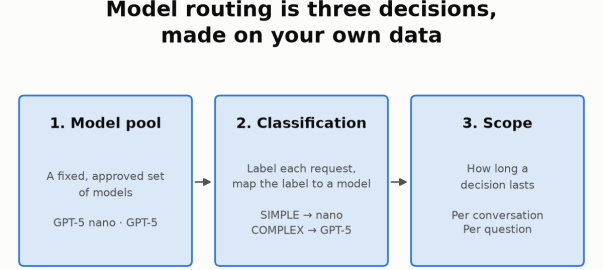
Model routing is three decisions, made on your own data: 1. Model pool (GPT-5 nano and GPT-5), 2. Classification (SIMPLE to nano, COMPLEX to GPT-5), 3. Scope (per conversation or per question).

Model Routing, Part 2: Choosing the Scope

Objective

In Part 1, I compared ways to choose which model should answer a support request. This post continues that experiment with a second decision: how long should that model choice lastβ€”a whole conversation or just one question? The small pilot illustrates a method, not a general recommendation.

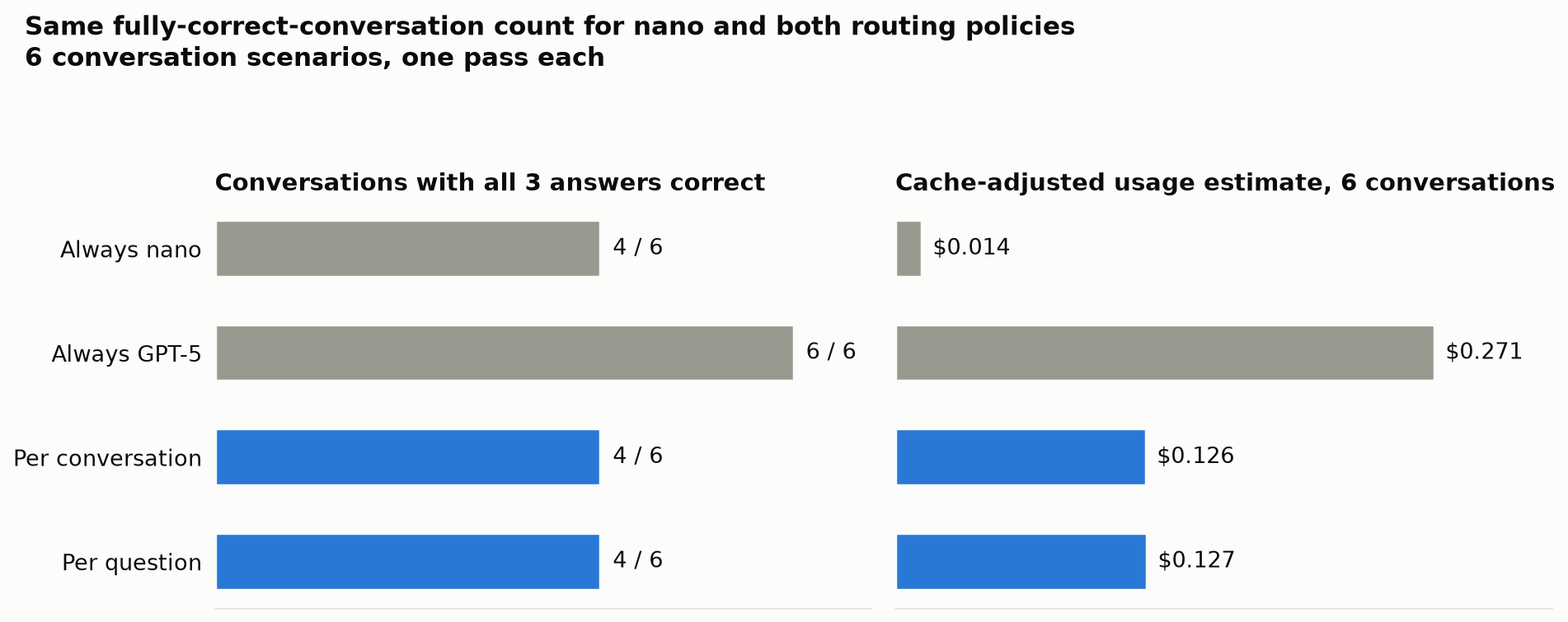
I compared four policies on six new three-question conversations: always GPT-5 nano, always GPT-5, per-conversation routing and per-question routing. Nano and both routing policies got 4 of 6 conversations fully correct; GPT-5 got all six. Routing cost about nine times nano, without improving the fully-correct-conversation count. Neither scope clearly won.

The Agent and Classifier

The agent answers marketplace support questions using read-only SQL and policy search, through the OpenAI Agents SDK and LiteLLM, with Langfuse tracing. Part 1 compared classifiers on 18 cases. Here I reuse its domain-aware nano classifier: SIMPLE β†’ nano, COMPLEX β†’ GPT-5.

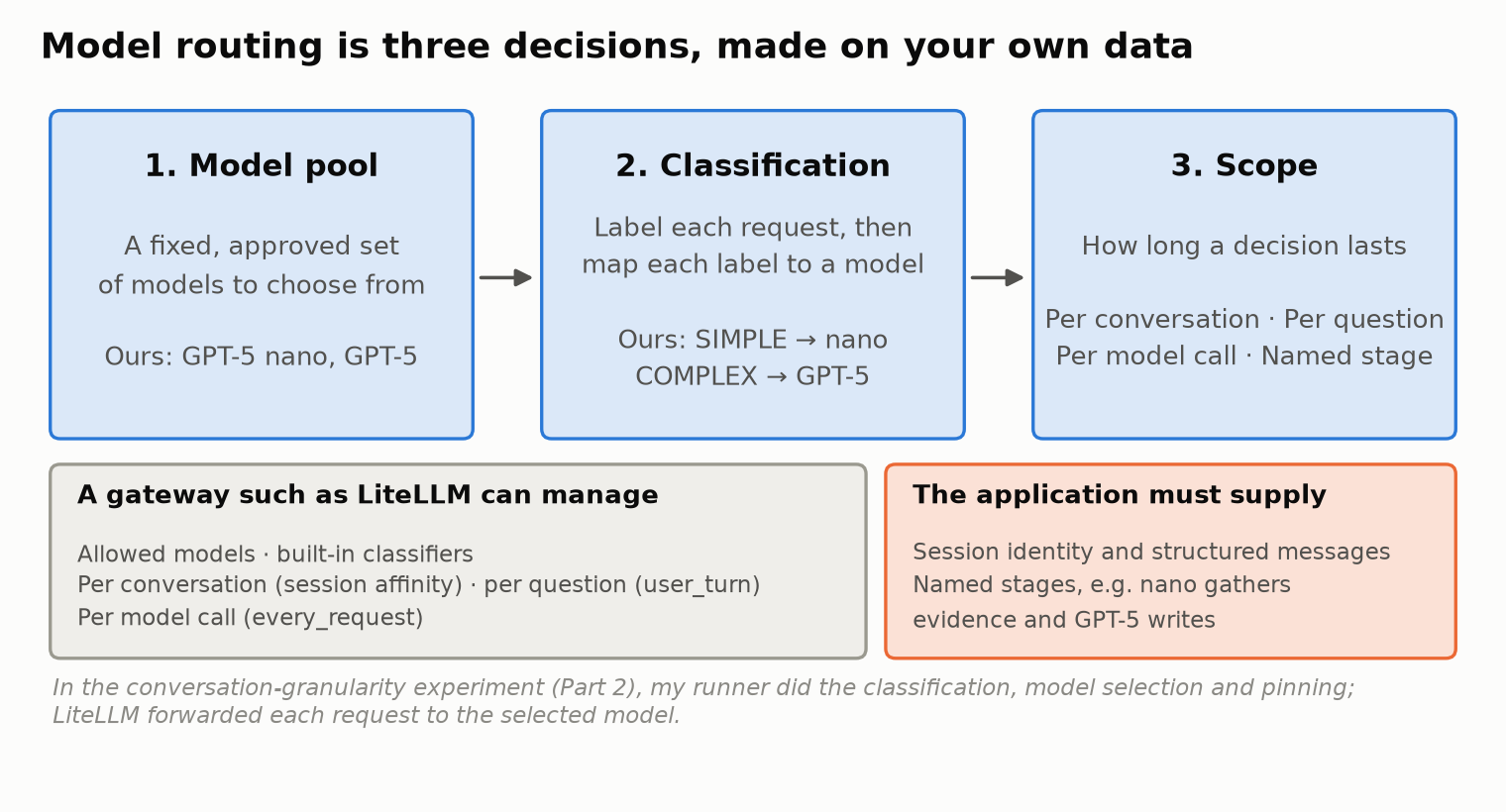
Three boxes: 1. Model pool (a fixed, approved set of models; ours are GPT-5 nano and GPT-5), 2. Classification (label each request, then map each label to a model; ours map SIMPLE to nano and COMPLEX to GPT-5), 3. Scope (per conversation, per question, per model call, named stage). Below, one box lists what a gateway such as LiteLLM can manage: allowed models, built-in classifiers, per-conversation selection through session affinity, per-question selection through user_turn and per-model-call selection through every_request. Another box lists what the application must supply: session identity, structured messages and named stages. A note says that in the conversation-granularity experiment the author's own runner did the classification, selection and pinning, and LiteLLM forwarded each request to the selected model.
Part 1 covered the model pool and classification. This post covers the third decision, scope.

My Starting Expectation

I expected per-conversation routing to preserve context and cache warmth, while per-question routing could save money on easy follow-ups. I also assumed switching would lose context or start cold. These were assumptions to test, not established properties.

Ways to Scope a Routing Decision

A gateway can manage most of these for you. LiteLLM’s documentation describes three built-in options:

  • Per conversation: session affinity pins the model chosen on the first turn of a session and skips reclassification on later turns.
  • Per question: classification_mode: user_turn classifies only new user questions, and carries that decision through the tool calls and continuation turns within the question.
  • Per model call: classification_mode: every_request (the default) classifies each request the agent sends to the gateway.

For any of these to work, the application supplies the session identity (LiteLLM reads a session_id from the request metadata) and well-structured messages, so the gateway can tell a new user question from a tool result.

Two more options need the application’s knowledge:

  • Named stages: a deliberate rule such as “nano gathers the evidence, GPT-5 writes the final answer”. The gateway can reclassify every call, but only the application knows which call is “gathering” and which is “writing”.
  • Escalation: start on nano and switch up when a check fails. This needs a reliable signal that an answer is wrong.

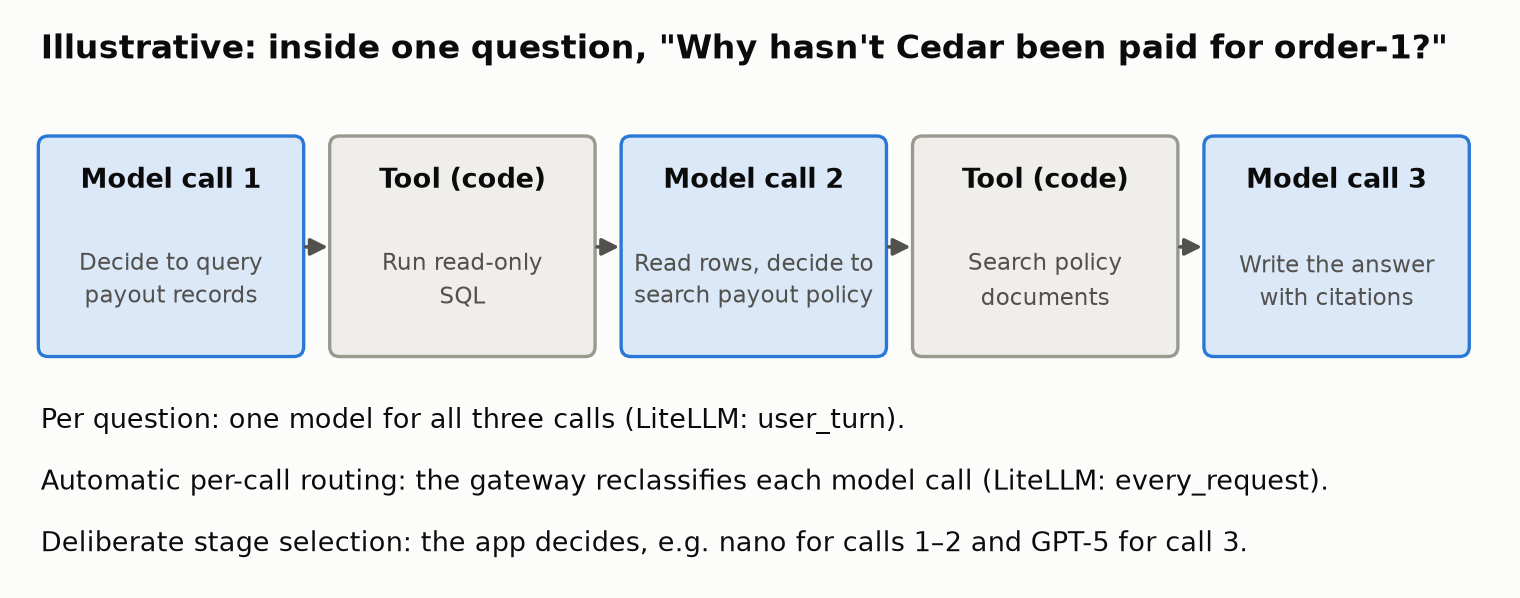
Here is what a single question looks like inside the agent:

Illustrative sequence for one question, "Why hasn't Cedar been paid for order-1?", in five steps: model call 1 decides to query payout records; a tool runs read-only SQL; model call 2 reads the rows and decides to search the payout policy; a tool searches the policy documents; model call 3 writes the answer with citations. Notes below explain that per-question routing uses one model for all three calls (LiteLLM user_turn), automatic per-call routing reclassifies each call (every_request), and deliberate stage selection is decided by the application.
An illustrative question. Automatic per-call routing reclassifies each call; deliberate stage selection needs the application to name the stages.

I tested per conversation and per question, against the two fixed models.

How I Tested It

What I implemented. My own runner did the classification, the model selection and the pinning. LiteLLM simply forwarded each request to the model the runner had explicitly selected. So these results test the two routing policies, not LiteLLM’s native session-affinity or user_turn implementations. Every internal model call for a question used the model chosen for that question.

The conversations. I wrote 6 new conversation scenarios of 3 questions each, with expected answers written in advance. They cover:

  • simple questions leading to hard ones, and the reverse
  • a clarification
  • a purchase that changes the data mid-conversation
  • a clock change that lets a payout hold pass
  • simple lookups only

The policies. Each scenario ran once under four policies:

  • always nano
  • always GPT-5
  • per-conversation routing
  • per-question routing, where the classifier also sees the earlier conversation

Six scenarios Γ— three questions Γ— four policies is 72 answers, but only 6 distinct scenarios, not 72 independent tests. I couldn’t reuse saved answers as in Part 1, because each answer shapes the next question’s context.

Grading. An LLM reviewer, GPT-6 Astra, reviewed every answer against the expected facts, and I adjudicated the borderline cases. Three borderline partial grades were flagged; I reviewed and accepted them. A conversation counts as fully correct only if all three of its answers are correct, because a support conversation with one bad answer is still a failed conversation.

One Conversation, Two Scopes

Here is one scenario, “simple lookup to payout investigation”, under the two routing policies:

#QuestionPer conversationPer question
1“For order-2, list the purchased product, quantity and seller.”nano (pinned for the conversation) βœ…nano βœ…
2“For that same order, explain why its seller has not received the payout and what must happen before release.”nano ⚠️ partialGPT-5 βœ…
3“What exact amount is currently payable to that seller for this order, after the marketplace fee?”nano βœ… β‚Ή1,618.20GPT-5 βœ… β‚Ή1,618.20

The first question looked simple, so per-conversation routing pinned the whole conversation to nano, including the harder second question. Per-question routing classified question 2 as COMPLEX and sent it to GPT-5. The classifier’s reason: “Determining why a seller payout is not completed requires tracing allocations, payments, shipments, returns/refunds, and payout status, plus policy-based eligibility.”

The Results

The headline measure is conversations with all three answers correct. Costs are cache-adjusted usage estimates for these newly generated answers. They are reconstructed from the token and cached-token counts the provider reported, at fixed list rates.

PolicyConversations fully correctCache-adjusted usage estimate, 6 conversationsvs always GPT-5
Always nano4 / 6$0.014βˆ’94.9%
Always GPT-56 / 6$0.271β€”
Per conversation4 / 6$0.126βˆ’53.4%
Per question4 / 6$0.127βˆ’53.2%
Two bar charts titled "Same fully-correct-conversation count for nano and both routing policies; 6 conversation scenarios, one pass each". Left: conversations with all three answers correct: always nano 4 of 6, always GPT-5 6 of 6, per conversation 4 of 6, per question 4 of 6. Right: cache-adjusted usage estimate for six conversations: always nano $0.014, always GPT-5 $0.271, per conversation $0.126, per question $0.127.
Nano and both routing policies had the same fully-correct-conversation count; only GPT-5 alone got all six. Six scenarios, one pass each.
  • Nano and both routing policies each got 4 of 6 conversations fully correct; GPT-5 got 6 of 6.
  • Routing cost about nine times nano, and it did not improve the fully-correct-conversation count.
  • Routing did reduce incorrect individual answers. Out of 18 answers per policy, nano got 15 correct, 1 partial and 2 incorrect; both routing policies got 15 / 2 / 1. Fewer wrong answers did not produce more fully correct conversations.
  • Neither granularity established a compelling advantage. Per conversation and per question got the same conversation score at almost the same cost.

Both routing policies chose nano for 12 of the 18 questions and GPT-5 for 6, though not always the same questions. Per-question routing switched models four times across the six conversations.

Right vs Wrong: Two Conversations in Detail

1. Per-question routing caught the harder question. In the scenario above, question 2 asks why the seller hasn’t been paid. The correct answer is that payment is captured, the shipment is still pending, and the payout is held until delivery is confirmed and a 24-hour hold has passed.

  • Per-conversation routing (pinned to nano): said the payout “is currently held” until “delivery/fulfillment conditions are satisfied”. It left out the 24-hour hold, so it was graded partial.
  • Per-question routing (sent to GPT-5): “Policy requires delivery confirmation plus a 24-hour hold… No delivery confirmation is recorded yet.” Correct.

Routing the hard question to the stronger model helped here. But there is a twist: in the separate always-nano run, nano answered this same question correctly. Same model, same question, different run, different grade. One run is not proof.

2. When every question looks simple, no scope helps. This scenario was about a name that means two things: “Cedar” is both a seller (Cedar & Co.) and a product (Cedar Desk).

  • “Please list purchases associated with Cedar.” Nano correctly asked whether I meant the seller or the product.
  • “The seller Cedar & Co., not the desk product.” Nano invented a “today only” date filter nobody asked for and replied that there were no purchases. In fact there was one: order-1, with two Canvas Weekenders. Graded incorrect.
  • “Within those purchases, show only items that have not been delivered.” Nano answered “none”. That happens to be the right result, since the order had been delivered, but only because the previous answer had filtered everything out. Right answer, wrong reason, graded partial.

The classifier labeled all three questions SIMPLE, and on the surface they are: a list, a clarification, a filter. So both routing policies used nano throughout and made the same mistakes. GPT-5 alone got all three right. Per-question routing only helps if the classifier can tell that a question is risky, and follow-ups often look simpler than they are. Once a wrong answer enters the conversation, later answers build on it.

What It Costs

The pilot also recorded latency and caching. Full-price estimates are shown next to the cache-adjusted estimates so the effect of caching is visible.

PolicyCache-adjusted estimateFull-price estimateCached share of inputLatency p50 / p95Model switches
Always nano$0.014$0.02050.6%10.3 s / 20.2 s0
Always GPT-5$0.271$0.46064.0%13.2 s / 34.8 s0
Per conversation$0.126$0.20654.0%10.4 s / 33.1 s0
Per question$0.127$0.21957.9%13.4 s / 38.8 s4
  • Caching changes the estimate a lot. For always-GPT-5, the cache-adjusted usage estimate was about 40% below the full-price estimate. Neither figure is an invoice.
  • Report cache differences, don’t explain them away. Per-question routing switched models four times, and its cached share was 57.9% against 54.0% for per-conversation. I am not attributing that difference to model switching, or to anything else, because two things make it hard to interpret:
    • Provider caches were shared and could already be warm across runs.
    • One conversation was interrupted mid-run when my API credit ran out. It resumed after funding, which may have changed cache warmth.
  • Treat the latency figures as rough. p95 over 18 answers per policy is an indicator, not a production estimate.

What Happened to My Expectation

I expected per-conversation routing to win on context and caching, with per-question routing trading some of both for lower cost. Here is how each part held up:

  • Context: my assumption was wrong. A model switch doesn’t lose the conversation. The application passes the conversation history with every call, so the model answering question 2 sees question 1 and its answer, whichever model it is. What carries over from one question to the next is the content of earlier answers, including their mistakes, not the model.
  • Caching: I didn’t observe the penalty I expected. The per-question policy’s cached share was higher, not lower, and that held within each model too: nano 51.5% versus 47.8%, GPT-5 66.9% versus 61.6%. With shared cache warmth, the funding interruption and a single pass, this observation doesn’t tell me why.
  • Cost: effectively the same. $0.126 for per-conversation, $0.127 for per-question.
  • Accuracy: the same conversation score, with different mistakes. Per-question routing rescued one question the pinned conversation got partly wrong. In another conversation, neither scope helped, because every question looked simple.

So the pilot didn’t confirm my expectation, and it didn’t reverse it either. It was inconclusive. The useful part is seeing that the differences between the scopes were smaller and more situational than I assumed.

Pros and Cons of Each Scope

No scope is best in general. Each one trades something:

ScopeProsConsConsider it when
Per conversationOne classification per conversation; one model; simplest to run and explainThe first question decides for all later ones; a simple opener can leave a hard follow-up on nanoConversations tend to stay at one level of difficulty
Per questionAdapts when a conversation gets harder or easier; conversation history still carries overA classification on every question; follow-ups often look simpler than they are; more model switches to monitorConversations often mix quick lookups with investigations
Per model call (automatic)The gateway can reclassify every call with no application changesCalls within one question may land on different models; more classifications; the classifier sees the call, not the stageYou want fine-grained routing without writing stage logic
Named stages (application-defined)Can reserve the stronger model for the stage that needs it, such as writing the final answerThe application must identify the stages; the final stage often carries the most context, so it may not save muchFailures cluster in one stage, such as interpreting evidence
EscalationPays for the stronger model only when the cheaper one failsNeeds a reliable signal that an answer is wrong; fluent wrong answers slip through; slower when it escalatesYou have strong automatic checks on answers

A Checklist for Choosing Routing

Steps 1–4 are from Part 1; steps 5 and 6 come from this post.

  1. Shortlist models on benchmarks, domain fit, cost and latency, from approved providers that support your agent’s needs.
  2. Run evals on your golden set, with single questions and full conversations, to narrow the shortlist. Then fix the pool and pin the versions.
  3. Weigh cost savings against accuracy. If the cheaper model meets your accuracy bar, use it. If only the stronger one does and its cost is acceptable, use it. Route only when routing saves meaningful cost while keeping accuracy within your bar.
  4. Design the classification. Choose labels that matter for your traffic and map them to models. Start with keyword rules, then try semantic or LLM-based classifiers built from real user journeys.
  5. Choose the granularity on real conversations. Compare per conversation and per question (and per call or named stages if they fit your agent) on multi-question conversations, watching conversation-level correctness, cost, latency and caching.
  6. Validate and monitor. Re-test on fresh scenarios and repeat unstable cases before deciding, and rerun your evals whenever a model changes or retires.

Limits and What’s Next

This was a small pilot, and I would not treat it as a benchmark:

  • Sample size: 6 conversation scenarios of 3 questions, one pass per policy.
  • Grading: an LLM reviewer plus my adjudication of borderline cases.
  • Classifier: a prompt developed on known cases.
  • Implementation: my own runner, not the gateway’s native routing.
  • Caching: shared cache warmth and a funding interruption; the figures are observations, not causal proof.

The “different run, different grade” twist above shows how much one pass can vary. Next, I want to:

  • run more conversations, with repeated passes
  • repeat the test with LiteLLM’s native session affinity and user_turn
  • try named-stage routing, with nano gathering evidence and GPT-5 writing the answer
  • test escalation, once I have a reliable signal that an answer is wrong
  • run controlled cache tests

Acknowledgements

This post was written with the help of Claude Opus 5.5 in Claude Code, which also helped me research the routing landscape and plan the experiments. The application and experiments were built and run with GPT-6 Astra, which also reviewed answers against the expected results.

References

This Series

Earlier Posts

Routing Tools

  • LiteLLM Auto Routing: session affinity, classification_mode (every_request and user_turn) and classifier configuration.
Model routing is three decisions, made on your own data: 1. Model pool (GPT-5 nano and GPT-5), 2. Classification (SIMPLE to nano, COMPLEX to GPT-5), 3. Scope (per conversation or per question).

Model Routing, Part 1: Choosing a Classifier

Objective

How do you choose a model router for your own application? I tested six classifiers on a marketplace support agent to compare cost against answer quality. This small study demonstrates the decision process, not a general ranking of products.

Both GPT-5 nano and GPT-5 answered 18 support cases: 16 single-turn and two two-turn cases, or 20 answer turns per model. The LLM classifier and JEV each selected fully correct answers for 88.9% of cases, versus 94.4% for GPT-5 alone and 50% for nano, at an estimated 55–58% of GPT-5’s cost.

Part 2 examines how long a routing decision should last across a conversation.

The Use Case

I built a simulated marketplace with buyers, sellers, orders, shipments, payouts, returns, refunds and versioned policies. Its internal support agent answers questions using read-only SQL and policy search, citing its evidence. It runs on the OpenAI Agents SDK, through LiteLLM, with Langfuse tracing; payments and business data are simulated.

The workload mixes quick lookupsβ€”β€œWhat products are in order-2?”—with investigations such as β€œWhy hasn’t this seller been paid?” The latter can require payment records, delivery events, policy and a time calculation.

Routing Is Three Decisions

Model routing is not one setting. It is three decisions:

Three boxes: 1. Model pool (a fixed, approved set of models; ours are GPT-5 nano and GPT-5), 2. Classification (label each request, then map each label to a model; ours map SIMPLE to nano and COMPLEX to GPT-5), 3. Scope (per conversation, per question, per model call, named stage). Below, one box lists what a gateway such as LiteLLM can manage: allowed models, built-in classifiers, per-conversation selection through session affinity, per-question selection through user_turn and per-model-call selection through every_request. Another box lists what the application must supply: session identity, structured messages and named stages. A note says that in the conversation-granularity experiment the author's own runner did the classification, selection and pinning, and LiteLLM forwarded each request to the selected model.
Routing is three decisions. A gateway can manage most of them; the application supplies session identity and any named stages.
  1. Model pool: which approved models the router may choose between.
  2. Classification: how each request is labeled, and which model each label maps to.
  3. Scope: how long a routing decision lasts, such as a whole conversation, a single question or a single model call. That is Part 2.

Choosing and Fixing the Model Pool

Shortlist approved models on benchmarks, domain fit, cost and latency, then run evals on your own golden set. Candidates must support the agent’s tool calls and output formats. Cost per correct answer matters more than token price alone.

My evaluated pair was GPT-5 nano, the lower-cost candidate, and GPT-5, the stronger performer. Both use the same provider behind one gateway. I did not run public benchmarks myself; the choice rested on workload evals, cost and latency.

Keep routing within the evaluated, approved pool and pin model versions for reproducibility. Even OpenRouter Auto was restricted to these two candidates.

How I Checked the Quality

A router can only be judged as well as the grades behind it, so grading came first.

I built a golden set: cases with known business data behind them and expected answers written in advance. A case counts as fully correct only if every requested fact is right, in every turn of the case.

Grading combined human review and LLM review:

  • Calibration, earlier: in an earlier model comparison, I graded 36 answers by hand and had Claude Opus 5.5 grade them as an LLM judge. After clarifying the grading rules, the judge agreed with my grade on 31 / 36 (86%). That calibration applies to that judge on those answers.
  • This comparison: the nano grades are existing accepted grades. The GPT-5 answers were reviewed by an LLM reviewer, GPT-6 Astra, against the expected answers, and I adjudicated the borderline cases. The Claude calibration does not validate that reviewer; the adjudication is what anchors those grades.

Baselines: What Routing Has to Beat

First, the two models on their own over the 18 cases. The cases cover order lookups, policy questions (current and historical), payout eligibility, refund histories, incidents, reconciliation, an ambiguous name, and a request the agent must refuse.

ModelCases correct / partial / incorrectFully correctEstimated cost, all 18 cases
GPT-5 nano9 / 7 / 250.0%$0.023
GPT-517 / 1 / 094.4%$0.456

GPT-5 was far more accurate and cost about 20Γ— more. That gap is what makes routing worth considering. The question routing has to answer is simple: how much cost can we save, and how much accuracy do we give up?

Classification: Labels Are a Design Choice

A classifier assigns a label to each request. A separate mapping turns that label into a model. Both are your choices.

  • Labels don’t have to be about difficulty. They can be task type (lookup, investigation, action request), business domain (payments, returns, fulfillment), risk, language, or a mix.
  • “Simple” doesn’t have to mean “cheapest”. A short but risky request such as “refund this order now” could be labeled simple and still be mapped to the strong model.
  • A pool can have more than two tiers.

For this study, I used the simplest useful setup for a two-model pool: SIMPLE β†’ GPT-5 nano and COMPLEX β†’ GPT-5, for the classifiers I configured. LiteLLM’s built-in tiers also include MEDIUM and REASONING; I mapped everything above SIMPLE to GPT-5. OpenRouter’s Auto Router is the exception: it does not use my labels at all (see below).

The Six Classifiers and How I Configured Them

Every rule, example and prompt below was written from the support-user journeys in my specification: the kinds of questions support staff actually ask. They were frozen before testing. The one exception is a separately versioned refinement of the semantic examples, which I made after seeing the first results. It is reported on its own and is not part of the results table.

How each one ran. For the first five, my own runner produced or collected the classification and chose the model. OpenRouter Auto made its own choice. None of this used a gateway’s automatic routing on live traffic.

  • Keyword rules, heuristic scorer and semantic similarity: LiteLLM’s native classification code, exercised separately. It was not routing live traffic through my gateway.
  • LLM classifier: GPT-5 nano called through my LiteLLM gateway.
  • JEV: called directly through OpenRouter’s Decisions API.
  • OpenRouter Auto: called through OpenRouter.

Keyword Rules

LiteLLM’s keyword rules map words to tiers without calling any model. My lists:

keyword_tier_rules:
- tier: SIMPLE
keywords: [list, show, quantity, stock, balance, price]
- tier: COMPLEX
keywords: [why, investigate, reconcile, history, policy, eligible, eligibility,
refund, failed, incident, cause, "can you", "can the", "can we"]

Simple words signal a direct lookup. Complex words signal explanation, investigation, policy, eligibility, money movement, or a request to act. If both lists match, the higher tier wins. If nothing matches, the question falls back to the heuristic scorer below.

Heuristic Scorer

This is LiteLLM’s default classifier, and I used its defaults unchanged on purpose, to see how a generic heuristic behaves out of the box. It scores seven text signals that were built with software questions in mind:

  • code words (weight 0.30)
  • reasoning phrases like “step by step” (0.25)
  • technical terms (0.25)
  • length (0.10)
  • simple phrases like “what is” (0.05)
  • “first… then” patterns (0.03)
  • several question marks (0.02)

LiteLLM lets you add your own technical keywords, which is how you would adapt it to a domain.

Semantic Similarity

LiteLLM can also match questions by meaning. I wrote 14 example sentences, embedded with text-embedding-3-small. A question takes the label of its closest example if the similarity is at least 0.5; otherwise it falls back to the heuristic. A few of the examples:

  • SIMPLE (6 examples): “Show the products purchased in this order and their quantities.” Β· “What is the listed price of this product?” Β· “List the sellers and their current outstanding amounts.”
  • COMPLEX (8 examples): “Explain why the buyer paid but the merchant has not received the money.” Β· “Determine whether delivery and the waiting period permit a payout now.” Β· “Can you approve a refund and transfer the money on my behalf?”

LLM Classifier

Here a small model, GPT-5 nano, reads a routing prompt and returns SIMPLE or COMPLEX with a one-line reason. The prompt has five parts:

  1. Purpose: classify the evidence and reasoning a correct answer needs, “not sentence length or how easy the answer sounds”.
  2. The application and its tools: read-only SQL, policy search, event history.
  3. “What makes business questions deceptively difficult”: eight domain traps. Examples: “Buyer payment, seller payout and buyer refund are different money movements”; “Current payout/refund rows can hide failed attempts preceding a success”; “Recorded state, eligibility and successful execution differ.”
  4. Decision rules: SIMPLE only for direct, bounded lookups. COMPLEX for causal explanation, event reconstruction, policy applied to live data, time-boundary calculations, reconciliation or ambiguity. “A short question can be COMPLEX. A long factual list can be SIMPLE.”
  5. Generic data definitions: the application’s entities, relationships and metrics, without any test data.

A typical pair of decisions:

  • “For order-2, list the product, quantity and seller” β†’ SIMPLE: “Direct bounded retrieval… No complex inference or policy.”
  • “Explain why its seller has not received the payout” β†’ COMPLEX: “requires tracing allocations, payments, shipments, returns/refunds, and payout status, plus policy-based eligibility.”

JEV

JEV is TypeSafe’s decision model, which I wrote about in Right Model, Right Job. I gave it the same routing rubric, adapted to JEV’s typed API. The rubric text went in as the instructions of a typed SIMPLE/COMPLEX choice question, with the first line changed to “Choose SIMPLE or COMPLEX” instead of asking for a reason. That keeps the two close to a like-for-like comparison.

JEV returns a typed choice and a probability for each option:

{"tier": {"type": "choice", "choice": "COMPLEX",
"probabilities": {"SIMPLE": 0, "COMPLEX": 1}}}

That was its answer for “Why has Cedar not been paid for order-1?”

Both the LLM classifier and JEV ran in standalone mode rather than through LiteLLM’s built-in auto-routing. LiteLLM supports both an LLM classifier and JEV as built-in options, so the same setup can be configured inside the gateway.

OpenRouter Auto

OpenRouter’s Auto Router works differently from the other five. There is no prompt or rule set to write, and it doesn’t use my SIMPLE/COMPLEX labels. OpenRouter applies its own task classification, then ranks candidate models using its market data.

  • I restricted it to only my two models (allowed_models: openai/gpt-5-nano, openai/gpt-5).
  • I supplied the cost tier myself, trying low and medium.
  • Both settings selected nano for every case.

That is a finding about this restricted two-model configuration. It is not evidence that OpenRouter’s router performs poorly in general.

The Results

Here is how each approach did on the same 18 cases. Costs are replay estimates for all 18 cases at full list price, and they include the classifier’s own cost. The keyword and semantic rows include their heuristic fallback.

ApproachCases correct / partial / incorrectFully correctnano / GPT-5 picksEstimated costSaving vs always GPT-5
Always GPT-5 nano9 / 7 / 250.0%18 / 0$0.02394.9%
Always GPT-517 / 1 / 094.4%0 / 18$0.456β€”
Keyword rules15 / 2 / 183.3%8 / 10$0.24047.4%
Heuristic (default)9 / 7 / 250.0%17 / 1$0.03891.7%
Semantic similarity13 / 4 / 172.2%13 / 5$0.13869.8%
LLM classifier16 / 1 / 188.9%9 / 9$0.24945.3%
JEV16 / 1 / 188.9%8 / 10$0.26641.7%
OpenRouter Auto (low and medium)9 / 7 / 250.0%18 / 0$0.02394.9%
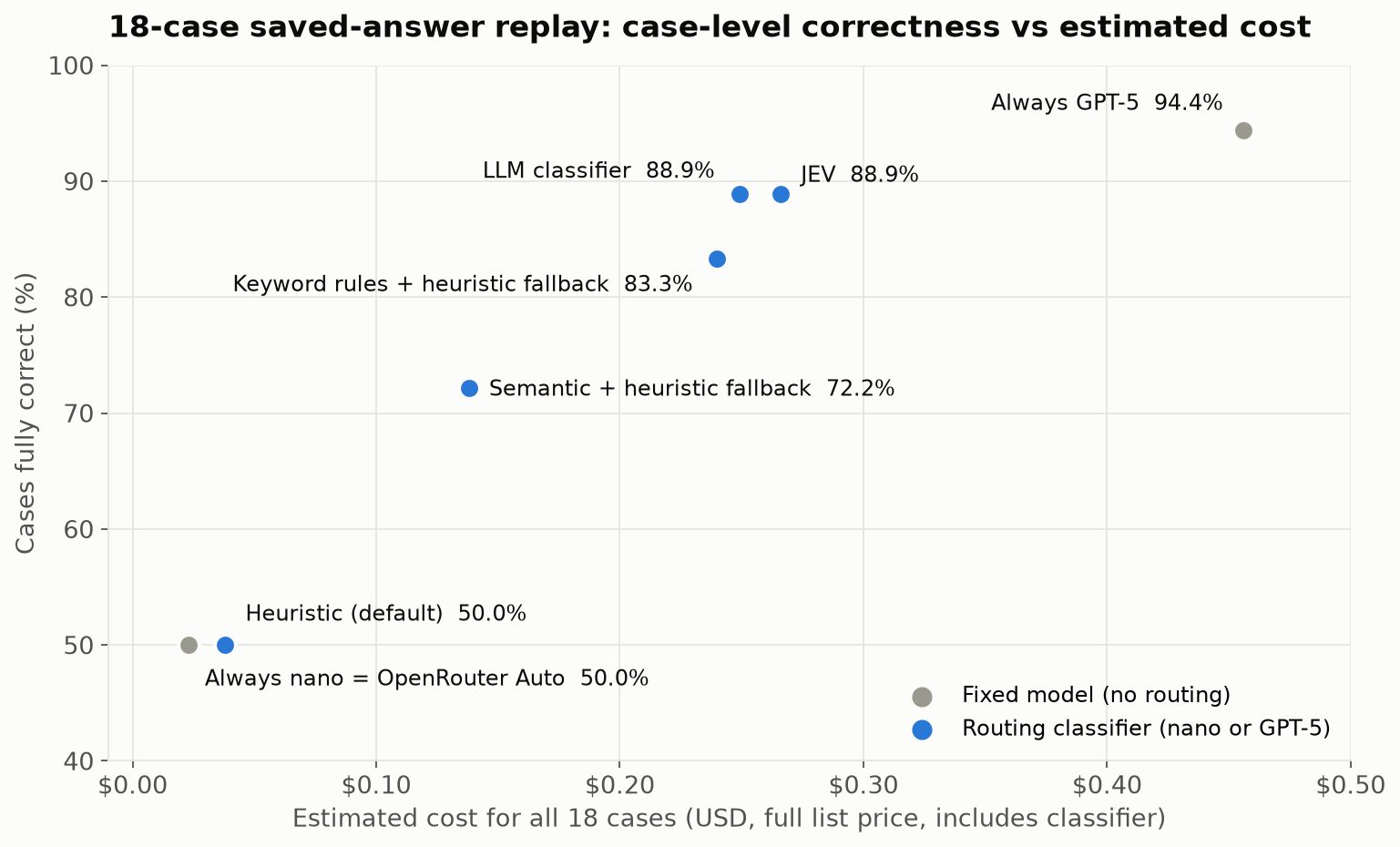
Scatter plot titled "18-case saved-answer replay: case-level correctness vs estimated cost". Always GPT-5 is top right at 94.4% and $0.456. The LLM classifier and JEV sit at 88.9% around $0.25 to $0.27, keyword rules with heuristic fallback at 83.3% and $0.240, semantic similarity with heuristic fallback at 72.2% and $0.138. The default heuristic, always nano and OpenRouter Auto all sit at 50% near $0.02 to $0.04.
On these 18 cases, classifiers written for the domain came closest to GPT-5’s case-level correctness at about half its estimated cost.

On this tested set:

  • The domain-aware classifiers did better than the generic ones. The LLM classifier and JEV share one domain-aware routing rubric. They kept 16 of GPT-5’s 17 fully correct cases at 55–58% of its estimated cost. The default heuristic and the restricted OpenRouter configuration selected nano almost every time and scored the same as nano alone.
  • Two short keyword lists got surprisingly close: 83.3% against 88.9%, at similar cost and with no model call.
  • Separate the classifier’s cost from the route’s cost. JEV’s 18 classification calls cost less than the LLM classifier’s (about $0.0038 versus $0.0054), and each decision was faster (about 0.7 s versus 2.7 s). Its route still cost more overall, because JEV selected GPT-5 for 10 cases against 9. The extra one was a case nano had already answered correctly.
  • Semantic matching depends on its examples. 10 of 18 cases matched no example closely enough and fell back to the heuristic. In the separately versioned refinement, I added more examples: fallbacks dropped to 6, but correctness did not improve and cost went up.
  • Routing did not outperform fixed GPT-5 here. That isn’t a law. Routing can beat the best fixed model when different models succeed on different cases. In this pair, GPT-5 was also right on every case where nano was right, so there was nothing for routing to gain over GPT-5 alone.

Right vs Wrong: Three Examples

Averages hide the interesting part, so here are three cases in detail.

1. A short question isn’t a simple question. “Why has Cedar not been paid for order-1?” is only eight words, and the default heuristic scored it as simple and sent it to nano. The real answer needs the payout records: the seller’s payout had failed because of a provider timeout. Nano’s answer did not mention the timeout and was graded partial. GPT-5 identified the recorded provider timeout and was correct. The keyword rules (“why”), the LLM classifier and JEV all sent this question to GPT-5. Generic signals measure how a question looks; domain-aware ones try to measure what answering it takes.

2. Two identical questions, routed differently. Two questions differed only in the order ID: “Explain the refund history for ord-6f3604a5fe.” and “Explain the refund history for ord-aaa1768930.” In the refined semantic version, the first scored 0.529 and the second 0.493 against the closest example, on opposite sides of the 0.5 threshold.

  • The first went to GPT-5, although nano’s answer to it was already fully correct. That was wasted cost.
  • The second fell back to the heuristic and went to nano, whose answer was partial while GPT-5’s was correct. That was lost accuracy.

It was wrong in both directions, because of an order ID. Similarity thresholds can be sensitive to details that don’t change the task.

3. A keyword list is only as good as its coverage. “After returning one Canvas Weekender, what remains payable to Cedar?” is a money calculation: take the seller’s share of the sale, then adjust for the refunded item and the fee. Its wording (“returning”, “payable”) wasn’t in either keyword list, so it fell back to the heuristic and went to nano. Nano’s answer was partial; GPT-5 computed the correct amount, β‚Ή2,249.10. Rules are cheap and transparent, but this gap led to a routing mistake. A fallback can sometimes still choose correctly; here it didn’t.

Lessons Learned

Domain-aware configurations did better on this set. Two keyword lists reached 83.3%, versus 88.9% for the LLM classifier and JEV. That makes simple rules a useful baseline, with their coverage gaps tested explicitly.

The LLM classifier and JEV agreed on 17 of 18 choices. JEV was faster and cheaper per decision, but agreement does not establish which part of the setup caused the benefit. Separate classifier cost from selected-model cost: a cheap classifier can still produce an expensive route by choosing GPT-5 more often.

A Checklist for Choosing a Classifier

  1. Shortlist models on benchmarks, domain fit, cost and latency, from approved providers that support your agent’s needs.
  2. Run evals on your golden set to narrow the shortlist. Then fix the pool and pin the versions.
  3. Weigh cost savings against accuracy. If the cheaper model meets your accuracy bar, use it. If only the stronger one does and its cost is acceptable, use it. Route only when routing saves meaningful cost while keeping accuracy within your bar.
  4. Design the classification. Choose labels that matter for your traffic and map them to models. Start with keyword rules, then try semantic or LLM-based classifiers built from real user journeys, not from test questions. Compare them on the same golden set, and look at both classifier cost and route cost.

Part 2 adds the remaining steps: choosing the scope on real conversations, and validating before you deploy.

Limits and What’s Next

This was a small study, and I would not treat it as a benchmark:

  • Sample size: 18 cases (20 answer turns per model), one run each.
  • Grading: the earlier calibrated judge, existing accepted grades, and an LLM reviewer with my adjudication of borderline cases.
  • Tuning: the rules, examples and prompts were written by someone who knew the test cases.
  • Costs: replay estimates at full list price.

The point is the process, not the percentages. Next, I want to:

  • test on fresh held-out cases, with repeated runs
  • add a middle-tier model
  • try routers I haven’t tested yet: Not Diamond, which learns from your graded data; Aurelio’s semantic-router; RouteLLM; Arch-Router; and the cloud platforms’ own model routers

Acknowledgements

This post was written with the help of Claude Opus 5.5 in Claude Code, which also helped me research the routing landscape and plan the experiments. The application and experiments were built and run with GPT-6 Astra, which also reviewed answers against the expected results. Claude Opus 5.5 served as the calibrated LLM judge in the earlier model comparison.

References

This Series

Earlier Posts

Routing Tools

For Future Work

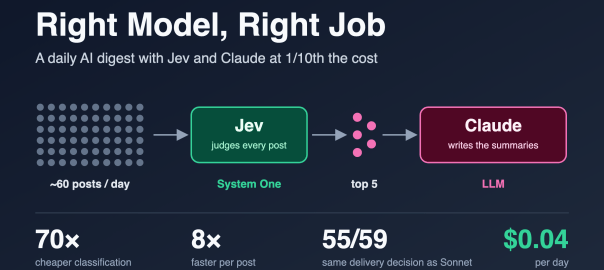
Right Model, Right Job: A Daily AI Digest with Jev and Claude at 1/10th the Cost

Objective

The goal of this post is to show, with real numbers from a working system, how to pick the right model for each step of an AI workflow:

  • Where a decision model like Jev fits, and where an LLM is still the right tool.
  • How much that split savesΒ compared to using an LLM for everything, on cost and on speed.
  • How to check that the cheaper model is good enough, by comparing its decisions against a strong LLM on the same inputs.
  • How to run it on a schedule in the cloud, using either Claude Code routines or GitHub Actions, and what each one is like to operate.

The example is a daily AI blog digest I built for myself. I used Jev, TypeSafe’s decision model, to judge every post, and Claude only to summarize the few that made the cut. The whole run costs about four cents a day. The pattern applies to any workflow that judges a lot of items and writes about a few.

The code is on GitHub: smakam/ai-blog-digest.

The Use Case

I follow around two dozen AI blogs through Feedly: frontier labs, research groups, a few people whose writing I trust, and some general tech and startup news. On a typical day that is 60 new posts. Maybe five of them are worth my time. The problem is not reading; it is deciding what to read.

So I built a small daily job that does the deciding for me. The requirements were short:

  1. Input:Β my Feedly subscriptions, exported as OPML. Only posts from the last day or so.
  2. Classify each postΒ on two questions: is it about AI, and is it worth reading?
  3. SummarizeΒ only the best posts, 4–5 lines each: what it is, why it matters, the key takeaway.
  4. DeliverΒ one Telegram message a day at 7 AM: top picks with summaries, a few more as plain links.
  5. Never send the same post twice, and never fail silently.
  6. Run in the cloud, without my laptop on.

One detail shaped the classifier: the worthiness judgment is about content only. Who wrote the post is not an input (there is a hook for an author boost later, but it is off).

The Question I Wanted to Answer

Can a purpose-built decision model replace an LLM for the high-volume, low-glamour part of an AI workflow, and what do you actually give up?

A digest is a good test case because it has a very lopsided shape:

  • Classification runs on every post.Β About 60 a day, each one a full article that has to be read in full.
  • Generation runs on almost nothing.Β Five summaries a day.

If you use one LLM for both, you pay LLM prices for the 55 posts you throw away. That is where nearly all the cost goes.

System One and System Two: Picking the Right Model for Each Job

TypeSafe describes Jev as a System One model. It does not generate text. You give it some state (here, the post’s title and text) and a set of typed questions, and it returns typed answers with probabilities:

  • aΒ noulΒ (yes/no) returns the probability of yes;
  • aΒ scoreΒ places the state on an ordered scale you describe in words and returns the expected level plus a probability per level;
  • aΒ choiceΒ picks one option from a set.

I think of the LLM as the System Two side of this system (that is my framing, not TypeSafe’s): slower, more expensive, and the right tool when you need language out, not a decision.

JobVolumeWhat it needsModel
Is this post about AI? How worthwhile is it?Every post (~60/day)A calibrated decision, fast and cheapJev (System One)
Summarize the best postsTop 5/dayFluent, specific writingClaude Haiku 4.5 (LLM)

I used Haiku 4.5 for summaries because it is the cheapest Claude model and the summaries are short. The summarizer is a single model ID in the config, so Claude Sonnet or Opus can be dropped in when you want richer summaries. I ran Sonnet 5 for part of the testing; the cost difference is in the table further down.

Both are reached through OpenRouter, so one API key covers the whole pipeline. Jev uses OpenRouter’s Decisions API rather than chat completions. I call it through TypeSafe’s official Python SDK with the base URL pointed at OpenRouter, so moving to TypeSafe’s native API later is a base-URL and key change.

How It Works

How the daily digest works
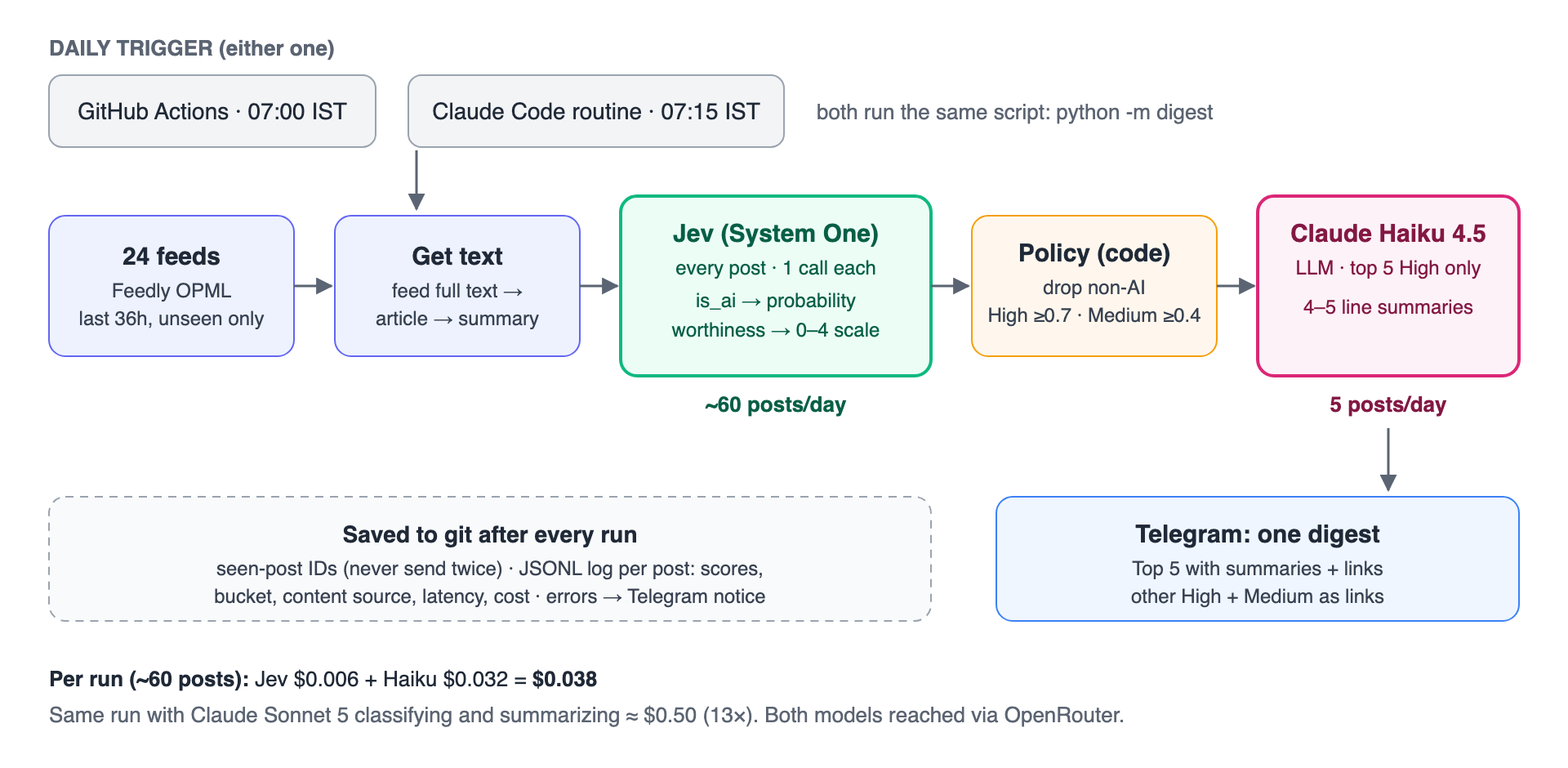
  1. Fetch.Β Parse the OPML, fetch every feed, and keep posts from the last 36 hours that haven’t been processed before. (36 rather than 24, so a late or skipped run doesn’t lose posts; the seen-post record prevents repeats.)
  2. Get the text.Β Use the full text from the feed if it’s there, otherwise fetch the article and extract the main text, otherwise fall back to the title and feed summary. On a typical day, 62 of 64 posts had full text.
  3. Classify with Jev.Β One call per post, two questions. Text is capped at about 20K tokens because Jev’s context is 32K.
  4. Apply the policy in code.Β This is deliberately not in the model (details below).
  5. Summarize the top 5 High postsΒ with Claude Haiku 4.5.
  6. Send one Telegram message, save the seen-post record and a per-post log, and send a short notice if anything failed.

The Classification Criteria

This is the actual question and rubric Jev gets. The whole “prompt engineering” for the classifier fits on one screen.

Is it about AI? (noul)

Is this blog post primarily about artificial intelligence: machine learning, LLMs, generative AI, AI agents, AI infrastructure, AI research, or AI products? Embodied AI, robotics, self-driving hardware, and humanoids count as NO.

With the two outcomes described as: yes means the post’s main subject is AI/ML software, models, research, tooling, or products; no means it is not mainly about AI, or it is about robotics or embodied AI.

So embodied AI, robotics, self-driving hardware, humanoids, and anything else where the AI lives in a physical machine are classified asΒ no. Any other topic is also classified as no. I specifically called out embodied AI and Robotics as these were in my feedly.

How worthwhile is it? (score, lowest to highest)

How worthwhile is this post for an experienced AI engineer who wants technical insight and significant launches, not news noise? Judge the content only.

LevelDescription
0Not worth reading: funding or acquisition news, listicles, prompt-tip posts, generic opinion or hype pieces, pricing changes, marketing fluff.
1Low value: minor feature updates, shallow news recaps, or thin commentary with no technical substance.
2Moderate: a tutorial on known techniques, a modest product update, or informed commentary with some concrete specifics.
3High value: architecture detail, agent infrastructure, LLMOps practice, or a significant product launch (a new model, a new agent or developer framework, a major platform capability).
4Exceptional: genuinely new technical insight, such as original research results, deep architecture write-ups, or first-hand engineering lessons.

Jev returns a probability-weighted level, so a post can land at 2.8 rather than exactly 3. I divide by 4 to get a 0–1 worthiness score.

The call itself is short:

from typesafe_sdk import Noul, Score, TypeSafeClient
client = TypeSafeClient(api_key=OPENROUTER_API_KEY,
base_url="https://openrouter.ai/api", model="jev-1.13")
result = client.system_one(
state={"title": post.title, "text": post.text[:80_000]},
questions={"is_ai": IS_AI, "worthiness": WORTHINESS},
)
is_ai = result.nouls["is_ai"].noul # e.g. 0.97
worthiness = result.scores["worthiness"].score / 4 # e.g. 0.75

No JSON parsing, no “respond only with…”, no retries because the model added a sentence before the JSON. The answer is typed.

What the Script Does on Top of Jev

Jev answers the questions. The decisions stay in code, where they are easy to see and change:

  • Drop non-AI posts:Β is_aiΒ below 0.5.
  • Bucket the restΒ by worthiness, with configurable thresholds:
BucketDefault thresholdWhat happens
Highβ‰₯ 0.7Top 5 get a summary and link; the rest are listed as links
Medium0.4 to 0.7Title and link
Low< 0.4Not delivered (but logged)
  • Cap summaries at five.Β That keeps the digest to one Telegram message and caps LLM cost. High posts beyond the fifth are still delivered, as links.
  • Never send twice.Β Seen-post IDs are saved after each successful delivery. Posts Jev failed on areΒ notΒ marked seen, so the next run retries them.
  • Never fail silently.Β A broken feed, a Jev error, a summary error, or a failed delivery sends a short notice to Telegram.
  • Log every postΒ with title, URL, source, both scores, bucket, where the text came from, latency, and cost. That log is what made the cost and quality comparisons below possible.

What It Costs

All numbers below come from real runs on my 24 feeds, priced by OpenRouter’s usage.cost field, not estimated from token counts.

Classification: Jev vs Claude Sonnet 5

I gave Jev and Claude Sonnet 5 exactly the same 59 posts, the same two questions, and the same rubric, and ran both through the same policy.

JevClaude Sonnet 5
Price (per million tokens)$0.042 input, output free$2 input, $10 output
Cost for 59 posts$0.006$0.41
Cost per 1,000 posts~$0.10~$6.95
Median latency per post0.34 s2.6 s

That is about 70Γ— cheaper and 8Γ— faster for the classification step.

Sonnet is a mid-tier model; a larger model would widen the gap. Cheaper LLMs narrow it but do not close it: from list prices, I estimate Gemini 3.5 Flash-Lite at around $0.06 for the same run (I did not measure this one), still roughly 10Γ— Jev. And with a general-purpose LLM you also own the output format, the parsing, and the calibration.

The Whole Pipeline

SetupClassifySummarize (5 posts)Per runPer month
Jev + Claude Haiku 4.5 (what I run)$0.006$0.032$0.038~$1.15
Jev + Claude Sonnet 5$0.006$0.088$0.094~$2.80
Claude Sonnet 5 for both$0.41$0.088~$0.50~$15

So the split gives roughly 13Γ— savings end to end, and 70Γ— on the step that runs on every post.

At my volume these are small numbers; nobody will notice $15 a month. The point is the shape. Classification scales with how much you read; generation scales with how much you keep. If this were 10,000 posts a day for a team or a product, classification is the line that grows, and it is the line Jev takes off the bill.

How I Checked the Quality

Cheap is only interesting if the answers are good. I didn’t have hand-labeled data on day one, so I used Sonnet as a reference point. It is not ground truth, but it is a strong model reading the same text with the same rubric.

On the same 59 posts:

AgreementResult
Is it AI?58 / 59
Delivered or not (High/Medium vs dropped)55 / 59
Same bucket (High / Medium / Low / Not AI)50 / 59

Bucket by bucket (rows are Jev, columns are Sonnet):

HighMediumLowNot AI
High7110
Medium3330
Low0080
Not AI00132

The nine disagreements split into two kinds.

Four were near-misses. Posts that Jev scored between 0.53 and 0.69 and Sonnet put at High, or a funding story both of them dropped under different labels. Part of this is mechanical: Sonnet almost always picked a whole level (0, 0.25, 0.5, 0.75, 1), while Jev returns a probability-weighted position anywhere in between. Anything near a threshold will flip.

Five were real differences, and in every one Sonnet was the stricter judge. Jev put two Gemini product launches at High where Sonnet said Medium or Low, and put a Claude Code release note and two startup-news pieces at Medium where Sonnet said Low. You could argue either side on the launches (my own rubric counts “major platform capabilities” as High). On release notes and business news, Sonnet was closer to what I asked for.

The practical reading: Jev is slightly more permissive, and it never dropped anything Sonnet rated High. The worst case is a couple of extra links in the Medium list, not a missed post. If I want Jev closer to Sonnet, raising the Medium threshold from 0.4 to about 0.5 would catch some of it. I am going to decide that after a week of my own manual review, not from one day.

This was one day and 59 posts. I would not treat it as a benchmark. It was enough to convince me the cheap model is not trading away the part I care about.

Scheduling: Claude Code Routines vs GitHub Actions

The requirement was to run in the cloud with my laptop closed. I set up two options and ran the identical script on both, so any difference is the runtime, not the digest.

GitHub ActionsClaude Code routine
What runs the jobGitHub runs python -m digest directlyA Claude session (Haiku 4.5) reads a short instruction and runs the same command
Schedulecron, 07:00 ISTcron, 07:15 IST
SecretsRepository secretsCloud environment variables
Where state is savedCommits to mainCommits to its own claude/digest-routine branch
Cost to runFree within Actions minutesUses some of your Claude plan
DebuggingJob logSession transcript
Runtime (script only)~26 s~28–41 s, plus about a minute of session start-up

What Worked Well

Both delivered the same digest. Each run’s data cost was identical ($0.038) because both call the same models. GitHub Actions needed nothing beyond a workflow file and three secrets. The routine was easy to create and, once configured, followed its instructions exactly: it didn’t try to fix anything or peek at secrets, and it reported failures clearly.

What You Give Up with the Routine

With GitHub Actions, the schedule starts the script directly. With a routine, the schedule starts a Claude session, and Claude reads my instructions and then runs the script. That extra step is useful when a job needs judgment, but here the job is a fixed command, so the agent adds a moving part (and some Claude usage) without adding anything the digest needs. The routine’s cloud environment also has constraints that GitHub Actions doesn’t:

  • GitHub access is scoped to the configured repo.Β One of my feeds was a GitHub releases feed; from the routine it returnedΒ 403Β withΒ “sessions are bound to their configured repositories.”
  • Some sites block its outbound IP.Β One feed’s host served a CAPTCHA page to the routine instead of the feed.
  • State needs a home.Β Each run starts on a fresh machine, so anything not pushed back to git is gone. By default routines can only push toΒ claude/Β branches, which turned out to be a nice constraint: the routine keeps its state on its own branch and never touchesΒ main.
  • A missing secret can’t notify you.Β My first routine run failed because the keys were in a different environment, and with no Telegram token it couldn’t report that to Telegram. It was visible only in the session transcript.

My Recommendation

For a fixed script on a schedule, GitHub Actions is the simpler and more predictable choice. Reach for a routine when the job actually benefits from an agent: when it needs to read something and decide what to do, not just run a command. I am running both for a week to measure reliability properly, but I expect Actions to be the one I keep.

Lessons Learned Along the Way

A few general notes that weren’t about models at all:

  • Feedly exports aren’t all public feeds.Β Nine of the 31 feeds in my export failed on the first fetch outside Feedly. Three wereΒ feedproxy.feedly.comΒ URLs that only work inside Feedly, five had moved, and one was just slow. Check every feed before you trust an OPML file.
  • Cap and check LLM output length.Β Every summary request sets a hard output limit (max_tokens) so a runaway response can’t blow up cost or the Telegram message. My first summaries asked for “4–5 lines” but came back around 8 lines and hit the limit (400 tokens at the time), so they were cut off mid-word. Two changes fixed it: a tighter prompt (“4–5 short sentences, 90 words at most”, with the limit lowered to 250 tokens to match), and trimming any reply that still hits the limit back to its last complete sentence. The trimming needed its own fix: a summary cut inside “2.66x” ended in “2.” and looked complete.
  • Decision models are not perfectly deterministic at the boundary.Β The same post, with identical text, scored 0.6975 in one run and 0.705 in another, either side of the 0.7 threshold. Small, but visible if you compare runs.
  • Strip what an unattended agent doesn’t need.Β When I created the routine through the API, it attached every connector on my account by default, including Gmail and Drive. A job that reads arbitrary web pages has no business holding my email. I removed them all.
  • Log everything you’ll want to compare.Β A JSONL line per post (scores, bucket, content source, latency, cost) turned every question in this post into a one-line query.

Summary

The lesson is simple: use the right model for the right job.

Most AI workflows have a high-volume judging step and a low-volume generating step. An LLM can do both, but you pay generation-model prices to make decisions, and with a general-purpose LLM you also get free-form output to parse. A System One model like Jev is built for the judging: typed answers, probabilities you can threshold in code, about 70Γ— cheaper and 8Γ— faster than Sonnet in my test, and in agreement with Sonnet on what to deliver for 55 of 59 posts. The LLM then does what it is uniquely good at, on the handful of posts that earned it.

For my digest that meant about four cents a day instead of fifty. At a larger scale, it is the difference between a feature you can afford to run on everything and one you ration.

Acknowledgements

This post was written with the help of Claude Opus 5.5 in Claude Code, which also helped me build the digest and run the cost and quality comparisons described here.

References

Code

Jev and TypeSafe

Scheduling

Prescribed Enterprise AI Architectures for Small, Mid-Size, and Large Organizations

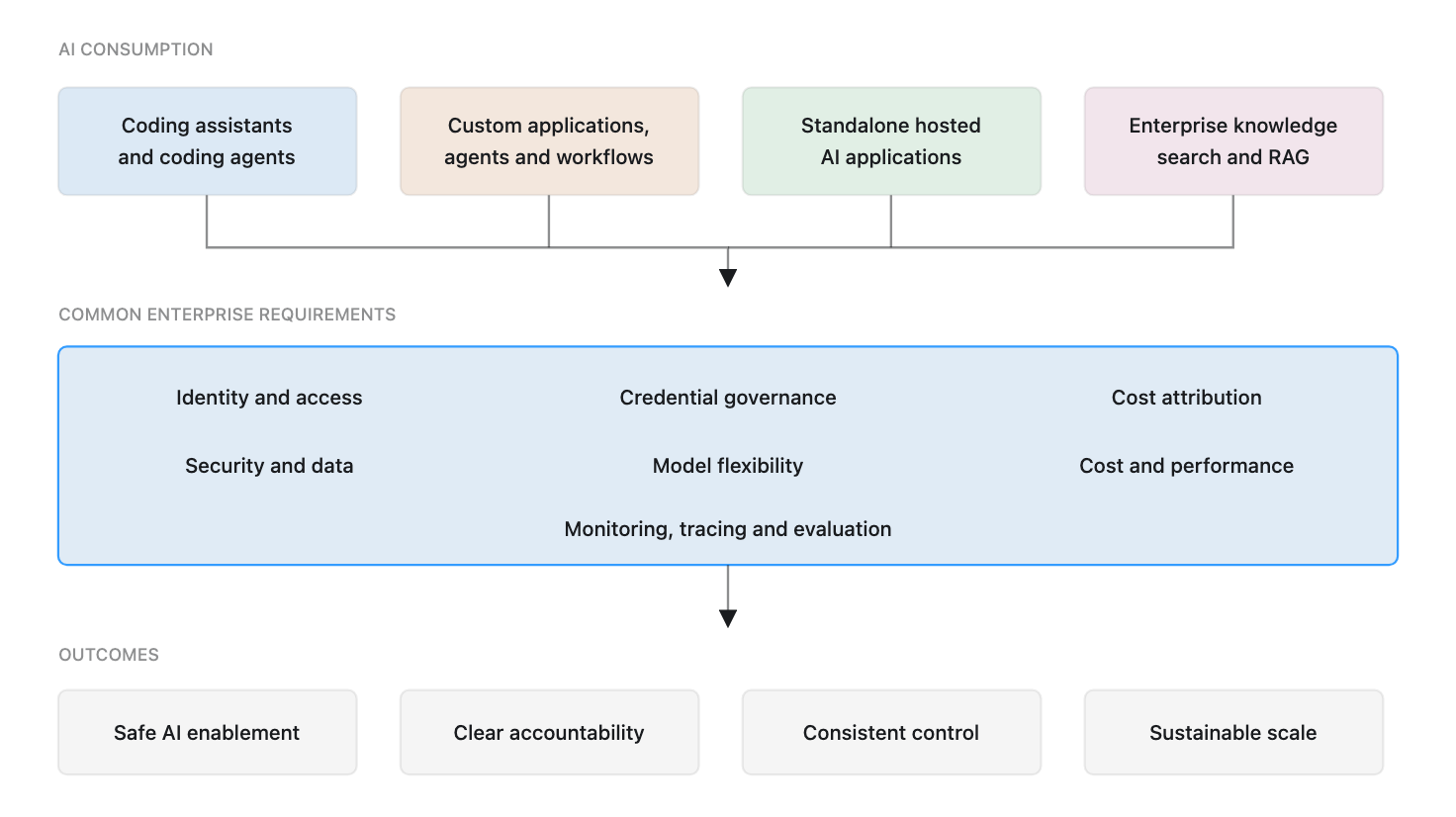
The first article in this series, Enterprise AI Adoption: Requirements for Security, Governance, and Scale, defined the problem: enterprises consume AI through coding tools, standalone hosted applications, custom agents, and enterprise knowledge systems, but need consistent controls across identity, credentials, data, cost, providers, and operations.

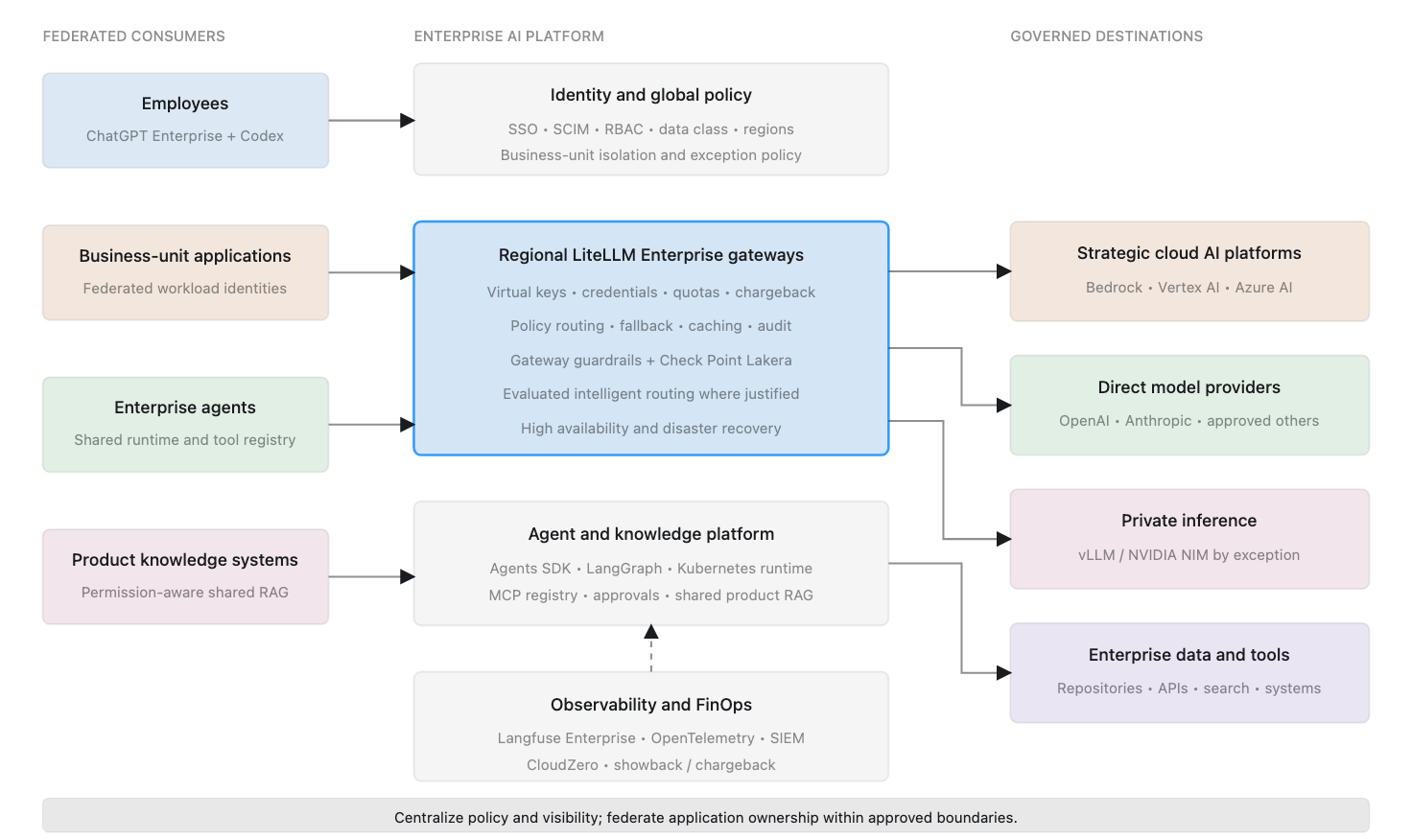
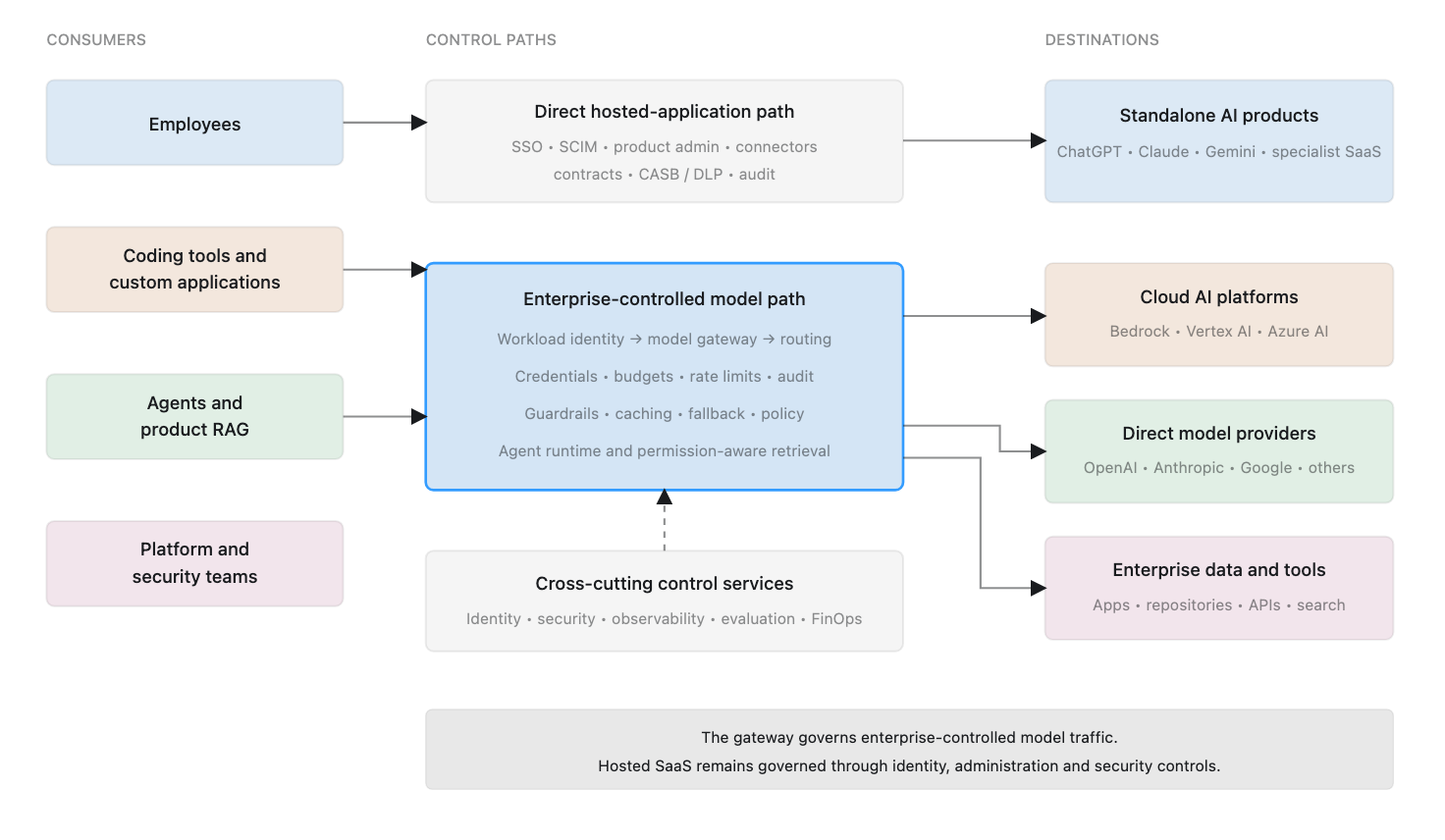
The second article, A Reference Architecture for Governed Enterprise AI, translated those requirements into architectural building blocks and described the available implementation choices.

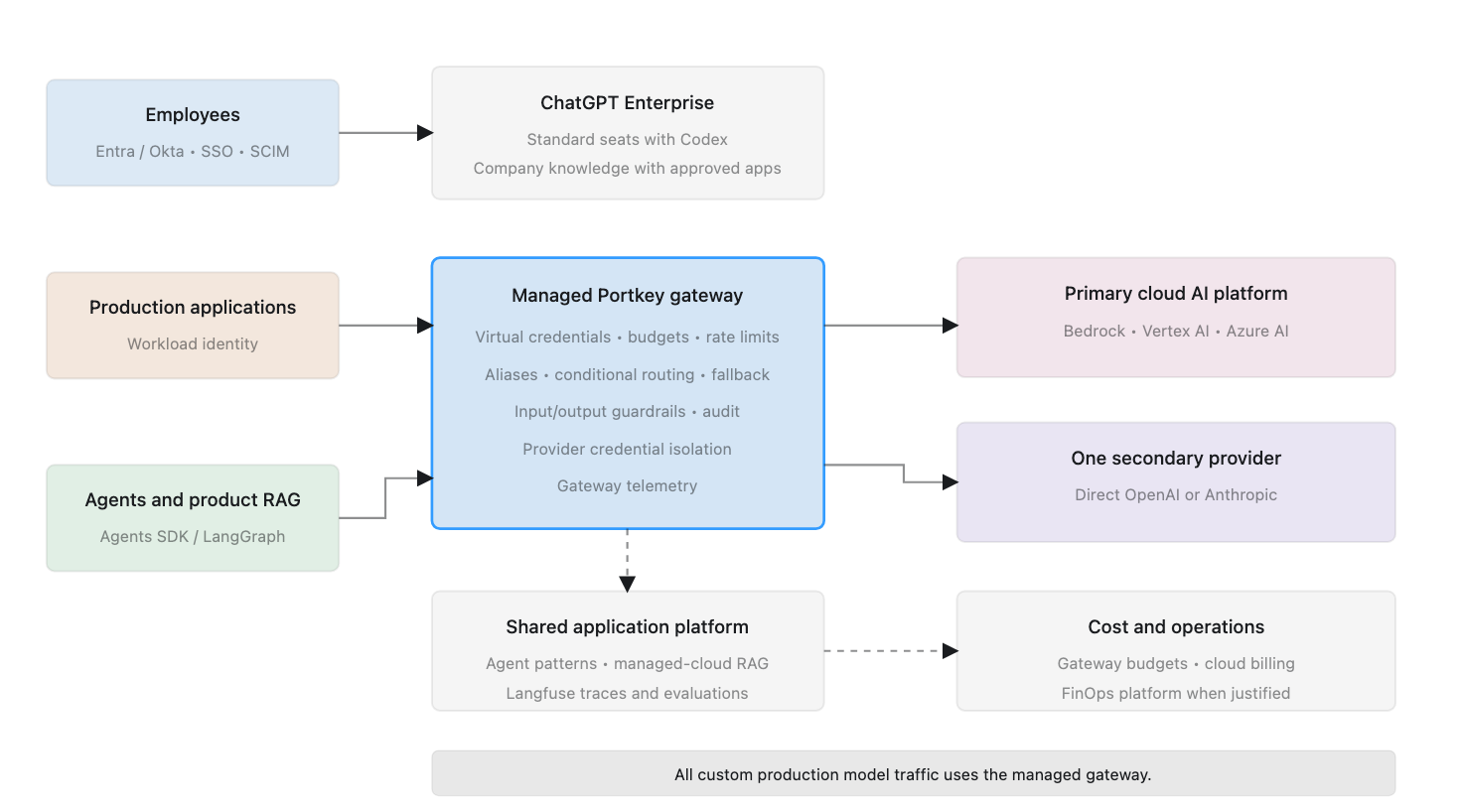
This article makes the opinionated decisions. It recommends what to implement, what to defer, and which representative products to consider for three enterprise profiles.

Product recommendations reflect the market as of July 2026 and should be revalidated before implementation.

Scope and Assumptions

Company size is the primary organizing variable because adding industry, geography, regulation, data sensitivity, cloud provider, and AI maturity as independent dimensions would make a simple prescription impossible.

The recommendations assume a software-enabled company with moderate data sensitivity, one primary public cloud, an existing corporate identity provider, both employee and custom AI usage, and a preference for managed services unless scale or control justifies ownership.

Size remains a proxy. Move to the next architecture tier when regulation, data sensitivity, AI expenditure, workload volume, geographic isolation, or operational complexity exceeds what is typical for the company profile.

ProfileWorking definitionOperating reality
Small5–50 engineersNo dedicated AI platform team; CTO or engineering lead owns AI
Mid-size50–500 engineersEmerging platform team; shared security and FinOps responsibilities
Large500+ engineersDedicated platform, security, data, and FinOps teams; multiple business units

Engineering scale is more useful than total employee count because it better predicts the number of custom workloads and the organization’s ability to operate platform components.

Small Enterprise: Prefer Simplicity

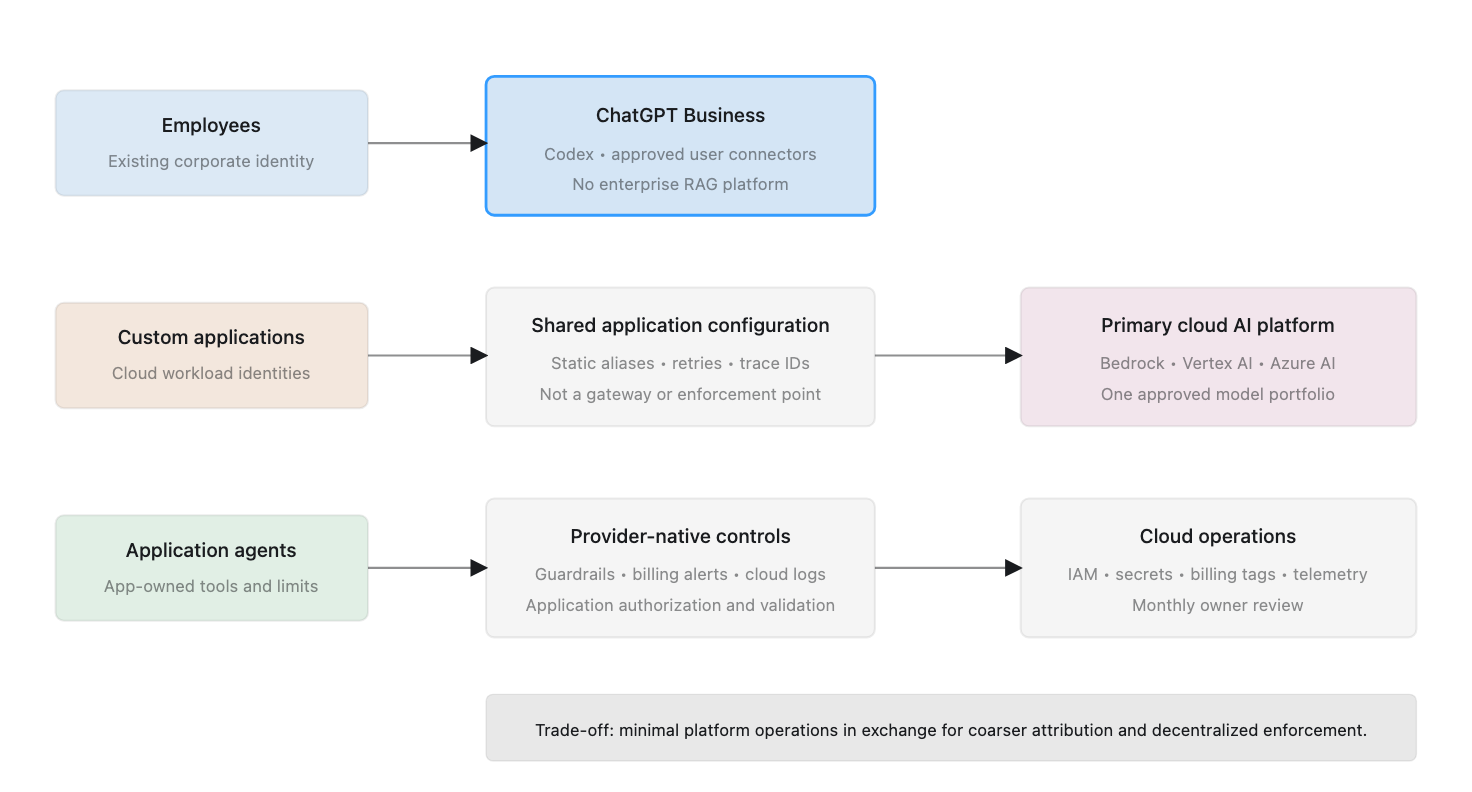
The small-enterprise architecture deliberately accepts coarser attribution and fewer centralized controls in exchange for low operating overhead.

Prescription

CapabilityRecommendation
Employee AIChatGPT Business
Coding assistantCodex under the managed company workspace
Human identityExisting Google Workspace or Microsoft Entra ID
Workload identityPrimary-cloud IAM and secrets services
Model inferenceExisting cloud’s managed AI platform
Model gatewayNone initially
Model selectionStatic aliases in shared application configuration
RoutingNo dedicated intelligent router
GuardrailsProvider-native controls plus application validation
Agent frameworkApplication-selected SDK; no enterprise standard
Agent runtimeExisting application infrastructure
KnowledgeApproved user connectors; no enterprise RAG platform
ObservabilityCloud telemetry and application traces
FinOpsProvider budgets, cloud billing, and monthly review
Self-hosted inferenceDo not implement

Hosted AI and coding

Use ChatGPT Business as the company-managed employee workspace and Codex as the standard coding assistant. Codex is included in ChatGPT Business, although usage limits and credit options depend on the plan. This reduces unmanaged subscriptions and keeps general AI and coding under one commercial and administrative relationship. OpenAI documents current Codex plan availability here.

Use SSO where available, central billing, approved data terms, and an explicit user-removal process. ChatGPT Business supports SSO but does not provide SCIM directory synchronization, so lifecycle management remains partly administrative. OpenAI documents the Business and Enterprise identity differences here.

Model access without a gateway

Applications call the primary cloud’s managed model platform directly using distinct workload identities. AWS-centric organizations use Amazon Bedrock, Google Cloud organizations use Vertex AI, and Microsoft-centric organizations use Azure AI Foundry. A company without meaningful cloud alignment may use a direct OpenAI or Anthropic API organization.

A shared client library may standardize model aliases, metadata, timeouts, retries, and trace identifiers. It is not a gateway and cannot guarantee centralized enforcement.

Attribution is therefore based on separate cloud projects or accounts, workload identities, billing tags, provider reports, and application logs. This is adequate while the workload portfolio is small, but it may not support reliable per-user or per-feature allocation.

Routing and guardrails

Use static model aliases such as general-fast, general-quality, and sensitive-approved. A centrally maintained configuration maps each alias to an approved cloud model deployment. Cloud IAM should restrict workloads to eligible deployments where supported.

Use provider-native guardrails and application controls. The application remains responsible for user authorization, tool permissions, structured output, agent limits, and approval of consequential actions.

Agents and knowledge

Do not standardize an agent framework yet. The first application can use an appropriate SDK and run within existing application infrastructure. Every agent still needs narrow tool permissions, least-privilege credentials, step and cost limits, and human approval for irreversible actions.

Do not build an enterprise knowledge platform. Employees can use administrator-approved connectors in the hosted workspace, subject to source permissions. Build retrieval only for a product workflow with a measurable requirement.

Graduation trigger

Introduce a managed gateway when the organization has several production AI applications, more than one provider, duplicated integrations, shared credential problems, or a need for centralized budgets, guardrails, routing, and detailed attribution.

Mid-Size Enterprise: Introduce a Shared Control Plane

The mid-size architecture requires all custom production model traffic to pass through a dedicated gateway. The platform remains primarily managed because the organization has an emerging platform team rather than a large AI infrastructure organization.

Prescription

CapabilityDefault recommendationAlternative
Employee AI and codingChatGPT Enterprise standard seats, including CodexCodex-only seats for restricted populations
Human identityEntra ID or Okta with SSO and SCIMGoogle Workspace
Workload identityCloud IAM plus gateway virtual credentialsVault where already established
Model gatewayManaged PortkeySelf-hosted LiteLLM
InferencePrimary cloud model platform plus one direct providerTwo approved cloud platforms
RoutingGateway aliases, conditional rules, and fallbackLiteLLM routing
GuardrailsProvider-native, Portkey, and application controlsCheck Point Lakera for higher-risk workloads
Agent frameworkOpenAI Agents SDKLangGraph for durable workflows
Agent runtimeExisting container or serverless platformDedicated runtime when volume justifies it
KnowledgeCompany knowledge in ChatGPT plus application RAGEnterprise search when justified
ObservabilityPortkey plus Langfuse CloudLiteLLM plus self-hosted Langfuse
FinOpsGateway budgets plus cloud billingFinout or CloudZero
Self-hosted inferenceGenerally deferWorkload-specific exception

Enterprise workspace

Use standard ChatGPT Enterprise seats for employees and engineers. A standard seat includes ChatGPT and Codex and offers the greatest flexibility. Codex-only seats should be reserved for people who need coding access but should not receive the broader ChatGPT workspace. OpenAI’s current Enterprise documentation describes both seat types and their access boundaries.

Use enforced SSO, SCIM, groups, and role-based access. Separate groups should cover general AI users, Codex users, AI developers, production operators, platform administrators, and sensitive-data users.

Gateway and model portfolio

Use managed Portkey as the default gateway. It provides multi-provider access, virtual credentials, routing, budgets, rate limits, retries, circuit breaking, observability, and integrated guardrails without requiring the emerging platform team to operate the full gateway stack. Portkey documents these gateway capabilities and deployment options.

Use the primary cloud model platform as the main backend and one approved direct provider as a secondary path. All production applications authenticate to the gateway; provider credentials remain with the platform team.

Use logical model aliases, policy restrictions, availability fallbacks, and controlled model-version rollout. Do not add a dedicated intelligent router until expenditure is material and evaluation data can prove that dynamic routing preserves quality.

Guardrails, agents, and tools

Apply provider-native controls, gateway input/output guardrails, and application-specific rules. Portkey guardrails support checks and actions on gateway requests and responses. Add Check Point Lakera only for public-facing or higher-risk workloads that justify specialized prompt-injection and data-leakage protection.

Adopt the OpenAI Agents SDK as the default for straightforward tool-using agents. Allow LangGraph for durable, stateful, resumable, or human-in-the-loop workflows. Run agents on the existing container or serverless platform and provide shared standards for identity, tool registration, MCP servers, traces, execution limits, approvals, and action logs.

Knowledge, observability, and FinOps

Use company knowledge in ChatGPT Enterprise with administrator-approved apps for employee search. Build a shared managed-cloud retrieval foundation only when multiple production applications need common ingestion, permissions, citations, and evaluation.

Use Portkey for gateway-level telemetry and Langfuse Cloud for multi-step traces and evaluations where deeper analysis is required. Use gateway budgets for enforcement and the existing cloud-finance process for reporting. Add Finout or CloudZero when model and supporting cloud costs span providers and require formal allocation or forecasting.

Graduation trigger

Move to the large-enterprise pattern when the company needs regional isolation, multiple business-unit control, formal chargeback, private deployment, dedicated AI security, a shared agent runtime, or self-hosted inference.

Large Enterprise: Central Policy, Federated Delivery

The large-enterprise architecture supports multiple providers, regions, business units, and control teams. Policy and visibility are centralized, while application ownership remains federated.

Prescription

CapabilityDefault recommendationAlternative
Employee AI and codingChatGPT Enterprise standard seats, including CodexCodex-only seats for restricted populations
IdentityEntra ID or Okta with SSO, SCIM, groups, and RBACExisting enterprise IdP
Workload identityCloud workload federation plus gateway virtual keysVault where standardized
Model gatewayRegional self-hosted LiteLLM EnterpriseManaged or self-hosted Portkey Enterprise
InferenceCloud AI platforms plus direct OpenAI and AnthropicAdditional approved providers
RoutingGateway policy routing plus evaluated intelligent routingApplication-directed routing
GuardrailsProvider controls, gateway policy, and Check Point LakeraNVIDIA NeMo Guardrails
Agent frameworkOpenAI Agents SDK plus LangGraph where justifiedApproved framework by exception
Agent runtimeShared Kubernetes-based runtimeManaged cloud agent runtime
KnowledgeCompany knowledge in ChatGPT plus shared product RAGGlean for dedicated enterprise search
ObservabilitySelf-hosted Langfuse Enterprise plus OpenTelemetryManaged enterprise platform
FinOpsCloudZeroFinout
Self-hosted inferencevLLM for selected stable workloadsNVIDIA NIM

Regional gateway and inference platform

Deploy LiteLLM Enterprise in approved regions as the standard model-access plane. Each deployment should provide high availability, business-unit isolation, local credentials, virtual keys, budgets, quotas, model aliases, audit records, guardrail integration, and approved fallback policies. LiteLLM documents virtual-key, authentication, SSO, and enterprise gateway capabilities in its product overview.

Applications should not receive direct provider credentials except through documented exceptions. The model portfolio can include strategic cloud AI platforms, direct OpenAI and Anthropic access, selected inference providers, and self-hosted open-weight models for justified workloads.

Expose internal capability aliases such as enterprise-fast, enterprise-reasoning, enterprise-code, regulated-region, and open-weight-private rather than embedding provider model names throughout applications.

Routing and guardrails

Apply policy routing to every request. Region, data classification, business unit, provider approval, and budget determine the eligible model set before performance or cost optimization.

Use intelligent routing only for workloads with evaluation datasets and measurable quality thresholds. RouteLLM or another router may select among eligible models, but the gateway remains the enforcement point.

Use four guardrail layers: provider-native safety, gateway policy, Check Point Lakera for high-risk workloads, and application business controls. Measure false positives, latency, and bypass resistance rather than treating guardrails as absolute security boundaries.

Agent platform

Provide an approved framework portfolio and a shared runtime. Use the OpenAI Agents SDK for the default tool-using pattern and LangGraph for durable workflows. The runtime should provide workload and delegated identity, queues, resumability, isolated code execution, an approved tool and MCP registry, secrets injection, limits, approvals, traces, cancellation, and kill switches.

The gateway governs model inference. The agent runtime governs execution and tools. Deterministic services should verify authorization and execute consequential actions proposed by a model.

Enterprise knowledge

Use company knowledge in ChatGPT Enterprise with approved apps for employee search and synthesis. This is a ChatGPT feature, not a separate product and not a backend for custom applications.

Operate a shared permission-aware RAG platform for product applications. It should provide connectors, ingestion, permission synchronization, deletion, retrieval APIs, citations, evaluation, and regional isolation.

Consider Glean when dedicated cross-enterprise search is a strategic requirement that company knowledge in ChatGPT does not satisfy. Do not deploy both without defining their distinct user populations and responsibilities.

Observability and FinOps

Use self-hosted Langfuse Enterprise for traces, evaluations, prompt management, datasets, RBAC, retention policies, and audit logs. These self-hosted enterprise controls are described in Langfuse’s deployment and pricing documentation. Export platform telemetry through OpenTelemetry and security events to the enterprise SIEM.

Use gateway budgets for real-time enforcement and CloudZero for allocation, anomaly detection, forecasting, unit economics, and showback or chargeback across inference and supporting infrastructure.

Self-host models through vLLM only for workloads with stable demand, demonstrated economics, suitable model quality, and an operations team able to own serving and upgrades.

How the Three Architectures Progress

CapabilitySmallMid-sizeLarge
Employee workspaceChatGPT BusinessChatGPT EnterpriseChatGPT Enterprise with enterprise policy
CodingCodexCodex in standard seatsCodex with role and spend controls
GatewayNoneManaged PortkeyRegional LiteLLM Enterprise
ProvidersOne primary platformPrimary plus one secondaryGoverned multi-provider portfolio
RoutingStatic configurationGateway rules and fallbackPolicy plus evaluated intelligent routing
GuardrailsProvider plus applicationProvider, gateway, applicationProvider, gateway, dedicated security, application
AgentsApplication-selected SDKStandard SDK and shared patternsFramework portfolio and shared runtime
KnowledgeUser connectorsCompany knowledge plus application RAGCompany knowledge plus shared product RAG
ObservabilityCloud and application logsPortkey plus Langfuse CloudSelf-hosted Langfuse Enterprise plus OTel
FinOpsBudgets and monthly reviewGateway budgets and optional FinOps platformCloudZero with showback or chargeback
Self-hosted inferenceNoUsually noSelected workloads only

When Size Is Not Enough

Use a stronger architecture tier when any of the following applies:

  • Regulated or highly sensitive data
  • Mandatory data residency or private networking
  • High AI expenditure or customer-facing AI cost of revenue
  • Many autonomous agents with consequential tools
  • Multiple cloud providers or geographic regions
  • Formal business-unit isolation or chargeback
  • Strict availability requirements
  • A large portfolio of production AI applications

A small healthcare or financial company may need large-enterprise security controls. A large company with limited AI use may begin with the mid-size platform. Size determines the default, not the exception policy.

Final Recommendation

The prescribed progression is intentionally conservative:

  • Small: one managed employee workspace, Codex, one model platform, no gateway, no enterprise RAG, and no dedicated FinOps platform.
  • Mid-size: ChatGPT Enterprise and Codex, a managed gateway, two inference paths, shared guardrails and tracing, and application-focused RAG.
  • Large: regional gateways, a governed provider portfolio, layered AI security, a shared agent runtime, enterprise retrieval, formal observability, and chargeback.

The architecture should become more sophisticated only when usage, risk, cost, or organizational scale creates a concrete reason. The objective is not to deploy every available AI platform component. It is to provide the minimum architecture that enables adoption without losing control.

A Reference Architecture for Governed Enterprise AI

In the first article in this series, Enterprise AI Adoption: Requirements for Security, Governance, and Scale, we identified four ways enterprises consume AI and seven requirements that apply across them. Those requirements cover identity, non-human credentials, cost governance, security and data controls, model flexibility, optimization, and observability.

This article translates those requirements into a reference architecture. It defines the architectural building blocks, their responsibilities, and the implementation choices available to an enterprise. The third article in the series will use these building blocks to prescribe specific architectures for small, mid-size, and large organizations.

One Architecture, Two Control Paths

Enterprise AI cannot be governed through a single product because not all AI traffic follows the same path.

Custom applications, agents, retrieval systems, and compatible coding tools can access models through an enterprise-controlled model gateway. The gateway can authenticate workloads, protect provider credentials, enforce policies, route requests, attribute cost, apply common guardrails, and record telemetry.

Standalone hosted applications such as ChatGPT, Claude, Gemini, and specialized cloud tools normally communicate directly with their providers. Their requests do not pass through the enterprise model gateway. They must instead be governed through corporate identity, provisioning, product administration, contracts, connector controls, SaaS security, data-loss prevention, and audit integrations.

This distinction is fundamental. A model gateway is an important control point, but it is not a universal control plane for every form of enterprise AI consumption.

Fig: Enterprise AI requires separate control paths for hosted applications and enterprise-controlled model traffic.

Architecture Principles

The reference architecture follows five principles.

Centralize policy without centralizing every decision

The enterprise needs common boundaries for identity, credentials, approved models, data, cost, and auditability. Application teams should remain free to select models and implementation patterns within those boundaries. The central platform should provide a governed path rather than become a manual approval queue.

Separate human, workload, and delegated identities

Employees authenticate through the corporate identity provider. Applications and agents use workload identities. When an agent acts for a person, the trace should preserve both the agent identity and the initiating user identity.

Keep provider credentials away from applications

Applications should authenticate to an enterprise-controlled gateway. The gateway protects and rotates provider credentials, maps workload identities to policies, and issues virtual credentials where needed.

Make data policy part of routing

Not every model or provider is approved for every data class. The eligible destination should be constrained by data sensitivity, contractual terms, region, retention policy, and workload risk before cost or performance optimization is considered.

Allow complexity to grow with need

The logical architecture can remain consistent while its implementation grows from cloud-native services to managed gateways, regional control planes, dedicated security tools, and self-hosted inference.

The Technology Landscape

The following table identifies representative implementation choices. These are examples, not recommendations for every organization.

Building blockImplementation choicesRepresentative examples
Human identityEnterprise identity providerMicrosoft Entra ID, Okta, Google Workspace
Workload identity and secretsCloud IAM, workload federation, secrets platformAWS IAM, Azure Managed Identities, Google Cloud IAM, HashiCorp Vault
Model gatewayCloud-native, managed, self-hostedAmazon Bedrock, Vertex AI, Azure AI Foundry, Portkey, LiteLLM, Kong, Cloudflare AI Gateway
RoutingGateway rules, intelligent router, application-directed routingGateway policies, RouteLLM, Not Diamond, Martian, OpenRouter
Guardrails and AI securityProvider-native, gateway-integrated, dedicated platform, open-source frameworkAmazon Bedrock Guardrails, Azure AI Content Safety, Google Model Armor, Portkey, Kong, Cloudflare, Check Point Lakera, NVIDIA NeMo Guardrails
First-party inferenceDirect model-provider APIOpenAI, Anthropic, Google, Cohere, Mistral
Cloud inferenceManaged cloud model platformAmazon Bedrock, Google Vertex AI, Azure AI Foundry
Hosted open-model inferenceManaged inference providerTogether AI, Fireworks AI, GroqCloud, Cerebras
Self-hosted inferenceEnterprise-operated model servingvLLM, NVIDIA NIM, Hugging Face TGI
Agent frameworkSDK, graph framework, managed agent serviceOpenAI Agents SDK, LangGraph, cloud-native agent services
AI observabilityGateway telemetry, specialized tracing, open telemetryLangfuse, LangSmith, Helicone, Arize Phoenix, OpenTelemetry
AI cost governance and FinOpsGateway budgets, attribution, forecasting, showback and chargebackLiteLLM, Portkey, CloudZero, Finout, Vantage
Enterprise knowledgeHosted knowledge feature, enterprise search, managed or custom RAGCompany knowledge in ChatGPT, Glean, cloud search services, vector and search platforms

1. Enterprise Identity and User Lifecycle

The corporate identity provider is the starting point for human access. Hosted AI products, coding applications, gateway consoles, observability platforms, and internal applications should use SSO wherever supported. Automated provisioning should create, update, suspend, and remove accounts as employees change roles or leave.

Groups and roles should represent approved populations such as general AI users, coding users, sensitive-data users, platform administrators, and model approvers. Identity establishes accountability and lifecycle control, but it does not determine what data a user may enter into an AI product. Data policy and product-specific administration remain necessary.

2. Governance for Standalone Hosted AI Applications

Standalone hosted applications sit outside the model-gateway path. The enterprise should maintain an approved product portfolio and evaluate each product for SSO, provisioning, administrative controls, retention, training terms, audit logs, regional processing, sharing, and connectors.

Connectors require particular care. When a hosted application connects to email, files, source code, or collaboration systems, it gains a new authorization path into enterprise information. Administrators must control which connections are available, which OAuth permissions are granted, and how access is revoked.

This is an architectural concern, but not a separate deployable product. It is implemented through identity, SaaS administration, procurement, CASB or DLP controls, connector governance, and organizational policy.

3. Workload Identity and Secrets

Every production workload should have an identity independent of the developer who created it. Production and non-production environments should not share identities or unrestricted credentials.

Where possible, use short-lived cloud workload credentials. When secrets are necessary, keep them in an enterprise secrets platform and rotate them through an established process. Applications should receive gateway credentials or virtual keys instead of underlying provider keys.

This allows a compromised application to be revoked independently, enables per-workload budgets and model permissions, and permits provider credentials to change without application redeployment.

4. Model Gateway

The model gateway is the shared access layer between enterprise-controlled workloads and model providers. It should authenticate the caller and evaluate attributes such as application, team, environment, data classification, use case, cost center, region, and requested capability.

The gateway capability set may include:

  • Workload authentication and model authorization
  • Provider credential protection and virtual keys
  • Standard request and response interfaces
  • Model aliases and provider abstraction
  • Usage metering, budgets, quotas, and rate limits
  • Routing, fallback, retries, and circuit breaking
  • Audit events and trace propagation
  • Caching where authorization permits it
  • Input and output guardrails
  • Sensitive-data detection and redaction
  • Model and use-case allowlists
  • Request-size and context limits
  • Schema and structured-output validation

The gateway should not contain all business logic. End-user authorization, prompt construction, tool selection, and domain rules normally belong in the application or agent runtime.

5. Model Providers and Inference Platforms

Behind the gateway, the enterprise may use direct model-provider APIs, public-cloud AI platforms, specialized inference providers, or self-hosted open-weight models.

Cloud-native platforms are a practical starting point for companies already standardized on a cloud because they integrate with cloud identity, networking, billing, and regional controls. Direct providers may expose capabilities earlier but create an additional contract, credential, billing path, and data boundary. Self-hosted inference offers deployment control but transfers responsibility for scaling, security, availability, upgrades, and model serving to the enterprise.

The reference architecture permits these options to coexist behind a controlled access path.

6. Policy, Data Controls, and Guardrails

Policy connects enterprise requirements to runtime decisions. It may consider workload, user, environment, data class, model, provider, region, and budget before allowing or routing a request.

Guardrails should be layered:

LayerResponsibility
Application or agentUser authorization, business rules, tool permissions, transaction limits, output validation
GatewayCommon input/output policies, data detection, model restrictions, schema checks, centralized enforcement
Model platformProvider-native content and model safety controls
Dedicated AI securityPrompt-injection defense, data-leakage controls, adversarial detection for higher-risk workloads

Guardrail actions may block, redact, warn, log, retry, or reroute. No guardrail product can determine domain-specific correctness or eliminate the need for least-privilege application design.

7. Routing, Resilience, and Portability

Routing is a logical architecture block even when it is implemented inside the gateway.

Three patterns are available:

  1. Gateway-integrated routing: The gateway selects a deployment using aliases, policy, cost, latency, availability, or region.
  2. Dedicated intelligent routing: A router such as RouteLLM selects between eligible models based on predicted quality, complexity, or cost. The gateway remains the enforcement point.
  3. Application-directed routing: The application selects a capability because it has the best task context, while the gateway verifies that the selection is allowed.

Fallbacks must satisfy the same data and compliance policy as the original destination. A technically available model is not automatically an approved fallback.

8. Agent Framework, Runtime, and Tool Governance

An agent framework defines agents, tools, handoffs, state, and execution flow. The runtime operates those workflows, including long-running execution, retries, queues, isolation, and resumability. The gateway controls model access but does not govern every action an agent can take.

The agent layer should provide:

  • An approved framework or supported framework portfolio
  • Workload and delegated user identity
  • Tool and MCP-server registry
  • Per-agent tool permissions
  • Step, time, cost, and concurrency limits
  • Isolated code execution
  • Action-level audit logs
  • Human approval for consequential actions
  • Retry, cancellation, and kill-switch behavior

For high-impact actions, the model should propose the action while deterministic code verifies authorization and performs the operation.

9. Cost Governance and FinOps

The gateway should record application, team, environment, provider, model, usage, and estimated cost. This enables real-time budgets, alerts, quotas, and rate limits.

Enterprise FinOps has a broader responsibility. It must reconcile provider invoices and include supporting costs such as retrieval, databases, queues, agent compute, and self-hosted inference. As maturity increases, the progression is:

Metering β†’ budgets and alerts β†’ attribution β†’ forecasting β†’ optimization β†’ showback or chargeback.

Optimization may include smaller-model routing, caching, prompt reduction, agent-loop limits, batching, or self-hosted inference. Quality and cost must be measured together.

10. Enterprise Knowledge and Retrieval

Employee knowledge access and application RAG are separate architectural needs.

Company knowledge in ChatGPT can search approved connected apps for employee questions and return cited answers while respecting source permissions. It is a feature inside ChatGPT Business and Enterprise, not a separate product or a reusable backend for custom applications.

Product applications require a retrieval architecture with ingestion, change detection, classification, permission synchronization, authorized retrieval, citations, and evaluation. Permission checks should occur before unauthorized content is provided to the model or written to traces.

Organizations may use a dedicated enterprise-search product, managed cloud services, or a custom shared platform depending on scale and requirements.

11. Monitoring, Tracing, Audit, and Evaluation

The architecture produces four kinds of operational evidence:

  • Infrastructure monitoring for availability, latency, failures, and resource health
  • AI traces across retrieval, model calls, and tool actions
  • Security and compliance audit records
  • Quality evaluations using test datasets, production feedback, automated scoring, and human review

Telemetry requires its own data policy. Prompts, responses, retrieved documents, and tool output may contain sensitive information. The enterprise must define redaction, retention, encryption, regional storage, and operator access.

Cloud-Native Access or a Dedicated Gateway?

A cloud-native model platform may be sufficient when most workloads use one cloud, the model portfolio is limited, cloud identity and billing provide enough control, and cross-provider routing is unnecessary.

A dedicated gateway becomes valuable when applications use multiple providers, credentials must be isolated centrally, budgets and policies must apply across teams, or common routing, guardrails, and audit records are required.

The two approaches are complementary: a dedicated gateway can use cloud-native model platforms as backends.

Managed, Self-Hosted, or Built Internally?

Managed products reduce operating effort. Self-hosted products increase deployment and data control but require upgrades, security maintenance, scaling, and availability ownership. Internal development should be reserved for requirements that available products cannot satisfy.

A model proxy or RAG demonstration may be simple. A production platform with identity, policy, streaming, retries, accounting, permissions, deletion, tracing, and high availability is not.

From Reference Architecture to Prescription

The architecture is intentionally broader than any one organization should deploy immediately. A small company may need only an approved employee assistant, one cloud model platform, and basic budgets. A mid-size organization may need a managed gateway, shared tracing, and application-level RAG. A large enterprise may require regional gateways, multi-provider routing, dedicated guardrails, chargeback, a shared agent runtime, and self-hosted components.

The next article, Prescribed Enterprise AI Architectures for Small, Mid-Size, and Large Organizations, selects a coherent implementation and representative vendors for each profile.

Enterprise AI Adoption: Requirements for Security, Governance, and Scale

AI adoption inside enterprises rarely begins with a coordinated platform strategy. It usually starts with individuals and teams selecting tools that solve immediate problems.

A developer subscribes to an AI coding assistant. Another team builds an application using a foundation-model API. Employees begin using standalone cloud applications such as ChatGPT, Claude, Gemini, or Codex. A business unit connects an AI application to internal documents. Eventually, the organization considers an enterprise-wide knowledge assistant or retrieval-augmented generation system.

Each decision may be reasonable on its own. Together, however, they create a fragmented operating environment.

Users authenticate differently across tools. Applications depend on provider API keys. Usage is billed through unrelated subscriptions and cloud accounts. Sensitive data may pass through systems with different retention and training policies. Security teams have limited visibility into what is being used, while finance teams struggle to determine which teams, applications, or business outcomes are responsible for the expenditure.

The enterprise AI problem is therefore not simply about selecting the best model or application. It is about enabling several forms of AI consumption while maintaining consistent control over identity, credentials, data, cost, providers, and operations.

Fig: Different AI consumption paths require one consistent set of enterprise controls

Four Ways Enterprises Consume AI

Enterprise AI adoption can be organized into four broad consumption patterns. These patterns overlap, but their ownership, identity, billing, and data-flow characteristics differ enough to require separate consideration.

1. AI-assisted software development

The first pattern is the use of AI by software-development teams. It includes IDE assistants, command-line tools, coding agents, code-review assistants, and autonomous development applications.

Some products are purchased as per-user subscriptions. Others allow users to connect a model-provider account or consume models through API credentials. More autonomous tools may execute commands, inspect repositories, modify files, or interact with development infrastructure.

The enterprise must determine whether users authenticate through corporate identity, which repositories and environments the tool may access, how source code is handled, how expenditure is attributed, and whether agent actions are logged and auditable.

The risk is not limited to source-code disclosure. Coding agents can access credentials, execute commands, change infrastructure, or introduce dependencies. Their permissions and actions require greater scrutiny than conventional autocomplete.

2. Custom AI applications, agents, and workflows

The second pattern consists of applications built or operated by the enterprise. Examples include customer-service assistants, document-processing workflows, incident-response agents, internal copilots, and automated business processes.

These systems usually consume foundation models through APIs. They may retrieve enterprise data, invoke tools, call internal services, maintain state, and perform actions on behalf of users.

Unlike a standalone application, the enterprise owns much of the operating responsibility. It must manage application identities, API credentials, authorization, model selection, usage limits, monitoring, and failure handling.

Agents make this especially important. A traditional application normally follows a path defined in code. An agent can dynamically choose a model, call tools, retrieve information, and take several steps to complete a task. The architecture must govern both model access and access to data and tools.

3. Standalone hosted AI applications

The third pattern is the direct use of cloud-hosted AI applications by employees. This includes general-purpose assistants and specialized applications for coding, research, writing, design, analytics, and productivity.

The provider operates the application and normally controls the interface, model selection, data handling, and underlying infrastructure. The enterprise consumes the product through user accounts, team subscriptions, or an enterprise agreement.

These products may be introduced through centralized procurement, but they can also enter through individual subscriptions and expense claims. This creates shadow AI: employees using services that the organization has not reviewed or cannot administer.

The enterprise must evaluate SSO, automated provisioning, administrative controls, retention and training terms, audit logs, sharing, and connections to internal systems. A model gateway cannot normally intercept these interactions because the application communicates directly with its provider.

4. Enterprise knowledge search and RAG

The fourth pattern is enterprise knowledge search, often implemented using retrieval-augmented generation, or RAG.

These systems search enterprise data sources and provide relevant content as context for a model response. Sources may include document repositories, collaboration systems, source-code platforms, ticketing systems, knowledge bases, or business applications.

An organization can purchase enterprise search, use knowledge features within a hosted assistant, build a custom RAG platform, or combine managed services with internal components.

The difficult part is rarely retrieving a document and sending it to a model. The harder requirements are preserving source permissions, keeping indexes current, removing content when permissions change, recording citations, preventing unauthorized retrieval, and measuring retrieval and answer quality.

Why Fragmentation Becomes a Governance Problem

The four patterns do not share a common operating model.

Coding applications may be licensed per user. Custom applications consume APIs based on tokens or requests. Hosted applications may use individual, team, or enterprise subscriptions. Knowledge platforms may combine licenses, indexed-content charges, infrastructure costs, and model consumption.

Identity is similarly fragmented. Employees authenticate interactively, while applications and agents use non-human identities. Some products support enterprise federation and automated provisioning; others rely on independently managed accounts. One employee may also connect several applications to internal data using separate authorization grants.

Data may be entered into a hosted application, sent to an API by an internal workload, retrieved from enterprise repositories, recorded in traces, or stored in provider logs.

Managing every product independently leads to predictable problems:

  • Former employees retain access to tools that were not centrally provisioned.
  • Provider API keys are shared between developers or embedded in applications.
  • Teams cannot identify which application caused an increase in expenditure.
  • Sensitive information is sent to models that are not approved for that data class.
  • Security teams cannot reconstruct which prompt, context, model, or tool produced an action.
  • Applications become tightly coupled to provider-specific interfaces.
  • Different teams build duplicate integrations and governance mechanisms.

A scalable AI program requires one set of enterprise requirements, even when those requirements are implemented differently across consumption patterns.

Seven Requirements for Enterprise AI Adoption

1. Identity and access governance

Human access should connect to the corporate identity system wherever the product permits it. This includes SSO, multi-factor authentication, role-based access, centralized provisioning, and timely deprovisioning.

Access decisions should reflect the sensitivity of the tool and the data it can reach. A general assistant with no internal connections does not present the same risk as an agent that can access source code, customer records, or production systems.

The organization also needs clear ownership. Someone must approve the product, determine who may use it, review access, and remove access when it is no longer required.

2. Non-human identity and credential governance

Applications and agents should not depend on personal API keys or shared provider credentials.

They require non-human identities with narrowly scoped permissions. Credentials should be issued through an approved process, stored in a secrets-management system, rotated, and revoked without disrupting unrelated applications.

Where possible, applications should receive virtual or intermediary credentials rather than direct provider keys. This allows application-specific limits and provider changes without redistributing credentials to every workload.

3. Cost attribution and financial governance

AI cost is variable and can grow quickly as applications gain users, agents perform more steps, or teams select more capable models.

Enterprises need visibility beyond the provider invoice. Usage should be attributable to a user, application, team, environment, or business unit. Budgets, quotas, alerts, and rate limits should operate at the same levels.

Small organizations may need only visibility and spending alerts. Larger organizations may require forecasting, showback or chargeback, unit-cost measurements, and formal FinOps ownership.

Where possible, expenditure should be connected to outcomes such as completed tasks, resolved cases, generated documents, or developer workflows. Token counts alone do not indicate whether an application is successful.

4. Security and data governance

The enterprise must define what data can be processed by which products, models, providers, and regions.

This requires consistent review of retention, provider-training terms, encryption, residency, subprocessors, auditability, and incident-response commitments. It must also cover information stored outside the primary request, including traces, prompts, retrieved context, cached responses, evaluation datasets, and application memory.

Controls should be proportional to data sensitivity. Public information, internal documents, source code, personal data, and regulated records should not automatically follow the same approval path.

5. Model and vendor flexibility

Model capabilities, prices, performance, and availability change rapidly. An application unnecessarily coupled to one provider becomes difficult to optimize or migrate.

Enterprises should use stable internal interfaces where the benefits justify the effort. Provider-specific features can still be used, but the dependency should be intentional and documented.

Vendor flexibility does not mean every request must switch dynamically between providers. It means the architecture preserves a practical path to compare, route, replace, or add models without redesigning every application.

6. Cost and performance optimization

Not every task requires the most capable or expensive model.

Applications should select models according to task complexity, latency, quality, privacy, and cost. Repeated requests may benefit from caching. High-volume and predictable workloads may eventually justify self-hosted open-weight models.

Optimization should follow measurement. A cheaper model is not cheaper if poor outputs cause repeated calls, human correction, or failed workflows. Cost, latency, and quality must be evaluated together.

7. Monitoring, tracing, and evaluation

Traditional infrastructure metrics are necessary but insufficient for AI systems.

Teams need to understand which model was used, how much was consumed, how long each step took, which context was retrieved, which tools were called, and where failures occurred. Agent traces may span multiple model calls and actions within one task.

Operational monitoring must be complemented by evaluation. An application can remain technically available while quality deteriorates because of a model change, prompt update, retrieval problem, or altered data source.

A Shared Control Point for Model Access

For custom applications, agents, and compatible coding workflows, many requirements can be enforced through a shared model-access layer.

This layer sits between enterprise workloads and model providers. Depending on the organization’s needs, it can authenticate applications, protect provider credentials, enforce model policies, route requests, apply quotas, attribute cost, record audit events, collect traces, and provide a consistent interface across providers.

It is often described as a model gateway or AI gateway.

The gateway is an important architectural control point, but it is not the entire governance solution. Standalone hosted applications generally operate outside it. Knowledge systems require source authorization and retrieval controls. Agents require tool and action governance. Coding tools require safeguards for source code, credentials, local execution, and development infrastructure.

Requirements Change with Enterprise Context

The requirements are broadly consistent, but implementation should reflect scale, risk, and operating maturity.

A small company may prioritize a limited set of approved tools, centralized billing, basic SSO, and managed model access. A mid-size organization may need a dedicated gateway, per-application credentials, team budgets, audit logs, and shared observability. A large enterprise may require multiple providers, regional deployments, formal data classifications, policy enforcement, business-unit isolation, chargeback, advanced evaluation, and self-hosted components.

Employee count alone is not enough. A smaller company handling regulated data may require stronger controls than a larger organization working mainly with public information. AI expenditure, data sensitivity, number of applications, regulation, and platform-team capability are often better indicators of architectural need.

Questions the Reference Architecture Must Answer

These requirements lead to concrete architectural questions:

  • Where should model access be centralized?
  • How should human users, applications, and agents authenticate?
  • How should provider credentials be isolated?
  • Which controls belong in the identity provider, gateway, application, or provider?
  • How should standalone hosted applications be governed?
  • Where should prompts, traces, retrieved context, and evaluation data be stored?
  • How should costs be attributed and controlled?
  • When is a cloud provider’s model platform sufficient?
  • When does an organization need a dedicated gateway?
  • When should enterprise knowledge search be purchased, built, or deferred?
  • How should the architecture evolve as usage, risk, and maturity increase?

There is no single product that answers every question. The solution is an architecture that combines identity, model access, security, cost management, observability, and application-level controls.

The next article, A Reference Architecture for Governed Enterprise AI, develops that architecture and explains the available implementation choices.

AI Assistants Have Many Interfaces. Context Is the Real Product.

AI assistants are no longer just chat windows. The same assistant now appears as a web app, desktop app, mobile app, browser extension, IDE extension, command-line tool, local agent, and cloud worker.

That is powerful, but it creates a new problem: deciding which interface to use, and keeping context alive when moving between them.

This post is based mostly on my experience with OpenAI and Anthropic products: ChatGPT, Codex, Claude, Claude Code, and their web, desktop, IDE, CLI, mobile, browser, and cloud interfaces. I also touch briefly on Gemini and browser-extension-style workflows, because they represent another way people are starting to interact with AI.

The question I am interested in is not just which model is better. It is: which interface should I use, when should I use it, and why does context still get lost when I move between them?

The OpenAI Interfaces

InterfaceHow I think about it
ChatGPT webBest for general thinking, writing, research, analysis, and normal assistant workflows.
ChatGPT mobileUseful when I am away from my laptop. Also useful as a controller for connected Codex hosts.
ChatGPT Voice ModeExcellent for brainstorming. It feels like a real-time conversation, not just dictation.
Codex desktop appMy default for local agent work. Best when the task needs local files, terminal commands, browser sessions, or writing changes on my Mac.
Codex VS Code extensionUseful for bigger projects inside the IDE, especially when I want to work across multiple agents or keep the workflow inside one editor.
Codex CLIPowerful for terminal-native workflows, but I do not use it much because I prefer seeing code and diffs visually.
Codex Web / CloudUseful when the repo is on GitHub and I want a small bounded change, PR-style task, or cloud execution without relying on my laptop.

The Codex desktop app is the OpenAI interface I use most for local work. For anything that needs access to local files, local folders, terminal commands, browser sessions, or writing changes on my Mac, the desktop app is my default.

It gives me a practical local agent environment where I can see what is happening, approve actions, inspect changes, and let the assistant work inside my machine.

The Codex VS Code extension is useful when I am already inside the IDE, especially for bigger projects where I want a single editor surface and may work across multiple agents or threads.

The Codex CLI is powerful, but I personally do not use it much. I prefer the feel of seeing the work visually while changes are being made.

The Codex Web / Cloud mode is different. It is useful when the work is already in GitHub and I want to make a small change, run a bounded task, or delegate something in a PR-style workflow.

In this mode I do not need a local workspace, and execution does not happen on my laptop. The assistant works in the cloud against the repository.

That has obvious advantages. If my laptop is not available, or if I want something long-running to continue without depending on my machine staying awake, cloud execution makes sense. It also works well when the task is self-contained and the repository can build and test cleanly in a cloud environment.

But cloud is not a replacement for local work in every case. If the task depends on unpushed local files, local credentials, desktop apps, browser sessions, local databases, or my Mac setup, the desktop app is still more convenient.

The Anthropic Interfaces

InterfaceHow I think about it
Claude webGood for general Claude chat, writing, thinking, analysis, and projects.
Claude mobileUseful for mobile access and remote workflows, but not a full replacement for desktop/project context.
Claude desktop appUseful, but the experience feels split across Chat, Cowork, and Code.
CoworkUseful for local desktop-style tasks, especially for non-technical users, but I do not fully understand why it needs to be separate from Chat.
Claude Code CLIMy main serious Claude coding workflow, especially inside VS Code.
Claude Code in VS CodeUseful when I want Claude close to the code editor.
Claude Code web/cloudGood when I want execution to happen in the cloud rather than on my local machine.
Dispatch / Remote ControlUseful ideas, but they do not feel like one unified control layer yet.
Browser extensions / browser usageUseful, but not the best long-term workflow yet because the integration does not feel smooth enough.

Claude has a similar spread of interfaces, but the experience feels more fragmented to me.

There is Claude web for general chat and projects. There is the Claude mobile app. There is the Claude desktop app, which separates the experience into areas like Chat, Cowork, and Code. There is Claude Code CLI, Claude Code in VS Code, and Claude Code on the web.

For serious coding, my main Claude workflow is Claude Code CLI inside VS Code. That combination feels powerful because I get the capabilities of the CLI while still keeping the editor open and visible.

Claude’s other modes are useful too. Cowork can help with local desktop-style tasks. Claude Code web provides a cloud coding mode when I want the execution to happen away from my machine. Dispatch and Remote Control are useful ideas for sending or steering work from another device.

But the product feels more split. The pieces are good, but I often feel the boundaries between them.

Voice Is Another Interface

One interface I do not want to ignore is voice.

ChatGPT Voice Mode is one of the most useful non-coding interfaces for me. It is especially good for brainstorming. Speaking to the assistant and getting a real-time spoken response feels very different from typing, or even from using a dictation tool.

Tools like Wispr Flow are useful because they let me speak instead of type. But that is still mostly a better input method for a text conversation. It is not the same as a real-time voice conversation.

ChatGPT Voice Mode feels closer to a true conversational interface. It feels less like β€œgenerate text, then read the text aloud,” and more like a direct voice interaction.

Claude also has voice capabilities, but in my usage it does not feel as natural as ChatGPT Voice Mode. It feels more like speech-to-text followed by a spoken response. That may not be the exact implementation, but from a user experience standpoint the difference is noticeable. The delay and response style make it less useful for live brainstorming.

I would also like to see this kind of voice experience inside the Codex app. If I am already working in a local agent workspace, being able to brainstorm with Codex by voice would be very useful. I may not want voice for every coding task, but for planning, debugging, architectural discussion, and reviewing tradeoffs, it would be a natural interface.

Mobile As A Controller Interface

Another interface that I find useful is ChatGPT mobile as a controller for Codex.

From the ChatGPT mobile app, I can connect to Codex running on my Mac or Windows machine and access the projects and threads available on that connected host. I can continue work, send follow-up instructions, approve actions, and review results from my phone.

That is a powerful pattern. The phone is not trying to become the full development environment. It is controlling the Codex environment already running on my machine.

As long as that host is awake, online, paired, and signed in, I can continue threads, approve actions, and inspect results. The permissions still belong to the host-side Codex session.

This is different from Codex Web, where the work happens in the cloud against GitHub. Both are useful, but they solve different problems.

Claude has related ideas through Dispatch and Remote Control, but it does not feel the same to me. Dispatch is more like sending work from mobile to desktop. Remote Control is useful for steering a running Claude Code session. But the experience still feels more split between Claude mobile, Claude desktop, Claude Code, Cowork, and Claude Code web.

What I would like is a more unified control layer: mobile, web, desktop, local machines, and cloud environments should feel like different surfaces over the same underlying work context.

Local vs Cloud

The way I think about local and cloud is simple.

Use local when the machine matters.

Use cloud when the shared repository or online workspace is the source of truth.

Local is better when I need my files, my terminal, my browser, my desktop apps, my local setup, or visual feedback. This is why I use the Codex desktop app so much.

Even though it runs with sandboxing and permissions, once I allow the right operations, it can work with my Mac and browser fairly smoothly. Compared with some other local agent experiences, this makes Codex feel more convenient for my daily workflow.

Cloud is better when the task is centered around a shared online source such as GitHub. If the code is pushed, the task is bounded, and the assistant can work in a clean environment, cloud agents are very useful.

They are especially good for small fixes, dependency updates, tests, review follow-ups, PR-style tasks, and background work that should not depend on my laptop staying awake.

The hybrid model is probably the most realistic. I may explore and develop locally, push a branch, then ask a cloud agent to do a bounded follow-up. Or I may use cloud for a small GitHub change while continuing deeper work locally.

The key is discipline: local and cloud workflows work best when the shared source of truth is clean and the assistant is given a clear task.

My Current Workflow

My personal workflow today is roughly this.

For OpenAI, I mostly use the Codex desktop app when the task needs local access or local file changes. It gives me the best balance of visibility, control, and convenience.

For bigger projects inside the editor, I use the Codex VS Code extension, especially when I want to work across multiple agents or keep the whole workflow inside one IDE.

I use Codex Web / Cloud selectively. If something is already on GitHub and I want a small change or a bounded task, it is a good fit. I do not use it as my main development environment, but I see the value clearly.

For general thinking, writing, research, and brainstorming, I use ChatGPT web, mobile, and Voice Mode. Those are still very useful interfaces. But they are separate from the local Codex app context, and that separation matters.

For Claude, I primarily use Claude Code CLI inside VS Code for bigger coding projects. That feels like the strongest Claude coding workflow for me right now.

I also use browser-based tools across Claude, Gemini, and Codex-style workflows, but I see room for improvement there. The browser is important, but the current extension-style experience does not yet feel like the final form.

What OpenAI Gets Right

What I like about Codex is that it feels like a unified local agent workspace.

In the Codex desktop app, I can ask questions about the project, inspect files, make changes, run commands, review diffs, manage threads, and use local browser/computer tools from one place. That reduces the number of decisions I have to make before starting work.

The local desktop app is especially useful because it works with my actual machine. It is sandboxed, and permissions still matter, but once I approve the right operations, it can interact with my Mac and browser smoothly enough for real work.

ChatGPT mobile controlling connected Codex projects is also a strong pattern. It shows what a good cross-device AI interface can look like. The mobile app becomes a control surface over the environment where the work is actually happening.

ChatGPT Voice Mode is another strong interface. For brainstorming, it is one of the best ways to interact with an AI assistant.

What Anthropic Gets Right

Claude Code CLI is very strong. Used inside VS Code, it gives me a powerful workflow while still letting me see the project in the editor. For bigger projects, this works well.

Claude also has powerful separate modes. Chat, Cowork, Code, CLI, web, mobile, Dispatch, Remote Control, and IDE integration all have a reason to exist. The pieces are good.

Claude Code web/cloud is useful when I want execution to happen in the cloud rather than on my machine. Dispatch and Remote Control are also interesting because they recognize that users want to start or steer work from different devices.

What I Would Like To See Improved In Claude

My issue with Claude is not capability. It is product shape.

As a user, I would prefer one universal Claude experience where chat, cowork, and code feel like modes of the same workspace rather than separate places.

I can understand Code being a specialized mode because coding has its own environment, tools, permissions, and workflows. But the separation between Chat and Cowork is less obvious to me.

Claude Cowork seems designed to make agentic desktop work easier for non-technical users. That makes sense. Not everyone wants to use a terminal or think in terms of repositories, branches, commands, and diffs.

But if I am chatting with Claude and the discussion turns into a task, why should I need to move into a different mode? Ideally, Cowork would feel like a capability inside the same Claude workspace rather than a separate place. The assistant should be able to move from discussion to action naturally, while still asking for the right permissions when it needs to touch files, apps, or the computer.

I would also like Claude’s voice experience to feel more natural for live brainstorming. In my usage, ChatGPT Voice Mode feels closer to a real-time conversation, while Claude voice feels more like speech-to-text followed by a spoken response.

Where The Interfaces Still Break Down

The issue is not that there are many interfaces. Different interfaces are useful for different jobs.

Voice is good for brainstorming. Desktop is good for local work. IDE is good for deep project work. Cloud is good for background execution. Mobile is good for steering work.

The problem is that the context does not always travel with me.

A few examples:

ChatGPT voice to Codex

If I brainstorm an idea in ChatGPT Voice Mode on mobile or web, that conversation does not naturally appear inside the Codex desktop app. If the brainstorming leads to an implementation task, I need to manually restate the context in Codex.

Codex desktop to ChatGPT mobile

This works better. If Codex is running on my Mac and the machine is awake, online, paired, and signed in, I can access those Codex projects and threads from ChatGPT mobile. This is one of the best examples of a useful cross-device AI interface.

Codex desktop to ChatGPT web

This is where the continuity feels incomplete. I can control connected Codex hosts from ChatGPT mobile, but I do not get the same connected-host control surface from ChatGPT web. Since I often work from a browser too, I would like the web interface to become another control surface for the same Codex host context.

ChatGPT web or mobile to Codex desktop

The reverse direction is also incomplete. General ChatGPT conversations, projects, and voice brainstorms do not automatically become available as working context inside Codex. That matters because many tasks start as thinking or planning before they become implementation.

Claude Chat, Cowork, and Code

In Claude, the fragmentation feels different. Claude has Chat, Cowork, Code, Claude Code CLI, Claude Code web, mobile, Dispatch, and Remote Control. Dispatch is useful because I can send work from mobile to desktop, and Remote Control is useful for steering a session. But it does not feel like one shared workspace where the same context naturally follows me across Claude web, desktop, mobile, and Code.

Claude Code local vs cloud

Claude Code has both local and cloud-style workflows. Local Claude Code is useful when I want the work to happen inside my own machine or IDE. Claude Code web/cloud is useful when I want the task to run away from my machine, usually against a GitHub-backed environment.

That separation makes sense technically. Local work and cloud work have different permissions, files, tools, and execution environments. But from a user experience standpoint, I still want the context to move more naturally between them. If I plan something in Claude chat, start work in Claude Code CLI, and later move to Claude Code web, I do not want to reconstruct the whole task manually.

The Real Problem Is Context Continuity

The missing piece is not one universal interface. I actually want multiple interfaces.

What I want is a shared context layer underneath them.

If I brainstorm in voice, I should be able to continue in desktop. If I start work in a local agent, I should be able to inspect it from mobile and web. If I delegate work to the cloud, the result should be easy to pull back into the local or conversational context.

If I switch from Claude web to Claude Code, or from ChatGPT to Codex, I should not have to reconstruct the entire task history manually.

The best current example of this working is ChatGPT mobile controlling Codex projects on a connected machine. That shows the direction I want: mobile is not replacing the desktop environment; it is becoming a control surface for it.

The next step is making that idea more universal across web, desktop, mobile, voice, IDE, local agents, and cloud agents.

At the same time, permissions should remain local to the right environment. I do not want every interface to have every permission. Local files, desktop apps, browser sessions, and computer control should stay tied to the machine where permissions were granted. Cloud work should stay in the cloud. Mobile should control what it is allowed to control.

But the reasoning context, project context, and user intent should travel better across these surfaces.

Where I Think This Is Going

The future of AI tools is not just better models. The models will keep improving, but the interface and context layer may matter just as much.

The winning product will be the one that lets me move between local, cloud, IDE, web, browser, desktop, mobile, and voice without constantly re-explaining what I am doing.

For me, that is the real product: not just the assistant, not just the model, and not just another interface.

The real product is context continuity.

My Multi-Agent Coding Setup to Lower LLM Cost

AI coding tools are now good enough that the question is no longer “Should I use them?” For me, the more useful question is: how do I use them without letting LLM cost grow unnecessarily?

The obvious answer is to use cheaper models. That helps, but it is not the full answer. In practice, the bigger unlock is designing the coding workflow so that I can switch between tools and models without changing the way I work.

My setup is based on separating three things that often get blurred together:

  • Editor: where I view and manually edit code.
  • Harness: the coding agent layer that reads files, edits code, runs commands, applies patches, and manages repo context.
  • Model: the LLM doing the reasoning underneath the harness.

Once these are separated, I can optimize cost more intelligently. I can use premium models when reasoning quality matters, and use lower-cost models for exploration, boilerplate, summarization, first-pass refactors, or less risky changes.

The Architecture

At a high level, my setup looks like this:

The important part is that the editor, harness, and model are not the same thing.

VS Code is usually my editor. Codex, Claude Code, OpenCode, Copilot, and VS Code extensions are the harness layer or harness-like coding environments. Claude, GPT/Codex models, GLM, Qwen, DeepSeek, and other models are the reasoning engines underneath.

That distinction matters because cost optimization becomes easier when the harness is portable and the model is replaceable.

Shared Project Context

The foundation of the setup is shared project context.

I try to keep repo-specific guidance in files such as:

  • AGENTS.md
  • CLAUDE.md
  • architecture notes
  • test commands
  • coding conventions
  • reusable task prompts

This avoids re-explaining the project every time I switch tools. The goal is simple: if I move from Claude Code to Codex, or from Codex to OpenCode, the new harness should still understand the important repo conventions.

This also saves tokens. Instead of dumping long explanations repeatedly into every chat, I keep durable instructions close to the codebase.

Approach 1: VS Code as Editor, Harnesses Through Extensions

This is the setup I use most often for complex projects.

Here, VS Code is the editor. It is where I read code, navigate files, review diffs, and make manual edits.

The AI harness is usually provided through VS Code extensions or integrations.

Examples:

Editor: VS Code
Harness: Copilot extension / Codex extension or CLI integration / Claude extension / OpenCode extension
Model: OpenAI / Claude / Copilot-supported models / OpenRouter-supported models
Context: AGENTS.md / CLAUDE.md / repo docs / prompts

This setup works well for me because I still want to see the code clearly. I like reviewing changes in the editor, understanding the file structure, and staying close to the diff. Maybe that is old-fashioned, but for larger projects it helps me avoid blindly accepting agent output.

The cost benefit comes from keeping VS Code constant while changing the harness or model depending on the task.

For example:

  • I may use Copilot for quick inline completions.
  • I may use Claude through a VS Code extension for complex reasoning-heavy changes.
  • I may use Codex for agentic repo work.
  • I may use OpenCode when I want more model flexibility.

The key point is that VS Code is not the whole AI coding system. It is the editor. The harness and the model can still vary underneath.

Approach 2: Harness-First Workflow

The second setup is when I work directly inside the harness.

This applies to tools like:

  • Codex CLI
  • Claude Code
  • OpenCode app

In this workflow, there may not be a separate editor involved at every step. The harness becomes the main interface. It inspects files, proposes changes, applies patches, runs tests, and iterates.

Editor: Optional / secondary
Harness: Codex CLI / Claude Code / OpenCode app
Model: Native model for that harness, or configurable provider if supported
Context: AGENTS.md / CLAUDE.md / repo docs / prompts

I use this less for complex projects because I prefer to look at the code and review changes directly in the editor. But it works well for smaller modifications, scripts, quick utilities, and contained tasks where I can verify the output easily.

For small projects, the harness-first approach can be efficient because the agent can inspect files, make changes, run commands, and iterate without needing much manual navigation.

Cost-wise, this also helps because the harness can do local exploration. It can search files, inspect only what matters, and avoid loading unnecessary context.

Approach 3: Harness Plus OpenRouter for Model Flexibility

The third setup is where the harness/model separation becomes most explicit.

Some harnesses can be configured to talk to OpenRouter or other compatible model providers. That means I can keep the same coding workflow but change the model underneath.

Editor: Optional
Harness: Codex CLI / Claude Code / OpenCode
Model: OpenRouter-routed models
Context: AGENTS.md / CLAUDE.md / repo docs / prompts

For example:

Codex CLI harness
|
v
OpenRouter provider
|
v
z-ai/glm-5.2, Claude, Qwen, DeepSeek, etc.

This is useful for experimentation and lower-cost first passes. I do not need every task to use the strongest model. Some tasks are mostly repo search, summarization, simple code generation, or mechanical refactoring. Those are good candidates for cheaper models.

Then, when I need better reasoning, I can move back to a premium model.

That said, I do not personally rely on this approach much for daily coding. It may be stable enough for some workflows, but the interface between a coding harness and a third-party model router can change. Codex, Claude Code, or OpenRouter can update their API behavior, headers, tool-calling assumptions, or model compatibility. If that breaks, the workflow breaks.

So for me, Approach 3 is useful to know and useful for experiments, but it is not my default daily setup.

Using OpenRouter with Codex CLI

Codex can be configured with profiles. That lets the default codex command keep using the normal OpenAI/Codex setup, while a separate command uses OpenRouter.

Create:

~/.codex/openrouter.config.toml

Example config:

model_provider = "openrouter"
model = "z-ai/glm-5.2"
model_reasoning_effort = "medium"
[model_providers.openrouter]
name = "OpenRouter"
base_url = "https://openrouter.ai/api/v1"
env_key = "OPENROUTER_API_KEY"
wire_api = "responses"
http_headers = { "HTTP-Referer" = "https://chatgpt.com/codex", "X-Title" = "Codex" }

Add your OpenRouter key:

echo 'OPENROUTER_API_KEY=your_key_here' >> ~/.codex/.env

Add a shell alias:

alias codex-openrouter='codex --profile openrouter'

Now:

codex

uses the normal Codex/OpenAI setup, while:

codex-openrouter

starts Codex through OpenRouter using the configured model.

Inside Codex, verify the active configuration with:

/status

To use a different OpenRouter model for one run:

codex --profile openrouter -m anthropic/claude-sonnet-4.6

The important point is that I do not have to replace my main setup. I keep the default Codex workflow intact and add OpenRouter as a separate profile.

Claude Code with OpenRouter

At a high level, the idea for Claude Code is similar: configure the harness to talk to an OpenAI-compatible endpoint or route requests through OpenRouter, where supported.

The exact setup depends on how Claude Code exposes provider configuration at that time. This is one reason I treat this approach as experimental rather than my default daily workflow.

The pattern is:

Claude Code harness
|
v
OpenRouter or compatible endpoint
|
v
Selected model

If you use this path, I would treat it as a flexible experiment rather than a guaranteed stable interface. The harness, provider, or model compatibility can change.

How I Think About Model Routing

I do not try to use the cheapest model for everything. That can backfire. A cheap model that creates bad code, misses context, or causes extra cleanup may cost more in time than it saves in tokens.

Instead, I route tasks by risk and complexity.

For example:

TaskModel Strategy
Inline completionsCopilot or editor-native tools
Repo explorationLower-cost model or configurable harness
BoilerplateLower-cost model
Simple refactorStart with lower-cost model
Complex debuggingPremium model
Architecture decisionsPremium model
Final reviewStrongest available model

The pattern is:

Use cheaper models for reversible work. Use stronger models when mistakes are expensive.

That single rule handles most cases.

My Actual Usage Pattern

My own usage looks roughly like this.

Approach 1 is my default for complex projects.

I use VS Code as the editor and switch between harnesses through extensions or integrations. I prefer this because I can inspect code, review diffs, and stay oriented.

Approach 2 is useful for smaller changes.

I use harness-first tools like Codex CLI, Claude Code, or OpenCode for scripts, contained edits, and smaller projects where the blast radius is low.

Approach 3 is mostly experimental for me.

OpenRouter gives useful model flexibility, but I do not depend on it heavily for daily coding because the connection between the harness and the model provider can change.

Where the Savings Come From

The savings are not just from cheaper tokens.

They come from a few habits:

  • keeping project context reusable
  • avoiding repeated explanations
  • using harnesses that can inspect the repo directly
  • starting with cheaper models for low-risk work
  • reserving premium models for hard reasoning
  • avoiding huge chat histories when a fresh session with repo instructions is enough
  • choosing the right harness for the task

The most expensive workflow is often the one where I paste too much context into a chat, ask an unclear question, get a partial answer, then spend more tokens correcting it.

A good harness plus good project context reduces that waste.

What about smaller Models That can run locally?

One more workflow I am watching closely is smaller models that can run locally.

I have tried a few Qwen and DeepSeek models through Ollama. My Mac has 48 GB RAM, so it can run some reasonably capable local models. But for the coding tasks I care about, the quality has not yet been strong enough for me to use them as a primary workflow.

That said, I expect this to improve. Smaller models are getting better, and coding harnesses like OpenCode can make this workflow practical if they integrate cleanly with local runtimes such as Ollama.

If this becomes good enough, the stack could look like this:

Editor: VS Code or optional
Harness: OpenCode
Model: Smaller coding-capable model running through Ollama
Cost: No per-token API cost

That would be a meaningful cost-saving path. It would not be completely free in an absolute sense, because there is still hardware cost, electricity, latency, memory pressure, and quality tradeoff. But the marginal API cost per coding task could be zero.

For now, I see this as promising but not yet my default for serious coding work. I expect that to change as smaller coding models improve.

The Tradeoffs

This setup is not free.

There are tradeoffs:

  • Different harnesses support different features.
  • Some models are better at tool use than others.
  • OpenRouter compatibility can vary by model and API behavior.
  • Cheaper models may need tighter prompts and smaller tasks.
  • Switching tools too often can hurt flow.

So I do not treat this as a rigid system. It is a practical routing strategy.

If a task is important, ambiguous, or risky, I use a stronger model. If a task is routine, exploratory, or easy to verify, I am comfortable using a cheaper model.

Final Thought

My approach to lowering LLM coding cost is not just “use cheaper models.”

It is:

Make the harness portable, make the project context reusable, and make the model replaceable.

Once those layers are separated, I can choose the right level of spend for each coding task.

VS Code can remain my editor. Codex, Claude Code, OpenCode, or Copilot can act as the harness. OpenAI, Anthropic, OpenRouter, or other providers can supply the model.

Over time, smaller models that can run locally may become another important part of this setup. If a model running through Ollama can provide good enough coding quality through a harness like OpenCode, then some workflows could move from lower-cost API models to zero marginal API cost local inference.

That flexibility is what lowers cost without forcing me to give up the benefits of high-quality AI coding tools.

πŸ–₯️ Running Local LLMs: Experiments and Insights

✨ Summary

Large Language Models (LLMs) have powered the AI wave of the last 3–4 years. While most are closed-source, a vibrant ecosystem of open-weight and open-source models has emerged.

As a long-time AI user, I wanted to peek under the hood: how do GenAI models work, and what happens when you actually run them locally on your laptop?

In this blog, I’ll cover:

  • How GenAI models are built βš™οΈ
  • Why local inference matters πŸš€
  • My experiments with Qwen, Llama, and GPT-OSS on my Mac πŸ’»

πŸ”„ Hybrid Model Inference

Computing has gone through cycles: centralized β†’ decentralized β†’ hybrid. I believe AI inference is following the same path:

  • Early computing β†’ Mainframes (centralized)
  • PCs/laptops β†’ Decentralized
  • Today β†’ Cloud + Edge (hybrid)

πŸ‘‰ Most model inference currently happens in the cloud (huge infra needed).
πŸ‘‰ But smaller, specialized models now run on edge devices (laptops, even mobiles).

⚠️ Training won’t realistically move to the edge β€” it’s too compute-heavy and usually a one-time process.
βœ… Inference is moving local β€” it’s repeated, latency-sensitive, and can benefit from privacy/cost savings.


πŸ’‘ Use Cases of Running Models Locally

  • ⚑ Reduce latency: Voice assistants, live translation, autonomous vehicles
  • πŸ’° Reduce cost: Developer workflows, consumer electronics
  • 🌍 Offline use: Remote fieldwork, disaster response
  • πŸ”’ Privacy: Healthcare, enterprise security
  • πŸ› οΈ Customization: LoRA adapters, RAG integration

πŸ—οΈ How GenAI Models Are Created

LLMs typically follow the Transformer architecture and are built in two stages:

  1. Pre-training: Learn general language patterns from massive datasets
  2. Post-training (fine-tuning): Teach task-specific skills (chat, reasoning, coding, etc.)

Result β†’ A model ready for inference.


🧩 What an AI Model Contains

  • Weights: Learned numerical parameters (quantized models = smaller + faster)
  • Tokenizer & Vocabulary: Convert text ↔ tokens
  • Config: Architecture, layer counts, hidden sizes, etc.

πŸ—‚οΈ Common formats: Hugging Face / Transformers, GGUF, ONNX, Apple MLX.


πŸ” How Generation Works (Simplified)

  1. Tokenization β†’ Text β†’ tokens
  2. Forward pass β†’ Model processes tokens β†’ probability distribution
  3. Decoding β†’ Pick next token (greedy, sampling, top-k/top-p, etc.)
  4. Loop β†’ Append token β†’ repeat until done
  5. Detokenize β†’ Tokens β†’ final response

πŸ“Š Comparing Models

Common Evaluation Axes

  • Technical specs: Parameters, memory, speed, context length
  • Quantitative benchmarks: MMLU (knowledge), ARC (science), HumanEval (coding)
  • Qualitative: Creativity, domain knowledge, licensing

πŸ” Open-Weights Model Comparison

I installed these 3 models in my mac, more details on it further down…

FeatureQwen2.5:7B-InstructLlama3:latestGPT-OSS:20B
Model Size7B8B20B
File Size4.7 GB4.7 GB13 GB
Key AdvantageMultilingual (29+), strong structured outputReasoning + code gen optimizedLarge, strong reasoning
Hardware Need8GB+ GPU8GB+ GPU16GB+ GPU
Typical UseMultilingual chat, summarizationGeneral-purpose, coding, creative writingAdvanced reasoning, tool use
LicenseApache 2.0Meta custom (check site)Apache 2.0

πŸ”“ Open Weights vs Open Source models

Often confused! Here’s the difference πŸ‘‡

ActionOpen SourceOpen Weights
Run inferenceβœ…βœ…
Fine-tune (adapters)βœ…βœ…
Full retrainingβœ…βŒ
Audit code/dataβœ…βŒ
Commercial useUsually allowedOften restricted
RedistributionUsuallyRestricted
Modify & republishβœ…βŒ

πŸ‘‰ Takeaway: Open weights let you use and adapt, but open source lets you rebuild.


πŸ’» Using Open Weight Models Locally

On my MacBook Pro (32 GB RAM) I installed models using Ollama:

  • Qwen2.5:7B-Instruct
  • Llama3:latest
  • GPT-OSS:20B
ollama list
NAME                   ID              SIZE      MODIFIED    
qwen2.5:7b-instruct    845dbda0ea48    4.7 GB    3 weeks ago    
llama3:latest          365c0bd3c000    4.7 GB    3 weeks ago    
gpt-oss:20b            aa4295ac10c3    13 GB     3 weeks ago   

Install Ollama:

brew install ollama

Download a model:

ollama pull gpt-oss:20b

Run it:

ollama run llama3

…and you can start chatting!


πŸ§ͺ My Experiments

βš–οΈ Use Case 1: Local LM Arena

Inspired by lmarena, I built a local version:

  • User query β†’ Sent to multiple models
  • A β€œjudge” model scores responses
  • Models get ranked

Following is a screenshot of the application:

The 2 models compared here are qwen and llama and gpt-oss is grading the response.

πŸ’‘ Example: Qwen scored 9/10, Llama scored 7/10, as judged by GPT-OSS.


πŸŽ›οΈ Use Case 2: Tuning Model Parameters

I tested how model parameters affect their responses:

ParameterRoleBest Use
TemperatureControls randomness0.1–0.3 β†’ factual, 0.7+ β†’ creative
Top-PRestrict to top probability massLower β†’ focused, Higher β†’ diverse
Top-KConsider top K tokensLow (10–40) β†’ predictable, High (100+) β†’ diverse
Repeat PenaltyDiscourage repetition1.05–1.1 β†’ natural
Stop SequencesCut off responsePrevent drift/hallucination
SeedFix randomnessDebugging / reproducibility

πŸ‘‰ Lowering temperature/top-p/top-k + good prompts = fewer hallucinations.

I created an application where we can specify these model input parameters and check how the responses vary. I used another model to evaluate if the responses provided are inline with the model parameters.

I was able to experiment and get the parameter combinations for providing consistent response or for reducing hallucinations. 

Following is a screenshot of the application:


Following is the response evaluation output:


πŸ› οΈ Use Case 3: Modifying Base Models

Tried LoRA adapters β†’ freeze base model + insert tiny trainable matrices.
⚠️ Didn’t fully succeed due to library issues, but worth exploring for cheap fine-tuning.


πŸ“– Glossary (Quick Reference)

  • Parameters: Learned weights/biases
  • Tokens: Atomic input/output units
  • Context length: Max tokens a model can process at once
  • Embedding: Numeric vector for tokens/context
  • Transformer: Model architecture with self-attention
  • Pre-training: Large-scale language learning
  • Fine-tuning: Specialization for tasks
  • Quantization: Lower precision β†’ smaller, faster models

πŸš€ Closing Thoughts

Local LLMs are moving from curiosity to practical tools. With tools like Ollama and LM Studio, you can:

  • Experiment with models directly on your laptop πŸ’»
  • Balance privacy, latency, and cost 🌍
  • Customize outputs for your own use cases πŸ› οΈ

And with ongoing advances in quantization and small yet powerful models, local inference is only going to get better.