Tag Archives: LLM Evaluation

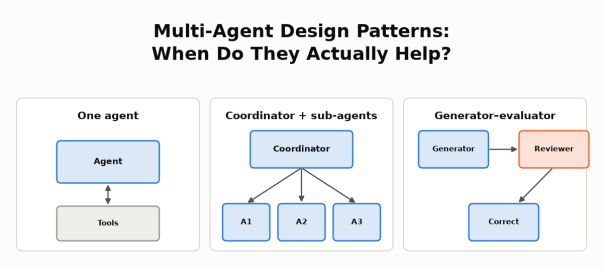
Multi-Agent Design Patterns: When Do They Actually Help? Three small diagrams: one agent with tools; a coordinator with three sub-agents; a generator, reviewer and correction flow.

Multi-Agent Design Patterns: When Do They Actually Help?

Objective

The goal of this post is to show, with real numbers from a working system, how to decide whether an agentic system should be a single agent or multiple agents working together.

I’ve read about cases where multi-agent systems helped, for example:

  • Anthropic’s research system: a lead agent sends several research agents to investigate different parts of a question in parallel, then combines what they find.
  • Cognition’s reviewer pattern: a second agent reviews the first agent’s work and sends back what needs fixing.
  • LangChain’s language comparison: to compare Python, JavaScript and Rust for web development, a separate agent researches each language and a coordinator combines the results.
  • OpenAI’s Navier–Stokes proof: thousands of agents explored different approaches to a long-open math problem in parallel, sharing their best findings across groups.

I wanted to know whether any of these patterns would help my own marketplace support agent: an AI agent that answers support staff’s questions about orders, payouts, refunds and policies in a small simulated marketplace, using read-only SQL and policy search. More details are in the use case below. This post walks through the patterns, how I looked for one that fits a support agent, the two designs I tested, and what I found.

On my agent:

  • Splitting the work across seller agents did not help. A coordinator agent with three seller agents gave the same answers as one agent with parallel tools, but took longer and cost about 2.5× more.
  • A reviewer agent did help, but only when it was a stronger model. GPT-5.4 reviewing GPT-5 nano’s answers removed every incorrect answer at about half the cost of running GPT-5.4 alone. When nano reviewed nano, nothing improved.

The lesson: As per my understanding, multi-agent helps in two situations below, there can be more.

  • The work splits into independent pieces that can run in parallel, each with its own context. When the steps are mostly sequential, or one query already covers the work, extra agents don’t help.
  • A second agent can see what the first one can’t.

Agent Design Patterns

Before comparing design patterns, it helps to ask one question: who controls the next step, the code or the model?

  • Workflow: in a workflow, code defines the path.
  • Agent: an agent’s model decides the next step, such as which tool to call.
  • Combinations: real systems often combine code-controlled and model-controlled steps. For example, code fixes the order of the steps, while agents decide how to carry out each one.

More model calls, different models or parallel tool calls don’t by themselves make a system multi-agent.

These are the patterns I considered:

PatternTypeHow it flowsExample
Workflow (chaining, routing, parallel steps)WorkflowCode defines each stepMy model-routing posts: classify the question, then send it to a cheap or strong model
Single agent with toolsAgentOne model loop decides which tool to call nextMy support agent: catalog → SQL → policy search → answer
Coordinator with sub-agentsMulti-agentEach agent works autonomously: a coordinator agent splits the task, sub-agents work in parallel in their own contexts, and the coordinator combines the resultsAnthropic’s research system; LangChain’s language comparison
Generator–evaluatorWorkflow + agentsCode fixes the order (draft → review → revise if needed); a generator agent drafts and an evaluator agent checksCognition’s reviewer; Anthropic’s verification subagent
HandoffWorkflow + agentsCode defines which specialist agents exist and who can hand off to whom; an agent decides when to hand the conversation over, and the specialist takes overA triage agent hands a refund request to a refunds agent, which continues with the user
Independent agents across systemsMulti-agent across organizationsAgents owned by different organizations exchange tasks and results over a protocol such as A2AA marketplace’s support agent asks a payment provider’s agent to investigate a failed payout

Why add agents at all? Anthropic’s January 2026 post on when to use multi-agent systems gives three reasons:

  • context protection: keep irrelevant detail out of an agent’s context
  • parallelization: investigate independent parts at the same time
  • specialization: focused tools and prompts

It also warns that multi-agent systems typically use 3–10× more tokens, and advises starting with the simplest approach that works.

Three examples show when splitting pays off:

  • Anthropic’s research system: a lead agent breaks a research question into parts, several research agents search in parallel, each in its own context, and the lead agent combines their findings.
  • OpenAI’s Navier–Stokes proof: on the order of 10,000 agents worked in groups, each trying a different variant or approach, and Codex shared the best findings across groups. They reached a proposed proof of the 90-year-old Millennium Prize problem in 88 hours, using about 130 billion output tokens, and a separate Lean step verified it. Mathematicians have not yet accepted it.
  • LangChain’s language comparison: for “Compare Python, JavaScript, and Rust for web development”, a coordinator sends each language to its own agent, which researches it with about 2,000 tokens of language-specific material. The coordinator then combines the three results.
    • Separate agents: 5 model calls and about 9K tokens.
    • Handoffs: passing control from one agent to the next takes 7+ calls and about 14K tokens, because the steps run one after another.
    • One agent holding all three languages’ material: about 15K tokens.

LangChain credits the 67% fewer tokens to “context isolation”.

All three have the same shape: independent pieces of work, each needing its own context, combined at the end. Cognition’s reviewer is a different idea: a second agent with fresh context checks the first agent’s work.

Not everyone finds that more agents help. Google’s research on scaling agent systems finds the benefit depends on how well the task decomposes, and a 2026 paper found single agents outperform multi-agent systems on multi-hop reasoning when both get the same thinking budget.

The Use Case

The agent is an internal customer support agent I built over a small simulated marketplace with buyers, sellers, orders, shipments, seller payouts, returns, refunds and versioned policies. Support staff ask it questions in plain English. It answers by calling read-only tools (a data catalog, SQL over the business data, order history and a policy-document search) and cites the evidence it used. It runs on the OpenAI Agents SDK behind a LiteLLM gateway.

I use two models: GPT-5 nano, the lower-cost model, and GPT-5.4, the stronger one. More background on the agent is in my model routing posts.

Looking for a Multi-Agent Fit

My first idea was a SQL agent and a RAG agent: one for the business data, one for the policy documents. It didn’t make sense.

  • The two are mostly sequential. The records SQL finds decide which policy to look up: which payout, which date, which return.
  • Combining contexts adds complexity. Splitting them means passing one agent’s findings to the other, then combining both into one answer, with nothing gained.
  • SQL and documents are tools, not separate jobs. One agent can use both.

The second idea looked more promising: one agent per seller. When payouts don’t go through, each seller can have different reasons: an item not yet delivered, a hold that hasn’t passed, an active return, a failed provider attempt. Investigating each seller separately looked like independent branches, the parallelization case. That became the first experiment.

The second experiment came from a different observation. In my earlier evaluations, nano’s wrong answers often had the right evidence available but drew the wrong conclusion. A second agent checking the work seemed worth testing.

Experiment 1: A Coordinator With Seller Agents

The task was a single investigation: “Investigate all sellers’ payouts, explain supported reasons, include paid and zero-due controls, and summarize unpaid totals by seller.” A fixed test dataset had 3 sellers and 11 payouts covering seven outcomes:

  • not delivered
  • under the 24-hour hold
  • active return
  • eligible but not yet released
  • failed provider attempt
  • fully refunded (nothing due)
  • paid

I compared two designs, both using GPT-5.4 and the same five read-only tools:

  • One agent with parallel tool calls allowed. This is not multi-agent: it’s a single agent that can run several tool calls at the same time.
  • A coordinator agent with three seller agents. Each seller agent has its own tool loop and context. The coordinator delegates, then combines their findings.
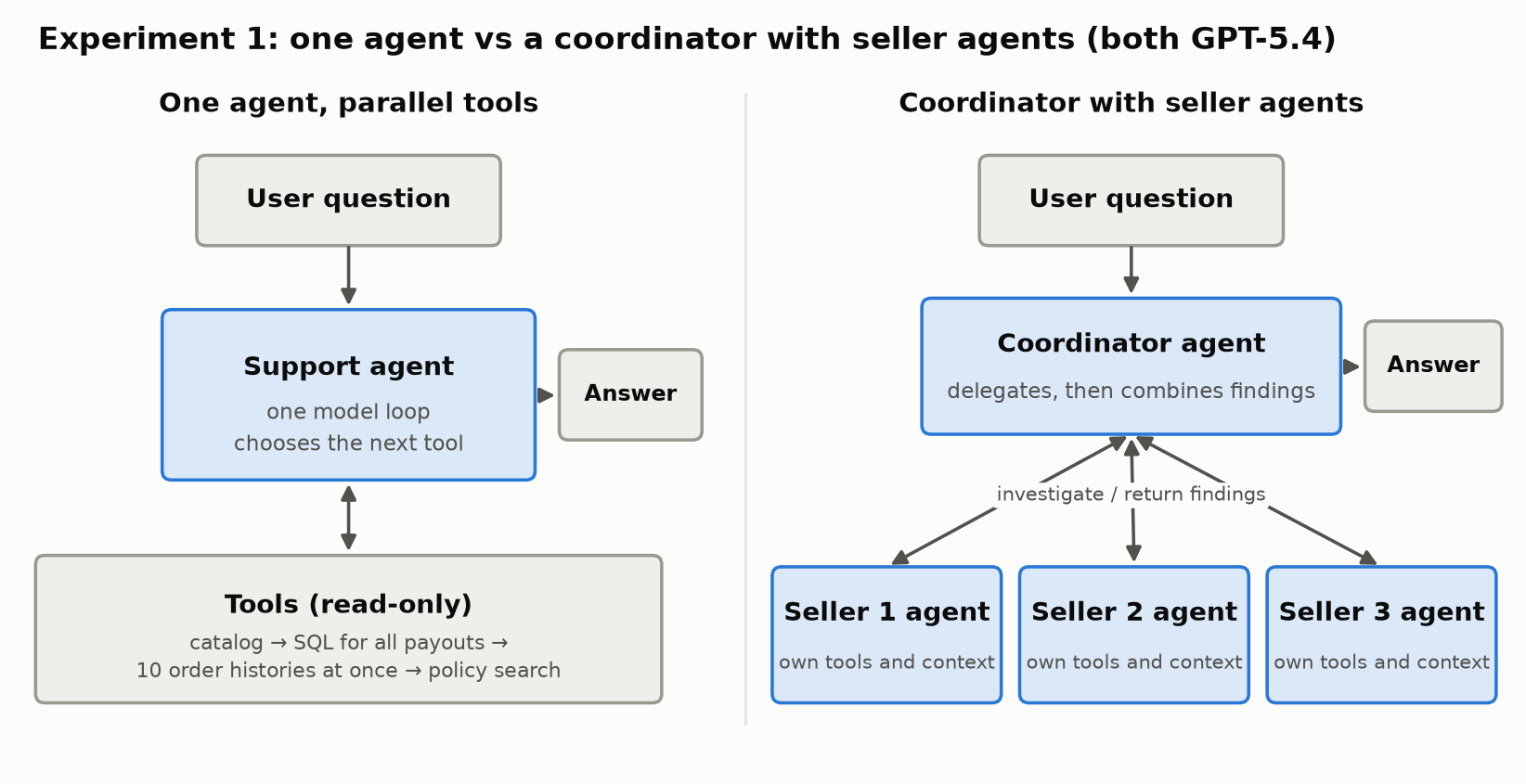
Two designs side by side. Left: one support agent, a single model loop that chooses the next tool, calls read-only tools: catalog, SQL for all payouts, ten order histories at once, then policy search, and returns the answer. Right: a coordinator agent receives the question, delegates to three seller agents that each have their own tools and context and return findings, then combines the findings into the answer.
The same investigation, done by one agent with parallel tools or by a coordinator with three seller agents.

Each design ran three times, in rotated order. An LLM reviewer checked every answer against the expected payouts, sellers and amounts. Here are the averages; one coordinator run did not complete, and its recorded usage is included.

DesignMean timeMean cost (cache-adjusted)Mean model requests
One agent, parallel tools82.0 s$0.1626.0
Coordinator + 3 seller agents108.1 s$0.40119.7

The answers were equally right on the business facts: every payout covered, the right seller and order, correct amounts and totals. The difference was time and cost. The coordinator design used about 3× the model requests and cost about 2.5× more.

The reasons are visible in the traces:

  • One query covered every seller. The single agent found all the payouts with one SQL query, so there was no heavy independent branch to hand off. Each seller’s investigation was small.
  • The single agent already worked in parallel. After finding the order IDs, it fetched 10 order histories at once in two of the three runs. Parallel tool calls gave concurrency without extra agents.
  • Sub-agents add overhead: each one repeats the instructions and catalog lookup, then packages its findings and evidence for the coordinator, which then has to combine them.

This is the opposite of LangChain’s language example. There, each language needs its own research and its own context; here, one query already held everything.

The limits matter. This was one task, three runs and three sellers, all under a common payout policy, and I didn’t give both designs equal budgets. With many more sellers, or seller-specific policies that need real independent investigation, sub-agents might pay off. Not shown here is the honest conclusion, not “sub-agents never help”.

Experiment 2: The Generator–Evaluator Pattern

The second design adds a reviewer. Anthropic calls this pattern evaluator-optimizer; I’ll call it generator–evaluator.

  1. A generator agent (nano) drafts the answer with tools.
  2. A reviewer agent sees the question, the draft and the full evidence the generator used. It has no answer key, and in this experiment no tools. It returns “no changes needed” or specific feedback.
  3. If the reviewer flags problems, a correction agent (nano) revises the answer once, with tools available.

The application controls the order of the steps; the generator and correction agents run their own tool loops.
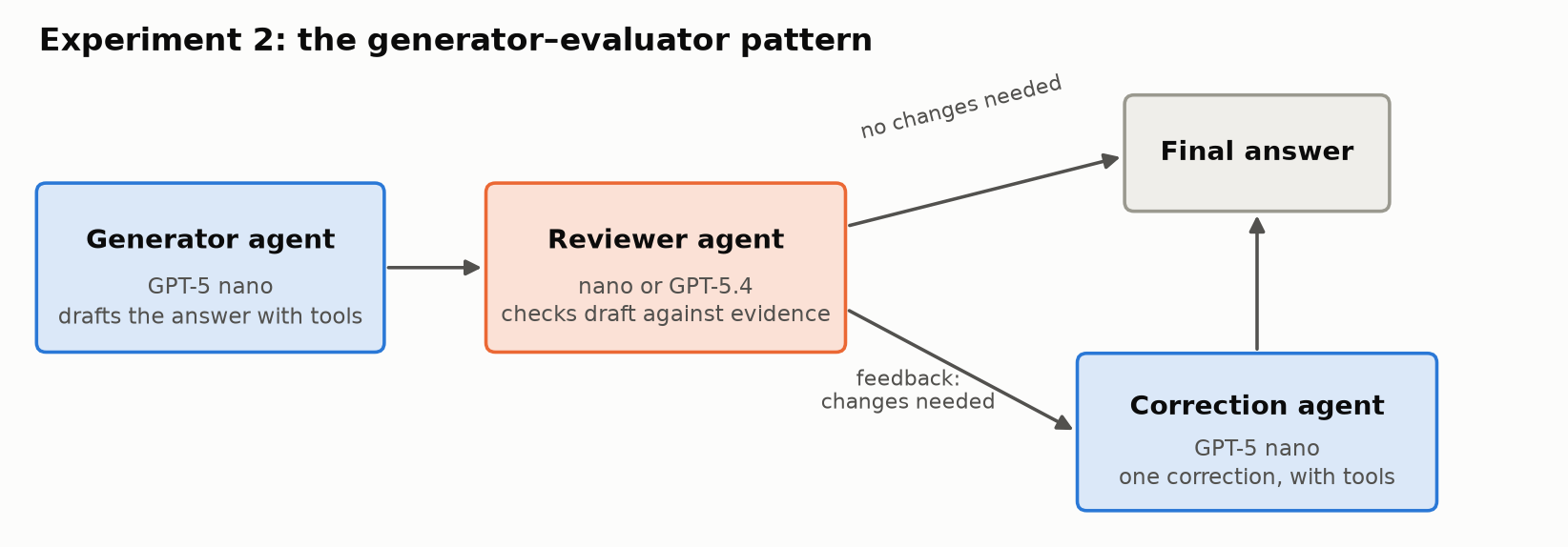
A left-to-right flow. A generator agent (GPT-5 nano) drafts the answer with tools and passes it to a reviewer agent (nano or GPT-5.4), which checks the draft against the evidence. If no changes are needed, the draft becomes the final answer. If changes are needed, feedback goes to a correction agent (GPT-5 nano), which makes one correction with tools and produces the final answer.
The generator–evaluator flow: draft, review, and at most one correction.

I ran it on the same 18 support cases I use for regression testing: order lookups, current and historical policy, payout eligibility, refund histories, reconciliation, an ambiguous name and a request the agent must refuse. Two cases are short follow-up conversations, giving 20 answers in total. An LLM reviewer graded every final answer against the expected results, separately from the reviewer agent’s own verdict. These grades are not human-adjudicated.

How it unfolded. I first ran it on 8 hard cases, with GPT-5.4 reviewing nano’s answers. Results moved from 3 correct / 3 partial / 2 incorrect to 5 / 3 / 0. It looked as if the pattern worked.

But was it the pattern, or a stronger model doing the reviewing? So I tested nano reviewing nano on the same 8 cases. It asked for no changes, and nothing improved. Then I ran both reviewers across all 18 cases:

DesignCorrect / partial / incorrectEstimated cost
One agent: nano11 / 4 / 3$0.037
Nano generator + nano reviewer11 / 4 / 3$0.053
Nano generator + GPT-5.4 reviewer14 / 4 / 0$0.582
One agent: GPT-5.417 / 1 / 0$1.210

Costs are model-usage estimates at uncached list prices, including nano’s drafts and the review and correction calls.
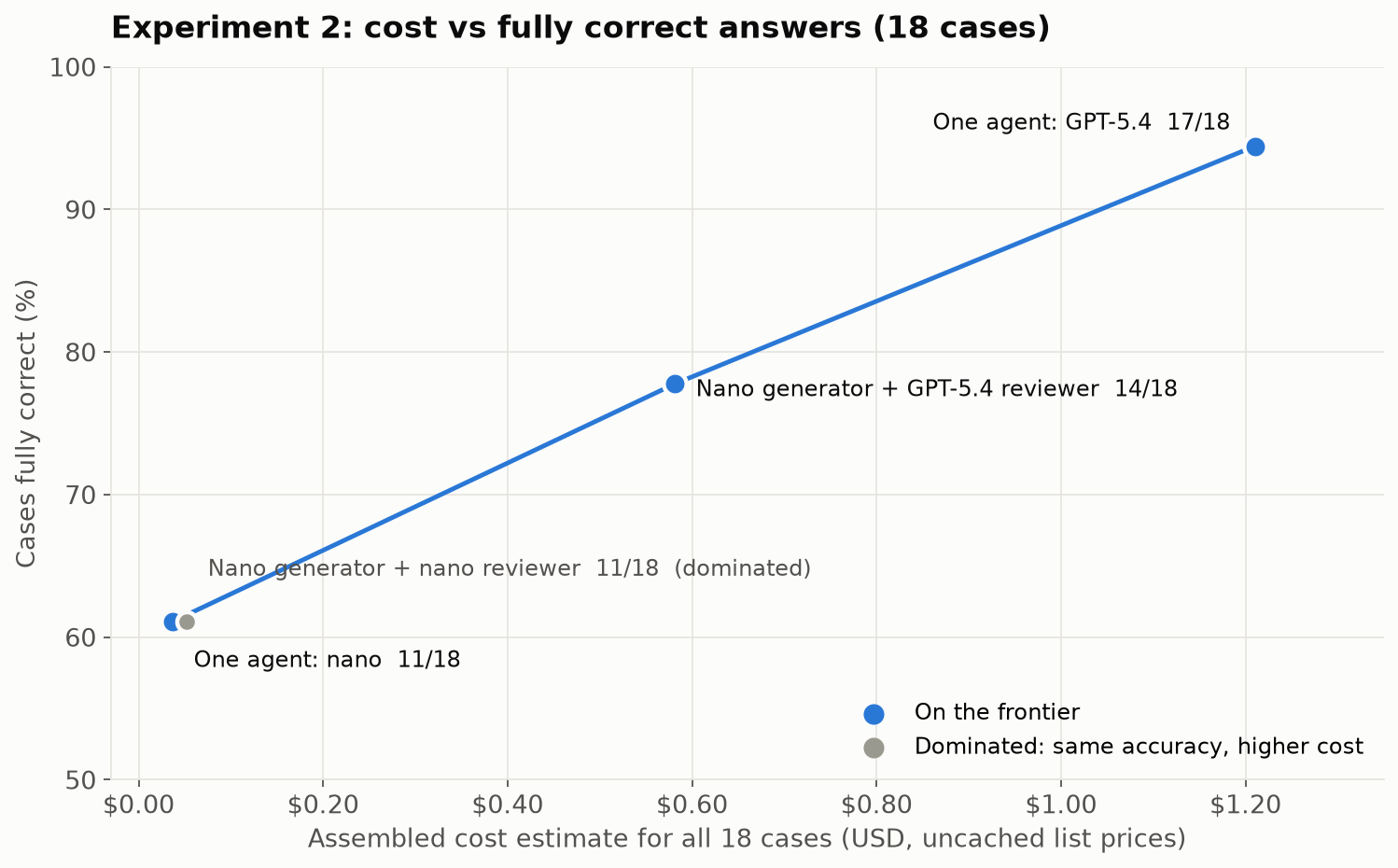
Scatter chart of cost against fully correct cases for the four designs. One agent nano: 11 of 18 at $0.037. Nano generator plus nano reviewer: 11 of 18 at $0.053, marked as dominated. Nano generator plus GPT-5.4 reviewer: 14 of 18 at $0.58. One agent GPT-5.4: 17 of 18 at $1.21. A line connects the three non-dominated designs.
Same-model review added cost without changing results. A stronger reviewer moved nano most of the way toward GPT-5.4 at about half its cost.

What the results show:

  • A reviewer can only catch what it can see. Across all 18 cases, nano as reviewer asked for three corrections, and none changed a grade. It shares the generator’s blind spots.
  • The stronger reviewer removed all three incorrect answers. Three answers became correct and one improved from incorrect to partial. The total came in about 52% below running GPT-5.4 alone, with three fewer fully correct answers.
  • Detection isn’t correction. GPT-5.4 asked for 13 corrections, and 4 answers improved. Several times nano was told what evidence was missing and still didn’t fetch it.
  • The gain comes from the reviewer’s capability. The pattern is how you spend that capability selectively: GPT-5.4 reads and judges nano’s work instead of doing all of it.

On a cost-versus-accuracy chart, nano reviewing nano is dominated: the same accuracy as nano alone, at higher cost. The useful choices are nano alone, nano with a GPT-5.4 reviewer, and GPT-5.4 alone. Which one is right depends on your accuracy bar and budget.

The limits: one pass over 18 known cases, and LLM-reviewer grades. This doesn’t show that self-review never works; it shows it didn’t work here.

When Multiple Agents Make Sense Across Systems

The experiments above looked at splitting one application’s work across agents. Multiple agents also make sense when the work crosses a boundary between systems, especially systems owned by different companies. The marketplace and a payment provider are two systems run by two different companies. The marketplace’s support agent could ask the provider’s agent to investigate a failed payout. Each side keeps its own tools, data and permissions, and they exchange only the task and the result.

That’s what the A2A (Agent2Agent) protocol is for: delegating work to an agent you don’t control. Google introduced it, and it’s now an open project under the Linux Foundation. Inside your own system, tools exposed through function calls or MCP are usually enough. I haven’t implemented A2A here, so I’m not claiming a measured benefit.

Lessons Learned

  • Look for independent branches, not tools. SQL and document search were mostly sequential, so separate agents would only have added a context-merging step.
  • One good query can beat a team. When a single bulk query covered every seller, sub-agents added time, cost and model calls without better answers.
  • Parallel tools give you concurrency without extra agents. The single agent fetched ten order histories at once, though it still had to find the orders first.
  • A reviewer is only as good as what it can see. Same-model review found nothing. A stronger reviewer removed every incorrect answer, which makes review a way to spend a strong model only where it matters.
  • Detection isn’t correction. Specific feedback helped most, but the correction agent didn’t always fetch the evidence it was told was missing.

A Checklist: Before You Add Multiple Agents

  1. Can one agent with the right tools, and parallel tool calls, do it?
  2. Are each agent’s task and context separate and isolated, or would the agents need each other’s details?
  3. Can the agents’ work run in parallel, or is it mostly sequential?
  4. Is one agent’s context actually overloaded? Measure it.
  5. For a reviewer: is it more capable than the generator on these errors? Test same-model review as a control.
  6. Compare against single-agent baselines on accuracy, cost, latency and failures.
  7. Across system boundaries, such as another team or another company, consider independent agents and A2A.

Limits

  • Both experiments are small: one investigation task with three runs, and 18 known cases with one pass.
  • Grades come from an LLM reviewer against expected answers, not human adjudication.
  • Costs are model-usage estimates, not invoices.

Summary

The lesson is simple: add multiple agents only for a reason you can name and measure. On my support agent, a coordinator with seller agents gave the same answers as one agent with parallel tools, at about 2.5× the cost, because one query already covered every seller. A reviewer agent helped only when it was stronger than the generator: GPT-5.4 reviewing nano removed every incorrect answer at about half the cost of GPT-5.4 alone, while nano reviewing nano changed nothing. Multi-agent pays off when the work splits into independent pieces that can run in parallel, each with its own context, or when a second agent can see what the first one can’t.

Acknowledgements

This post was written with the help of Claude Opus 5.5 in Claude Code, which also helped me research the multi-agent patterns and plan the experiments. The experiments were built and run with GPT-6 Astra, which also graded the answers against the expected results.

References

Patterns and Evidence

Earlier Posts

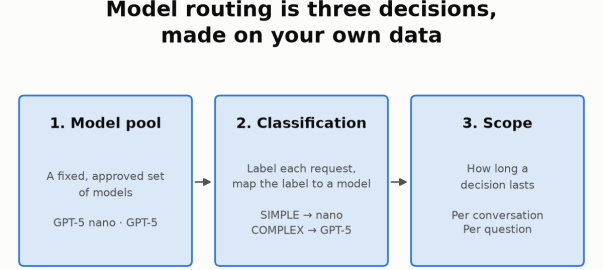
Model routing is three decisions, made on your own data: 1. Model pool (GPT-5 nano and GPT-5), 2. Classification (SIMPLE to nano, COMPLEX to GPT-5), 3. Scope (per conversation or per question).

Model Routing, Part 2: Choosing the Scope

Objective

In Part 1, I compared ways to choose which model should answer a support request. This post continues that experiment with a second decision: how long should that model choice last—a whole conversation or just one question? The small pilot illustrates a method, not a general recommendation.

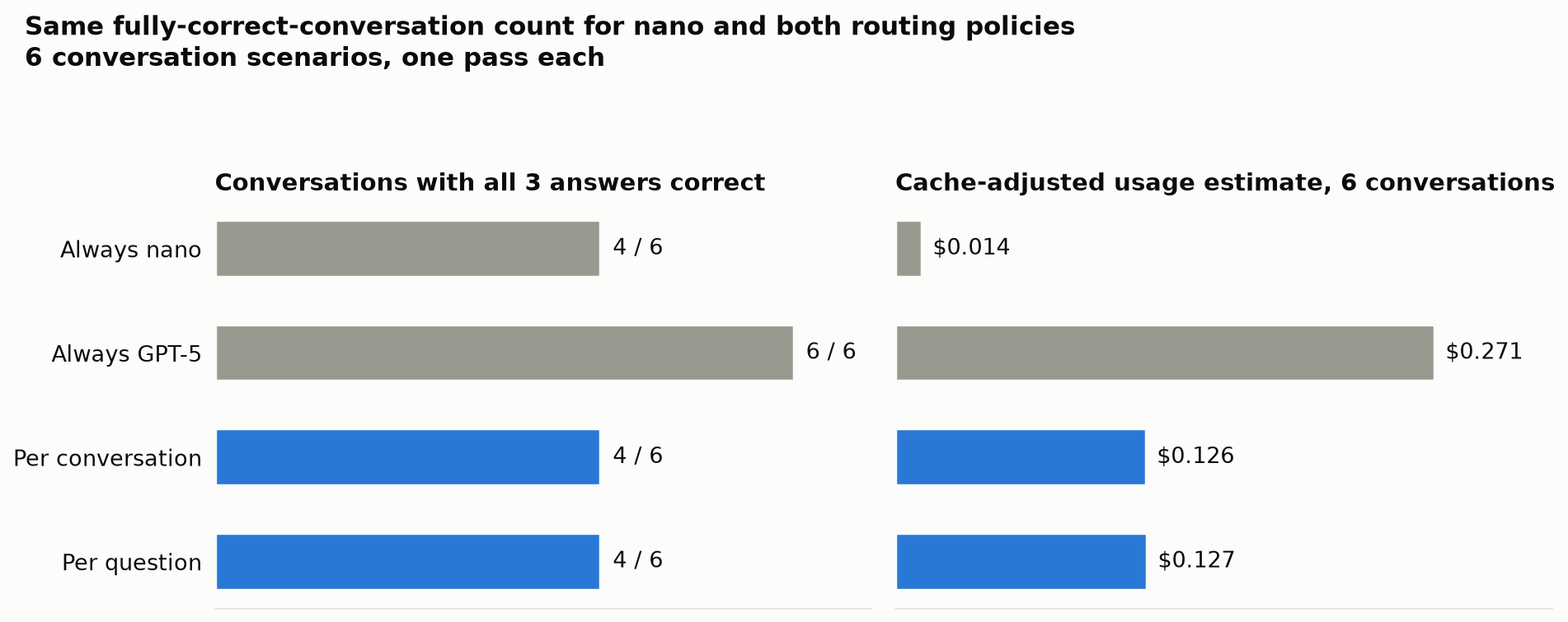
I compared four policies on six new three-question conversations: always GPT-5 nano, always GPT-5, per-conversation routing and per-question routing. Nano and both routing policies got 4 of 6 conversations fully correct; GPT-5 got all six. Routing cost about nine times nano, without improving the fully-correct-conversation count. Neither scope clearly won.

The Agent and Classifier

The agent answers marketplace support questions using read-only SQL and policy search, through the OpenAI Agents SDK and LiteLLM, with Langfuse tracing. Part 1 compared classifiers on 18 cases. Here I reuse its domain-aware nano classifier: SIMPLE → nano, COMPLEX → GPT-5.

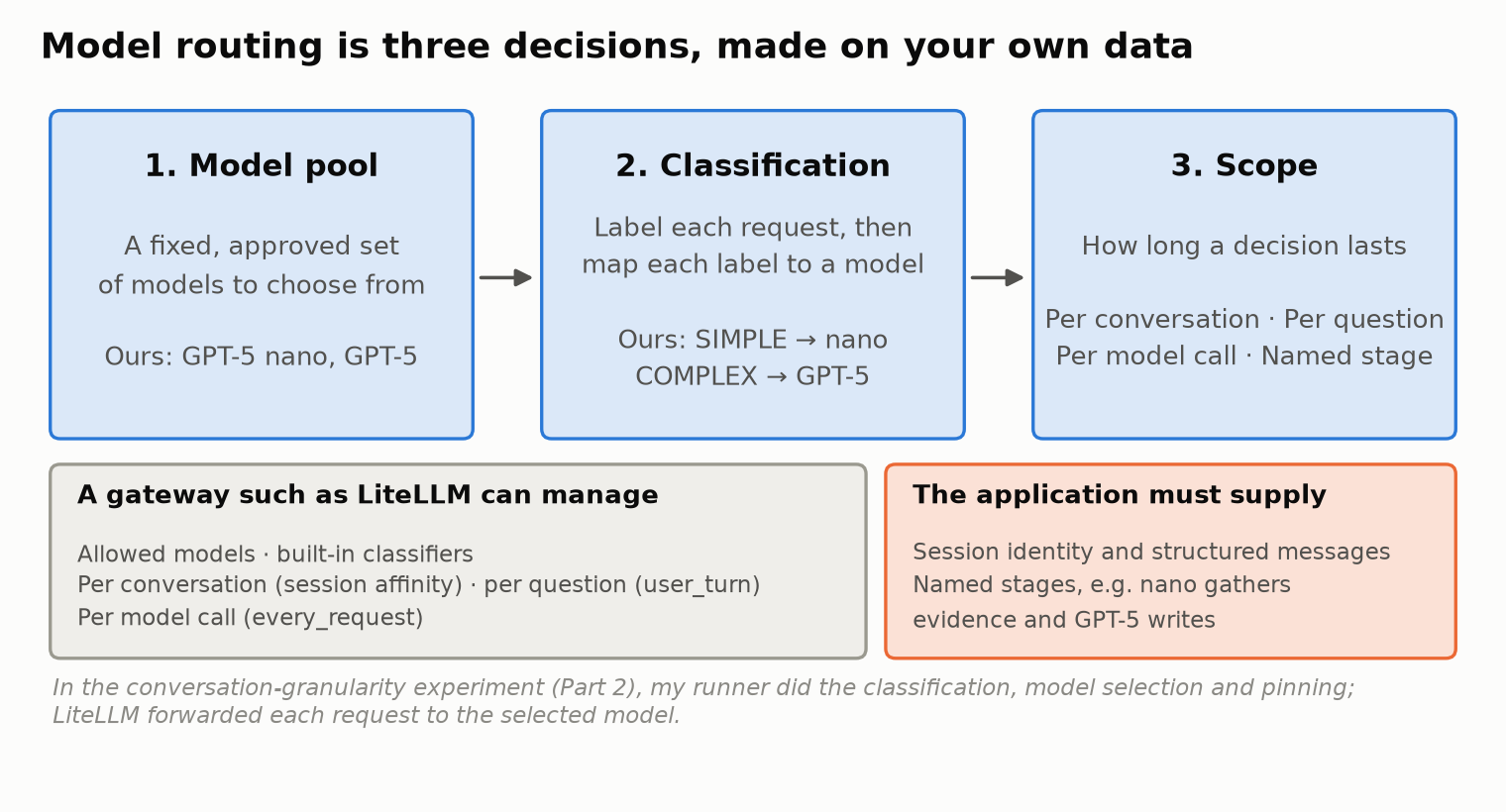
Three boxes: 1. Model pool (a fixed, approved set of models; ours are GPT-5 nano and GPT-5), 2. Classification (label each request, then map each label to a model; ours map SIMPLE to nano and COMPLEX to GPT-5), 3. Scope (per conversation, per question, per model call, named stage). Below, one box lists what a gateway such as LiteLLM can manage: allowed models, built-in classifiers, per-conversation selection through session affinity, per-question selection through user_turn and per-model-call selection through every_request. Another box lists what the application must supply: session identity, structured messages and named stages. A note says that in the conversation-granularity experiment the author's own runner did the classification, selection and pinning, and LiteLLM forwarded each request to the selected model.
Part 1 covered the model pool and classification. This post covers the third decision, scope.

My Starting Expectation

I expected per-conversation routing to preserve context and cache warmth, while per-question routing could save money on easy follow-ups. I also assumed switching would lose context or start cold. These were assumptions to test, not established properties.

Ways to Scope a Routing Decision

A gateway can manage most of these for you. LiteLLM’s documentation describes three built-in options:

  • Per conversation: session affinity pins the model chosen on the first turn of a session and skips reclassification on later turns.
  • Per question: classification_mode: user_turn classifies only new user questions, and carries that decision through the tool calls and continuation turns within the question.
  • Per model call: classification_mode: every_request (the default) classifies each request the agent sends to the gateway.

For any of these to work, the application supplies the session identity (LiteLLM reads a session_id from the request metadata) and well-structured messages, so the gateway can tell a new user question from a tool result.

Two more options need the application’s knowledge:

  • Named stages: a deliberate rule such as “nano gathers the evidence, GPT-5 writes the final answer”. The gateway can reclassify every call, but only the application knows which call is “gathering” and which is “writing”.
  • Escalation: start on nano and switch up when a check fails. This needs a reliable signal that an answer is wrong.

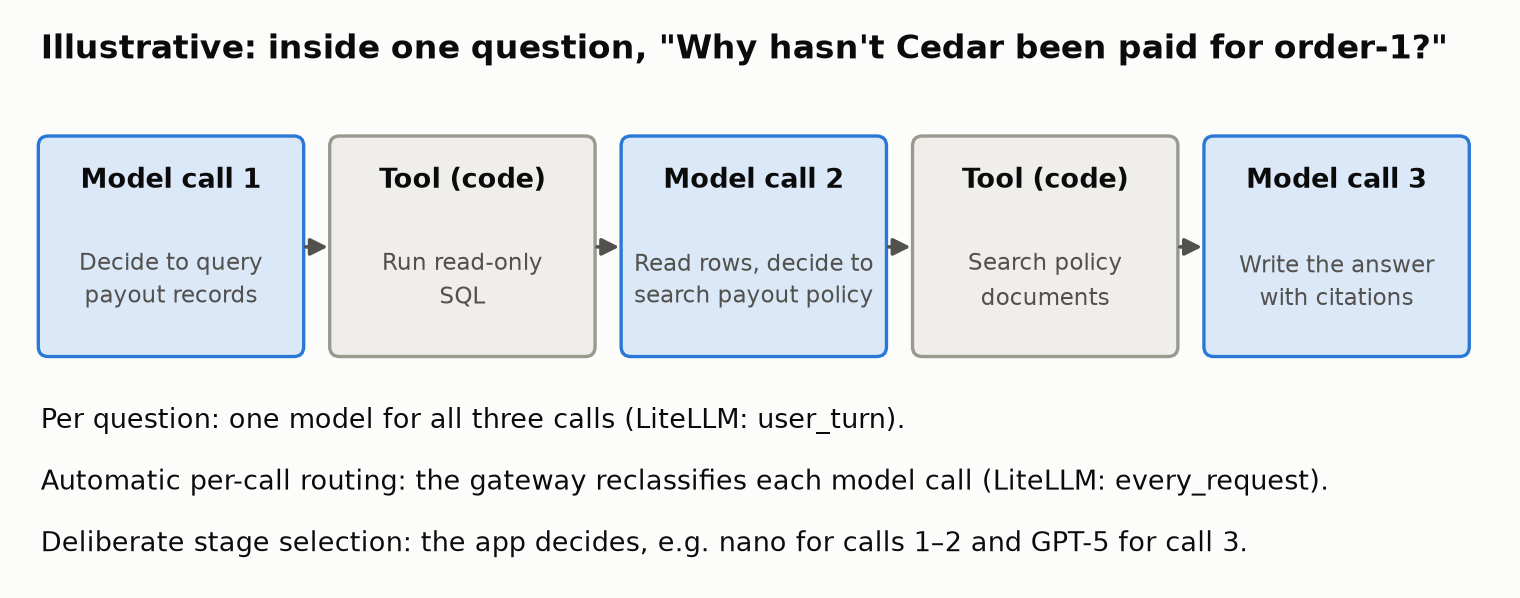
Here is what a single question looks like inside the agent:

Illustrative sequence for one question, "Why hasn't Cedar been paid for order-1?", in five steps: model call 1 decides to query payout records; a tool runs read-only SQL; model call 2 reads the rows and decides to search the payout policy; a tool searches the policy documents; model call 3 writes the answer with citations. Notes below explain that per-question routing uses one model for all three calls (LiteLLM user_turn), automatic per-call routing reclassifies each call (every_request), and deliberate stage selection is decided by the application.
An illustrative question. Automatic per-call routing reclassifies each call; deliberate stage selection needs the application to name the stages.

I tested per conversation and per question, against the two fixed models.

How I Tested It

What I implemented. My own runner did the classification, the model selection and the pinning. LiteLLM simply forwarded each request to the model the runner had explicitly selected. So these results test the two routing policies, not LiteLLM’s native session-affinity or user_turn implementations. Every internal model call for a question used the model chosen for that question.

The conversations. I wrote 6 new conversation scenarios of 3 questions each, with expected answers written in advance. They cover:

  • simple questions leading to hard ones, and the reverse
  • a clarification
  • a purchase that changes the data mid-conversation
  • a clock change that lets a payout hold pass
  • simple lookups only

The policies. Each scenario ran once under four policies:

  • always nano
  • always GPT-5
  • per-conversation routing
  • per-question routing, where the classifier also sees the earlier conversation

Six scenarios × three questions × four policies is 72 answers, but only 6 distinct scenarios, not 72 independent tests. I couldn’t reuse saved answers as in Part 1, because each answer shapes the next question’s context.

Grading. An LLM reviewer, GPT-6 Astra, reviewed every answer against the expected facts, and I adjudicated the borderline cases. Three borderline partial grades were flagged; I reviewed and accepted them. A conversation counts as fully correct only if all three of its answers are correct, because a support conversation with one bad answer is still a failed conversation.

One Conversation, Two Scopes

Here is one scenario, “simple lookup to payout investigation”, under the two routing policies:

#QuestionPer conversationPer question
1“For order-2, list the purchased product, quantity and seller.”nano (pinned for the conversation) ✅nano ✅
2“For that same order, explain why its seller has not received the payout and what must happen before release.”nano ⚠️ partialGPT-5 ✅
3“What exact amount is currently payable to that seller for this order, after the marketplace fee?”nano ✅ ₹1,618.20GPT-5 ✅ ₹1,618.20

The first question looked simple, so per-conversation routing pinned the whole conversation to nano, including the harder second question. Per-question routing classified question 2 as COMPLEX and sent it to GPT-5. The classifier’s reason: “Determining why a seller payout is not completed requires tracing allocations, payments, shipments, returns/refunds, and payout status, plus policy-based eligibility.”

The Results

The headline measure is conversations with all three answers correct. Costs are cache-adjusted usage estimates for these newly generated answers. They are reconstructed from the token and cached-token counts the provider reported, at fixed list rates.

PolicyConversations fully correctCache-adjusted usage estimate, 6 conversationsvs always GPT-5
Always nano4 / 6$0.014−94.9%
Always GPT-56 / 6$0.271—
Per conversation4 / 6$0.126−53.4%
Per question4 / 6$0.127−53.2%
Two bar charts titled "Same fully-correct-conversation count for nano and both routing policies; 6 conversation scenarios, one pass each". Left: conversations with all three answers correct: always nano 4 of 6, always GPT-5 6 of 6, per conversation 4 of 6, per question 4 of 6. Right: cache-adjusted usage estimate for six conversations: always nano $0.014, always GPT-5 $0.271, per conversation $0.126, per question $0.127.
Nano and both routing policies had the same fully-correct-conversation count; only GPT-5 alone got all six. Six scenarios, one pass each.
  • Nano and both routing policies each got 4 of 6 conversations fully correct; GPT-5 got 6 of 6.
  • Routing cost about nine times nano, and it did not improve the fully-correct-conversation count.
  • Routing did reduce incorrect individual answers. Out of 18 answers per policy, nano got 15 correct, 1 partial and 2 incorrect; both routing policies got 15 / 2 / 1. Fewer wrong answers did not produce more fully correct conversations.
  • Neither granularity established a compelling advantage. Per conversation and per question got the same conversation score at almost the same cost.

Both routing policies chose nano for 12 of the 18 questions and GPT-5 for 6, though not always the same questions. Per-question routing switched models four times across the six conversations.

Right vs Wrong: Two Conversations in Detail

1. Per-question routing caught the harder question. In the scenario above, question 2 asks why the seller hasn’t been paid. The correct answer is that payment is captured, the shipment is still pending, and the payout is held until delivery is confirmed and a 24-hour hold has passed.

  • Per-conversation routing (pinned to nano): said the payout “is currently held” until “delivery/fulfillment conditions are satisfied”. It left out the 24-hour hold, so it was graded partial.
  • Per-question routing (sent to GPT-5): “Policy requires delivery confirmation plus a 24-hour hold… No delivery confirmation is recorded yet.” Correct.

Routing the hard question to the stronger model helped here. But there is a twist: in the separate always-nano run, nano answered this same question correctly. Same model, same question, different run, different grade. One run is not proof.

2. When every question looks simple, no scope helps. This scenario was about a name that means two things: “Cedar” is both a seller (Cedar & Co.) and a product (Cedar Desk).

  • “Please list purchases associated with Cedar.” Nano correctly asked whether I meant the seller or the product.
  • “The seller Cedar & Co., not the desk product.” Nano invented a “today only” date filter nobody asked for and replied that there were no purchases. In fact there was one: order-1, with two Canvas Weekenders. Graded incorrect.
  • “Within those purchases, show only items that have not been delivered.” Nano answered “none”. That happens to be the right result, since the order had been delivered, but only because the previous answer had filtered everything out. Right answer, wrong reason, graded partial.

The classifier labeled all three questions SIMPLE, and on the surface they are: a list, a clarification, a filter. So both routing policies used nano throughout and made the same mistakes. GPT-5 alone got all three right. Per-question routing only helps if the classifier can tell that a question is risky, and follow-ups often look simpler than they are. Once a wrong answer enters the conversation, later answers build on it.

What It Costs

The pilot also recorded latency and caching. Full-price estimates are shown next to the cache-adjusted estimates so the effect of caching is visible.

PolicyCache-adjusted estimateFull-price estimateCached share of inputLatency p50 / p95Model switches
Always nano$0.014$0.02050.6%10.3 s / 20.2 s0
Always GPT-5$0.271$0.46064.0%13.2 s / 34.8 s0
Per conversation$0.126$0.20654.0%10.4 s / 33.1 s0
Per question$0.127$0.21957.9%13.4 s / 38.8 s4
  • Caching changes the estimate a lot. For always-GPT-5, the cache-adjusted usage estimate was about 40% below the full-price estimate. Neither figure is an invoice.
  • Report cache differences, don’t explain them away. Per-question routing switched models four times, and its cached share was 57.9% against 54.0% for per-conversation. I am not attributing that difference to model switching, or to anything else, because two things make it hard to interpret:
    • Provider caches were shared and could already be warm across runs.
    • One conversation was interrupted mid-run when my API credit ran out. It resumed after funding, which may have changed cache warmth.
  • Treat the latency figures as rough. p95 over 18 answers per policy is an indicator, not a production estimate.

What Happened to My Expectation

I expected per-conversation routing to win on context and caching, with per-question routing trading some of both for lower cost. Here is how each part held up:

  • Context: my assumption was wrong. A model switch doesn’t lose the conversation. The application passes the conversation history with every call, so the model answering question 2 sees question 1 and its answer, whichever model it is. What carries over from one question to the next is the content of earlier answers, including their mistakes, not the model.
  • Caching: I didn’t observe the penalty I expected. The per-question policy’s cached share was higher, not lower, and that held within each model too: nano 51.5% versus 47.8%, GPT-5 66.9% versus 61.6%. With shared cache warmth, the funding interruption and a single pass, this observation doesn’t tell me why.
  • Cost: effectively the same. $0.126 for per-conversation, $0.127 for per-question.
  • Accuracy: the same conversation score, with different mistakes. Per-question routing rescued one question the pinned conversation got partly wrong. In another conversation, neither scope helped, because every question looked simple.

So the pilot didn’t confirm my expectation, and it didn’t reverse it either. It was inconclusive. The useful part is seeing that the differences between the scopes were smaller and more situational than I assumed.

Pros and Cons of Each Scope

No scope is best in general. Each one trades something:

ScopeProsConsConsider it when
Per conversationOne classification per conversation; one model; simplest to run and explainThe first question decides for all later ones; a simple opener can leave a hard follow-up on nanoConversations tend to stay at one level of difficulty
Per questionAdapts when a conversation gets harder or easier; conversation history still carries overA classification on every question; follow-ups often look simpler than they are; more model switches to monitorConversations often mix quick lookups with investigations
Per model call (automatic)The gateway can reclassify every call with no application changesCalls within one question may land on different models; more classifications; the classifier sees the call, not the stageYou want fine-grained routing without writing stage logic
Named stages (application-defined)Can reserve the stronger model for the stage that needs it, such as writing the final answerThe application must identify the stages; the final stage often carries the most context, so it may not save muchFailures cluster in one stage, such as interpreting evidence
EscalationPays for the stronger model only when the cheaper one failsNeeds a reliable signal that an answer is wrong; fluent wrong answers slip through; slower when it escalatesYou have strong automatic checks on answers

A Checklist for Choosing Routing

Steps 1–4 are from Part 1; steps 5 and 6 come from this post.

  1. Shortlist models on benchmarks, domain fit, cost and latency, from approved providers that support your agent’s needs.
  2. Run evals on your golden set, with single questions and full conversations, to narrow the shortlist. Then fix the pool and pin the versions.
  3. Weigh cost savings against accuracy. If the cheaper model meets your accuracy bar, use it. If only the stronger one does and its cost is acceptable, use it. Route only when routing saves meaningful cost while keeping accuracy within your bar.
  4. Design the classification. Choose labels that matter for your traffic and map them to models. Start with keyword rules, then try semantic or LLM-based classifiers built from real user journeys.
  5. Choose the granularity on real conversations. Compare per conversation and per question (and per call or named stages if they fit your agent) on multi-question conversations, watching conversation-level correctness, cost, latency and caching.
  6. Validate and monitor. Re-test on fresh scenarios and repeat unstable cases before deciding, and rerun your evals whenever a model changes or retires.

Limits and What’s Next

This was a small pilot, and I would not treat it as a benchmark:

  • Sample size: 6 conversation scenarios of 3 questions, one pass per policy.
  • Grading: an LLM reviewer plus my adjudication of borderline cases.
  • Classifier: a prompt developed on known cases.
  • Implementation: my own runner, not the gateway’s native routing.
  • Caching: shared cache warmth and a funding interruption; the figures are observations, not causal proof.

The “different run, different grade” twist above shows how much one pass can vary. Next, I want to:

  • run more conversations, with repeated passes
  • repeat the test with LiteLLM’s native session affinity and user_turn
  • try named-stage routing, with nano gathering evidence and GPT-5 writing the answer
  • test escalation, once I have a reliable signal that an answer is wrong
  • run controlled cache tests

Acknowledgements

This post was written with the help of Claude Opus 5.5 in Claude Code, which also helped me research the routing landscape and plan the experiments. The application and experiments were built and run with GPT-6 Astra, which also reviewed answers against the expected results.

References

This Series

Earlier Posts

Routing Tools

  • LiteLLM Auto Routing: session affinity, classification_mode (every_request and user_turn) and classifier configuration.
Model routing is three decisions, made on your own data: 1. Model pool (GPT-5 nano and GPT-5), 2. Classification (SIMPLE to nano, COMPLEX to GPT-5), 3. Scope (per conversation or per question).

Model Routing, Part 1: Choosing a Classifier

Objective

How do you choose a model router for your own application? I tested six classifiers on a marketplace support agent to compare cost against answer quality. This small study demonstrates the decision process, not a general ranking of products.

Both GPT-5 nano and GPT-5 answered 18 support cases: 16 single-turn and two two-turn cases, or 20 answer turns per model. The LLM classifier and JEV each selected fully correct answers for 88.9% of cases, versus 94.4% for GPT-5 alone and 50% for nano, at an estimated 55–58% of GPT-5’s cost.

Part 2 examines how long a routing decision should last across a conversation.

The Use Case

I built a simulated marketplace with buyers, sellers, orders, shipments, payouts, returns, refunds and versioned policies. Its internal support agent answers questions using read-only SQL and policy search, citing its evidence. It runs on the OpenAI Agents SDK, through LiteLLM, with Langfuse tracing; payments and business data are simulated.

The workload mixes quick lookups—“What products are in order-2?”—with investigations such as “Why hasn’t this seller been paid?” The latter can require payment records, delivery events, policy and a time calculation.

Routing Is Three Decisions

Model routing is not one setting. It is three decisions:

Three boxes: 1. Model pool (a fixed, approved set of models; ours are GPT-5 nano and GPT-5), 2. Classification (label each request, then map each label to a model; ours map SIMPLE to nano and COMPLEX to GPT-5), 3. Scope (per conversation, per question, per model call, named stage). Below, one box lists what a gateway such as LiteLLM can manage: allowed models, built-in classifiers, per-conversation selection through session affinity, per-question selection through user_turn and per-model-call selection through every_request. Another box lists what the application must supply: session identity, structured messages and named stages. A note says that in the conversation-granularity experiment the author's own runner did the classification, selection and pinning, and LiteLLM forwarded each request to the selected model.
Routing is three decisions. A gateway can manage most of them; the application supplies session identity and any named stages.
  1. Model pool: which approved models the router may choose between.
  2. Classification: how each request is labeled, and which model each label maps to.
  3. Scope: how long a routing decision lasts, such as a whole conversation, a single question or a single model call. That is Part 2.

Choosing and Fixing the Model Pool

Shortlist approved models on benchmarks, domain fit, cost and latency, then run evals on your own golden set. Candidates must support the agent’s tool calls and output formats. Cost per correct answer matters more than token price alone.

My evaluated pair was GPT-5 nano, the lower-cost candidate, and GPT-5, the stronger performer. Both use the same provider behind one gateway. I did not run public benchmarks myself; the choice rested on workload evals, cost and latency.

Keep routing within the evaluated, approved pool and pin model versions for reproducibility. Even OpenRouter Auto was restricted to these two candidates.

How I Checked the Quality

A router can only be judged as well as the grades behind it, so grading came first.

I built a golden set: cases with known business data behind them and expected answers written in advance. A case counts as fully correct only if every requested fact is right, in every turn of the case.

Grading combined human review and LLM review:

  • Calibration, earlier: in an earlier model comparison, I graded 36 answers by hand and had Claude Opus 5.5 grade them as an LLM judge. After clarifying the grading rules, the judge agreed with my grade on 31 / 36 (86%). That calibration applies to that judge on those answers.
  • This comparison: the nano grades are existing accepted grades. The GPT-5 answers were reviewed by an LLM reviewer, GPT-6 Astra, against the expected answers, and I adjudicated the borderline cases. The Claude calibration does not validate that reviewer; the adjudication is what anchors those grades.

Baselines: What Routing Has to Beat

First, the two models on their own over the 18 cases. The cases cover order lookups, policy questions (current and historical), payout eligibility, refund histories, incidents, reconciliation, an ambiguous name, and a request the agent must refuse.

ModelCases correct / partial / incorrectFully correctEstimated cost, all 18 cases
GPT-5 nano9 / 7 / 250.0%$0.023
GPT-517 / 1 / 094.4%$0.456

GPT-5 was far more accurate and cost about 20× more. That gap is what makes routing worth considering. The question routing has to answer is simple: how much cost can we save, and how much accuracy do we give up?

Classification: Labels Are a Design Choice

A classifier assigns a label to each request. A separate mapping turns that label into a model. Both are your choices.

  • Labels don’t have to be about difficulty. They can be task type (lookup, investigation, action request), business domain (payments, returns, fulfillment), risk, language, or a mix.
  • “Simple” doesn’t have to mean “cheapest”. A short but risky request such as “refund this order now” could be labeled simple and still be mapped to the strong model.
  • A pool can have more than two tiers.

For this study, I used the simplest useful setup for a two-model pool: SIMPLE → GPT-5 nano and COMPLEX → GPT-5, for the classifiers I configured. LiteLLM’s built-in tiers also include MEDIUM and REASONING; I mapped everything above SIMPLE to GPT-5. OpenRouter’s Auto Router is the exception: it does not use my labels at all (see below).

The Six Classifiers and How I Configured Them

Every rule, example and prompt below was written from the support-user journeys in my specification: the kinds of questions support staff actually ask. They were frozen before testing. The one exception is a separately versioned refinement of the semantic examples, which I made after seeing the first results. It is reported on its own and is not part of the results table.

How each one ran. For the first five, my own runner produced or collected the classification and chose the model. OpenRouter Auto made its own choice. None of this used a gateway’s automatic routing on live traffic.

  • Keyword rules, heuristic scorer and semantic similarity: LiteLLM’s native classification code, exercised separately. It was not routing live traffic through my gateway.
  • LLM classifier: GPT-5 nano called through my LiteLLM gateway.
  • JEV: called directly through OpenRouter’s Decisions API.
  • OpenRouter Auto: called through OpenRouter.

Keyword Rules

LiteLLM’s keyword rules map words to tiers without calling any model. My lists:

keyword_tier_rules:
- tier: SIMPLE
keywords: [list, show, quantity, stock, balance, price]
- tier: COMPLEX
keywords: [why, investigate, reconcile, history, policy, eligible, eligibility,
refund, failed, incident, cause, "can you", "can the", "can we"]

Simple words signal a direct lookup. Complex words signal explanation, investigation, policy, eligibility, money movement, or a request to act. If both lists match, the higher tier wins. If nothing matches, the question falls back to the heuristic scorer below.

Heuristic Scorer

This is LiteLLM’s default classifier, and I used its defaults unchanged on purpose, to see how a generic heuristic behaves out of the box. It scores seven text signals that were built with software questions in mind:

  • code words (weight 0.30)
  • reasoning phrases like “step by step” (0.25)
  • technical terms (0.25)
  • length (0.10)
  • simple phrases like “what is” (0.05)
  • “first… then” patterns (0.03)
  • several question marks (0.02)

LiteLLM lets you add your own technical keywords, which is how you would adapt it to a domain.

Semantic Similarity

LiteLLM can also match questions by meaning. I wrote 14 example sentences, embedded with text-embedding-3-small. A question takes the label of its closest example if the similarity is at least 0.5; otherwise it falls back to the heuristic. A few of the examples:

  • SIMPLE (6 examples): “Show the products purchased in this order and their quantities.” · “What is the listed price of this product?” · “List the sellers and their current outstanding amounts.”
  • COMPLEX (8 examples): “Explain why the buyer paid but the merchant has not received the money.” · “Determine whether delivery and the waiting period permit a payout now.” · “Can you approve a refund and transfer the money on my behalf?”

LLM Classifier

Here a small model, GPT-5 nano, reads a routing prompt and returns SIMPLE or COMPLEX with a one-line reason. The prompt has five parts:

  1. Purpose: classify the evidence and reasoning a correct answer needs, “not sentence length or how easy the answer sounds”.
  2. The application and its tools: read-only SQL, policy search, event history.
  3. “What makes business questions deceptively difficult”: eight domain traps. Examples: “Buyer payment, seller payout and buyer refund are different money movements”; “Current payout/refund rows can hide failed attempts preceding a success”; “Recorded state, eligibility and successful execution differ.”
  4. Decision rules: SIMPLE only for direct, bounded lookups. COMPLEX for causal explanation, event reconstruction, policy applied to live data, time-boundary calculations, reconciliation or ambiguity. “A short question can be COMPLEX. A long factual list can be SIMPLE.”
  5. Generic data definitions: the application’s entities, relationships and metrics, without any test data.

A typical pair of decisions:

  • “For order-2, list the product, quantity and seller” → SIMPLE: “Direct bounded retrieval… No complex inference or policy.”
  • “Explain why its seller has not received the payout” → COMPLEX: “requires tracing allocations, payments, shipments, returns/refunds, and payout status, plus policy-based eligibility.”

JEV

JEV is TypeSafe’s decision model, which I wrote about in Right Model, Right Job. I gave it the same routing rubric, adapted to JEV’s typed API. The rubric text went in as the instructions of a typed SIMPLE/COMPLEX choice question, with the first line changed to “Choose SIMPLE or COMPLEX” instead of asking for a reason. That keeps the two close to a like-for-like comparison.

JEV returns a typed choice and a probability for each option:

{"tier": {"type": "choice", "choice": "COMPLEX",
"probabilities": {"SIMPLE": 0, "COMPLEX": 1}}}

That was its answer for “Why has Cedar not been paid for order-1?”

Both the LLM classifier and JEV ran in standalone mode rather than through LiteLLM’s built-in auto-routing. LiteLLM supports both an LLM classifier and JEV as built-in options, so the same setup can be configured inside the gateway.

OpenRouter Auto

OpenRouter’s Auto Router works differently from the other five. There is no prompt or rule set to write, and it doesn’t use my SIMPLE/COMPLEX labels. OpenRouter applies its own task classification, then ranks candidate models using its market data.

  • I restricted it to only my two models (allowed_models: openai/gpt-5-nano, openai/gpt-5).
  • I supplied the cost tier myself, trying low and medium.
  • Both settings selected nano for every case.

That is a finding about this restricted two-model configuration. It is not evidence that OpenRouter’s router performs poorly in general.

The Results

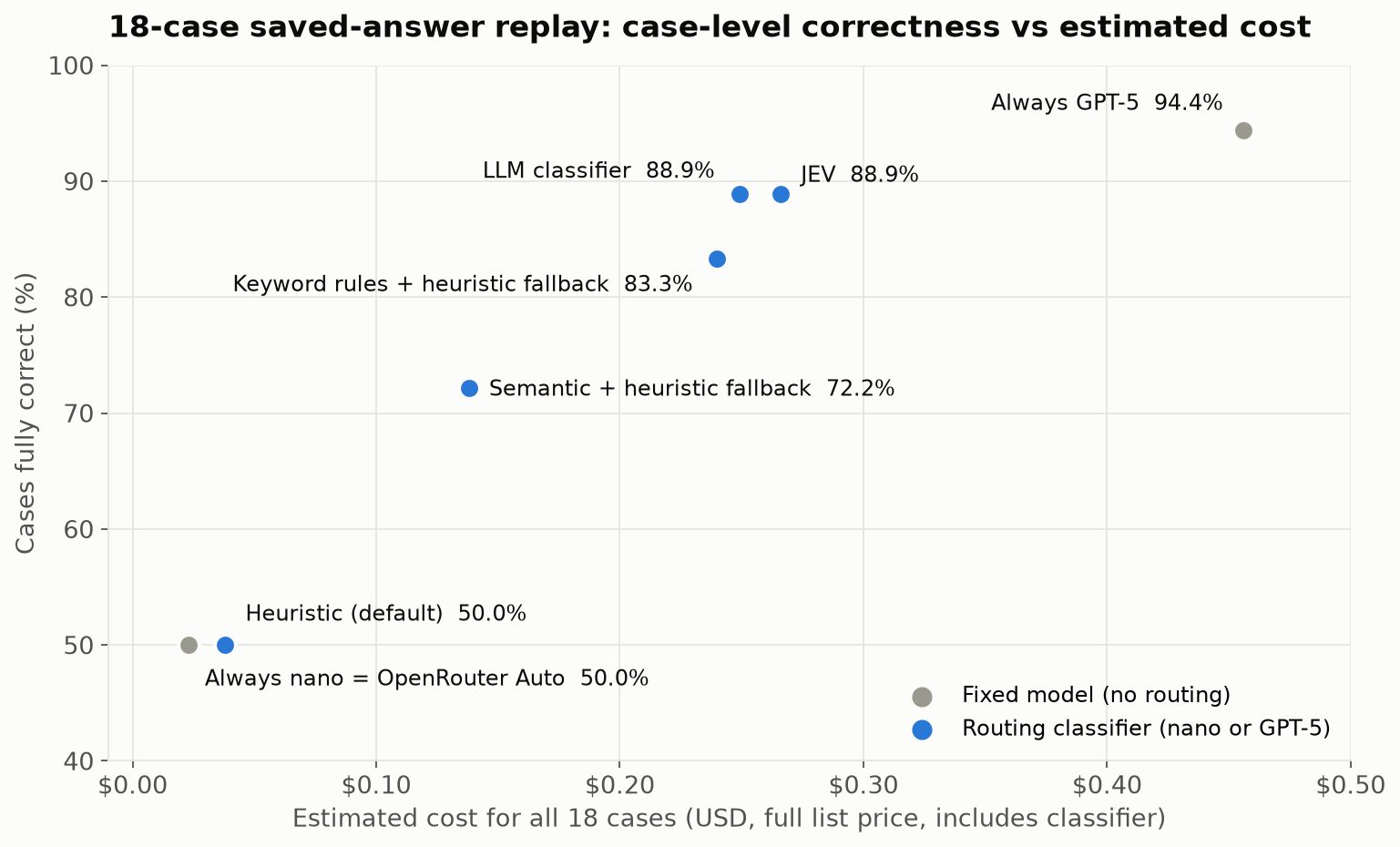
Here is how each approach did on the same 18 cases. Costs are replay estimates for all 18 cases at full list price, and they include the classifier’s own cost. The keyword and semantic rows include their heuristic fallback.

ApproachCases correct / partial / incorrectFully correctnano / GPT-5 picksEstimated costSaving vs always GPT-5
Always GPT-5 nano9 / 7 / 250.0%18 / 0$0.02394.9%
Always GPT-517 / 1 / 094.4%0 / 18$0.456—
Keyword rules15 / 2 / 183.3%8 / 10$0.24047.4%
Heuristic (default)9 / 7 / 250.0%17 / 1$0.03891.7%
Semantic similarity13 / 4 / 172.2%13 / 5$0.13869.8%
LLM classifier16 / 1 / 188.9%9 / 9$0.24945.3%
JEV16 / 1 / 188.9%8 / 10$0.26641.7%
OpenRouter Auto (low and medium)9 / 7 / 250.0%18 / 0$0.02394.9%
Scatter plot titled "18-case saved-answer replay: case-level correctness vs estimated cost". Always GPT-5 is top right at 94.4% and $0.456. The LLM classifier and JEV sit at 88.9% around $0.25 to $0.27, keyword rules with heuristic fallback at 83.3% and $0.240, semantic similarity with heuristic fallback at 72.2% and $0.138. The default heuristic, always nano and OpenRouter Auto all sit at 50% near $0.02 to $0.04.
On these 18 cases, classifiers written for the domain came closest to GPT-5’s case-level correctness at about half its estimated cost.

On this tested set:

  • The domain-aware classifiers did better than the generic ones. The LLM classifier and JEV share one domain-aware routing rubric. They kept 16 of GPT-5’s 17 fully correct cases at 55–58% of its estimated cost. The default heuristic and the restricted OpenRouter configuration selected nano almost every time and scored the same as nano alone.
  • Two short keyword lists got surprisingly close: 83.3% against 88.9%, at similar cost and with no model call.
  • Separate the classifier’s cost from the route’s cost. JEV’s 18 classification calls cost less than the LLM classifier’s (about $0.0038 versus $0.0054), and each decision was faster (about 0.7 s versus 2.7 s). Its route still cost more overall, because JEV selected GPT-5 for 10 cases against 9. The extra one was a case nano had already answered correctly.
  • Semantic matching depends on its examples. 10 of 18 cases matched no example closely enough and fell back to the heuristic. In the separately versioned refinement, I added more examples: fallbacks dropped to 6, but correctness did not improve and cost went up.
  • Routing did not outperform fixed GPT-5 here. That isn’t a law. Routing can beat the best fixed model when different models succeed on different cases. In this pair, GPT-5 was also right on every case where nano was right, so there was nothing for routing to gain over GPT-5 alone.

Right vs Wrong: Three Examples

Averages hide the interesting part, so here are three cases in detail.

1. A short question isn’t a simple question. “Why has Cedar not been paid for order-1?” is only eight words, and the default heuristic scored it as simple and sent it to nano. The real answer needs the payout records: the seller’s payout had failed because of a provider timeout. Nano’s answer did not mention the timeout and was graded partial. GPT-5 identified the recorded provider timeout and was correct. The keyword rules (“why”), the LLM classifier and JEV all sent this question to GPT-5. Generic signals measure how a question looks; domain-aware ones try to measure what answering it takes.

2. Two identical questions, routed differently. Two questions differed only in the order ID: “Explain the refund history for ord-6f3604a5fe.” and “Explain the refund history for ord-aaa1768930.” In the refined semantic version, the first scored 0.529 and the second 0.493 against the closest example, on opposite sides of the 0.5 threshold.

  • The first went to GPT-5, although nano’s answer to it was already fully correct. That was wasted cost.
  • The second fell back to the heuristic and went to nano, whose answer was partial while GPT-5’s was correct. That was lost accuracy.

It was wrong in both directions, because of an order ID. Similarity thresholds can be sensitive to details that don’t change the task.

3. A keyword list is only as good as its coverage. “After returning one Canvas Weekender, what remains payable to Cedar?” is a money calculation: take the seller’s share of the sale, then adjust for the refunded item and the fee. Its wording (“returning”, “payable”) wasn’t in either keyword list, so it fell back to the heuristic and went to nano. Nano’s answer was partial; GPT-5 computed the correct amount, ₹2,249.10. Rules are cheap and transparent, but this gap led to a routing mistake. A fallback can sometimes still choose correctly; here it didn’t.

Lessons Learned

Domain-aware configurations did better on this set. Two keyword lists reached 83.3%, versus 88.9% for the LLM classifier and JEV. That makes simple rules a useful baseline, with their coverage gaps tested explicitly.

The LLM classifier and JEV agreed on 17 of 18 choices. JEV was faster and cheaper per decision, but agreement does not establish which part of the setup caused the benefit. Separate classifier cost from selected-model cost: a cheap classifier can still produce an expensive route by choosing GPT-5 more often.

A Checklist for Choosing a Classifier

  1. Shortlist models on benchmarks, domain fit, cost and latency, from approved providers that support your agent’s needs.
  2. Run evals on your golden set to narrow the shortlist. Then fix the pool and pin the versions.
  3. Weigh cost savings against accuracy. If the cheaper model meets your accuracy bar, use it. If only the stronger one does and its cost is acceptable, use it. Route only when routing saves meaningful cost while keeping accuracy within your bar.
  4. Design the classification. Choose labels that matter for your traffic and map them to models. Start with keyword rules, then try semantic or LLM-based classifiers built from real user journeys, not from test questions. Compare them on the same golden set, and look at both classifier cost and route cost.

Part 2 adds the remaining steps: choosing the scope on real conversations, and validating before you deploy.

Limits and What’s Next

This was a small study, and I would not treat it as a benchmark:

  • Sample size: 18 cases (20 answer turns per model), one run each.
  • Grading: the earlier calibrated judge, existing accepted grades, and an LLM reviewer with my adjudication of borderline cases.
  • Tuning: the rules, examples and prompts were written by someone who knew the test cases.
  • Costs: replay estimates at full list price.

The point is the process, not the percentages. Next, I want to:

  • test on fresh held-out cases, with repeated runs
  • add a middle-tier model
  • try routers I haven’t tested yet: Not Diamond, which learns from your graded data; Aurelio’s semantic-router; RouteLLM; Arch-Router; and the cloud platforms’ own model routers

Acknowledgements

This post was written with the help of Claude Opus 5.5 in Claude Code, which also helped me research the routing landscape and plan the experiments. The application and experiments were built and run with GPT-6 Astra, which also reviewed answers against the expected results. Claude Opus 5.5 served as the calibrated LLM judge in the earlier model comparison.

References

This Series

Earlier Posts

Routing Tools

For Future Work

7 Common Misconceptions When Choosing an AI Model

Choosing an AI model often appears straightforward: compare the leaderboard, check the token price, look at the context window, and select the winner.

In production, it is rarely that simple.

One resource I regularly use is Artificial Analysis, which compares models across intelligence, speed, and cost per task. For an actual product, I translate this into three broad dimensions:

  • Intelligence for the capabilities my system needs
  • End-to-end latency
  • Cost per successful task

Even these dimensions cannot be evaluated in isolation. A model only becomes useful when it is placed inside a system with prompts, context, tools, validation, recovery mechanisms, and real users.

Here are seven common misconceptions I have seen people make when choosing an AI model.

The benchmark figures in this article reflect published results available in August 2026 and may change as evaluations and models are updated.

1. At similar intelligence, a lower token price means a cheaper model

Token price and task cost are not the same thing.

Consider Kimi K3 and GPT-5.6 Sol. Kimi K3’s output-token price was $15 per million tokens, compared with $30 for GPT-5.6 Sol.

Based on the headline price, Kimi K3 appeared to be 50% cheaper.

However, Artificial Analysis estimated their cost per Intelligence Index task at:

  • Kimi K3: $0.94
  • GPT-5.6 Sol: $1.04

That is only about a 10% difference in task cost.

The reason is token efficiency. A model with cheaper tokens may consume more reasoning and output tokens to complete the same work. Input tokens, cache reads and writes, and answer tokens also contribute to Artificial Analysis’s task-cost calculation.

In a production system, the calculation can become even broader. Retries, failed outputs, tool calls, validation steps, and human corrections can all affect the final cost.

The lesson is:

Among models that provide the required intelligence, compare cost per successful task—not merely cost per token.

Read the Kimi K3 analysis and the GPT-5.6 Sol analysis.

2. The benchmark leader is the best model

Intelligence is not one universal capability.

A model may excel at coding but perform less well in automation, knowledge work, tool use, visual reasoning, instruction following, or presentation.

Kimi K3 illustrates this difference. It scored 57 on the overall Artificial Analysis Intelligence Index, behind GPT-5.6 Sol at 59. But Kimi K3 took the leading position on AutomationBench-AA at launch, scoring 53%.

Which model was better?

It depended on the task.

There is another reason to treat public leaderboards carefully: benchmark contamination. Evaluation questions or closely related material may appear in training data, potentially inflating the reported performance. Models may also be repeatedly optimized against familiar public evaluations without those improvements generalizing to new workloads.

This does not make benchmarks useless. They remain valuable for discovery and shortlisting. But the final decision should come from private evaluations based on:

  • Your actual prompts and data
  • The capabilities your workflow depends on
  • Your tools and system instructions
  • Known failure conditions
  • Required output formats
  • Your definition of a successful task

Research on benchmark-data contamination explains why public scores may not always represent performance on unseen tasks.

The lesson is:

Use public benchmarks to create the shortlist. Use workload-specific evaluations to select the model.

3. Open-weight models are cheaper

Open-weight models can be cheaper, particularly when there is enough sustained demand to use the underlying infrastructure efficiently.

But self-hosting also introduces costs:

  • GPUs and infrastructure
  • Capacity planning and utilization
  • Deployment engineering
  • Monitoring and reliability
  • Security
  • Model upgrades
  • Operational support

Cost may not even be the strongest reason to choose an open-weight model.

Control, privacy, deployment flexibility, data residency, offline operation, and independence from a hosted provider may be more important.

A recent Hugging Face security incident provides a powerful example. During its investigation, Hugging Face needed to analyze real attack commands, exploit payloads, and command-and-control artifacts. The commercial models it initially tried blocked those requests through their safety guardrails.

Hugging Face instead ran the open-weight GLM 5.2 on its own infrastructure. This also ensured that attacker data and referenced credentials did not leave its environment.

Importantly, Hugging Face did not identify which model powered the attacker’s system. Its conclusion was about defensive readiness: organizations may need a capable model they can operate within their own environment when hosted services cannot support the workflow.

Read the Hugging Face security-incident disclosure.

The lesson is:

Choose open-weight models for control and operational independence—not because they are automatically cheaper.

4. Domain-specific knowledge requires fine-tuning

Fine-tuning is one way to build a domain-specific system. It is not the only way.

Depending on the problem, domain knowledge can be introduced through:

  • Detailed prompting
  • In-context examples
  • Retrieval-augmented generation
  • SQL or structured-data retrieval
  • APIs and tool calling
  • Knowledge graphs
  • Deterministic business rules
  • User or session memory
  • Fine-tuning
  • A combination of these approaches

A useful distinction is to separate knowledge from behavior.

If the information already exists in documents, databases, or business systems—and changes regularly—it may be better to retrieve it at runtime.

If the model must consistently learn a new task pattern, classification boundary, response structure, tool-selection behavior, or specialized style, fine-tuning may be appropriate.

AWS explored this using Amazon Nova models and AWS-specific questions. In its experiment, both RAG and fine-tuning improved the average evaluated response score by approximately 30% over the base Nova Lite model. Combining fine-tuning with RAG produced the strongest improvement.

This was a limited experiment involving ten domain-specific questions and LLM-based judges, so the percentages should not be treated as a universal rule. The valuable result is that the appropriate architecture depends on the problem—and sometimes the best answer is a combination.

Read the AWS comparison of RAG, fine-tuning, and a combined approach.

The lesson is:

Domain-specific knowledge does not automatically require fine-tuning. First identify whether you are solving a knowledge problem, a behavior problem, or both.

5. The biggest model is always the best model

The most capable frontier model may produce the strongest answer, but that does not mean it creates the best user experience.

For bounded tasks such as classification, extraction, autocomplete, short summarization, or on-device assistance, a smaller model may provide:

  • Lower latency
  • Better privacy
  • Offline availability
  • Predictable cost
  • Reduced network dependence
  • Sufficient intelligence for the task

Apple’s Foundation Models guidance provides a practical example. Apple positions its on-device model for lightweight, latency-sensitive, privacy-sensitive, and offline tasks. When an application needs deeper reasoning or a larger context window, it can use a more capable server model through Private Cloud Compute.

The point is not that smaller models are always faster or better. Their performance still depends on the device, optimization, task, and model architecture.

The principle is:

Use the smallest model that reliably meets the intelligence, latency, and operational requirements of the task.

Read Apple’s documentation on on-device Foundation Models and server-side intelligence through Private Cloud Compute.

6. The same context-window size means the same context understanding

A context window describes how much information a model can accept. It does not guarantee how effectively the model can use that information.

NVIDIA’s RULER benchmark makes this distinction concrete.

Qwen3-235B-A22B and Mistral-Large-2411 both advertise 128K-token context windows. At 128K on RULER, their reported scores were:

  • Qwen3-235B-A22B: 90.6
  • Mistral-Large-2411: 48.1

RULER classified Qwen’s effective context length as greater than 128K, while Mistral-Large-2411’s effective length was approximately 64K.

The input could fit inside both models. Their ability to use it was substantially different.

Long-context performance can depend on whether a model can:

  • Find relevant details
  • Preserve instructions from earlier in the prompt
  • Connect information across distant sections
  • Ignore irrelevant material
  • Perform aggregation and multi-hop reasoning

The exact RULER results are one benchmark rather than a universal ranking. They nevertheless demonstrate why advertised context capacity should not be treated as effective context intelligence.

Review the NVIDIA RULER benchmark and results.

The lesson is:

Context capacity tells us what a model can accept. Effective context tells us how much it can use reliably.

7. Using the best model produces the best product

Users do not interact with a model in isolation. They interact with a complete system.

The harness around a model may manage:

  • Prompt and context construction
  • File and repository access
  • Tools and permissions
  • State and memory
  • Validation
  • Retries and recovery
  • Stopping conditions
  • Output formatting
  • Observability and human escalation

A coding-agent benchmark called Claw-SWE-Bench demonstrates how much this can matter.

The researchers evaluated OpenClaw with the same GLM 5.1 model using two different adapters.

With a minimal coding adapter, it scored 19.1% Pass@1. With a full repository-editing adapter, it scored 73.4%.

The full adapter placed the agent in the correct repository workspace, allowed it to edit files directly, extracted the resulting patch from the repository state, removed unrelated artifacts, and produced the format required by the evaluator.

The model did not become more intelligent. The surrounding system became better at converting its intelligence into a valid result.

The dramatic difference partly reflects correct integration with the benchmark’s patch-submission contract, so it should not be interpreted as proof that every harness improvement will produce a fourfold gain. However, the study’s broader controlled comparisons also found meaningful performance differences when the model was held fixed and the harness changed.

Read the Claw-SWE-Bench paper.

The lesson is:

Model intelligence is potential. The harness determines how effectively that potential becomes completed work.

A more practical model-selection process

Instead of asking, “Which model is best?”, start with a more specific set of questions:

  1. What intelligence does this workload require?
  2. Which failures are unacceptable?
  3. What end-to-end latency can users tolerate?
  4. What is the cost per successful task?
  5. How effectively does the model use the context we provide?
  6. Does the model work reliably with our tools and harness?
  7. What privacy, deployment, and operational controls do we need?
  8. How does it perform on our own evaluation set?

The best model is rarely the one with the most impressive number in a single column.

It is the model—and the surrounding system—that delivers the required intelligence, latency, reliability, control, and task economics for the application being built.

What misconceptions or unexpected quirks have you encountered while selecting models for production?