Tag Archives: A2A

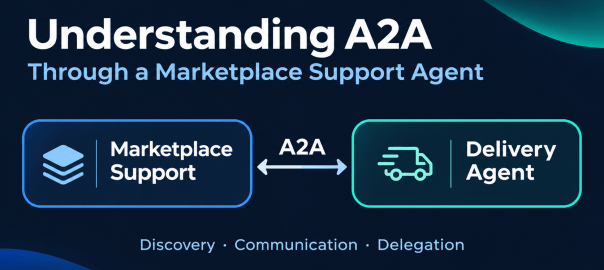
Understanding A2A through a marketplace support agent communicating with a separate delivery agent.

Understanding A2A Through a Marketplace Support Agent

Objective

Agent2Agent (A2A) is an open standard for discovering what an agent offers and for communication and task delegation between agents. Originally developed by Google, it is now a project of the Linux Foundation’s Agentic AI Foundation.

I wanted to understand A2A through a familiar application: a marketplace with buyers, sellers, orders, shipments and a support assistant. The goal is to explain what changes when I expose that assistant through A2A, then let it ask a separate delivery agent for help.

In this blog, I cover what A2A is, when to use it, how it compares with MCP and other multi-agent approaches, and how its protocol architecture works. I then walk through two marketplace use cases: exposing the support agent through A2A, and letting support talk to a separate delivery agent through A2A.

What Is A2A?

A2A provides a standard way to discover what an agent can do, ask it to do work and receive the result, without needing to know how the agent is built.

The caller can be another agent, an application or a script. It does not need to use the same model, framework or platform as the agent it calls.

This matters in enterprises that use agents from different providers and platforms. Ordinary APIs can connect these systems, but each integration may use a different contract. A2A provides a common way to describe agent capabilities and exchange requests and results across systems that support it. A2A overview

For example, a marketplace support agent can ask a delivery agent to investigate a delayed shipment. The delivery agent returns its findings, and support uses them to answer the customer. Each agent keeps its own implementation; A2A standardizes their interaction.

A2A And MCP

A2A standardizes interaction with an agent. MCP standardizes interaction between an agent and its tools and resources. A2A and MCP

To understand an MCP tool, look at its name, what it does, the input parameters it accepts and the output it returns. MCP tools

A2A describes an agent’s skills at the level of business work, such as investigating why a delivery is delayed. The caller asks for that outcome, and the agent decides how to carry out the investigation. A skill description is not a callable function signature.

For this marketplace, the actual MCP tool and A2A skill look like this:

Detail MCP Tool A2A Agent Skill
Name get_order_history Investigate marketplace records (marketplace-investigation)
What it does Reads order-related records and their event history. Investigates order, shipment, return, refund and payout questions.
Input / request order_id: string. Example: order-2. A message, such as: “Why has the seller not been paid for order-2?”
Output / result current_records and event_timeline; each contains rows, columns and evidence metadata. A Task containing a Support answer artifact: an explanation with supporting evidence.

The protocols can be used together. An agent can receive work through A2A and use MCP to access the tools it needs. A2A carries the request to the agent; MCP carries its tool calls.

A2A Vs. Other Multi-Agent Approaches

A2A is useful when connecting agents across different teams, platforms or providers that need a common interface. This can also apply within one organization when teams manage their agents independently.

Within the same team or application, agents can often coordinate through framework handoffs, function calls, APIs or queues. Multiple agents do not, by themselves, require A2A; it may add unnecessary protocol handling when both sides already share a contract.

In our marketplace example, delivery represents a separate provider with its own agent and tools. A2A lets support ask that provider to investigate a shipment while each side keeps its internal implementation. The delivery provider is simulated in this example.

The Protocol Architecture
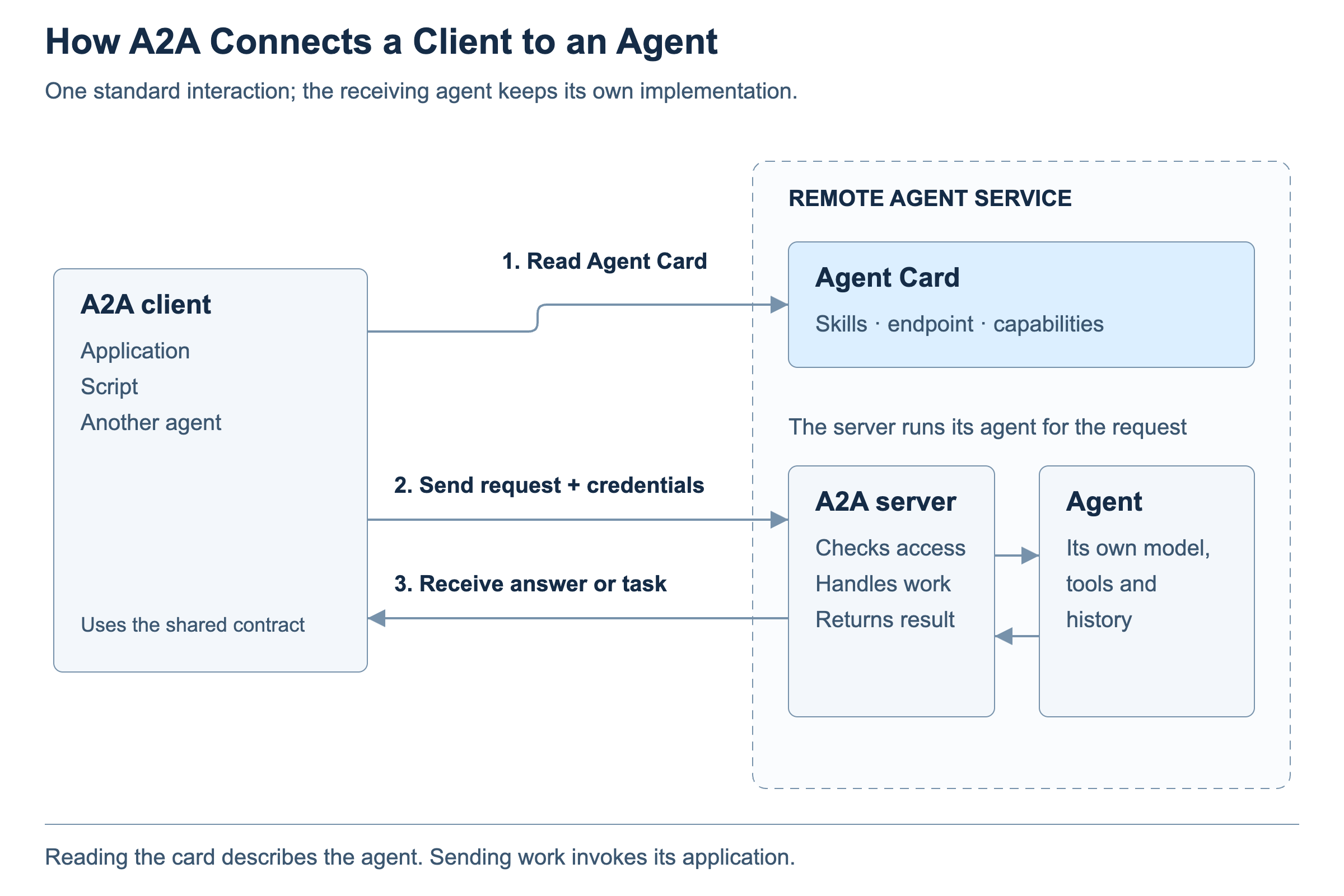
A client reads the Agent Card, sends an authorized request to the A2A server and receives an answer or task; the agent keeps its internal model, tools and history
The client reads the card to choose an interface, sends an authorized request and receives an answer or task. The agent’s internals stay behind the server.

The Agent Card describes the agent’s skills (business work it offers), endpoint (the address to call), and capabilities (supported communication features, such as streaming and push notifications).

The A2A server checks access, associates the message with the right context, creates or continues a task when needed, and invokes the agent runtime. The application supplies the relevant conversation history. The server then returns the answer or task result.

The client reads the card and uses supported options. For an ordinary request, it chooses a blocking call (wait for the result or a request for input) or a non-blocking call (return a task reference and check later). Execution modes

Our Marketplace Implementation

The two A2A connections in our marketplace use cases use these settings.

Setting Marketplace A2A agent Delivery A2A agent
A2A client Browser application Marketplace backend
Authentication Marketplace session + CSRF Preconfigured bearer token
Capabilities Streaming: off; push notifications: off Streaming: off; push notifications: off
Skills Investigate marketplace records; investigate linked delivery shipments (Multi-agent mode) Investigate delivery; simulate shipment operations
Client call Blocking Blocking

Discovery

Discovery means finding which agents are available and what they can do, within one platform or across several platforms.

A2A facilitates discovery through a standard Agent Card and a well-known location for retrieving it. It does not provide a universal search service or prescribe a standard registry API. Clients commonly use three approaches: Agent discovery

  • Known domain: retrieve the Agent Card from its well-known location.
  • Curated registry: search a catalog that returns matching cards or their locations.
  • Direct configuration: supply the card or its address in the application configuration.

Each separately exposed A2A agent has its own card; it may use other agents internally. Multi-agent routing

Here is an excerpt from the marketplace support Agent Card. Only selected fields are shown; authentication requirements and other fields are omitted:

{
  "name": "Marketplace Support",
  "supportedInterfaces": [{
    "url": "http://127.0.0.1:5179/api/a2a/support",
    "protocolBinding": "JSONRPC", "protocolVersion": "1.0"
  }],
  "capabilities": {"streaming": false, "pushNotifications": false},
  "skills": [
    {"id": "marketplace-investigation",
     "name": "Investigate marketplace records"},
    {"id": "delivery-investigation",
     "name": "Investigate linked delivery shipments"}
  ]
}

Use Case One: Support Agent Exposed Using A2A

This experiment changes how a question reaches marketplace support. In the ordinary flow, the application uses its custom backend API. In Marketplace A2A mode, an A2A client sends the question to the A2A adapter. Both paths reach the same support agent. The code is in the Agentic Marketplace GitHub repository.
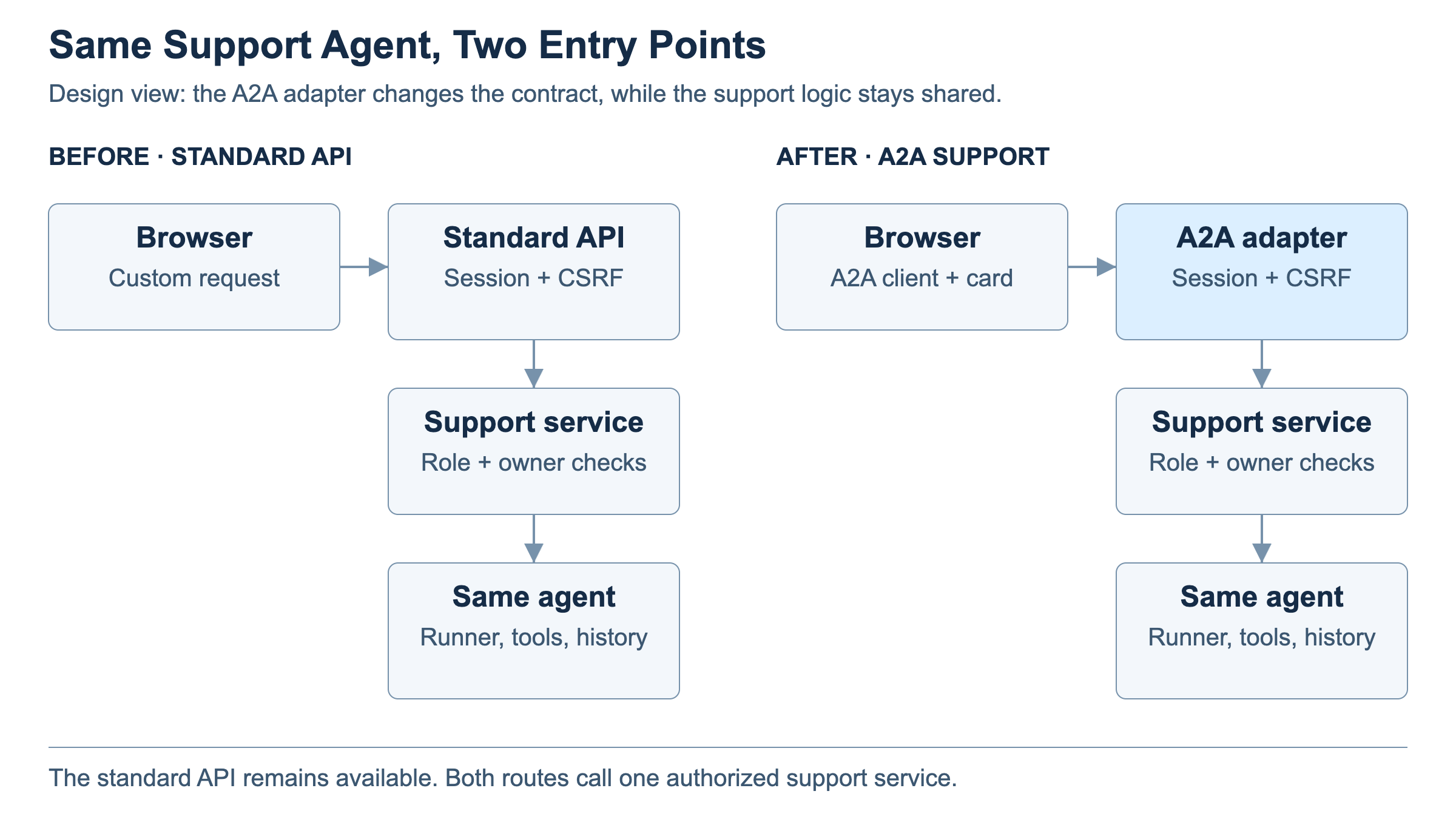
Side-by-side design of the existing application API and new A2A adapter reaching the same authorized support service
The external contract changes. The support model, instructions, tools and conversation history are shared.

Two application changes make this possible:

Browser: add an A2A client that reads the configured Agent Card and sends support questions as A2A messages. In this demo, View Agent Card fetches the card on demand; the message destination is configured.

Backend: add an A2A adapter that validates the request and calls the existing support service, run_support_question. The service starts the same agent loop. The adapter packages the returned answer as an A2A task result.
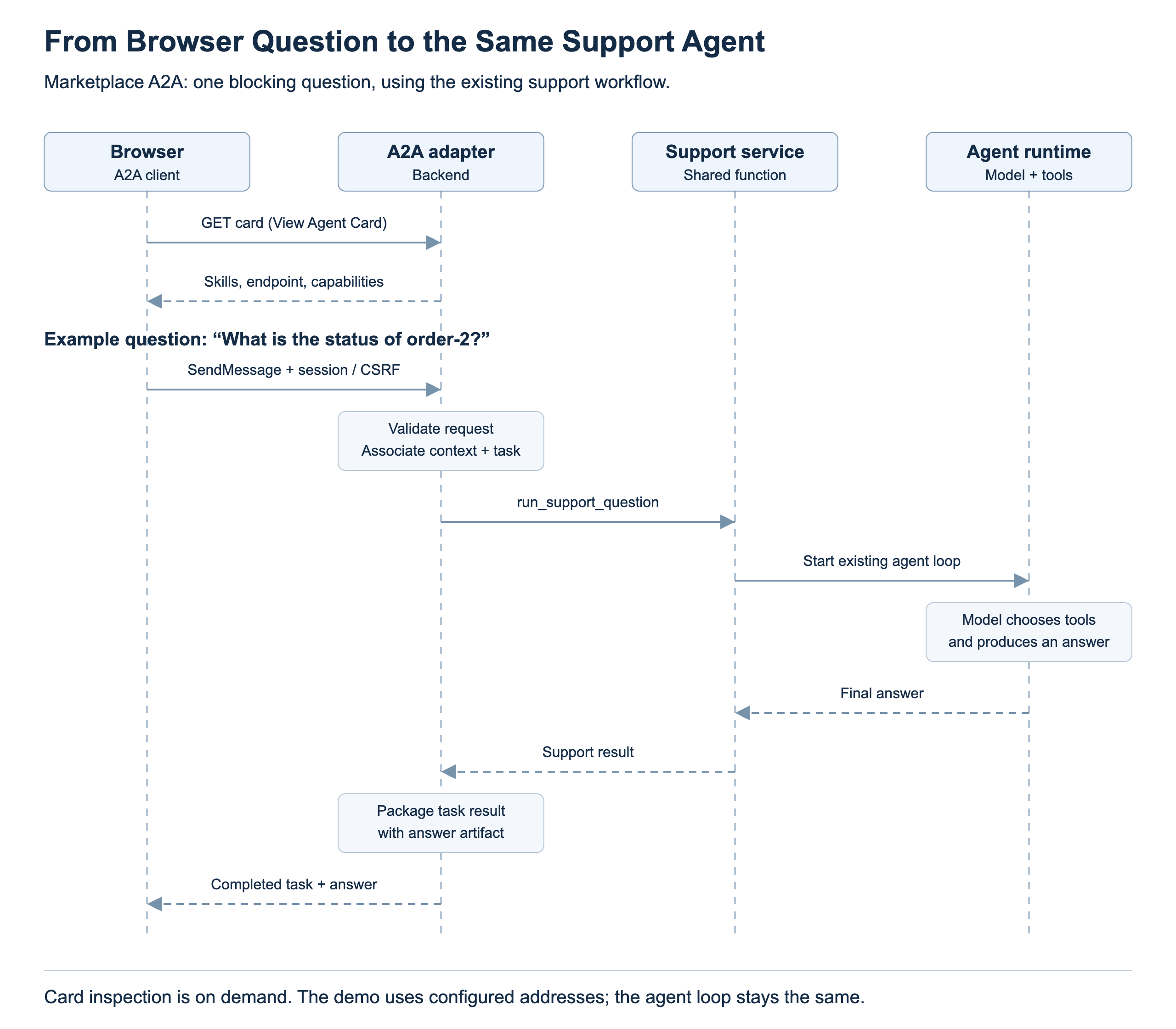
The browser reads the Agent Card on demand and sends a support question through the A2A adapter to the existing support service and agent runtime
The browser sends a support question. The adapter reaches the existing support service, and the same agent chooses which tools to use.

Use Case Two: Support Agent Talking To Delivery Agent Using A2A

In the original marketplace, the seller dispatches a shipment and later marks it delivered. The marketplace records these updates, but it has no delivery-provider integration or detailed carrier tracking.

For the second use case, I model delivery as a separate provider’s agent rather than another agent inside the marketplace. A2A gives marketplace support a standard way to ask that provider for delivery information while the provider owns its records and investigation. Our demo simulates this separate service. A real provider could connect it to carrier systems; those integrations are outside this experiment.

When Support Delegates

Marketplace support delegates the question. In Multi-agent A2A mode, the support model can request an investigation such as “Why is this shipment delayed?” The backend sends that question and the shipment reference to the delivery agent through A2A. Basic order-status questions stay in the marketplace.

The delivery agent owns these two read tools:

  • Get shipment status: read the current delivery state and schedule evidence.

  • Get delivery problem reason: read recorded exception details and supporting events.

Inside the delivery agent, its own model checks shipment status first and calls the problem-reason tool when further explanation is needed. The delivery agent returns its findings through A2A. Marketplace support uses those findings to answer the user.
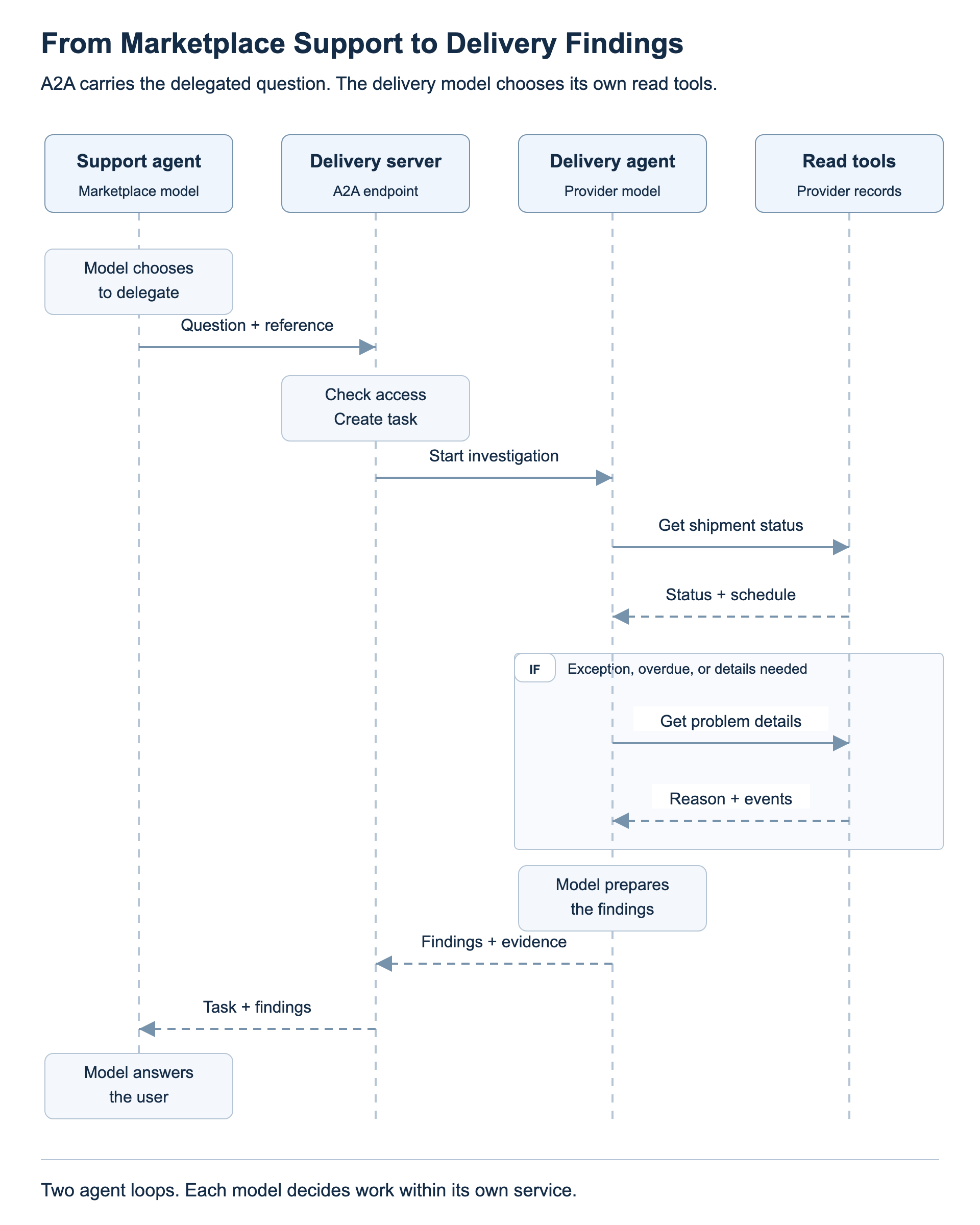
Sequence of marketplace support delegating through A2A, the delivery agent checking status and optional problem details, and findings returning to support
The support model chooses delegation; the delivery model investigates its own recorded evidence.

How To Test The Use Cases

Use the Agentic Marketplace application from the GitHub repository and select its Test workspace. Follow the repository’s A2A setup and run guide, then sign in with the demo accounts. Run each comparison in a new support conversation so an earlier answer does not supply the evidence.

Use Case One: Compare The Two Entry Points

  1. In Support, open Workspace options and choose Reset to defaults. Ask for the status of an existing order through the Standard API path. Note the order number.

  2. Under A2A, select Marketplace A2A. Use View Agent Card to inspect the support agent’s skills, endpoint and capabilities.

  3. Start a new conversation and ask the same question about the same order. The entry point changes; the support agent and its tools remain the same.

Use Case Two: Investigate Delivery

  1. Under A2A, select Multi-agent A2A and set Delivery scenario to Normal transit — on schedule before placing a new order.

  2. Log in as a buyer, place the order and note its number. Log in as the seller and choose Dispatch. Leave Deliver for later.

  3. Return to Support. Ask for basic order status, then ask explicitly for delivery details for that order in a new conversation. Basic status comes from marketplace records; detailed tracking can call the delivery agent.

  4. Repeat with Depot exception selected before another new purchase. Ask for delivery details for that order to see the recorded depot problem. Changing the workspace scenario does not change an existing order’s saved scenario.

Marketplace shipment status moves from pending to dispatched to delivered. At dispatch, the simulated provider records in transit for the normal scenario or exception for the depot scenario; marketplace still shows dispatched in both cases. The seller’s later Deliver action completes the provider simulation and updates marketplace. An exception does not necessarily mean the shipment is overdue or that the A2A task failed.

What To Look For In Langfuse

Open Langfuse from the workspace, select a recent time range and find the trace for your support question.

  • Use case one: compare Standard API request with A2A marketplace request. The outer request span differs; the support investigation and model/tool workflow underneath remain the same. Individual tool choices and wording can vary.

  • Use case two: look for the delivery investigation, the marketplace’s outbound A2A call and the delivery service’s inbound request. The delivery agent runs its own model, reads shipment status and requests problem details when needed. Its findings return to marketplace support.

Dispatch also produces an outbound/inbound A2A pair for booking the shipment. That booking path does not run the delivery investigator model; distinguish it from the later support investigation.

Lessons Learned

  • A2A is an interface around an agent. The first use case can preserve the existing reasoning loop while changing how the caller describes and tracks work.
  • Discovery needs a starting point. A card tells me about a candidate service after a known domain, registry or configuration leads me there.
  • Skills, protocol features and tools answer different questions. Keeping them separate makes both the card viewer and the runtime easier to understand.
  • Keep responsibilities clear. Marketplace answers basic status; delivery provides detailed tracking when the mode enables it and the question calls for it.

Acknowledgements

Codex helped research the protocol, prepare this draft and create the design diagrams. The coding work produced the implementation, tests and local browser/model artifacts reviewed here.

References

Protocol

Runtime And Code

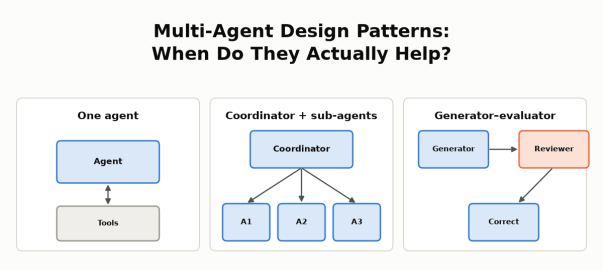
Multi-Agent Design Patterns: When Do They Actually Help? Three small diagrams: one agent with tools; a coordinator with three sub-agents; a generator, reviewer and correction flow.

Multi-Agent Design Patterns: When Do They Actually Help?

Objective

The goal of this post is to show, with real numbers from a working system, how to decide whether an agentic system should be a single agent or multiple agents working together.

I’ve read about cases where multi-agent systems helped, for example:

  • Anthropic’s research system: a lead agent sends several research agents to investigate different parts of a question in parallel, then combines what they find.
  • Cognition’s reviewer pattern: a second agent reviews the first agent’s work and sends back what needs fixing.
  • LangChain’s language comparison: to compare Python, JavaScript and Rust for web development, a separate agent researches each language and a coordinator combines the results.
  • OpenAI’s Navier–Stokes proof: thousands of agents explored different approaches to a long-open math problem in parallel, sharing their best findings across groups.

I wanted to know whether any of these patterns would help my own marketplace support agent: an AI agent that answers support staff’s questions about orders, payouts, refunds and policies in a small simulated marketplace, using read-only SQL and policy search. More details are in the use case below. This post walks through the patterns, how I looked for one that fits a support agent, the two designs I tested, and what I found.

On my agent:

  • Splitting the work across seller agents did not help. A coordinator agent with three seller agents gave the same answers as one agent with parallel tools, but took longer and cost about 2.5× more.
  • A reviewer agent did help, but only when it was a stronger model. GPT-5.4 reviewing GPT-5 nano’s answers removed every incorrect answer at about half the cost of running GPT-5.4 alone. When nano reviewed nano, nothing improved.

The lesson: As per my understanding, multi-agent helps in two situations below, there can be more.

  • The work splits into independent pieces that can run in parallel, each with its own context. When the steps are mostly sequential, or one query already covers the work, extra agents don’t help.
  • A second agent can see what the first one can’t.

Agent Design Patterns

Before comparing design patterns, it helps to ask one question: who controls the next step, the code or the model?

  • Workflow: in a workflow, code defines the path.
  • Agent: an agent’s model decides the next step, such as which tool to call.
  • Combinations: real systems often combine code-controlled and model-controlled steps. For example, code fixes the order of the steps, while agents decide how to carry out each one.

More model calls, different models or parallel tool calls don’t by themselves make a system multi-agent.

These are the patterns I considered:

PatternTypeHow it flowsExample
Workflow (chaining, routing, parallel steps)WorkflowCode defines each stepMy model-routing posts: classify the question, then send it to a cheap or strong model
Single agent with toolsAgentOne model loop decides which tool to call nextMy support agent: catalog → SQL → policy search → answer
Coordinator with sub-agentsMulti-agentEach agent works autonomously: a coordinator agent splits the task, sub-agents work in parallel in their own contexts, and the coordinator combines the resultsAnthropic’s research system; LangChain’s language comparison
Generator–evaluatorWorkflow + agentsCode fixes the order (draft → review → revise if needed); a generator agent drafts and an evaluator agent checksCognition’s reviewer; Anthropic’s verification subagent
HandoffWorkflow + agentsCode defines which specialist agents exist and who can hand off to whom; an agent decides when to hand the conversation over, and the specialist takes overA triage agent hands a refund request to a refunds agent, which continues with the user
Independent agents across systemsMulti-agent across organizationsAgents owned by different organizations exchange tasks and results over a protocol such as A2AA marketplace’s support agent asks a payment provider’s agent to investigate a failed payout

Why add agents at all? Anthropic’s January 2026 post on when to use multi-agent systems gives three reasons:

  • context protection: keep irrelevant detail out of an agent’s context
  • parallelization: investigate independent parts at the same time
  • specialization: focused tools and prompts

It also warns that multi-agent systems typically use 3–10× more tokens, and advises starting with the simplest approach that works.

Three examples show when splitting pays off:

  • Anthropic’s research system: a lead agent breaks a research question into parts, several research agents search in parallel, each in its own context, and the lead agent combines their findings.
  • OpenAI’s Navier–Stokes proof: on the order of 10,000 agents worked in groups, each trying a different variant or approach, and Codex shared the best findings across groups. They reached a proposed proof of the 90-year-old Millennium Prize problem in 88 hours, using about 130 billion output tokens, and a separate Lean step verified it. Mathematicians have not yet accepted it.
  • LangChain’s language comparison: for “Compare Python, JavaScript, and Rust for web development”, a coordinator sends each language to its own agent, which researches it with about 2,000 tokens of language-specific material. The coordinator then combines the three results.
    • Separate agents: 5 model calls and about 9K tokens.
    • Handoffs: passing control from one agent to the next takes 7+ calls and about 14K tokens, because the steps run one after another.
    • One agent holding all three languages’ material: about 15K tokens.

LangChain credits the 67% fewer tokens to “context isolation”.

All three have the same shape: independent pieces of work, each needing its own context, combined at the end. Cognition’s reviewer is a different idea: a second agent with fresh context checks the first agent’s work.

Not everyone finds that more agents help. Google’s research on scaling agent systems finds the benefit depends on how well the task decomposes, and a 2026 paper found single agents outperform multi-agent systems on multi-hop reasoning when both get the same thinking budget.

The Use Case

The agent is an internal customer support agent I built over a small simulated marketplace with buyers, sellers, orders, shipments, seller payouts, returns, refunds and versioned policies. Support staff ask it questions in plain English. It answers by calling read-only tools (a data catalog, SQL over the business data, order history and a policy-document search) and cites the evidence it used. It runs on the OpenAI Agents SDK behind a LiteLLM gateway.

I use two models: GPT-5 nano, the lower-cost model, and GPT-5.4, the stronger one. More background on the agent is in my model routing posts.

Looking for a Multi-Agent Fit

My first idea was a SQL agent and a RAG agent: one for the business data, one for the policy documents. It didn’t make sense.

  • The two are mostly sequential. The records SQL finds decide which policy to look up: which payout, which date, which return.
  • Combining contexts adds complexity. Splitting them means passing one agent’s findings to the other, then combining both into one answer, with nothing gained.
  • SQL and documents are tools, not separate jobs. One agent can use both.

The second idea looked more promising: one agent per seller. When payouts don’t go through, each seller can have different reasons: an item not yet delivered, a hold that hasn’t passed, an active return, a failed provider attempt. Investigating each seller separately looked like independent branches, the parallelization case. That became the first experiment.

The second experiment came from a different observation. In my earlier evaluations, nano’s wrong answers often had the right evidence available but drew the wrong conclusion. A second agent checking the work seemed worth testing.

Experiment 1: A Coordinator With Seller Agents

The task was a single investigation: “Investigate all sellers’ payouts, explain supported reasons, include paid and zero-due controls, and summarize unpaid totals by seller.” A fixed test dataset had 3 sellers and 11 payouts covering seven outcomes:

  • not delivered
  • under the 24-hour hold
  • active return
  • eligible but not yet released
  • failed provider attempt
  • fully refunded (nothing due)
  • paid

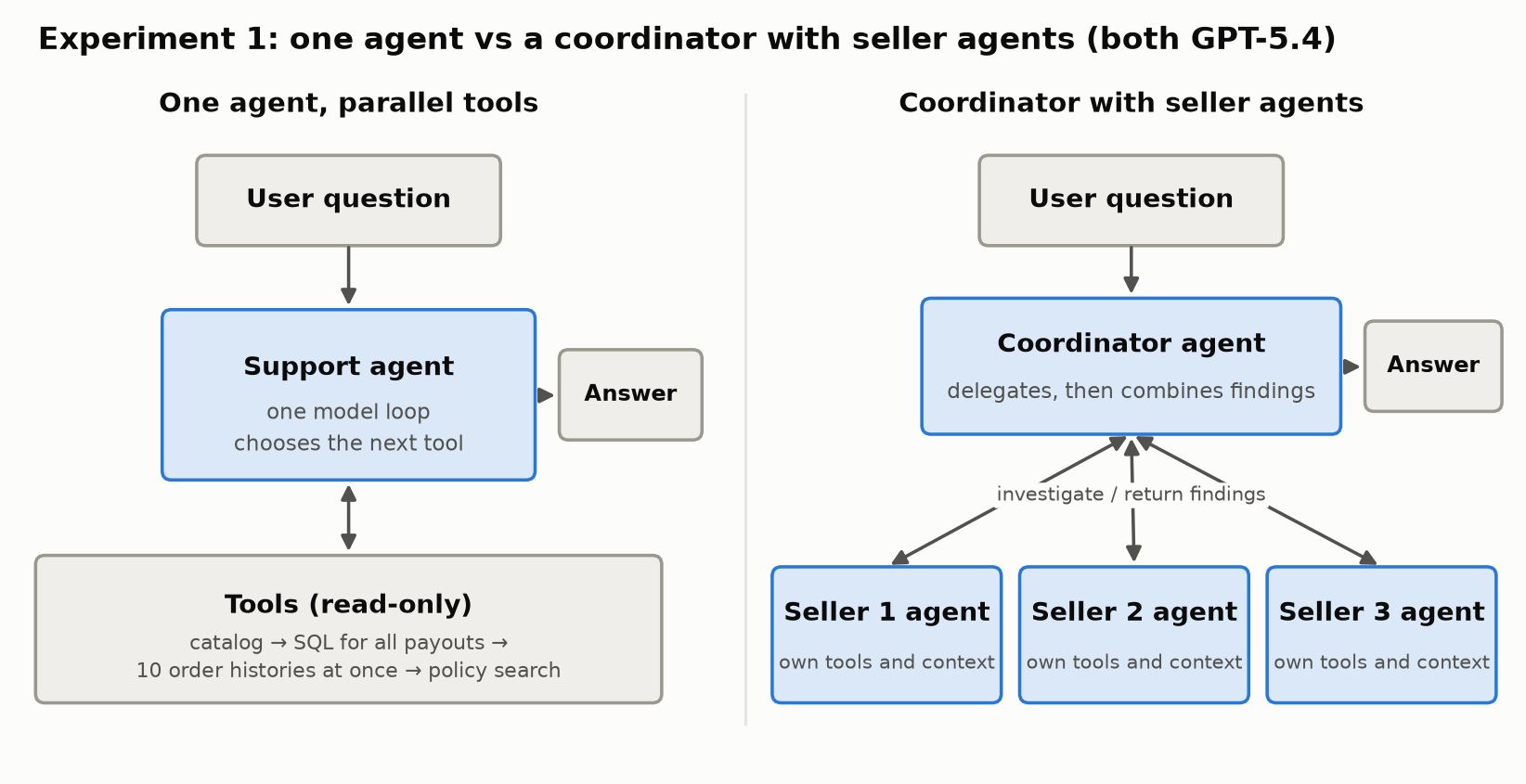
I compared two designs, both using GPT-5.4 and the same five read-only tools:

  • One agent with parallel tool calls allowed. This is not multi-agent: it’s a single agent that can run several tool calls at the same time.
  • A coordinator agent with three seller agents. Each seller agent has its own tool loop and context. The coordinator delegates, then combines their findings.
Two designs side by side. Left: one support agent, a single model loop that chooses the next tool, calls read-only tools: catalog, SQL for all payouts, ten order histories at once, then policy search, and returns the answer. Right: a coordinator agent receives the question, delegates to three seller agents that each have their own tools and context and return findings, then combines the findings into the answer.
The same investigation, done by one agent with parallel tools or by a coordinator with three seller agents.

Each design ran three times, in rotated order. An LLM reviewer checked every answer against the expected payouts, sellers and amounts. Here are the averages; one coordinator run did not complete, and its recorded usage is included.

DesignMean timeMean cost (cache-adjusted)Mean model requests
One agent, parallel tools82.0 s$0.1626.0
Coordinator + 3 seller agents108.1 s$0.40119.7

The answers were equally right on the business facts: every payout covered, the right seller and order, correct amounts and totals. The difference was time and cost. The coordinator design used about 3× the model requests and cost about 2.5× more.

The reasons are visible in the traces:

  • One query covered every seller. The single agent found all the payouts with one SQL query, so there was no heavy independent branch to hand off. Each seller’s investigation was small.
  • The single agent already worked in parallel. After finding the order IDs, it fetched 10 order histories at once in two of the three runs. Parallel tool calls gave concurrency without extra agents.
  • Sub-agents add overhead: each one repeats the instructions and catalog lookup, then packages its findings and evidence for the coordinator, which then has to combine them.

This is the opposite of LangChain’s language example. There, each language needs its own research and its own context; here, one query already held everything.

The limits matter. This was one task, three runs and three sellers, all under a common payout policy, and I didn’t give both designs equal budgets. With many more sellers, or seller-specific policies that need real independent investigation, sub-agents might pay off. Not shown here is the honest conclusion, not “sub-agents never help”.

Experiment 2: The Generator–Evaluator Pattern

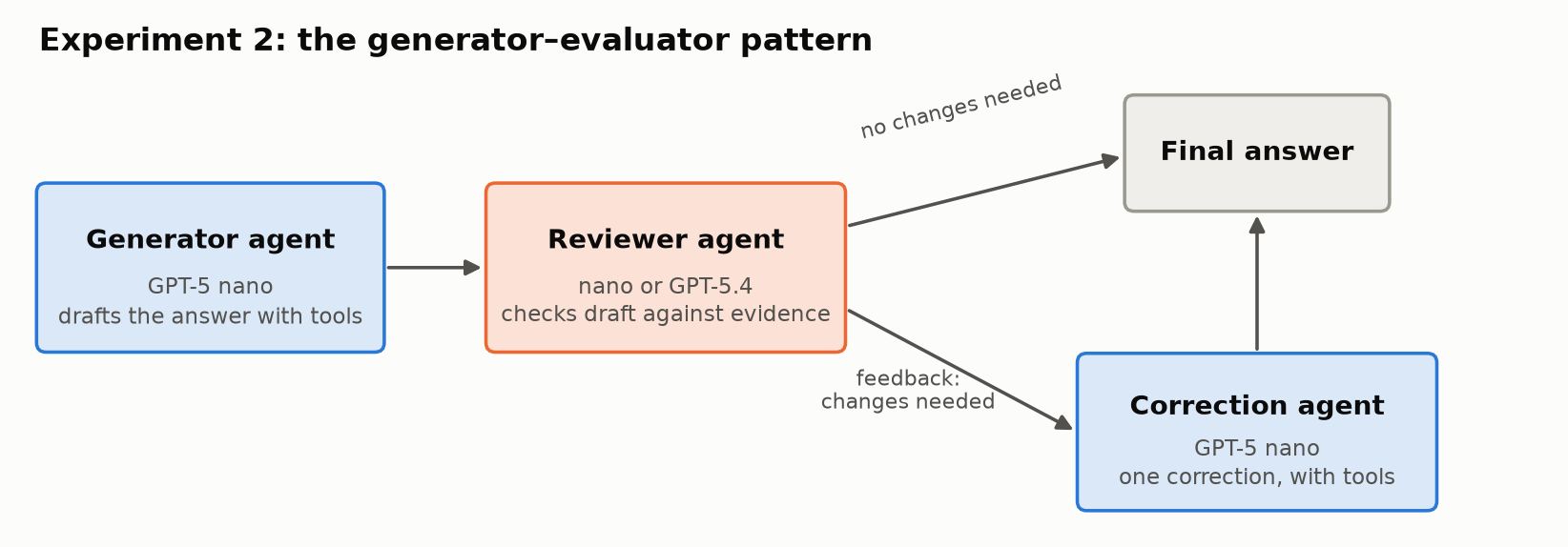
The second design adds a reviewer. Anthropic calls this pattern evaluator-optimizer; I’ll call it generator–evaluator.

  1. A generator agent (nano) drafts the answer with tools.
  2. A reviewer agent sees the question, the draft and the full evidence the generator used. It has no answer key, and in this experiment no tools. It returns “no changes needed” or specific feedback.
  3. If the reviewer flags problems, a correction agent (nano) revises the answer once, with tools available.

The application controls the order of the steps; the generator and correction agents run their own tool loops.

A left-to-right flow. A generator agent (GPT-5 nano) drafts the answer with tools and passes it to a reviewer agent (nano or GPT-5.4), which checks the draft against the evidence. If no changes are needed, the draft becomes the final answer. If changes are needed, feedback goes to a correction agent (GPT-5 nano), which makes one correction with tools and produces the final answer.
The generator–evaluator flow: draft, review, and at most one correction.

I ran it on the same 18 support cases I use for regression testing: order lookups, current and historical policy, payout eligibility, refund histories, reconciliation, an ambiguous name and a request the agent must refuse. Two cases are short follow-up conversations, giving 20 answers in total. An LLM reviewer graded every final answer against the expected results, separately from the reviewer agent’s own verdict. These grades are not human-adjudicated.

How it unfolded. I first ran it on 8 hard cases, with GPT-5.4 reviewing nano’s answers. Results moved from 3 correct / 3 partial / 2 incorrect to 5 / 3 / 0. It looked as if the pattern worked.

But was it the pattern, or a stronger model doing the reviewing? So I tested nano reviewing nano on the same 8 cases. It asked for no changes, and nothing improved. Then I ran both reviewers across all 18 cases:

DesignCorrect / partial / incorrectEstimated cost
One agent: nano11 / 4 / 3$0.037
Nano generator + nano reviewer11 / 4 / 3$0.053
Nano generator + GPT-5.4 reviewer14 / 4 / 0$0.582
One agent: GPT-5.417 / 1 / 0$1.210

Costs are model-usage estimates at uncached list prices, including nano’s drafts and the review and correction calls.

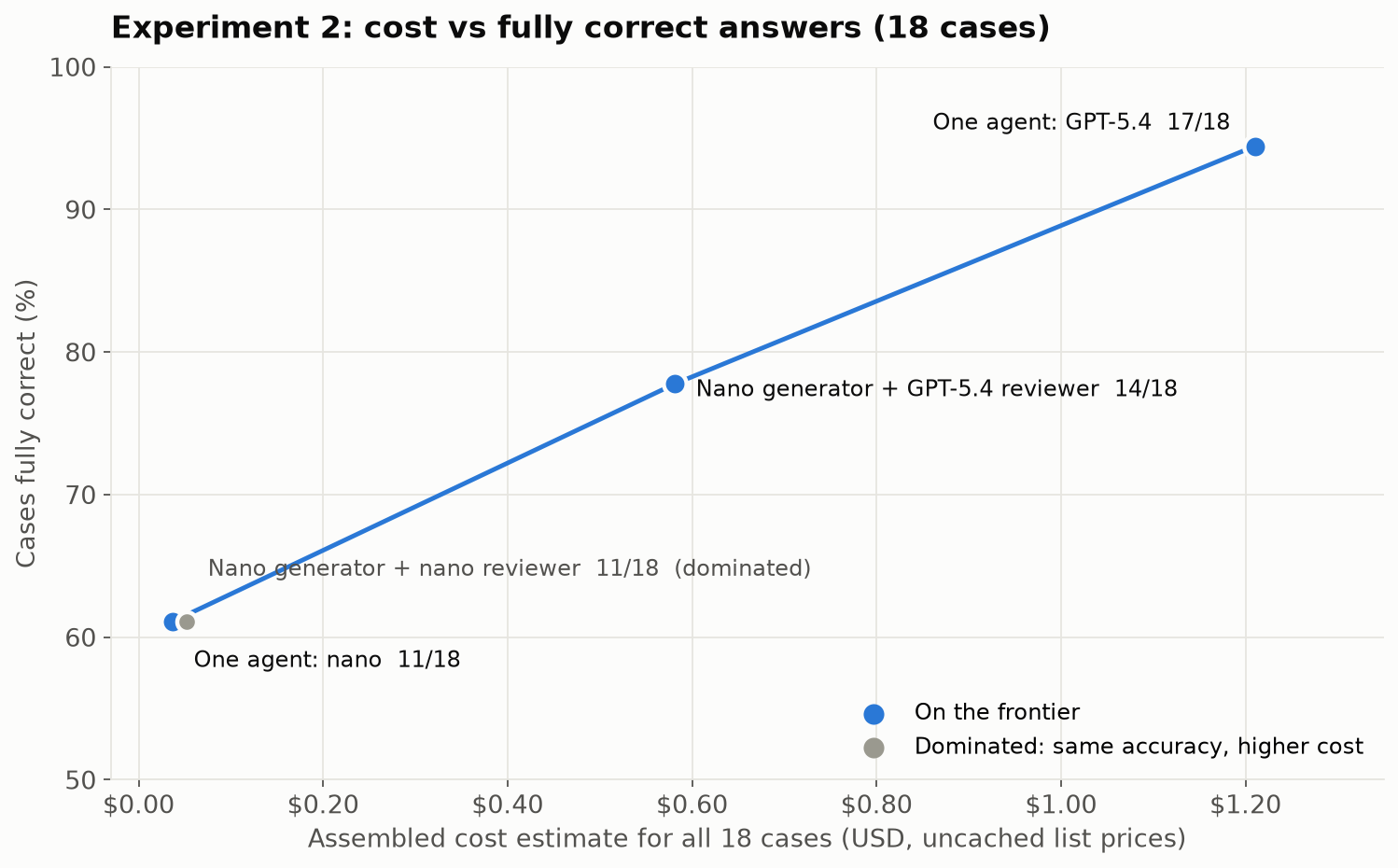
Scatter chart of cost against fully correct cases for the four designs. One agent nano: 11 of 18 at $0.037. Nano generator plus nano reviewer: 11 of 18 at $0.053, marked as dominated. Nano generator plus GPT-5.4 reviewer: 14 of 18 at $0.58. One agent GPT-5.4: 17 of 18 at $1.21. A line connects the three non-dominated designs.
Same-model review added cost without changing results. A stronger reviewer moved nano most of the way toward GPT-5.4 at about half its cost.

What the results show:

  • A reviewer can only catch what it can see. Across all 18 cases, nano as reviewer asked for three corrections, and none changed a grade. It shares the generator’s blind spots.
  • The stronger reviewer removed all three incorrect answers. Three answers became correct and one improved from incorrect to partial. The total came in about 52% below running GPT-5.4 alone, with three fewer fully correct answers.
  • Detection isn’t correction. GPT-5.4 asked for 13 corrections, and 4 answers improved. Several times nano was told what evidence was missing and still didn’t fetch it.
  • The gain comes from the reviewer’s capability. The pattern is how you spend that capability selectively: GPT-5.4 reads and judges nano’s work instead of doing all of it.

On a cost-versus-accuracy chart, nano reviewing nano is dominated: the same accuracy as nano alone, at higher cost. The useful choices are nano alone, nano with a GPT-5.4 reviewer, and GPT-5.4 alone. Which one is right depends on your accuracy bar and budget.

The limits: one pass over 18 known cases, and LLM-reviewer grades. This doesn’t show that self-review never works; it shows it didn’t work here.

When Multiple Agents Make Sense Across Systems

The experiments above looked at splitting one application’s work across agents. Multiple agents also make sense when the work crosses a boundary between systems, especially systems owned by different companies. The marketplace and a payment provider are two systems run by two different companies. The marketplace’s support agent could ask the provider’s agent to investigate a failed payout. Each side keeps its own tools, data and permissions, and they exchange only the task and the result.

That’s what the A2A (Agent2Agent) protocol is for: delegating work to an agent you don’t control. Google introduced it, and it’s now an open project under the Linux Foundation. Inside your own system, tools exposed through function calls or MCP are usually enough. I haven’t implemented A2A here, so I’m not claiming a measured benefit.

Lessons Learned

  • Look for independent branches, not tools. SQL and document search were mostly sequential, so separate agents would only have added a context-merging step.
  • One good query can beat a team. When a single bulk query covered every seller, sub-agents added time, cost and model calls without better answers.
  • Parallel tools give you concurrency without extra agents. The single agent fetched ten order histories at once, though it still had to find the orders first.
  • A reviewer is only as good as what it can see. Same-model review found nothing. A stronger reviewer removed every incorrect answer, which makes review a way to spend a strong model only where it matters.
  • Detection isn’t correction. Specific feedback helped most, but the correction agent didn’t always fetch the evidence it was told was missing.

A Checklist: Before You Add Multiple Agents

  1. Can one agent with the right tools, and parallel tool calls, do it?
  2. Are each agent’s task and context separate and isolated, or would the agents need each other’s details?
  3. Can the agents’ work run in parallel, or is it mostly sequential?
  4. Is one agent’s context actually overloaded? Measure it.
  5. For a reviewer: is it more capable than the generator on these errors? Test same-model review as a control.
  6. Compare against single-agent baselines on accuracy, cost, latency and failures.
  7. Across system boundaries, such as another team or another company, consider independent agents and A2A.

Limits

  • Both experiments are small: one investigation task with three runs, and 18 known cases with one pass.
  • Grades come from an LLM reviewer against expected answers, not human adjudication.
  • Costs are model-usage estimates, not invoices.

Summary

The lesson is simple: add multiple agents only for a reason you can name and measure. On my support agent, a coordinator with seller agents gave the same answers as one agent with parallel tools, at about 2.5× the cost, because one query already covered every seller. A reviewer agent helped only when it was stronger than the generator: GPT-5.4 reviewing nano removed every incorrect answer at about half the cost of GPT-5.4 alone, while nano reviewing nano changed nothing. Multi-agent pays off when the work splits into independent pieces that can run in parallel, each with its own context, or when a second agent can see what the first one can’t.

Acknowledgements

This post was written with the help of Claude Opus 5.5 in Claude Code, which also helped me research the multi-agent patterns and plan the experiments. The experiments were built and run with GPT-6 Astra, which also graded the answers against the expected results.

References

Patterns and Evidence

Earlier Posts