Objective
Agent2Agent (A2A) is an open standard for discovering what an agent offers and for communication and task delegation between agents. Originally developed by Google, it is now a project of the Linux Foundation’s Agentic AI Foundation.
I wanted to understand A2A through a familiar application: a marketplace with buyers, sellers, orders, shipments and a support assistant. The goal is to explain what changes when I expose that assistant through A2A, then let it ask a separate delivery agent for help.
In this blog, I cover what A2A is, when to use it, how it compares with MCP and other multi-agent approaches, and how its protocol architecture works. I then walk through two marketplace use cases: exposing the support agent through A2A, and letting support talk to a separate delivery agent through A2A.
What Is A2A?
A2A provides a standard way to discover what an agent can do, ask it to do work and receive the result, without needing to know how the agent is built.
The caller can be another agent, an application or a script. It does not need to use the same model, framework or platform as the agent it calls.
This matters in enterprises that use agents from different providers and platforms. Ordinary APIs can connect these systems, but each integration may use a different contract. A2A provides a common way to describe agent capabilities and exchange requests and results across systems that support it. A2A overview
For example, a marketplace support agent can ask a delivery agent to investigate a delayed shipment. The delivery agent returns its findings, and support uses them to answer the customer. Each agent keeps its own implementation; A2A standardizes their interaction.
A2A And MCP
A2A standardizes interaction with an agent. MCP standardizes interaction between an agent and its tools and resources. A2A and MCP
To understand an MCP tool, look at its name, what it does, the input parameters it accepts and the output it returns. MCP tools
A2A describes an agent’s skills at the level of business work, such as investigating why a delivery is delayed. The caller asks for that outcome, and the agent decides how to carry out the investigation. A skill description is not a callable function signature.
For this marketplace, the actual MCP tool and A2A skill look like this:
| Detail | MCP Tool | A2A Agent Skill |
|---|---|---|
| Name | get_order_history |
Investigate marketplace records (marketplace-investigation) |
| What it does | Reads order-related records and their event history. | Investigates order, shipment, return, refund and payout questions. |
| Input / request | order_id: string. Example: order-2. |
A message, such as: “Why has the seller not been paid for order-2?” |
| Output / result | current_records and event_timeline; each contains rows, columns and evidence metadata. |
A Task containing a Support answer artifact: an explanation with supporting evidence. |
The protocols can be used together. An agent can receive work through A2A and use MCP to access the tools it needs. A2A carries the request to the agent; MCP carries its tool calls.
A2A Vs. Other Multi-Agent Approaches
A2A is useful when connecting agents across different teams, platforms or providers that need a common interface. This can also apply within one organization when teams manage their agents independently.
Within the same team or application, agents can often coordinate through framework handoffs, function calls, APIs or queues. Multiple agents do not, by themselves, require A2A; it may add unnecessary protocol handling when both sides already share a contract.
In our marketplace example, delivery represents a separate provider with its own agent and tools. A2A lets support ask that provider to investigate a shipment while each side keeps its internal implementation. The delivery provider is simulated in this example.
The Protocol Architecture
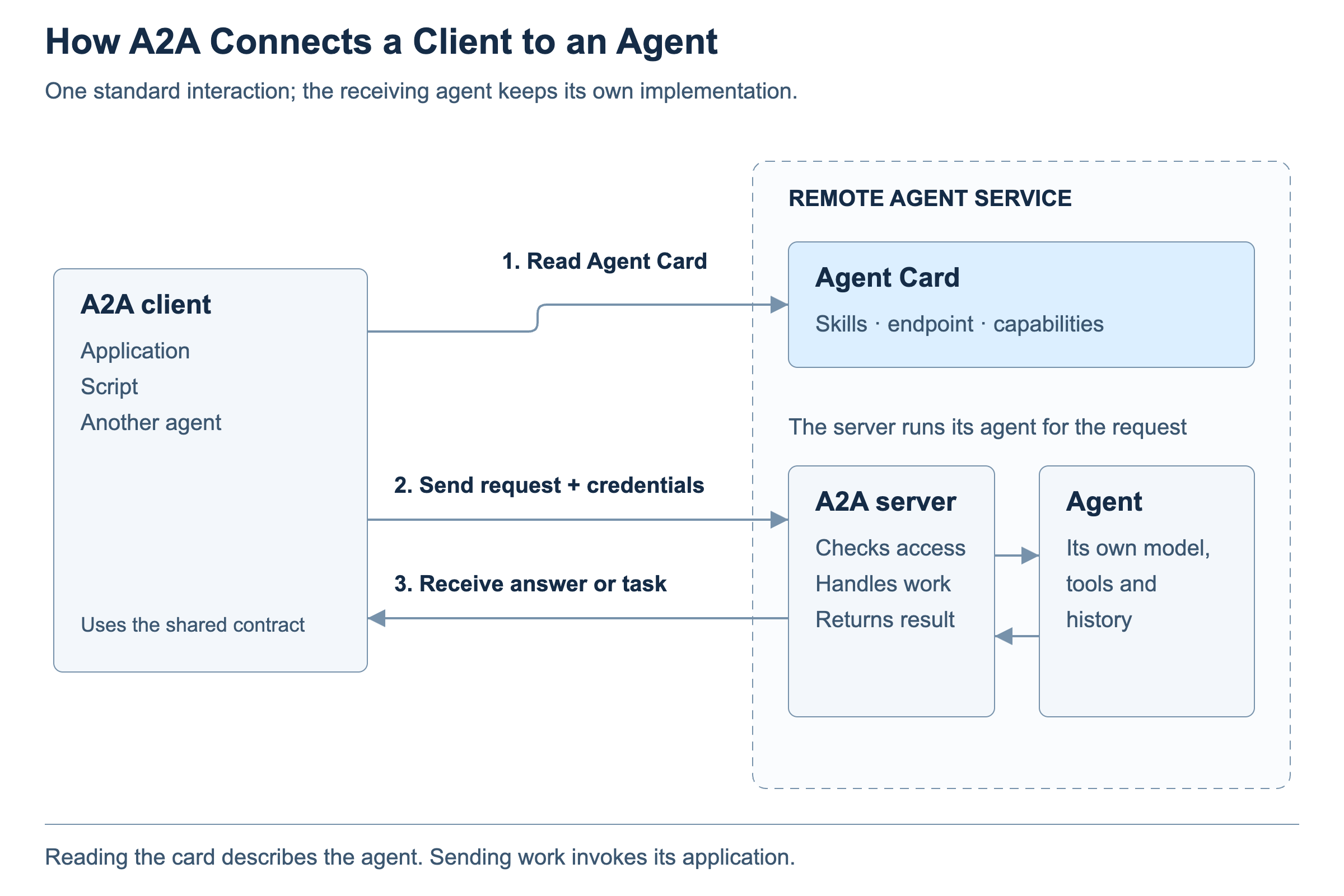
The Agent Card describes the agent’s skills (business work it offers), endpoint (the address to call), and capabilities (supported communication features, such as streaming and push notifications).
The A2A server checks access, associates the message with the right context, creates or continues a task when needed, and invokes the agent runtime. The application supplies the relevant conversation history. The server then returns the answer or task result.
The client reads the card and uses supported options. For an ordinary request, it chooses a blocking call (wait for the result or a request for input) or a non-blocking call (return a task reference and check later). Execution modes
Our Marketplace Implementation
The two A2A connections in our marketplace use cases use these settings.
| Setting | Marketplace A2A agent | Delivery A2A agent |
|---|---|---|
| A2A client | Browser application | Marketplace backend |
| Authentication | Marketplace session + CSRF | Preconfigured bearer token |
| Capabilities | Streaming: off; push notifications: off | Streaming: off; push notifications: off |
| Skills | Investigate marketplace records; investigate linked delivery shipments (Multi-agent mode) | Investigate delivery; simulate shipment operations |
| Client call | Blocking | Blocking |
Discovery
Discovery means finding which agents are available and what they can do, within one platform or across several platforms.
A2A facilitates discovery through a standard Agent Card and a well-known location for retrieving it. It does not provide a universal search service or prescribe a standard registry API. Clients commonly use three approaches: Agent discovery
- Known domain: retrieve the Agent Card from its well-known location.
- Curated registry: search a catalog that returns matching cards or their locations.
- Direct configuration: supply the card or its address in the application configuration.
Each separately exposed A2A agent has its own card; it may use other agents internally. Multi-agent routing
Here is an excerpt from the marketplace support Agent Card. Only selected fields are shown; authentication requirements and other fields are omitted:
{
  "name": "Marketplace Support",
  "supportedInterfaces": [{
    "url": "http://127.0.0.1:5179/api/a2a/support",
    "protocolBinding": "JSONRPC", "protocolVersion": "1.0"
  }],
  "capabilities": {"streaming": false, "pushNotifications": false},
  "skills": [
    {"id": "marketplace-investigation",
     "name": "Investigate marketplace records"},
    {"id": "delivery-investigation",
     "name": "Investigate linked delivery shipments"}
  ]
}
Use Case One: Support Agent Exposed Using A2A
This experiment changes how a question reaches marketplace support. In the ordinary flow, the application uses its custom backend API. In Marketplace A2A mode, an A2A client sends the question to the A2A adapter. Both paths reach the same support agent. The code is in the Agentic Marketplace GitHub repository.
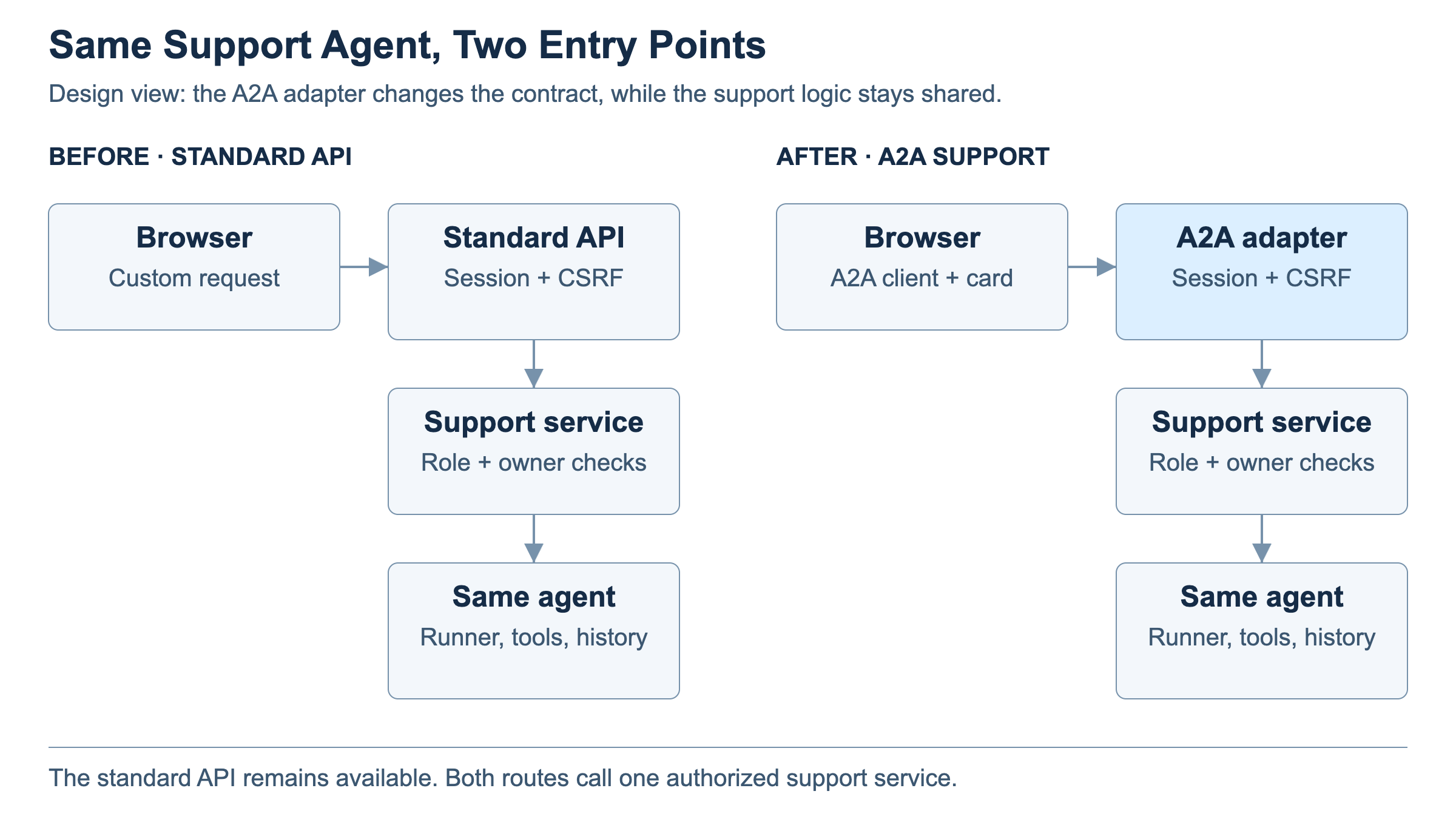
Two application changes make this possible:
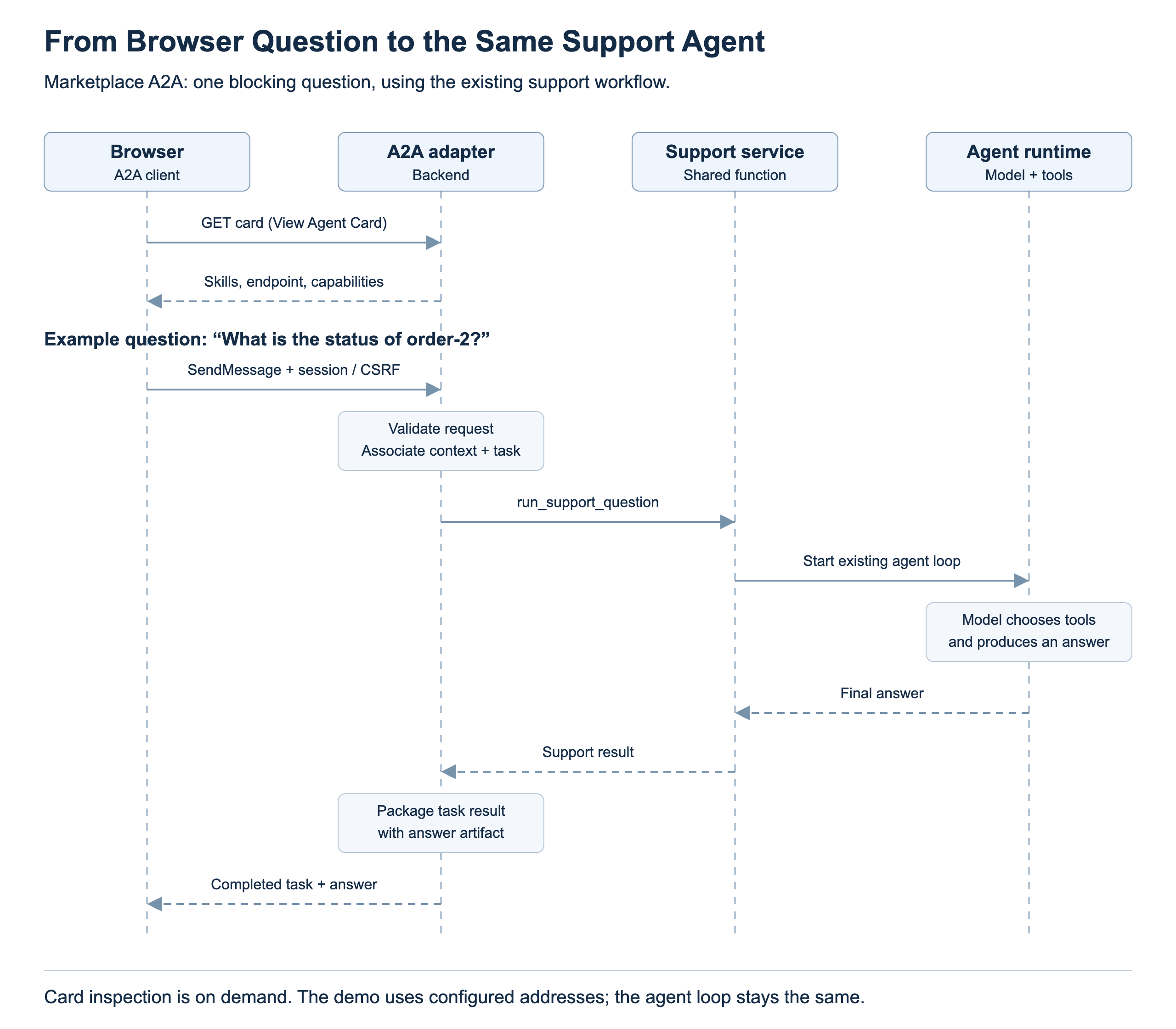
Browser: add an A2A client that reads the configured Agent Card and sends support questions as A2A messages. In this demo, View Agent Card fetches the card on demand; the message destination is configured.
Backend: add an A2A adapter that validates the request and calls the existing support service, run_support_question. The service starts the same agent loop. The adapter packages the returned answer as an A2A task result.
Use Case Two: Support Agent Talking To Delivery Agent Using A2A
In the original marketplace, the seller dispatches a shipment and later marks it delivered. The marketplace records these updates, but it has no delivery-provider integration or detailed carrier tracking.
For the second use case, I model delivery as a separate provider’s agent rather than another agent inside the marketplace. A2A gives marketplace support a standard way to ask that provider for delivery information while the provider owns its records and investigation. Our demo simulates this separate service. A real provider could connect it to carrier systems; those integrations are outside this experiment.
When Support Delegates
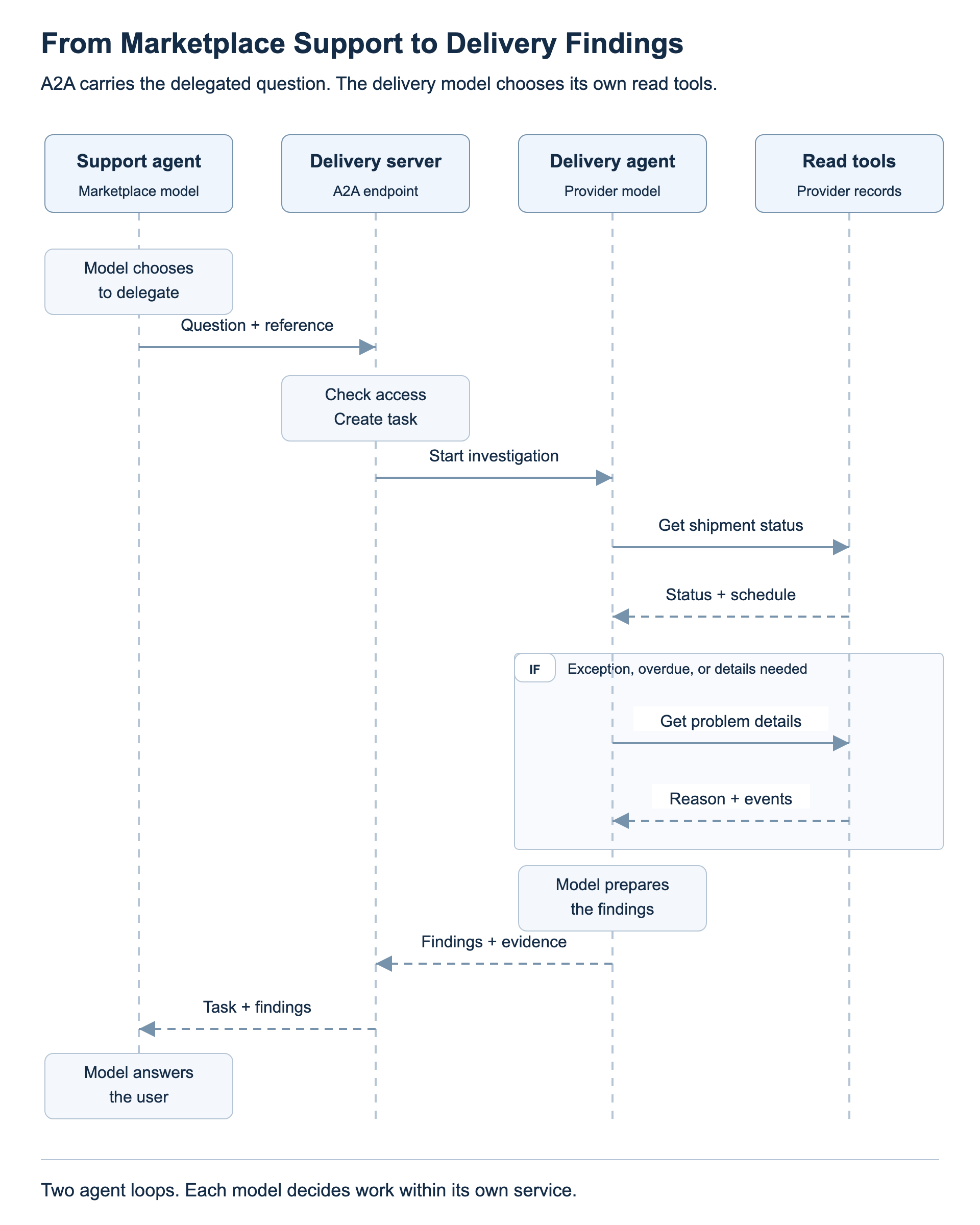
Marketplace support delegates the question. In Multi-agent A2A mode, the support model can request an investigation such as “Why is this shipment delayed?” The backend sends that question and the shipment reference to the delivery agent through A2A. Basic order-status questions stay in the marketplace.
The delivery agent owns these two read tools:
-
Get shipment status: read the current delivery state and schedule evidence.
-
Get delivery problem reason: read recorded exception details and supporting events.
Inside the delivery agent, its own model checks shipment status first and calls the problem-reason tool when further explanation is needed. The delivery agent returns its findings through A2A. Marketplace support uses those findings to answer the user.
How To Test The Use Cases
Use the Agentic Marketplace application from the GitHub repository and select its Test workspace. Follow the repository’s A2A setup and run guide, then sign in with the demo accounts. Run each comparison in a new support conversation so an earlier answer does not supply the evidence.
Use Case One: Compare The Two Entry Points
-
In Support, open Workspace options and choose Reset to defaults. Ask for the status of an existing order through the Standard API path. Note the order number.
-
Under A2A, select Marketplace A2A. Use View Agent Card to inspect the support agent’s skills, endpoint and capabilities.
-
Start a new conversation and ask the same question about the same order. The entry point changes; the support agent and its tools remain the same.
Use Case Two: Investigate Delivery
-
Under A2A, select Multi-agent A2A and set Delivery scenario to Normal transit — on schedule before placing a new order.
-
Log in as a buyer, place the order and note its number. Log in as the seller and choose Dispatch. Leave Deliver for later.
-
Return to Support. Ask for basic order status, then ask explicitly for delivery details for that order in a new conversation. Basic status comes from marketplace records; detailed tracking can call the delivery agent.
-
Repeat with Depot exception selected before another new purchase. Ask for delivery details for that order to see the recorded depot problem. Changing the workspace scenario does not change an existing order’s saved scenario.
Marketplace shipment status moves from pending to dispatched to delivered. At dispatch, the simulated provider records in transit for the normal scenario or exception for the depot scenario; marketplace still shows dispatched in both cases. The seller’s later Deliver action completes the provider simulation and updates marketplace. An exception does not necessarily mean the shipment is overdue or that the A2A task failed.
What To Look For In Langfuse
Open Langfuse from the workspace, select a recent time range and find the trace for your support question.
-
Use case one: compare Standard API request with A2A marketplace request. The outer request span differs; the support investigation and model/tool workflow underneath remain the same. Individual tool choices and wording can vary.
-
Use case two: look for the delivery investigation, the marketplace’s outbound A2A call and the delivery service’s inbound request. The delivery agent runs its own model, reads shipment status and requests problem details when needed. Its findings return to marketplace support.
Dispatch also produces an outbound/inbound A2A pair for booking the shipment. That booking path does not run the delivery investigator model; distinguish it from the later support investigation.
Lessons Learned
- A2A is an interface around an agent. The first use case can preserve the existing reasoning loop while changing how the caller describes and tracks work.
- Discovery needs a starting point. A card tells me about a candidate service after a known domain, registry or configuration leads me there.
- Skills, protocol features and tools answer different questions. Keeping them separate makes both the card viewer and the runtime easier to understand.
- Keep responsibilities clear. Marketplace answers basic status; delivery provides detailed tracking when the mode enables it and the question calls for it.
Acknowledgements
Codex helped research the protocol, prepare this draft and create the design diagrams. The coding work produced the implementation, tests and local browser/model artifacts reviewed here.
References
Protocol
- A2A and MCP — How the two interfaces fit together.
- Core concepts — Clients, servers, messages, cards and outputs.
- Agent discovery — Known domains, registries and private configuration.
- A2A specification — Operations, request fields, cards and protocol bindings; verify the pinned implementation version against this evolving documentation.
- Life of a task — Context, follow-ups and terminal tasks.
- Multi-agent routing — Multiple exposed agents behind a shared host or endpoint.
- Streaming and asynchronous operations — Optional update mechanisms.
Runtime And Code
- A2A implementation and local run guide — Pinned setup and walkthrough for the pushed review branch.
-
A2A validation report — Executed checks, browser sequence and limits.
-
OpenAI Agents SDK: Running agents — Model and tool work within one run, and state between turns.
- Marketplace support runner — Baseline support implementation reviewed for the research.
- Marketplace API — Baseline ownership, role and question handling.
- Marketplace business rules — Baseline purchase, shipment transitions and demo-clock delivery timing.
- Project repository — Access depends on repository permissions. These baseline links do not establish that the A2A design is merged or deployed.

