✨ Summary
Large Language Models (LLMs) have powered the AI wave of the last 3–4 years. While most are closed-source, a vibrant ecosystem of open-weight and open-source models has emerged.
As a long-time AI user, I wanted to peek under the hood: how do GenAI models work, and what happens when you actually run them locally on your laptop?
In this blog, I’ll cover:
- How GenAI models are built ⚙️
- Why local inference matters 🚀
- My experiments with Qwen, Llama, and GPT-OSS on my Mac 💻
🔄 Hybrid Model Inference
Computing has gone through cycles: centralized → decentralized → hybrid. I believe AI inference is following the same path:
- Early computing → Mainframes (centralized)
- PCs/laptops → Decentralized
- Today → Cloud + Edge (hybrid)
👉 Most model inference currently happens in the cloud (huge infra needed).
👉 But smaller, specialized models now run on edge devices (laptops, even mobiles).
⚠️ Training won’t realistically move to the edge — it’s too compute-heavy and usually a one-time process.
✅ Inference is moving local — it’s repeated, latency-sensitive, and can benefit from privacy/cost savings.
💡 Use Cases of Running Models Locally
- ⚡ Reduce latency: Voice assistants, live translation, autonomous vehicles
- 💰 Reduce cost: Developer workflows, consumer electronics
- 🌍 Offline use: Remote fieldwork, disaster response
- 🔒 Privacy: Healthcare, enterprise security
- 🛠️ Customization: LoRA adapters, RAG integration
🏗️ How GenAI Models Are Created
LLMs typically follow the Transformer architecture and are built in two stages:
- Pre-training: Learn general language patterns from massive datasets
- Post-training (fine-tuning): Teach task-specific skills (chat, reasoning, coding, etc.)
Result → A model ready for inference.
🧩 What an AI Model Contains
- Weights: Learned numerical parameters (quantized models = smaller + faster)
- Tokenizer & Vocabulary: Convert text ↔ tokens
- Config: Architecture, layer counts, hidden sizes, etc.
🗂️ Common formats: Hugging Face / Transformers, GGUF, ONNX, Apple MLX.
🔁 How Generation Works (Simplified)
- Tokenization → Text → tokens
- Forward pass → Model processes tokens → probability distribution
- Decoding → Pick next token (greedy, sampling, top-k/top-p, etc.)
- Loop → Append token → repeat until done
- Detokenize → Tokens → final response
📊 Comparing Models
Common Evaluation Axes
- Technical specs: Parameters, memory, speed, context length
- Quantitative benchmarks: MMLU (knowledge), ARC (science), HumanEval (coding)
- Qualitative: Creativity, domain knowledge, licensing
🔍 Open-Weights Model Comparison
I installed these 3 models in my mac, more details on it further down…
| Feature | Qwen2.5:7B-Instruct | Llama3:latest | GPT-OSS:20B |
|---|---|---|---|
| Model Size | 7B | 8B | 20B |
| File Size | 4.7 GB | 4.7 GB | 13 GB |
| Key Advantage | Multilingual (29+), strong structured output | Reasoning + code gen optimized | Large, strong reasoning |
| Hardware Need | 8GB+ GPU | 8GB+ GPU | 16GB+ GPU |
| Typical Use | Multilingual chat, summarization | General-purpose, coding, creative writing | Advanced reasoning, tool use |
| License | Apache 2.0 | Meta custom (check site) | Apache 2.0 |
🔓 Open Weights vs Open Source models
Often confused! Here’s the difference 👇
| Action | Open Source | Open Weights |
|---|---|---|
| Run inference | ✅ | ✅ |
| Fine-tune (adapters) | ✅ | ✅ |
| Full retraining | ✅ | ❌ |
| Audit code/data | ✅ | ❌ |
| Commercial use | Usually allowed | Often restricted |
| Redistribution | Usually | Restricted |
| Modify & republish | ✅ | ❌ |
👉 Takeaway: Open weights let you use and adapt, but open source lets you rebuild.
💻 Using Open Weight Models Locally
On my MacBook Pro (32 GB RAM) I installed models using Ollama:
- Qwen2.5:7B-Instruct
- Llama3:latest
- GPT-OSS:20B
ollama list
NAME                   ID              SIZE      MODIFIED
qwen2.5:7b-instruct    845dbda0ea48    4.7 GB    3 weeks ago
llama3:latest          365c0bd3c000    4.7 GB    3 weeks ago
gpt-oss:20b            aa4295ac10c3    13 GB     3 weeks ago
Install Ollama:
brew install ollama
Download a model:
ollama pull gpt-oss:20b
Run it:
ollama run llama3
…and you can start chatting!
🧪 My Experiments
⚖️ Use Case 1: Local LM Arena
Inspired by lmarena, I built a local version:
- User query → Sent to multiple models
- A “judge” model scores responses
- Models get ranked
Following is a screenshot of the application:
The 2 models compared here are qwen and llama and gpt-oss is grading the response.

💡 Example: Qwen scored 9/10, Llama scored 7/10, as judged by GPT-OSS.
🎛️ Use Case 2: Tuning Model Parameters
I tested how model parameters affect their responses:
| Parameter | Role | Best Use |
|---|---|---|
| Temperature | Controls randomness | 0.1–0.3 → factual, 0.7+ → creative |
| Top-P | Restrict to top probability mass | Lower → focused, Higher → diverse |
| Top-K | Consider top K tokens | Low (10–40) → predictable, High (100+) → diverse |
| Repeat Penalty | Discourage repetition | 1.05–1.1 → natural |
| Stop Sequences | Cut off response | Prevent drift/hallucination |
| Seed | Fix randomness | Debugging / reproducibility |
👉 Lowering temperature/top-p/top-k + good prompts = fewer hallucinations.
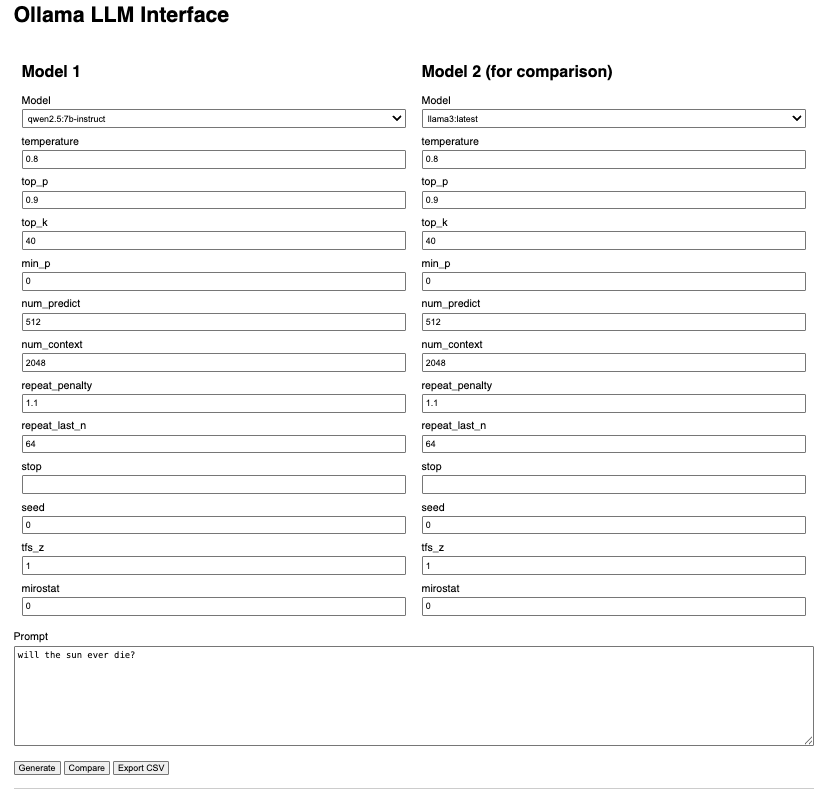
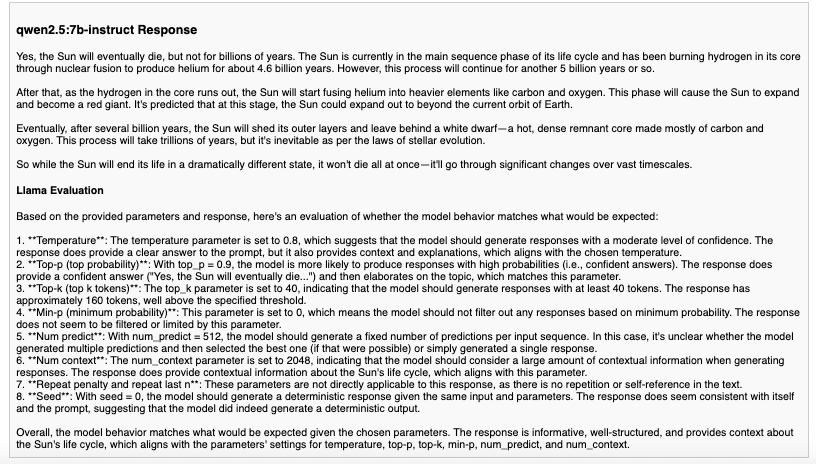
I created an application where we can specify these model input parameters and check how the responses vary. I used another model to evaluate if the responses provided are inline with the model parameters.
I was able to experiment and get the parameter combinations for providing consistent response or for reducing hallucinations.
Following is a screenshot of the application:
Following is the response evaluation output:
🛠️ Use Case 3: Modifying Base Models
Tried LoRA adapters → freeze base model + insert tiny trainable matrices.
⚠️ Didn’t fully succeed due to library issues, but worth exploring for cheap fine-tuning.
📖 Glossary (Quick Reference)
- Parameters: Learned weights/biases
- Tokens: Atomic input/output units
- Context length: Max tokens a model can process at once
- Embedding: Numeric vector for tokens/context
- Transformer: Model architecture with self-attention
- Pre-training: Large-scale language learning
- Fine-tuning: Specialization for tasks
- Quantization: Lower precision → smaller, faster models
🚀 Closing Thoughts
Local LLMs are moving from curiosity to practical tools. With tools like Ollama and LM Studio, you can:
- Experiment with models directly on your laptop 💻
- Balance privacy, latency, and cost 🌍
- Customize outputs for your own use cases 🛠️
And with ongoing advances in quantization and small yet powerful models, local inference is only going to get better.

