Docker Networking – Weave

This blog is part of my ongoing series on Docker containers. Weaveworks is developing a Docker Networking solution to connect Containers. I recently played around with their solution and in this blog, I will capture some of my thoughts.

Following are some internals on their implementation as I understood:

  • Weave creates a Weave bridge as well as a Weave router in the host machine.
  • Weave router establishes both tcp and udp connection across hosts to other Weave routers. TCP connection is used for discovery and protocol related exchange. UDP is used for data encapsulation. Encryption can be done if needed.
  • The Weave bridge is configured to sniff the packets that needs to be sent across hosts and redirect to the Weave router. For local switching, weave router is not used.

Following is a picture of the data path between 2 containers on 2 different hosts.
Continue reading Docker Networking – Weave →

Docker Networking – Socketplane

This blog is part of my ongoing series on Docker containers. In my previous blogs 1 and 2, I covered basics of Docker Networking and also covered some of the limitations with the current solutions. In the next few blogs, I will cover Docker Networking solutions from Socketplane, Weaveworks, CoreOS. Socketplane is developing a Docker networking solution that links containers across multiple hosts. They released a technology preview recently of their initial implementation. In this blog, I will cover some of my thoughts related to trying out the their initial solution.

Following are some internals of the implementation as I understood:

  • Openvswitch is used as the bridge where container interfaces are connected.
  • Multicast DNS is used to discover other cluster members. As of now, multicast is a requirement in Underlay network.
  • Consul is used as a service discovery mechanism where the key, data values for the whole cluster is stored. When socketplane agent is started, it prompts to choose the primary and secondary cluster members.
  • vxlan is used as a tunneling mechanism for data encapsulation between hosts.

Following is a picture of the data path between 2 containers on 2 different hosts.

Continue reading Docker Networking – Socketplane →

Docker Orchestration

This blog is part of my ongoing series on Docker containers. Orchestrating Containers is a pretty complex task and there is a lot of work ongoing to solve this particular problem. There are big companies, startups as well as Opensource projects involved with this work. There are many different technologies and projects ongoing that got me really confused when I started looking at this. In this blog, I have tried to break down the Docker orchestration problem into smaller pieces and have tried to map different existing/developing solutions into the smaller pieces. Considering that the technologies are evolving and that my knowledge in this area is limited, this blog might need updates and corrections as we move forward. Also, I might have missed few technologies as well as companies..

Problem statement:

Docker does a great job in packaging and transporting single containers. Following are specific problems we need to address:

  • Distributed Applications split between multiple containers.
  • Manage a large number of containers both in terms of allocating the containers to the cluster of hosts as well as handling container failures.

Orchestration blocks:

Continue reading Docker Orchestration →

Docker Networking – Part2

This blog is part of my Docker series. This is a continuation from my previous blog on Docker Networking. In this blog, I will cover current Docker networking limitations, Pipework overview and a sample Docker application where I have linked containers in 2 different hosts.

There are 4 networking options that Docker provides when creating containers:

  1. –net=bridge. This is the default option that Docker provides where containers connect to the linux “docker” bridge.
  2. –net=host. In this option, there is no new network namespace created for the container and the container shares the same network namespace as host machine.
  3. –net=(container name or id). In this option, the new container shares the same network namespace as the specified container in the ‘net’ option. (Example:  “sudo docker run -ti –name=ubuntu2 –net=container:ubuntu1 ubuntu:14.04 /bin/bash”. Here, ubuntu2 container shares same network namespace as ubuntu1 container)
  4. –net=none. In this option, container does not get allocated a new network namespace. Only the loopback interface is created in this case. This option is useful in scenarios where we want to create our own networking options for the container.

Currently, Native Docker networking has the following limitations.

Continue reading Docker Networking – Part2 →

Docker Networking – Part1

This blog is part of my Docker series. In this blog, I will cover basics of Docker Networking that covers the ingress and egress connectivity for containers and how containers are linked together. I will cover advanced networking topics in next blog.

When docker service is started, a linux bridge is created on the host machine. The interfaces on the containers talk to the bridge and the bridge proxies to external world. Multiple containers on the same host can talk to each other through the linux bridge.

Following is the bridge created on host machine seen through ifconfig. The bridge gets allocated IP address 172.17.42.1.

docker0   Link encap:Ethernet  HWaddr 56:84:7a:fe:97:99  
          inet addr:172.17.42.1  Bcast:0.0.0.0  Mask:255.255.0.0
          UP BROADCAST MULTICAST  MTU:1500  Metric:1
          RX packets:0 errors:0 dropped:0 overruns:0 frame:0
          TX packets:0 errors:0 dropped:0 overruns:0 carrier:0
          collisions:0 txqueuelen:0 
          RX bytes:0 (0.0 B)  TX bytes:0 (0.0 B)

Now, lets create 2 containers:

Continue reading Docker Networking – Part1 →

Docker hands-on with boot2docker

This blog is part of my Docker series. In my previous blog, I covered installation and usage of Docker on Ubuntu Linux. I had installed Ubuntu Linux as a VM inside Virtualbox running in Windows 7. For folks who are interested in trying Docker using a simpler approach on Windows or Mac, boot2docker is an option.

boot2docker:

Docker is supported currently only on Linux kernel. boot2docker is a tiny distribution of Linux on top of which Docker is installed. Installing boot2docker on Windows would allow us to run Docker on Windows machine. Actually boot2docker runs as a VM on top of Virtualbox. During installation, an option is given to install Virtualbox along with boot2docker. If you have Virtualbox already installed, you can select installation of only boot2docker, otherwise you can install both together. boot2docker for Windows can be installed from here. It does not make much sense to run boot2docker in Linux since Docker is supported natively in Linux and there will be performance impact of running boot2docker in a VM under Linux. Infact, I did not seen an option to install boot2docker under Linux.

Continue reading Docker hands-on with boot2docker →

Docker Hands-on

This blog is part of my Docker series. In this blog, I will cover some Hands-on stuff that I tried with Docker.

I installed Docker in my Ubuntu 12.04 that is running on Virtualbox using the procedure here. I have also installed Docker in Ubuntu 14.04 using the procedure here. To install a specific version of Docker and not the latest, use the procedure here.

Following is the docker version that got installed. I have seen recently that 1.4.1 is the default version that gets installed.

$ docker --version
Docker version 1.3.1, build 4e9bbfa
$ sudo docker version
Client version: 1.3.1
Client API version: 1.15
Go version (client): go1.3.3
Git commit (client): 4e9bbfa
OS/Arch (client): linux/amd64
Server version: 1.3.1
Server API version: 1.15
Go version (server): go1.3.3
Git commit (server): 4e9bbfa

To test the basic container functionality, try the following:

$ sudo docker run -t -i ubuntu:14.04 /bin/bash
root@ce1b5eff4e71:/#

Continue reading Docker Hands-on →

Docker Overview

Even though Linux container technology has been available for quite some time, Docker has revolutionized the container technology with its simple packaging that allows portability of applications. Docker packages the applications along with the dependencies like related libraries into an simple image. This single image can be then run on different locations like bare-metal, VM, Cloud etc. In this blog, I will cover comparison of Containers with VM, technologies that Docker uses, Docker architecture and Container use cases. In the next series of blogs, I will cover more on Docker.

Comparing Containers with VM:

Virtual machines did the hardware Virtualization and this allowed multiple Operating systems to run in a single Server. Virtualization technologies have matured now with popular hypervisors being ESX, Xen, HyperV etc. Following picture from Linuxjournal article compares the blocks involved in VM and Containers.

Continue reading Docker Overview →

Group based policy in Opendaylight

This is a continuation of my previous blog on Group based policy(GBP). In this blog, I will cover the GBP features in Opendaylight helium release, Use-cases that are published in the Opendaylight wiki as well as different usecase that I tried out.

Group based policy in Opendaylight:

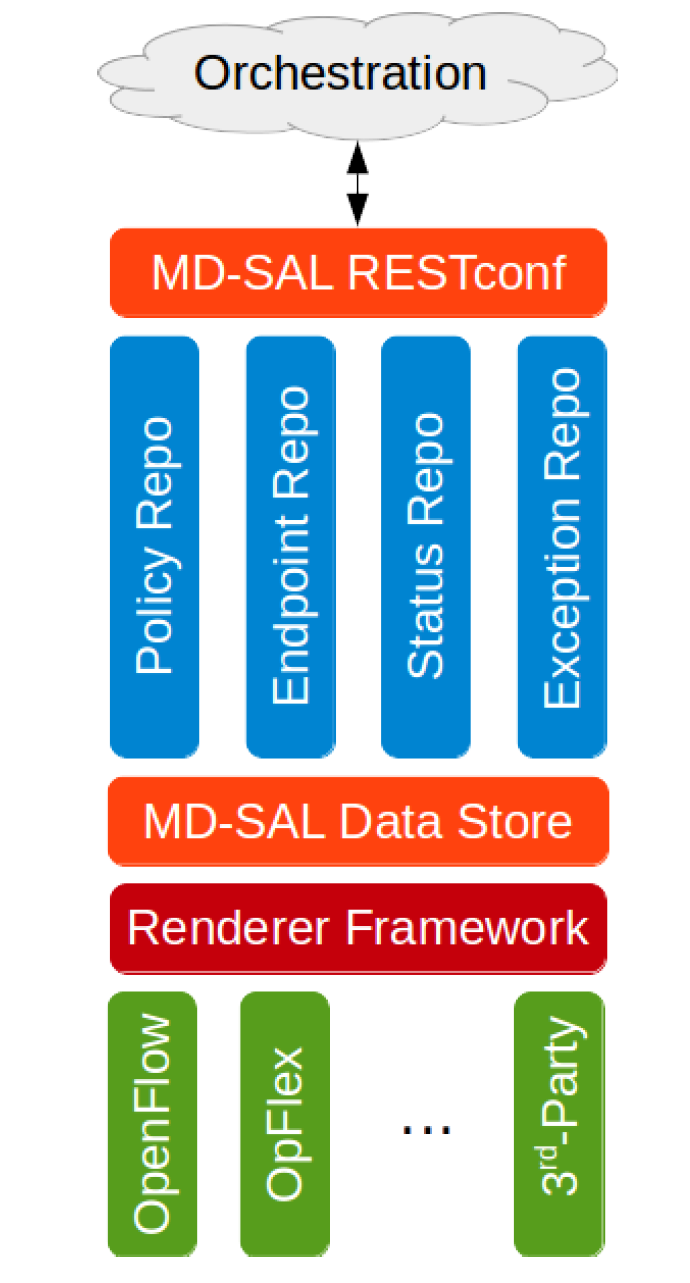
Following diagram is from Opendaylight GBP wiki:

gbp3

  • Openstack here is the orchestration layer and it communicates the policy to ODL through Neutron apis.
  • The policy is expressed in high level data language and is translated and programmed into hardware through renderers.
  • In ODL helium release, the only available renderer is Openflow and it uses ovsdb overlay design.
  • Opflex renderer is being developed currently and it is also based on ovsdb overlay. When Opflex is available, there will be a Opflex agent in the openvswitch that will eventually do the low level translation and programming.

Continue reading Group based policy in Opendaylight →

Group based policy

There is lot of work going on in both Openstack and Opendaylight projects on Group based policy and I will try to capture my learnings in the next few blogs.

Group based policy(GBP) is an abstracted way of specifying interactions between the applications rather than using infrastructure specifics. In the networking context, for example, rather than using terms like ip address, vlan, port numbers, the policies are specified in much higher level language in terms of what the application needs. Currently Group based policy is targeted for Networking. Eventually, it will be applicable to Compute and Storage as well. I kind of see GBP as Open source variant of Cisco’s ACI model, multiple vendors are involved in the development of GBP.

In Openstack Neutron context, following are the goals of Group based policy.

Continue reading Group based policy →