Openstack Juno – Management interfaces

This blog is part of my series on Openstack Juno. In this blog, I will cover different management interfaces to Openstack. Following are the different management interfaces available.

  • Horizon web interface
  • CLI interface to each service. CLI interface is provided by Python script. Internally, the script calls the REST interface.
  • REST interface. This is accessible either through Curl or a POSTMAN kind of client.
  • Programmatic interface using Python SDK.

Horizon interface:

On the host where stacking is done, webserver runs on port 80 and all Openstack services can be configured using this interface. Login to Horizon can be done with either tenant userid or admin userid. Based on the userid, privileges are granted.

CLI interface:

CLI interface is provided for each service. Nova services are accessible through “nova” client, Swift services are accessible with “swift” client and so on. Following example lists running VMs. Continue reading Openstack Juno – Management interfaces →
Openstack Juno – Group based policy

This blog is part of my series on Openstack Juno. In this blog, I will cover Group based policy in Openstack Juno. For more information on Group based policy(GBP), please refer to my earlier blogs on GBP basics and ODL integration.

Group based policy(GBP) support in Juno:

Preliminary support for GBP is available in Juno, more functionality will come in Kilo release. We need to pull a GBP label based devstack to get the GBP functionality. I followed the instructions in Openstack GBP wiki to try out GBP functionality with devstack. The exercise walks through a dummy application stack with 2 client groups and 1 web server group and having some policies between the 3 group application to control the interactions.

Following are some advantages that I realized as part of trying the exercise:

Continue reading Openstack Juno – Group based policy →

Openstack Juno – Multihost Networking

This blog is part of my series on Openstack Juno.

In this blog, I will cover adding a compute host to the Openstack Devstack cluster and connect the 2 hosts using either vxlan or gre encapsulation.
Lets first do the stacking on the controller host using the steps mentioned in my previous blog.
Lets look at the hypervisor list. As expected, we see only 1 host.

$ nova hypervisor-list
+----+-------------------------+
| ID | Hypervisor hostname     |
+----+-------------------------+
| 1  | sreeubuntu14-VirtualBox |
+----+-------------------------+

Lets look at the networks created by default:

Continue reading Openstack Juno – Multihost Networking →

Openstack Juno services – Swift, Glance, Heat, Ceilometer

This blog is part of my series on Openstack Juno. In this blog, I will cover the usage of Openstack services Swift, Glance, Heat, Ceilometer.

Swift:

Swift is used for Object based storage. Its similar to AWS S3 service.
First, create a container to store objects:

$ swift post mycont

Upload a file to the container

$ swift upload mycont local.conf

List container and objects.

$ swift list
mycont
$ swift list mycont
local.conf

List status of created container.

Continue reading Openstack Juno services – Swift, Glance, Heat, Ceilometer →

Openstack Juno services – Nova, Cinder

This blog is part of my series on Openstack Juno. In this blog, I will cover the usage of Openstack services Nova, Cinder.

I found this blog on Openstack services good in giving a highlevel overview of services and comparing individual Openstack services with Amazon AWS services.

Nova basics:

Nova is the Openstack compute service.
Following command shows the flavors available by default. Flavors are different configurations(CPU, memory, hard disk) for the VMs that can be created from Nova.

Continue reading Openstack Juno services – Nova, Cinder →

Openstack Juno Install using Devstack

Earlier, I had written 2 blogs on Openstack devstack Icehouse installation and networking. The feedback was positive on these blogs. This prompted me to do a series on different aspects of Openstack Juno. Openstack Juno is the 10th and latest release of Openstack that got released in October 2014. In the next series of blogs, I will cover the following aspects of Openstack Juno.

  • Openstack Juno devstack installation and debugging.
  • Accessing Openstack services through CLI, API and SDK.
  • Overview of different Openstack services along with a demo of their usage.
  • Multi-node devstack installation.

In this blog, I will cover the steps to install Openstack Juno in Devstack.

My environment:

  • Windows 7 with Virtualbox 4.3.20
  • 24 GB RAM (Devstack install per VM requires a minimum of 4GB)

Installation steps:

Continue reading Openstack Juno Install using Devstack →

Containers – Docker, LXC and Rkt

This blog is part of my ongoing series on Docker containers. In my previous blog, I covered LXC. When I tried out LXC, I realized that there are lots of similarities between Docker and LXC. Also, I saw a recent announcement about Rkt which is another Container runtime technology. In this blog, I have tried to answer multiple questions that I had about these technologies based on reading through the reference materials mentioned below. This is a pretty controversial topic as folks have strong opinions about these technologies, I have tried to keep it as neutral as possible.

How is Container management different from Container technologies?

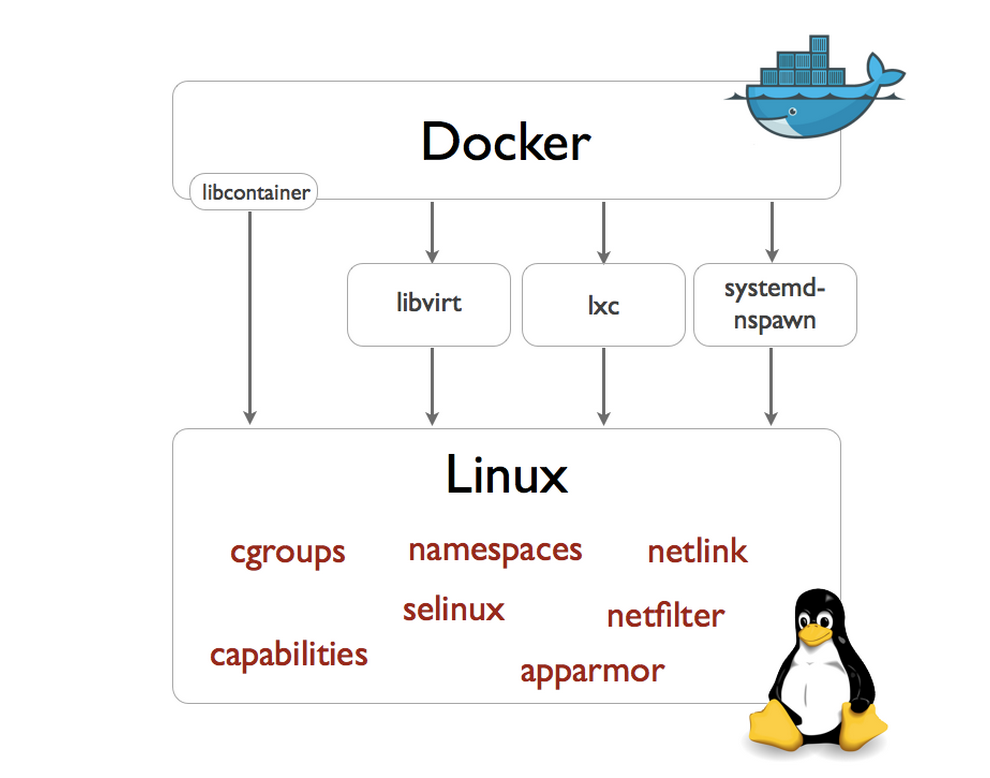
I found this diagram from Docker blog very helpful in answering the above question.

docker3

Linux kernel has support for Container technologies like namespaces, cgroups etc. Docker, LXC and Rocket use the technologies available in Linux kernel to manage the lifecycle of the Container. Container management involves Container creation, deletion and modification, image format and the tools around it. Before Docker version 0.9, Docker was using LXC to interact with Linux kernel. From Docker version 0.9, Docker directly interacts with Linux kernel using libcontainer interface that they developed.

How is Docker different from LXC?

Continue reading Containers – Docker, LXC and Rkt →

LXC Containers

This blog is part of my ongoing series on Docker containers. In this blog, I will take a deviation from Docker and focus on LXC. LXC manages Containers like Docker, there are some differences, I will cover the differences in a later blog. LXC is an Opensource Linux container project from Linuxcontainers.org that provides an user space interface to manage Linux containers.There are other projects from linuxcontainers.org focusing on containers like LXD, LXCFS, CGManager etc. In this blog, I will cover some hands-on stuff I tried with LXC.

My environment:

Ubuntu 14.04 running in Virtuabox in Windows 7.

Hands-on:

To install lxc, I followed the below steps:

sudo apt-get update
sudo apt-get install lxc

Following command creates a Ubuntu LXC container.

sudo lxc-create -t ubuntu -n cn-01

Continue reading LXC Containers →

Docker Networking – CoreOS Flannel

This blog is part of my ongoing series on Docker containers. In this blog, I will cover Flannel which is a CoreOS networking solution to connect containers across multiple hosts. Please refer to my first blog on CoreOS to understand CoreOS basics as well as how to setup CoreOS cluster.

Flannel Overview:

Flannel creates an Overlay network using either udp or vxlan encapsulation. Flannel links itself to the Docker bridge to which the containers are attached and creates the overlay. Following picture illustrates this.

coreos3

Demo:

Lets create 3 containers in 3 different CoreOS hosts that are part of same cluster in 11.0.0.0/16 subnet, connect them using Flannel and try to ping them. Create the 3 node cluster using the procedure in my previous CoreOS blog.

Continue reading Docker Networking – CoreOS Flannel →

CoreOS overview

This blog is part of my ongoing series on Docker containers. In this blog, I will cover basics of CoreOS and some hands-on stuff I tried with CoreOS. As mentioned in my other blog on Docker  orchestration, CoreOS falls in the category of specialized Linux distributions that can host Containers and are suitable for massive server deployments.

CoreOS is a Linux distribution with very minimal services installed and the primary goal is to have a scalable clustering system. Following 2 pictures from CoreOS shows the details from both single host perspective as well as Cluster perspective.

Continue reading CoreOS overview →