Following link captures the slides on Container monitoring with Sysdig that I presented at Docker Meetup, Bangalore on February 27, 2016.
Following are the 2 demo recordings:
Following link captures the slides on Container monitoring with Sysdig that I presented at Docker Meetup, Bangalore on February 27, 2016.
Following are the 2 demo recordings:
This blog is part of my ongoing series on Docker containers. In my previous blog, I covered LXC. When I tried out LXC, I realized that there are lots of similarities between Docker and LXC. Also, I saw a recent announcement about Rkt which is another Container runtime technology. In this blog, I have tried to answer multiple questions that I had about these technologies based on reading through the reference materials mentioned below. This is a pretty controversial topic as folks have strong opinions about these technologies, I have tried to keep it as neutral as possible.
How is Container management different from Container technologies?
I found this diagram from Docker blog very helpful in answering the above question.
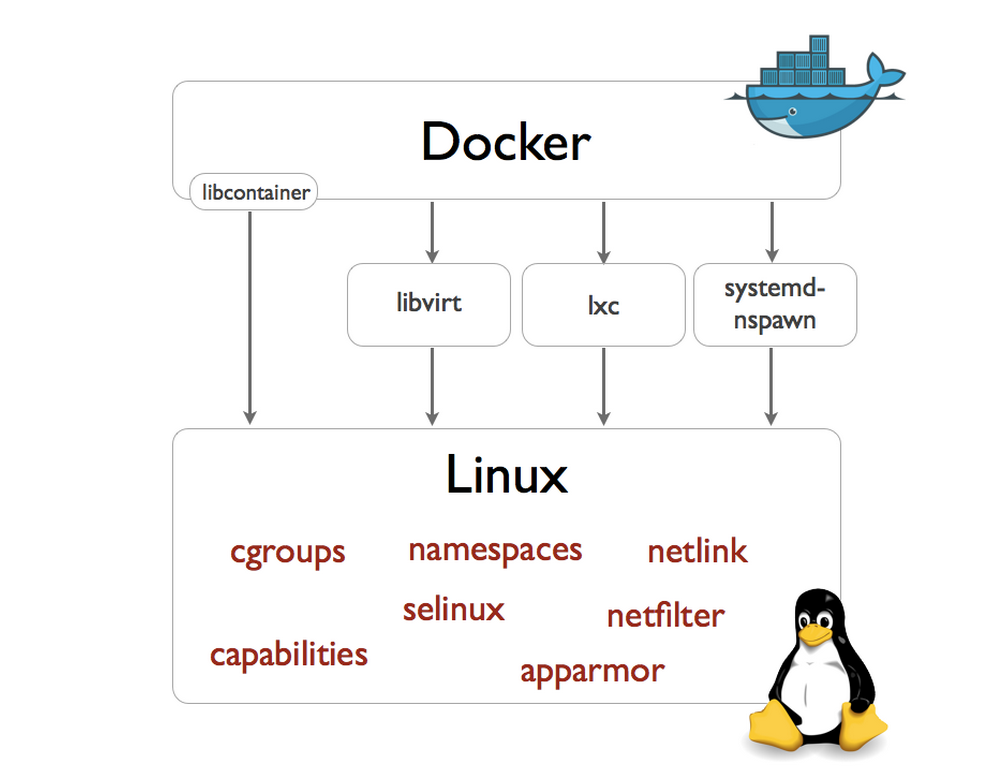
Linux kernel has support for Container technologies like namespaces, cgroups etc. Docker, LXC and Rocket use the technologies available in Linux kernel to manage the lifecycle of the Container. Container management involves Container creation, deletion and modification, image format and the tools around it. Before Docker version 0.9, Docker was using LXC to interact with Linux kernel. From Docker version 0.9, Docker directly interacts with Linux kernel using libcontainer interface that they developed.
How is Docker different from LXC?
This blog is part of my ongoing series on Docker containers. In this blog, I will take a deviation from Docker and focus on LXC. LXC manages Containers like Docker, there are some differences, I will cover the differences in a later blog. LXC is an Opensource Linux container project from Linuxcontainers.org that provides an user space interface to manage Linux containers.There are other projects from linuxcontainers.org focusing on containers like LXD, LXCFS, CGManager etc. In this blog, I will cover some hands-on stuff I tried with LXC.
Ubuntu 14.04 running in Virtuabox in Windows 7.
To install lxc, I followed the below steps:
sudo apt-get update
sudo apt-get install lxc
Following command creates a Ubuntu LXC container.
sudo lxc-create -t ubuntu -n cn-01

