Tag Archives: aws

Hashicorp Atlas workflow with Vagrant, Packer and Terraform

I have used and loved Vagrant for a long time and I recently used Consul and I was very impressed by both these Devops tools. Recently, I saw some of the videos of Hashiconf and I learnt that Hashicorp has an ecosystem of tools addressing Devops needs and that these tools can be chained together to create complete application delivery platform from development to production. Atlas is Hashicorp’s product that combines its open source tools into a platform and it has a commercial version as well. In this blog, I will cover a development to production workflow for a LAMP application stack using Atlas, Vagrant, Packer and Terraform.

Overview of Vagrant, Packer, Terraform and Atlas

Vagrant

Vagrant provides a repeatable VM development environment. Vagrant integrates well with major hypervisors like Virtualbox, VMWare, HyperV. “Vagrantfile” describes the VM settings as well as initial bootstrap provisioning that needs to be done on the VM. Vagrant also integrates well with other provisioning tools like Chef, Ruby and Ansible to describe the provisioning. Simply by doing “vagrant up”, the complete VM environment is exactly reproduced. The typical problems like “it does not work for me even though its working in your machine” goes away.

Packer

Packer is a tool to create machine images for providers like Virtualbox, VMWare, AWS, Google cloud. Packer configuration is described as a JSON file and images for multiple providers can be created in parallel. The typical workflow is for developer to create development environment in Vagrant and once it becomes stable, the production image can be built from Packer. Since the provisioning part is baked into the image, the deployment of production images becomes much faster. Following link describes how Vagrant and Packer fits well together.

Continue reading Hashicorp Atlas workflow with Vagrant, Packer and Terraform
Docker Experimental Networking – 3

This blog is a continuation of my previous blog on Docker Experimental Networking. In this blog, I will walk through the example mentioned in this link where experimental Docker is integrated with Compose and Swarm. I have made some modifications here and I will cover this here.

I will create 2 applications in this example using Docker Compose.

  1. Counter container connecting to redis container running on 2 different hosts.
  2. WordPress container connecting to mysql container running on 2 different hosts.

I have used AWS instead of Digitalocean. First step is to create Consul machine and start Consul server.

docker-machine create --driver=amazonec2 --amazonec2-access-key=xxx --amazonec2-secret-key=xxx --amazonec2-vpc-id=vpc-5f77c23a --amazonec2-region=us-west-2 --engine-install-url "https://experimental.docker.com" consul

docker $(docker-machine config consul) run -d \
    -p "8500:8500" \
    -h "consul" \
    progrium/consul -server -bootstrap

Next, create 2 machines connecting both the nodes to Consul:

Continue reading Docker Experimental Networking – 3

Docker Experimental Networking – 1

Networking support in Docker was primitive till now. Single host connectivity was through Linux bridge and there was no native mechanism to connect Containers across hosts. With Pipework, we could do a hacky approach to connect Containers across hosts. Companies like Socketplane, Weave have been working to address this Networking gap. I have written multiple blogs before on Docker Networking and they can be referred here. Socketplane was recently acquired by Docker and they provide the native batteries-included Docker Networking solution and solutions like from Weave will be available as a Docker Networking plugin. With Docker experimental release, we can connect Containers across hosts using Docker native solution as well as use Networking plugins to connect Containers across hosts. In this blog, I will cover some basics of the solution and will walk-through some of the hands-on stuff that I tried with the experimental Docker release.

Docker Networking blocks:

dockerexpnet1

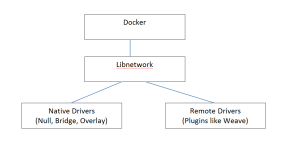
At high level, the diagram above describes the flow for Docker Networking.

  • Docker runtime was integrated previously with Networking and there was no way to separate the 2. Libnetwork is the new Networking library that provides the Networking functionality and is seperated from Core Docker. Docker 1.7 release has already included the libnetwork and is backward compatible from enduser perspective.
  • Drivers implement the APIs provided by libnetwork. Docker is leaning towards plugin approach for major functionalities like Networking, Storage, Orchestration where Docker provides a native solution which can be substituted with technologies with other vendors as long as they implement the APIs provided by the common library. In this case, Bridge and Overlay are the Native Docker networking drivers and remote drivers can be implemented by third-party. There are already many remote drivers available like Weave.

Docker Container Networking model: Continue reading Docker Experimental Networking – 1

Docker Machine

As part of Docker Orchestration, Docker has released 3 new tools Machine, Swarm, Compose. In the last few weeks, I was playing with these tools and I will share my experiences in this blog. I will start with Docker machine in this blog and I will cover Swarm, Compose in the next set of blogs. Only preliminary version of these tools are released and there is a plan to release more updated versions later this year. For basics and other details on Docker, you can refer to my Docker blog series.

Docker Machine:

Docker machine makes it easier to create Docker hosts using an uniform approach across bare metal, VM, Cloud provider, Private clouds etc. Before Docker machine was there, following were the approaches available to create Docker hosts:

  • On Linux machines, Docker agent and client are installed natively.
  • For Windows, boot2docker is used to create a Docker host on top of hypervisor like Virtualbox.
  • For public clouds, we would create a Linux VM and install Docker on top of it.

Continue reading Docker Machine

Kubernetes – Overview

Earlier, I had written a blog on Docker Orchestration. This is a pretty new area and different solutions are being developed to address this problem. Few weeks back, I had written a blog on AWS EC2 Container service. Kubernetes is a Docker Orchestration engine used to manage a cluster of Containers. Google initially developed Kubernetes, currently its an open source project and source code is available here. Google Cloud’s Container engine uses Kubernetes to manage Docker Containers. Kubernetes can be used standalone or with any Cloud service like AWS, EC2.

Kubernetes basics:

Following are basic building blocks within Kubernetes:

  • Cluster(master and minion) – This is the cluster of machines where Container services are launched on. There is 1 master node and the other nodes are called as worker nodes or minions. The master node runs etcd configuration database service, scheduler to schedule the containers, api server for external clients to talk to, replication controller to manage the state of containers. The minion node runs a slave agent to talk to the master node.
  • Pods – can be a single container or a collection of containers. Containers within a pod share same characteristics and are brought up and teared down together. They are normally launched on same minion. An example could be a pod containing redis master and slave database containers. Pod configuration is defined as a json file.
  • Service – Service is an abstraction over Pod that is useful for Service discovery and exposing environment variables to other services. Example could be a database service exposing port numbers to web service.
  • Labels – Labels are used with Pods and Services for easier management of Containers through filters. Rather than managing individual Pods and Services, Containers can be managed at Label level. For example, we can say destroy all “frontend” labels.

Continue reading Kubernetes – Overview

Google Cloud – Getting started

I have used AWS for most of my Cloud related needs. Recently, I tried out Google Cloud and I will share some of my experiences with Google Cloud in this blog.

The easiest way to get started is to signup for the 60 day trial. This gives 300$ of credit to use Google Cloud for 60 days. It is necessary to register using a credit card.

Google cloud services can be accessed either using Developer’s console, CLI, SDK. It is needed to create atleast a single project to get started. First, I created a project using the Developer’s console. Developer’s console can be accessed from here.

Installing and using gcloud SDK:

Use the procedure here to install SDK.
Following are the steps that I did to install SDK in Ubuntu 14.04 VM running in Virtualbox:

Continue reading Google Cloud – Getting started

AWS ECS(EC2 Container service)

I recently tried out AWS ECS(EC2 Container service). In this blog, I will provide overview of EC2 container service, some hands-on stuff I tried and my experiences with ECS. AWS ECS is available as a preview currently with only CLI interface. I assume general availability with web interface will be available soon. Amazon does not charge separately for the ECS service, instances used for containers will be charged appropriately. I have a AWS free-tier account and I was able to try the ECS with the free-tier account.

Pre-requisites:

  • Familiarity with Containers and Docker. You can refer to my blog on Docker series.
  • Familiarity with AWS services. You can refer to my previous blogs on AWS overview and how to access AWS services.
  • For the hands-on stuff, you need to have atleast a free-tier account with AWS. AWS cli needs to be installed since ECS is available only with a CLI interface currently.

Overview of ECS:

I had written a blog earlier on Docker Orchestration. ECS is a Docker Container Orchestration service that provides the following functionalities.

  • Allows to deploy Containers across a cluster of hosts using either AWS scheduler or integrate with third party schedulers like Mesos.
  • Allows management of an application that spans multiple containers rather than just managing containers.
  • Provides high availability for Containers by monitoring Container health.

Following are components of ECS:

  • Cluster – Logical entity that contains multiple EC2 instances. Instances within the container can be of different types.
  • Container instances – Each instance is an EC2 instance with Docker and Container agent pre-installed and is available as AWS AMI image. Container agent registers itself to the cluster and it monitors health of the Containers in the host. AWS is open-sourcing the Container agent project and its available in github.
  • Tasks – Tasks contains the application definition, resources needed and it can span multiple containers. Task definitions are specified in json format.
  • ECS Master – This manages everything. ECS master is responsible for scheduling the containers and also for talking to the container agent to get the health of container instances. When ECS master schedules the containers, it takes into account resources needed for the container and the resources available in the container instance.

ECS hands-on:

Most of the steps below are as mentioned in AWS ECS developer guide.

Continue reading AWS ECS(EC2 Container service)

Docker Orchestration

This blog is part of my ongoing series on Docker containers. Orchestrating Containers is a pretty complex task and there is a lot of work ongoing to solve this particular problem. There are big companies, startups as well as Opensource projects involved with this work. There are many different technologies and projects ongoing that got me really confused when I started looking at this. In this blog, I have tried to break down the Docker orchestration problem into smaller pieces and have tried to map different existing/developing solutions into the smaller pieces. Considering that the technologies are evolving and that my knowledge in this area is limited, this blog might need updates and corrections as we move forward. Also, I might have missed few technologies as well as companies..

Problem statement:

Docker does a great job in packaging and transporting single containers. Following are specific problems we need to address:

  • Distributed Applications split between multiple containers.
  • Manage a large number of containers both in terms of allocating the containers to the cluster of hosts as well as handling container failures.

Orchestration blocks:

Continue reading Docker Orchestration

Storage Primer

Storage is a very critical component in the current IT domain. Choosing the right Storage platform and software is a critical part of a good Data center whether it is internal or external cloud. Even though I understood some Storage basics, I never ventured deep to understand the different storage technologies available. I tried to brush up my knowledge by doing some reading recently and I have tried to capture some of my reading in this blog.

Storage device(HDD vs RAID vs SSD)

HDD – Hard disk drive consists of a spindle with disks.

RAID(Redundant array of Independent disks) – Combines multiple HDDs to provide more reliability, throughput and capacity.

SSD – Solid state drive is a memory chip and it has no moving parts.

Storage device performance is measured in terms of throughput(data transfer rate), latency(time it takes to start a IO task) and IOPS(IO operations per second).  SSD scores better over HDD on all the performance parameters. RAID provides comparable throughput and IOPS as SSD, but SSD provides better latency. The only disadvantage of SSD is the much higher cost.

Continue reading Storage Primer

Hybrid Cloud

In the recent Rightscale survey, 74% of the respondents mentioned that they have a multi-cloud strategy and 48% of the respondents are planning for hybrid clouds. The recent trend in Cloud computing after Public and Private cloud is Hybrid cloud. Hybrid cloud offers the best of Private and Public cloud in some scenarios and Enterprises seem to like that.

In this blog, I will cover the following:

  • What is Hybrid cloud and Multi-cloud?
  • Use cases for Hybrid cloud.
  • Components of Hybrid cloud and design considerations – Cloud management, Network connectivity, Application portability
  • Popular Hybrid cloud providers – Rightscale and AWS, Vmware VCHS, Cisco Intercloud, Rackspace hybrid cloud, Redhat open hybrid cloud

Continue reading Hybrid Cloud