This blog is part of my series on Devops for Networking. In this blog, I will cover a brief overview of UCS management model, management tools and how to automate configuration and monitoring of Cisco UCS using Python SDK. UCS is Cisco’s Unified computing system that provides a tightly integrated compute, networking and storage solution.
UCS Management
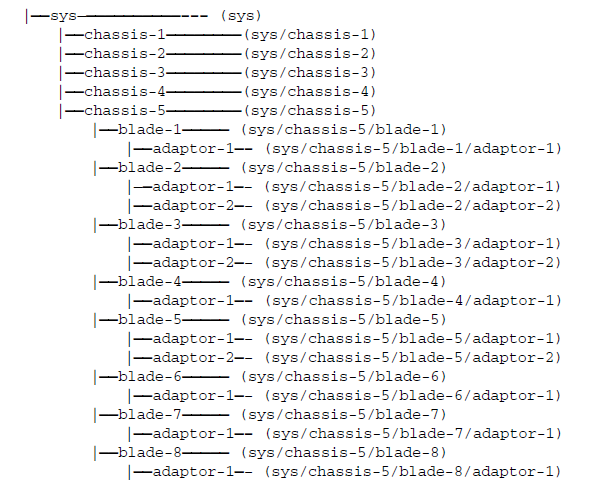
Cisco UCS management information model is a hierarchical tree with each node in the tree representing either physical or logical entity. The node is referred to as MO(Managed object). Physical entities could be chassis, servers, switches and logical entities could be policies, service profiles etc. XML based interface is provided to set and get managed objects. Following picture shows a sample Management tree with Chassis, blades and adapters.
Following picture shows overview of Cisco UCS management blocks.
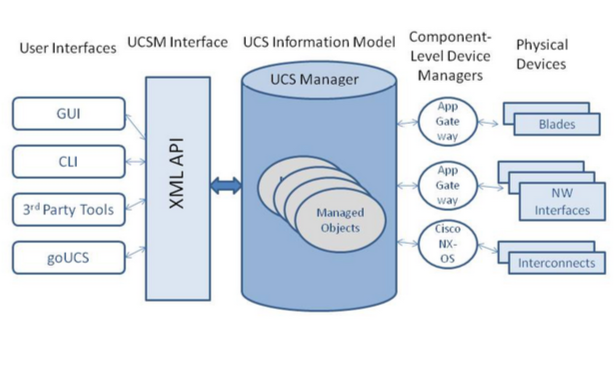
Following are some notes:
- UCS information model is the central repository.
- Different management tools can be used to modify and retrieve the information model. These tools can be CLI, GUI as well as third-party tools.
- When the model is modified, device level agents take that modified information and update the physical and logical devices with the new state.
UCS Python SDK
To make UCS management easier, Cisco has provided a Python SDK library. The Python SDK library abstracts some of the low level details and provide simple APIs to manage UCS. It is easier to automate configuration and monitoring using the abstractions provided by the SDK. Following are some functionalities Python SDK provides:
- Handles setting up of connections with login details.
- Provides apis to get managed object based on classid or Distinguished name.
- Provides apis to add, set, remove, compare managed objects.
- Provides capability to watch MO events.
Getting started with UCS Python SDK
If you have access to UCS hardware which I have access to, you can try with it. Else you can use the UCS platform emulator which can be installed as a VM.
The easiest way to browse MO tree is using Visore browser based tool that UCS provides. To access the tool, type <ip/visore.html> in the browser. You will see the following main page where we can filter based on classid, Distinguished name, property.

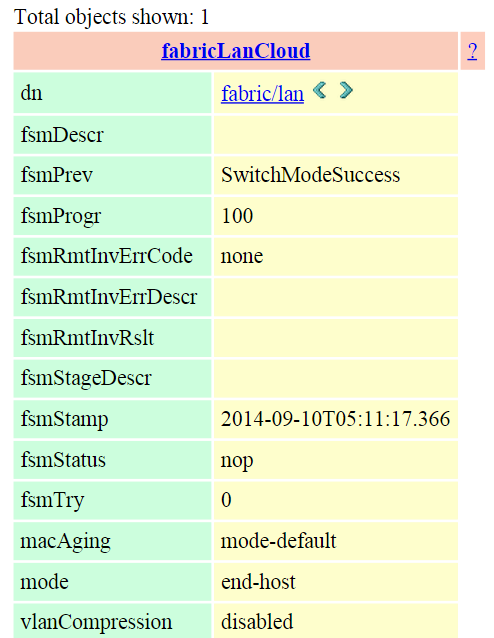
Following is a sample output for classid “fabricLanCloud” or Distinguished name “fabric/lan”. The different rows we see are the properties associated with this managed object. 1 of the key properties we see here is Ethernet mode of the switch which it says as End-host.
Download SDK from here. I installed version 0.8.2 in my Ubuntu 12.04 using the following instructions mentioned in user guide.
python setup.py build
sudo python setup.py install
There are some sample scripts present in the “samples” directory.
Using the sample scripts, I wrote a small application that can read and display basic properties of UCS device. The usecase for this script is that we have a bunch of UCS devices in our lab and to test out a particular scenario, we need a particular UCS system with specific configuration like cluster/stand-alone, software version, specific type of server etc. Instead of logging into each device and executing a bunch of commands to get this info, the script can automatically fetch this information. The script can be found in github.
To execute the script:
python getUcsProp.py -i <ip>-u <username>-p <password>
Output from the above script on a specific device:
hamode cluster ethmode end-host version 2.2(3a)
fia-model UCS-FI-6248UP
fib-model UCS-FI-6248UP
chassis 1 model N20-C6508
server 1 model UCSB-B200-M3
server 2 model UCSB-B200-M3
The capability to manage a device through a script provides endless possibilities for the automation team.
Note:
For UCS sdk version 0.8.3, there is a change in default behavior where all MOs are not in single file and we either need to load individual module MOs are make an additional change to load all Modules. Above script modified for sdk version 0.8.3 is available here. (Thanks Amir for pointing out the issue)
References:
- Cisco UCSM Devnet
- Cisco UCS Python SDK
- Hyperlinks mentioned inline
Pictures used in the blog are from the references.
 Sreenivas Makam's Blog
Hi Sreenivas. Thank you for this great write up. I’m trying to build my first Python UCS script and when I run it – I get the following:
+++++++++++++++++++++++++++++++++++++++++++++++
amirsafayan@UCS /cygdrive/c/UcsDsk/UcsSdk-0.8.3
$ python goodluck.py -i 10.10.10.10 -u admin -p PASSWORD
Exception: global name ‘OrgOrg’ is not defined
————————————————————
Traceback (most recent call last):
File “goodluck.py”, line 156, in
ethmode = getEthernetMode(handle)
File “goodluck.py”, line 42, in getEthernetMode
molist = handle.GetManagedObject(None, None, {OrgOrg.DN:”fabric/lan”})
NameError: global name ‘OrgOrg’ is not defined
————————————————————
+++++++++++++++++++++++++++++++++++++++++++++++
When I look in visore – I see that my orgOrg MO has a dn = org-root.
Do you have a suggestion on how to resolve this?
Thank you!
Amir
hi Amir
Thanks for the feedback.
Not clear abt the issue. What UCSM version is your system running?( I am running 2.2) The only other difference I see is you are running UcsSdk-0.8.3, I am running UcsSdk-0.8.2. Can you try the scripts provided in samples directory(that comes with sdk) like getFaults.py and check if that works?
Regards
Sreenivas
Hi,
Thanks for the follow up. Yes, it just so happens that getfaults.py is one I tried successfully last night.
I work for a large Cisco reseller and am developing ways to monitor / manage the UCS platform with our Linux platform. It is very interesting to me that the community has put so much time and effort into developing Powershell scripts when the world has adopted Linux as the de facto standard OS.
I’m looking to perform full inventories and a health check of the various physical and logical components typically acquired via SNMP polling. And perhaps even performance metrics and graphing via the XML API and the Python SDK.
When I get back to my home office – I’ll run some of the other scripts and provide you the failed output. I remember running several others last night and if I remenber correctly, they failed with “OrgOrg not being defined.” as well.
Regards,
Amir
Hi,
As mentioned earlier, I’m able to successfully run the getFaults.py script as shown here:
++++++++++++++++++++++++++++++++++++++++++++++
amirsafayan@UCS /cygdrive/c/UcsDsk/UcsSdk-0.8.3/samples
$ python getFaults.py -i 10.10.10.10. -u admin -p PASSWORD
Managed Object : FaultInst
————–
ChangeSet :
Lc :
Descr :On Fabric: A, Port: 1/9 following overlapping VLANs detected: 1
LastTransition :2014-06-18T13:41:35.761
Rn :fault-F1090
Type :network
Severity :info
Dn :fabric/lan/A/phys-slot-1-port-9/fault-F1090
Tags :
Cause :configuration-error
Status :None
Created :2014-06-18T13:41:35.761
Ack :no
Rule :fabric-eth-lan-ep-overlapping-vlan
OrigSeverity :info
PrevSeverity :info
Code :F1090
HighestSeverity :info
Id :191998
Occur :1
Ucs :fab-int
++++++++++++++++++++++++++++++++++++++++++++++
I’ve posted this question in the community forums – hopefully someone has some insight:
https://communities.cisco.com/message/175530#175530
Thank you!
Amir
hi Amir
I figured out your issue. its because of sdk difference. I upgraded to 0.8.3 and found the same issue as yours. Then I looked at the user guide for 0.8.3 and they mention that with the new version, they are not loading all MOs by default. You either need to import individual modules or load all modules. Details are in section 3.6.1 of 0.8.3 user guide. After making the change the script worked fine.
Will also post the same to community list.
Regards
Sreenivas
Excellent. Thank you VERY much Sreenivas! Will look at that right now.
Amir
Hi Sreenivas,
Where did you place the revised script? I just grab’ed the github script and it matched the script that I had downloaded and tested with yesterday. So I don’t see the “revised” script.
Thanks,
Amir
Updated the blog and github just now, new script is at https://github.com/smakam/devops/blob/master/getUcsProp_newsdk.py
(left the old script as it is)
Hi Sreenivas,
I just ran your script but I got below error. I am running from ubuntu 10.4 OS and my ucsm version is 2.1.3, sdk is .0.8.3:
$python ./t.py -i 10.191.240.21 -u admin -p xxx
Traceback (most recent call last):
File “./t.py”, line 151, in
loadAllMo()
File “./t.py”, line 44, in loadAllMo
subpackage = ‘{}.{}’.format(package_name+”.MoMeta”, modulename)
ValueError: zero length field name in format
Hi Lufan
few things to check:
I have tried this on Ubuntu 12.04 and Ubuntu 14.04 with Python 2.7.3. What is the Python version you are using, that could be the issue.
Ubuntu 10.04 seems pretty old. Did the sdk install work fine? Did you get any errors with the UCS sdk install?
Regards
Sreenivas
it is running python 2.6 and sdk installation did not show error. I rerun sdk installation and here is what I got:
]$ sudo python setup.py install
/usr/lib/python2.6/distutils/dist.py:266: UserWarning: Unknown distribution option: ‘zip_safe’
warnings.warn(msg)
/usr/lib/python2.6/distutils/dist.py:266: UserWarning: Unknown distribution option: ‘include_package_data’
warnings.warn(msg)
/usr/lib/python2.6/distutils/dist.py:266: UserWarning: Unknown distribution option: ‘namespace_packages’
warnings.warn(msg)
running install
running build
running build_py
running install_lib
copying build/lib.linux-x86_64-2.6/UcsSdk/MoMeta.py -> /usr/local/lib/python2.6/dist-packages/UcsSdk
copying build/lib.linux-x86_64-2.6/UcsSdk/Mos.py -> /usr/local/lib/python2.6/dist-packages/UcsSdk
copying build/lib.linux-x86_64-2.6/UcsSdk/MethodMeta.py -> /usr/local/lib/python2.6/dist-packages/UcsSdk
byte-compiling /usr/local/lib/python2.6/dist-packages/UcsSdk/MoMeta.py to MoMeta.pyc
byte-compiling /usr/local/lib/python2.6/dist-packages/UcsSdk/Mos.py to Mos.pyc
byte-compiling /usr/local/lib/python2.6/dist-packages/UcsSdk/MethodMeta.py to MethodMeta.pyc
running install_egg_info
Removing /usr/local/lib/python2.6/dist-packages/UcsSdk-0.8.3.egg-info
Writing /usr/local/lib/python2.6/dist-packages/UcsSdk-0.8.3.egg-info
Hi Amir, forgot to say: ~/UcsSdk-0.8.3/samples/getFaults.py ran just fine.
Hi Sreenivas, it is python 2.6 and sdk install show no error. also ~/UcsSdk-0.8.3/samples/getFaults.py ran just fine.
It worked!
++++++++++++++++++++++++++++++++++++++++++++++++++++
amirsafayan@ucs /cygdrive/c/UcsDsk/UcsSdk-0.8.3
$ python getUcsPropv2.py -i 10.10.10.10 -u admin -p PASSWORD
hamode cluster ethmode end-host version 2.1(3a)
fia-model UCS-FI-6248UP
fib-model UCS-FI-6248UP
Blade chassis:
N20-C6508
Blade servers:
UCSB-B200-M3
UCSB-B200-M3
UCSB-B200-M3
UCSB-B200-M3
Rack servers:
amirsafayan@ucs /cygdrive/c/UcsDsk/UcsSdk-0.8.3
$
++++++++++++++++++++++++++++++++++++++++++++++++++++
How difficult would it be to acquire the serial numbers and firmware versions?
Thank you very, very much!
Amir
The script already prints the UCSM version. serial numbers and firmware versions can be read from individual devices. For example, “sys/switch-a” will display the Fabric interconnect serial number.
Hi,
How do you use the script to acquire the individual device serial numbers and versions?
Thanks,
Amir
i didnt get your question. Lets say that you have a list of IPs that you want to get the inventory, you can go to each IP and get details of FI, servers etc. Each has a different MO and we need to query it. Currently, my script queries for 1 IP which it takes as argument, we can change that to pass a list or a file.
Regards
Sreenivas
I have been trying for quite some time to modify this script to get the individual device serial numbers and firmware versions. I have failed miserably. As Amir Safayan asked, Sreenivas would you please, most graciously, assist in adding firmware versions to your script? This would be most appreciated.
Hi,
My goal is to develop a single script using the Python SDK that will provide me the entire inventory of a single UCS B-Series with Product Name, PID and SN. This script would be used in the “discovery” phase of a project.
This data can be generated with the following two B-Series CLI commands:
1. show chassis inventory expand
+++++++++++++++++++++++++++++++++++
fab-int-A# show chassis inventory expand –
++OUTPUT MODIFIED FOR BREVITY++
Chassis 1:
Servers:
Server 1/1:
Equipped Product Name: Cisco UCS B200 M3
Equipped PID: UCSB-B200-M3
Equipped VID: V01
Equipped Serial (SN): FCHXXXXXXX
PSU 1:
Presence: Equipped
Product Name: Platinum AC PSU for N20-C6508 Blade Server Chassis
PID: UCSB-PSU-2500ACPL
VID: V03
Vendor: Cisco Systems Inc
Serial (SN): DTMXXXXXXXXXX
HW Revision: 0
Fan Modules:
Tray 1 Module 1:
Presence: Equipped
ID PID Vendor Serial (SN) HW Revision
———- ———— ————— ———– ———–
1 N20-FAN5 Cisco Systems I NWGXXXXXXX 0
2 N20-FAN5 Cisco Systems I NWGXXXXXXX 0
IOCard 1:
Side: Left
Fabric ID: A
Product Name: Cisco UCS 2208XP
PID: UCS-IOM-2208XP
VID: V03
Vendor: Cisco Systems Inc
Serial (SN): FCHXXXXXXXX
HW Revision: 0
+++++++++++++++++++++++++++++++++++
2. show server inventory expand
+++++++++++++++++++++++++++++++++++
fab-int-A# show server inventory expand
++OUTPUT MODIFIED FOR BREVITY++
Server 1/1:
BIOS:
Motherboard:
Array 1:
CPU:
RAID Controller 1:
Adapter:
+++++++++++++++++++++++++++++++++++
Thank you!
Amir
Sreenevas, Do you have a “GA” version of this?
Hi
Are you asking abt GA version of Python SDK? My understanding is that is already available as GA including the one that I used.
Regards
Sreenivas
Hi Sreenivas,
Thank you for great article !
I’m trying to build my first Python UCS script using the UCS Emulator, but when I attempt to login I have a SSL Error :
Traceback (most recent call last):
File “test.py”, line 221, in
handle.Logout()
File “C:\Python27\lib\site-packages\UcsSdk\UcsHandle.py”, line 416, in Logout
response = self.AaaLogout(dumpXml)
File “C:\Python27\lib\site-packages\UcsSdk\UcsHandle.py”, line 2385, in AaaLogout
response = self.XmlQuery(method, WriteXmlOption.Dirty, dumpXml)
File “C:\Python27\lib\site-packages\UcsSdk\UcsHandle.py”, line 214, in XmlQuery
f = opener.open(req)
File “C:\Python27\lib\urllib2.py”, line 431, in open
response = self._open(req, data)
File “C:\Python27\lib\urllib2.py”, line 449, in _open
‘_open’, req)
File “C:\Python27\lib\urllib2.py”, line 409, in _call_chain
result = func(*args)
File “C:\Python27\lib\urllib2.py”, line 1240, in https_open
context=self._context)
File “C:\Python27\lib\urllib2.py”, line 1197, in do_open
raise URLError(err)
urllib2.URLError:
I even try to launch /samples script within the sdk, still the same error.
Did this happened to you ?
Do you have a suggestion on how to resolve this ?
Regards,
Samy
Hi srinivas,
Thank you for this good article.
Is is possible to upgrade a Blade firmware or Fabric Interconnect firmware using python UcsmSdk ?
Thanks in advance
Keerthi
hi Keerthi
this is what i saw in 2.2(3a) emulator guide:
Firmware download and upgrade is now supported. New
firmware can be downloaded either from the Cisco
Developer Network or any other source and installed on the
Platform Emulator. Upgrade of installed firmware is
supported only for B-Series and C-Series components such
as bios, adapter, Cisco IMC, and storage controller.
Installation can also be done using Host Firmware Pack and
Auto Install feature.
I havent tried this. Based on the above statement, it should be possible, but only for B and C series components not for A-series.
Regards
Sreenivas
Thanks a lot srinivas
Any way to connect local-mgmt and nxos from ucsmsdk