This is a continuation of my previous 2 blogs on Docker machine, Swarm. In this blog, I will cover Docker Compose and how Docker Machine, Swarm and Compose can work with each other. The interworking part is actively being developed by Docker team and is still at the preliminary stages. Docker Compose: Docker Compose comes from Fig project. With Docker Compose, we can define a multi-container application in a YAML file along with the Container dependencies, affinities etc and Compose will take care of orchestrating the application. Following picture from Docker Compose presentation illustrates the point above. 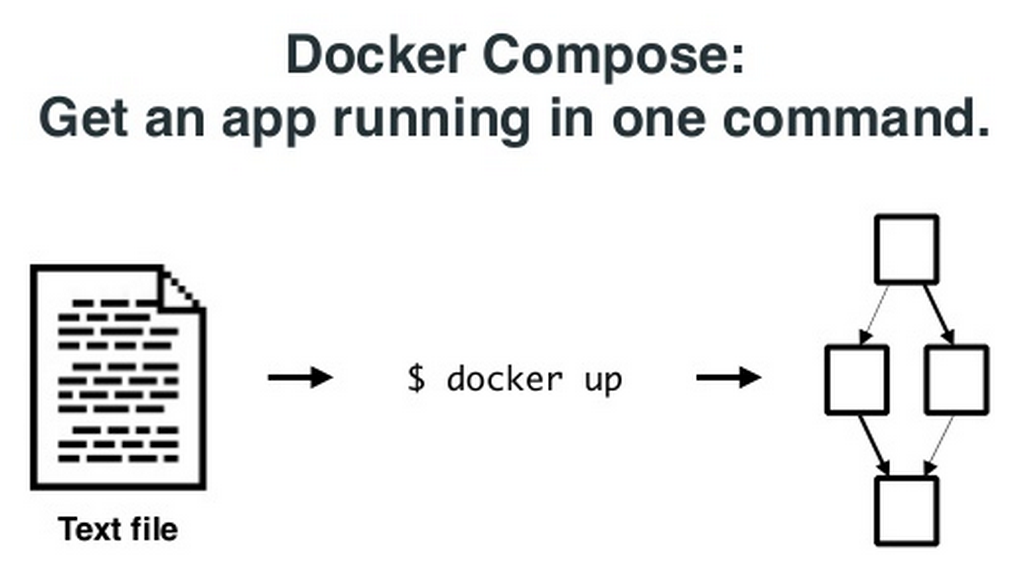 Following is a sample YAML file describing a small application with 2 containers, 1 for web and another for db.
web:
  build: .
  command: python app.py
  ports:
   - "5000:5000"
  volumes:
   - .:/code
  links:
   - redis
redis:
  image: redis
We can observe the following:
- For web container, we have to build the Docker image using the Dockerfile in that directory.
- For web container, we specify the exposed ports and how its mapped to the host machine. Since volumes are mapped to host machine, code changes can be made dynamic.
- Because we have specified the linking to the redis container, there is no need to specify the db port numbers statically.
Following are some things I tried: Defined a single application container in docker-compose.yml:
web:
  image: nginx
Created 5 containers using this template above. Below, we can see the containers getting created and displayed.
$ docker-compose scale web=5
Creating composetest1_web_1...
Creating composetest1_web_2...
Creating composetest1_web_3...
Creating composetest1_web_4...
Creating composetest1_web_5...
Starting composetest1_web_1...
Starting composetest1_web_2...
Starting composetest1_web_3...
Starting composetest1_web_4...
Starting composetest1_web_5...
sreeni@ubuntu:~/composetest1$ docker ps
CONTAINER ID        IMAGE               COMMAND                CREATED             STATUS              PORTS               NAMES
a4ecd1ffd1bb        nginx:latest        "nginx -g 'daemon of   4 seconds ago       Up 2 seconds        80/tcp, 443/tcp     composetest1_web_5
37c3ea424261        nginx:latest        "nginx -g 'daemon of   4 seconds ago       Up 3 seconds        80/tcp, 443/tcp     composetest1_web_4
cb8cf79d939d        nginx:latest        "nginx -g 'daemon of   4 seconds ago       Up 3 seconds        80/tcp, 443/tcp     composetest1_web_3
90cc275201f0        nginx:latest        "nginx -g 'daemon of   4 seconds ago       Up 3 seconds        80/tcp, 443/tcp     composetest1_web_2
561eda1e8a58        nginx:latest        "nginx -g 'daemon of   4 seconds ago       Up 3 seconds        80/tcp, 443/tcp     composetest1_web_1
e065a9a35c9d        swarm:latest        "/swarm join --addr=   23 hours ago        Up 23 hours         2375/tcp            pensive_babbage
$ docker-compose ps
       Name                Command          State        Ports
-------------------------------------------------------------------
composetest1_web_1   nginx -g daemon off;   Up      443/tcp, 80/tcp
composetest1_web_2   nginx -g daemon off;   Up      443/tcp, 80/tcp
composetest1_web_3   nginx -g daemon off;   Up      443/tcp, 80/tcp
composetest1_web_4   nginx -g daemon off;   Up      443/tcp, 80/tcp
composetest1_web_5   nginx -g daemon off;   Up      443/tcp, 80/tcp
1 problem that I faced is that if the image is not pulled before-hand, docker-compose returns below errors and times out:
compose.progress_stream.StreamOutputError: Get https://registry-1.docker.io/v1/repositories/library/nginx/tags: dial tcp: lookup registry-1.docker.io on 127.0.1.1:53: read udp 127.0.1.1:53: i/o timeout
We can work around the problem by pulling the Docker image before-hand. This workaround also applies when docker-compose is run on a Swarm cluster. Docker Compose with Swarm, Machine: There is a great value in Docker Machine, Swarm and Compose working together. Docker Compose can run on the Swarm cluster created using Docker Machine. Following is a pictorial representation of the interworking. 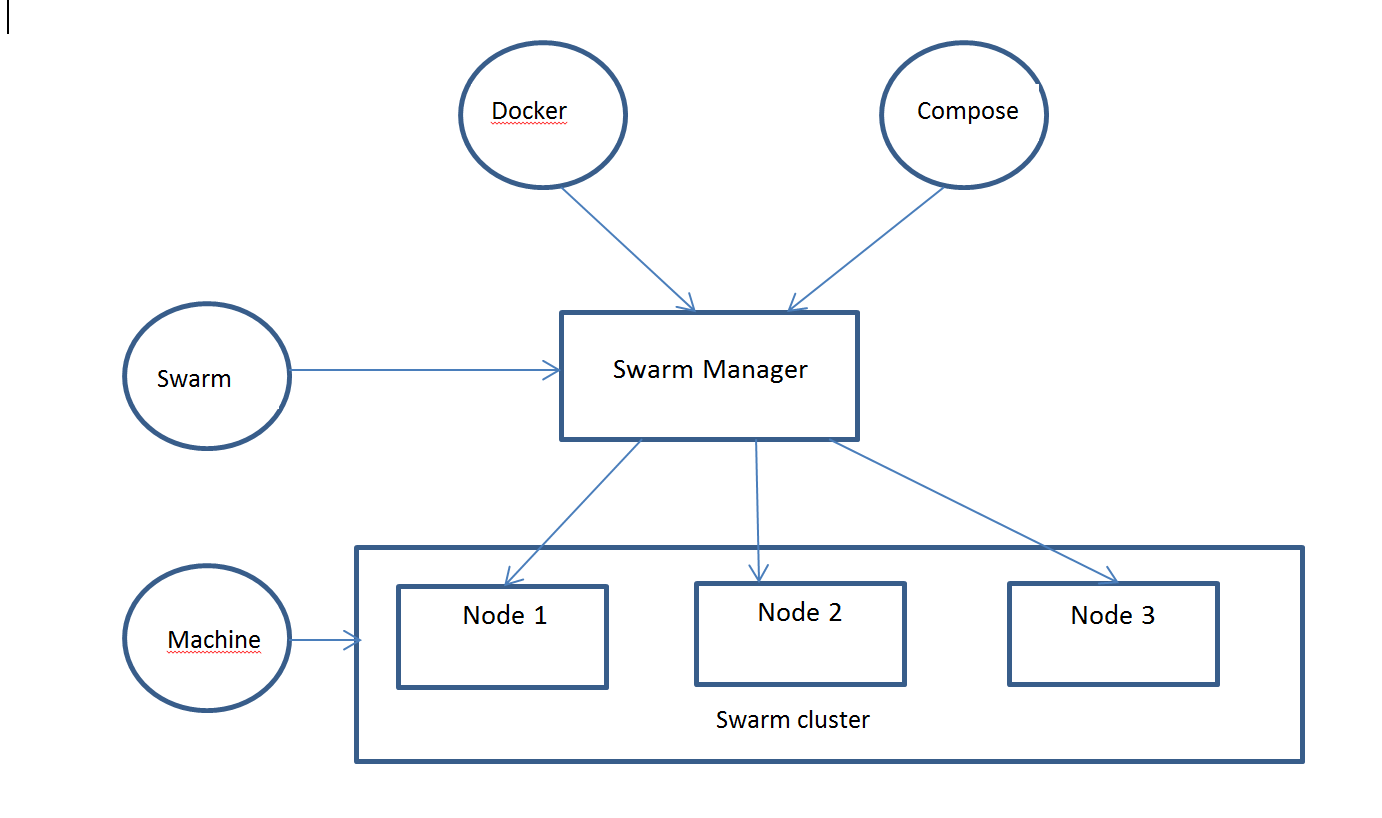 Following is an example application I tried with Docker Machine, Swarm, Compose. I used the same application that’s mentioned in Docker Compose documentation. The application has web and db container and it shows the number of visits to the webpage. There are few limitations in the current integration:
- Containers created with docker-compose for a single application needs to be in the same host.
- Using Compose with Docker build against a Swarm cluster is not implemented.
First, I created a Swarm cluster using docker-machine and following is my cluster:
$ docker info
Containers: 6
Strategy: spread
Filters: affinity, health, constraint, port, dependency
Nodes: 2
 swarm-master: 192.168.99.100:2376
  └ Containers: 4
  └ Reserved CPUs: 0 / 1
  └ Reserved Memory: 0 B / 1.023 GiB
 swarm-node-00: 192.168.99.103:2376
  └ Containers: 2
  └ Reserved CPUs: 0 / 1
  └ Reserved Memory: 0 B / 1.023 GiB
Because docker build is not supported with Compose and Swarm cluster, I created a build and pushed the Docker image to Docker hub with the following application and build file. Following is the application I found in Docker page:
from flask import Flask
from redis import Redis
import os
app = Flask(__name__)
redis = Redis(host='redis', port=6379)
@app.route('/')
def hello():
    redis.incr('hits')
    return 'Hello World! I have been seen %s times.' % redis.get('hits')

if __name__ == "__main__":
    app.run(host="0.0.0.0", debug=True)
Following is the sample Dockerfile that I used:
FROM python:2.7
WORKDIR /code
ADD requirements.txt /code/
RUN pip install -r requirements.txt
ADD . /code
CMD python app.py
requirements.txt has:
flask
redis
I created and pushed Docker image to docker hub using:
docker push smakam/web2
Following is my docker-compose.yml file that uses the Docker web image created from previous step and redis container.
$ cat docker-compose.yml
web:
  image: smakam/web2
  ports:
   - "5000:5000"
  links:
   - redis
redis:
  image: redis
At this point, I can compose the Docker application on Swarm cluster.
$ docker-compose up -d
Creating composetest3_redis_1...
Creating composetest3_web_1...
$ docker-compose ps
      Name             Command             State              Ports
-------------------------------------------------------------------------
composetest3_red   /entrypoint.sh     Up                 6379/tcp
is_1               redis-server
composetest3_web   /bin/sh -c         Up                 192.168.99.100:5
_1                 python app.py                         000->5000/tcp
To see, where the containers are hosted, we can do ps command. We can see that both containers are hosted in swarm-master node.
$ docker ps
CONTAINER ID        IMAGE                COMMAND                CREATED             STATUS              PORTS                           NAMES
81b514a81910        smakam/web2:latest   "/bin/sh -c 'python    22 seconds ago      Up 19 seconds       192.168.99.100:5000->5000/tcp   swarm-master/composetest3_web_1
53d90f8691c5        redis:latest         "/entrypoint.sh redi   23 seconds ago      Up 20 seconds       6379/tcp                        swarm-master/composetest3_redis_1,swarm-master/composetest3_web_1/composetest3_redis_1,swarm-master/composetest3_web_1/redis,swarm-master/composetest3_web_1/redis_1
Sometimes, I saw a bug that containers gets hosted in different nodes of Swarm cluster and in those cases, Containers are not able to talk to each other. To see that the application is working, we can do a web query.
$ curl localhost:5000
Hello World! I have been seen 1 times.docker@swarm-master:~$
docker@swarm-master:~$
docker@swarm-master:~$ curl localhost:5000
Hello World! I have been seen 2 times.
In summary, I see that Docker machine, Swarm and Compose makes it simpler to orchestrate and scale Docker containers. I like the batteries included approach where the functionality is available natively and support is available to replace third-party components. This applies for Clustering and Scheduling where Docker can support Mesos and Kubernetes. Since the released versions are pretty new, I did hit few bugs and had to try workarounds to overcome them. 1 big missing piece I see is the Container networking across multiple hosts. As per my understanding, this is actively under development and will be available soon.

