This blog is a continuation of my previous blog on Docker Experimental Networking. In this blog, I will cover an example of Docker container connectivity using bridge and overlay driver.
Following is a sample usecase that I tried:
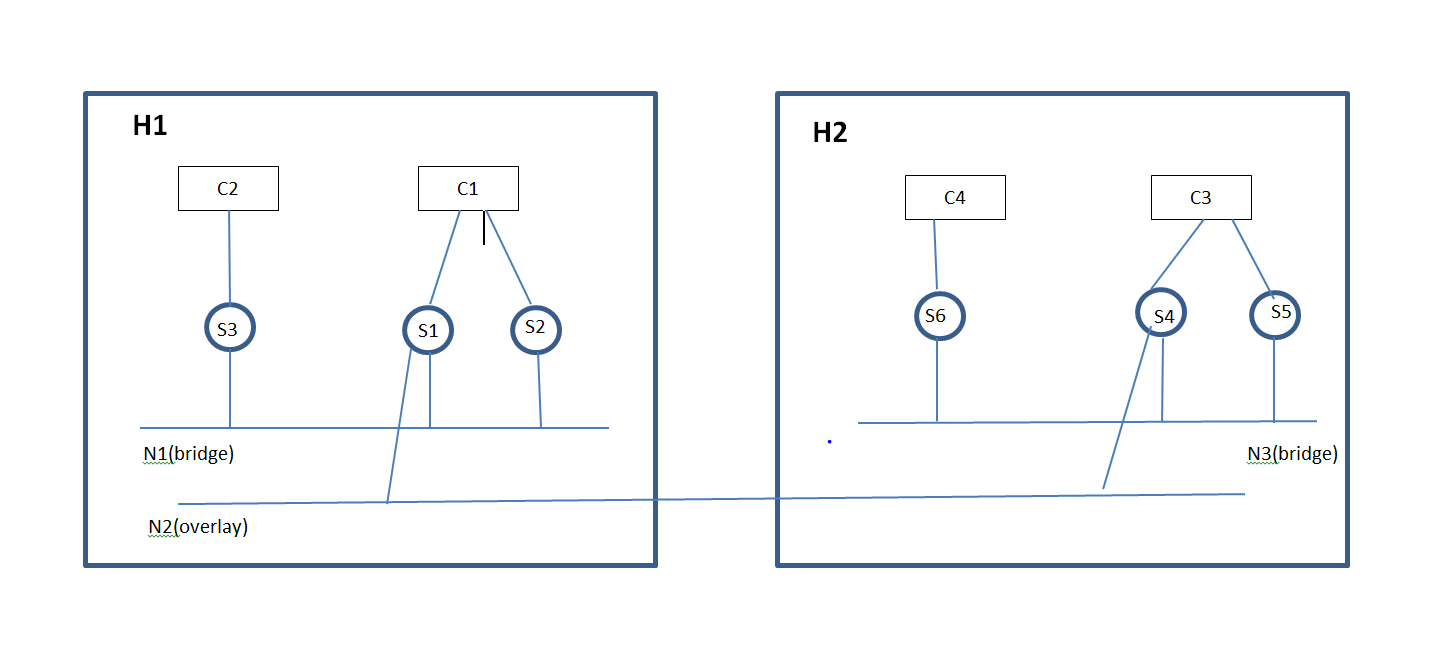
- Container C1 in host H1 will be able to talk to Container C3 in Host H2 using service endpoints S1 in C1 and S4 in C3 through Network N2(Overlay driver).
- On Host H1, Container C1 has 2 services and C2 has 1 service in the Network N1(bridge driver) and they will be able to talk to each other using the Network N1.
- On Host H2, Container C3 has 2 services and C4 has 1 service in the Network N3(bridge driver) and they will be able to talk to each other using the Network N3.
- Containers will be able to discover services in the same network.
I came across the following limitations/bugs:
- Docker run command has only 1 publish-service option. This means only 1 service can be attached to the Container using this command. We can use Service attach option as a workaround.
- If we attach a service to a Container at later point, Service discovery does not happen automatically. We can still talk through IP addresses.
Because of the above 2 issues, I have attached 1 service as part of Docker run and have attached the remaining services separately in the example below.
Create Consul host and 2 Docker machines:
I used the approach of Docker machine and Virtualbox driver to create Docker hosts. We need a Keystore mechanism to share data between the 2 Containers and Consul is 1 of the approaches to share data.
Create consul machine and start consul:
docker-machine create -d virtualbox --virtualbox-boot2docker-url=http://sirile.github.io/files/boot2docker-1.8.iso infra
eval "$(docker-machine env infra)"
docker run -d -p 8500:8500 progrium/consul --server -bootstrap-expect 1
Create docker machine 1 and connect to Consul:
docker-machine create -d virtualbox --virtualbox-boot2docker-url=http://sirile.github.io/files/boot2docker-1.8.iso --engine-opt="default-network=overlay:multihost" --engine-opt="kv-store=consul:$(docker-machine ip infra):8500" --engine-label="com.docker.network.driver.overlay.bind_interface=eth1" app0
Create docker machine 2 and connect to Consul and Docker machine 1:
docker-machine create -d virtualbox --virtualbox-boot2docker-url=http://sirile.github.io/files/boot2docker-1.8.iso --engine-opt="default-network=overlay:multihost" --engine-opt="kv-store=consul:$(docker-machine ip infra):8500" --engine-label="com.docker.network.driver.overlay.bind_interface=eth1" --engine-label="com.docker.network.driver.overlay.neighbor_ip=$(docker-machine ip app0)" app1
Create Network, services and Containers:
Create appropriate Networks and Services on host 1:
docker network create -d bridge n1
docker network create -d overlay n2
docker service publish s1.n1
docker service publish s2.n1
docker service publish s3.n1
docker service publish s1.n2
Create appropriate Networks and Services on host 2:
docker network create -d bridge n3
docker network create -d overlay n4
docker service publish s4.n3
docker service publish s5.n3
docker service publish s6.n3
docker service publish s4.n4
Create c1 with service s1 in overlay network n2 on host 1:
docker run -it --name c1 --publish-service s1.n2 busybox
Create c3 with service s4 in overlay network n2 on host 2:
docker run -it --name c3 --publish-service s4.n2 busybox
Now, lets display the services and networks created:
$ docker $(docker-machine config app0) service ls
SERVICE ID          NAME                NETWORK             CONTAINER
685b7191d247        s1                  n1
0a21ae8447e1        s2                  n1
e0441f98aaf4        s3                  n1
79133a610b5d        s4                  n4
2b0f3a59edf7        s1                  n2                  a3d2bb0ac8e5
9a58ba27041b        s4                  n2                  59dfd0f459f8
d8e0d4b43ce2        c2                  none                cb02cba04363
$ docker $(docker-machine config app0) network ls
NETWORK ID          NAME                TYPE
de1859d9b1e4        multihost           overlay
07849eec84b4        none                null
23a260f491ad        host                host
38bed47026b4        bridge              bridge
f2c8b872380e        n1                  bridge
7ba5dba8ee3c        n4                  overlay
bd116c1ac6a1        n2                  overlay
Lets look at ifconfig output in c1(I have skipped loopback interface)
 # ifconfig
eth0      Link encap:Ethernet  HWaddr 02:42:F7:9F:D6:B9
          inet addr:172.21.0.7  Bcast:0.0.0.0  Mask:255.255.0.0
          UP BROADCAST RUNNING MULTICAST  MTU:1500  Metric:1
          RX packets:14 errors:0 dropped:2 overruns:0 frame:0
          TX packets:10 errors:0 dropped:0 overruns:0 carrier:0
          collisions:0 txqueuelen:0
          RX bytes:1116 (1.0 KiB)  TX bytes:828 (828.0 B)
Relevant /etc/hosts output in c1:
172.21.0.7	ca86cd16f37d
127.0.0.1	localhost
172.21.0.7	s1
172.21.0.7	s1.n2
172.21.0.9	s4
172.21.0.9	s4.n2
As we can see above, c1 has learnt the services s4 in c2 through service discovery.
Lets try to ping s4 from c1. As we can see, ping is successful through hostname.
# ping -c1 s4.n2
PING s4.n2 (172.21.0.9): 56 data bytes
64 bytes from 172.21.0.9: seq=0 ttl=64 time=23.739 ms

--- s4.n2 ping statistics ---
1 packets transmitted, 1 packets received, 0% packet loss
round-trip min/avg/max = 23.739/23.739/23.739 ms
Now, lets create container c2 and c4 in H1 and H2 with no networks and services.
H1:
docker run -it --name c2 --net=none busybox
H2:
docker run -it --name c4 --net=none busybox
Lets attach the other services to both the hosts:
docker $(docker-machine config app0) service attach $cid1 s1.n1
docker $(docker-machine config app0) service attach $cid1 s2.n1
docker $(docker-machine config app0) service attach $cid2 s3.n1

docker $(docker-machine config app1) service attach $cid3 s4.n3
docker $(docker-machine config app1) service attach $cid3 s5.n3
docker $(docker-machine config app1) service attach $cid4 s6.n3
Lets look at the ifconfig output in c1. Here, eth0 corresponds to s1.n2, eth1 corresponds to s1.n1, eth2 corresponds to s2.n1.
eth0      Link encap:Ethernet  HWaddr 02:42:F7:9F:D6:B9
          inet addr:172.21.0.7  Bcast:0.0.0.0  Mask:255.255.0.0
          UP BROADCAST RUNNING MULTICAST  MTU:1500  Metric:1
          RX packets:13 errors:0 dropped:0 overruns:0 frame:0
          TX packets:14 errors:0 dropped:0 overruns:0 carrier:0
          collisions:0 txqueuelen:0
          RX bytes:1038 (1.0 KiB)  TX bytes:1156 (1.1 KiB)

eth1      Link encap:Ethernet  HWaddr 02:42:AC:12:2A:02
          inet addr:172.18.42.2  Bcast:0.0.0.0  Mask:255.255.255.0
          UP BROADCAST RUNNING MULTICAST  MTU:1500  Metric:1
          RX packets:32 errors:0 dropped:0 overruns:0 frame:0
          TX packets:11 errors:0 dropped:0 overruns:0 carrier:0
          collisions:0 txqueuelen:0
          RX bytes:2592 (2.5 KiB)  TX bytes:906 (906.0 B)

eth2      Link encap:Ethernet  HWaddr 02:42:AC:12:2A:03
          inet addr:172.18.42.3  Bcast:0.0.0.0  Mask:255.255.255.0
          UP BROADCAST RUNNING MULTICAST  MTU:1500  Metric:1
          RX packets:27 errors:0 dropped:0 overruns:0 frame:0
          TX packets:11 errors:0 dropped:0 overruns:0 carrier:0
          collisions:0 txqueuelen:0
          RX bytes:2202 (2.1 KiB)  TX bytes:906 (906.0 B)
Lets look at c2 ifconfig output. eth0 corresponds to s3.n1 here.
# ifconfig
eth0      Link encap:Ethernet  HWaddr 02:42:AC:12:2A:09
          inet addr:172.18.42.9  Bcast:0.0.0.0  Mask:255.255.255.0
          UP BROADCAST RUNNING MULTICAST  MTU:1500  Metric:1
          RX packets:24 errors:0 dropped:0 overruns:0 frame:0
          TX packets:6 errors:0 dropped:0 overruns:0 carrier:0
          collisions:0 txqueuelen:0
          RX bytes:1980 (1.9 KiB)  TX bytes:516 (516.0 B)
For the new services, we can ping by IP address but not by service name because of the limitation mentioned above.
 Sreenivas Makam's Blog
What was the version of virtualBox. I am currently using the latest 5.0.
eval “$(docker-machine env infra)”
Unexpected error getting machine url: exit status 255
When I do the “docker-machine ls”. I don’t the URL on the list.
I am using virtualbox 4.3.28.
what version of docker-machine you are using. you need to use 0.3.0.
i feel that there must be some error running the first docker-machine command.
The docker-machine is 3.0. Let me try once again..
Sorry 0.3.0
Made some progress with VirtualBox 4.3.28. When I run
“docker newtork create -d overlay n2”, I get an error response ; no datastore configured. cannot obtain vxlan id
Overlay network needs post 3.16 linux kernel. I have seen your error in older 3.13 kernel. are you sure you are using the iso image that was mentioned above? The iso images have the latest kernel.
The other issue I can think of is some error happened with creating consul vm.
Does it depend on the boot2docker version? The version I have for the boot2docker is 1.7.1.
boot2docker 1.7.1 wont work, thats why I have used 1.8 private iso in my example.
Looks like a problem while creating consul vm. Will try to debug tomorrow
Made some more progress. Yes it was the consul which was the problem. When I run the command : docker $(docker-machine config app0) service ls – I don’t see c2. Correct me if I am wrong at this point c2 is not created. Appreciate your help
its correct that c2 is not displayed in service output. In my display in the blog, I think it was some remnant service.
–publish-service is removed, see https://github.com/docker/docker/pull/16645
Thanks for pointing it out. I need to do an updated blog with Docker 1.9…