In this blog, I will cover “Docker for AWS” beta service launched by Docker. This blog is part of my Docker for AWS series and uses the sample voting application for illustration.
As part of Docker 1.12 announcement, Docker released AWS Docker integration as beta software. With this software, Docker is trying to simplify AWS integration by better integrating Docker with AWS services like load balancer, security groups, logs etc. Docker launched similar integration service with Microsoft Azure as well. Docker 1.12 RC4 is available as part of this integration, so Swarm mode feature can be used.
Following are some features that Docker has added as part of this integration with AWS:
- EC2 instances + Autoscaling groups – Instances and Autoscaling groups are created based on the number of manager and worker nodes specified by the user.
- IAM profiles – This allows for modification of different services provided by AWS based on user identity.
- DynamoDB Tables – It is not clear how exactly this is used. Looks like this is an database used for internal communication.
- SQS Queue – This facilitates upgrade handling as mentioned here.
- VPC + subnets – This allows for network management in an isolated domain.
- ELB – For services that expose external ports, automatic integration is done with AWS ELB.
Following are the summary of steps:
- Register for AWS beta.
- Start Docker cluster using cloudformation template.
- Deploy application.
Registering for Docker AWS beta
New users can register here with AWS account details. Docker team will reply back with registration details. The link provided as part of successful beta invite takes to a cloudformation template that allows for automatic creation of Docker Swarm mode cluster with associated AWS services.
Following is the GUI snapshot of Cloudformation template:
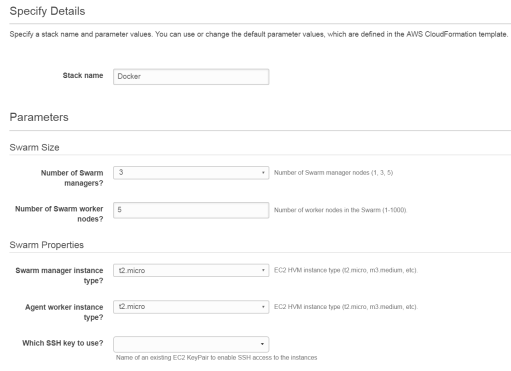
Following are some details that needs to be entered:
- Number of manager and worker nodes.
- Instance type for manager and worker nodes.
- Security key to ssh.
At this point, there is no option to select Docker version and it comes installed with Docker 1.12 RC4 by default.
Cloudformation gives ELB DNS name and option to ssh to master node as 2 outputs. Following is the output for my AWS Docker cluster.

The way Docker creates security groups, ssh access is allowed only to master node and ssh access is prevented to worker nodes. This is on purpose to provide better security and was discussed here. To debug issues, suggestion provided is to use cloudwatch logs or by looking at Container logs from master node. Container logs of worker nodes can be monitored from master using:
docker -H logs
I selected 1 manager node and 2 worker nodes during the initial template input process. Following is the Swarm mode cluster that got created.
$ docker node ls
ID                           HOSTNAME                                      MEMBERSHIP  STATUS  AVAILABILITY  MANAGER STATUS
4obcqdkd1zu3g2eb3lzs0iw0q    ip-192-168-34-65.us-west-2.compute.internal   Accepted    Ready   Active
b9t9zpj4ydc67wr4uhh1z0kz3 *  ip-192-168-33-175.us-west-2.compute.internal  Accepted    Ready   Active        Leader
dtbrn7e9orq8u72okwg9tmnkn    ip-192-168-33-7.us-west-2.compute.internal    Accepted    Ready   Active
To do better integration between Docker and AWS, Docker creates some system containers in each node. Following output shows system containers running in master node:
$ docker ps
CONTAINER ID        IMAGE                                       COMMAND                  CREATED             STATUS              PORTS                NAMES
abf8951cd712        docker4x/controller:aws-v1.12.0-rc4-beta2   "controller run --log"   7 hours ago         Up 7 hours          8080/tcp             editions_controller
8e72ace27e55        docker4x/shell-aws:aws-v1.12.0-rc4-beta2    "/entry.sh /usr/sbin/"   7 hours ago         Up 7 hours          0.0.0.0:22->22/tcp   nauseous_wozniak
fdaf4d4f61d0        docker4x/guide-aws:aws-v1.12.0-rc4-beta2    "/entry.sh"              7 hours ago         Up 7 hours                               infallible_jones
Controller container is responsible for talking to Docker engine and AWS backend services. For example, when ports get externally exposed by Docker services, controller container takes care of automatically updating AWS ELB to load balance between the EC2 instances. Since routing mesh exposes the port in each Docker node, it takes care of automatically load balancing between the individual containers associated with that service.
Deploying application
Following set of commands deploys the “client” and “vote” service in the overlay network “overlay1”
sudo docker network create --driver overlay overlay1
sudo docker service create --replicas 1 --name client --network overlay1 smakam/myubuntu:v4 ping docker.com
sudo docker service create --name vote --network overlay1 --replicas 2 -p 8080:80 instavote/vote
Following output shows the running services:
$ docker service ls
ID            NAME    REPLICAS  IMAGE               COMMAND
87qk6yt5za8c  client  1/1       smakam/myubuntu:v4  ping docker.com
cj4iznzzjtex  vote    2/2       instavote/vote
Following output shows the request sent to ELB domain name and getting load balanced between the “vote” containers associated with “vote” service.
$ curl Docker-ELB-1271640601.us-west-2.elb.amazonaws.com:8080 | grep -i "container id"
          Processed by container ID b8a467211555
sreeni@ubuntu:~$ curl Docker-ELB-1271640601.us-west-2.elb.amazonaws.com:8080 | grep -i "container id"
          Processed by container ID 7d34e8032693
We can access the “vote” service from “client” service as well. By default VIP based load balancing would be done in that case.
References


2 thoughts on “Docker for AWS beta”