This blog is last in the series on VPC native GKE clusters. In this blog, I will cover Network endpoint groups(NEG) and Container native load balancing. For the first part on GKE ip addressing, please refer here and the second part on VPC native clusters, please refer here.
Container load balancing and Network endpoint groups(NEG)
Following diagram shows how default Container load balancing works(without NEG). This is applicable to both http and network load balancer.
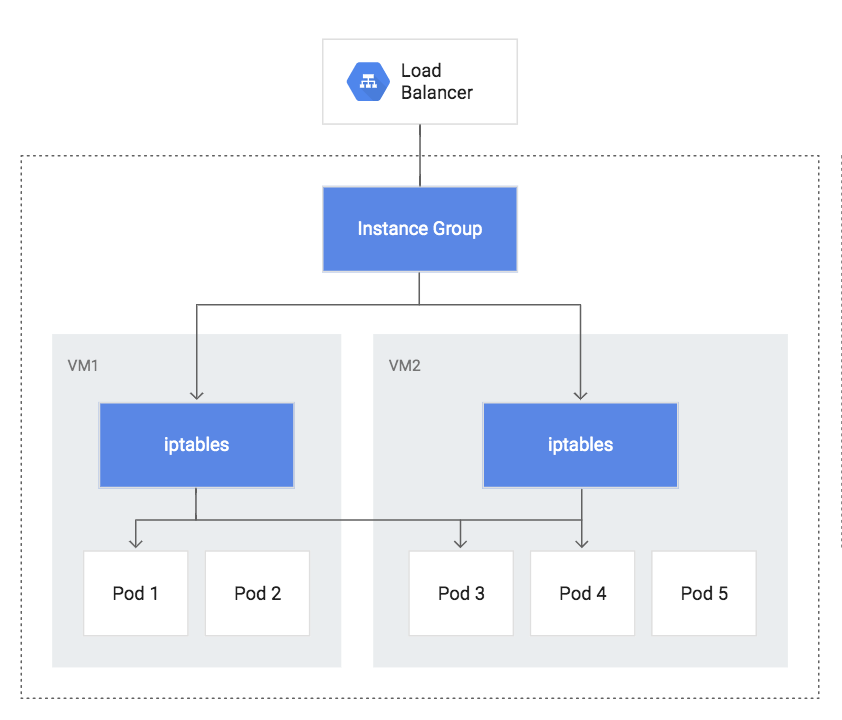
Traffic flows like this:
Load balancer -> VM -> iptables -> Pods
Load balancer distributes traffic to instances in instance group. iptables rules in each node further distributes the traffic among pods. If the pod is not in the same node, packets get routed to another node. This causes a double hop problem as illustrated by the path below for a specific case:
Load balancer -> VM1(iptables) -> VM2(Pod3)
Double hop increases latency. To avoid double hop, Kubernetes provides a service annotation “onlyLocal” which restricts the iptables in each node to distribute traffic to only the pods in that specific node. This is how the path would look like for different flows:
Load balancer -> VM1(iptables) -> Pod1
Load balancer -> VM2(iptables) -> Pod3
Load balancer -> VM2(iptables) -> Pod4
The disadvantage with “onlyLocal” is that the traffic distribution between pods will not be equal. For example, in the above example, pod1 would get more traffic compared to pods 3 and 4.
Network endpoint groups(NEG):
NEG can be a backend for http load balancer similar to managed instance groups. NEGs are zonal resources and each endpoint in NEG is composed of a combination of IP address and port. IP address can be primary IP address of VM or alias IP addresses.
Container load balancing with NEG:
NEG allows Containers to be represented as first class citizens from the load balancer perspective. Before NEG, Load balancers were not aware of containers. With NEG, pod IP address and port are exposed as endpoints to Load balancer and this provides the following advantages:
- Compared to regular load balancing, this approach provides better performance because it prevents double hop. Compared to “onlyLocal” approach, this provides an equal traffic distribution between the pods.
- This approach provides greater visibility and troubleshooting as the iptables layer is not there from load balancing perspective.
Container load balancing feature is in beta currently. It is supported only with http load balancer.
Following diagram illustrates the block diagram with Container native load balancing:

Traffic flow would look like this:
Load balancer-> NEG -> Pod1, Pod 3, Pod 4
To compare between the 3 load balancing approaches(native load balancing, native load balancing with onlyLocal, Container based load balancing with NEG), I created a Kubernetes cluster with 3 nodes and with IP aliasing enabled. I used the sample application illustrated here and deployed it with all 3 load balancing approaches. The goal was to highlight that native load balancing and container based load balancing with NEG does equal distribution of traffic between pods while “onlyLocal” approach does an uneven distribution.
Container based load balancing:
As a first step, I created a GKE cluster with IP alias enabled.
gcloud container clusters create cluster-vpc --zone us-central1-b --enable-ip-alias
The Service’s annotation, cloud.google.com/neg: '{"ingress": true}', enables container-native load balancing.
Then, create deployment, service and ingress. Create 4 replicas so that 1 node has more than 1 pod while other nodes has 1 pod each. This application prints the details of node serving the traffic.
kubectl apply -f neg-demo-app.yaml
kubectl apply -f neg-demo-svc.yaml
kubectl apply -f neg-demo-ing.yaml
kubectl scale deployment neg-demo-app --replicas 4
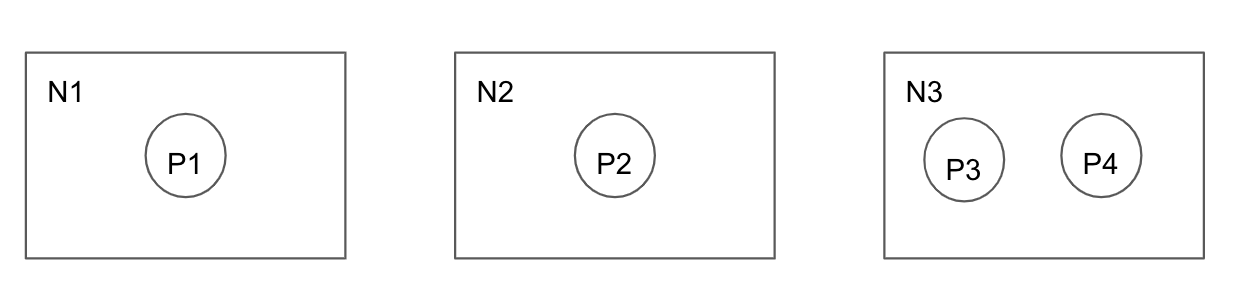
Following command shows the pod distribution. As we can see, 2 pods are allocated in 1 node, other 2 are distributed between 2 other nodes.
 neg-demo-app-7bbd69746c-bwcl4    1/1       Running   0          1d        10.64.0.6   gke-cluster-vpc-default-pool-db114d00-1l9m
 neg-demo-app-7bbd69746c-drvhf    1/1       Running   0          1d        10.64.1.7   gke-cluster-vpc-default-pool-db114d00-2mz8
 neg-demo-app-7bbd69746c-qv8qx    1/1       Running   0          1d        10.64.2.7   gke-cluster-vpc-default-pool-db114d00-j9km
 neg-demo-app-7bbd69746c-tv5ll    1/1       Running   0          1d        10.64.0.5   gke-cluster-vpc-default-pool-db114d00-1l9m
Following diagram shows how the pods are allocated between nodes:
Native load balancing with “onlyLocal”:
For this case, we need to modify the service to remove “neg” annotation and add annotation for “onlyLocal” as shown below.
Following is the service yaml for “onlyLocal” configuration:
 apiVersion: v1
 kind: Service
 metadata:
   name: neg-demo-svc # Name of Service
 spec: # Service's specification
   type: NodePort
   externalTrafficPolicy: Local
   selector:
     run: neg-demo-app # Selects Pods labelled run: neg-demo-app
   ports:
   - port: 80 # Service's port
     protocol: TCP
     targetPort: 9376
Native load balancing:
For this case, we need to remove “neg” annotation as well as “onlyLocal” annotation.
Traffic test:
For all 3 approaches above, I sent a request to load balancer IP 100 times and measured the distribution of traffic between the pods.
for ((i=1;i<=10;i++)); do curl "34.96.89.199"; done
What I observed is that in native load balancing and container based load balancing, traffic distribution between pods are equal. Each pod receives approximately 25% of the trafffic. In “onlyLocal” approach, I see that only 1/3 of the traffic is reaching 1 of the nodes that has both the pod scheduled. The traffic distribution looks like(pod1-33%, pod2-33%, pod3-17%, pod4-16%) with pod3 and pod4 scheduled on same node.
Between the 3 approaches mentioned above, Container load balancing with NEG provides best performance, distribution and visibility.
References:


2 thoughts on “VPC native GKE clusters – Container native LB”