Category Archives: Cloud Platforms

Contiv – Policy based networking for Containers

Contiv is an Open source project driven primarily by Cisco for policy based networking, storage and cluster management for containerized applications. In this blog, I will focus on how Contiv does policy based Container networking. In the next blog, I will cover some hands-on stuff that I tried with Contiv.

Container Policy

Policies have become critical to control the business logic in a Cloud environment. There are 2 ways to describe policy. In imperative model, policy is defined in terms of how the end goal is achieved. For example, we specify the filters and actions with Openflow protocol that achieves end goal of packet handling and this is an example of imperative model. In declarative model, policy is defined in terms of the end goal and it gives flexibility to the end-system to implement the policy in different ways. Congress and Opflex are examples of declarative policy model. With declarative model, it is possible to specify the policy in terms of business logic without specifying implementation detail. For example, the business logic can say that web container should not talk to database container. The implementation of this business logic can be achieved by having an iptables rule or by having a hardware tcam rule to block specific ports. In a cloud computing world, policies can be defined for compute, storage and networking. Both Containers and VM needs policies to implement business logic. Following are examples of some policies that can be applied to applications deployed in Cloud using either VMs or Containers:

  • Authorization policy – Specifies tenants and their privileges.
  • Resource usage policy – Specifies resource constraints for tenants, containers and VMs.
  • Application access policy – Specifies containers that can communicate to each other and containers that are exposed to outside world.

Contiv Networking

Contiv Networking project provides policy based networking for Docker Containers. Following are some details on Contiv Networking:

Continue reading Contiv – Policy based networking for Containers
Openstack Deployment using Containers

I recently saw the Openstack self-healing demo from CoreOS team using Tectonic(Stackanetes project) and I kind of felt that the boundary between Containers and VMs are blurring. In this blog, I discuss the usecase of deploying Openstack using Containers.

We typically think of Openstack as a VM Orchestration tool. Openstack is composed of numerous services and deploying Openstack as one monolithic blob is pretty complex and difficult to maintain. The demo described showed how Containers simplify Openstack deployment. This is a great example of using Microservices architecture to simplify infrastructure deployment.

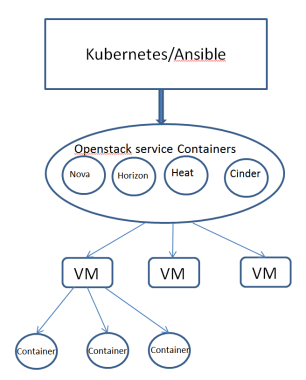
Following diagram shows the Openstack deployment model using Containers. The diagram below shows how Openstack service containers deploys user VM. The user VMs deployed using Openstack can run Containers as well..

vm_container1.PNG

Following are some notes on the architecture:

  • Openstack services like Nova, Heat, Horizon are containerized using Openstack Kolla project as Docker Containers. Some Openstack services like Nova is composed of multiple Containers.
  • Infrastructure components like Ceph, Openvswitch, Mongodb are also deployed as Containers.
  • For Container deployment, Openstack natively uses Ansible. Kubernetes can also be used for Orchestration.
  • Using Containers for Openstack service containers gives all the build, ship and deploy advantages of Containers.
  • Using orchestration solution like Kubernetes gives all the resiliency and deployment advantages for Openstack services.

This work also shows how Containers and VMs can work closely with each other for lot of use-cases. There are other Openstack projects like Magnum and Kuryr where there is an intersection between Containers and VMs. Magnum project deals with Container orchestration using Openstack and Kuryr project deals with doing Container networking using Openstack Neutron.

References:

Microservices Infrastructure using Mantl

Mantl is an Open source project from Cisco and it provides an integrated solution to deploy distributed Microservices. Any company deploying Microservices has to integrate different components before the solution becomes production ready. Mantl makes it easier by integrating the different components and providing the glue software that integrates the components. In this blog, I will cover the following:

  • Distributed Microservice infrastructure components and the need for Mantl.
  • Mantl Architecture.
  • Mantl installation using Vagrant
  • Mantl installation using AWS public cloud

Microservices infrastructure

Following are typical components in Container based Microservices infrastructure:

Continue reading Microservices Infrastructure using Mantl

Baremetal cloud using Packet

Typical Opensource demo applications comes packaged as a Vagrant application which starts a bunch of VMs and does automatic provisioning. I have a Windows machine with Virtualbox and VMWare player installed. Since Virtualbox does not support nested virtualization with 64 bit VMs(More details can be found in my previous blogs on Virtualbox and VMWare player), I use VMWare player to try out demo applications that needs 64 bit VMs. The demo applications typically run on Linux, so running them on Windows with Virtualbox is ruled out. I was recently trying this Mantl project for deploying distributed microservices and I found that it was very slow to run in VMWare player with nested virtualization. I tried to run the application in AWS and I found that AWS does not support nested virtualization(More details can be found here). Then I tried out Google cloud. Even though Google cloud supports nested virtualization, hardware virtualization is disabled on the guest VMs and this prevents running 64 bit VMs inside Google cloud VMs. After I ran out of these options, I stumbled upon the possibility of using baremetal cloud. I used baremetal cloud from Packet and it worked great for my usecase mentioned above. Though this is not a typical use case, I was very happy with the performance and the possibilities that this provides. In this blog, I will share the use cases for baremetal cloud and my experiences with using Packet service.

Bare metal cloud Use case

Typical cloud providers like Amazon, Google, Digitalocean, Microsoft rent out VMs as part of their compute offering. These VMs run on top of a hypervisor. Though the user is guaranteed a specific performance, these VMs share the same resources with other VMs running on the same host machine. With bare metal cloud, the cloud provider hosts machines that the user can rent which is not shared with anyone. Cloud providers provide different configurations for bare metal and the user can choose based on their performance needs and the costing is based on the performance provided by the bare metal server. Following are some advantages that bare metal cloud provides:

Continue reading Baremetal cloud using Packet

Hashicorp Atlas workflow with Vagrant, Packer and Terraform

I have used and loved Vagrant for a long time and I recently used Consul and I was very impressed by both these Devops tools. Recently, I saw some of the videos of Hashiconf and I learnt that Hashicorp has an ecosystem of tools addressing Devops needs and that these tools can be chained together to create complete application delivery platform from development to production. Atlas is Hashicorp’s product that combines its open source tools into a platform and it has a commercial version as well. In this blog, I will cover a development to production workflow for a LAMP application stack using Atlas, Vagrant, Packer and Terraform.

Overview of Vagrant, Packer, Terraform and Atlas

Vagrant

Vagrant provides a repeatable VM development environment. Vagrant integrates well with major hypervisors like Virtualbox, VMWare, HyperV. “Vagrantfile” describes the VM settings as well as initial bootstrap provisioning that needs to be done on the VM. Vagrant also integrates well with other provisioning tools like Chef, Ruby and Ansible to describe the provisioning. Simply by doing “vagrant up”, the complete VM environment is exactly reproduced. The typical problems like “it does not work for me even though its working in your machine” goes away.

Packer

Packer is a tool to create machine images for providers like Virtualbox, VMWare, AWS, Google cloud. Packer configuration is described as a JSON file and images for multiple providers can be created in parallel. The typical workflow is for developer to create development environment in Vagrant and once it becomes stable, the production image can be built from Packer. Since the provisioning part is baked into the image, the deployment of production images becomes much faster. Following link describes how Vagrant and Packer fits well together.

Continue reading Hashicorp Atlas workflow with Vagrant, Packer and Terraform

Docker Experimental Networking – 3

This blog is a continuation of my previous blog on Docker Experimental Networking. In this blog, I will walk through the example mentioned in this link where experimental Docker is integrated with Compose and Swarm. I have made some modifications here and I will cover this here.

I will create 2 applications in this example using Docker Compose.

  1. Counter container connecting to redis container running on 2 different hosts.
  2. WordPress container connecting to mysql container running on 2 different hosts.

I have used AWS instead of Digitalocean. First step is to create Consul machine and start Consul server.

docker-machine create --driver=amazonec2 --amazonec2-access-key=xxx --amazonec2-secret-key=xxx --amazonec2-vpc-id=vpc-5f77c23a --amazonec2-region=us-west-2 --engine-install-url "https://experimental.docker.com" consul

docker $(docker-machine config consul) run -d \
    -p "8500:8500" \
    -h "consul" \
    progrium/consul -server -bootstrap

Next, create 2 machines connecting both the nodes to Consul:

Continue reading Docker Experimental Networking – 3

Docker Experimental Networking – 1

Networking support in Docker was primitive till now. Single host connectivity was through Linux bridge and there was no native mechanism to connect Containers across hosts. With Pipework, we could do a hacky approach to connect Containers across hosts. Companies like Socketplane, Weave have been working to address this Networking gap. I have written multiple blogs before on Docker Networking and they can be referred here. Socketplane was recently acquired by Docker and they provide the native batteries-included Docker Networking solution and solutions like from Weave will be available as a Docker Networking plugin. With Docker experimental release, we can connect Containers across hosts using Docker native solution as well as use Networking plugins to connect Containers across hosts. In this blog, I will cover some basics of the solution and will walk-through some of the hands-on stuff that I tried with the experimental Docker release.

Docker Networking blocks:

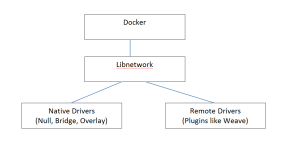
dockerexpnet1

At high level, the diagram above describes the flow for Docker Networking.

  • Docker runtime was integrated previously with Networking and there was no way to separate the 2. Libnetwork is the new Networking library that provides the Networking functionality and is seperated from Core Docker. Docker 1.7 release has already included the libnetwork and is backward compatible from enduser perspective.
  • Drivers implement the APIs provided by libnetwork. Docker is leaning towards plugin approach for major functionalities like Networking, Storage, Orchestration where Docker provides a native solution which can be substituted with technologies with other vendors as long as they implement the APIs provided by the common library. In this case, Bridge and Overlay are the Native Docker networking drivers and remote drivers can be implemented by third-party. There are already many remote drivers available like Weave.

Docker Container Networking model: Continue reading Docker Experimental Networking – 1

Vagrant and Devstack

Openstack is a Cloud Orchestration software. Devstack script provides a development environment for Openstack. Devstack provides a great way to get hands-on with Openstack. I had written 2 earlier blogs on installing Devstack for Openstack Icehouse and Openstack Juno. I received multiple queries on installation related issues. To make this simple, I created Vagrant images for different Openstack releases. With this, VM creation and Devstack installation can all be done with a single script. In this blog, I will walk-thru the steps for the installation.

Vagrant makes it easier to create and share VMs and this makes Vagrant Devops friendly. For getting started on Vagrant, you can refer  to my earlier blog on Vagrant.

My Development environment:

Windows 7 machine with Virtualbox 4.3.28 and Vagrant 1.7.2.

Pre-requisites:

Following are typical issues I have seen folks facing when running Devstack:

  • There are some pre-requisite software that needs to be installed before running Devstack like setting up Python environment etc.
  • It is needed to setup VM with atleast 4G RAM and 8G hard disk. Otherwise, either Stacking will fail or instance creation will fail.

Continue reading Vagrant and Devstack

Openstack and Docker – Part 2

This is a continuation of my previous blog on Openstack and Docker. In this blog, I will cover Openstack Docker heat plugin and Magnum.

Following are some of the items that Nova Docker driver cannot do currently:

  1. Passing environment variables
  2. Linking containers
  3. Specifying volumes
  4. Orchestrating and scheduling the containers

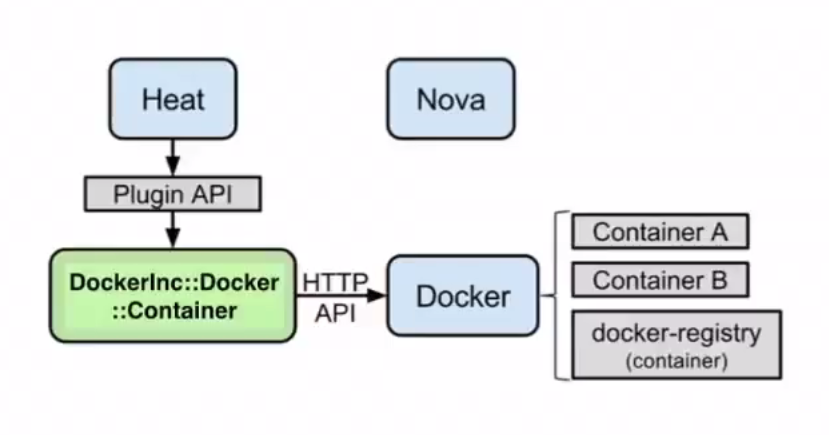
Heat docker plugin solves problems 1-3 and partially solves problem 4. Following is the architecture diagram I found in Openstack Docker wiki for heat.

odocker2

  • Nova is not involved here. Openstack heat uses Docker plugin to talk to Docker agent on the host.
  • The host here is the VM spawned. The VM can either be spawned by Nova or Heat can spawn this using Nova driver.
  • Glance is not involved here as the container images are stored in Docker registry.
  • The Heat approach allows us to specify environment variables, link containers, specify volumes as well as orchestrate the host on which the Docker runs.

Using Heat plugin:

Continue reading Openstack and Docker – Part 2

Openstack and Docker – Part 1

In this blog, I will cover the different ways in which Openstack can create and manage Docker Containers. The 3 predominant approaches are using Nova Docker driver, Heat Docker plugin and Magnum. Magnum is pretty new and is under development. Openstack is opensource cloud orchestration software and Docker is opensource container management software. For this blog, I am assuming users are already familiar with Openstack and Docker. There are lot of resources for learning Openstack and Docker available in the web, my blogs related to these topics can be found here and here.

Nova Docker Driver:

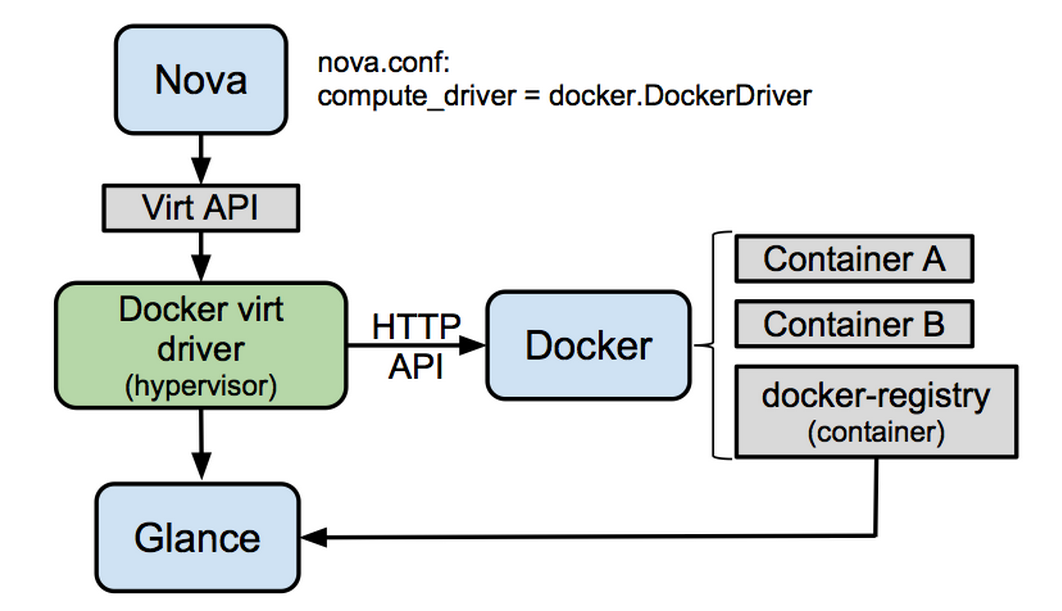
Nova typically manages VMs. In this approach, Nova driver is extended to spawn Docker Containers. Following is the architecture diagram mentioned in the Nova Docker wiki.

odocker1

  • To spawn containers Nova compute driver is pointed to Docker driver.
  • Nova Docker Virt driver talks to Docker agent using http api calls.
  • Docker images are stored in the Docker registry and images are exported to glance from Docker registry which Nova uses to create Containers.

Nova Docker driver with Devstack:

Continue reading Openstack and Docker – Part 1