Following link captures the slides on Docker 1.9 feature overview that I presented at Docker Meetup, Bangalore on December 5, 2015. You can find more details on the meetup here and here.
Docker Multihost Networking demo
Following link captures the slides on Docker 1.9 feature overview that I presented at Docker Meetup, Bangalore on December 5, 2015. You can find more details on the meetup here and here.
Docker Multihost Networking demo
Docker Toolbox simplifies the creation of Docker environment for Windows and Mac. This deprecates boot2docker. Following components are included in Docker Toolbox.
I recently tried out Docker Toolbox. I had few issues to get it working and after some hiccups, I was able to get it working with some help from mailers. In this blog, I will share my experiences.
This blog is a continuation of my previous blog on Docker Experimental Networking. In this blog, I will walk through the example mentioned in this link where experimental Docker is integrated with Compose and Swarm. I have made some modifications here and I will cover this here.
I will create 2 applications in this example using Docker Compose.
I have used AWS instead of Digitalocean. First step is to create Consul machine and start Consul server.
docker-machine create --driver=amazonec2 --amazonec2-access-key=xxx --amazonec2-secret-key=xxx --amazonec2-vpc-id=vpc-5f77c23a --amazonec2-region=us-west-2 --engine-install-url "https://experimental.docker.com" consul

docker $(docker-machine config consul) run -d \
    -p "8500:8500" \
    -h "consul" \
    progrium/consul -server -bootstrap
Next, create 2 machines connecting both the nodes to Consul:
This blog is a continuation of my previous blog on Docker Experimental Networking. In this blog, I will cover an example of Docker container connectivity using bridge and overlay driver.
Following is a sample usecase that I tried:
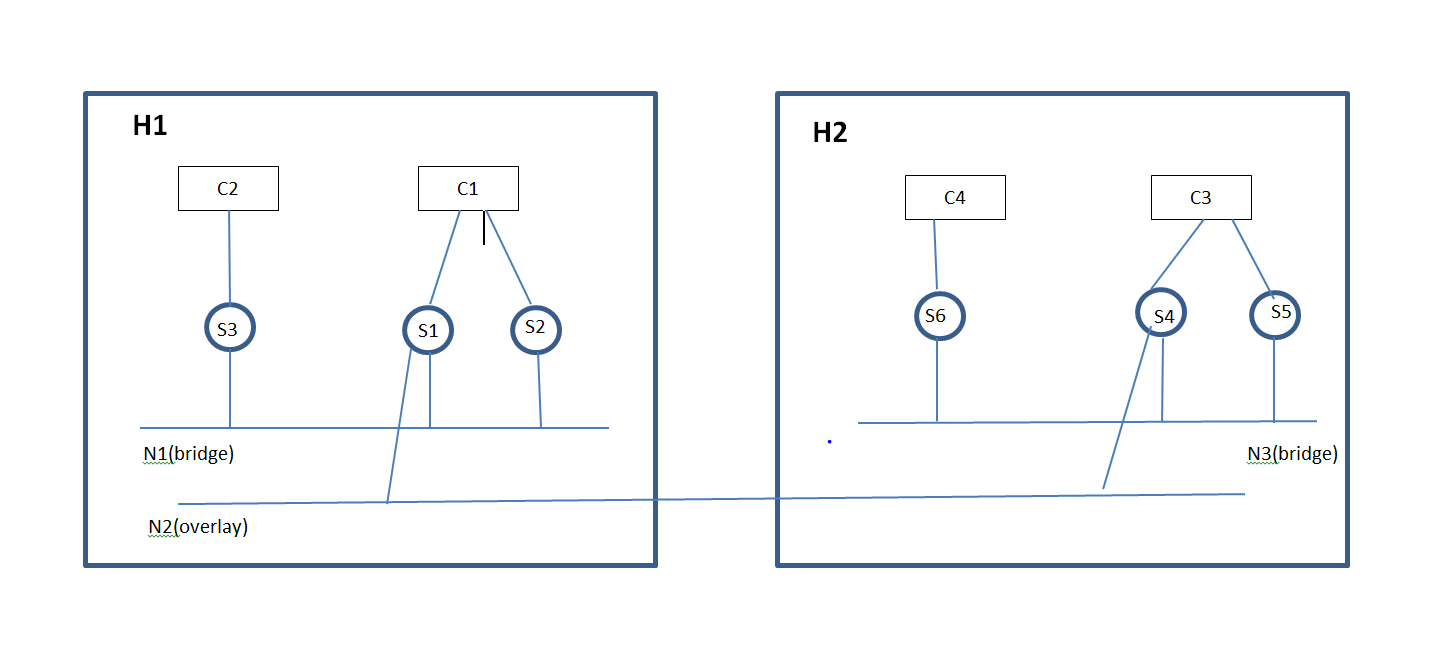
I came across the following limitations/bugs:
Networking support in Docker was primitive till now. Single host connectivity was through Linux bridge and there was no native mechanism to connect Containers across hosts. With Pipework, we could do a hacky approach to connect Containers across hosts. Companies like Socketplane, Weave have been working to address this Networking gap. I have written multiple blogs before on Docker Networking and they can be referred here. Socketplane was recently acquired by Docker and they provide the native batteries-included Docker Networking solution and solutions like from Weave will be available as a Docker Networking plugin. With Docker experimental release, we can connect Containers across hosts using Docker native solution as well as use Networking plugins to connect Containers across hosts. In this blog, I will cover some basics of the solution and will walk-through some of the hands-on stuff that I tried with the experimental Docker release.
Docker Networking blocks:
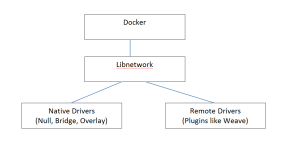
At high level, the diagram above describes the flow for Docker Networking.
Docker Container Networking model: Continue reading Docker Experimental Networking – 1
This blog is an update from my previous blog on Flocker. I had faced a bunch of issues while trying out Flocker. Based on the cases raised by me, Flocker team has been kind enough to help me to sort out some of these issues. In this blog, I have updated the cases where I found a workable solution. There are couple of more issues pending. I will update this blog as I make more progress.
Approach 3(Experimental Flocker install with AWS):
Procedure for this tutorial is covered here and case details are covered in this link. The first issue I faced was that the volume creation got stuck. This was because of an operator error on my part w.r.to setting permission for the AWS user to create EBS.
Following is my sample cluster.yml file.
In this blog, I will cover Flocker from ClusterHQ which is used for Container data/volume management. I will cover some Flocker basics and some hands-on stuff that I tried with Flocker.
Docker volumes are used to store persistent data that is outside the scope of the Container Union file system. 1 common example is database. Data volumes are attached to the container so that Containers can update the volume and these volumes can be reattached to other containers or shared across Containers. Data volumes are not deleted when Containers are deleted, Data volumes needs to be deleted manually.
Following is a simple example to create container with mount volume. Here, /webapp is mounted as a data volume.
docker run -d -P --name web -v /webapp training/webapp python app.py
When Containers are deleted, volumes don’t get deleted. To delete volumes when Containers are deleted, we can use:
docker rm -v
Volumes are stored in host under /var/lib/docker/volumes.
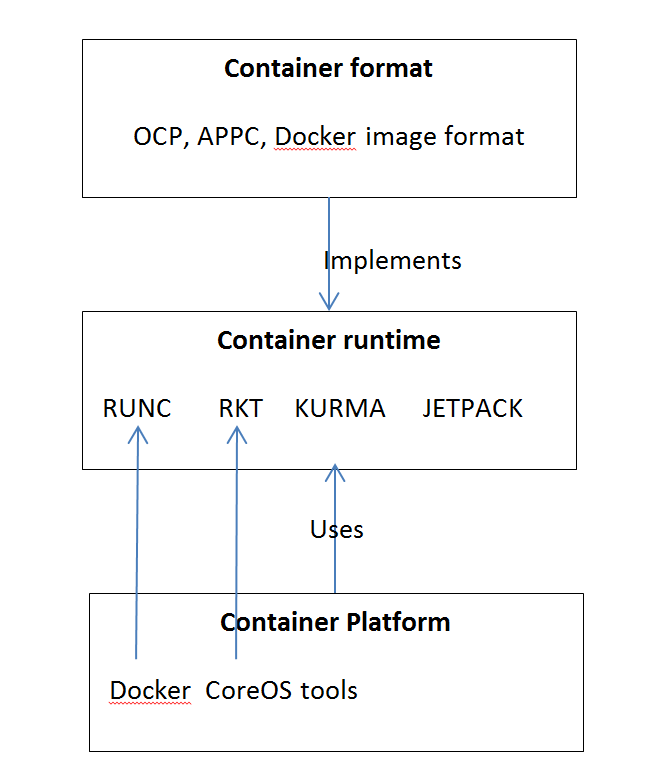
1 of the big announcements in Dockercon 2015 was the Open Container project(OCP). OCP is an Opensource project under Linux foundation to define a common Container format. Container format, runtime and platform mean different things. There are many Container formats, runtime and multiple acronyms surrounding it. In this blog, I have tried to capture my understanding around these. I have not discussed about traditional Linux containers in this blog. This is how I see the relationship between Container formats, Container runtime and Container platforms.
Kitematic simplifies Docker installation for Mac and also provides an easy GUI interface to manage Containers. Recently, Kitematic released an alpha version for Windows. I tried this recently and I will share my experiences in this blog.
I had covered boot2docker in 1 of my earlier blog. Kitematic is boot2docker combined with a GUI for managing containers. Kitematic uses the same Linux VM as boot2docker.
Installation:
After registering for Alpha program, I received the download link 1 day later. Kitematic loads a small Linux VM in Virtualbox over which the Container runs. If Virtualbox is not installed, Kitematic installation program also installs Virtualbox. In my case, I already had Virtualbox installed. When I tried installing, I got this issue:
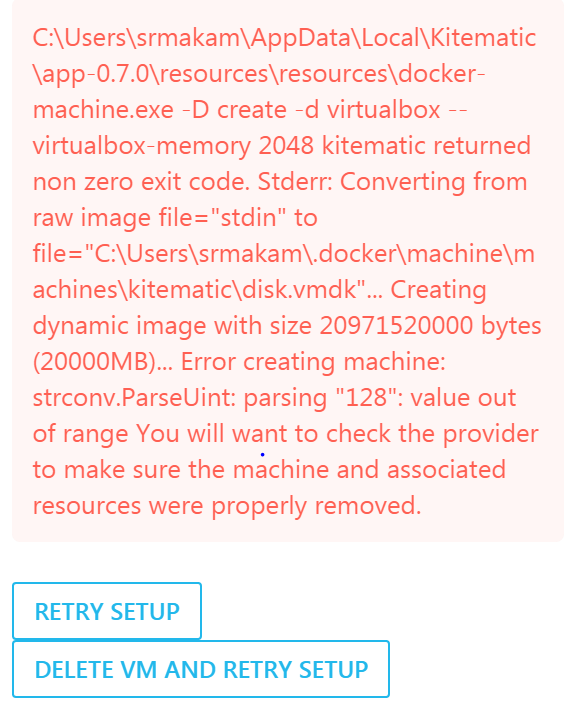
I had faced similar issue when installing boot2docker. 1 of the workarounds I found by googling was to delete the host-only interface that Virtualbox creates for Kitematic/boot2docker. I already had 6 host-only interfaces created in my Virtualbox. I deleted 4 of them and tried reinstalling Kitematic and the installation went through after that.
The second issue I faced was with running Docker CLI and it complained that Docker client and agent versions did not match.This was because I had boot2docker installed previously in my Windows machine. I uninstalled boot2docker and Docker CLI worked fine after that.
Kitematic Networking:

