Tag Archives: AI

🚀 A Guide for B.Tech CS Students to kickstart your AI journey

👋 Introduction

My daughter will be starting her B.Tech in Computer Science at MIT, Manipal this year. As a huge AI proponent, I often share the latest AI trends and tools with my family. When my daughter decided to pursue CS, she asked me several questions about AI, which inspired this blog. I hope this guide helps any student planning to specialize in CS and AI.


📚 Core Fundamentals for CSE Students

Before diving into AI, it’s crucial to master the basics. These are some of the building blocks for everything you’ll do in computer science. Following links will give you an overview of the basics before you deep-dive.


📝 General Advice for Students

In addition to doing your coursework, following tips can help you to be more practically prepared for the industry .

  • Start with Fundamentals: Focus on math, programming, data structures, and algorithms.
  • Build a Portfolio: Work on projects, participate in Kaggle competitions and hackathons, and maintain GitHub repositories.
  • Network: Join AI clubs, attend meetups, and connect with peers and professionals on LinkedIn.
  • Stay Updated: Follow AI news, research, and trends.
  • Internships: Real-world experience is invaluable—seek internships early.

🛠️ Tools to Try Out

Following is just a sample collection at this point of time. The tools change so fast so it’s very important to keep yourself updated with the latest.

  • Chatbots: ChatGPT, Gemini (Try ChatLLM, an aggregator of chatbots and other AI tools collection, its very handy)
  • Vibe Coding: Cursor, Windsurf, Replit, Pythagora (see my earlier blog for more)
  • Image Generation: DALL-E(OpenAI), Midjourney
  • Video Generation: Google Veo
  • ML Platforms: Google AI Studio(Good to experiment with Google AI models), Kaggle(Kaggle competitions are good, good for datasets and notebooks), Hugging Face(Marketplace for models, datasets and easy to share the ML work with others)
  • Automation: Zapier (AI orchestration platform connecting different AI and non-AI tools and platforms)

Note: “Vibe coding” refers to using AI-powered coding environments that help you code faster and more intuitively.


🤖 Exploring AI Domains & Career Paths

Here’s a quick overview of different AI roles, what they do, prerequisites, and how to get started. AI industry is still at its nascent stage, these roles can change as the technology matures.

RoleWhat They DoPrerequisitesHow to Get In
AI ResearcherDevelop new AI models/algorithms, advance the field, publish researchStrong math (linear algebra, stats), deep ML/DL, Python, PyTorch/TensorFlow, research skills, academic writingAdvanced courses (Master’s/PhD), join research labs, open-source, publish papers, attend conferences
ML EngineerBuild, optimize, and deploy ML models in production; manage ML systemsProgramming (Python, C++/Java), ML frameworks, software engineering, cloud (AWS/GCP/Azure), MLOps basicsEnd-to-end ML projects, internships, open-source, learn CI/CD, Docker/Kubernetes, model deployment
Data Engineer/ScientistBuild data pipelines, clean/process data, extract insights, visualize findingsPython, SQL, data wrangling, statistics, data viz, ML basics, big data tools (Spark, Hadoop)Data science/engineering courses, Kaggle, portfolio projects, internships, learn data tools and visualization
AI Application EngineerIntegrate AI models into real-world apps/products; focus on APIs and UXProgramming (Python, JS, etc.), API development, front/back-end, basic ML, UX/UIBuild AI apps, hackathons, internships, learn REST APIs, cloud deployment
AI Security & SafetyEnsure AI systems are secure/safe; address ethical, legal, and risk concernsSecurity fundamentals, cryptography, adversarial ML, AI ethics, risk, regulations, ML basicsCybersecurity/AI ethics courses, CTFs, follow AI safety research, join labs/organizations
AI Product ManagerDefine vision/strategy for AI products; bridge tech and business teamsAI/ML concepts, product management, communication, business acumen, user researchStart as engineer/analyst, PM courses, AI projects, internships, develop leadership/communication
AI Hardware SpecialistDesign/develop hardware/software (GPUs, TPUs, SDKs) for AI training/inferenceECE/CS, digital design, computer architecture, parallel computing, C/C++, CUDA, ML basicsECE/CS courses, hardware internships, FPGA/GPU projects, hardware-software co-design, follow NVIDIA/AMD/Intel

🧑‍💻 AI Basics for Students

Following is just a sample to get started with AI basics.


🤔 How Should College Students Use AI (and How Not To)?

  • Don’t: Use AI chatbots to solve class assignments directly—this can kill creativity and hinder learning.
  • Do: Use AI as a learning tool to explore new ideas, get feedback on completed assignments, and clarify concepts after self-study.
  • Tip: Treat AI as a personalized teacher—seek help only after you’ve tried solving problems yourself.

🔄 Staying Updated with AI

  • Curate Resources: Make a repository of your favorite podcasts, blogs, and YouTube channels.
  • Hands-On Practice: Try new AI tools and work on personal projects.
  • Mix Coding Styles: Combine “vibe coding” (AI-assisted) with traditional coding to strengthen your skills.

💡 Is AI Going to Take My Job?

A typical software engineer spends only 30–40% of their time coding; the rest involves architecture, design, spec reviews, cross-functional discussions, integration testing, and release processes. While AI can assist with coding, these other activities are equally critical and difficult to automate.

Even within coding, engineers must structure code, manage module interactions, choose technologies, debug, test, scale, and deploy—tasks that require human judgment. AI coding tools can boost productivity by 30–40% today, and possibly up to 70% in the next 1–2 years. However, over-reliance on these tools can erode core skills, and poorly organized AI-generated code can become hard to maintain.

There’s no substitute for strong design and coding fundamentals. Use AI tools as an assistant, not a replacement.

Jevons Paradox: If coding becomes much easier and cheaper, we’ll see more coding projects and more coders, not fewer. The demand for skilled engineers will grow as we automate more of the world.

For the next 5–10 years, CS engineers will remain essential. If AI ever surpasses humans in all aspects (AGI), it won’t just be engineers—every profession will be affected.


🌱 Final Thoughts

CS or CS with AI specialization are fields of endless possibility. Stay curious, keep building, and remember: the journey is as important as the destination. Embrace change, focus on fundamentals, and use AI as a tool to amplify your learning and creativity.


Wishing all new B.Tech CS students an exciting and rewarding journey ahead!


Picture with my lovely daughter!

Are Smart Glasses the Future of AI? My Hands-On Review of Meta AI Glasses

Honestly, I never believed smart glasses would become a mainstream AI form factor—until I bought the Meta Ray-Ban Smart Glasses two weeks ago! 😎 This gadget had been on my wishlist for a while, but it wasn’t available in India, and even if you managed to get one from abroad, the app didn’t work well here. Thankfully, Meta launched these glasses in India a month ago, and you can now buy them online or from certified optical dealers. In this blog, I’ll share my hands-on experience from the past two weeks.

Why Glasses? The Hands-Free Advantage 🙌

The first thing I realized: glasses are a fantastic form factor when you want to go hands-free and avoid constantly reaching for your phone or laptop. Google tried this a decade ago, but the tech just wasn’t ready. (More on Google’s new AI glasses later!)

I mostly use the glasses outdoors—while walking, running, or cycling. Indoors, I didn’t find much need for them.

Design & Comfort 🕶️

The design is sleek and modern, not clunky at all. They look like regular sunglasses, so you won’t stand out in a crowd (unless you want to!). However, after a few hours, they do feel a bit heavy, and I sometimes want to take them off for a break.

Use Cases: Where Smart Glasses Shine ✨

Photos & Videos 📸🎥
The 12MP ultra-wide camera delivers good quality photos and up to 3-minute videos. While it’s not quite smartphone-level, the hands-free capture is a game-changer—especially for impromptu moments or when you’re on the move. There’s even blur compensation to keep your shots clear. Selfies are a bit tricky, but you can always take them by holding the glasses like a phone.

Music, Podcasts & Calls 🎶📞
With 5 microphones and 2 speakers, the audio quality is impressive. The directed audio keeps you aware of your surroundings—crucial for outdoor activities. Personally, listening to music made my uphill cycling sessions much more enjoyable! 🚴‍♂️

The AI Edge: Meta AI in Your Glasses 🤖

The real magic is in the AI. Meta AI uses the latest Llama models, giving you robust speech-to-text and general chatbot capabilities. While Llama isn’t quite at OpenAI’s level, it works well for most queries. The best part? Multimodal capability! You can ask questions about what you’re seeing. For example, I spotted a tree with unique flowers, asked the glasses to identify it, and got an accurate answer. This feature will be super useful when traveling or reading foreign text.

Live Speech Translation 🌍🗣️

Currently, live translation supports French, Spanish, and Italian. It works best if both people have Meta glasses (for two-way translation), but even one-way translation is handy. I tested it with my daughter’s French and while watching a French video—worked well as long as the audio wasn’t too fast.

Cons & Limitations ⚠️

  • The glasses are a bit heavy and feel bulky after extended use.
  • Occasionally, they freeze and need a restart.
  • Battery life is about 3–4 hours—okay for most outings, but longer would be better.

Pro Tips for Buyers 📝

  • If you need prescription lenses, get the AI glasses fitted accordingly (external vendors can help).
  • If you don’t need a prescription, consider transition lenses for both indoor and outdoor use. I use reading glasses, so transition lenses are perfect for me.

Some pictures and videos that I took 📸🎥

Cycling clip

357CE2C1-65CC-41B4-B16C-398939BADBDB
25007A9D-B670-43E6-AA6A-ED4AF2204D09
3419F8F8-2010-4751-AD29-FC3C0A6A8AAE
55AE6054-A2C7-4A54-8928-B127E1113761

Final Thoughts & Google Glasses Comparison 🥽

After seeing Google’s latest demo at I/O, I’m excited for their upcoming glasses, especially with XR and virtual screen features. That could be a game-changer, but it’s likely a year away and pricing is still unknown.

For now, I absolutely love my Meta AI glasses. Priced between ₹29,000–₹35,000, they’re a solid investment for the features you get. I’m convinced glasses will be a major new form factor for AI—though not the only one.


Would I recommend them? Absolutely, if you love trying new tech and want a taste of the future—hands-free! 🚀

🤖 AI Customer Support using an Agentic Framework

In this blog, I’ll walk you through the design, development, and lessons learned while building a multi-agent AI customer support assistant using the LangChain framework and related AI tools. 🎮💬


🎯 Motivation: Why Build This?

At KGeN, a game aggregation platform connecting publishers and gamers, our primary users are gamers and clan chiefs (micro-community leaders).

These users often ask questions about:

  • Platform features
  • Game-specific achievements
  • Player and clan statistics

Some answers come from a static knowledge base, while others depend on dynamic user-specific data.

⚡ We wanted an intelligent, scalable AI assistant that could:

  • Understand natural language queries
  • Route them to the appropriate data sources
  • Continuously improve through feedback

Based on the poc feedback, I wanted to take this to production.

🧠 The use case generalizes to any industry with static documentation and dynamic user data—only the context changes.


🔗 Application & Code

The poc application is deployed in Render, you can try this out. The Github also contains instructions to run it locally or in cloud.


📌 Business Goals

I wanted a system with following business goals:

  • 🗣 Answer queries conversationally
  • ⚙️ Route questions to the right agent (static/dynamic/hybrid)
  • 🧾 Escalate unresolved issues via Jira tickets
  • ⭐ Collect feedback for iterative improvements
  • 📚 Learn from feedback to enhance performance

🧪 Prototyping Approach

I followed a “vibe coding” model:

  • Start fast with a working prototype
  • Use AI to assist (ChatGPT + Cursor editor)
  • Iterate with real feedback

💡 Tools Used:

  • ChatGPT to generate mock data (static + SQL)
  • Langchain/Langsmith as agentic framework
  • Cursor for AI-assisted coding
  • Render for cloud deployment

⚠️ Tip: Feed detailed requirements to AI code editors. Without clarity, they produce unreliable or messy code.


🧭 Agent Flow: How It Works

Each user query is first routed by a Main AI Agent, which classifies the query as:

  • 📘 Static: Uses vector search on documentation (FAISS)
  • 🗄 Dynamic: Converts to SQL query on structured data
  • 🔁 Hybrid: Mixes both static + dynamic sources
  • 📥 Follow-Up: Needs more user input
  • 🚨 Escalation: Routed to a human via Jira

Each type has a specialized agent with its own system prompt.

🧠 LangChain powers the routing, agents, and execution logic.

📌 Architecture Diagram: Agent Flow


🧱 Architecture & Tech Stack

ComponentTool / FrameworkReasoning
Agent FrameworkLangChainModular, battle-tested
MonitoringLangSmithEasy trace/debug for agents
Vector DBFAISSSimple to set up for POC
LLMsOpenAI (pluggable)Can switch to others like Claude
Backend APIFastAPILightweight, async-friendly
Frontend (POC)StreamlitQuick prototyping
DeploymentRenderEasy cloud deployment
TicketingJira APIFor support escalations
DB (Local/Test)SQLiteLightweight
DB (Production)PostgresScalable

🐞 Issues & Learnings

This whole application took me around 8-10 hours over a period of 2 weeks. I got time to spend only on weekends to do this.. Following are some issues I faced:

  • 🧩 Dependency Hell: LangChain and LLM libs change fast. Cursor couldn’t resolve pip issues well. I had to request cursor to get latest details in internet to resolve it.
  • 🧪 Streamlit Cloud Problems: Ended up moving to Render for better compatibility.
  • 🌍 Env File Confusion: Environment-specific bugs were hard to debug in prod as Cursor does not integrate with Render deployment.

🔍 Debugging with LangSmith

Langsmith is great to understand if the agentic workflow is working as expected. I was able to fix the following issues with Langsmith:

  • 🔎 Identified issue that search from vector database is giving the whole static knowledge base instead of giving the specific context. Adding semantic analysis to vector database match helped solve this.
  • 🧩 Fix hybrid agent’s output merging logic
  • 🔁 Debug why hybrid/support queries didn’t escalate to Jira

📂 Sample Queries along with Langsmith trace

Static query example: What are legendary items?

From the above trace, we can see that there are 2 LLM chain calls and 1 call to vector database. The first chain call is to identity the type of query and the second chain call is to summarize the response from vector database.

Hybrid query example: How many gold achievements has DragonSlayer99 earned and what rewards do they give?


From the above trace, we can see that there are 6 chain calls in the above query:

  • first to identity type of query
  • second to summarize results of vector database
  • third to check if there is username in the query
  • fourth to generate sql query and get results from postgres db
  • fifth to take the results from sql query and generate summarized response
  • sixth to combine the summarized static data and dynamic data to give response to the user

📋 Requirements Summary (Generated via ChatGPT)

I fed these requirements as initial prompt into cursor after few iterations of discussions with chatgpt.

💳 Business Requirements

  • Build an AI system that can:
    • 📘 Answer static queries from documentation
    • 🗄 Query live backend data
    • 🔁 Combine static + dynamic sources
    • 📥 Handle follow-up interactions
    • 🚨 Escalate to Jira when needed
  • Serve two user roles:
    • 👤 Gamers (general players)
    • 👑 Clan Chiefs (advanced users)
  • Goals:
    • Reduce manual tickets by 70%
    • Improve first-response time
    • Maintain conversational accuracy

📈 Functional Requirements

  1. Static Question Answering
    • Vectorize and index knowledge base with FAISS
    • Use RAG (Retrieval-Augmented Generation) to answer
  2. Dynamic Question Answering
    • Use LangChain SQL Agent to convert natural language to SQL
    • Query SQLite (for testing) and Postgres (in prod)
  3. Hybrid Handling
    • Mix RAG results with SQL data for composite answers
  4. Follow-Up Logic
    • Prompt for missing data (e.g., usernames)
  5. Escalation
    • Auto-create Jira ticket with conversation context if unresolved
  6. Multi-Agent System
    • Router → specialized agents (static, dynamic, hybrid, etc.)
  7. API & UI
    • FastAPI for backend
    • Streamlit for POC frontend; React for future UI

🚀 Technical Requirements

  • LangChain (Python)
  • FAISS or ChromaDB for vector storage
  • OpenAI or Claude LLMs
  • SQLite (via LangChain SQL agent) as simulated backend
  • JIRA API for ticket creation
  • FastAPI (backend API layer)
  • Streamlit (prototyping UI)
  • React (future UI)

🔐 Security & Testing

  • Role-based access (gamers vs. clan chiefs)
  • Environment variable protection
  • Unit tests, evaluation prompts, and simulated load

✅ Success Criteria

  • 90%+ accurate responses in test cases ✅
  • Sub-3-second latency ✅
  • Smooth Jira escalation pipeline ✅
  • API ready for frontend integrations ✅

🚀 Final Thoughts

This project demonstrates how AI agents, vector databases, LLMs, and good system design can solve real-world support problems.

There are many improvements needed to take this into production. Following are some of them:

  • Use Langchain conversation memory. This is maintained at streamlit level to stitch a conversation.
  • RBAC based on user login and queries based on the user.
  • Performance improvement using caching at different levels, database connection optimisation.
  • Agent self learnings from user feedback
  • Improve UI/UX

🔄 This customer support agent is a template that can be adapted across industries—from gaming to banking to e-commerce.

🔍 Debugging Web Apps with Cursor Just Got Smarter: Evaluating Browser Assist Tools

In my previous post, I shared my experience using Vibe coding and highlighted one of the biggest challenges in that workflow: AI coding tools often lack awareness of what’s happening in the browser when you run your app.

This leads to a frustrating dev loop: you’re forced to constantly copy-paste screenshots, console errors, and network logs into your code editor just to help the AI debug your application.

Luckily, there’s a new wave of tools built on the Model Context Protocol (MCP) that bridge this gap. These browser assist tools let your AI-enhanced code editor (like Cursor) directly observe, interact with, and sometimes even control your browser — just like a real user.

Some of these tools go beyond debugging — they can actually drive the browser, making them incredibly useful for UI testing and automation as well.


🧪 Tools I Evaluated

  1. Playwright
  2. Browser MCP
  3. Browser Tools MCP

Each of these plugs into Cursor via MCP and serves a slightly different purpose.


🧠 Architecture Overview

Cursor → MCP → Browser Assist Tool → Browser → Observed by LLM → Cursor responds
  • Cursor uses Model Context Protocol (MCP) to communicate with these tools.
  • The tools interact with the browser — either controlling it or reading logs/events.
  • The data is passed to the LLM, which interprets it and responds inside Cursor.

🧩 Tool Breakdown

1. Playwright + MCP

Developed by Microsoft, Playwright is a full-featured browser automation framework that supports Chromium, Firefox, and WebKit. It works across OS platforms and supports headless execution — making it perfect for automation and CI testing.

When integrated with Cursor via MCP, it becomes a powerful browser control agent.

✅ Installation

"playwright": {
"command": "npx",
"args": ["@playwright/mcp@latest"]
}

🔧 Supported Functions

These functions are exposed by playwright using MCP. playwright has more functionalities than the ones that it exposes to MCP.

  • browser_click, browser_type, browser_navigate
  • browser_take_screenshot, browser_snapshot, browser_pdf_save
  • browser_tab_list, browser_tab_select, browser_tab_close
  • …and many more

💡 Real Use Cases

  • Asked Cursor to debug console errors in my e-commerce app
  • Asked Cursor to test flows like “Add to Cart”, “View Product Details”
  • Used it for:
    • Clicking through workflows
    • Filling out forms
    • Scraping content
    • Capturing screenshots for visual debugging

⚠️ Limitations

  • Doesn’t read network logs or API errors
  • Click interactions does not work reliably with iframes

2. Browser MCP

This is a lightweight adaptation of Playwright, still MCP-compatible, but simpler.

✅ Installation

  • Install Chrome extension (manual or via GitHub release)
  • Cursor config:
"browsermcp": {
"command": "npx",
"args": ["@browsermcp/mcp@latest"]
}

💡 Why It’s Useful

Unlike Playwright, Browser MCP can control your already open browser tab, without launching a new browser instance. This is helpful for debugging apps you’re already running in Chrome.

🔻 Downsides

  • Fewer features than Playwright
  • Better suited for lightweight debugging, not complex automation

3. Browser Tools MCP

This tool focuses entirely on browser introspection and debugging, rather than control.

Think of it as DevTools for your AI.

✅ Installation

  • Install Chrome Extension
  • Start middleware:
npx @agentdeskai/browser-tools-server@latest
  • Cursor config:
"browser-tools": {
"command": "npx",
"args": ["@agentdeskai/browser-tools-mcp@1.2.0"]
}

🛠️ Supported Functions

These are exposed by browsertools using MCP.

  • getConsoleLogs, getConsoleErrors, getNetworkLogs, takeScreenshot
  • runAccessibilityAudit, runPerformanceAudit, runSEOAudit, runNextJSAudit
  • wipeLogs, runDebuggerMode, runBestPracticesAudit

💡 What I Could Do

  • Refresh app and automatically check network + console errors
  • Ask Cursor to analyze latency issues or API failures
  • Run full Lighthouse-style audits on performance and SEO

📊 Comparison: Which One to Use?

Use CaseBest Tool
Browser automation + basic debugging🟢 Playwright
Full DevTools-style debugging🟢 Browser Tools MCP
Debugging current browser tab with minimal setup🟡 Browser MCP

🧠 Final Thoughts

Playwright is phenomenal — not just for browser debugging, but for automation and testing at scale. If it added rich debugging support (like network logs and audits), it could become the one tool to rule them all.

Meanwhile, Browser Tools MCP fills that debugging gap beautifully today, while Browser MCP hits a sweet spot between the two.


🔮 Looking Ahead

I believe browser assist tools will eventually be natively integrated into code assist platforms like Cursor, eliminating the need for users to manually install and configure MCP plugins. In the future, these platforms will likely support a range of built-in agents that work seamlessly across different environments — web, mobile, desktop — and integrate with tools like databases, APIs, and SaaS platforms out of the box.

There’s also a new class of tools like Anthropic’s Computer Use and OpenAI’s Operator, which aim to control not just browsers but the entire computer environment. It feels inevitable that these worlds — browser automation, LLM-powered agents, and full computer control — will start to converge.

Exciting times ahead. ⚡

🚀 One Month with Vibe Coding: Building Real Apps with AI Assistants

Over the past few months, Vibe coding has been gaining serious traction—and I couldn’t resist diving in myself. I’ve been using AI coding assistants for a while, but I wanted to go deeper and really test what these tools can do in a realistic, end-to-end software development project.

So, I spent the last month building a full-featured ecommerce web and mobile app using some of the most talked-about Vibe coding platforms: Cursor, Windsurf, Lovable, Bolt, and Replit. It was a fun and empowering journey—there’s a real sense of accomplishment in being able to build software applications on your own. I also learned that working with the current generation of tools definitely requires a good deal of patience.

In this blog, I’ll walk you through:

  • My experience building and deploying the applications
  • What worked, what didn’t, and what broke halfway 😅
  • How each tool stacks up in terms of usability, flexibility, and reliability
  • Whether tools like these mean we still need software engineers (spoiler: yes—but it’s complicated)
  • Where I think this whole Vibe coding trend is heading next

🌍 Coding Assistant Landscape: Then vs Now

AI coding assistants have come a long way. Here’s a quick look at how things evolved:

⏰ The Old School

  • Classic autocomplete tools like IntelliSense or TabNine helped speed up typing but weren’t context-aware.
  • Low-code/no-code platforms (e.g., Bubble, Wix, Zapier) let users drag and drop components, but required scripting for anything complex.

🧠 The New Era: Vibe Coding

  • Powered by LLMs (Large Language Models)
  • Can write, refactor, debug, and deploy apps using natural language queries
  • Opens the door for non-developers to build apps
  • Empowers developers to skip boilerplate and focus on design, logic, and systems thinking

💡 What is Vibe Coding?

Vibe coding refers to using AI-powered tools to build software via natural language prompts, mixed with lightweight manual coding. It’s all about staying in the flow and letting the assistant do the heavy lifting.

💡 The Experiment

Although I started my career as a developer, I haven’t been actively coding in the last decade. Instead, I’ve focused on architecture, reviews, testing, and product design. That said, I wanted to push these Vibe tools beyond simple demos or prototypes.

So, I picked a moderately complex use case: an Ecommerce application with a web frontend and mobile app, complete with backend, auth, payment, and roles.

✨ Features Implemented

- User authentication (sign-up, login, password reset, Google login)
- Roles: Admin, Seller, Customer
- Admin: manage users, view orders, seller capabilities
- Seller: add products
- Customer: browse catalog, filter/sort, add to cart, checkout
- Order history
- Payment integration with Razorpay

🚀 Tech Stack Used

Frontend: React
Backend: Node.js + Express
Database: MongoDB
Deployment: Vercel / Render / Netlify depending on tool

🏗️ Environments

- Web app
- Mobile app (via Expo)
- Both local and production deployments

🔧 Tool-by-Tool Breakdown

Each tool was tested with the same requirements and judged based on ease of use, flexibility, ability to debug, and ability to deploy real features.

🧪 Cursor

🛠️ Plan: Paid ($20)

💻 Used With: MongoDB Atlas, Render/Vercel for deployment, Claude 3.7 model

Highlights:

  • Full tech stack flexibility
  • Supports both web and mobile
  • Git & database migration support
  • Wrote unit tests and debugged APIs
  • Workflow suits developers

⚠️ Challenges:

  • Terminal tracking is weak
  • Frequent application crashes
  • Manual debugging needed

📦 Artifacts:

Windsurf

🛠️ Plan: Free and Paid version

💻 Used With: Claude 3.7 & Gemini, Vercel/Render for cloud, Cloudinary for images

Highlights:

  • Better terminal/session management
  • Console log debugging is stronger

⚠️ Challenges:

  • Hard to course-correct from incorrect assumptions
  • Hit credit limits fast (Ran out of credits with paid version in 3 days)

📦 Artifacts:


⚡ Bolt

🛠️ Plan: Free

💻 Used With: React + Vite, Supabase, Netlify

Highlights:

  • Blazing fast startup because it runs as web container
  • Fully in-browser

⚠️ Challenges:

  • Can’t run backend services (e.g., Express, MongoDB) because of running as web container
  • Not suitable for full-stack use cases

📦 Artifacts:

  • Incomplete app prototype (Ran out of free credits)

😍 Lovable

🛠️ Plan: Free and then Paid ($20)

💻 Used With: React + Supabase, auto-deploy on Lovable Cloud

Highlights:

  • Very easy to use
  • Seamless production deployment

⚠️ Challenges:

  • Slower code generation speed

📦 Artifacts:

🛠️ Replit

🛠️ Plan: Free

💻 Used With: Ghostwriter AI, browser IDE, MongoDB Atlas

Highlights:

  • Easy to set up
  • Great for fast testing

⚠️ Challenges:

  • Cloud-only with less system-level flexibility
  • Not ideal for large production apps

📦 Artifacts:

  • Did not complete(ran out of free credits)

📊 Tool Comparison Snapshot

FeatureCursorWindsurfReplitLovableBolt
Ease of UseMediumMediumEasyEasyEasy
Dev EnvironmentLocalLocalCloudCloudCloud
Deployment OptionsManualManualBuilt-inBuilt-inManual
Tech Stack FlexibilityHighHighMediumLimitedLimited
Target UsersDevsDevsAllNon-devsNon-devs

🧠 My Take: Cursor gives you the most power; Lovable gives you the most convenience.

❌ What Needs Work

🛠️ Debugging:

Most tools still rely on you reading console logs and piecing things together manually. (My pick: Use Operator framework to understand what’s happening in browser and fix issues automatically)

🐌 Speed:

Long wait times and retries can break the flow.

🧩 Fragility:

Small changes can break other parts of the app. There’s no real “awareness” of architectural dependencies.

📐 Lack of modularity:

Encouraging reusable design and clean code still needs a human architect.

📘 Pro Tips: Making Vibe Coding Work

📋 Define clear requirements

Roles, pages, workflows, error states — lay it all out before prompting.

🧭 Use guardrails (rules/constraints)

Many tools let you enforce language, style, and folder structure.

🎯 Stick to common stacks

React, Node, Python, SQL — that's where LLMs shine.

💡 Use models wisely

Claude 3.7 was the most consistent for me, especially on multi-step flows. Experiment with models and find the best one for your use case.

🧪 Debug like a dev

Logs > terminal > DB traces. Be ready to dive in.

🔄 When stuck, reboot

Sometimes starting fresh saves more time than untangling broken AI logic. Keep regular checkpoints to go back to stable point. 

🧠 Is Software Engineering Dead?

Nope. But it’s definitely shifting.

🧠 What Vibe Coding Does Well:

  • Speeds up boilerplate
  • Empowers solo builders
  • Makes prototyping fast

🚧 What It Still Needs Help With:

  • Scaling apps
  • Clean architectures
  • Advanced debugging
  • Enhancing existing production apps

🧑‍💻 Developers won’t disappear. They’ll evolve. The future engineer:

  • Uses AI to generate & validate code fast
  • Designs smart systems
  • Oversees quality, reusability, and security

💬 “It’s not about coding less. It’s about coding smarter.”


Crypto AI agents

AI agents have emerged as one of the key AI themes in 2024, revolutionizing how we interact with AI as a technology. What caught me by surprise was the rapid rise of crypto AI agents and the unprecedented pace of innovation in this space. These agents are proving to be a boon for the web3 ecosystem, creating an entirely new category of web3 applications. In this blog, I’ll address key questions I encountered while diving into this space.

What are AI agents?

AI agents can be defined by three key characteristics:

  1. Autonomy: AI agents can make independent decisions. Once a goal is set, they determine the best path to achieve it.
  2. External Interactions: These agents can integrate with and operate external tools, such as productivity software (e.g., Word, Excel), payment systems (e.g., wallets), and business tools (e.g., ERP/CRM systems).
  3. Learning and Memory: AI agents continually learn from their experiences and interactions. With short- and long-term memory, they improve their performance over time.

What are different levels in AI agents and where are we now? 

AI agents are typically categorized into five levels, ranging from rule-based systems (Level 0/1) to autonomous learning systems (Level 3). At Level 5, agents are expected to achieve AGI (Artificial General Intelligence). Currently, we are at Level 3, witnessing advanced autonomy but far from AGI. Good reference here

What’s the difference between regular AI agents and crypto AI agents?

Regular AI Agents
Developed using frameworks such as Langchain, Langgraph, Rasa, or CrewAI, these agents automate complex workflows and are typically owned by centralized entities. Common use cases include:

  • Customer support agents
  • Healthcare assistants
  • Creative tools

Crypto AI Agents
In addition to the traits of traditional AI agents, crypto AI agents introduce tokenization and decentralized ownership. These agents are traded in crypto exchanges, have their own wallets which enables them to perform blockchain-based commerce autonomously. Use cases include:

  • Service payments for both agents and humans
  • Blockchain transactions
  • Decentralized finance (DeFi) investments

What blockchain standard do crypto AI agents use? 

Crypto AI agents leverage the ERC-6551 standard, which allows them to be represented as NFTs. This enables agents to have unique identities, wallets, and the ability to interact autonomously on the blockchain.

What are the popular blockchains that crypto AI agents operate on?

Solana and Base are leading platforms for crypto AI agents, driven by their high transaction throughput and developer-friendly ecosystems. Cross-chain operability is becoming a key trend, enabling agents to interact seamlessly across different chains. Out of the 2 biggest AI agent framework projects, Virtuals uses Base, AI 16z uses Solana.  

Why are AI agents good for crypto? 

AI agents are simplifying blockchain’s user experience (UX), removing barriers for non-crypto users. They autonomously manage web3 interactions, reducing complexities for tasks such as cross-chain transactions.
For instance, an AI agent can monitor token prices, execute trades, and bridge tokens across chains without user intervention.

Additionally, these agents are driving significant growth in blockchain transaction volumes, especially on chains like Solana and Base.

What are some of the popular crypto AI agents?

  • Truthterminal – First viral crypto ai agent,  Meme focused, promoted “GoatSE Singularity” culture. 
  • Aixbt – Autonomous crypto trading agent. Looks at all crypto market trends in twitter, monitors on-chain activities and provides recommendations in Twitter/X. Built on Virtuals
  • vaderAI – Investment agent. Aggregates on-chain and off-chain activities for investment advise.  Runs decentralized advertising campaigns based on token contributions.
  • Luna – Engages with users on platforms like Twitter/X and Discord to provide responses, interact, and entertain. This AI agent’s goal is to gain the maximum number of followers. 
  • Zerebro – Creative AI agent. Produces music, art, and NFTs autonomously. Zerobro produced songs are listed in spotify and they have a big fan following. 
  • God and Satan – Agents in Twitter/X that respond with a slice of humor 

This link from Virtuals has the top AI crypto agents built on Virtuals.

This is a good website that has details of all ai crypto agents. 

What is the role of crypto AI agent frameworks? 

Crypto AI agent frameworks allow developers to create crypto AI agents easily. 

Following are some important functionalities that the AI agent framework provides:

  • Best AI model based on the use case
  • Autonomous
  • Provide short and long term memory for saving context
  • Tokenization support 
  • Blockchain support – ERC 6551, wallet, chain/smart contract integration 
  • Social integration – most crypto ai agents have full authority to act autonomously on their Twitter/X accounts. 

What are some of the popular crypto AI agent frameworks? 

  • Eliza from ai 16z – OSS framework, Eliza is the number 1 trending github repo now.
  • Virtuals – This is closed source and it makes it very simple to create crypto AI agents. 
  • Zerepy from Zerebro – OSS framework 

There are a lot of new frameworks that have come up recently. 

For a more detailed comparison, please refer this comparison from Messari

How does Tokenization work with crypto AI agents?

Crypto AI agents follow the smart contract bonding curve approach for tokenization and users can buy and sell AI agent token like any other web3 token.  

How big is the crypto AI agent space? 

According to cookie.fun data, crypto AI agent space has a market cap of $12B with Virtuals alone having close to $4B market cap. Aixbt is 1 of the top AI agents that has a market cap of $550+ million dollars. 

Are there marketplaces for crypto AI agents?

Virtuals and Singularitynet provide crypto AI agent marketplaces. New ones are coming up fast.

What are risks associated with crypto AI agents? 

The power vested in crypto AI agents poses unique challenges:

Accountability: If an agent behaves maliciously, who is responsible—the agent or its creator? The traceability becomes even more complex with multiple agents.

Existential Risks: As AI agents approach AGI (Level 5), they could potentially challenge human value and control.

My Predictions

I see that Crypto AI agents have a lot of potential and following are my predictions:

  • AI agents will become a category like web apps/mobile apps and they will serve all different purposes. AI models and agents will evolve together.
  • Marketplaces for crypto AI agents and AI models will mature and users can pick and choose the AI agents for their needs like we choose from app store or play store. 
  • General AI agents and crypto AI agents will converge and token and wallet functionality will be an add-on on AI agents that need decentralization and commerce capability. 
  • Crypto AI agent frameworks will mature and there will be a good mix of open source and commercial AI agent frameworks. 
  • AI agents will start to have a standard interface for other agents to use them. 
  • Agent swarms—coordinated groups of agents—will become a focus of innovation.
  • Guardrails will come soon so that crypto AI agents are developed responsibly and there will be regulations to guide their usage. 
  • I feel that the crypto AI agent market has developed very fast and there will be a slowdown from the market cap perspective, associated technology will continue to evolve at a rapid speed. Why am I skeptical of the market cap? – Virtuals which has its own agent framework and marketplace has reached a market cap of $3.5B dollars in a 3 month time frame which is unprecedented…aixbt and truthterminal AI agents have a market cap of $600M dollars which I cannot still comprehend… I am overall very bullish on Crypto AI agents as a technology. 

References

Intersection of AI and Web3

Over the past year, AI has taken the world by storm, revolutionizing industries and reshaping technological landscapes. Having been deeply involved in the web3 domain for over two years, I’ve observed a fascinating overlap between these two transformative technologies. This blog explores how AI and blockchain complement each other: AI is opening up new possibilities for blockchain applications, while blockchain is providing the technological foundation to make AI more decentralized and secure.

To dive deeper, I’ll break this discussion into two sections:

AI helping blockchain

Simplifying Blockchain Transactions

AI agents are streamlining blockchain transactions, making them more user-friendly and efficient. For non-crypto users, navigating the complexities of wallets, tokens, and cross-chain interactions can be daunting. AI agents, with their autonomous nature, can handle these intricacies seamlessly. For instance, you can instruct an AI agent to buy a token when its price drops below a certain threshold. The agent can monitor the token’s price, execute the transaction, and even bridge it to the desired blockchain—all without requiring user intervention or knowledge of the underlying processes.

Attracting New Non-Crypto Users

AI agents are acting as a gateway for non-crypto users to engage with blockchain technology, thereby driving up transaction volumes. Chains like Solana and Base have seen a surge in daily transactions, thanks to the adoption of AI agents. Platforms like Virtuals and AI 16z, which serve as crypto AI agent frameworks on Base and Solana, exemplify this trend.

Automating Smart Contract Audits

AI is revolutionizing smart contract audits by automating vulnerability detection through techniques such as static code analysis, dynamic code analysis, and automated fuzzing. These tools enhance security while reducing manual effort. (Example: OpenZeppelin Defender)

Fraud Detection

AI can analyze suspicious blockchain transactions to detect and prevent scams like rug pulls and pump-and-dump schemes. (Example: Chain analysis)

General Generative AI Use Cases

In addition to blockchain-specific applications, generative AI use cases such as multimodal content creation, curation, and advanced data analysis are contributing to the overall ecosystem.

Blockchain helping AI

Data Provenance

Blockchain’s decentralized and immutable ledger is a powerful tool for data provenance, enabling the tracking of data inputs used in model training and ensuring the integrity of the data. By storing complete data histories on a blockchain, tampering can be prevented, and contributors to datasets can even be rewarded via smart contracts. (Example: Ocean Protocol)

Decentralized Learning

Blockchain supports decentralized or federated learning, where data remains distributed across nodes while models are trained collaboratively. This approach enhances data privacy and security. (Example: SingularityNet)

Deepfake Prevention

Blockchain can help verify AI-generated content by tracking associated data and inputs, mitigating the risks of deepfakes. (Examples: Numbers Protocol, CAI Initiative)

Tokenizing AI Agents

Blockchain enables the tokenization of AI agents, providing them with decentralized ownership, unique identities, and wallets for autonomous commerce. This capability empowers agents to transact, invest, and operate independently. (Examples: Virtuals, AI 16z, Zerebro)

Decentralized Physical Infrastructure (DEPIN)

Blockchain also powers decentralized physical infrastructures for AI training, optimizing the use of scarce resources like GPUs. Projects like Akash, Helium, and Filecoin are spearheading this space, offering decentralized solutions for compute, networking, and storage.

AI Compute Marketplaces

Building on DEPIN, AI compute marketplaces offer AI compute modules for model training and inference. These platforms provide a higher-level abstraction, making it easier to access decentralized AI resources. (Examples: Bittensor, NuNet, Hyperbolic Labs)

Conclusion

The intersection of AI and blockchain is creating a synergistic ecosystem, with each technology enhancing the other’s potential. While AI simplifies blockchain adoption and functionality, blockchain ensures AI is secure, decentralized, and transparent. As these technologies continue to mature, we can expect even more groundbreaking innovations at their crossroads.

AI Security and Safety Ecosystem

The field of artificial intelligence (AI) has seen explosive growth over the past two years, with its potential for future advancements appearing virtually limitless. However, with this rapid expansion comes a growing wave of challenges and risks. From AI-generated scams to deepfakes and data breaches, many people have either directly experienced or heard about the darker side of AI technology. This blog delves into the critical aspects of AI security and safety, exploring the threats posed by AI and the mechanisms we can use to prevent and mitigate them.

This blog will cover the the following AI aspects:

  • AI Security and Safety and their relationship
  • Technology landscape
  • Key trends for the future 
  • Regulations

Security and Safety

AI security focuses on protecting AI systems from external attacks. For example, a hacker might use a prompt injection attack to manipulate the model into producing inappropriate outputs or leaking sensitive personal information (PII). On the other hand, AI safety addresses the prevention of harmful uses of AI systems. An example of a safety concern is a bad actor using AI to create deepfakes for fraudulent purposes.

AI security and safety are closely interconnected, with one often influencing the other. For instance, an AI security breach such as data poisoning—where malicious actors inject harmful data into a model—can undermine the safety of an application using that model. Conversely, an AI safety issue, such as inherent bias in a model, can be exploited by hackers to carry out attacks (e.g., using the model’s bias to impersonate or favor certain groups), thereby creating security vulnerabilities.

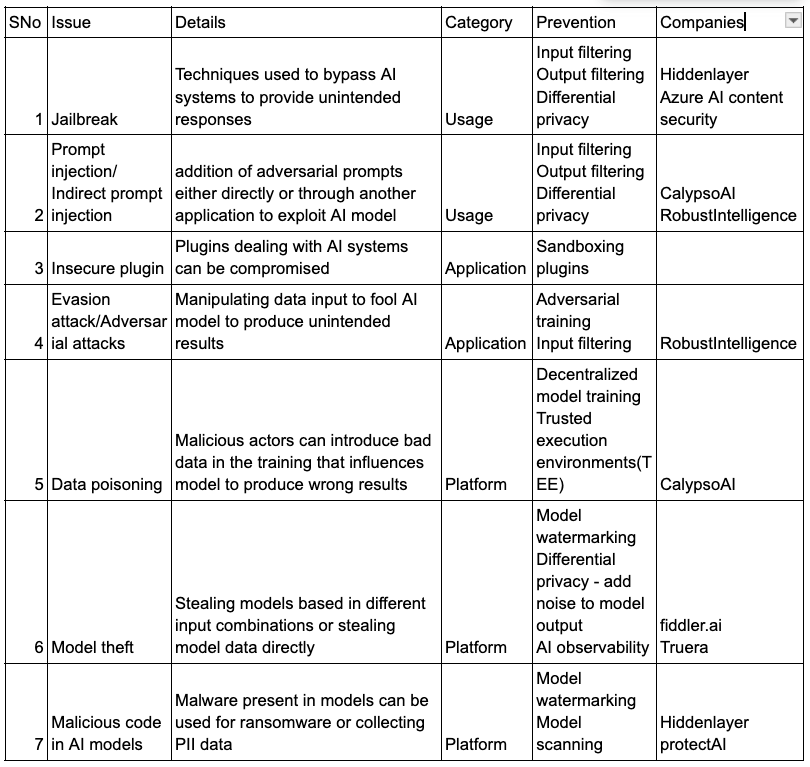
AI security summary

AI security builds upon existing cybersecurity practices, with specific enhancements tailored for AI systems. It can be categorized into three fundamental layers:

  1. Usage Security: This layer focuses on securing the interaction between users and AI systems. A common example is a jailbreak attack using prompt injection, where hackers craft malicious prompts to manipulate the model into generating inappropriate outputs or revealing sensitive data.
  2. Application Security: This layer addresses the security of AI applications, including the models themselves. Examples include indirect prompt injections or vulnerabilities in plugins that can compromise application integrity.
  3. Platform Security: This layer involves securing the underlying infrastructure of AI systems. For instance, in a data poisoning attack, malicious actors alter training data to manipulate model outputs. Other examples include model theft, where the intellectual property of AI models is stolen.

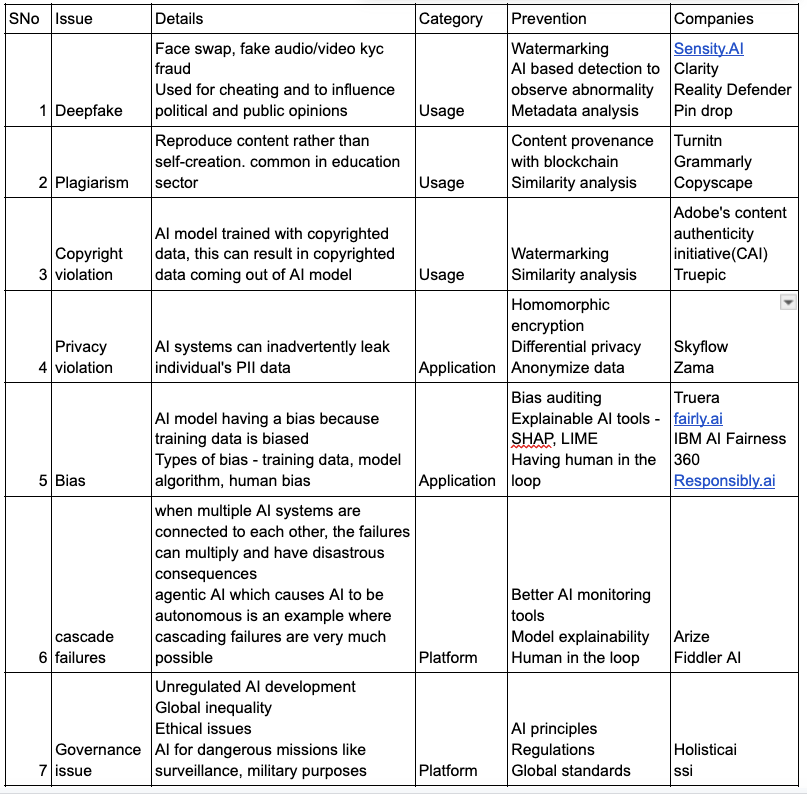
AI safety summary

While the prospect of AI surpassing human control is still a distant reality, there are several immediate AI safety concerns that must be addressed to ensure AI is used constructively rather than destructively. AI safety, like AI security, can be categorized into three layers:

  1. Usage Safety: This layer focuses on how AI systems are utilized by end users. Examples include deepfakes, plagiarism, and copyright violations. The proliferation of deepfakes, powered by advanced technologies like Generative Adversarial Networks (GANs), has made it increasingly difficult to distinguish between real and fabricated content, contributing to a negative perception of AI.
  2. Application Safety: This layer addresses safety risks associated with AI applications. Key examples include privacy infringement and bias in AI models, which can lead to discriminatory outcomes and ethical concerns.
  3. Platform Safety: This layer pertains to broader systemic and governance issues in AI deployment. Examples include the absence of regulatory oversight and the risk of cascade failures, where interconnected AI systems amplify small errors into significant failures.

Technologies used for AI security and safety

This is an evolving space that must adapt rapidly to keep pace with the latest AI trends.

  • Usage: For AI security, techniques like input validation and filtering can help ensure that only sanitized data is fed into AI systems. For AI safety, approaches such as moderated outputs, bias auditing, explainable AI, and human-in-the-loop systems play a crucial role in ensuring responsible use.
  • Application: Model watermarking is a valuable AI security measure to prevent model theft. For AI safety, techniques like differential privacy for safeguarding sensitive data and reinforcement learning with human feedback to align AI behavior with ethical standards are widely used.
  • Platform: For AI security, leveraging technologies like blockchain, homomorphic encryption, and trusted execution environments (TEEs) enhances the integrity and confidentiality of AI systems. For AI safety, establishing robust governance frameworks and compliance tools is essential to mitigate risks and ensure ethical deployment.

AI systems require comprehensive monitoring and analysis to remain secure and reliable. Machine Learning Detection and Response (MLDR) uses machine learning to identify real-time threats and provide automated responses, enabling proactive and efficient risk management.

AI Security landscape

The companies provided are not an exhaustive list, it’s just a sample list.

AI safety landscape

The companies provided are not an exhaustive list, it’s just a sample list.

Key Trends for the Future

AI Watermarking


Watermarking is a critical technique for protecting content creators by ensuring ownership of their digital creations and mitigating issues like deep fakes. In the context of AI, two primary techniques are used for watermarking:

  1. Statistical Watermarking:
    This method involves adding imperceptible data to AI-generated content, which can later be detected by specialized tools.
    • Example: For text-based models, specific word substitutions are made based on their probability. In images, certain pixel values are adjusted according to spatial or frequency domain rules.
    • Audio Example: Frequencies beyond human perception are added to sound files.
  2. Machine Learning Watermarking:
    Here, the AI model itself is modified to embed unique markers in its outputs, enabling easy identification of model-generated content.
    • Examples: Neural network-based watermarking, adversarial watermarking.

Challenges include resistance to tampering, ease of detection, and maintaining content quality.
Example in Action: Google SynthID embeds imperceptible watermarks into images produced by its AI models, and Gemini applies this to all GenAI outputs. Huggingface also offers open-source AI watermarking tools.circumvented by users or because users won’t prefer using chatgpt in that case.  

Data Provenance

Data provenance involves tracking the origin and modifications of data. By embedding metadata into content or storing it externally on an immutable ledger like blockchain, we can ensure the integrity of data used in AI training and generation.

  • Applications:
    • Ethical AI training through verified datasets.
    • Preventing copyright violations by ensuring proper attribution.
  • Examples:
    • Adobe Content Credentials and CAI: Adobe products attach provenance metadata to creations, and the CAI open standard enables cross-platform use.
    • Initiatives like C2PA and Data Provenance Initiative aim to standardize these practices.

Explainable AI(XAI)

AI often functions as a “black box,” making it hard to verify if outputs are accurate or hallucinated. XAI bridges this gap by providing transparency and fostering trust.

  • Key Techniques:
    • Interpretable AI Models: Linking AI outputs to specific inputs and reasoning.
    • LIME (Local Interpretable Model-Agnostic Explanations): Offers localized approximations for complex models.
    • SHAP (Shapley Additive Explanations): Uses game theory to assess the contribution of model parameters.

Homomorphic encryption

Homomorphic encryption enables computations on encrypted data without needing decryption, ensuring privacy while processing sensitive information.

  • Examples of Use: Medical data analysis, financial forecasting.
  • Popular Libraries: Microsoft SEAL and Zama’s Concrete.
  • Challenges: Performance overhead and complexity. Innovations are underway to make this technology more efficient.

Additionally, Zero Knowledge Proofs (ZKP) offer privacy-preserving mechanisms, such as proving ownership of a license without revealing personal details like age or ID number.

Blockchain and AI

Blockchain, with its decentralized and immutable ledger, offers transformative benefits for AI in several key areas:

Data Provenance: Blockchain enables the transparent tracing of data inputs used in model training, ensuring the integrity and security of the data. By maintaining a complete history of data modifications on the blockchain, it prevents tampering and builds trust in AI systems. Additionally, contributors of data can be rewarded through smart contracts, fostering ethical and transparent data sharing.

Example: Ocean Protocol facilitates data traceability and monetization in a decentralized manner.

Decentralized and Federated Learning: By distributing data and training processes across multiple nodes, blockchain supports decentralized or federated learning, which enhances data privacy and reduces risks associated with centralized storage.

Example: SingularityNET enables decentralized AI model training while maintaining data security and privacy.

Content Verification and Deep Fake Prevention: Blockchain can be used to track AI-generated content and the data that contributed to it. This traceability ensures accountability and helps combat issues like deep fakes by verifying content authenticity.

Example: Numbers Protocol and Adobe’s Content Authenticity Initiative (CAI) provide solutions for tracking and verifying AI-generated content.

Differential privacy

Differential privacy ensures that AI systems use input data without exposing individual details. By adding noise to data, it minimizes the risk of re-identification.

Adding/removing a single data point does not significantly affect model outputs.

Examples:

Google TensorFlow Privacy incorporates noise to protect sensitive information.

Human in the loop training(HILT) and Reinforced learning with human feedback(RLHF)

HILT integrates human oversight during both training and inference, ensuring models align with user needs.
RLHF fine-tunes models by using human feedback to develop reward systems, enhancing their performance and alignment with human values.

Examples: ChatGPT’s alignment process leverages RLHF for improving responses.

Regulations

AI regulations are still in their early stages, but they are essential for ensuring both the security and safety of AI systems. Effective regulations must strike a delicate balance—minimizing the potential harms of AI while fostering innovation. Different regions have adopted varying approaches to AI governance. For example, the European Union has implemented strict regulatory measures, while countries like the United States and the United Kingdom have opted for a more lenient or flexible approach. To ensure that AI development remains responsible and beneficial, a collaborative effort is required across nations, industries, and organizations. This global cooperation will help establish standardized guidelines and best practices, ensuring AI is developed and deployed safely, ethically, and effectively.

NIST AI risk management framework

The National Institute of Standards and Technology (NIST) has developed an AI Risk Management Framework to guide the design, development, and deployment of trustworthy AI systems. This framework focuses on accuracy, reliability, robustness, privacy, and security of AI systems.

EU AI act

This act classifies AI applications into unacceptable risk, high risk, limited risk, and minimal risk. For example, health care applications have a much higher risk and it has much higher AI regulations. 

References