Tag Archives: Docker

Docker Experimental Networking – 2

This blog is a continuation of my previous blog on Docker Experimental Networking. In this blog, I will cover an example of Docker container connectivity using bridge and overlay driver.

Following is a sample usecase that I tried:
dockerexpnet3

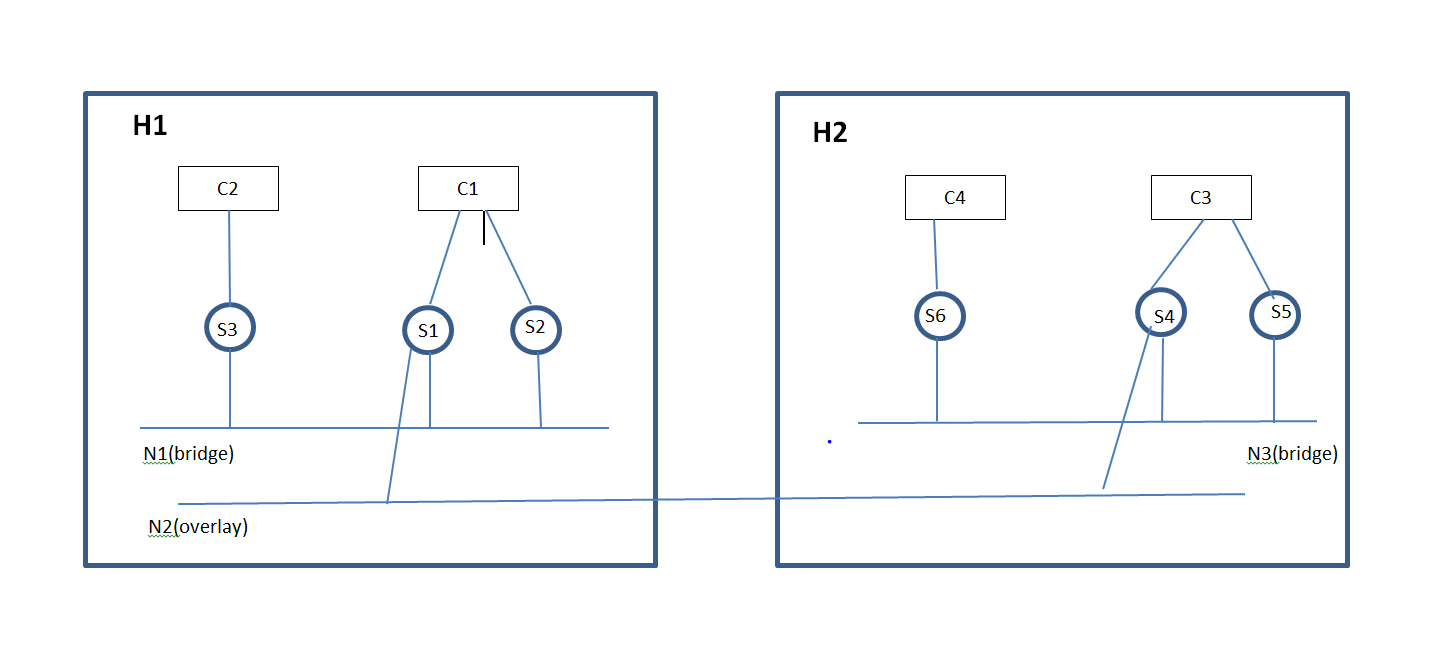
  • Container C1 in host H1 will be able to talk to Container C3 in Host H2 using service endpoints S1 in C1 and S4 in C3 through Network N2(Overlay driver).
  • On Host H1, Container C1 has 2 services and C2 has 1 service in the Network N1(bridge driver) and they will be able to talk to each other using the Network N1.
  • On Host H2, Container C3 has 2 services and C4 has 1 service in the Network N3(bridge driver) and they will be able to talk to each other using the Network N3.
  • Containers will be able to discover services in the same network.

I came across the following limitations/bugs:
Continue reading Docker Experimental Networking – 2

Docker Experimental Networking – 1

Networking support in Docker was primitive till now. Single host connectivity was through Linux bridge and there was no native mechanism to connect Containers across hosts. With Pipework, we could do a hacky approach to connect Containers across hosts. Companies like Socketplane, Weave have been working to address this Networking gap. I have written multiple blogs before on Docker Networking and they can be referred here. Socketplane was recently acquired by Docker and they provide the native batteries-included Docker Networking solution and solutions like from Weave will be available as a Docker Networking plugin. With Docker experimental release, we can connect Containers across hosts using Docker native solution as well as use Networking plugins to connect Containers across hosts. In this blog, I will cover some basics of the solution and will walk-through some of the hands-on stuff that I tried with the experimental Docker release.

Docker Networking blocks:

dockerexpnet1

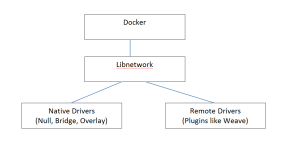
At high level, the diagram above describes the flow for Docker Networking.

  • Docker runtime was integrated previously with Networking and there was no way to separate the 2. Libnetwork is the new Networking library that provides the Networking functionality and is seperated from Core Docker. Docker 1.7 release has already included the libnetwork and is backward compatible from enduser perspective.
  • Drivers implement the APIs provided by libnetwork. Docker is leaning towards plugin approach for major functionalities like Networking, Storage, Orchestration where Docker provides a native solution which can be substituted with technologies with other vendors as long as they implement the APIs provided by the common library. In this case, Bridge and Overlay are the Native Docker networking drivers and remote drivers can be implemented by third-party. There are already many remote drivers available like Weave.

Docker Container Networking model: Continue reading Docker Experimental Networking – 1

Flocker – Docker Data volumes(Updates)

This blog is an update from my previous blog on Flocker. I had faced a bunch of issues while trying out Flocker. Based on the cases raised by me, Flocker team has been kind enough to help me to sort out some of these issues. In this blog, I have updated the cases where I found a workable solution. There are couple of more issues pending. I will update this blog as I make more progress.

Approach 3(Experimental Flocker install with AWS):

Procedure for this tutorial is covered here and case details are covered in this link. The first issue I faced was that the volume creation got stuck. This was because of an operator error on my part w.r.to setting permission for the AWS user to create EBS.

Following is my sample cluster.yml file.

Continue reading Flocker – Docker Data volumes(Updates)

Flocker – Docker Data volumes

In this blog, I will cover Flocker from ClusterHQ which is used for Container data/volume management. I will cover some Flocker basics and some hands-on stuff that I tried with Flocker.

Docker Volumes:

Docker volumes are used to store persistent data that is outside the scope of the Container Union file system. 1 common example is database. Data volumes are attached to the container so that Containers can update the volume and these volumes can be reattached to other containers or shared across Containers. Data volumes are not deleted when Containers are deleted, Data volumes needs to be deleted manually.

Following is a simple example to create container with mount volume. Here, /webapp is mounted as a data volume.

docker run -d -P --name web -v /webapp training/webapp python app.py

When Containers are deleted, volumes don’t get deleted. To delete volumes when Containers are deleted, we can use:

docker rm -v

Volumes are stored in host under /var/lib/docker/volumes.

Flocker basics:

Continue reading Flocker – Docker Data volumes

Containers – Format, Runtime and Platform

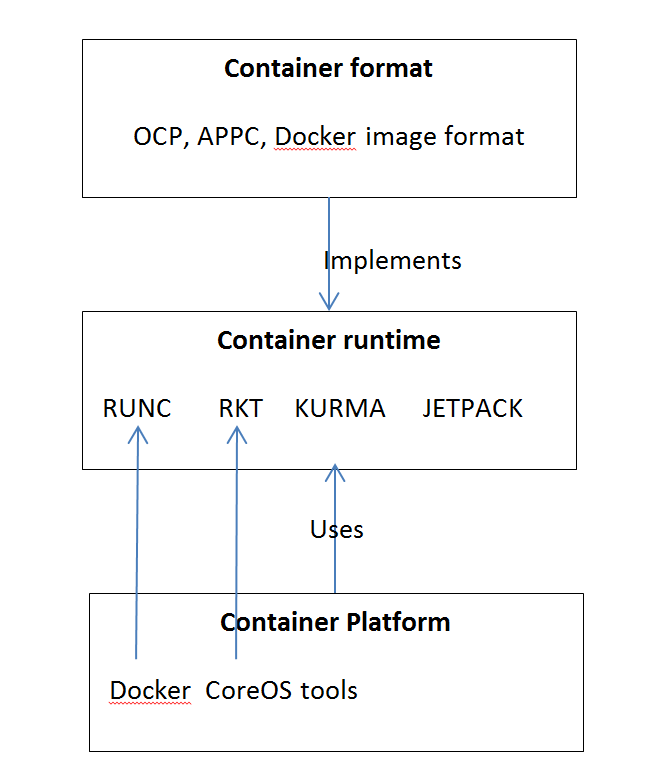
1 of the big announcements in Dockercon 2015 was the Open Container project(OCP). OCP is an Opensource project under Linux foundation to define a common Container format. Container format, runtime and platform mean different things. There are many Container formats, runtime and multiple acronyms surrounding it. In this blog, I have tried to capture my understanding around these. I have not discussed about traditional Linux containers in this blog. This is how I see the relationship between Container formats, Container runtime and Container platforms.

docker10

Continue reading Containers – Format, Runtime and Platform

Docker Kitematic for Windows

Kitematic simplifies Docker installation for Mac and also provides an easy GUI interface to manage Containers. Recently, Kitematic released an alpha version for Windows. I tried this recently and I will share my experiences in this blog.

I had covered boot2docker in 1 of my earlier blog. Kitematic is boot2docker combined with a GUI for managing containers. Kitematic uses the same Linux VM as boot2docker.

Installation:

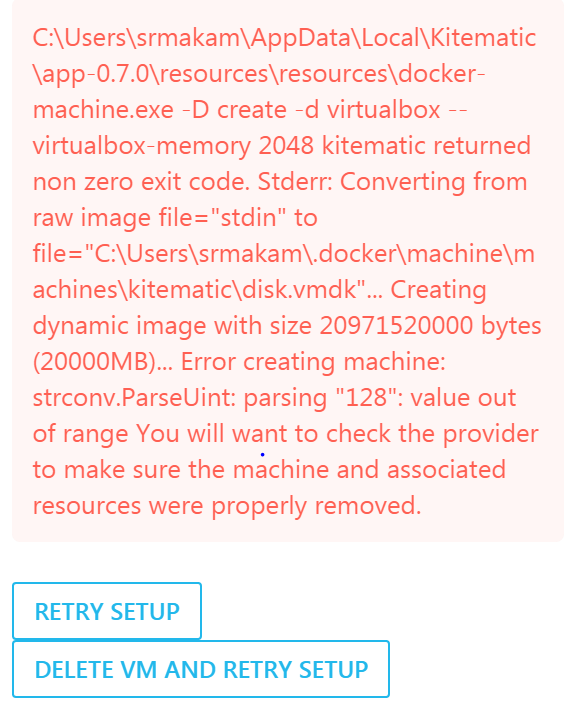
After registering for Alpha program, I received the download link 1 day later. Kitematic loads a small Linux VM in Virtualbox over which the Container runs. If Virtualbox is not installed, Kitematic installation program also installs Virtualbox. In my case, I already had Virtualbox installed. When I tried installing, I got this issue:

docker9

I had faced similar issue when installing boot2docker. 1 of the workarounds I found by googling was to delete the host-only interface that Virtualbox creates for Kitematic/boot2docker. I already had 6 host-only interfaces created in my Virtualbox. I deleted 4 of them and tried reinstalling Kitematic and the installation went through after that.

The second issue I faced was with running Docker CLI and it complained that Docker client and agent versions did not match.This was because I had boot2docker installed previously in my Windows machine. I uninstalled boot2docker and Docker CLI worked fine after that.

Kitematic Networking:

Continue reading Docker Kitematic for Windows

Openstack and Docker – Part 2

This is a continuation of my previous blog on Openstack and Docker. In this blog, I will cover Openstack Docker heat plugin and Magnum.

Following are some of the items that Nova Docker driver cannot do currently:

  1. Passing environment variables
  2. Linking containers
  3. Specifying volumes
  4. Orchestrating and scheduling the containers

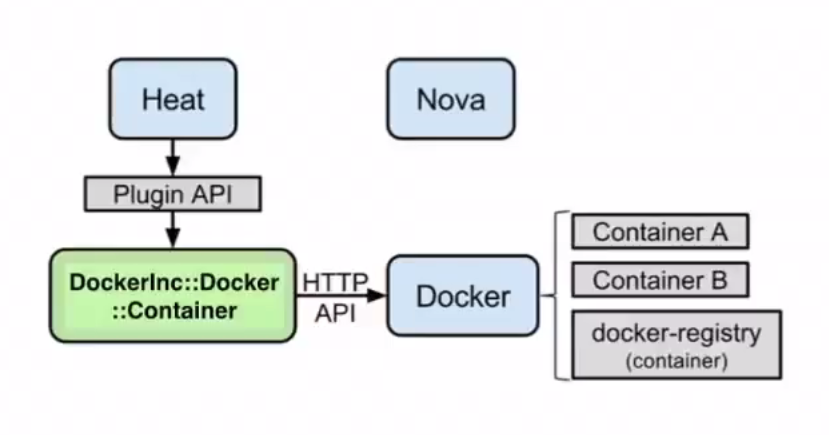
Heat docker plugin solves problems 1-3 and partially solves problem 4. Following is the architecture diagram I found in Openstack Docker wiki for heat.

odocker2

  • Nova is not involved here. Openstack heat uses Docker plugin to talk to Docker agent on the host.
  • The host here is the VM spawned. The VM can either be spawned by Nova or Heat can spawn this using Nova driver.
  • Glance is not involved here as the container images are stored in Docker registry.
  • The Heat approach allows us to specify environment variables, link containers, specify volumes as well as orchestrate the host on which the Docker runs.

Using Heat plugin:

Continue reading Openstack and Docker – Part 2

Openstack and Docker – Part 1

In this blog, I will cover the different ways in which Openstack can create and manage Docker Containers. The 3 predominant approaches are using Nova Docker driver, Heat Docker plugin and Magnum. Magnum is pretty new and is under development. Openstack is opensource cloud orchestration software and Docker is opensource container management software. For this blog, I am assuming users are already familiar with Openstack and Docker. There are lot of resources for learning Openstack and Docker available in the web, my blogs related to these topics can be found here and here.

Nova Docker Driver:

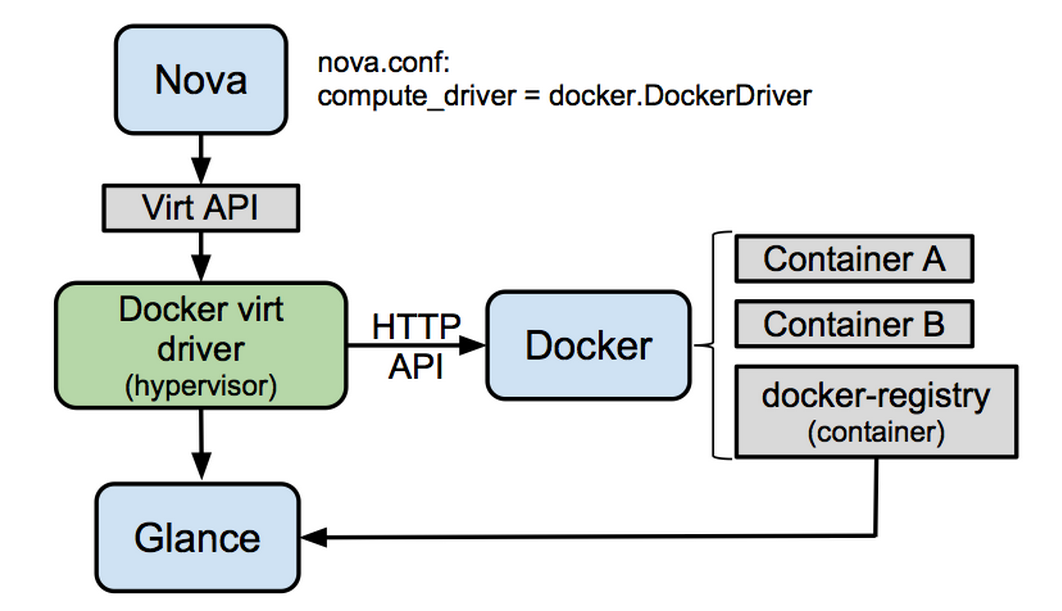
Nova typically manages VMs. In this approach, Nova driver is extended to spawn Docker Containers. Following is the architecture diagram mentioned in the Nova Docker wiki.

odocker1

  • To spawn containers Nova compute driver is pointed to Docker driver.
  • Nova Docker Virt driver talks to Docker agent using http api calls.
  • Docker images are stored in the Docker registry and images are exported to glance from Docker registry which Nova uses to create Containers.

Nova Docker driver with Devstack:

Continue reading Openstack and Docker – Part 1

Docker Compose and Interworking of Docker Machine, Swarm, Compose

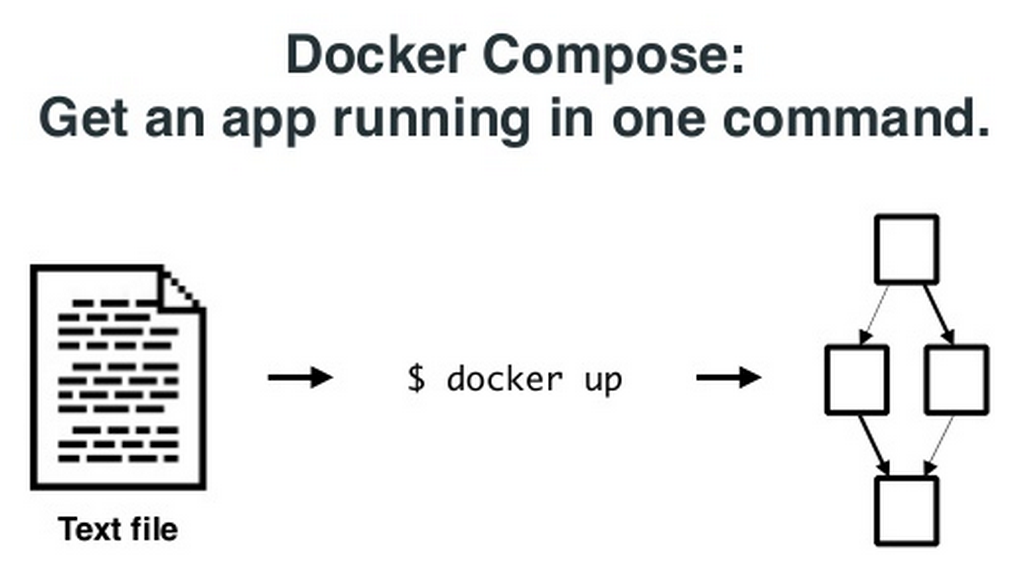
This is a continuation of my previous 2 blogs on Docker machine, Swarm. In this blog, I will cover Docker Compose and how Docker Machine, Swarm and Compose can work with each other. The interworking part is actively being developed by Docker team and is still at the preliminary stages. Docker Compose: Docker Compose comes from Fig project. With Docker Compose, we can define a multi-container application in a YAML file along with the Container dependencies, affinities etc and Compose will take care of orchestrating the application. Following picture from Docker Compose presentation illustrates the point above. docker7 Following is a sample YAML file describing a small application with 2 containers, 1 for web and another for db. Continue reading Docker Compose and Interworking of Docker Machine, Swarm, Compose

Docker Swarm

This is a continuation of my previous blog on Docker machine. In this blog, I will cover Docker Swarm.

Swarm manages a set of Docker nodes as a single cluster. This has the following advantages:

  • Rather than managing individual Docker nodes, the cluster can be managed as a single entity.
  • Swarm has an in-built scheduler that will decide the placement of Containers in the cluster. There are different constraints and affinities that can be mentioned which Swarm uses to decide the Container placement. Constraints could be cpu, memory etc and Affinity could be for grouping related Containers together. Swarm also has the provision to take its scheduler out and work with other schedulers like Mesos and Kubernetes.
  • Swarm will take care of node failures so that Container HA can be provided.

Swarm has the following software components:

  • Swarm Manager that takes of scheduling and HA. HA piece is not yet available.
  • Swarm agent that runs in each node and communicates to Swarm manager.
  • Node discovery. There are different approaches available for Swarm worker nodes to discover Swarm master. Discovery is needed because Swarm master and agents run on different nodes and there is a need to find the discovery parameters dynamically. Available discovery mechanisms are docker hub, etcd, Consul etc.

Continue reading Docker Swarm