I had heard some good things about Arista EoS(Extensible Operating System). I have never used Arista switches before. I did some reading on Arista EoS and I also tried their VEoS which is their Virtual machine offering for running Arista switch as VM. In this blog, I will share some of my experiences.
EoS Overview:
I found this block diagram in Arista White paper:
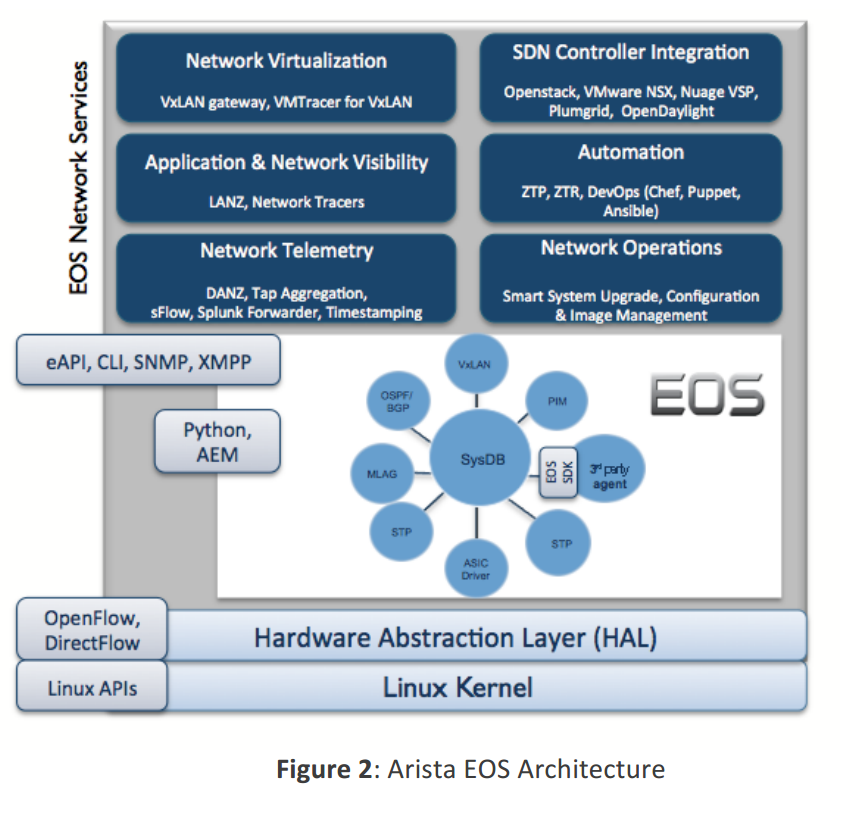
Following are the things that I liked:
- Linux kernel is unmodified.
- User is given access to native linux shell and this means that all tools/applications available with Linux can be used with their OS. This gives the opportunity to manage the router/switch as a server rather than as a switch. All data path interfaces gets exposed from Linux shell. In summary, this makes Arista EoS automation friendly.
vEoS:
vEoS is the EoS instance that runs as a Virtual machine. This is similar to Cisco VIRL/CML. The main difference is with vEoS, we can run multiple EoS instances and we need to manage connectivity between each router/switch instance. Cisco VIRL/CML is a complete Network modeling platform.
Installing vEoS:
I installed vEoS using 2 approaches. 1 using Virtualbox as explained here and another using VMPlayer as explained here. We can download the vEoS images from Arista website after creating a guest account.
vEoS using Virtualbox:
I created this network mentioned here. The procedure explained in the link works great, there are few minor things that I needed to change:
- Memory for each instance had to be set to 2gb.
- Hostname in each vEoS instance needs to be set manually.
- IP address of management instance also needs to be set manually.
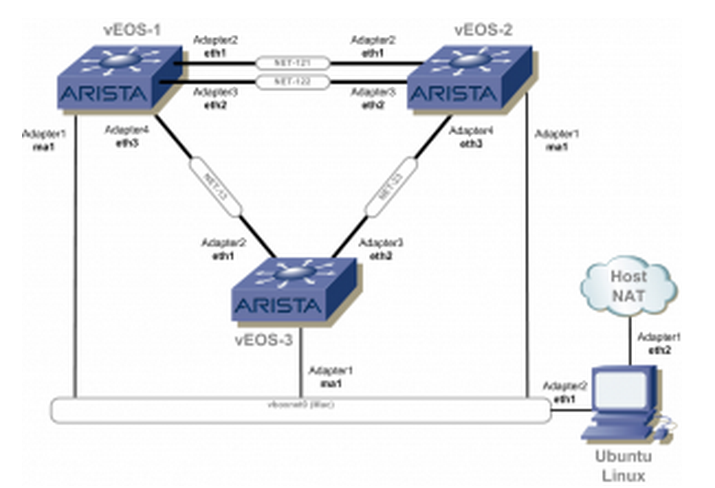
Following is the interface created in my Ubuntu linux machine that connects to all Arista EoS instance.
eth1      Link encap:Ethernet  HWaddr 08:00:27:b1:04:8c
          inet addr:10.10.10.10  Bcast:10.10.10.255  Mask:255.255.255.0
          inet6 addr: fe80::a00:27ff:feb1:48c/64 Scope:Link
          UP BROADCAST RUNNING MULTICAST  MTU:1500  Metric:1
          RX packets:99 errors:0 dropped:0 overruns:0 frame:0
          TX packets:56 errors:0 dropped:0 overruns:0 carrier:0
          collisions:0 txqueuelen:1000
          RX bytes:9449 (9.4 KB)  TX bytes:9440 (9.4 KB)
          Interrupt:16 Base address:0xd240
Following are some relevant outputs in vEoS1:
vEoS1#show interfaces status
Port       Name              Status       Vlan        Duplex  Speed Type
Et1                          connected    1             full unconf EbraTestPhyP
Et2                          connected    1             full unconf EbraTestPhyP
Et3                          connected    1             full unconf EbraTestPhyP
Ma1                          connected    routed      a-full a-100M 10/100/1000

vEoS1#show lldp neighbors
Last table change time   : 0:08:41 ago
Number of table inserts  : 7
Number of table deletes  : 0
Number of table drops    : 0
Number of table age-outs : 0

Port       Neighbor Device ID             Neighbor Port ID           TTL
Et1        vEoS2                          Ethernet1                  120
Et2        vEoS2                          Ethernet2                  120
Et3        vEoS3                          Ethernet1                  120
Ma1        vEoS3                          Management1                120
Ma1        sreeubuntu14-VirtualBox        0800.27b1.048c             120
Ma1        vEoS2                          Management1                120

vEoS1#show spanning-tree
MST0
  Spanning tree enabled protocol mstp
  Root ID    Priority    32768
             Address     0800.270b.505c
             This bridge is the root

  Bridge ID  Priority    32768  (priority 32768 sys-id-ext 0)
             Address     0800.270b.505c
             Hello Time  2.000 sec  Max Age 20 sec  Forward Delay 15 sec

Interface        Role       State      Cost      Prio.Nbr Type
---------------- ---------- ---------- --------- -------- --------------------
Et1              designated forwarding 2000      128.1    P2p
Et2              designated forwarding 2000      128.2    P2p
Et3              designated forwarding 2000      128.3    P2p
In lldp neighbors output, we see that neighbors are discovered from multiple interfaces since Management interface is shared across all vEoS instances.
vEoS using VMWare Player:
Arista does not claim VMWare Player support, but claims only Workstation and Fusion support. Since these are not free, I tried using VMWare Player, I was able to get majority of the things working with VMPlayer.
Following is the network I created.
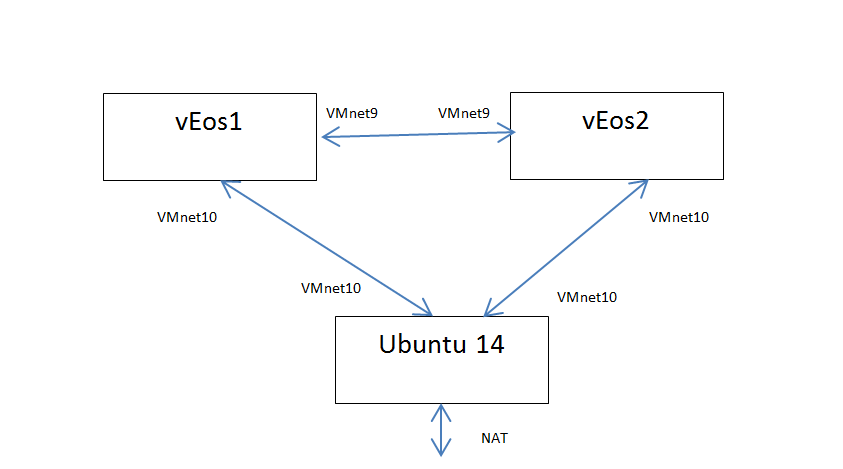
I created custom network interfaces using vmnetcfg. Details are in my blog on VMWare player. Initially, I was not able to get link up between Linux VM and vEoS, I added the following line to vEoS configuration line “ethernet1.virtualDev = “e1000”. With this, the link came up. I was still not able to get network connectivity between Linux VM and vEoS instances, I see packets being transmitted, but not received in both direction. vEoS instances were able to talk to each other. I was also able to see lldp neighbors getting updated correctly.
Considering that I have never used EoS and vEoS before, it was very easy to get started and I liked the full Linux exposure.
References:
Pictures used in the blog are from references.


2 thoughts on “Arista EoS and vEoS”