All posts by Sreenivas Makam

Vagrant and Devstack

Openstack is a Cloud Orchestration software. Devstack script provides a development environment for Openstack. Devstack provides a great way to get hands-on with Openstack. I had written 2 earlier blogs on installing Devstack for Openstack Icehouse and Openstack Juno. I received multiple queries on installation related issues. To make this simple, I created Vagrant images for different Openstack releases. With this, VM creation and Devstack installation can all be done with a single script. In this blog, I will walk-thru the steps for the installation.

Vagrant makes it easier to create and share VMs and this makes Vagrant Devops friendly. For getting started on Vagrant, you can refer  to my earlier blog on Vagrant.

My Development environment:

Windows 7 machine with Virtualbox 4.3.28 and Vagrant 1.7.2.

Pre-requisites:

Following are typical issues I have seen folks facing when running Devstack:

  • There are some pre-requisite software that needs to be installed before running Devstack like setting up Python environment etc.
  • It is needed to setup VM with atleast 4G RAM and 8G hard disk. Otherwise, either Stacking will fail or instance creation will fail.
Continue reading Vagrant and Devstack

Openstack and Docker – Part 2

This is a continuation of my previous blog on Openstack and Docker. In this blog, I will cover Openstack Docker heat plugin and Magnum.

Following are some of the items that Nova Docker driver cannot do currently:

  1. Passing environment variables
  2. Linking containers
  3. Specifying volumes
  4. Orchestrating and scheduling the containers

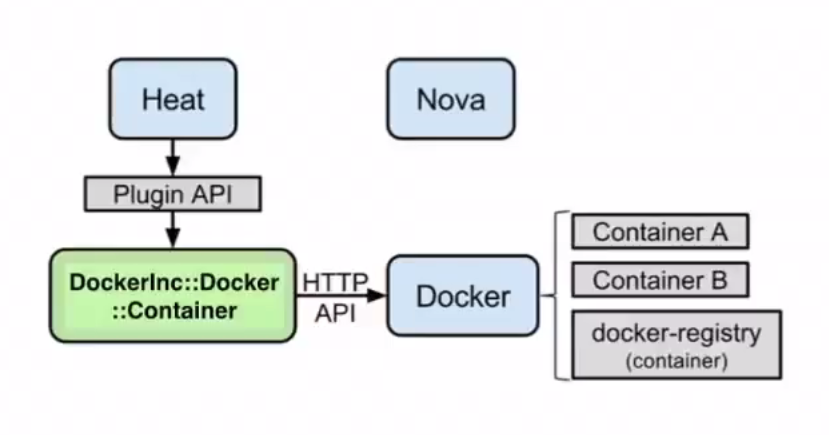
Heat docker plugin solves problems 1-3 and partially solves problem 4. Following is the architecture diagram I found in Openstack Docker wiki for heat.

odocker2

  • Nova is not involved here. Openstack heat uses Docker plugin to talk to Docker agent on the host.
  • The host here is the VM spawned. The VM can either be spawned by Nova or Heat can spawn this using Nova driver.
  • Glance is not involved here as the container images are stored in Docker registry.
  • The Heat approach allows us to specify environment variables, link containers, specify volumes as well as orchestrate the host on which the Docker runs.

Using Heat plugin:

Continue reading Openstack and Docker – Part 2

Openstack and Docker – Part 1

In this blog, I will cover the different ways in which Openstack can create and manage Docker Containers. The 3 predominant approaches are using Nova Docker driver, Heat Docker plugin and Magnum. Magnum is pretty new and is under development. Openstack is opensource cloud orchestration software and Docker is opensource container management software. For this blog, I am assuming users are already familiar with Openstack and Docker. There are lot of resources for learning Openstack and Docker available in the web, my blogs related to these topics can be found here and here.

Nova Docker Driver:

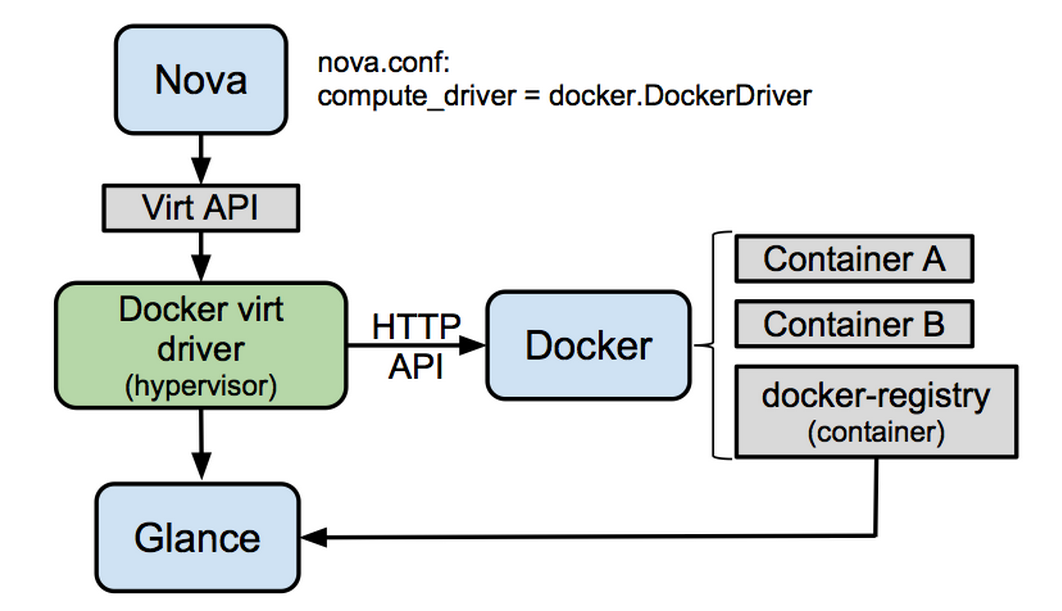
Nova typically manages VMs. In this approach, Nova driver is extended to spawn Docker Containers. Following is the architecture diagram mentioned in the Nova Docker wiki.

odocker1

  • To spawn containers Nova compute driver is pointed to Docker driver.
  • Nova Docker Virt driver talks to Docker agent using http api calls.
  • Docker images are stored in the Docker registry and images are exported to glance from Docker registry which Nova uses to create Containers.

Nova Docker driver with Devstack:

Continue reading Openstack and Docker – Part 1

Docker Compose and Interworking of Docker Machine, Swarm, Compose

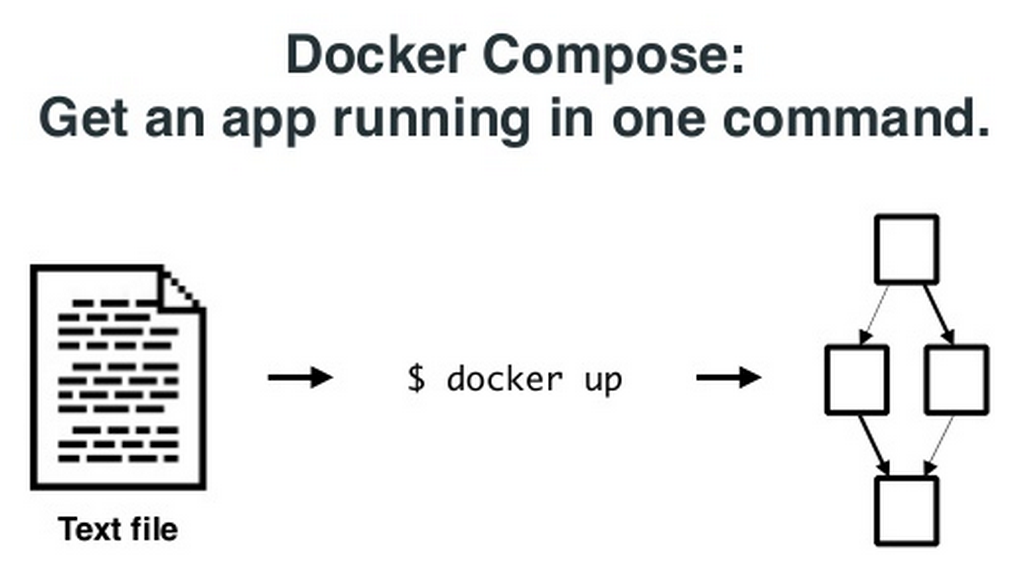
This is a continuation of my previous 2 blogs on Docker machine, Swarm. In this blog, I will cover Docker Compose and how Docker Machine, Swarm and Compose can work with each other. The interworking part is actively being developed by Docker team and is still at the preliminary stages. Docker Compose: Docker Compose comes from Fig project. With Docker Compose, we can define a multi-container application in a YAML file along with the Container dependencies, affinities etc and Compose will take care of orchestrating the application. Following picture from Docker Compose presentation illustrates the point above. docker7 Following is a sample YAML file describing a small application with 2 containers, 1 for web and another for db. Continue reading Docker Compose and Interworking of Docker Machine, Swarm, Compose

Docker Swarm

This is a continuation of my previous blog on Docker machine. In this blog, I will cover Docker Swarm.

Swarm manages a set of Docker nodes as a single cluster. This has the following advantages:

  • Rather than managing individual Docker nodes, the cluster can be managed as a single entity.
  • Swarm has an in-built scheduler that will decide the placement of Containers in the cluster. There are different constraints and affinities that can be mentioned which Swarm uses to decide the Container placement. Constraints could be cpu, memory etc and Affinity could be for grouping related Containers together. Swarm also has the provision to take its scheduler out and work with other schedulers like Mesos and Kubernetes.
  • Swarm will take care of node failures so that Container HA can be provided.

Swarm has the following software components:

  • Swarm Manager that takes of scheduling and HA. HA piece is not yet available.
  • Swarm agent that runs in each node and communicates to Swarm manager.
  • Node discovery. There are different approaches available for Swarm worker nodes to discover Swarm master. Discovery is needed because Swarm master and agents run on different nodes and there is a need to find the discovery parameters dynamically. Available discovery mechanisms are docker hub, etcd, Consul etc.

Continue reading Docker Swarm

Docker Machine

As part of Docker Orchestration, Docker has released 3 new tools Machine, Swarm, Compose. In the last few weeks, I was playing with these tools and I will share my experiences in this blog. I will start with Docker machine in this blog and I will cover Swarm, Compose in the next set of blogs. Only preliminary version of these tools are released and there is a plan to release more updated versions later this year. For basics and other details on Docker, you can refer to my Docker blog series.

Docker Machine:

Docker machine makes it easier to create Docker hosts using an uniform approach across bare metal, VM, Cloud provider, Private clouds etc. Before Docker machine was there, following were the approaches available to create Docker hosts:

  • On Linux machines, Docker agent and client are installed natively.
  • For Windows, boot2docker is used to create a Docker host on top of hypervisor like Virtualbox.
  • For public clouds, we would create a Linux VM and install Docker on top of it.

Continue reading Docker Machine

Connecting VMs between Virtualbox and VMWare Player

I had written blogs earlier on using Virtualbox and VMWare Player. I recently had a need to connect VMs running on Virtualbox and VMWare player. This is for my Windows laptop. I found the procedure mentioned in this link to be very useful. There are 2 options.

  1. Use bridged mechanism. Create a networking interface with bridged adapter on Virtualbox and map it to 1 of the physical adapters. Create a networking interface with bridged adapter on VMWare player and map it to the same physical adapter as Virtualbox. In this option, the connection between the 2 hosts is established through external router. It is possible that the router blocks this external communication. Even after clearing the firewall rules on the router, I was not able to get Virtualbox VM talk to VMWare player VM with this approach. I was able to get Virtual box VMs using bridged adapters to talk to each other, same with VMWare player. I feel that there is some filtering enforced either by Virtualbox or VMWare and I am not able to find the reason…
  2. Use host-only adapter mechanism. Create a host-only adapter on Virtualbox and create a networking interface on the VM and map it to the host-only adapter created. The host-only adapter can be configured with/without dhcp. Open “vmnetcfg” to map 1 of the VMWare adapters to bridged host-only adapter that was created with Virtualbox. I have captured details of  “vmnetcfg” in my VMWare player blog. On the VM with VMWare player, create a networking interface and map it to the custom VMNetx interface that was bridged to the Virtualbox adapter. After this, the 2 VMs will be able to talk to each other using the host-only network. This option does not have the disadvantage of dependency on external router and firewall.

References:

Netconf Python ncclient

In my earlier blogs, I had covered basics of Netconf and Yang and how to use Netconf to configure Cisco devices. Recently, I came across this Python ncclient library that simplifies the configuration/monitoring of Networking devices that supports Netconf. Using ncclient library, we can programmatically configure and monitor devices using Netconf. I also found out that Cisco Openstack Neutron plugin uses ncclient library to program the Nexus switches.

I have used Cisco Nexus 3k switch and Cisco VIRL NXOS switch for the examples in this blog.

In my earlier blog on configuring Cisco Nexus devices using Netconf, I covered the following netconf requests.

  1. “get” request using filter to display configuration.
  2. “edit-config” request to change configuration.
  3. “exec-command” to execute raw CLI requests.

In this blog, I will cover the above same tests using Python ncclient library. Even though the examples below are tried from Python interactive shell, the same can be executed as a Python program as well.

First step is to import the ncclient library and create a connection:

Continue reading Netconf Python ncclient

Connecting NXOS VIRL instance to Arista vEoS

In this blog, I will cover the steps that I did to connect Cisco NXOS VIRL switch instance to Arista vEoS switch instance. We can connect any Cisco switch simulated in VIRL, I just picked the NXOS switch type. CML/VIRL supports majority of Cisco switches as VM as well as few external switches from Juniper, Vyatta. External virtual or physical switches can be connected to Cisco switches running inside VIRL using VM Networking magic. I just think it is cool to connect Virtual devices, try out real-time network configurations and see how the device responds.

Prerequisites:

  • Install CML/VIRL using the procedure here.
  • Install vEoS using the procedure here.
  • I used VMPlayer to run VIRL and vEoS. Connecting across Virtualbox and VMWare player is little painful.

Following is the network I created:

Continue reading Connecting NXOS VIRL instance to Arista vEoS

Cisco NXAPI with VIRL

In this blog, I will cover the steps to get NXAPI working with NXOS image in VIRL. For more details on CML/VIRL, please refer to my earlier blog series. Running NXAPI with VIRL image makes it easy to write automation scripts without needing a physical switch.

Earlier, I had installed VIRL February release(0.9.17) which included the VIRL STD 0.10.13.11. To run NXAPI which is supported in NXOS 7.2.0 version, it is needed to upgrade VIRL to the latest version. I tried running NXOS 7.2.0 in VIRL 0.10.13.11. Even though I was able to enable “feature nxapi”, I was not able to configure management IP and be able to connect from outside.

VIRL’s latest April release(0.9.242) has the following components:

  • VM Maestro 1.2.2 Build Dev-211
  • VIRL STD 0.10.14.20

There are 2 approaches to upgrade VIRL.

  1. Full upgrade which upgrades both VIRL and OS related stuff.
  2. Quick upgrade which upgrades only VIRL. Based on the VIRL 0.9.242 upgrade note here, it is fine to do quick upgrade for users running VIRL STD 0.10.13.11. For folks outside Cisco, I am not sure if VIRL 0.9.242 is released outside.

Continue reading Cisco NXAPI with VIRL