Tag Archives: VIRL

Netconf Python ncclient

In my earlier blogs, I had covered basics of Netconf and Yang and how to use Netconf to configure Cisco devices. Recently, I came across this Python ncclient library that simplifies the configuration/monitoring of Networking devices that supports Netconf. Using ncclient library, we can programmatically configure and monitor devices using Netconf. I also found out that Cisco Openstack Neutron plugin uses ncclient library to program the Nexus switches.

I have used Cisco Nexus 3k switch and Cisco VIRL NXOS switch for the examples in this blog.

In my earlier blog on configuring Cisco Nexus devices using Netconf, I covered the following netconf requests.

  1. “get” request using filter to display configuration.
  2. “edit-config” request to change configuration.
  3. “exec-command” to execute raw CLI requests.

In this blog, I will cover the above same tests using Python ncclient library. Even though the examples below are tried from Python interactive shell, the same can be executed as a Python program as well.

First step is to import the ncclient library and create a connection:
Continue reading Netconf Python ncclient

Connecting NXOS VIRL instance to Arista vEoS

In this blog, I will cover the steps that I did to connect Cisco NXOS VIRL switch instance to Arista vEoS switch instance. We can connect any Cisco switch simulated in VIRL, I just picked the NXOS switch type. CML/VIRL supports majority of Cisco switches as VM as well as few external switches from Juniper, Vyatta. External virtual or physical switches can be connected to Cisco switches running inside VIRL using VM Networking magic. I just think it is cool to connect Virtual devices, try out real-time network configurations and see how the device responds.

Prerequisites:

  • Install CML/VIRL using the procedure here.
  • Install vEoS using the procedure here.
  • I used VMPlayer to run VIRL and vEoS. Connecting across Virtualbox and VMWare player is little painful.

Following is the network I created:

Continue reading Connecting NXOS VIRL instance to Arista vEoS

Cisco NXAPI with VIRL

In this blog, I will cover the steps to get NXAPI working with NXOS image in VIRL. For more details on CML/VIRL, please refer to my earlier blog series. Running NXAPI with VIRL image makes it easy to write automation scripts without needing a physical switch.

Earlier, I had installed VIRL February release(0.9.17) which included the VIRL STD 0.10.13.11. To run NXAPI which is supported in NXOS 7.2.0 version, it is needed to upgrade VIRL to the latest version. I tried running NXOS 7.2.0 in VIRL 0.10.13.11. Even though I was able to enable “feature nxapi”, I was not able to configure management IP and be able to connect from outside.

VIRL’s latest April release(0.9.242) has the following components:

  • VM Maestro 1.2.2 Build Dev-211
  • VIRL STD 0.10.14.20

There are 2 approaches to upgrade VIRL.

  1. Full upgrade which upgrades both VIRL and OS related stuff.
  2. Quick upgrade which upgrades only VIRL. Based on the VIRL 0.9.242 upgrade note here, it is fine to do quick upgrade for users running VIRL STD 0.10.13.11. For folks outside Cisco, I am not sure if VIRL 0.9.242 is released outside.

Continue reading Cisco NXAPI with VIRL

VIRL and CML- L2 connectivity Usecase

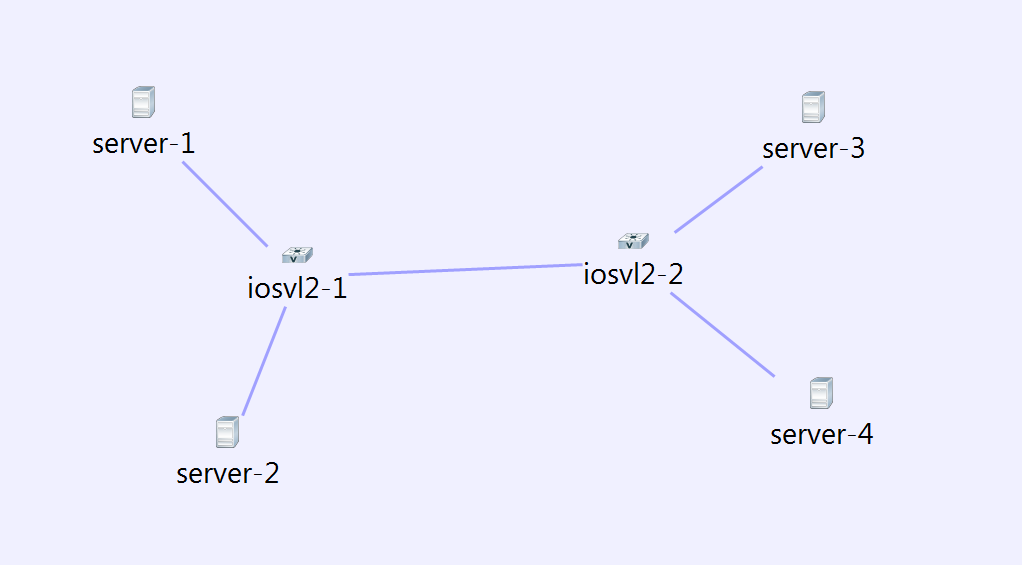
This is a continuation of my VIRL, CML blog series. VIRL/CML overview is covered here. In this blog, I will cover L2 connectivity usecase. L3 support has been present in VIRL for quite some time, L2 support was added recently in VIRL. I used the IOSvL2 experimental image for this usecase. Official L2 image is yet to be released.

Following is the topology I created with IOS L2 nodes and servers attached to the nodes.

virl12

Servers1 and 3 are in vlan 10, Server 2 and 4 are in vlan 20. To configure the VLAN, we need to select the link in node view of server and add vlan. I did not add the vlan to the trunk links, Autonetkit automatically adds it. I was not able to specify multiple vlans in the vlan text box, not sure if that’s on purpose. I felt that specifying multiple vlans would be needed for trunking interfaces.

Following is the Autonetkit visualization view in L2 mode.

Continue reading VIRL and CML- L2 connectivity Usecase

Connecting VIRL, CML networks to outside world

This is a continuation of my VIRL, CML blog series. VIRL/CML overview is covered here. It will be good to connect VIRL, CML networks to outside world. Following are some use cases.

  • If management interface of VIRL routers are accessible from outside machines, we can run management application in the client machine and connect directly to VIRL routers. NXAPI, OnePK are some examples of management application like this.
  • Extending VIRL network to physical routers and switches. For example, we can expose 1 of the interfaces of VIRL network and that can form peering IGP relationship with a physical router.

External connectivity requirements for VIRL install using VMPlayer:

As mentioned in my earlier blog, it is necessary to install VIRL with 4 custom host-only interfaces. It is necessary to match the IP address of the custom host-only interfaces to what is mentioned in /etc/virl.ini file. If we change the IP, virl.ini needs to be modified and networking needs to be restarted. This can be done with “”vinstall rehost”

  • eth0 – NAT interface used for internet access.
  • eth1(172.16.1.x) and eth2(172.16.2.x) are used for FLAT management and inband.
  • eth3(172.16.3.x) is used for SNAT L3 access.

Following is the ipconfig VMnet* output in my host machine after creation of custom networks. VMnet3 and VMnet4 are used for FLAT management and inband. VMnet5 is  used for SNAT L3 access.

Continue reading Connecting VIRL, CML networks to outside world

VIRL Simulation – L3 connectivity Usecase

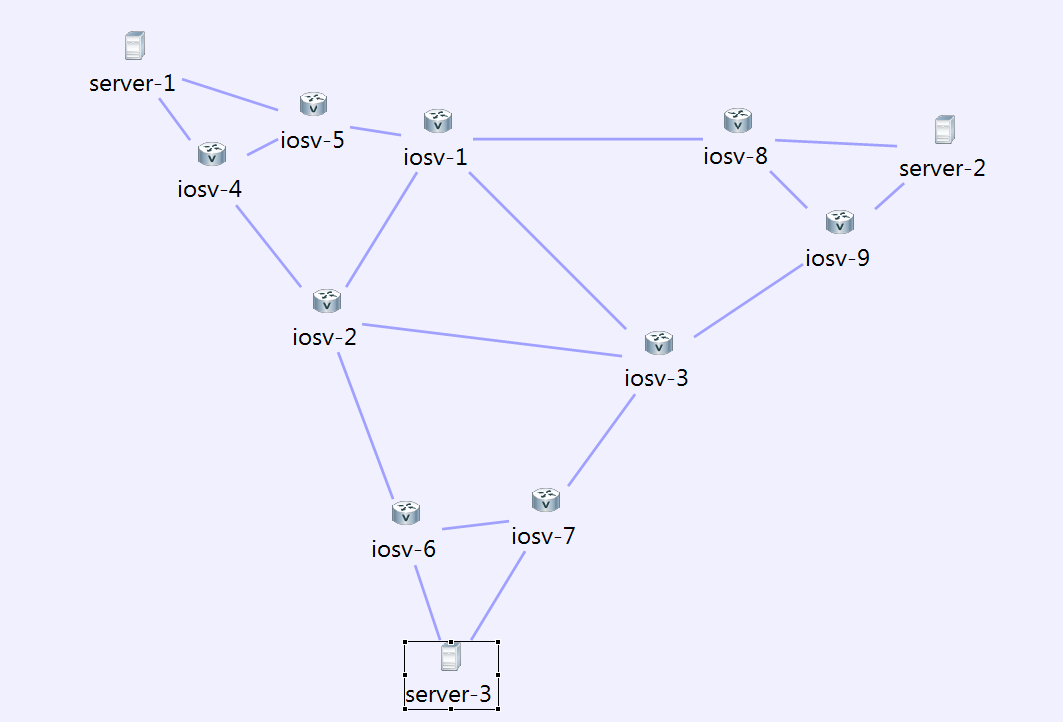
This is a continuation of my VIRL, CML blog series. VIRL/CML overview is covered here. Here, we will create a L3 IGP network running OSPF. I have used IOS nodes for all routers, we can use XR and NXOS routers as well. I didnt do it because the VM images are bigger for XR and NXOS and it slows up the simulation.

Following is the Network topology I created during the design phase. iosv[1-3] are in area 0, iosv[4-5] are in area 1, iosv[6-7] are in area 3, iosv[8-9] are in area 2.

virl7

Continue reading VIRL Simulation – L3 connectivity Usecase

VIRL and CML – Installation

This blog is part of my VIRL and CML series. VIRL/CML overview is covered here. In this blog, I will cover the installation steps and how to get started with the first simulation.

I have tried 2 approaches to install CML and 1 approach to install VIRL. Since I work at Cisco, I did not have to buy VIRL and CML software, the methods of obtaining License and installing them would be different for me compared to users purchasing this from outside. Otherwise, the steps below should be the same.

Prerequisite for installing in Laptop:

  • Use VMPlayer version 6.0.5. I had problems with other versions. I have installed VMPlayer in Windows 7.
  • It is needed to create custom networks to be able to share the VM network with the host machine. “vmnetcfg” utility is provided by default with VMWorkstation and VMfusion. To use it with VMPlayer, please refer to my other blog on VMPlayer networking. We need to create 4 custom networks. The first 2 custom network are used for Flat networks, third one is used for SNAT network, fourth one is for future use. Following image shows my networks in VMPlayer.

Continue reading VIRL and CML – Installation

VIRL and CML – Overview

CML(Cisco Modeling lab) and VIRL(Virtual Internet and Routing lab) are Network modeling platforms from Cisco. I have been trying this out for the last 2 weeks and I am very impressed by what it can do. I feel that the potential for this platform is so huge that it will create a fundamental impact in the Networking industry. Currently, the simulation is limited mainly to Cisco devices though I have seen Juniper and Vyatta images in the VM list. In the next series of blogs, I will walk through some of the following topics:

  • What is CML, VIRL? Architecture and Software components.
  • How to get started? Installation and Quickstart.
  • Examples/Use cases that I tried. L3, L2, management.

Difference between CML and VIRL:

CML is a code branch of VIRL that has been enhanced to provide more scale, VIRL has a 15 node limit. CML customers get Cisco TAC support. CML is focussed towards Enterprise customers, while VIRL is focussed on individuals and training institutions. Obviously, VIRL is much cheaper than CML. VIRL has different prices based on personal or academic use.

Since I work in Cisco, I didnt have to pay any money to try out CML and VIRL. Going forward, I will use the term VIRL to describe the Network Modeling platform. If there are any CML specifics, I will mention those.

VIRL/CML Overview:

Continue reading VIRL and CML – Overview