This is a continuation of my VIRL, CML blog series. VIRL/CML overview is covered here. In this blog, I will cover L2 connectivity usecase. L3 support has been present in VIRL for quite some time, L2 support was added recently in VIRL. I used the IOSvL2 experimental image for this usecase. Official L2 image is yet to be released.
Following is the topology I created with IOS L2 nodes and servers attached to the nodes.
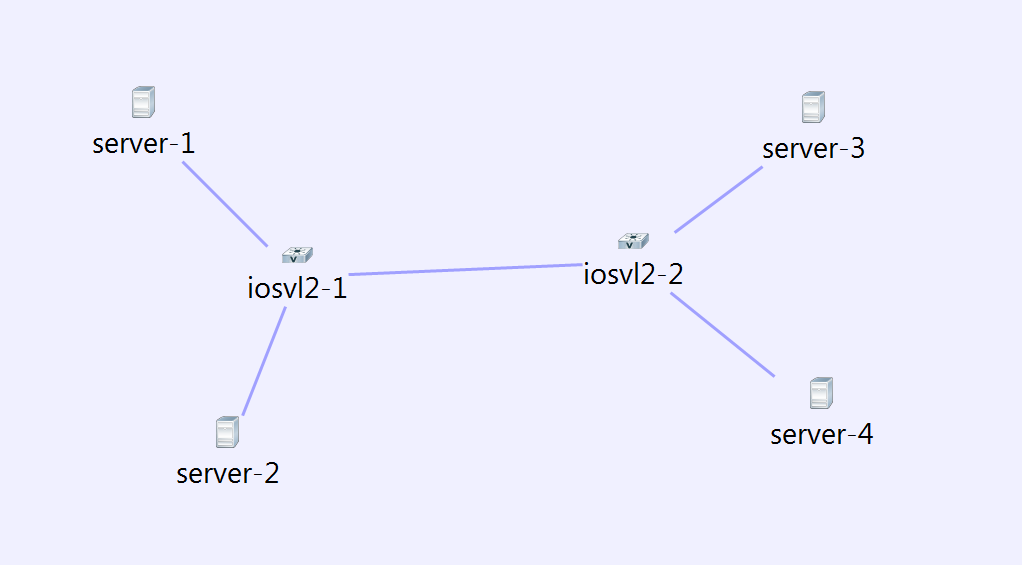
Servers1 and 3 are in vlan 10, Server 2 and 4 are in vlan 20. To configure the VLAN, we need to select the link in node view of server and add vlan. I did not add the vlan to the trunk links, Autonetkit automatically adds it. I was not able to specify multiple vlans in the vlan text box, not sure if that’s on purpose. I felt that specifying multiple vlans would be needed for trunking interfaces.
Following is the Autonetkit visualization view in L2 mode.
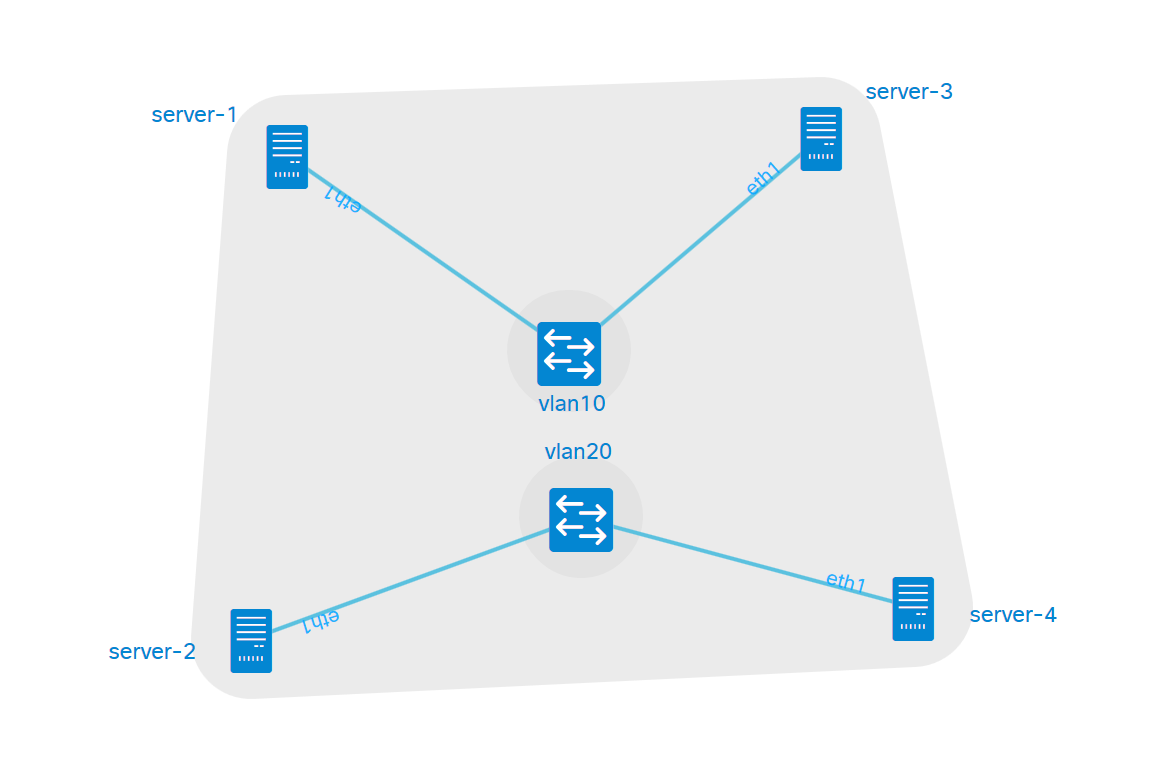
After running the simulation, lets look at relevant outputs in switch 1. We can see the relevant VLANs configured in the trunking interface and that STP has converged.
iosvl2-1#show vlan

VLAN Name                             Status    Ports
---- -------------------------------- --------- -------------------------------
1    default                          active    Gi0/0
10   VLAN0010                         active    Gi0/1
20   VLAN0020                         active    Gi0/2
1002 fddi-default                     act/unsup
1003 token-ring-default               act/unsup
1004 fddinet-default                  act/unsup
1005 trnet-default                    act/unsup

iosvl2-1#show interfaces trunk

Port        Mode             Encapsulation  Status        Native vlan
Gi0/3       on               802.1q         trunking      1

Port        Vlans allowed on trunk
Gi0/3       1-4094

Port        Vlans allowed and active in management domain
Gi0/3       1,10,20

Port        Vlans in spanning tree forwarding state and not pruned
Gi0/3       10,20

iosvl2-1#show spanning-tree summary
Switch is in pvst mode
Root bridge for: none
Extended system ID           is enabled
Portfast Default             is disabled
PortFast BPDU Guard Default  is disabled
Portfast BPDU Filter Default is disabled
Loopguard Default            is disabled
EtherChannel misconfig guard is enabled
Configured Pathcost method used is short
UplinkFast                   is disabled
BackboneFast                 is disabled

Name                   Blocking Listening Learning Forwarding STP Active
---------------------- -------- --------- -------- ---------- ----------
VLAN0001                     1         0        0          1          2
VLAN0010                     0         0        0          2          2
VLAN0020                     0         0        0          2          2
---------------------- -------- --------- -------- ---------- ----------
3 vlans                      1         0        0          5          6
Following are the access vlan ip addresses on the servers.
cisco@server-1:~$ ifconfig eth1
eth1      Link encap:Ethernet  HWaddr fa:16:3e:bc:93:d3
          inet addr:10.0.0.5  Bcast:10.0.0.7  Mask:255.255.255.252
          inet6 addr: fe80::f816:3eff:febc:93d3/64 Scope:Link
          UP BROADCAST RUNNING MULTICAST  MTU:1500  Metric:1
          RX packets:338 errors:0 dropped:286 overruns:0 frame:0
          TX packets:7 errors:0 dropped:0 overruns:0 carrier:0
          collisions:0 txqueuelen:1000
          RX bytes:31874 (31.8 KB)  TX bytes:578 (578.0 B)

cisco@server-2:~$ ifconfig eth1
eth1      Link encap:Ethernet  HWaddr fa:16:3e:13:66:bc
          inet addr:10.0.0.9  Bcast:10.0.0.11  Mask:255.255.255.252
          inet6 addr: fe80::f816:3eff:fe13:66bc/64 Scope:Link
          UP BROADCAST RUNNING MULTICAST  MTU:1500  Metric:1
          RX packets:342 errors:0 dropped:288 overruns:0 frame:0
          TX packets:10 errors:0 dropped:0 overruns:0 carrier:0
          collisions:0 txqueuelen:1000
          RX bytes:32102 (32.1 KB)  TX bytes:788 (788.0 B)

cisco@server-3:~$ ifconfig eth1
eth1      Link encap:Ethernet  HWaddr fa:16:3e:b9:e3:c7
          inet addr:10.0.0.6  Bcast:10.0.0.7  Mask:255.255.255.252
          inet6 addr: fe80::f816:3eff:feb9:e3c7/64 Scope:Link
          UP BROADCAST RUNNING MULTICAST  MTU:1500  Metric:1
          RX packets:331 errors:0 dropped:285 overruns:0 frame:0
          TX packets:7 errors:0 dropped:0 overruns:0 carrier:0
          collisions:0 txqueuelen:1000
          RX bytes:30718 (30.7 KB)  TX bytes:578 (578.0 B)

cisco@server-4:~$ ifconfig eth1
eth1      Link encap:Ethernet  HWaddr fa:16:3e:2e:ce:f8
          inet addr:10.0.0.10  Bcast:10.0.0.11  Mask:255.255.255.252
          inet6 addr: fe80::f816:3eff:fe2e:cef8/64 Scope:Link
          UP BROADCAST RUNNING MULTICAST  MTU:1500  Metric:1
          RX packets:352 errors:0 dropped:290 overruns:0 frame:0
          TX packets:10 errors:0 dropped:0 overruns:0 carrier:0
          collisions:0 txqueuelen:1000
          RX bytes:33496 (33.4 KB)  TX bytes:788 (788.0 B)
Server 1 is able to talk to Server 3, Server 1 is not able to talk to Server 2.
cisco@server-1:~$ ping -c1 10.0.0.6
PING 10.0.0.6 (10.0.0.6) 56(84) bytes of data.
64 bytes from 10.0.0.6: icmp_seq=1 ttl=64 time=24.3 ms

--- 10.0.0.6 ping statistics ---
1 packets transmitted, 1 received, 0% packet loss, time 0ms
rtt min/avg/max/mdev = 24.305/24.305/24.305/0.000 ms
cisco@server-1:~$ ping -c1 10.0.0.9
PING 10.0.0.9 (10.0.0.9) 56(84) bytes of data.
From 10.255.0.96 icmp_seq=1 Destination Host Unreachable

--- 10.0.0.9 ping statistics ---
1 packets transmitted, 0 received, +1 errors, 100% packet loss, time 0ms
There are scenarios where we would need to capture packets to isolate issues. Below is 1 approach to capture packets. In recent VIRL versions, packet capture is integrated with User workspace management. In the version I am using, it was not integrated, so I needed to use this approach below as specified in VIRL guide. First, we need to download virl-utils scripts to our VIRL server.
git clone https://github.com/VIRL-Open/virl-utils
Then we can see the list of interfaces that are active in the simulation. For this example:
virl@virl:~/virl-utils$ ./list.py guest
+---------------+----------+-----------+----------------------+----------------+
| Project       | Topology | Node      | Link                 | Interface      |
+---------------+----------+-----------+----------------------+----------------+
| My_Topologies | Iosl2    | iosvl2-1  | iosvl2-1-to-server-1 | tap2e36867e-7d |
|               |          | iosvl2-1  | iosvl2-1-to-server-2 | tapad467a83-6a |
|               |          | iosvl2-1  | Management Network   | tapc83c2b15-a0 |
|               |          | iosvl2-1  | iosvl2-1-to-iosvl2-2 | tapcce7993b-9a |
|               |          | iosvl2-2  | Management Network   | tap0bcd5eeb-1e |
|               |          | iosvl2-2  | iosvl2-1-to-iosvl2-2 | tap12cce891-f4 |
|               |          | iosvl2-2  | iosvl2-2-to-server-3 | tap770b51ba-14 |
|               |          | iosvl2-2  | iosvl2-2-to-server-4 | tapa1a0b4f5-1b |
|               |          | server-1  | Management Network   | tap5c186a88-e7 |
|               |          | server-1  | iosvl2-1-to-server-1 | tap604bb385-e4 |
|               |          | server-2  | iosvl2-1-to-server-2 | tap32f6c323-a2 |
|               |          | server-2  | Management Network   | tap42e2e4cc-fc |
|               |          | server-3  | Management Network   | tap0542641e-ae |
|               |          | server-3  | iosvl2-2-to-server-3 | tapc64bc257-95 |
|               |          | server-4  | iosvl2-2-to-server-4 | tap7284e62d-b9 |
|               |          | server-4  | Management Network   | tap754730e8-82 |
|               |          | ~mgmt-lxc | Management Network   | tap3ad61080-80 |
|               |          | ~mgmt-lxc | ~lxc-flat            | tap96b397bf-f5 |
+---------------+----------+-----------+----------------------+----------------+
Lets do a ping between Server 1 and Server 3 and capture on interface tapcce7993b-9a. We can see the ping request and response as seen below.
virl@virl:~/virl-utils$ sudo tcpdump -vvni tapcce7993b-9a icmp
tcpdump: WARNING: tapcce7993b-9a: no IPv4 address assigned
tcpdump: listening on tapcce7993b-9a, link-type EN10MB (Ethernet), capture size 65535 bytes
11:28:23.992075 IP (tos 0x0, ttl 64, id 7507, offset 0, flags [DF], proto ICMP (1), length 84)
    10.0.0.5 > 10.0.0.6: ICMP echo request, id 1412, seq 1, length 64
11:28:23.993807 IP (tos 0x0, ttl 64, id 1311, offset 0, flags [none], proto ICMP (1), length 84)
    10.0.0.6 > 10.0.0.5: ICMP echo reply, id 1412, seq 1, length 64


Very good post thanks.