This is a continuation of my VIRL, CML blog series. VIRL/CML overview is covered here. It will be good to connect VIRL, CML networks to outside world. Following are some use cases.
- If management interface of VIRL routers are accessible from outside machines, we can run management application in the client machine and connect directly to VIRL routers. NXAPI, OnePK are some examples of management application like this.
- Extending VIRL network to physical routers and switches. For example, we can expose 1 of the interfaces of VIRL network and that can form peering IGP relationship with a physical router.
External connectivity requirements for VIRL install using VMPlayer:
As mentioned in my earlier blog, it is necessary to install VIRL with 4 custom host-only interfaces. It is necessary to match the IP address of the custom host-only interfaces to what is mentioned in /etc/virl.ini file. If we change the IP, virl.ini needs to be modified and networking needs to be restarted. This can be done with “”vinstall rehost”
- eth0 – NAT interface used for internet access.
- eth1(172.16.1.x) and eth2(172.16.2.x) are used for FLAT management and inband.
- eth3(172.16.3.x) is used for SNAT L3 access.
Following is the ipconfig VMnet* output in my host machine after creation of custom networks. VMnet3 and VMnet4 are used for FLAT management and inband. VMnet5 is used for SNAT L3 access.
Ethernet adapter VMware Network Adapter VMnet2:

   Connection-specific DNS Suffix  . :
   Link-local IPv6 Address . . . . . : fe80::1d31:f261:b304:2ff%44
   IPv4 Address. . . . . . . . . . . : 172.16.1.1
   Subnet Mask . . . . . . . . . . . : 255.255.255.0
   Default Gateway . . . . . . . . . :

Ethernet adapter VMware Network Adapter VMnet3:

   Connection-specific DNS Suffix  . :
   Link-local IPv6 Address . . . . . : fe80::4cd3:fe99:516:c826%45
   IPv4 Address. . . . . . . . . . . : 172.16.2.1
   Subnet Mask . . . . . . . . . . . : 255.255.255.0
   Default Gateway . . . . . . . . . :

Ethernet adapter VMware Network Adapter VMnet4:

   Connection-specific DNS Suffix  . :
   Link-local IPv6 Address . . . . . : fe80::d88f:ac24:128b:e327%46
   IPv4 Address. . . . . . . . . . . : 172.16.3.1
   Subnet Mask . . . . . . . . . . . : 255.255.255.0
   Default Gateway . . . . . . . . . :

Ethernet adapter VMware Network Adapter VMnet5:

   Connection-specific DNS Suffix  . :
   Link-local IPv6 Address . . . . . : fe80::d841:7bc1:f2bd:9ddb%48
   IPv4 Address. . . . . . . . . . . : 172.16.4.1
   Subnet Mask . . . . . . . . . . . : 255.255.255.0
   Default Gateway . . . . . . . . . :
External connectivity requirements for UCS install:
For UCS servers, VIRL/CML can be installed on bare-metal or on top of ESXi. I have done CML installation on top of ESXi with my colleague’s help. I have not done external connectivity. This should be similar to VMPlayer. In this case, we need to use eth1-eth4 for external connectivity.
FLAT management access:
This option is useful if we want to access the router VM from host network. After designing the topology, we need to select “Shared flat network” from management network option. To illustrate this, lets create a single IOSv node and simulate it with “Shared flat network” option.
After simulation is done, lets look at the IP addresses for the node. gig0/0 is the mgmt interface and this IP will be accessible from the host machine.
iosv-1#show ip interface brief
Interface                  IP-Address      OK? Method Status                Protocol
GigabitEthernet0/0         172.16.1.111    YES NVRAM  up                    up
Loopback0                  192.168.0.1     YES NVRAM  up                    up
To illustrate the usage of management port, lets try to run a sample OnePK program that I covered in my previous blog.
Following is the onep configuration in the iosv node. onep is enabled by default.
onep
 transport type tls localcert TP-self-signed-4294967295 disable-remotecert-validation
Lets run the sample onep script from host machine. Before this, we need to download sample onepk script and also Python must be installed in host machine. For development of management application, this will be of immense help since we dont need a real router/switch.
> c:\Python27\python.exe sample.py -i 172.16.1.111 -u cisco -p cisco

NetworkElement [ 172.16.1.111 ]
        Product ID   : IOSv
        Processor    : IOSv Chassis
        Serial No    : 9WTX2713NE1LF09EOZGW2
        sysName      : iosv-1
        sysUpTime    : 1230
        sysDescr     : Cisco IOS Software, IOSv Software (VIOS-ADVENTERPRISEK9-M
), Experimental Version 15.4(20141119:013030) [jsfeng-V154_3_M 107]
Copyright (c) 1986-2014 by Cisco Systems, Inc.
Compiled Tue 18-Nov-14 20:30 by jsfeng
FLAT Inband access:
This option is useful if we want to expose 1 of the data interfaces of the router VM to external world. I simulated the following topology:
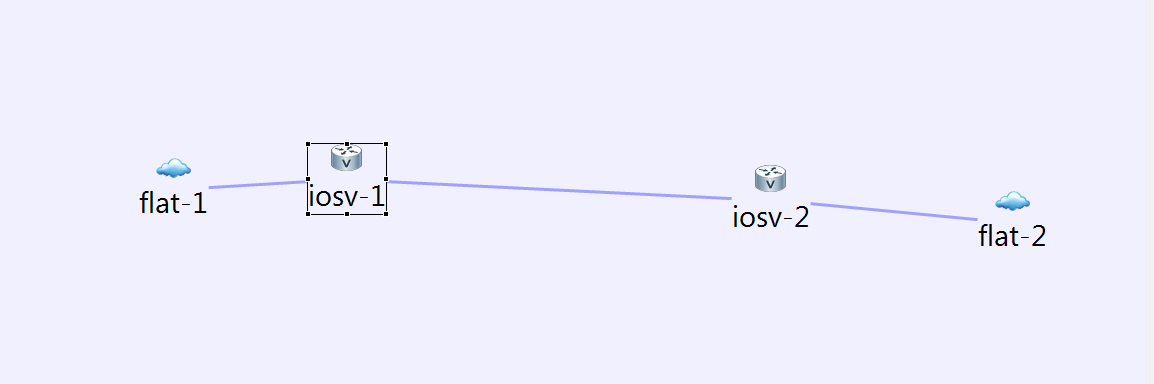
Each of ios node is connected to 2 different flat networks and these flat networks connect to outside world using VMnet2 and VMnet3. Following is the ip configuration in routers.
iosv-1#show ip interface brief
Interface                  IP-Address      OK? Method Status                Protocol
GigabitEthernet0/0         10.255.0.1      YES NVRAM  up                    up
GigabitEthernet0/1         172.16.1.115    YES NVRAM  up                    up
GigabitEthernet0/2         10.1.0.1        YES NVRAM  up                    up
Loopback0                  192.168.0.1     YES NVRAM  up                    up

iosv-2#show ip interface brief
Interface                  IP-Address      OK? Method Status                Protocol
GigabitEthernet0/0         10.255.0.3      YES NVRAM  up                    up
GigabitEthernet0/1         10.1.0.2        YES NVRAM  up                    up
GigabitEthernet0/2         172.16.2.51     YES NVRAM  up                    up
Loopback0                  192.168.0.2     YES NVRAM  up                    up
We can connect either a physical or virtual device to the VMnet2 and VMnet3 network and they will be able to talk to iosv device after that.


Hi; I need to attach one of my V-routers interface to our internal network, so it can reach my existent servers. I read many articles about NAT, SNAT, FLAT, including yours, but they are not straight forward and not easy to understand, at least for me!! so would you mind, please guide me through this process. actually I need to use the same exact process that is written under “FLAT Inbound Access” in your article. I appreciate your time.
hi
Are your existing servers running as a VM in your machine?
Which hypervisor software are you using?
I wrote this blog recently(https://sreeninet.wordpress.com/2015/05/13/connecting-nxos-virl-instance-to-arista-veos/) where I get into the VM networking details for FLAT access. Please see if that helps.
Sreenivas
Hi and thanks for your quick reply. almost most of our servers are virtual but maybe on different physical VMware ESXi hosts. what I need is installing Cisco Security suits (like ISE, WSA and ESA) as virtual machines and create a topology on VIRL and make devices on VIRL to communicate with those servers. if you did this before, which I’m pretty sure about it, I will really appreciate you if share your ideas with details simple steps. thanks lots of lot 😉
I have not connected across hosts, I have connected between VMs running on same host. This is how I think you can do across hosts:
IP Connectivity between the hosts is obviously needed.
Set up flat connectivity where VIRL is running on 1 host.
Add a route entry in both hosts for reaching the internal server IP addresses.
Add a default route entry in VIRL VM to reach external world.
supposing I’m going to install my servers on the same ESXi host as the VIRL, “setting up FLAT network”, this is where that I don’t know how to do it?
I have created VIRL with 5 network as they said in the documentation guide and my VmMaestro can reach to the VIRL server by its “first” NIC with the name “VM Network”. from this point on, I don’t know how to act 😦
You need to know little bit about VM networking to do this. To learn about VM networking with VMWare, you can refer to this(https://sreeninet.wordpress.com/2015/03/22/vmware-player-and-vm-networking/). As I mentioned before, I have added some details in my other blog on how I used flat network in VIRL(https://sreeninet.wordpress.com/2015/05/13/connecting-nxos-virl-instance-to-arista-veos/). I have done this with VM player, ESXi should have similar options. You need to make sure that the second interface in VIRL shares the same virtual interface as your other host so that they can see each other…
Hi Sreenivas, thanks for sharing. I wrote a blog post on similar subject. Very often my readers asked about using VMware player, I always send them to your site for reference. I’m just wondering, have you tried OpenStack clustering?
https://www.speaknetworks.com/cisco-virl-external-connectivity/
Hi Jack
Thanks for your feedback and sharing your article. Its pretty useful.
By Openstack clustering, do you mean something like this(https://wiki.openstack.org/wiki/Senlin). I have not used it. Not sure if this is similar to the multi-cluster federation service introduced in Kubernetes 1.3?
Regards
Sreenivas
Hi Sreenivas, when I hit the node limit of 30, I’d like to have another VIRL instance running on a separate server. I’m trying to use OpenStack cluster to connect two instances on separate servers into one, resource intensive logical instance. I’ll share my experience with you as soon as I made it work 🙂
I have flat-1 setup in a VIRL simulation. iosv-2 is directly connected to flat-1. I can ping my external web server fine. From every other router on my simulation, I can ping end to end but not past G0/5 on iosv-2. I want to be able to put my simulations on my web site by redirecting the sh run and other command to a tftp server. I can only get directly connected routers to go out through flat
I am looking to connect real Cisco router with vRouter in VIRL such that they are able to form OSPF adjacency and exchange LSA with each other. Is this possible?