Category Archives: Distributed Systems

Opensource Meetup Presentation

I did a presentation on CoreOS and Service Discovery in Opensource Meetup group last week. Following are related slides and demo recording.

CoreOS Overview and Current Status

Slides:

CoreOS HA Demo recording:

Scripts used are available here.

Service Discovery using etcd, Consul and Kubernetes

Slides:

Consul Service Discovery Demo:

Following are the commands to start Consul Container, Registrator Container and 3 Container services.

docker run -d -p 8500:8500 -p 192.168.0.1:53:8600/udp -p 8400:8400 gliderlabs/consul-server -node myconsul -bootstrap
docker run -d -v /var/run/docker.sock:/tmp/docker.sock --net=host gliderlabs/registrator -internal consul://localhost:8500

docker run -d -p :80 -e "SERVICE_80_NAME=http" -e "SERVICE_80_ID=http1" -e "SERVICE_80_CHECK_HTTP=true" -e "SERVICE_80_CHECK_HTTP=/" --name=nginx1 nginx
docker run -d -p :80 -e "SERVICE_80_NAME=http" -e "SERVICE_80_ID=http2" -e "SERVICE_80_CHECK_HTTP=true" -e "SERVICE_80_CHECK_HTTP=/" --name=nginx2 nginx
docker run -ti smakam/myubuntu:v3 bash
Service Discovery with Consul

In a Microservices architecture, Services are dynamic, distributed and present in large numbers. It is needed to have a good Service discovery solution to address this dynamic problem. In this blog, I will cover basics of Service discovery and using Consul to do Service discovery.

What is Service discovery?

Service discovery should provide the following:

  1. Discovery – Services need to discover each other to get IP address and port detail to communicate with other services in the cluster.
  2. Health check – Only healthy services should participate in handling traffic, unhealthy services need to be dynamically pruned out.
  3. Load balancing – Traffic destined to a particular service should be dynamically load balanced to all instances providing the particular service.

Following are the critical components of Service discovery:

Continue reading Service Discovery with Consul

Microservices Infrastructure using Mantl

Mantl is an Open source project from Cisco and it provides an integrated solution to deploy distributed Microservices. Any company deploying Microservices has to integrate different components before the solution becomes production ready. Mantl makes it easier by integrating the different components and providing the glue software that integrates the components. In this blog, I will cover the following:

  • Distributed Microservice infrastructure components and the need for Mantl.
  • Mantl Architecture.
  • Mantl installation using Vagrant
  • Mantl installation using AWS public cloud

Microservices infrastructure

Following are typical components in Container based Microservices infrastructure:

Continue reading Microservices Infrastructure using Mantl

Docker Compose and Interworking of Docker Machine, Swarm, Compose

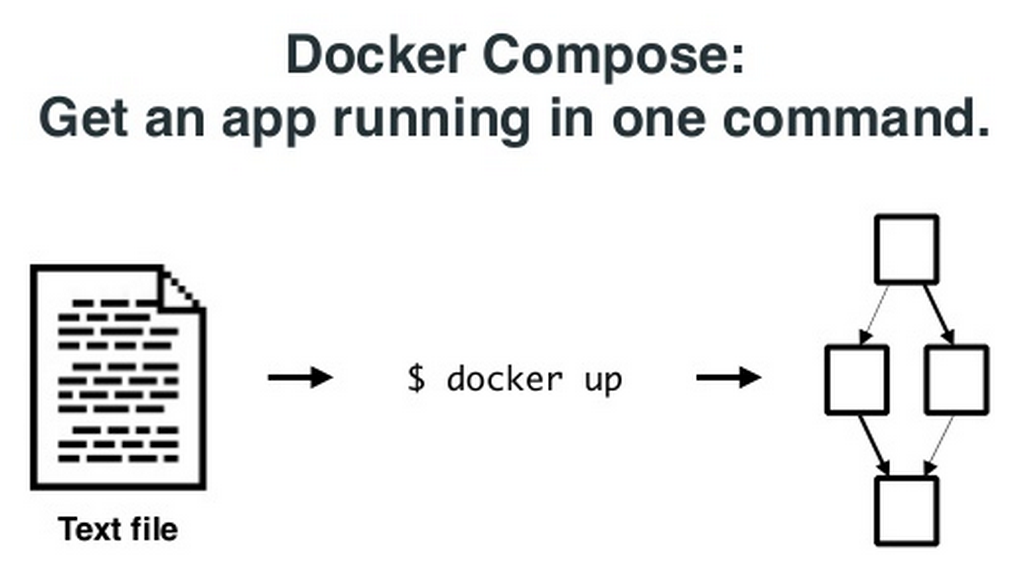
This is a continuation of my previous 2 blogs on Docker machine, Swarm. In this blog, I will cover Docker Compose and how Docker Machine, Swarm and Compose can work with each other. The interworking part is actively being developed by Docker team and is still at the preliminary stages. Docker Compose: Docker Compose comes from Fig project. With Docker Compose, we can define a multi-container application in a YAML file along with the Container dependencies, affinities etc and Compose will take care of orchestrating the application. Following picture from Docker Compose presentation illustrates the point above. docker7 Following is a sample YAML file describing a small application with 2 containers, 1 for web and another for db. Continue reading Docker Compose and Interworking of Docker Machine, Swarm, Compose

Docker Swarm

This is a continuation of my previous blog on Docker machine. In this blog, I will cover Docker Swarm.

Swarm manages a set of Docker nodes as a single cluster. This has the following advantages:

  • Rather than managing individual Docker nodes, the cluster can be managed as a single entity.
  • Swarm has an in-built scheduler that will decide the placement of Containers in the cluster. There are different constraints and affinities that can be mentioned which Swarm uses to decide the Container placement. Constraints could be cpu, memory etc and Affinity could be for grouping related Containers together. Swarm also has the provision to take its scheduler out and work with other schedulers like Mesos and Kubernetes.
  • Swarm will take care of node failures so that Container HA can be provided.

Swarm has the following software components:

  • Swarm Manager that takes of scheduling and HA. HA piece is not yet available.
  • Swarm agent that runs in each node and communicates to Swarm manager.
  • Node discovery. There are different approaches available for Swarm worker nodes to discover Swarm master. Discovery is needed because Swarm master and agents run on different nodes and there is a need to find the discovery parameters dynamically. Available discovery mechanisms are docker hub, etcd, Consul etc.

Continue reading Docker Swarm

Docker Machine

As part of Docker Orchestration, Docker has released 3 new tools Machine, Swarm, Compose. In the last few weeks, I was playing with these tools and I will share my experiences in this blog. I will start with Docker machine in this blog and I will cover Swarm, Compose in the next set of blogs. Only preliminary version of these tools are released and there is a plan to release more updated versions later this year. For basics and other details on Docker, you can refer to my Docker blog series.

Docker Machine:

Docker machine makes it easier to create Docker hosts using an uniform approach across bare metal, VM, Cloud provider, Private clouds etc. Before Docker machine was there, following were the approaches available to create Docker hosts:

  • On Linux machines, Docker agent and client are installed natively.
  • For Windows, boot2docker is used to create a Docker host on top of hypervisor like Virtualbox.
  • For public clouds, we would create a Linux VM and install Docker on top of it.

Continue reading Docker Machine

Docker Orchestration

This blog is part of my ongoing series on Docker containers. Orchestrating Containers is a pretty complex task and there is a lot of work ongoing to solve this particular problem. There are big companies, startups as well as Opensource projects involved with this work. There are many different technologies and projects ongoing that got me really confused when I started looking at this. In this blog, I have tried to break down the Docker orchestration problem into smaller pieces and have tried to map different existing/developing solutions into the smaller pieces. Considering that the technologies are evolving and that my knowledge in this area is limited, this blog might need updates and corrections as we move forward. Also, I might have missed few technologies as well as companies..

Problem statement:

Docker does a great job in packaging and transporting single containers. Following are specific problems we need to address:

  • Distributed Applications split between multiple containers.
  • Manage a large number of containers both in terms of allocating the containers to the cluster of hosts as well as handling container failures.

Orchestration blocks:

Continue reading Docker Orchestration

Storage Primer

Storage is a very critical component in the current IT domain. Choosing the right Storage platform and software is a critical part of a good Data center whether it is internal or external cloud. Even though I understood some Storage basics, I never ventured deep to understand the different storage technologies available. I tried to brush up my knowledge by doing some reading recently and I have tried to capture some of my reading in this blog.

Storage device(HDD vs RAID vs SSD)

HDD – Hard disk drive consists of a spindle with disks.

RAID(Redundant array of Independent disks) – Combines multiple HDDs to provide more reliability, throughput and capacity.

SSD – Solid state drive is a memory chip and it has no moving parts.

Storage device performance is measured in terms of throughput(data transfer rate), latency(time it takes to start a IO task) and IOPS(IO operations per second).  SSD scores better over HDD on all the performance parameters. RAID provides comparable throughput and IOPS as SSD, but SSD provides better latency. The only disadvantage of SSD is the much higher cost.

Continue reading Storage Primer