Objective
When people interact with agents, a text answer is useful, but a visual interface can make information easier to understand and act on. Rather than only asking people to navigate screens designed in advance, the interface can change dynamically with the user’s question and task. Agentic UI is an interface that an agent selects, assembles or generates to suit that question and task, giving the user a visual answer to explore or act on.
You may have seen interactive charts in ChatGPT or small interactive tools in Claude’s Artifacts. These are familiar examples of this broader experience. I explain the choices behind it, where A2UI, MCP Apps and AG-UI fit, and how to choose an approach using a marketplace application.
Two Examples Of The User Benefit
Compare product choices. Alder, Levin+Riegner’s personal-stylist demo, starts with an occasion and budget. The agent presents recommendations through a tailored interface so the user can review outfits and choose products. The catalog and checkout use fictional demo data.
Review a coordinated plan. In Google’s sick-day illustration, a person needs to adjust meetings, notify their team and set an out-of-office reply. A tailored view brings those proposed changes together. The user can adjust the plan and confirm before actions are taken. The illustration shows how the proposed actions can be reviewed together.
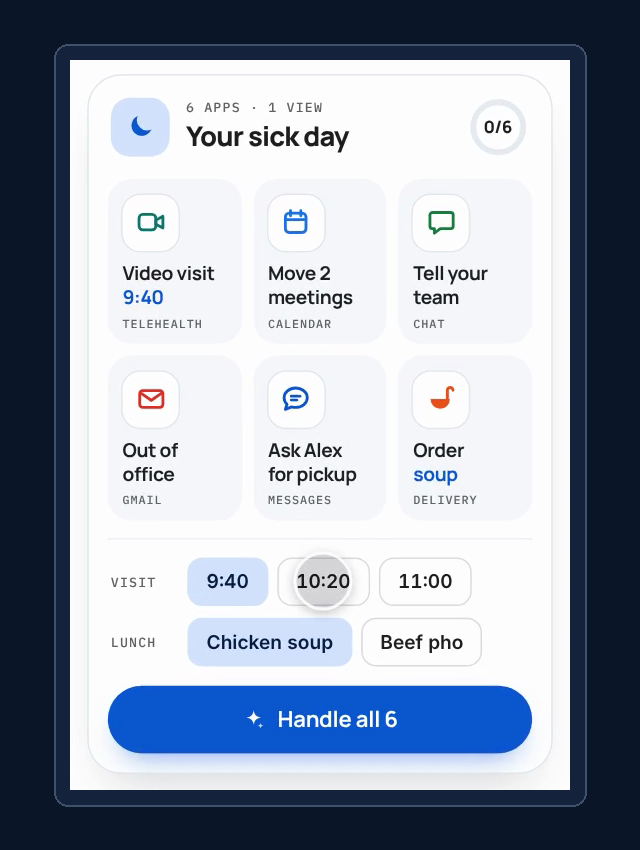
Source: Google Developers Blog — A2UI 1.0.
The common idea is that the question shapes the interface, and the interface helps the person make a decision.
One Marketplace, Different Visual Answers
My marketplace application has buyers, sellers, orders, shipments and a support agent. The agent investigates questions using read-only business tools. Its evidence can include the current order, item records, delivery details and earlier events.
I use two questions: what is the current status of an order, and what happened during its recorded history? The first can benefit from an items table. The second can benefit from a timeline, perhaps alongside a separate table of returns or payouts.
The business investigation comes first. The presentation step receives its completed answer and evidence. Changing the interface does not authorize the model to change an order or invent an event.
This separation makes the application useful for experimentation: hold the business facts constant, change the presentation, and inspect what changed. The user-facing goal remains easier understanding and a clearer next step.
Four Questions Keep The Choices Clear
A generation technique, an embedding mechanism and an agent connection solve different problems. These four questions separate the decisions. The options are examples, rather than an exhaustive list:
| Question | The Decision | Possible Options |
|---|---|---|
| How is the UI generated? | Who chooses the view, components, arrangement or code? | Developer-defined view; agent selects a view, composes components or generates code. |
| How is it delivered? | How do the interface and data reach the application? | Custom HTTP API; MCP tools/resources; another agreed protocol contract. |
| How is it rendered? | What code draws it, and where does that code run? | Application or native widgets; a separate web interface in an iframe. |
| How does interaction reach the agent? | How do requests, progress, results, state and user decisions move between application and backend? | Custom request/response; AG-UI event streams; host-mediated MCP tool calls. |
The last question does not mean every click needs an agent. Sorting an already loaded table can stay local. Requesting order history needs backend work because it retrieves additional evidence.
Three Patterns For Producing A View
An agent can produce a view in different ways. Here are three approaches.
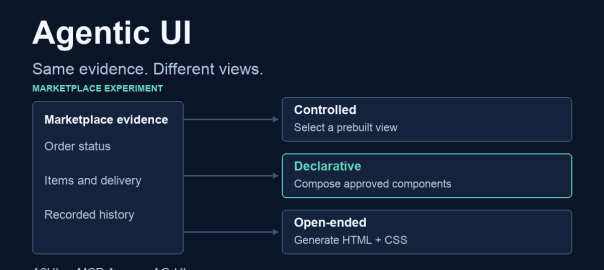
Controlled: Select A Prebuilt View
Developers build the available views and their layouts in advance. In my marketplace, these include an order summary, items table and event timeline. The model selects a view and a reference to supplied data. Application code checks that selection and displays the corresponding records.
For a checked order-status answer, the model selected a table. For history, it selected a timeline. The model did not decide where the table columns or timeline entries should appear: that arrangement was already implemented.
My application renders the selected prebuilt view directly in React.
This gives developers control over layout, accessibility, responsive behavior and supported actions. They must also build each useful view. A sophisticated prebuilt dashboard is still controlled; visual complexity does not determine the pattern.
Declarative: Compose Agreed Components
Developers define a catalog and implement the widgets it names. The model chooses which components to use, how to arrange them and which supplied data they display. A2UI provides a component-description and data-binding contract for this pattern.
My catalog includes Order Summary, Record Table and Event Timeline, plus layout, text and button components. A checked status answer used a record table and history button. A checked history answer combined a timeline with a table of related records. The chosen components can vary with the question.
A composed view must still show the right evidence. My application checks its data references, and the user can compare the visible facts with the text answer and sources.
The model arranges whole components; widget code controls how each component displays its data. The client supplies its own theme and implementations. A new component therefore needs a supported catalog definition and matching widget, not merely a name added to the prompt.
Open-Ended: Generate The UI Code
Here the model writes the interface implementation instead of selecting a prebuilt view or composing a fixed component vocabulary. The broader pattern can generate HTML, CSS and JavaScript.
My example generates HTML/CSS from the support answer and evidence, then displays it inside an isolated iframe. Application code sets limits on what the generated interface can do. A “Show order history” button requests the permitted read action through that application code.
This pattern can express views that developers did not anticipate as catalog components. It also increases the presentation behavior to check: factual accuracy, readability, accessibility, responsive layout and working interactions.
Delivery And Rendering Are Separate Choices
Delivery moves the interface description or code, together with its data, from the backend to the frontend where the user sees it. Delivery can use a custom HTTP API or a standard protocol such as MCP. A custom API can be simpler when the team controls both ends.
Rendering turns what arrives into a visible interface. Direct rendering uses the application’s page. An iframe displays a separate web document with its own styles, which is useful for embedding an interface inside another application. Its size and communication still need coordination with the host. Direct rendering is often simpler in an application I own; an iframe provides a distinct container when embedding a third-party interface.
Where The Technologies Fit
MCP Apps: Bring An Interface Into A Host
MCP Apps lets a provider expose an interactive interface inside a compatible assistant. The provider supplies UI resources and tools; the host loads the interface, passes tool data and mediates tool requests from the embedded view.
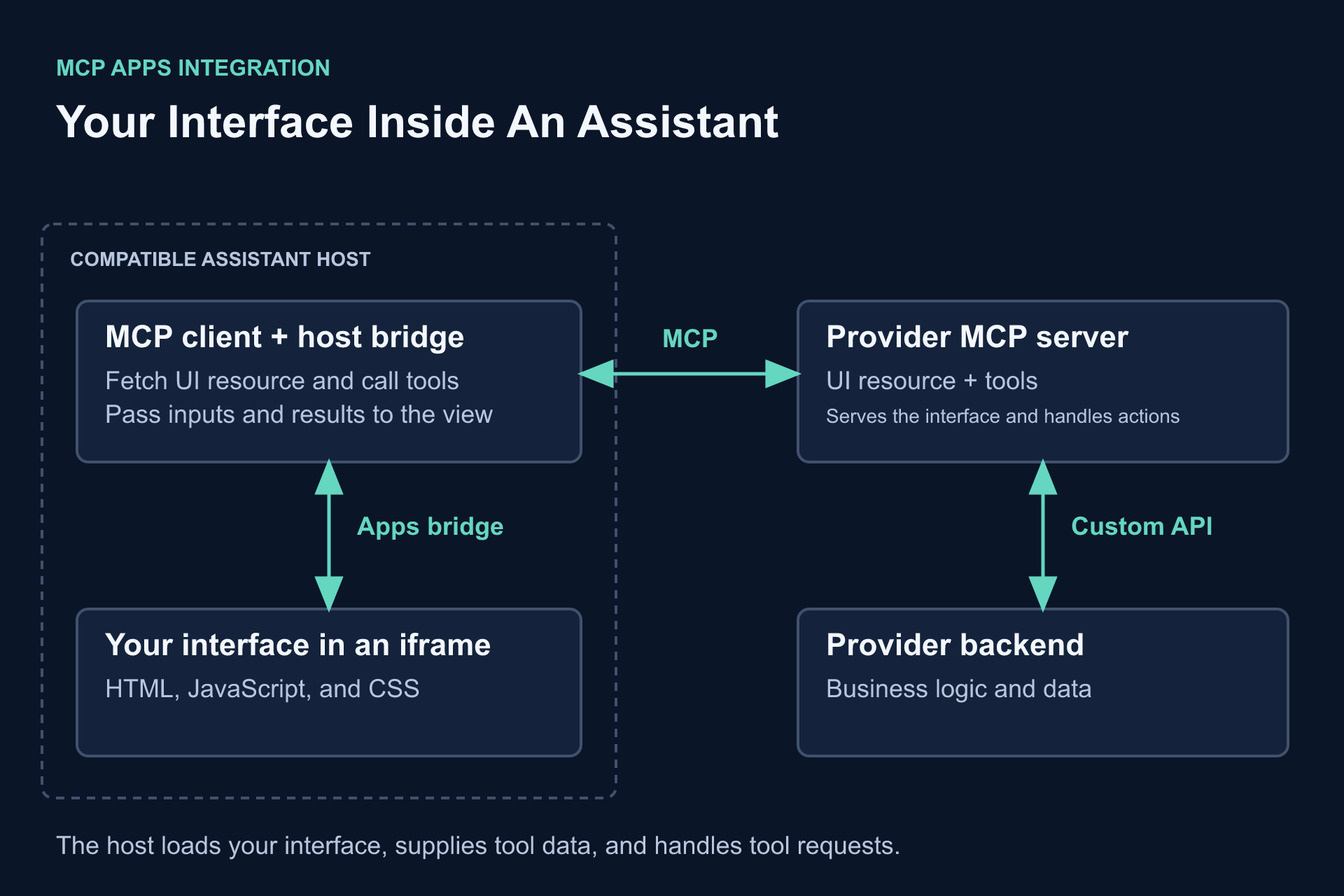
In the order-status example, the provider’s tool declares a UI resource. The host reads that resource, loads its HTML interface and supplies the result. When the user requests history, the interface asks the host to call the appropriate tool; the result returns through the host.
The provider retains its business tools and records; the host controls the embedded environment. The view can support interaction without taking over either responsibility.
In my demo, the MCP Apps host loads the declarative A2UI view, supplies its data and handles the history action through MCP.
A2UI: Describe Components And Data
A2UI standardizes a description that compatible clients can render using agreed widgets. It covers component composition, bindings and actions. The application supplies the business logic and widget implementations.
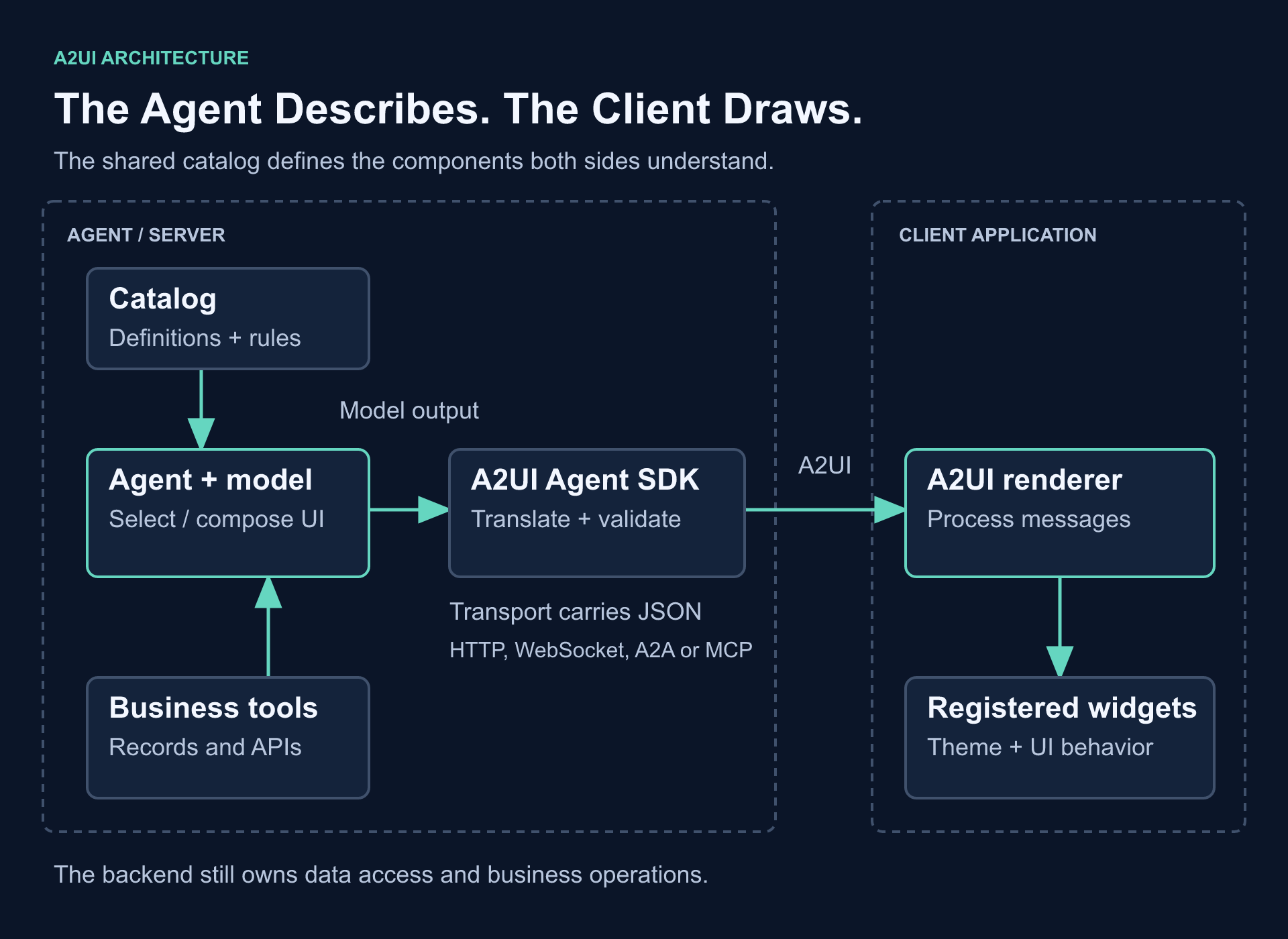
I use the A2UI SDK to produce and validate the messages.
A2UI content can travel over an application’s API, or an A2UI renderer can run inside an MCP App. One determines what the view describes; the other determines how it is embedded and connected to tools. This is why the technologies can be combined.
AG-UI: Connect Application And Agent
An investigation can require more than a final response: progress, streamed text, tool activity, state changes or a user decision. AG-UI provides a shared event-based contract between a user-facing application and an agent backend. It does not choose the widgets or write their implementation. AG-UI can carry an agent’s updates while A2UI describes the view.
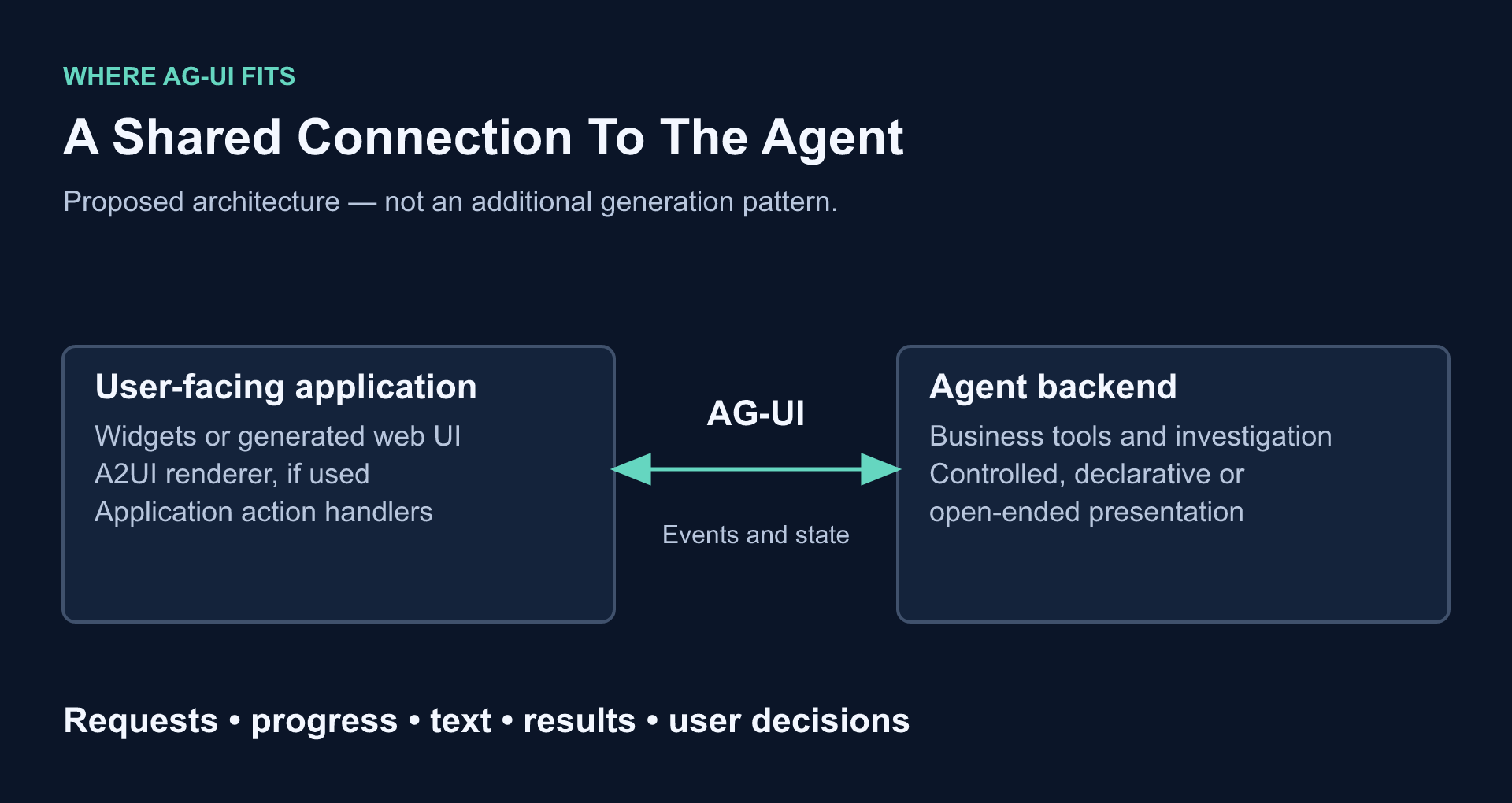
CopilotKit supplies tooling for these connections. My marketplace still uses its existing API; AG-UI is explained, not integrated. A simple request/response may not need another protocol. A shared live-event contract becomes useful when it reduces custom integration work.
What Changed In The Marketplace
The support investigation still retrieves facts and prepares its text answer. I added a presentation stage that reuses that completed result. Mode buttons can compare different presentations without rerunning the business investigation. A history click is different: it starts a new investigation to retrieve history.
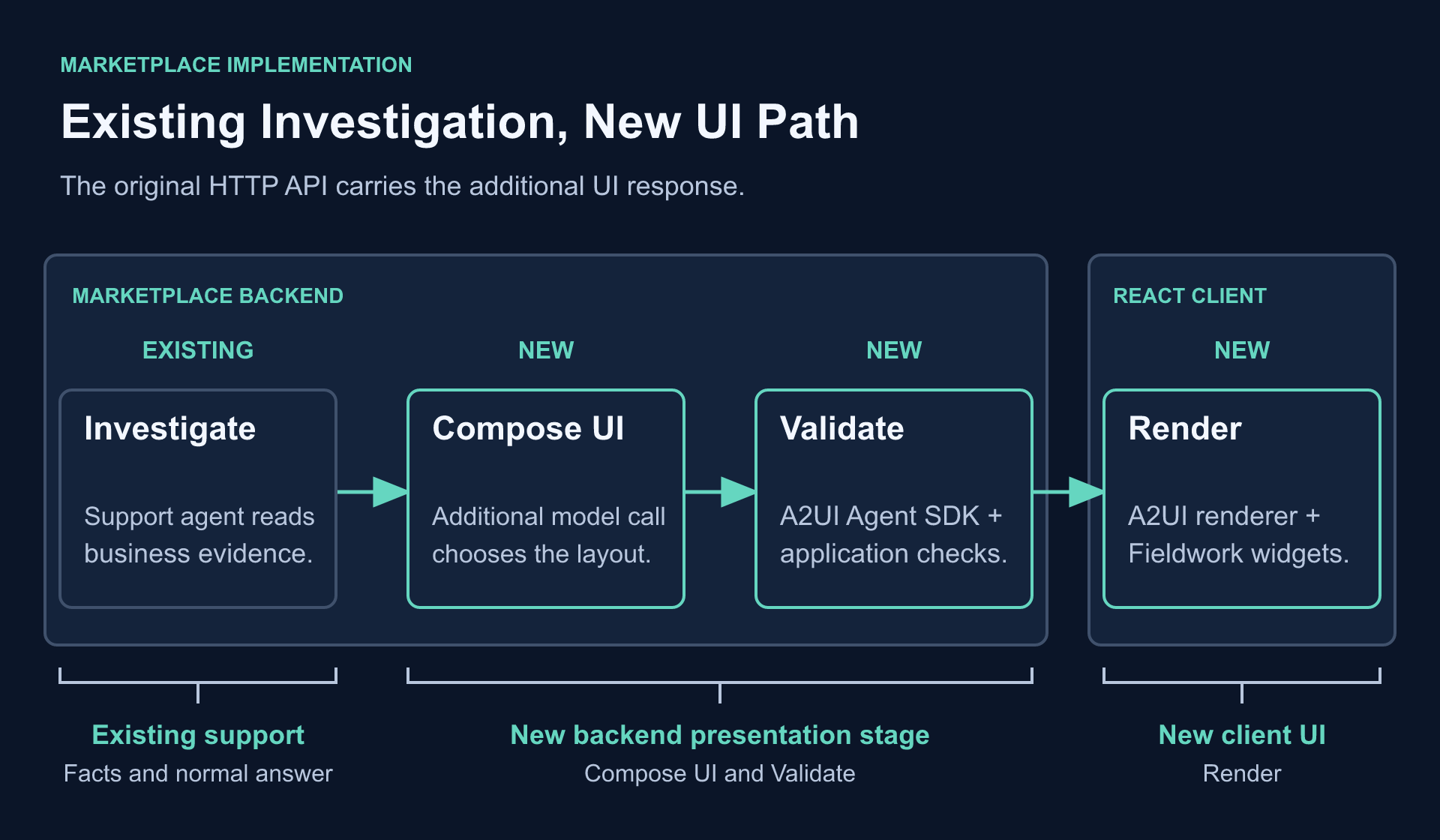
Controlled mode selects a prebuilt view that the application renders directly. Declarative mode describes components that the A2UI client renders. Open-ended mode returns sanitized HTML/CSS for an iframe. The separate Direct / MCP Apps choice is available for the declarative example; it changes the integration path while reusing its widgets.
The MCP Apps host uses tools and a UI resource. It passes inputs/results into the iframe and routes the permitted history request back through MCP.
What To Inspect
The setup and demo guide contains the full walkthrough. For a useful comparison:
- Complete an order-status investigation and keep its text answer and sources visible.
- In Controlled mode, inspect the view selection and selected data. In Declarative mode, inspect the component arrangement and A2UI messages. Similar-looking tables can have different decision owners.
- Inspect the generated HTML/CSS in Open-ended mode and check it against the same evidence.
- Select Declarative → MCP Apps, then request history inside the iframe. Inspect the resource/tool events rather than assuming the iframe proves the protocol path.
The lab guide also explains how to inspect MCP requests and the presentation model’s instructions and output in Langfuse.
Choosing An Approach
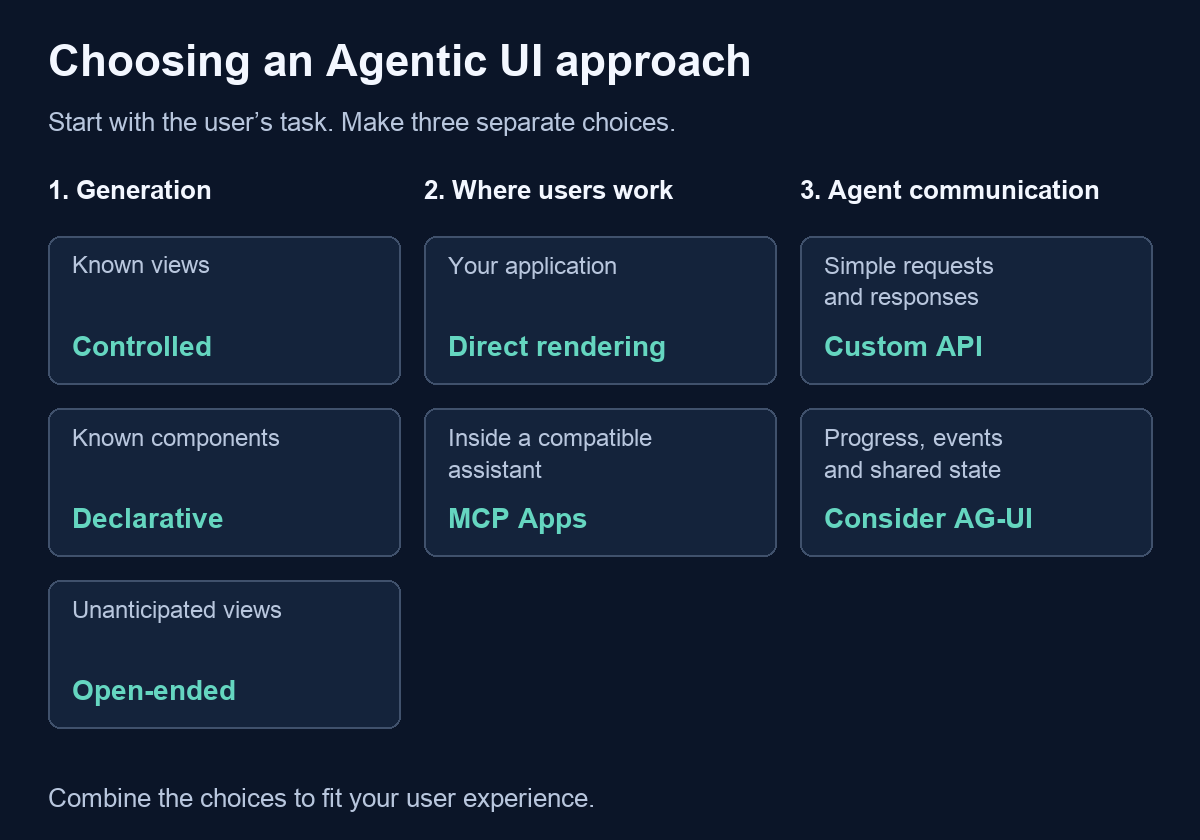
Start with the freedom the user experience needs. Known, well-designed views favor controlled generation: the team can make each supported task predictable. A known component vocabulary with variable arrangements favors declarative generation: the answer can adapt while retaining the product’s widgets and theme. Unanticipated visual explanations can justify open-ended generation, provided the team can check the resulting interface.
The trade-off is practical. Controlled views require development when a new layout is needed. Declarative generation needs a maintained component catalog and widgets. Open-ended generation offers broader expression but asks more of review and testing. A more flexible interface is useful only if it helps the person complete the task.
Then decide where people will work. For an application I own, direct rendering can fit its existing navigation and design system. For an interface inside a compatible assistant, MCP Apps supplies the embedding contract. Neither hosting choice automatically determines the generation pattern.
Finally, consider whether a common application–agent event contract helps. AG-UI can support progress and state exchange while another mechanism describes the view. These are independent design decisions, not a progression from basic to advanced.
Summary
Agentic UI lets a visual answer fit the user’s question and task. Controlled generation selects a prebuilt view; declarative generation composes agreed components; open-ended generation writes interface code. A2UI describes the view, MCP Apps embeds an interface and connects it to tools, and AG-UI handles the application–agent event connection. Choose the freedom the agent needs, where the user will work, and how interaction should reach the backend. The marketplace makes those choices concrete: keep the business evidence, change the presentation or integration, and inspect the result.
Acknowledgements
OpenAI Codex helped research the protocols, implement the comparison and prepare this article. The generation-spectrum framing follows CopilotKit’s documentation.
References
Specifications And Tools
- Familiar visual answers and Claude Artifacts: Interactive charts and tools as product examples.
- A2UI overview: Generation, SDK support, messages and client rendering.
- MCP Apps overview and SDK documentation: Resources, host embedding and tool communication.
- AG-UI overview: Application–agent events and state.
- CopilotKit generative UI: Generation categories and open-ended implementation.
Code And Related Work
- Marketplace code: Agentic UI is included on main. Follow the isolated lab guide and validation record.
- Earlier A2A article: Agent discovery and communication, separate from these UI decisions.

