This is a continuation of my previous 2 blogs on Docker machine, Swarm. In this blog, I will cover Docker Compose and how Docker Machine, Swarm and Compose can work with each other. The interworking part is actively being developed by Docker team and is still at the preliminary stages. Docker Compose: Docker Compose comes from Fig project. With Docker Compose, we can define a multi-container application in a YAML file along with the Container dependencies, affinities etc and Compose will take care of orchestrating the application. Following picture from Docker Compose presentation illustrates the point above. 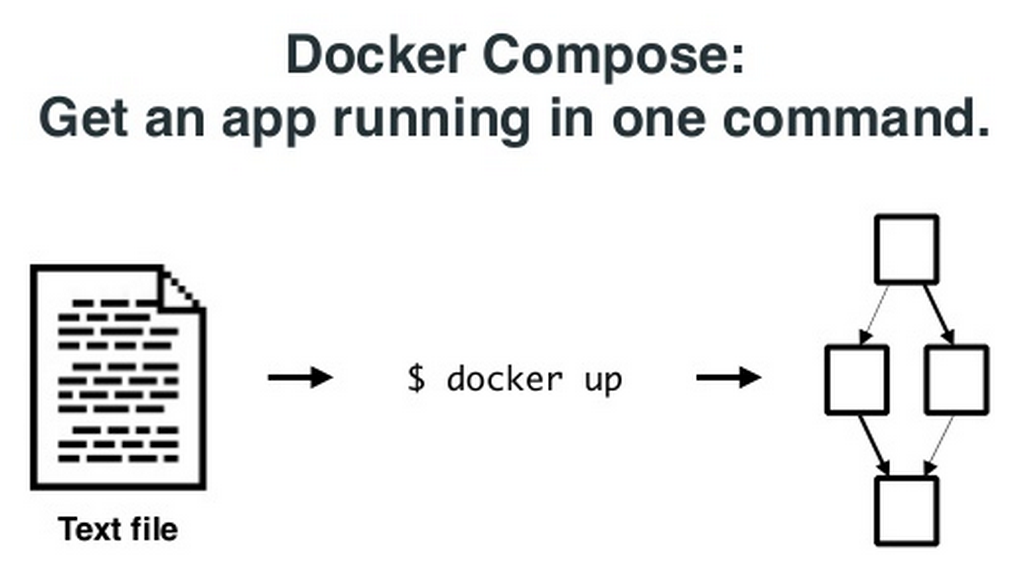 Following is a sample YAML file describing a small application with 2 containers, 1 for web and another for db. Continue reading Docker Compose and Interworking of Docker Machine, Swarm, Compose
Tag Archives: Containers & Kubernetes
Docker Swarm
This is a continuation of my previous blog on Docker machine. In this blog, I will cover Docker Swarm.
Swarm manages a set of Docker nodes as a single cluster. This has the following advantages:
- Rather than managing individual Docker nodes, the cluster can be managed as a single entity.
- Swarm has an in-built scheduler that will decide the placement of Containers in the cluster. There are different constraints and affinities that can be mentioned which Swarm uses to decide the Container placement. Constraints could be cpu, memory etc and Affinity could be for grouping related Containers together. Swarm also has the provision to take its scheduler out and work with other schedulers like Mesos and Kubernetes.
- Swarm will take care of node failures so that Container HA can be provided.
Swarm has the following software components:
- Swarm Manager that takes of scheduling and HA. HA piece is not yet available.
- Swarm agent that runs in each node and communicates to Swarm manager.
- Node discovery. There are different approaches available for Swarm worker nodes to discover Swarm master. Discovery is needed because Swarm master and agents run on different nodes and there is a need to find the discovery parameters dynamically. Available discovery mechanisms are docker hub, etcd, Consul etc.
Docker Machine
As part of Docker Orchestration, Docker has released 3 new tools Machine, Swarm, Compose. In the last few weeks, I was playing with these tools and I will share my experiences in this blog. I will start with Docker machine in this blog and I will cover Swarm, Compose in the next set of blogs. Only preliminary version of these tools are released and there is a plan to release more updated versions later this year. For basics and other details on Docker, you can refer to my Docker blog series.
Docker Machine:
Docker machine makes it easier to create Docker hosts using an uniform approach across bare metal, VM, Cloud provider, Private clouds etc. Before Docker machine was there, following were the approaches available to create Docker hosts:
- On Linux machines, Docker agent and client are installed natively.
- For Windows, boot2docker is used to create a Docker host on top of hypervisor like Virtualbox.
- For public clouds, we would create a Linux VM and install Docker on top of it.
Kubernetes and Google container engine
In this blog, I will cover the Google container engine service that I tried out.
Pre-requisites:
- Need Google cloud account.
- Install Google cloud SDK.
Google container engine is not available in the normal gcloud SDK installation. To use container engine service, we need to update preview component.
$ gcloud components update preview
I followed the 2 examples mentioned in the container engine documentation.
WordPress application:
In this example, we create a cluster which has a single master and single worker node. We create a pod running WordPress container in the cluster and expose the WordPress service to external world. Since there is only 1 pod, we dont create a service.
Following are the commands used:
Kubernetes on Google cloud
In this blog, I will cover the steps to run Kubernetes on Google compute VM. I used the steps mentioned here.
Pre-requisites:
- Need Google cloud account.
- Install Google cloud SDK.
First step is to download and unzip Kubernetes tar file from here.
Next, we create the cluster using the provided script.
export KUBERNETES_PROVIDER=gce
./cluster/kube-up.sh
The above script creates the clusters with 1 master and 4 minions. Also, it sets up all necessary services both in master and minions node.
Lets look at the VMs created:
Kubernetes – Overview
Earlier, I had written a blog on Docker Orchestration. This is a pretty new area and different solutions are being developed to address this problem. Few weeks back, I had written a blog on AWS EC2 Container service. Kubernetes is a Docker Orchestration engine used to manage a cluster of Containers. Google initially developed Kubernetes, currently its an open source project and source code is available here. Google Cloud’s Container engine uses Kubernetes to manage Docker Containers. Kubernetes can be used standalone or with any Cloud service like AWS, EC2.
Kubernetes basics:
Following are basic building blocks within Kubernetes:
- Cluster(master and minion) – This is the cluster of machines where Container services are launched on. There is 1 master node and the other nodes are called as worker nodes or minions. The master node runs etcd configuration database service, scheduler to schedule the containers, api server for external clients to talk to, replication controller to manage the state of containers. The minion node runs a slave agent to talk to the master node.
- Pods – can be a single container or a collection of containers. Containers within a pod share same characteristics and are brought up and teared down together. They are normally launched on same minion. An example could be a pod containing redis master and slave database containers. Pod configuration is defined as a json file.
- Service – Service is an abstraction over Pod that is useful for Service discovery and exposing environment variables to other services. Example could be a database service exposing port numbers to web service.
- Labels – Labels are used with Pods and Services for easier management of Containers through filters. Rather than managing individual Pods and Services, Containers can be managed at Label level. For example, we can say destroy all “frontend” labels.
AWS ECS(EC2 Container service)
I recently tried out AWS ECS(EC2 Container service). In this blog, I will provide overview of EC2 container service, some hands-on stuff I tried and my experiences with ECS. AWS ECS is available as a preview currently with only CLI interface. I assume general availability with web interface will be available soon. Amazon does not charge separately for the ECS service, instances used for containers will be charged appropriately. I have a AWS free-tier account and I was able to try the ECS with the free-tier account.
Pre-requisites:
- Familiarity with Containers and Docker. You can refer to my blog on Docker series.
- Familiarity with AWS services. You can refer to my previous blogs on AWS overview and how to access AWS services.
- For the hands-on stuff, you need to have atleast a free-tier account with AWS. AWS cli needs to be installed since ECS is available only with a CLI interface currently.
Overview of ECS:
I had written a blog earlier on Docker Orchestration. ECS is a Docker Container Orchestration service that provides the following functionalities.
- Allows to deploy Containers across a cluster of hosts using either AWS scheduler or integrate with third party schedulers like Mesos.
- Allows management of an application that spans multiple containers rather than just managing containers.
- Provides high availability for Containers by monitoring Container health.
Following are components of ECS:
- Cluster – Logical entity that contains multiple EC2 instances. Instances within the container can be of different types.
- Container instances – Each instance is an EC2 instance with Docker and Container agent pre-installed and is available as AWS AMI image. Container agent registers itself to the cluster and it monitors health of the Containers in the host. AWS is open-sourcing the Container agent project and its available in github.
- Tasks – Tasks contains the application definition, resources needed and it can span multiple containers. Task definitions are specified in json format.
- ECS Master – This manages everything. ECS master is responsible for scheduling the containers and also for talking to the container agent to get the health of container instances. When ECS master schedules the containers, it takes into account resources needed for the container and the resources available in the container instance.
ECS hands-on:
Most of the steps below are as mentioned in AWS ECS developer guide.
Containers – Docker, LXC and Rkt
This blog is part of my ongoing series on Docker containers. In my previous blog, I covered LXC. When I tried out LXC, I realized that there are lots of similarities between Docker and LXC. Also, I saw a recent announcement about Rkt which is another Container runtime technology. In this blog, I have tried to answer multiple questions that I had about these technologies based on reading through the reference materials mentioned below. This is a pretty controversial topic as folks have strong opinions about these technologies, I have tried to keep it as neutral as possible.
How is Container management different from Container technologies?
I found this diagram from Docker blog very helpful in answering the above question.
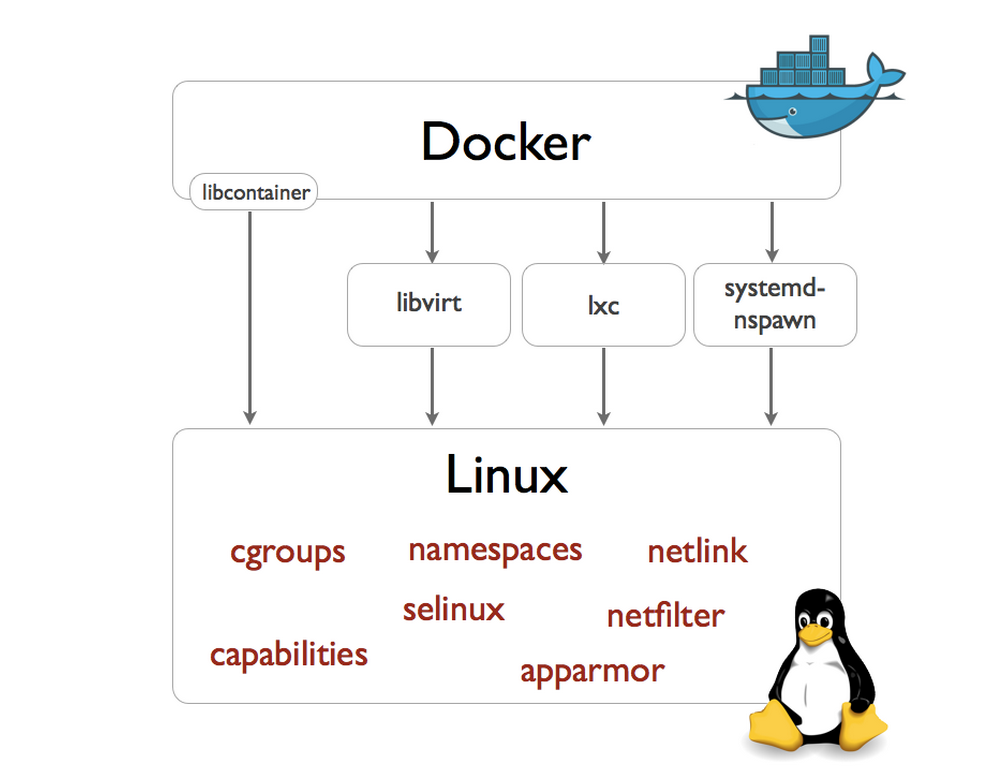
Linux kernel has support for Container technologies like namespaces, cgroups etc. Docker, LXC and Rocket use the technologies available in Linux kernel to manage the lifecycle of the Container. Container management involves Container creation, deletion and modification, image format and the tools around it. Before Docker version 0.9, Docker was using LXC to interact with Linux kernel. From Docker version 0.9, Docker directly interacts with Linux kernel using libcontainer interface that they developed.
How is Docker different from LXC?
LXC Containers
This blog is part of my ongoing series on Docker containers. In this blog, I will take a deviation from Docker and focus on LXC. LXC manages Containers like Docker, there are some differences, I will cover the differences in a later blog. LXC is an Opensource Linux container project from Linuxcontainers.org that provides an user space interface to manage Linux containers.There are other projects from linuxcontainers.org focusing on containers like LXD, LXCFS, CGManager etc. In this blog, I will cover some hands-on stuff I tried with LXC.
My environment:
Ubuntu 14.04 running in Virtuabox in Windows 7.
Hands-on:
To install lxc, I followed the below steps:
sudo apt-get update
sudo apt-get install lxc
Following command creates a Ubuntu LXC container.
sudo lxc-create -t ubuntu -n cn-01
Docker Networking – CoreOS Flannel
This blog is part of my ongoing series on Docker containers. In this blog, I will cover Flannel which is a CoreOS networking solution to connect containers across multiple hosts. Please refer to my first blog on CoreOS to understand CoreOS basics as well as how to setup CoreOS cluster.
Flannel Overview:
Flannel creates an Overlay network using either udp or vxlan encapsulation. Flannel links itself to the Docker bridge to which the containers are attached and creates the overlay. Following picture illustrates this.

Demo:
Lets create 3 containers in 3 different CoreOS hosts that are part of same cluster in 11.0.0.0/16 subnet, connect them using Flannel and try to ping them. Create the 3 node cluster using the procedure in my previous CoreOS blog.
 Sreenivas Makam's Blog