Earlier, I had written about Cisco NXOS device configuration/monitoring using Python and OnePK. Recently, I came across NXAPI approach to configure and monitor NXOS devices. NXAPI uses either http/https to connect to NXOS devices and talk using NXOS CLI. For configuration, CLI is encoded in XML/JSON. For monitoring, CLI is encoded in XML/JSON and the results are returned in similar format that makes it easy to parse. I also saw this blog and nxos-ansible project from Jason where he has created Ansible modules using NXAPI. In this blog, I will cover NXAPI basics and my experience in trying Pycsco library and nxos-ansible modules from Jason. Thanks to Jason, he has done a nice job abstracting the NXAPI into higher level functions and Ansible modules and this can help others to build up on top of it rather than working from scratch.
Enabling NXAPI:
NXAPI is available on Nexus 3k and 9k devices. I have access to N3K device and I tried this there. To enable NXAPI, we need to execute “feature nxapi” from config prompt. NXAPI also provides a sandbox environment which can be accessed using http from the management ip address. With the sandbox environment, we can execute NXOS CLI commands and get output in JSON or XML format. Following image is a snapshot of the sandbox. 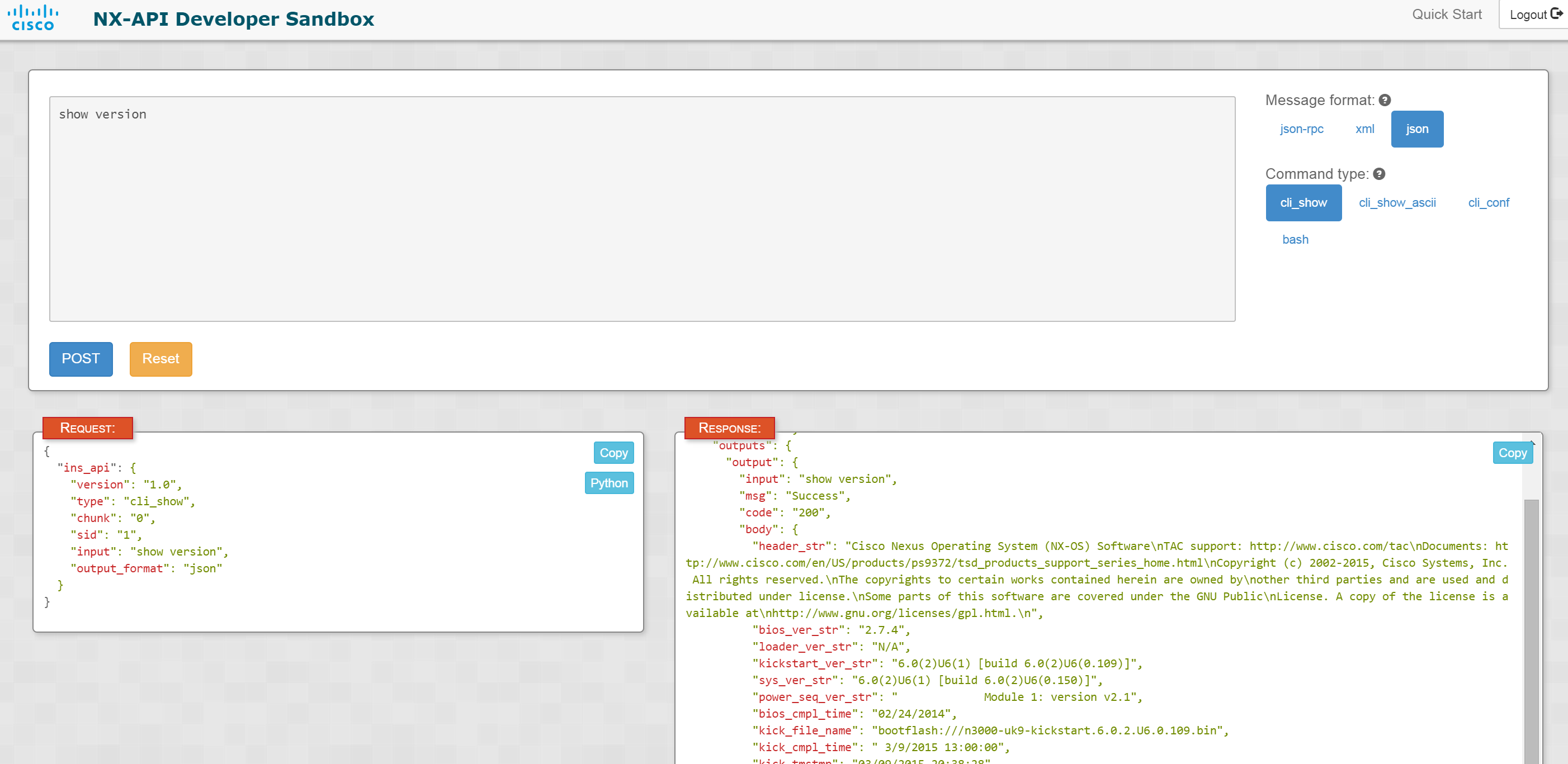
Following is the version running on my N3K:
kickstart: version 6.0(2)U6(1) [build 6.0(2)U6(0.109)]
system:    version 6.0(2)U6(1) [build 6.0(2)U6(0.150)]
Cisco has put the NXAPI sample code in github. I executed the following script after modifying the script and updating ip address, username, password. Also, I commented out the create and delete vlan part. The script executes “show version”, “show modules”, “show cdp neighbors” parses the json output and prints the relevant outputs.
C:\sreeni\general\controller\devops\nexus9000\nx-os\nxapi\getting_started>python
 nxapi_basics.py
System n157 is a Nexus 3132 Chassis running 6.0(2)U6(1) [build 6.0(2)U6(0.109)]
Its serial number is FOC17052NVJ
CPU is Intel(R) Core(TM) i3- CPU @ 2.00GHz

List of modules:
================
Slot 1: 32x40G Supervisor(N3K-C3132Q-40GE-SU),32 ports. Status: active *

CDP Neighbors:
==============
Interface Ethernet1/25 is connected to Ethernet1/25 of switch(FOC1702R0D5)(N3K-C
3132Q-40GE @ 10.197.121.138)
Interface Ethernet1/3 is connected to Ethernet1/3 of switch(FOC1702R0D5)(N3K-C31
32Q-40GE @ 10.197.121.138)
Interface Ethernet1/9 is connected to Ethernet1/9 of switch(FOC1702R0D5)(N3K-C31
32Q-40GE @ 10.197.121.138)
Interface mgmt0 is connected to GigabitEthernet1/0/24 of SW-VEGA-INSBU-A16(cisco
 WS-C3750X-48 @ 10.197.121.12)
The script first gets a cookie after authentication and then executes commands using the cookie.
Pycsco library:
This library from Jason provides Python wrapper functions to easily access, display and configure NXOS devices. The commands can either be executed from Python shell or the functions can be called from within a program. I installed the library in Ubuntu 14.04. Install pycsco library:
$ sudo pip install pycsco
Check pycsco version:
$ sudo pip list | grep csco
pycsco (0.2.0)
Following is an example session using Pycsco. First, we import the device and utilities library and then create the switch device.
smakam14@sreeubuntu14-VirtualBox:~$ python
Python 2.7.6 (default, Mar 22 2014, 22:59:56)
[GCC 4.8.2] on linux2
Type "help", "copyright", "credits" or "license" for more information.
>>> from pycsco.nxos.utils.nxapi_lib import *
>>> from pycsco.nxos.device import Device
>>> switch = Device(ip='',username='',password='')
Following command shows list of library functions available.
>>> dir()
['Device', '__builtins__', '__doc__', '__name__', '__package__', 'cmd_list_to_string', 'create_dir', 'delete_dir', 'feature_enabled', 'get_active_vpc_peer_link', 'get_existing_portchannel_to_vpc_mappings', 'get_facts', 'get_feature_list', 'get_hsrp_group', 'get_hsrp_groups_on_interfaces', 'get_interface', 'get_interface_detail', 'get_interface_mode', 'get_interface_running_config', 'get_interface_type', 'get_interfaces_dict', 'get_ipv4_interface', 'get_list_of_vlans', 'get_min_links', 'get_mtu', 'get_neighbors', 'get_portchannel', 'get_portchannel_list', 'get_portchannel_vpc_config', 'get_switchport', 'get_system_mtu', 'get_udld_global', 'get_udld_interface', 'get_vlan', 'get_vpc', 'get_vpc_running_config', 'get_vrf', 'get_vrf_list', 'interface_is_portchannel', 'is_default', 'is_interface_copper', 'peer_link_exists', 'switch', 'switch_files_list', 'vlan_range_to_list']
Lets try some sample functions.
>>> get_list_of_vlans(switch)
['1', '100']
>>> get_neighbors(switch)
[{'neighbor_interface': 'GigabitEthernet1/0/24', 'platform': 'cisco WS-C3750X-48', 'local_interface': 'mgmt0', 'neighbor': 'SW-VEGA-INSBU-A16'}, {'neighbor_interface': 'Ethernet1/3', 'platform': 'N3K-C3132Q-40GE', 'local_interface': 'Ethernet1/3', 'neighbor': 'switch(FOC1702R0D5)'}, {'neighbor_interface': 'Ethernet1/9', 'platform': 'N3K-C3132Q-40GE', 'local_interface': 'Ethernet1/9', 'neighbor': 'switch(FOC1702R0D5)'}, {'neighbor_interface': 'Ethernet1/25', 'platform': 'N3K-C3132Q-40GE', 'local_interface': 'Ethernet1/25', 'neighbor': 'switch(FOC1702R0D5)'}]
nxos-ansible module library:
For Ansible basics, you can refer to my earlier blogs. Jason has created a set of Ansible modules that automates some of the common nxos configurations and monitoring tasks. These modules uses his Pycsco library which in turn uses NXAPI to configure/monitor the device. This link describes how to get started with these modules and this link describes the modules in detail. Ansible modules are idempotent, no changes are done if its not needed. I followed the instructions in Jason’s page and I was able to try out the modules. The advantage with using Ansible modules is this can help in devops kind of environment where we need to automate the configuration across a set of devices and we dont want to spend time configuring each device separately. 1 additional thing that I had to do in addition to the instructions in the link before trying out the modules is to set the Ansible module path.
export ANSIBLE_LIBRARY=/usr/share/ansible/
I tried out the example for “get_interface_neighbor” module. “get_interface_neighbor” module returns a neighbor for different protocol types like cdp, lldp. Following is an example playbook I tried.
---

- name: get neighbor data
  hosts: 3k-grp1
  connection: local
  gather_facts: no


  tasks:

    - name: get neighbors
      nxos_get_neighbors: type=cdp host={{ inventory_hostname }}
      register: my_neighbors

    - name: print data to file
      template: src=templates/neighbors.j2 dest=configs/neighbors.json
The first task gets neighbors for cdp and puts it in value “my_neighbors”. The second task uses the “template” Ansible module to convert the neighbors into a readable json format. It is needed to create templates/neighbors.j2 before and also create “configs” directory. “neighbors.j2” is the Jinja file with following content to convert the neighbors into a readable json format.
{{ my_neighbors.resource | to_nice_json }}
Following is my 3k-grp1 definition in “/etc/ansible/hosts”
[3k-grp1]
n3k1
n3k2
I have only 1 3k host, so I worked around this by using the same IP address for n3k1 and n3k2 for the demo purpose. Following is the playbook output:
$ ansible-playbook get-neighbors.yml

PLAY [get neighbor data] ******************************************************

TASK: [get neighbors] *********************************************************
ok: [n3k1]
ok: [n3k2]

TASK: [print data to file] ****************************************************
changed: [n3k1]
ok: [n3k2]

PLAY RECAP ********************************************************************
n3k1                       : ok=2    changed=1    unreachable=0    failed=0
n3k2                       : ok=2    changed=0    unreachable=0    failed=0
As you can see above, changed field is updated only for n3k1. Since I had the same IP for n3k1 and n3k2, Ansible was smart enough to figure out that the neighbors are same and that there is no need to update the configs file multiple times. Following is the output of “configs/neighbors.json”
$ cat neighbors.json
[
    {
        "local_interface": "mgmt0",
        "neighbor": "SW-VEGA-INSBU-A16",
        "neighbor_interface": "GigabitEthernet1/0/24",
        "platform": "cisco WS-C3750X-48"
    }
]
I feel that NXAPI is a temporary solution that hides the CLIs but at the end of it, they are still tied to CLIs. Better longterm approach would be to use APIs, use modeling language like Yang to expose device capabilities and use a protocol like Netconf to manage device configuration. I had written about Netconf and Yang basics here.


1 thought on “Cisco NXAPI”