Category Archives: Networking & SDN

Group based policy in Opendaylight

This is a continuation of my previous blog on Group based policy(GBP). In this blog, I will cover the GBP features in Opendaylight helium release, Use-cases that are published in the Opendaylight wiki as well as different usecase that I tried out.

Group based policy in Opendaylight:

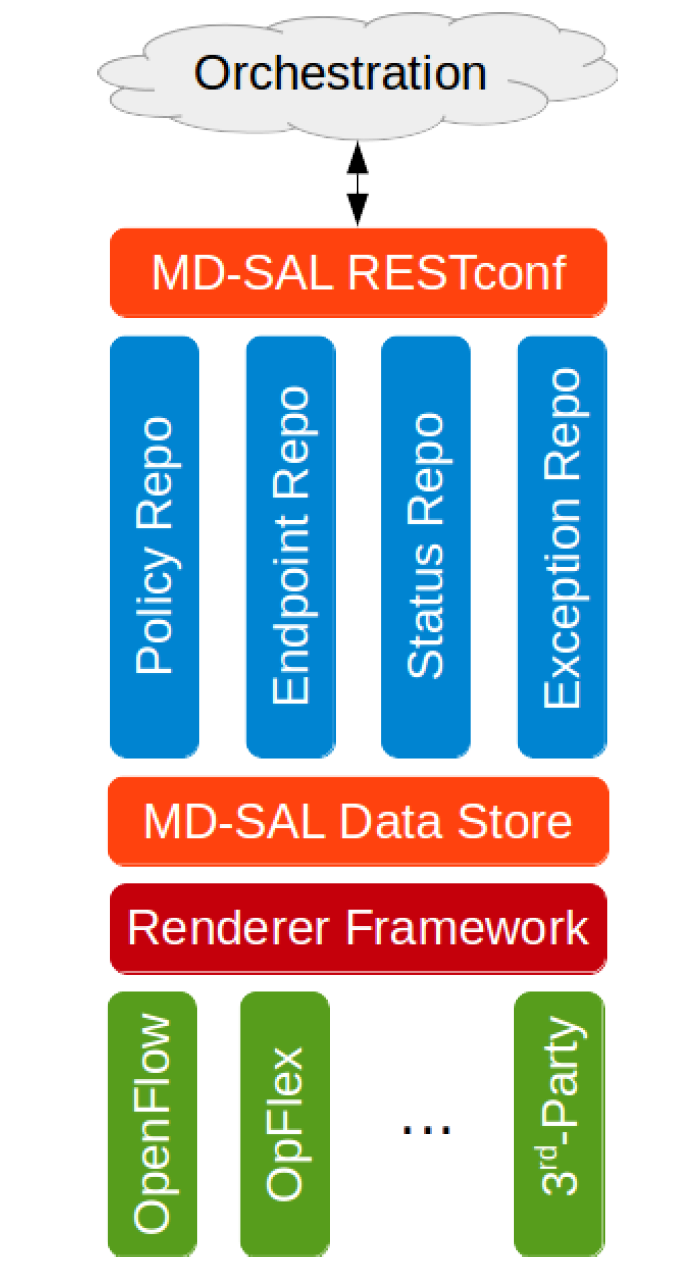
Following diagram is from Opendaylight GBP wiki:

gbp3

  • Openstack here is the orchestration layer and it communicates the policy to ODL through Neutron apis.
  • The policy is expressed in high level data language and is translated and programmed into hardware through renderers.
  • In ODL helium release, the only available renderer is Openflow and it uses ovsdb overlay design.
  • Opflex renderer is being developed currently and it is also based on ovsdb overlay. When Opflex is available, there will be a Opflex agent in the openvswitch that will eventually do the low level translation and programming.

Continue reading Group based policy in Opendaylight

Group based policy

There is lot of work going on in both Openstack and Opendaylight projects on Group based policy and I will try to capture my learnings in the next few blogs.

Group based policy(GBP) is an abstracted way of specifying interactions between the applications rather than using infrastructure specifics. In the networking context, for example, rather than using terms like ip address, vlan, port numbers, the policies are specified in much higher level language in terms of what the application needs. Currently Group based policy is targeted for Networking. Eventually, it will be applicable to Compute and Storage as well. I kind of see GBP as Open source variant of Cisco’s ACI model, multiple vendors are involved in the development of GBP.

In Openstack Neutron context, following are the goals of Group based policy.

Continue reading Group based policy

Opendaylight Helium release

Opendaylight Helium is the second release after Hydrogen and it was released late September 2014. Earlier, I was using Opendaylight Hydrogen release and recently, I tried out Opendaylight Helium release. In this blog, I have shared some of my experiences with Helium.

Following are some important additions to Helium compared to Hydrogen. For more details, please refer Opendaylight webpage.

  • Hardening of the controller, Clustering capability, Security options like AAA.
  • Better integration with Openstack which has features like Group based policy, service function chaining.
  • Use of Apache karaf container format so that individual features can be installed.
  • Better Dlux gui.

Continue reading Opendaylight Helium release

How to define SDN?

Someone recently asked me what SDN is? Even though I have written multiple blogs related to SDN, I was not able to give a crisp answer which I was satisfied with. Since its fashionable to associate any new development in Networking to SDN, the definition becomes complex. In this blog, I will mention the different definitions I found for SDN in the Internet along with my definition in the end.

From Wikipedia:

Approach to computer networking that allows network administrators to manage network services through abstraction of lower-level functionality. This is done by decoupling the system that makes decisions about where traffic is sent (the control plane) from the underlying systems that forward traffic to the selected destination (the data plane). 

Continue reading How to define SDN?

Mininet Internals and Network Namespaces

Mininet is a very powerful virtual network emulation system that’s generally used in SDN development environments. With Mininet, a complex network with hundreds of switches can be simulated in a laptop and this opens up testing real-life network usecases. I have covered Mininet usage in 1 of my earlier blogs on tools used with Opendaylight. I have always wondered about how Mininet works under the hood. Recently, i went through a Stanford webinar which shed details on the Mininet internals. In this blog, I will cover Mininet internals along with a sample network that I tried out. 1 of the key concepts used in Mininet is Network namespaces which is also the basis for Linux containers. I will also cover briefly about Network namespaces in this blog.

Network Namespaces:

Network namespaces allows for creation of virtual networking domain with its own set of interfaces, ip addresses, routing table etc. This is similar to VRF in Cisco terminology. Network namespaces connect to outside world using virtual ethernet links. Virtual ethernet link is a wire with 2 endpoints, typically 1 end point is located in local namespace and another in global namespace. Network namespaces are also used in Docker and Openstack Neutron. With Openstack neutron, Network namespaces allows for isolating tenants as well as to have overlapping IP addresses.

Mininet internals:

Mininet uses the following Linux concepts:

  • Network namespaces are used to implement hosts or endpoints. Each host will have its own set of interfaces, IP and routing table.
  • Openvswitch or Linux switch is used to implement switches. Openvswitch is used by default. Openflow is used to program data path and ovsdb is used for setting up configuration on Openvswitch.
  • Controller could be any Openflow controller like Opendaylight, Floodlight etc.
  • For controlling link characteristics like bandwidth, latency, Linux tc tool is used.
  • For limiting CPU usage of individual namespaces, Linux cpu groups is used.
  • Mininet uses a Python wrapper on top of the above tools as well as other Linux tools like perf to present a high level abstraction.

Hands-on:

To try out the different concepts above, I have the following environment:

  • Ubuntu 12.04
  • Opendaylight controller helium release.
  • Openvswitch 2.1.3
  • Mininet 2.1.0

Continue reading Mininet Internals and Network Namespaces

Recent Networking Opensource projects – OPNFV, Openconfig, ONOS

I came across few recent Opensource projects which I found them to be interesting. In this blog, I will cover some details on OPNFV, Openconfig, ONOS. There is no relation between the 3 projects, the common thing is all the 3 projects are focussed on Networking and Cloud and all are relatively new.

OPNFV

OPNFV is an Opensource project under Linux foundation. The goal is to create a Opensource reference platform for developing NFV applications. In 1 of my earlier blogs on NFV, I covered overview of NFV and the ETSI NFV model. The goal of the OPNFV project is to create a reference implementation using the model proposed by ETSI. OPNFV’s plan is to leverage the work done in other Opensource projects like Openstack, Opendaylight, Openvswitch, KVM, Linux kernel, DPDK. Even though OPNFV can work with other Cloud OS and SDN controllers, the goal for the first release is to use the most popular Cloud OS, SDN controller and hypervisor mentioned above. Following picture from OPNFV illustrates the blocks that OPNFV will focus on from ETSI NFV reference model.

Continue reading Recent Networking Opensource projects – OPNFV, Openconfig, ONOS

Vagrant – Overview and Opendaylight Vagrant Image

Recently, I came across this tool called Vagrant that eases the creation and sharing of VM work environment. I played with it and found it very useful. Vagrant integrates with VM hosting providers like Virtualbox, Vmware and AWS. Different devops tools like Chef, Puppet, Ansible are integrated with Vagrant. In this blog, I will cover high level overview and use cases of Vagrant, Vagrant workflow and an application that I created using Vagrant. In the application, I have created a Vagrant Opendaylight(ODL) box using Ubuntu 12.04 as baseline. I will describe the steps that I followed to create the Vagrant ODL box and how it can be used.

Vagrant Use cases:

  • Easier to share VM and this allows for better collaboration. Rather than sharing large OVA files, Vagrant configuration files can be shared.
  • Same VM base can be used for different applications. For example, Vagrant box can be a Ubuntu OS which contains the OS alone. Vagrant box could also be Ubuntu OS plus LAMP stack, this base box can be used for developers wanting to develop applications on top of LAMP stack.
  • VagrantCloud can be used to find base VMs for a lot of different use cases. The same site can be used to host new base VMs. Free VagrantCloud account does not allow hosting.
  • Vagrant integrates well with devops tools like Chef, Puppet and Ansible and this makes the recipe installation easier.

Workflow:

Continue reading Vagrant – Overview and Opendaylight Vagrant Image

Openstack distribution

In the last few months, following were some acquisitions that happened: Cisco acquiring Metacloud, EMC acquiring Cloudscaling, HP acquiring Eucalyptus. Metacloud and Cloudscaling have Openstack based distributions, Eucalyptus has a cloud OS similar to Openstack. This set of acquisitions prompted me to look little closely at Openstack distributions and following blog is a result of this.

I see a close parallel between Linux and Openstack in terms of how they are evolving. Unix started off with various flavors like FreeBSD, Solaris, Linux etc. Linux is the dominant Unix version used now. There are different companies like Redhat, Ubuntu selling and supporting Linux distributions. There are currently different Cloud OS like Cloudstack, Eucalyptus, Openstack etc. Openstack is emerging as a major Cloud OS. There are different companies selling Openstack distributions currently.

Continue reading Openstack distribution

Ansible for Network Automation – Part 2

This blog is part of my series on Devops for Networking. In the previous blog, I covered basics of Ansible and how to get started with it. In this blog, I will cover a sample application that I wrote with Ansible. This Ansible application builds on UCS sdk utility that I covered in a previous blog. The UCS python utility displays the inventory of UCS system. I have made that utility as an Ansible module and extended the application to display the inventory of a list of UCS systems that are defined in the host list. This project is more to illustrate the usecase for Ansible.

The source code for the project can be found here. There are 3 files listed here:

getucs.yml - YAML file that defines the playbook
getucsinfo - New module that is defined. This file needs to be in "usr/share/ansible"
getUcsProp.py - getucsinfo module uses functions in this library. This file needs to be in PYTHONPATH.The library provides utility functions to get UCS inventory.

Continue reading Ansible for Network Automation – Part 2

Ansible for Network automation – Part 1

This blog is part of my series on Devops for Networking. Ansible is a very popular Devops tool and serves similar purposes as Puppet, Chef etc. Ansible has the unique feature that there is no need to install agent on the device side and this makes it very popular for Network device configuration since Network devices are still predominantly a closed system which does not allow agent installation in the device. In this blog, I will cover how to get started with Ansible and in the next blog, I will cover a sample application that I have written.

Ansible basics:

Ansible modules can be run locally or remotely. With the local approach, the module runs locally using apis to talk to remote devices. In remote scenario ,modules are pushed to remote devices, executed as python script and results are returned. Even though there is no need to install remote agent, remote device should allow execution of Python script. Ansible can either be run in command-line for simple tasks or can be executed using a playbook.

Continue reading Ansible for Network automation – Part 1