Category Archives: Networking & SDN

Embrane – What do they do?

Cisco recently acquired Embrane. I tried to dig deep to answer some questions I had and this blog is a result of that.

What does Embrane do?

Embrane provides L3-L7 Network services and lifecycle management of L3-L7 Network services. Embrane has their own version of Firewall, Load balancers etc and they also partner with vendors like F5, Citrix, A10 to manage their Network Services. Based on my understanding, Embrane’s focus is more on Network service lifecycle management rather than selling Network services itself.

What are Virtual L3-L7 services?

L3-L7 services like Firewall, Load balancers, VPN, Security are traditionally provided with physical boxes. With advances in computing, they can be achieved using a virtual appliance running as VM.

What is Network service lifecycle management?
Continue reading Embrane – What do they do?

Cisco UCS Platform Emulator

Earlier, I had written a blog on Cisco UCS automation using Python SDK. At that time, I used real UCS system to test my scripts. Cisco UCS PE(Platform Emulator) emulates UCSM(UCS Manager) software and we can run this as a VM. Different types of hardware(Fabric Interconnect, FEX/IOM, Servers, adapters, power supply) can be added to create a complex UCS system. We can do majority of the configurations and can trigger different conditions to see how UCSM reacts. Obviously, traffic related testing cannot be done with this. For scripting, UCS PE is a perfect solution. In this blog, I will cover what I did to get UCS PE up and running.

Environment:

VMWare Player 6.05 running on Windows 7.

Installation:

Download the PE zip files. I used version 2.2(3a). Unzip them and import into VMplayer. Choose the default configurations, 3 NAT interfaces are created by default.

Basic configuration:

Continue reading Cisco UCS Platform Emulator

VIRL and CML- L2 connectivity Usecase

This is a continuation of my VIRL, CML blog series. VIRL/CML overview is covered here. In this blog, I will cover L2 connectivity usecase. L3 support has been present in VIRL for quite some time, L2 support was added recently in VIRL. I used the IOSvL2 experimental image for this usecase. Official L2 image is yet to be released.

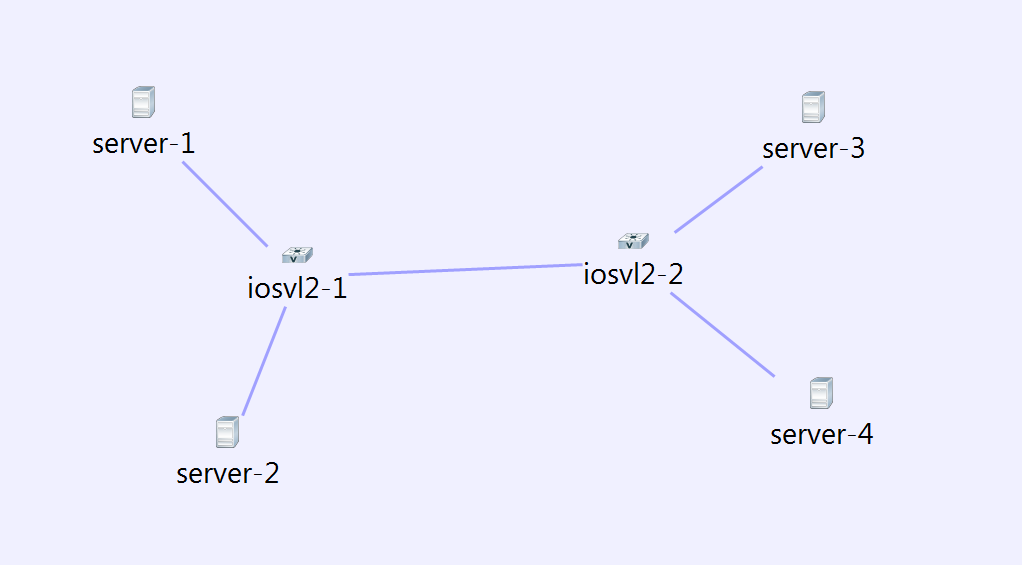
Following is the topology I created with IOS L2 nodes and servers attached to the nodes.

virl12

Servers1 and 3 are in vlan 10, Server 2 and 4 are in vlan 20. To configure the VLAN, we need to select the link in node view of server and add vlan. I did not add the vlan to the trunk links, Autonetkit automatically adds it. I was not able to specify multiple vlans in the vlan text box, not sure if that’s on purpose. I felt that specifying multiple vlans would be needed for trunking interfaces.

Following is the Autonetkit visualization view in L2 mode.

Continue reading VIRL and CML- L2 connectivity Usecase

Connecting VIRL, CML networks to outside world

This is a continuation of my VIRL, CML blog series. VIRL/CML overview is covered here. It will be good to connect VIRL, CML networks to outside world. Following are some use cases.

  • If management interface of VIRL routers are accessible from outside machines, we can run management application in the client machine and connect directly to VIRL routers. NXAPI, OnePK are some examples of management application like this.
  • Extending VIRL network to physical routers and switches. For example, we can expose 1 of the interfaces of VIRL network and that can form peering IGP relationship with a physical router.

External connectivity requirements for VIRL install using VMPlayer:

As mentioned in my earlier blog, it is necessary to install VIRL with 4 custom host-only interfaces. It is necessary to match the IP address of the custom host-only interfaces to what is mentioned in /etc/virl.ini file. If we change the IP, virl.ini needs to be modified and networking needs to be restarted. This can be done with “”vinstall rehost”

  • eth0 – NAT interface used for internet access.
  • eth1(172.16.1.x) and eth2(172.16.2.x) are used for FLAT management and inband.
  • eth3(172.16.3.x) is used for SNAT L3 access.

Following is the ipconfig VMnet* output in my host machine after creation of custom networks. VMnet3 and VMnet4 are used for FLAT management and inband. VMnet5 is  used for SNAT L3 access.

Continue reading Connecting VIRL, CML networks to outside world

VIRL Simulation – L3 connectivity Usecase

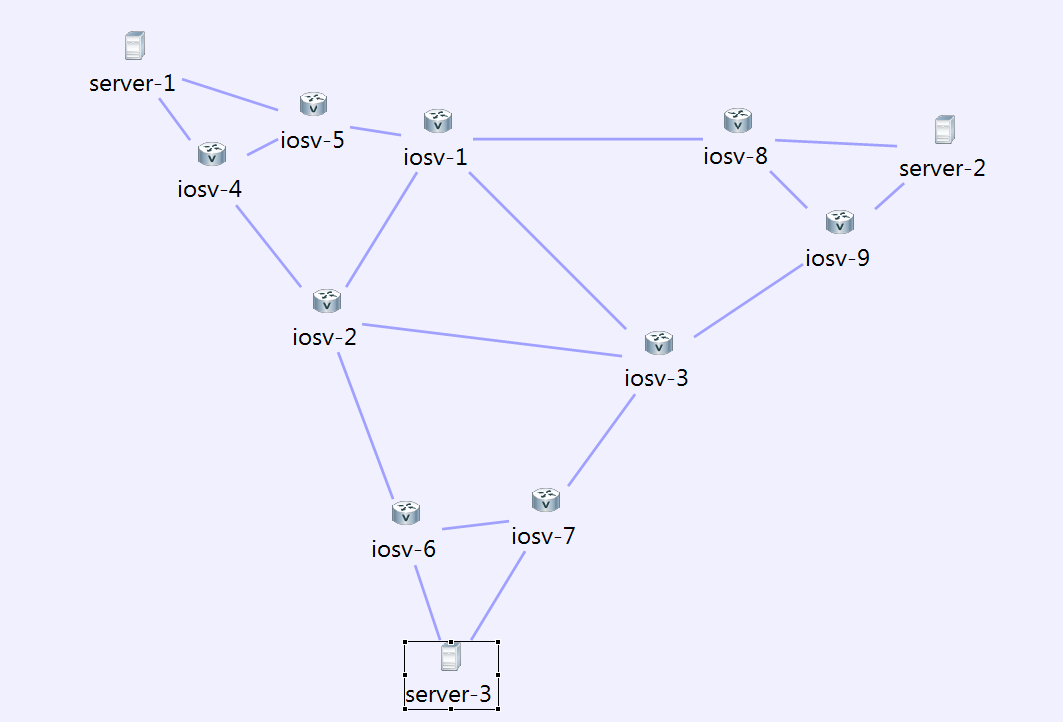
This is a continuation of my VIRL, CML blog series. VIRL/CML overview is covered here. Here, we will create a L3 IGP network running OSPF. I have used IOS nodes for all routers, we can use XR and NXOS routers as well. I didnt do it because the VM images are bigger for XR and NXOS and it slows up the simulation.

Following is the Network topology I created during the design phase. iosv[1-3] are in area 0, iosv[4-5] are in area 1, iosv[6-7] are in area 3, iosv[8-9] are in area 2.

virl7

Continue reading VIRL Simulation – L3 connectivity Usecase

VIRL and CML – Installation

This blog is part of my VIRL and CML series. VIRL/CML overview is covered here. In this blog, I will cover the installation steps and how to get started with the first simulation.

I have tried 2 approaches to install CML and 1 approach to install VIRL. Since I work at Cisco, I did not have to buy VIRL and CML software, the methods of obtaining License and installing them would be different for me compared to users purchasing this from outside. Otherwise, the steps below should be the same.

Prerequisite for installing in Laptop:

  • Use VMPlayer version 6.0.5. I had problems with other versions. I have installed VMPlayer in Windows 7.
  • It is needed to create custom networks to be able to share the VM network with the host machine. “vmnetcfg” utility is provided by default with VMWorkstation and VMfusion. To use it with VMPlayer, please refer to my other blog on VMPlayer networking. We need to create 4 custom networks. The first 2 custom network are used for Flat networks, third one is used for SNAT network, fourth one is for future use. Following image shows my networks in VMPlayer.

Continue reading VIRL and CML – Installation

VIRL and CML – Overview

CML(Cisco Modeling lab) and VIRL(Virtual Internet and Routing lab) are Network modeling platforms from Cisco. I have been trying this out for the last 2 weeks and I am very impressed by what it can do. I feel that the potential for this platform is so huge that it will create a fundamental impact in the Networking industry. Currently, the simulation is limited mainly to Cisco devices though I have seen Juniper and Vyatta images in the VM list. In the next series of blogs, I will walk through some of the following topics:

  • What is CML, VIRL? Architecture and Software components.
  • How to get started? Installation and Quickstart.
  • Examples/Use cases that I tried. L3, L2, management.

Difference between CML and VIRL:

CML is a code branch of VIRL that has been enhanced to provide more scale, VIRL has a 15 node limit. CML customers get Cisco TAC support. CML is focussed towards Enterprise customers, while VIRL is focussed on individuals and training institutions. Obviously, VIRL is much cheaper than CML. VIRL has different prices based on personal or academic use.

Since I work in Cisco, I didnt have to pay any money to try out CML and VIRL. Going forward, I will use the term VIRL to describe the Network Modeling platform. If there are any CML specifics, I will mention those.

VIRL/CML Overview:

Continue reading VIRL and CML – Overview

OpenNSL – Thoughts

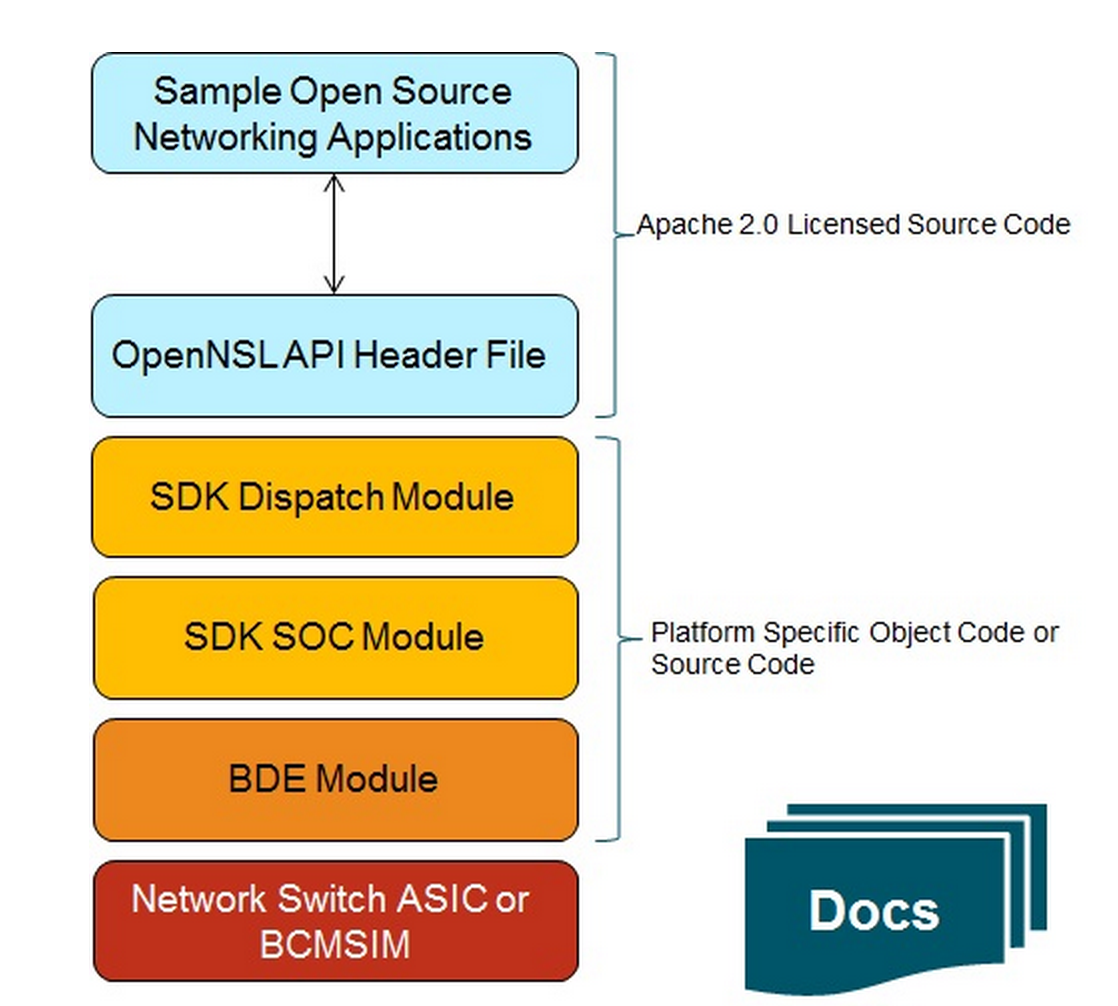
Recently, Broadcom has opensourced API for their network switching asic as part of OpenNSL project. I tried to dig little deep into what it really means and this blog is a result of that.

What is really Opensourced?

Following picture from Broadcom OpenNSL project clearly illustrates this:

opennsl1
Following are some notes:

  • OpenNSL is a layer on top of Broadcom SDK. Broadcom SDK is not opensourced, only the OpenNSL layer is opensourced.

Continue reading OpenNSL – Thoughts

Opencompute Networking – Facebook Contributions

Earlier, I had written a blog on Opencompute networking project. There were few recent contributions from Facebook to Opencompute. In this blog, I wanted to capture major Opencompute Networking contributions from Facebook. I see these contributions as pretty significant in the context of White box switches.

Wedge hardware design for TOR:

The goal here was to develop modular switches where any hardware component of the switch can be replaced independently. Servers in the TOR use the Group Hug architecture where standard connector is used to connect the servers to the motherboard. This can allow a easier change of processor.

Continue reading Opencompute Networking – Facebook Contributions