Tag Archives: chatgpt

AI Assistants Have Many Interfaces. Context Is the Real Product.

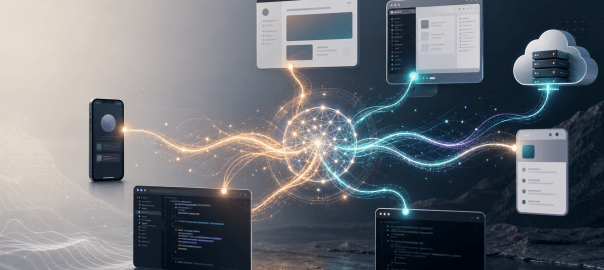
AI assistants are no longer just chat windows. The same assistant now appears as a web app, desktop app, mobile app, browser extension, IDE extension, command-line tool, local agent, and cloud worker.

That is powerful, but it creates a new problem: deciding which interface to use, and keeping context alive when moving between them.

This post is based mostly on my experience with OpenAI and Anthropic products: ChatGPT, Codex, Claude, Claude Code, and their web, desktop, IDE, CLI, mobile, browser, and cloud interfaces. I also touch briefly on Gemini and browser-extension-style workflows, because they represent another way people are starting to interact with AI.

The question I am interested in is not just which model is better. It is: which interface should I use, when should I use it, and why does context still get lost when I move between them?

The OpenAI Interfaces

InterfaceHow I think about it
ChatGPT webBest for general thinking, writing, research, analysis, and normal assistant workflows.
ChatGPT mobileUseful when I am away from my laptop. Also useful as a controller for connected Codex hosts.
ChatGPT Voice ModeExcellent for brainstorming. It feels like a real-time conversation, not just dictation.
Codex desktop appMy default for local agent work. Best when the task needs local files, terminal commands, browser sessions, or writing changes on my Mac.
Codex VS Code extensionUseful for bigger projects inside the IDE, especially when I want to work across multiple agents or keep the workflow inside one editor.
Codex CLIPowerful for terminal-native workflows, but I do not use it much because I prefer seeing code and diffs visually.
Codex Web / CloudUseful when the repo is on GitHub and I want a small bounded change, PR-style task, or cloud execution without relying on my laptop.

The Codex desktop app is the OpenAI interface I use most for local work. For anything that needs access to local files, local folders, terminal commands, browser sessions, or writing changes on my Mac, the desktop app is my default.

It gives me a practical local agent environment where I can see what is happening, approve actions, inspect changes, and let the assistant work inside my machine.

The Codex VS Code extension is useful when I am already inside the IDE, especially for bigger projects where I want a single editor surface and may work across multiple agents or threads.

The Codex CLI is powerful, but I personally do not use it much. I prefer the feel of seeing the work visually while changes are being made.

The Codex Web / Cloud mode is different. It is useful when the work is already in GitHub and I want to make a small change, run a bounded task, or delegate something in a PR-style workflow.

In this mode I do not need a local workspace, and execution does not happen on my laptop. The assistant works in the cloud against the repository.

That has obvious advantages. If my laptop is not available, or if I want something long-running to continue without depending on my machine staying awake, cloud execution makes sense. It also works well when the task is self-contained and the repository can build and test cleanly in a cloud environment.

But cloud is not a replacement for local work in every case. If the task depends on unpushed local files, local credentials, desktop apps, browser sessions, local databases, or my Mac setup, the desktop app is still more convenient.

The Anthropic Interfaces

InterfaceHow I think about it
Claude webGood for general Claude chat, writing, thinking, analysis, and projects.
Claude mobileUseful for mobile access and remote workflows, but not a full replacement for desktop/project context.
Claude desktop appUseful, but the experience feels split across Chat, Cowork, and Code.
CoworkUseful for local desktop-style tasks, especially for non-technical users, but I do not fully understand why it needs to be separate from Chat.
Claude Code CLIMy main serious Claude coding workflow, especially inside VS Code.
Claude Code in VS CodeUseful when I want Claude close to the code editor.
Claude Code web/cloudGood when I want execution to happen in the cloud rather than on my local machine.
Dispatch / Remote ControlUseful ideas, but they do not feel like one unified control layer yet.
Browser extensions / browser usageUseful, but not the best long-term workflow yet because the integration does not feel smooth enough.

Claude has a similar spread of interfaces, but the experience feels more fragmented to me.

There is Claude web for general chat and projects. There is the Claude mobile app. There is the Claude desktop app, which separates the experience into areas like Chat, Cowork, and Code. There is Claude Code CLI, Claude Code in VS Code, and Claude Code on the web.

For serious coding, my main Claude workflow is Claude Code CLI inside VS Code. That combination feels powerful because I get the capabilities of the CLI while still keeping the editor open and visible.

Claudeโ€™s other modes are useful too. Cowork can help with local desktop-style tasks. Claude Code web provides a cloud coding mode when I want the execution to happen away from my machine. Dispatch and Remote Control are useful ideas for sending or steering work from another device.

But the product feels more split. The pieces are good, but I often feel the boundaries between them.

Voice Is Another Interface

One interface I do not want to ignore is voice.

ChatGPT Voice Mode is one of the most useful non-coding interfaces for me. It is especially good for brainstorming. Speaking to the assistant and getting a real-time spoken response feels very different from typing, or even from using a dictation tool.

Tools like Wispr Flow are useful because they let me speak instead of type. But that is still mostly a better input method for a text conversation. It is not the same as a real-time voice conversation.

ChatGPT Voice Mode feels closer to a true conversational interface. It feels less like โ€œgenerate text, then read the text aloud,โ€ and more like a direct voice interaction.

Claude also has voice capabilities, but in my usage it does not feel as natural as ChatGPT Voice Mode. It feels more like speech-to-text followed by a spoken response. That may not be the exact implementation, but from a user experience standpoint the difference is noticeable. The delay and response style make it less useful for live brainstorming.

I would also like to see this kind of voice experience inside the Codex app. If I am already working in a local agent workspace, being able to brainstorm with Codex by voice would be very useful. I may not want voice for every coding task, but for planning, debugging, architectural discussion, and reviewing tradeoffs, it would be a natural interface.

Mobile As A Controller Interface

Another interface that I find useful is ChatGPT mobile as a controller for Codex.

From the ChatGPT mobile app, I can connect to Codex running on my Mac or Windows machine and access the projects and threads available on that connected host. I can continue work, send follow-up instructions, approve actions, and review results from my phone.

That is a powerful pattern. The phone is not trying to become the full development environment. It is controlling the Codex environment already running on my machine.

As long as that host is awake, online, paired, and signed in, I can continue threads, approve actions, and inspect results. The permissions still belong to the host-side Codex session.

This is different from Codex Web, where the work happens in the cloud against GitHub. Both are useful, but they solve different problems.

Claude has related ideas through Dispatch and Remote Control, but it does not feel the same to me. Dispatch is more like sending work from mobile to desktop. Remote Control is useful for steering a running Claude Code session. But the experience still feels more split between Claude mobile, Claude desktop, Claude Code, Cowork, and Claude Code web.

What I would like is a more unified control layer: mobile, web, desktop, local machines, and cloud environments should feel like different surfaces over the same underlying work context.

Local vs Cloud

The way I think about local and cloud is simple.

Use local when the machine matters.

Use cloud when the shared repository or online workspace is the source of truth.

Local is better when I need my files, my terminal, my browser, my desktop apps, my local setup, or visual feedback. This is why I use the Codex desktop app so much.

Even though it runs with sandboxing and permissions, once I allow the right operations, it can work with my Mac and browser fairly smoothly. Compared with some other local agent experiences, this makes Codex feel more convenient for my daily workflow.

Cloud is better when the task is centered around a shared online source such as GitHub. If the code is pushed, the task is bounded, and the assistant can work in a clean environment, cloud agents are very useful.

They are especially good for small fixes, dependency updates, tests, review follow-ups, PR-style tasks, and background work that should not depend on my laptop staying awake.

The hybrid model is probably the most realistic. I may explore and develop locally, push a branch, then ask a cloud agent to do a bounded follow-up. Or I may use cloud for a small GitHub change while continuing deeper work locally.

The key is discipline: local and cloud workflows work best when the shared source of truth is clean and the assistant is given a clear task.

My Current Workflow

My personal workflow today is roughly this.

For OpenAI, I mostly use the Codex desktop app when the task needs local access or local file changes. It gives me the best balance of visibility, control, and convenience.

For bigger projects inside the editor, I use the Codex VS Code extension, especially when I want to work across multiple agents or keep the whole workflow inside one IDE.

I use Codex Web / Cloud selectively. If something is already on GitHub and I want a small change or a bounded task, it is a good fit. I do not use it as my main development environment, but I see the value clearly.

For general thinking, writing, research, and brainstorming, I use ChatGPT web, mobile, and Voice Mode. Those are still very useful interfaces. But they are separate from the local Codex app context, and that separation matters.

For Claude, I primarily use Claude Code CLI inside VS Code for bigger coding projects. That feels like the strongest Claude coding workflow for me right now.

I also use browser-based tools across Claude, Gemini, and Codex-style workflows, but I see room for improvement there. The browser is important, but the current extension-style experience does not yet feel like the final form.

What OpenAI Gets Right

What I like about Codex is that it feels like a unified local agent workspace.

In the Codex desktop app, I can ask questions about the project, inspect files, make changes, run commands, review diffs, manage threads, and use local browser/computer tools from one place. That reduces the number of decisions I have to make before starting work.

The local desktop app is especially useful because it works with my actual machine. It is sandboxed, and permissions still matter, but once I approve the right operations, it can interact with my Mac and browser smoothly enough for real work.

ChatGPT mobile controlling connected Codex projects is also a strong pattern. It shows what a good cross-device AI interface can look like. The mobile app becomes a control surface over the environment where the work is actually happening.

ChatGPT Voice Mode is another strong interface. For brainstorming, it is one of the best ways to interact with an AI assistant.

What Anthropic Gets Right

Claude Code CLI is very strong. Used inside VS Code, it gives me a powerful workflow while still letting me see the project in the editor. For bigger projects, this works well.

Claude also has powerful separate modes. Chat, Cowork, Code, CLI, web, mobile, Dispatch, Remote Control, and IDE integration all have a reason to exist. The pieces are good.

Claude Code web/cloud is useful when I want execution to happen in the cloud rather than on my machine. Dispatch and Remote Control are also interesting because they recognize that users want to start or steer work from different devices.

What I Would Like To See Improved In Claude

My issue with Claude is not capability. It is product shape.

As a user, I would prefer one universal Claude experience where chat, cowork, and code feel like modes of the same workspace rather than separate places.

I can understand Code being a specialized mode because coding has its own environment, tools, permissions, and workflows. But the separation between Chat and Cowork is less obvious to me.

Claude Cowork seems designed to make agentic desktop work easier for non-technical users. That makes sense. Not everyone wants to use a terminal or think in terms of repositories, branches, commands, and diffs.

But if I am chatting with Claude and the discussion turns into a task, why should I need to move into a different mode? Ideally, Cowork would feel like a capability inside the same Claude workspace rather than a separate place. The assistant should be able to move from discussion to action naturally, while still asking for the right permissions when it needs to touch files, apps, or the computer.

I would also like Claudeโ€™s voice experience to feel more natural for live brainstorming. In my usage, ChatGPT Voice Mode feels closer to a real-time conversation, while Claude voice feels more like speech-to-text followed by a spoken response.

Where The Interfaces Still Break Down

The issue is not that there are many interfaces. Different interfaces are useful for different jobs.

Voice is good for brainstorming. Desktop is good for local work. IDE is good for deep project work. Cloud is good for background execution. Mobile is good for steering work.

The problem is that the context does not always travel with me.

A few examples:

ChatGPT voice to Codex

If I brainstorm an idea in ChatGPT Voice Mode on mobile or web, that conversation does not naturally appear inside the Codex desktop app. If the brainstorming leads to an implementation task, I need to manually restate the context in Codex.

Codex desktop to ChatGPT mobile

This works better. If Codex is running on my Mac and the machine is awake, online, paired, and signed in, I can access those Codex projects and threads from ChatGPT mobile. This is one of the best examples of a useful cross-device AI interface.

Codex desktop to ChatGPT web

This is where the continuity feels incomplete. I can control connected Codex hosts from ChatGPT mobile, but I do not get the same connected-host control surface from ChatGPT web. Since I often work from a browser too, I would like the web interface to become another control surface for the same Codex host context.

ChatGPT web or mobile to Codex desktop

The reverse direction is also incomplete. General ChatGPT conversations, projects, and voice brainstorms do not automatically become available as working context inside Codex. That matters because many tasks start as thinking or planning before they become implementation.

Claude Chat, Cowork, and Code

In Claude, the fragmentation feels different. Claude has Chat, Cowork, Code, Claude Code CLI, Claude Code web, mobile, Dispatch, and Remote Control. Dispatch is useful because I can send work from mobile to desktop, and Remote Control is useful for steering a session. But it does not feel like one shared workspace where the same context naturally follows me across Claude web, desktop, mobile, and Code.

Claude Code local vs cloud

Claude Code has both local and cloud-style workflows. Local Claude Code is useful when I want the work to happen inside my own machine or IDE. Claude Code web/cloud is useful when I want the task to run away from my machine, usually against a GitHub-backed environment.

That separation makes sense technically. Local work and cloud work have different permissions, files, tools, and execution environments. But from a user experience standpoint, I still want the context to move more naturally between them. If I plan something in Claude chat, start work in Claude Code CLI, and later move to Claude Code web, I do not want to reconstruct the whole task manually.

The Real Problem Is Context Continuity

The missing piece is not one universal interface. I actually want multiple interfaces.

What I want is a shared context layer underneath them.

If I brainstorm in voice, I should be able to continue in desktop. If I start work in a local agent, I should be able to inspect it from mobile and web. If I delegate work to the cloud, the result should be easy to pull back into the local or conversational context.

If I switch from Claude web to Claude Code, or from ChatGPT to Codex, I should not have to reconstruct the entire task history manually.

The best current example of this working is ChatGPT mobile controlling Codex projects on a connected machine. That shows the direction I want: mobile is not replacing the desktop environment; it is becoming a control surface for it.

The next step is making that idea more universal across web, desktop, mobile, voice, IDE, local agents, and cloud agents.

At the same time, permissions should remain local to the right environment. I do not want every interface to have every permission. Local files, desktop apps, browser sessions, and computer control should stay tied to the machine where permissions were granted. Cloud work should stay in the cloud. Mobile should control what it is allowed to control.

But the reasoning context, project context, and user intent should travel better across these surfaces.

Where I Think This Is Going

The future of AI tools is not just better models. The models will keep improving, but the interface and context layer may matter just as much.

The winning product will be the one that lets me move between local, cloud, IDE, web, browser, desktop, mobile, and voice without constantly re-explaining what I am doing.

For me, that is the real product: not just the assistant, not just the model, and not just another interface.

The real product is context continuity.
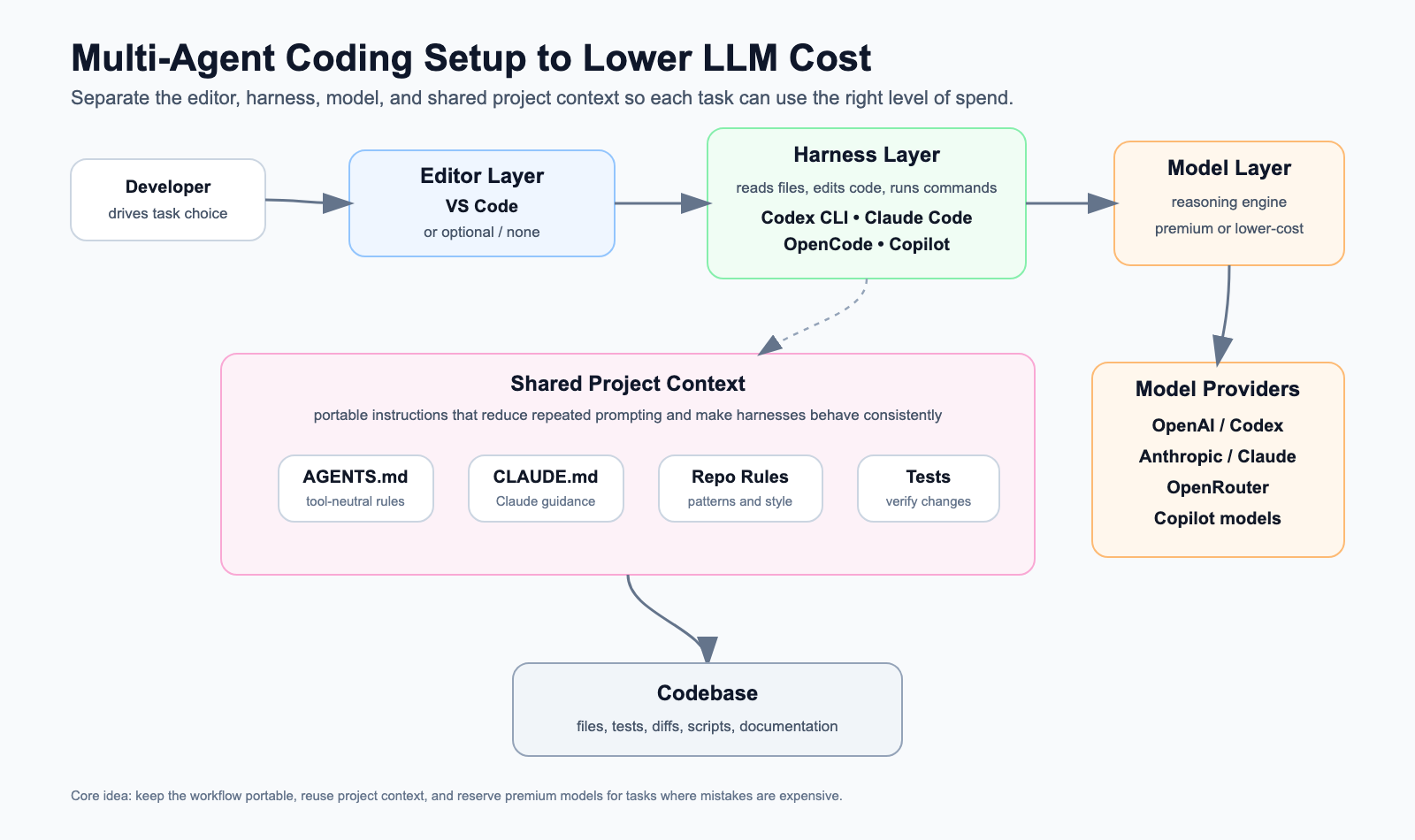
My Multi-Agent Coding Setup to Lower LLM Cost

AI coding tools are now good enough that the question is no longer “Should I use them?” For me, the more useful question is: how do I use them without letting LLM cost grow unnecessarily?

The obvious answer is to use cheaper models. That helps, but it is not the full answer. In practice, the bigger unlock is designing the coding workflow so that I can switch between tools and models without changing the way I work.

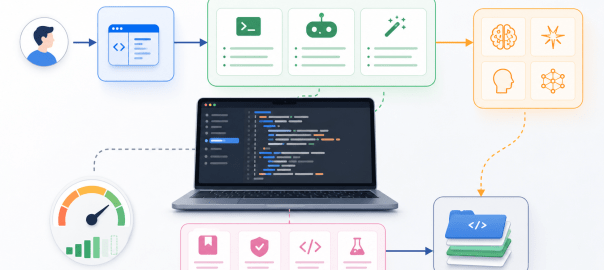
My setup is based on separating three things that often get blurred together:

  • Editor: where I view and manually edit code.
  • Harness: the coding agent layer that reads files, edits code, runs commands, applies patches, and manages repo context.
  • Model: the LLM doing the reasoning underneath the harness.

Once these are separated, I can optimize cost more intelligently. I can use premium models when reasoning quality matters, and use lower-cost models for exploration, boilerplate, summarization, first-pass refactors, or less risky changes.

The Architecture

At a high level, my setup looks like this:

The important part is that the editor, harness, and model are not the same thing.

VS Code is usually my editor. Codex, Claude Code, OpenCode, Copilot, and VS Code extensions are the harness layer or harness-like coding environments. Claude, GPT/Codex models, GLM, Qwen, DeepSeek, and other models are the reasoning engines underneath.

That distinction matters because cost optimization becomes easier when the harness is portable and the model is replaceable.

Shared Project Context

The foundation of the setup is shared project context.

I try to keep repo-specific guidance in files such as:

  • AGENTS.md
  • CLAUDE.md
  • architecture notes
  • test commands
  • coding conventions
  • reusable task prompts

This avoids re-explaining the project every time I switch tools. The goal is simple: if I move from Claude Code to Codex, or from Codex to OpenCode, the new harness should still understand the important repo conventions.

This also saves tokens. Instead of dumping long explanations repeatedly into every chat, I keep durable instructions close to the codebase.

Approach 1: VS Code as Editor, Harnesses Through Extensions

This is the setup I use most often for complex projects.

Here, VS Code is the editor. It is where I read code, navigate files, review diffs, and make manual edits.

The AI harness is usually provided through VS Code extensions or integrations.

Examples:

Editor: VS Code
Harness: Copilot extension / Codex extension or CLI integration / Claude extension / OpenCode extension
Model: OpenAI / Claude / Copilot-supported models / OpenRouter-supported models
Context: AGENTS.md / CLAUDE.md / repo docs / prompts

This setup works well for me because I still want to see the code clearly. I like reviewing changes in the editor, understanding the file structure, and staying close to the diff. Maybe that is old-fashioned, but for larger projects it helps me avoid blindly accepting agent output.

The cost benefit comes from keeping VS Code constant while changing the harness or model depending on the task.

For example:

  • I may use Copilot for quick inline completions.
  • I may use Claude through a VS Code extension for complex reasoning-heavy changes.
  • I may use Codex for agentic repo work.
  • I may use OpenCode when I want more model flexibility.

The key point is that VS Code is not the whole AI coding system. It is the editor. The harness and the model can still vary underneath.

Approach 2: Harness-First Workflow

The second setup is when I work directly inside the harness.

This applies to tools like:

  • Codex CLI
  • Claude Code
  • OpenCode app

In this workflow, there may not be a separate editor involved at every step. The harness becomes the main interface. It inspects files, proposes changes, applies patches, runs tests, and iterates.

Editor: Optional / secondary
Harness: Codex CLI / Claude Code / OpenCode app
Model: Native model for that harness, or configurable provider if supported
Context: AGENTS.md / CLAUDE.md / repo docs / prompts

I use this less for complex projects because I prefer to look at the code and review changes directly in the editor. But it works well for smaller modifications, scripts, quick utilities, and contained tasks where I can verify the output easily.

For small projects, the harness-first approach can be efficient because the agent can inspect files, make changes, run commands, and iterate without needing much manual navigation.

Cost-wise, this also helps because the harness can do local exploration. It can search files, inspect only what matters, and avoid loading unnecessary context.

Approach 3: Harness Plus OpenRouter for Model Flexibility

The third setup is where the harness/model separation becomes most explicit.

Some harnesses can be configured to talk to OpenRouter or other compatible model providers. That means I can keep the same coding workflow but change the model underneath.

Editor: Optional
Harness: Codex CLI / Claude Code / OpenCode
Model: OpenRouter-routed models
Context: AGENTS.md / CLAUDE.md / repo docs / prompts

For example:

Codex CLI harness
|
v
OpenRouter provider
|
v
z-ai/glm-5.2, Claude, Qwen, DeepSeek, etc.

This is useful for experimentation and lower-cost first passes. I do not need every task to use the strongest model. Some tasks are mostly repo search, summarization, simple code generation, or mechanical refactoring. Those are good candidates for cheaper models.

Then, when I need better reasoning, I can move back to a premium model.

That said, I do not personally rely on this approach much for daily coding. It may be stable enough for some workflows, but the interface between a coding harness and a third-party model router can change. Codex, Claude Code, or OpenRouter can update their API behavior, headers, tool-calling assumptions, or model compatibility. If that breaks, the workflow breaks.

So for me, Approach 3 is useful to know and useful for experiments, but it is not my default daily setup.

Using OpenRouter with Codex CLI

Codex can be configured with profiles. That lets the default codex command keep using the normal OpenAI/Codex setup, while a separate command uses OpenRouter.

Create:

~/.codex/openrouter.config.toml

Example config:

model_provider = "openrouter"
model = "z-ai/glm-5.2"
model_reasoning_effort = "medium"
[model_providers.openrouter]
name = "OpenRouter"
base_url = "https://openrouter.ai/api/v1"
env_key = "OPENROUTER_API_KEY"
wire_api = "responses"
http_headers = { "HTTP-Referer" = "https://chatgpt.com/codex", "X-Title" = "Codex" }

Add your OpenRouter key:

echo 'OPENROUTER_API_KEY=your_key_here' >> ~/.codex/.env

Add a shell alias:

alias codex-openrouter='codex --profile openrouter'

Now:

codex

uses the normal Codex/OpenAI setup, while:

codex-openrouter

starts Codex through OpenRouter using the configured model.

Inside Codex, verify the active configuration with:

/status

To use a different OpenRouter model for one run:

codex --profile openrouter -m anthropic/claude-sonnet-4.6

The important point is that I do not have to replace my main setup. I keep the default Codex workflow intact and add OpenRouter as a separate profile.

Claude Code with OpenRouter

At a high level, the idea for Claude Code is similar: configure the harness to talk to an OpenAI-compatible endpoint or route requests through OpenRouter, where supported.

The exact setup depends on how Claude Code exposes provider configuration at that time. This is one reason I treat this approach as experimental rather than my default daily workflow.

The pattern is:

Claude Code harness
|
v
OpenRouter or compatible endpoint
|
v
Selected model

If you use this path, I would treat it as a flexible experiment rather than a guaranteed stable interface. The harness, provider, or model compatibility can change.

How I Think About Model Routing

I do not try to use the cheapest model for everything. That can backfire. A cheap model that creates bad code, misses context, or causes extra cleanup may cost more in time than it saves in tokens.

Instead, I route tasks by risk and complexity.

For example:

TaskModel Strategy
Inline completionsCopilot or editor-native tools
Repo explorationLower-cost model or configurable harness
BoilerplateLower-cost model
Simple refactorStart with lower-cost model
Complex debuggingPremium model
Architecture decisionsPremium model
Final reviewStrongest available model

The pattern is:

Use cheaper models for reversible work. Use stronger models when mistakes are expensive.

That single rule handles most cases.

My Actual Usage Pattern

My own usage looks roughly like this.

Approach 1 is my default for complex projects.

I use VS Code as the editor and switch between harnesses through extensions or integrations. I prefer this because I can inspect code, review diffs, and stay oriented.

Approach 2 is useful for smaller changes.

I use harness-first tools like Codex CLI, Claude Code, or OpenCode for scripts, contained edits, and smaller projects where the blast radius is low.

Approach 3 is mostly experimental for me.

OpenRouter gives useful model flexibility, but I do not depend on it heavily for daily coding because the connection between the harness and the model provider can change.

Where the Savings Come From

The savings are not just from cheaper tokens.

They come from a few habits:

  • keeping project context reusable
  • avoiding repeated explanations
  • using harnesses that can inspect the repo directly
  • starting with cheaper models for low-risk work
  • reserving premium models for hard reasoning
  • avoiding huge chat histories when a fresh session with repo instructions is enough
  • choosing the right harness for the task

The most expensive workflow is often the one where I paste too much context into a chat, ask an unclear question, get a partial answer, then spend more tokens correcting it.

A good harness plus good project context reduces that waste.

What about smaller Models That can run locally?

One more workflow I am watching closely is smaller models that can run locally.

I have tried a few Qwen and DeepSeek models through Ollama. My Mac has 48 GB RAM, so it can run some reasonably capable local models. But for the coding tasks I care about, the quality has not yet been strong enough for me to use them as a primary workflow.

That said, I expect this to improve. Smaller models are getting better, and coding harnesses like OpenCode can make this workflow practical if they integrate cleanly with local runtimes such as Ollama.

If this becomes good enough, the stack could look like this:

Editor: VS Code or optional
Harness: OpenCode
Model: Smaller coding-capable model running through Ollama
Cost: No per-token API cost

That would be a meaningful cost-saving path. It would not be completely free in an absolute sense, because there is still hardware cost, electricity, latency, memory pressure, and quality tradeoff. But the marginal API cost per coding task could be zero.

For now, I see this as promising but not yet my default for serious coding work. I expect that to change as smaller coding models improve.

The Tradeoffs

This setup is not free.

There are tradeoffs:

  • Different harnesses support different features.
  • Some models are better at tool use than others.
  • OpenRouter compatibility can vary by model and API behavior.
  • Cheaper models may need tighter prompts and smaller tasks.
  • Switching tools too often can hurt flow.

So I do not treat this as a rigid system. It is a practical routing strategy.

If a task is important, ambiguous, or risky, I use a stronger model. If a task is routine, exploratory, or easy to verify, I am comfortable using a cheaper model.

Final Thought

My approach to lowering LLM coding cost is not just “use cheaper models.”

It is:

Make the harness portable, make the project context reusable, and make the model replaceable.

Once those layers are separated, I can choose the right level of spend for each coding task.

VS Code can remain my editor. Codex, Claude Code, OpenCode, or Copilot can act as the harness. OpenAI, Anthropic, OpenRouter, or other providers can supply the model.

Over time, smaller models that can run locally may become another important part of this setup. If a model running through Ollama can provide good enough coding quality through a harness like OpenCode, then some workflows could move from lower-cost API models to zero marginal API cost local inference.

That flexibility is what lowers cost without forcing me to give up the benefits of high-quality AI coding tools.

The Rise of CLI-Based AI Coding Agents: Claude code vs Gemini CLI

Introduction

I have been a Cursor user for vibe coding for 3 months. I was very skeptical about using Claude Code and Gemini CLI at first, since I wasnโ€™t comfortable with the idea of using a terminal as an AI agent. But in the last 1โ€“2 months, Iโ€™ve been trying them both โ€” and it completely changed my opinion.

In this blog, Iโ€™ll share my experiences of using them, my favorite pick between the two, and a comparison of the three broad categories of AI-assisted coding approaches that exist today.


The Three Approaches to AI-Assisted Coding

I see broadly 3 kinds of AI-assisted coding approaches:

  • Chat interface with canvas โ†’ ChatGPT, Claude
  • IDE integrated AI tools โ†’ Cursor, Windsurf, Replit, Lovable
  • CLI-based AI agent tools โ†’ Claude Code, Gemini CLI, Warp
๐Ÿง‘โ€๐Ÿ’ป Category๐Ÿ’ฌ Chat Interface๐Ÿ› ๏ธ IDE Integrated Assistโšก CLI-based AI Agent
Where it operatesBrowserStandalone IDE or browser (Cursor uses IDE, Lovable uses browser)Terminal or IDE
Use casePrototyping, small functions, quick answers, โ€œthrowaway weekend projects.โ€Augmenting the core coding loop: writing, refactoring, debugging.Automating workflows: multi-step tasks, system commands, project-wide changes.
Vibe coding stylePure โ€œvibe codingโ€ (conversational prompting).Hybrid of โ€œvibe codingโ€ + โ€œdeveloper assist.โ€Agentic + autonomous (give AI a goal and let it execute).

For a vibe coder like me, a CLI-based AI agent inside VS Code works perfectly โ€” I get the best of both IDE and terminal with AI agent powers.


My Project: A 2-Way Translator App ๐ŸŒ

To test these tools, I built a translation application.

When I visited Vietnam a few months back, I noticed cab drivers and restaurants using Google Translate effectively. But one problem stood out: only one device could be used for back-and-forth communication.

So, I decided to build a two-way translation application that solved this problem.

I drafted the following prompt (with ChatGPTโ€™s help):

Global Translator App โ€“ MVP Requirements (Web Application)

  • Build a web app that lets two users communicate in real time via text translation.
  • Users connect via QR code or unique ID.
  • Support both text and speech.
  • Translate automatically for seamless conversation.

(Details moved to the appendix ๐Ÿ‘‡)

Pre-requisites:

  • Google Translate API with GCP
  • Firebase backend

Claude Code vs Gemini CLI โšก

๐Ÿ”Ž Feature๐Ÿค– Claude Code๐ŸŒ Gemini CLI
๐Ÿ“ Location of useStandalone terminal or inside VS Code. In VS Code, Claude Code has IDE context โ€” lets you select code and ask about it.Standalone terminal only. In VS Code, Gemini CLI has no IDE context (though Google offers Gemini Code Assist for IDE, without terminal capability).
๐Ÿ’ป Terminal capabilityExcellent โ€” can view files, execute commands, analyze outputs.Limited โ€” shell commands canโ€™t run in foreground, stateless (no persistent cd), no command completion.
โš™๏ธ AI agent capabilityStrong coding performance; required multiple iterations but reliable.Decent, though not as strong as Claude Code.
๐Ÿงช Debugging & TestingSuperb. With terminal + MCP integration, I could run unit tests from both terminal and frontend.Limited debugging/testing due to terminal restrictions and weaker MCP tool support.
๐Ÿ”Œ MCP integrationVery good. I integrated Playwright (UI automation) + Firebase.Okay. Playwright struggled (e.g., no 2-browser instance support). Firebase worked fine.
๐Ÿ’ธ Cost & model$20/month plan (Sonnet). Didnโ€™t use Opus ($200/month). Sometimes hit daily quota limits.Free with generous limits (Gemini 2.5 Pro).

Verdict so far: Claude Code > Gemini CLI for most features, especially debugging and testing.
But Gemini CLIโ€™s pricing (free) and generous usage limits are a big plus.

If Google can merge Gemini CLI with Code Assist and improve Playwright integration, it will become a fantastic package. On the other hand, Claude Code really needs a more flexible pricing tier between $20 and $200.


Project Output

  • Translation app built with Claude Code โ†’ [Demo link here]
  • Translation app built with Gemini CLI โ†’ [Demo link here]

Flow of the app:

  1. User logs in with a username (no auth to keep simple).
  2. Picks language + connects with another user via QR code or username.
  3. Supports both text + voice translation in real time.
  4. Built as a PWA โ†’ works on web + mobile.

Debugging & Testing with Claude Code ๐Ÿ”

This is where Claude Code really shines:

  • Console errors are debugged + fixed automatically.
  • AI agent generates unit test cases, executes them, finds failures, and fixes them.
  • Even frontend integration testing works โ€” thanks to MCP integration:
    • It inspects browser console logs.
    • Takes screenshots to analyze UI/UX issues (!).

I even asked Claude Code to:

  • Make a 90-second demo video of the app.
  • Simulate two users chatting with translations in the app. It worked beautifully.

Demo video created by Claude

Global Translation – User1

Global Translation – User2


Summary โœจ

AI-assisted coding has matured tremendously in the last year and is now a top revenue driver among AI apps.

In my first blog on Vibe coding, I complained about limited debugging and testing with the AI coding tools. With these new coding agents, that problem feels largely solved.

Next, Iโ€™d love to see AI agents:

  • Do better system design.
  • Produce more modular code.
  • Integrate smoothly with existing codebases.

Between Claude Code and Gemini CLI โ†’ Claude Code wins hands down ๐Ÿ†.
But Iโ€™m confident Gemini CLI will close the gap soon.


Appendix

Detailed prompt given for the translation application:

Tech Stack

  • Frontend Framework: React (or a similar modern JavaScript framework like Vue/Angular, but React aligns with future React Native plans)
  • Backend: Firebase (Firestore/Realtime Database for real-time chat, Authentication, Cloud Functions for server-side logic if needed)
  • Translation API: Google Cloud Translation API
  • QR Code: Open-source JavaScript libraries for QR code generation and scanning (e.g., qrcode.react, html5-qrcode)
  • Authentication: Anonymous sign-in (extendable to Gmail sign-in later)
  • Chat History: Local browser storage (e.g., LocalStorage, IndexedDB โ€“ no cloud sync for MVP)
  • Encryption: Not required for MVP
  • UI/UX: Simple, intuitive, and modern chat interface inspired by leading web messaging apps (e.g., WhatsApp Web, Telegram Web)
  • Dark Mode: Full support for dark mode from MVP

Core Features (MVP)

  • User Onboarding
    • Anonymous sign-in (no registration required for MVP)
    • Generate a unique user ID and QR code for each user upon entering the app
    • Users can choose and save a unique username, which is validated against a central Firestore database to prevent conflicts.
  • Connection Mechanism
    • QR Code Scanning: Allow users to scan another user’s QR code using their device’s webcam/camera (if available and permission granted).
    • Manual ID Entry: Provide an option to manually enter another userโ€™s unique ID to initiate a chat.
    • Display your own QR code for others to scan.
    • The application remembers the last 5 friends you’ve connected with, allowing for quick selection from a dropdown menu.
  • Progressive Web App (PWA):
    • The application is designed to be installable on mobile and desktop

devices, offering an app-like experience with potential offline capabilities.

  • The layout is optimized to adapt and display correctly across various screen sizes, including iOS and Android mobile browsers.
  • Chat Interface
    • Real-time text chat between two users.
    • Each user selects their preferred language from a dropdown/selector. This language is the language to be used by the friend on the other side. 
    • Messages are automatically translated to the recipientโ€™s language using Google Translate API.
    • Show both original and translated text in the chat bubble.
    • Support for dark mode.
    • Friend Online Status (Basic): It displays whether a friend is currently “Online” or “Offline” (with a “Last seen” timestamp). Note: The “offline” status is not automatically updated on browser close in the current setup.
  • Session Management
    • One-to-one chat sessions.
    • Simple chat history stored locally in the browser.
  • Language Support
    • Initial support for: Hindi, Telugu, Tamil, Kannada, English, and French.
  • Misc
    • A version number is displayed on the screen, making it easy to identify the deployed application version.

Non-Functional Requirements

  • Responsive and intuitive UI/UX, adapting well to different screen sizes (desktop, tablet, mobile browsers).
  • Fast translation and message delivery.
  • Minimal data usage.
  • Accessibility support.
  • Dark mode support.
  • Cross-browser compatibility (Chrome, Firefox, Safari, Edge).

Future Extensions (Post-MVP)

  • Native mobile applications (Android & iOS) using React Native.
  • Gmail sign-in and user profiles.
  • Speech-to-text and text-to-speech for voice communication.
  • Discover nearby users (if feasible for the web, e.g., using WebRTC data channels or location APIs).
  • Group chats.
  • Persistent chat history with cloud sync.
  • End-to-end encryption.
  • Support for additional languages.

๐Ÿš€ A Guide for B.Tech CS Students to kickstart your AI journey

๐Ÿ‘‹ Introduction

My daughter will be starting her B.Tech in Computer Science at MIT, Manipal this year. As a huge AI proponent, I often share the latest AI trends and tools with my family. When my daughter decided to pursue CS, she asked me several questions about AI, which inspired this blog. I hope this guide helps any student planning to specialize in CS and AI.


๐Ÿ“š Core Fundamentals for CSE Students

Before diving into AI, itโ€™s crucial to master the basics. These are some of the building blocks for everything youโ€™ll do in computer science. Following links will give you an overview of the basics before you deep-dive.


๐Ÿ“ General Advice for Students

In addition to doing your coursework, following tips can help you to be more practically prepared for the industry .

  • Start with Fundamentals: Focus on math, programming, data structures, and algorithms.
  • Build a Portfolio: Work on projects, participate in Kaggle competitions and hackathons, and maintain GitHub repositories.
  • Network: Join AI clubs, attend meetups, and connect with peers and professionals on LinkedIn.
  • Stay Updated: Follow AI news, research, and trends.
  • Internships: Real-world experience is invaluableโ€”seek internships early.

๐Ÿ› ๏ธ Tools to Try Out

Following is just a sample collection at this point of time. The tools change so fast so it’s very important to keep yourself updated with the latest.

  • Chatbots: ChatGPT, Gemini (Try ChatLLM, an aggregator of chatbots and other AI tools collection, its very handy)
  • Vibe Coding: Cursor, Windsurf, Replit, Pythagora (see my earlier blog for more)
  • Image Generation: DALL-E(OpenAI), Midjourney
  • Video Generation: Google Veo
  • ML Platforms: Google AI Studio(Good to experiment with Google AI models), Kaggle(Kaggle competitions are good, good for datasets and notebooks), Hugging Face(Marketplace for models, datasets and easy to share the ML work with others)
  • Automation: Zapier (AI orchestration platform connecting different AI and non-AI tools and platforms)

Note: โ€œVibe codingโ€ refers to using AI-powered coding environments that help you code faster and more intuitively.


๐Ÿค– Exploring AI Domains & Career Paths

Hereโ€™s a quick overview of different AI roles, what they do, prerequisites, and how to get started. AI industry is still at its nascent stage, these roles can change as the technology matures.

RoleWhat They DoPrerequisitesHow to Get In
AI ResearcherDevelop new AI models/algorithms, advance the field, publish researchStrong math (linear algebra, stats), deep ML/DL, Python, PyTorch/TensorFlow, research skills, academic writingAdvanced courses (Masterโ€™s/PhD), join research labs, open-source, publish papers, attend conferences
ML EngineerBuild, optimize, and deploy ML models in production; manage ML systemsProgramming (Python, C++/Java), ML frameworks, software engineering, cloud (AWS/GCP/Azure), MLOps basicsEnd-to-end ML projects, internships, open-source, learn CI/CD, Docker/Kubernetes, model deployment
Data Engineer/ScientistBuild data pipelines, clean/process data, extract insights, visualize findingsPython, SQL, data wrangling, statistics, data viz, ML basics, big data tools (Spark, Hadoop)Data science/engineering courses, Kaggle, portfolio projects, internships, learn data tools and visualization
AI Application EngineerIntegrate AI models into real-world apps/products; focus on APIs and UXProgramming (Python, JS, etc.), API development, front/back-end, basic ML, UX/UIBuild AI apps, hackathons, internships, learn REST APIs, cloud deployment
AI Security & SafetyEnsure AI systems are secure/safe; address ethical, legal, and risk concernsSecurity fundamentals, cryptography, adversarial ML, AI ethics, risk, regulations, ML basicsCybersecurity/AI ethics courses, CTFs, follow AI safety research, join labs/organizations
AI Product ManagerDefine vision/strategy for AI products; bridge tech and business teamsAI/ML concepts, product management, communication, business acumen, user researchStart as engineer/analyst, PM courses, AI projects, internships, develop leadership/communication
AI Hardware SpecialistDesign/develop hardware/software (GPUs, TPUs, SDKs) for AI training/inferenceECE/CS, digital design, computer architecture, parallel computing, C/C++, CUDA, ML basicsECE/CS courses, hardware internships, FPGA/GPU projects, hardware-software co-design, follow NVIDIA/AMD/Intel

๐Ÿง‘โ€๐Ÿ’ป AI Basics for Students

Following is just a sample to get started with AI basics.


๐Ÿค” How Should College Students Use AI (and How Not To)?

  • Donโ€™t: Use AI chatbots to solve class assignments directlyโ€”this can kill creativity and hinder learning.
  • Do: Use AI as a learning tool to explore new ideas, get feedback on completed assignments, and clarify concepts after self-study.
  • Tip: Treat AI as a personalized teacherโ€”seek help only after youโ€™ve tried solving problems yourself.

๐Ÿ”„ Staying Updated with AI

  • Curate Resources: Make a repository of your favorite podcasts, blogs, and YouTube channels.
  • Hands-On Practice: Try new AI tools and work on personal projects.
  • Mix Coding Styles: Combine โ€œvibe codingโ€ (AI-assisted) with traditional coding to strengthen your skills.

๐Ÿ’ก Is AI Going to Take My Job?

A typical software engineer spends only 30โ€“40% of their time coding; the rest involves architecture, design, spec reviews, cross-functional discussions, integration testing, and release processes. While AI can assist with coding, these other activities are equally critical and difficult to automate.

Even within coding, engineers must structure code, manage module interactions, choose technologies, debug, test, scale, and deployโ€”tasks that require human judgment. AI coding tools can boost productivity by 30โ€“40% today, and possibly up to 70% in the next 1โ€“2 years. However, over-reliance on these tools can erode core skills, and poorly organized AI-generated code can become hard to maintain.

Thereโ€™s no substitute for strong design and coding fundamentals. Use AI tools as an assistant, not a replacement.

Jevons Paradox: If coding becomes much easier and cheaper, weโ€™ll see more coding projects and more coders, not fewer. The demand for skilled engineers will grow as we automate more of the world.

For the next 5โ€“10 years, CS engineers will remain essential. If AI ever surpasses humans in all aspects (AGI), it wonโ€™t just be engineersโ€”every profession will be affected.


๐ŸŒฑ Final Thoughts

CS or CS with AI specialization are fields of endless possibility. Stay curious, keep building, and remember: the journey is as important as the destination. Embrace change, focus on fundamentals, and use AI as a tool to amplify your learning and creativity.


Wishing all new B.Tech CS students an exciting and rewarding journey ahead!


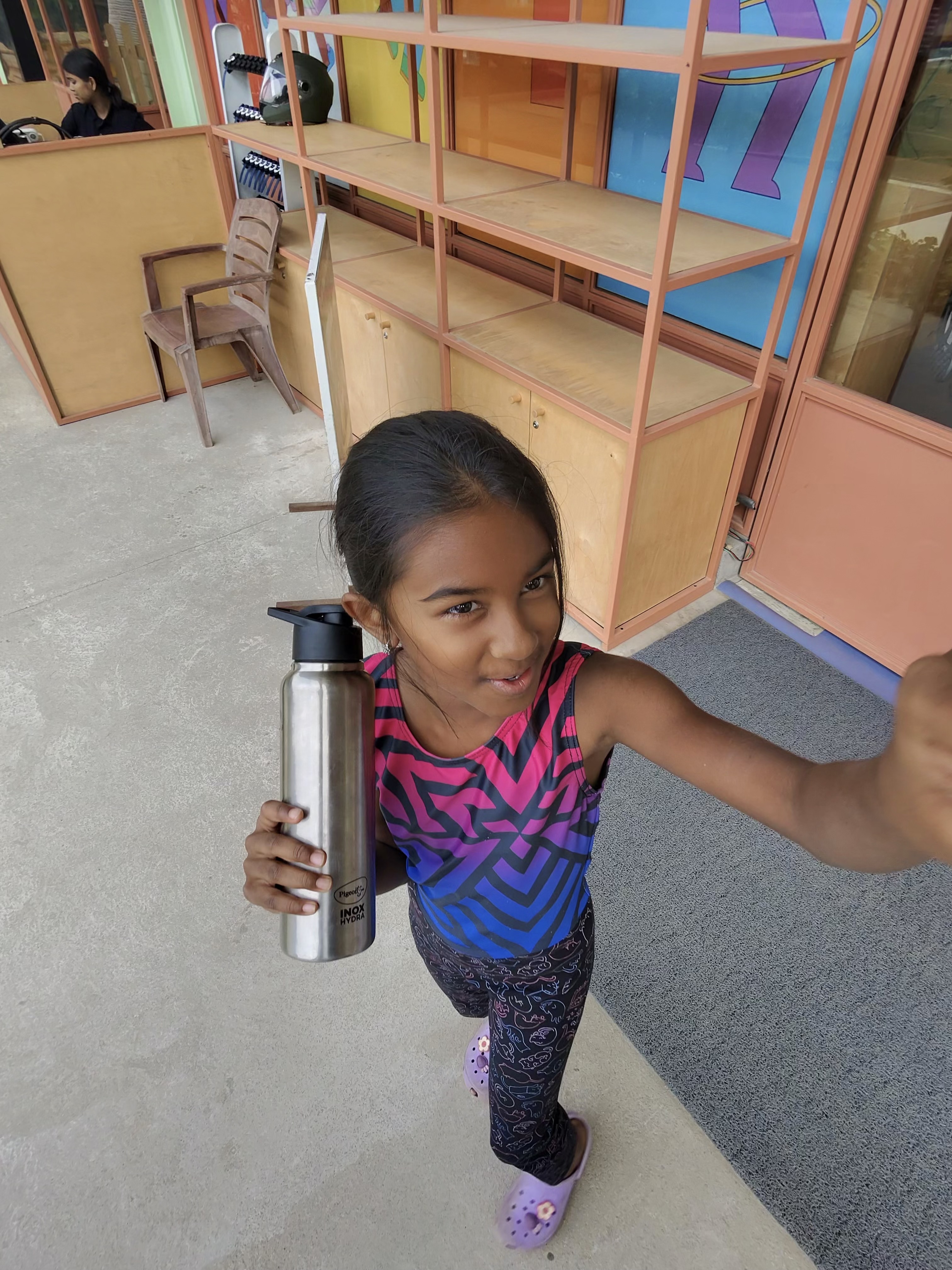
Picture with my lovely daughter!

Are Smart Glasses the Future of AI? My Hands-On Review of Meta AI Glasses

Honestly, I never believed smart glasses would become a mainstream AI form factorโ€”until I bought the Meta Ray-Ban Smart Glasses two weeks ago! ๐Ÿ˜Ž This gadget had been on my wishlist for a while, but it wasnโ€™t available in India, and even if you managed to get one from abroad, the app didnโ€™t work well here. Thankfully, Meta launched these glasses in India a month ago, and you can now buy them online or from certified optical dealers. In this blog, Iโ€™ll share my hands-on experience from the past two weeks.

Why Glasses? The Hands-Free Advantage ๐Ÿ™Œ

The first thing I realized: glasses are a fantastic form factor when you want to go hands-free and avoid constantly reaching for your phone or laptop. Google tried this a decade ago, but the tech just wasnโ€™t ready. (More on Googleโ€™s new AI glasses later!)

I mostly use the glasses outdoorsโ€”while walking, running, or cycling. Indoors, I didnโ€™t find much need for them.

Design & Comfort ๐Ÿ•ถ๏ธ

The design is sleek and modern, not clunky at all. They look like regular sunglasses, so you wonโ€™t stand out in a crowd (unless you want to!). However, after a few hours, they do feel a bit heavy, and I sometimes want to take them off for a break.

Use Cases: Where Smart Glasses Shine โœจ

Photos & Videos ๐Ÿ“ธ๐ŸŽฅ
The 12MP ultra-wide camera delivers good quality photos and up to 3-minute videos. While itโ€™s not quite smartphone-level, the hands-free capture is a game-changerโ€”especially for impromptu moments or when youโ€™re on the move. Thereโ€™s even blur compensation to keep your shots clear. Selfies are a bit tricky, but you can always take them by holding the glasses like a phone.

Music, Podcasts & Calls ๐ŸŽถ๐Ÿ“ž
With 5 microphones and 2 speakers, the audio quality is impressive. The directed audio keeps you aware of your surroundingsโ€”crucial for outdoor activities. Personally, listening to music made my uphill cycling sessions much more enjoyable! ๐Ÿšดโ€โ™‚๏ธ

The AI Edge: Meta AI in Your Glasses ๐Ÿค–

The real magic is in the AI. Meta AI uses the latest Llama models, giving you robust speech-to-text and general chatbot capabilities. While Llama isnโ€™t quite at OpenAIโ€™s level, it works well for most queries. The best part? Multimodal capability! You can ask questions about what youโ€™re seeing. For example, I spotted a tree with unique flowers, asked the glasses to identify it, and got an accurate answer. This feature will be super useful when traveling or reading foreign text.

Live Speech Translation ๐ŸŒ๐Ÿ—ฃ๏ธ

Currently, live translation supports French, Spanish, and Italian. It works best if both people have Meta glasses (for two-way translation), but even one-way translation is handy. I tested it with my daughterโ€™s French and while watching a French videoโ€”worked well as long as the audio wasnโ€™t too fast.

Cons & Limitations โš ๏ธ

  • The glasses are a bit heavy and feel bulky after extended use.
  • Occasionally, they freeze and need a restart.
  • Battery life is about 3โ€“4 hoursโ€”okay for most outings, but longer would be better.

Pro Tips for Buyers ๐Ÿ“

  • If you need prescription lenses, get the AI glasses fitted accordingly (external vendors can help).
  • If you donโ€™t need a prescription, consider transition lenses for both indoor and outdoor use. I use reading glasses, so transition lenses are perfect for me.

Some pictures and videos that I took ๐Ÿ“ธ๐ŸŽฅ

Cycling clip

357CE2C1-65CC-41B4-B16C-398939BADBDB
25007A9D-B670-43E6-AA6A-ED4AF2204D09
3419F8F8-2010-4751-AD29-FC3C0A6A8AAE
55AE6054-A2C7-4A54-8928-B127E1113761

Final Thoughts & Google Glasses Comparison ๐Ÿฅฝ

After seeing Googleโ€™s latest demo at I/O, Iโ€™m excited for their upcoming glasses, especially with XR and virtual screen features. That could be a game-changer, but itโ€™s likely a year away and pricing is still unknown.

For now, I absolutely love my Meta AI glasses. Priced between โ‚น29,000โ€“โ‚น35,000, theyโ€™re a solid investment for the features you get. Iโ€™m convinced glasses will be a major new form factor for AIโ€”though not the only one.


Would I recommend them? Absolutely, if you love trying new tech and want a taste of the futureโ€”hands-free! ๐Ÿš€

๐Ÿค– AI Customer Support using an Agentic Framework

In this blog, Iโ€™ll walk you through the design, development, and lessons learned while building a multi-agent AI customer support assistant using the LangChain framework and related AI tools. ๐ŸŽฎ๐Ÿ’ฌ


๐ŸŽฏ Motivation: Why Build This?

At KGeN, a game aggregation platform connecting publishers and gamers, our primary users are gamers and clan chiefs (micro-community leaders).

These users often ask questions about:

  • Platform features
  • Game-specific achievements
  • Player and clan statistics

Some answers come from a static knowledge base, while others depend on dynamic user-specific data.

โšก We wanted an intelligent, scalable AI assistant that could:

  • Understand natural language queries
  • Route them to the appropriate data sources
  • Continuously improve through feedback

Based on the poc feedback, I wanted to take this to production.

๐Ÿง  The use case generalizes to any industry with static documentation and dynamic user dataโ€”only the context changes.


๐Ÿ”— Application & Code

The poc application is deployed in Render, you can try this out. The Github also contains instructions to run it locally or in cloud.


๐Ÿ“Œ Business Goals

I wanted a system with following business goals:

  • ๐Ÿ—ฃ Answer queries conversationally
  • โš™๏ธ Route questions to the right agent (static/dynamic/hybrid)
  • ๐Ÿงพ Escalate unresolved issues via Jira tickets
  • โญ Collect feedback for iterative improvements
  • ๐Ÿ“š Learn from feedback to enhance performance

๐Ÿงช Prototyping Approach

I followed a “vibe coding” model:

  • Start fast with a working prototype
  • Use AI to assist (ChatGPT + Cursor editor)
  • Iterate with real feedback

๐Ÿ’ก Tools Used:

  • ChatGPT to generate mock data (static + SQL)
  • Langchain/Langsmith as agentic framework
  • Cursor for AI-assisted coding
  • Render for cloud deployment

โš ๏ธ Tip: Feed detailed requirements to AI code editors. Without clarity, they produce unreliable or messy code.


๐Ÿงญ Agent Flow: How It Works

Each user query is first routed by a Main AI Agent, which classifies the query as:

  • ๐Ÿ“˜ Static: Uses vector search on documentation (FAISS)
  • ๐Ÿ—„ Dynamic: Converts to SQL query on structured data
  • ๐Ÿ” Hybrid: Mixes both static + dynamic sources
  • ๐Ÿ“ฅ Follow-Up: Needs more user input
  • ๐Ÿšจ Escalation: Routed to a human via Jira

Each type has a specialized agent with its own system prompt.

๐Ÿง  LangChain powers the routing, agents, and execution logic.

๐Ÿ“Œ Architecture Diagram: Agent Flow


๐Ÿงฑ Architecture & Tech Stack

ComponentTool / FrameworkReasoning
Agent FrameworkLangChainModular, battle-tested
MonitoringLangSmithEasy trace/debug for agents
Vector DBFAISSSimple to set up for POC
LLMsOpenAI (pluggable)Can switch to others like Claude
Backend APIFastAPILightweight, async-friendly
Frontend (POC)StreamlitQuick prototyping
DeploymentRenderEasy cloud deployment
TicketingJira APIFor support escalations
DB (Local/Test)SQLiteLightweight
DB (Production)PostgresScalable

๐Ÿž Issues & Learnings

This whole application took me around 8-10 hours over a period of 2 weeks. I got time to spend only on weekends to do this.. Following are some issues I faced:

  • ๐Ÿงฉ Dependency Hell: LangChain and LLM libs change fast. Cursor couldnโ€™t resolve pip issues well. I had to request cursor to get latest details in internet to resolve it.
  • ๐Ÿงช Streamlit Cloud Problems: Ended up moving to Render for better compatibility.
  • ๐ŸŒ Env File Confusion: Environment-specific bugs were hard to debug in prod as Cursor does not integrate with Render deployment.

๐Ÿ” Debugging with LangSmith

Langsmith is great to understand if the agentic workflow is working as expected. I was able to fix the following issues with Langsmith:

  • ๐Ÿ”Ž Identified issue that search from vector database is giving the whole static knowledge base instead of giving the specific context. Adding semantic analysis to vector database match helped solve this.
  • ๐Ÿงฉ Fix hybrid agentโ€™s output merging logic
  • ๐Ÿ” Debug why hybrid/support queries didnโ€™t escalate to Jira

๐Ÿ“‚ Sample Queries along with Langsmith trace

Static query example: What are legendary items?

From the above trace, we can see that there are 2 LLM chain calls and 1 call to vector database. The first chain call is to identity the type of query and the second chain call is to summarize the response from vector database.

Hybrid query example: How many gold achievements has DragonSlayer99 earned and what rewards do they give?


From the above trace, we can see that there are 6 chain calls in the above query:

  • first to identity type of query
  • second to summarize results of vector database
  • third to check if there is username in the query
  • fourth to generate sql query and get results from postgres db
  • fifth to take the results from sql query and generate summarized response
  • sixth to combine the summarized static data and dynamic data to give response to the user

๐Ÿ“‹ Requirements Summary (Generated via ChatGPT)

I fed these requirements as initial prompt into cursor after few iterations of discussions with chatgpt.

๐Ÿ’ณ Business Requirements

  • Build an AI system that can:
    • ๐Ÿ“˜ Answer static queries from documentation
    • ๐Ÿ—„ Query live backend data
    • ๐Ÿ” Combine static + dynamic sources
    • ๐Ÿ“ฅ Handle follow-up interactions
    • ๐Ÿšจ Escalate to Jira when needed
  • Serve two user roles:
    • ๐Ÿ‘ค Gamers (general players)
    • ๐Ÿ‘‘ Clan Chiefs (advanced users)
  • Goals:
    • Reduce manual tickets by 70%
    • Improve first-response time
    • Maintain conversational accuracy

๐Ÿ“ˆ Functional Requirements

  1. Static Question Answering
    • Vectorize and index knowledge base with FAISS
    • Use RAG (Retrieval-Augmented Generation) to answer
  2. Dynamic Question Answering
    • Use LangChain SQL Agent to convert natural language to SQL
    • Query SQLite (for testing) and Postgres (in prod)
  3. Hybrid Handling
    • Mix RAG results with SQL data for composite answers
  4. Follow-Up Logic
    • Prompt for missing data (e.g., usernames)
  5. Escalation
    • Auto-create Jira ticket with conversation context if unresolved
  6. Multi-Agent System
    • Router โ†’ specialized agents (static, dynamic, hybrid, etc.)
  7. API & UI
    • FastAPI for backend
    • Streamlit for POC frontend; React for future UI

๐Ÿš€ Technical Requirements

  • LangChain (Python)
  • FAISS or ChromaDB for vector storage
  • OpenAI or Claude LLMs
  • SQLite (via LangChain SQL agent) as simulated backend
  • JIRA API for ticket creation
  • FastAPI (backend API layer)
  • Streamlit (prototyping UI)
  • React (future UI)

๐Ÿ” Security & Testing

  • Role-based access (gamers vs. clan chiefs)
  • Environment variable protection
  • Unit tests, evaluation prompts, and simulated load

โœ… Success Criteria

  • 90%+ accurate responses in test cases โœ…
  • Sub-3-second latency โœ…
  • Smooth Jira escalation pipeline โœ…
  • API ready for frontend integrations โœ…

๐Ÿš€ Final Thoughts

This project demonstrates how AI agents, vector databases, LLMs, and good system design can solve real-world support problems.

There are many improvements needed to take this into production. Following are some of them:

  • Use Langchain conversation memory. This is maintained at streamlit level to stitch a conversation.
  • RBAC based on user login and queries based on the user.
  • Performance improvement using caching at different levels, database connection optimisation.
  • Agent self learnings from user feedback
  • Improve UI/UX

๐Ÿ”„ This customer support agent is a template that can be adapted across industriesโ€”from gaming to banking to e-commerce.