Category Archives: DevOps & Automation

Opensource Meetup Presentation

I did a presentation on CoreOS and Service Discovery in Opensource Meetup group last week. Following are related slides and demo recording.

CoreOS Overview and Current Status

Slides:

CoreOS HA Demo recording:

Scripts used are available here.

Service Discovery using etcd, Consul and Kubernetes

Slides:

Consul Service Discovery Demo:

Following are the commands to start Consul Container, Registrator Container and 3 Container services.

docker run -d -p 8500:8500 -p 192.168.0.1:53:8600/udp -p 8400:8400 gliderlabs/consul-server -node myconsul -bootstrap
docker run -d -v /var/run/docker.sock:/tmp/docker.sock --net=host gliderlabs/registrator -internal consul://localhost:8500

docker run -d -p :80 -e "SERVICE_80_NAME=http" -e "SERVICE_80_ID=http1" -e "SERVICE_80_CHECK_HTTP=true" -e "SERVICE_80_CHECK_HTTP=/" --name=nginx1 nginx
docker run -d -p :80 -e "SERVICE_80_NAME=http" -e "SERVICE_80_ID=http2" -e "SERVICE_80_CHECK_HTTP=true" -e "SERVICE_80_CHECK_HTTP=/" --name=nginx2 nginx
docker run -ti smakam/myubuntu:v3 bash

Service Discovery with Consul

In a Microservices architecture, Services are dynamic, distributed and present in large numbers. It is needed to have a good Service discovery solution to address this dynamic problem. In this blog, I will cover basics of Service discovery and using Consul to do Service discovery.

What is Service discovery?

Service discovery should provide the following:

  1. Discovery – Services need to discover each other to get IP address and port detail to communicate with other services in the cluster.
  2. Health check – Only healthy services should participate in handling traffic, unhealthy services need to be dynamically pruned out.
  3. Load balancing – Traffic destined to a particular service should be dynamically load balanced to all instances providing the particular service.

Following are the critical components of Service discovery:

Continue reading Service Discovery with Consul

Microservices Infrastructure using Mantl

Mantl is an Open source project from Cisco and it provides an integrated solution to deploy distributed Microservices. Any company deploying Microservices has to integrate different components before the solution becomes production ready. Mantl makes it easier by integrating the different components and providing the glue software that integrates the components. In this blog, I will cover the following:

  • Distributed Microservice infrastructure components and the need for Mantl.
  • Mantl Architecture.
  • Mantl installation using Vagrant
  • Mantl installation using AWS public cloud

Microservices infrastructure

Following are typical components in Container based Microservices infrastructure:

Continue reading Microservices Infrastructure using Mantl

Hashicorp Atlas workflow with Vagrant, Packer and Terraform

I have used and loved Vagrant for a long time and I recently used Consul and I was very impressed by both these Devops tools. Recently, I saw some of the videos of Hashiconf and I learnt that Hashicorp has an ecosystem of tools addressing Devops needs and that these tools can be chained together to create complete application delivery platform from development to production. Atlas is Hashicorp’s product that combines its open source tools into a platform and it has a commercial version as well. In this blog, I will cover a development to production workflow for a LAMP application stack using Atlas, Vagrant, Packer and Terraform.

Overview of Vagrant, Packer, Terraform and Atlas

Vagrant

Vagrant provides a repeatable VM development environment. Vagrant integrates well with major hypervisors like Virtualbox, VMWare, HyperV. “Vagrantfile” describes the VM settings as well as initial bootstrap provisioning that needs to be done on the VM. Vagrant also integrates well with other provisioning tools like Chef, Ruby and Ansible to describe the provisioning. Simply by doing “vagrant up”, the complete VM environment is exactly reproduced. The typical problems like “it does not work for me even though its working in your machine” goes away.

Packer

Packer is a tool to create machine images for providers like Virtualbox, VMWare, AWS, Google cloud. Packer configuration is described as a JSON file and images for multiple providers can be created in parallel. The typical workflow is for developer to create development environment in Vagrant and once it becomes stable, the production image can be built from Packer. Since the provisioning part is baked into the image, the deployment of production images becomes much faster. Following link describes how Vagrant and Packer fits well together.

Continue reading Hashicorp Atlas workflow with Vagrant, Packer and Terraform

Preview launch of my book “Mastering CoreOS”

Last 6 months, I have been blogging very little since I was busy writing a book on CoreOS. The book is available for pre-ordering now from the publisher websiteAmazon US and Amazon India. Discounts are available till Feb 29th from publisher and discount code is available here. The tentative publishing date is early end of Feb/early March.

Why I wrote the book other than the fact that I can make some money out of it?
I started blogging around later part of 2013. The first open source project that I tried was Opendaylight. It was very exciting to create virtual networks using Mininet and manage it with Openflow and Opendaylight. In early 2014, I focused on cloud technologies like AWS, Google Cloud and Openstack and learnt how Public and Private clouds revolutionized how we consume resources. Around August 2014, I started spending time on Devops and learnt how tools like Ansible eased the management pain not just in server infrastructure but also in networking infrastructure. From December 2014, I started spending time on Docker and CoreOS. The first Docker version I used was 1.3.1(Now its 1.9) and first CoreOS version I used was 500.x(Now its 933.x). Even though Microservices and Containers were present before, Docker made Containers easier to use which in turn made Microservices popular. CoreOS pretty much invented the Cluster OS or Container-optimized OS category and provided OS and tools that ease Container deployment. By writing this book, I felt that I could connect the dots between SDN, Cloud, Devops technologies that I focussed on earlier with Docker and CoreOS.

What are some questions the book tries to answer?
What is a Container-Optimized OS?
Why CoreOS and Containers are needed?
How to deploy microservices and distributed applications?
How to setup, maintain and update CoreOS cluster?
What role does key CoreOS services etcd, fleet, systemd play?
How does Docker and CoreOS manage networking and storage?
What role does standards play in Containers?
Why there are multiple Container runtimes like Docker and Rkt?
How does Kubernetes and Swarm orchestrate Container deployment?
How is Openstack, AWS ECS, Google Container engine, Tectonic related to CoreOS and Docker?
How to debug Containers and CoreOS?
What are the production considerations when deploying microservices?

What did I learn?
That there is a lot more to learn..
Open source is very powerful and it aids innovation and collaboration
Trying hands-on is more important than reading through software manuals
Can learn a lot from Conference Video recordings/slides, blogs
Need lot more patience for writing a book when compared to writing a blog
It is good to do something different part-time from daily office job to keep life interesting

If you read the book or read few chapters of the book, please feel free to provide your feedback..

Thanks to CoreOS, Docker and Container community for the amazing technologies that they have developed. Big thanks to Open source community for making software easily accessible to everyone.
Gopaddle Meetup Bangalore – CI, CD Presentation

Following link captures the slides on CI, CD with Docker, Jenkins and Tutum that I presented at GoPaddle meetup, Bangalore on January 23, 2015. You can find more details on the meetup here. In this presentation, I covered the following:

  • Overview of Continuous Integration(CI), Continuous deployment(CD)
  • Tutum Overview
  • Jenkins with Docker Integration
  • CI, CD Use cases with Docker and Jenkins, Docker and Tutum

CI, CD with Docker, Jenkins and Tutum

In this blog, I will give an overview of Continuous Integration (CI) and Continuous Deployment (CD) and cover few CI, CD Use cases with Docker, Jenkins and Tutum. Docker provides Container runtime and tools around Containers to create a Container platform. Jenkins is a CI/CD application to build, test and deploy applications. Tutum is a SaaS Container platform that can be used to build, deploy and manage Docker Containers. I have covered overview of Tutum in previous blog. There are Use cases where these applications work well with each other and the Use cases in this blog will illustrate that.

CI/CD Overview

Traditional approach of releasing software has the following problems:

  • Software release cycles were spaced apart which caused new features taking longer time to reach the customers.
  • Majority of the process of getting software from development stage to production was manual.
  • Considering the different deployment scenarios, it was difficult to guarantee that software worked in all environments and configurations.

Containers have tried to mitigate some of the problems above. By using microservices and Container approach, it is guaranteed that the application will behave similar in development and production stages. Process automation and appropriate testing is still needed for Container based environment.

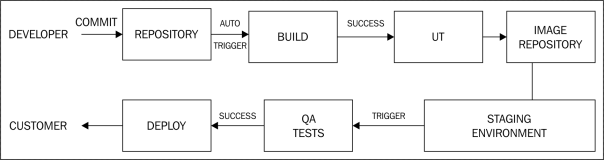
Continuous Integration refers to the process of making an executable or a Container image automatically after developer has done the UT and commit.

Continuous delivery refers to the process of taking the developer built image, setting up the staging environment for testing the image and deploying it successfully for production.

Following diagram show the different stages of CI, CD cycle.

cicd1

Following are some notes on the above diagram:

Continue reading CI, CD with Docker, Jenkins and Tutum

Ansible book – Technical review

I recently did a technical review for “Mastering Ansible” book by Jesse Keating. This book covers usage of Ansible for automation with practical examples. If anyone is interested, please look at the book. Pre-requisite is to have basic Ansible knowledge.

Ansible is similar to configuration management tools like Chef, Puppet. Agent-less architecture and short learning curve has made Ansible very popular in recent years. I have covered Ansible in few of my previous blogs. Ansible documentation is also pretty good to understand the basics.

Vagrant and Devstack

Openstack is a Cloud Orchestration software. Devstack script provides a development environment for Openstack. Devstack provides a great way to get hands-on with Openstack. I had written 2 earlier blogs on installing Devstack for Openstack Icehouse and Openstack Juno. I received multiple queries on installation related issues. To make this simple, I created Vagrant images for different Openstack releases. With this, VM creation and Devstack installation can all be done with a single script. In this blog, I will walk-thru the steps for the installation.

Vagrant makes it easier to create and share VMs and this makes Vagrant Devops friendly. For getting started on Vagrant, you can refer  to my earlier blog on Vagrant.

My Development environment:

Windows 7 machine with Virtualbox 4.3.28 and Vagrant 1.7.2.

Pre-requisites:

Following are typical issues I have seen folks facing when running Devstack:

  • There are some pre-requisite software that needs to be installed before running Devstack like setting up Python environment etc.
  • It is needed to setup VM with atleast 4G RAM and 8G hard disk. Otherwise, either Stacking will fail or instance creation will fail.

Continue reading Vagrant and Devstack

Netconf Python ncclient

In my earlier blogs, I had covered basics of Netconf and Yang and how to use Netconf to configure Cisco devices. Recently, I came across this Python ncclient library that simplifies the configuration/monitoring of Networking devices that supports Netconf. Using ncclient library, we can programmatically configure and monitor devices using Netconf. I also found out that Cisco Openstack Neutron plugin uses ncclient library to program the Nexus switches.

I have used Cisco Nexus 3k switch and Cisco VIRL NXOS switch for the examples in this blog.

In my earlier blog on configuring Cisco Nexus devices using Netconf, I covered the following netconf requests.

  1. “get” request using filter to display configuration.
  2. “edit-config” request to change configuration.
  3. “exec-command” to execute raw CLI requests.

In this blog, I will cover the above same tests using Python ncclient library. Even though the examples below are tried from Python interactive shell, the same can be executed as a Python program as well.

First step is to import the ncclient library and create a connection:

Continue reading Netconf Python ncclient