AI Code Review in CI: Codex Cloud vs GitHub Actions vs CodeRabbit

I have been thinking about how AI should fit into CI/CD. Not the part where a developer uses an AI coding agent before opening a pull request. That is important, but it is still developer workflow.

The part I wanted to test was what happens after the pull request is opened.

At that point, a normal CI pipeline already has several responsibilities:

  • Run tests.
  • Run static analysis.
  • Run security checks.
  • Possibly run dynamic or integration checks.
  • Give reviewers useful evidence before a human approves the change.

AI can fit into this, but it should not replace every deterministic tool. Linters, type checkers, test frameworks, dependency scanners, and security scanners are still valuable because they are repeatable. The interesting question is where an AI reviewer adds judgment: finding logical defects, interpreting tool output, spotting missing tests, and giving a reviewer a concise explanation of risk.

This first experiment focuses only on AI code review for pull requests. I compared three approaches:

  1. Hosted Codex Cloud code review
  2. A repository-owned GitHub Action using Codex
  3. CodeRabbit

The broader CI question โ€” static analysis, dynamic analysis, security tooling, and testing with AI interpreting the results โ€” is covered in Part 2: AI in CI Should Not Replace Your Tools. It Should Read the Evidence.

The Question I Wanted to Answer

The starting point was simple: if an AI tool can write code, can a different AI tool review it?

My instinct was that the reviewer should be independent from the coding agent. If the same model, prompt, and context wrote the change and then reviewed it, the review is less convincing. It may repeat the same assumptions. Independence matters.

But independence does not automatically require a dedicated code review product. A coding agent can also act as a reviewer if it is run with a different prompt, different constraints, and a review-only role.

So the actual comparison is not just “model vs product.” It is:

  • How much review quality comes from the model?
  • How much comes from the prompt and repository instructions?
  • How much comes from operational product features such as GitHub integration, inline comments, deduplication, review status, dashboards, and configuration?
  • How much control does the repository owner retain?
  • How much effort is required to make the workflow reliable?

The Test Repository

I used a real repository for the experiment:

Repository: smakam/doctor-parser

The repository setup was introduced in PR #1. The repository-owned inline-review publisher was added in PR #3. I then used controlled experiment PRs for the actual comparison rather than reviewing the setup changes themselves.

The application has a backend and frontend, including code paths for uploaded doctor nameboard extraction and review/correction flows. That gave us enough realistic surface area to test authorization and data-mapping bugs.

To keep the comparison fair, I used two controlled defects.

Defect 1: Authorization Check Inversion

In backend/app/routers/nameboard.py, the access check was changed from denying access when neither ownership identifier matched to denying access when the session identifier did match.

- if uploader != requesting_user_id and record.session_id != requesting_user_id:
+ if uploader != requesting_user_id and record.session_id == requesting_user_id:

The expected finding was a high-priority authorization issue: a requester whose ID differs from both the uploader and session ID could access or mutate another record, while a matching guest session could be incorrectly denied.

Defect 2: Incorrect Correction Mapping

In backend/app/services/review_service.py, the correction mapping for medical_registration_no was changed to write into qualifications.

- "medical_registration_no": "medical_registration_no",
+ "medical_registration_no": "qualifications",

The expected finding was a data integrity issue: submitting a registration-number correction would overwrite qualifications and leave the actual registration number unchanged.

These are useful defects for this kind of experiment because they are not formatting issues. They require the reviewer to understand intent, data flow, and security impact.

Shared Review Guidance

One important design choice was to make the review guidance repository-owned.

The shared policy lives in .github/review/code-review.md.

The policy tells the reviewer to prioritize:

  • Authorization and access-control regressions
  • PII exposure
  • Security-sensitive behavior
  • Logic defects introduced by the pull request
  • Incorrect persistence or field mapping
  • Missing validation that changes behavior

It also sets a threshold: only report actionable defects introduced by the PR. Do not produce a generic style review.

This is an important lesson from the experiment. The model matters, but the review role matters just as much. If you want an AI reviewer, you need to define what “good review” means for your repository.
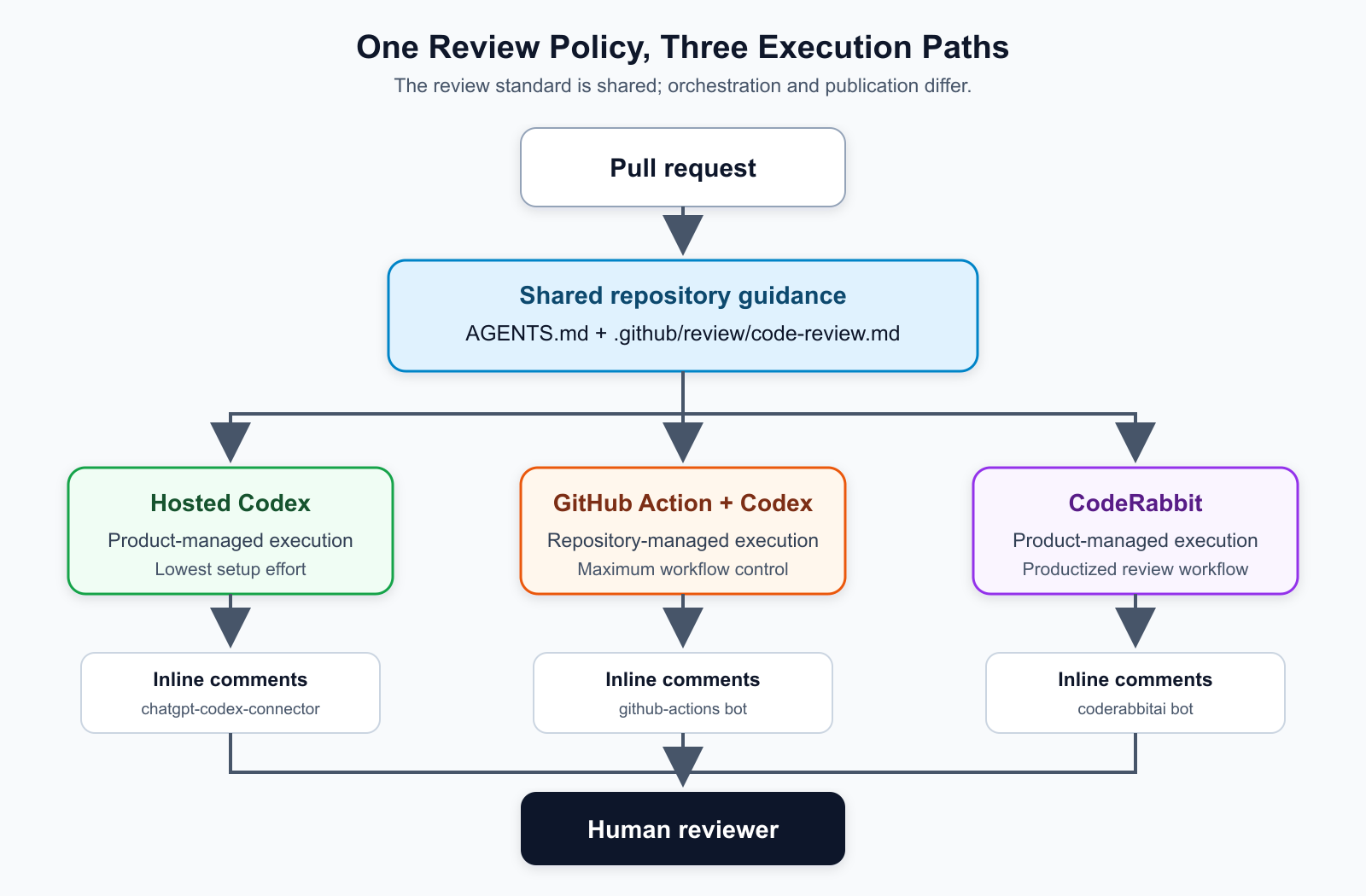
How the Three Review Paths Fit Together

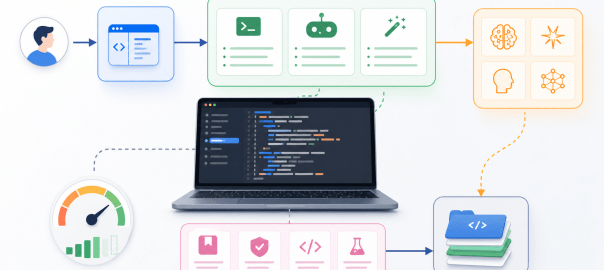
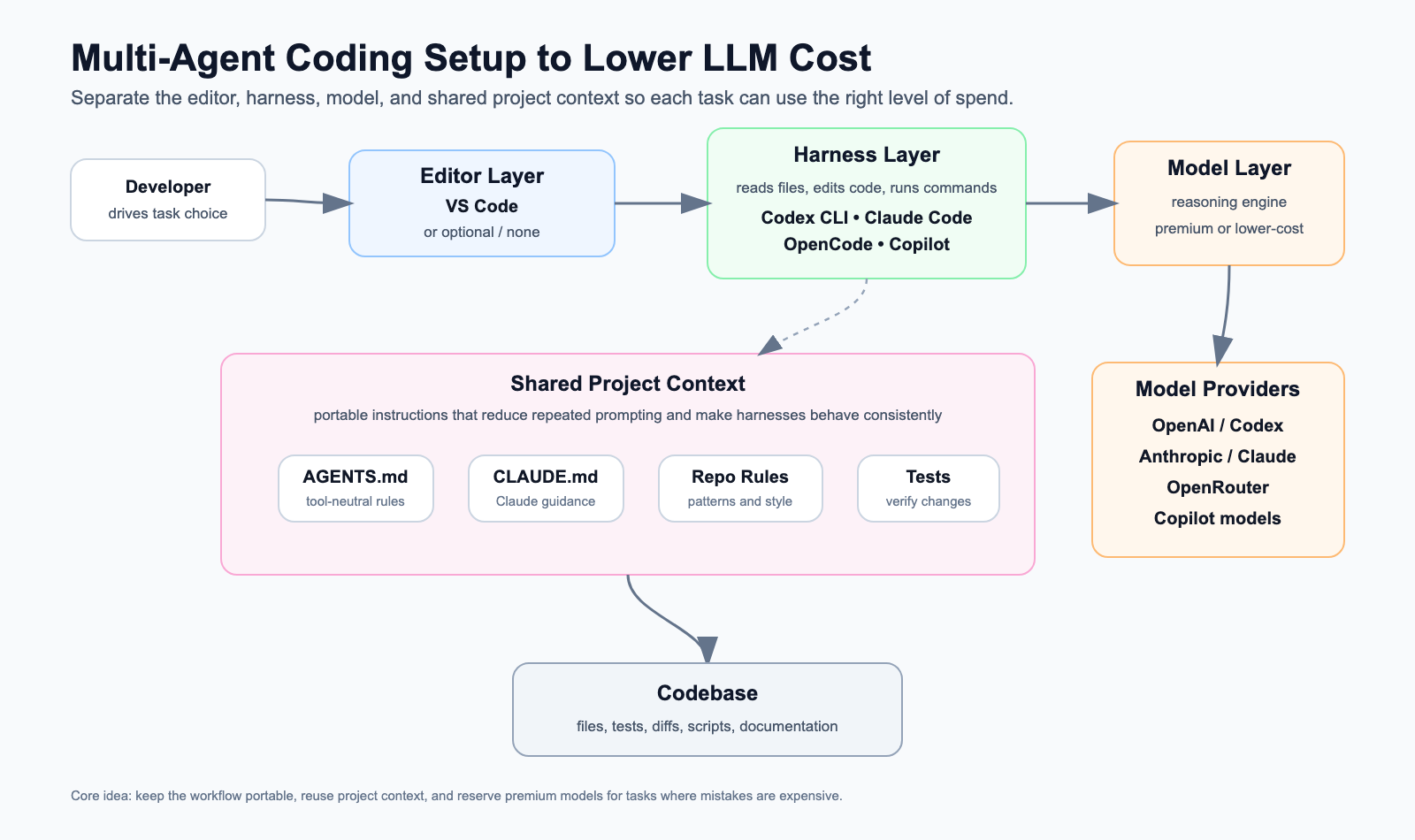
All three approaches start with the same pull request and the same repository-owned review policy. What changes is who runs the review and who owns the operational layer around it.

The review policy is shared. The execution and publication layers differ.

Option 1: Hosted Codex Cloud Code Review

The first approach used hosted Codex Cloud code review.

In this mode, the repository uses AGENTS.md as the durable instruction entry point. For PR reviews, AGENTS.md routes the reviewer to the shared review policy.

There is no GitHub Actions workflow involved in this path. The hosted Codex integration reviews the pull request and posts inline GitHub review comments.

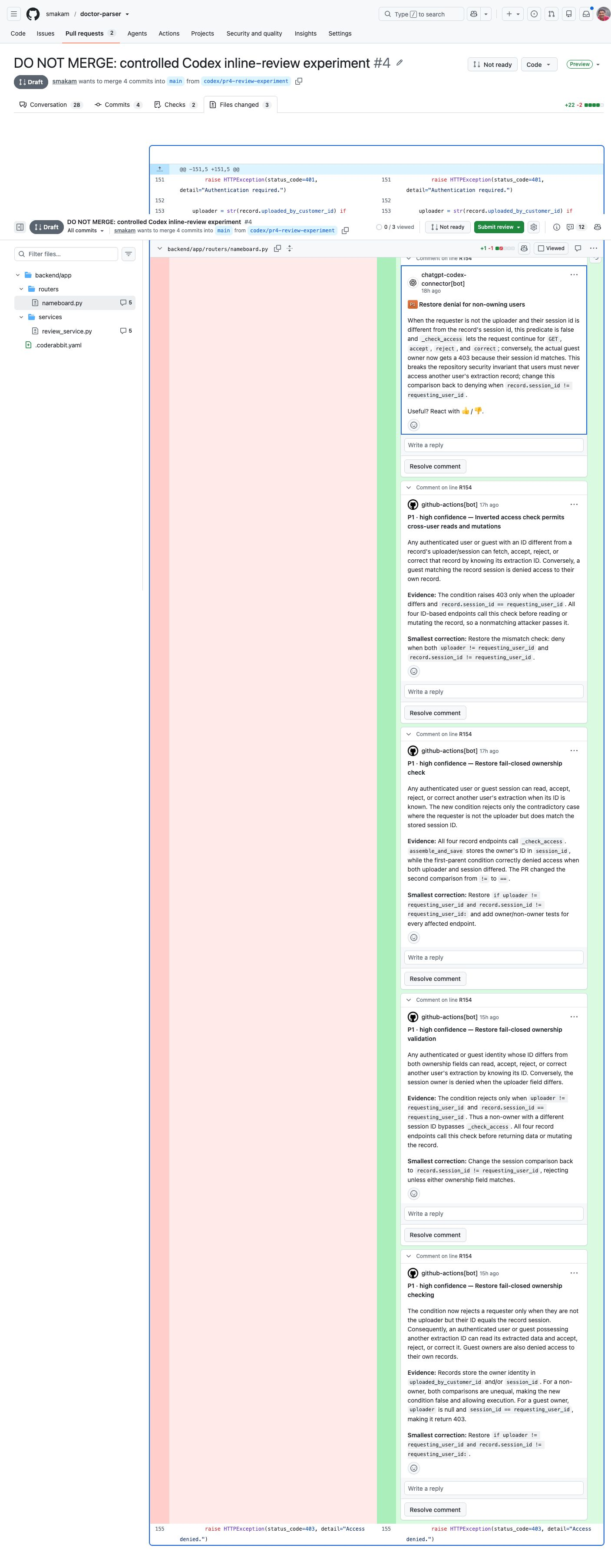
In our experiment, hosted Codex posted inline comments as chatgpt-codex-connector on PR #4.

Hosted Codex posted native inline findings on the changed code.
What Worked Well

The setup cost was low. Once the repository guidance was in place, the hosted reviewer could use that context and post inline comments directly on the PR.

It found the important seeded defects, including the authorization issue and the incorrect field mapping.

This is the simplest path if you want an AI reviewer without building a review pipeline.

What You Give Up

The tradeoff is control.

You do not own the workflow in the same way you own a GitHub Action. You have less control over:

  • Trigger rules
  • Output schema
  • Deduplication behavior
  • Review gating
  • Model/provider substitution
  • Combining the review with other CI signals
  • Custom publishing logic

For many teams, that may be fine. But if the long-term goal is a larger AI-assisted CI system, this approach may become only one review source rather than the central orchestration layer.

Option 2: Repository-Owned GitHub Action Using Codex

The second approach used a GitHub Action.

The GitHub Action does not use a separate definition of what good review means. It uses the same AGENTS.md and shared .github/review/code-review.md policy as hosted Codex. The Action prompt explicitly tells Codex to read AGENTS.md, which routes it to that common policy.

On top of that shared layer, the repository owns four Action-specific files:

This separation is deliberate. The shared code-review.md file defines review priorities, repository invariants, and the finding threshold. The Action-specific pr-review.md file defines how this particular automated run should execute and how it must structure its output. It does not duplicate the review policy.

The workflow is label-gated. A pull request is reviewed only when the codex-action-review label is present. It also runs again when a new commit is pushed to the PR branch, as long as the label remains present.

The action asks Codex to produce structured JSON with sections such as:

  • summary
  • findings
  • validation
  • coverage
  • uncertainty

That structure is not mainly for humans. It is an execution contract between the reviewer and the publishing script. The script needs predictable fields so it can decide which findings can become inline comments and which ones should fall back to a summary.

The GitHub Action then publishes review comments as github-actions[bot] on the same PR #4.

The repository-owned Action produced native inline comments after we built the publishing layer.

What We Had to Build

This approach required the most custom work.

To make the review useful, we had to build:

  • A review prompt with strict output expectations
  • A JSON schema for review results
  • Patch parsing to understand changed lines
  • Inline comment publishing through the GitHub API
  • Fallback summary behavior for findings that cannot be anchored to a changed line
  • Fingerprinting to avoid duplicate comments on repeated runs
  • A safer permission model where the trusted publisher code comes from the base branch

This is the biggest practical difference between a coding agent and a code review product. The model can identify findings, but the product workflow around those findings still has to exist somewhere.

The Fingerprint Problem

Fingerprinting is specific to the repository-owned Action path.

If a workflow runs every time a commit is pushed, the reviewer may find the same issue more than once. Without deduplication, the PR gets noisy. The same comment can be posted repeatedly.

The fingerprint solves that by creating a stable identity for a finding, usually based on fields such as:

  • File path
  • Line number
  • Rule or issue title
  • Finding body or normalized explanation

Before posting a new comment, the publisher checks whether an equivalent finding has already been posted. If yes, it avoids posting a duplicate.

Dedicated review products usually handle this operational detail internally. In the GitHub Action approach, the repository owner has to implement it.

What Worked Well

The GitHub Action found both controlled defects and posted inline comments.

It also gave the most control:

  • The model can be swapped.
  • The prompt can be changed.
  • The trigger policy can be changed.
  • The output schema is owned by the repository.
  • The review can later be combined with static-analysis, security, or test output.

This is the strongest architecture if the goal is a scalable, model-agnostic AI review pipeline.

What You Give Up

You own the operational burden.

Inline comments, deduplication, schema validation, retries, permissions, security hardening, and future maintenance are all your responsibility.

If you only want PR review, this may be too much. If you want an AI-assisted CI orchestration layer, this is probably the most extensible foundation.

Option 3: CodeRabbit

The third approach used CodeRabbit, a dedicated AI code review product.

For this experiment, CodeRabbit was configured with .coderabbit.yaml.

The configuration used:

  • The assertive review profile
  • Code guidelines pointing to .github/review/code-review.md
  • Path instructions for backend routers and services

The CodeRabbit configuration was first merged independently in PR #5. The clean CodeRabbit test was PR #6. It was created as a non-draft PR, with the configuration already present on main, and without the competing Codex Action label.

CodeRabbit posted inline comments as coderabbitai[bot].

CodeRabbit produced native inline comments in the clean, non-draft experiment.

What Worked Well

Under clean conditions, CodeRabbit found both seeded defects:

  • The authorization bypass in backend/app/routers/nameboard.py
  • The incorrect registration-number mapping in backend/app/services/review_service.py

The product experience is clearly stronger than a bare GitHub Action. CodeRabbit provides more than model output:

  • Inline comments
  • PR walkthroughs and summaries
  • Review status
  • Pre-merge checks
  • Configuration through YAML
  • Code guidelines
  • Path instructions
  • Knowledge-base behavior
  • Learnings
  • Autofix and docstring generation depending on plan
  • Unit test generation on higher plans
  • Analytics and reports
  • IDE and CLI review options
  • Integrations such as Jira and Linear
  • Linter and SAST tool support

That is the real value of a dedicated code review product. It is not just that it has a model. It packages the operational workflow around the model.

The Inconsistent Run

Before the clean PR #6 test, we had the noisier PR #4.

That PR was draft at one point, had hosted Codex comments, GitHub Action comments, manual CodeRabbit review commands, and CodeRabbit configuration changes inside the same PR.

In that noisy run, CodeRabbit selected the relevant files but did not publish the two expected actionable inline comments. Later, a CodeRabbit chat response acknowledged that the two issues should have been flagged.

I would not treat that as proof that draft PRs are unsupported or that CodeRabbit cannot find these defects. The cleaner conclusion is more limited:

CodeRabbitโ€™s behavior was inconsistent in a noisy mixed-bot/draft/config-changing experiment, but it worked correctly in a clean non-draft PR with configuration already present on main.

That distinction matters. The blog should not overclaim from a messy experiment.

Feature Comparison

AreaHosted Codex CloudGitHub Action + CodexCodeRabbit
Setup effortLowHighMedium
Inline commentsYesYes, after custom publisherYes
Comment authorchatgpt-codex-connectorgithub-actions[bot]coderabbitai[bot]
Uses shared repo guidanceYes, via AGENTS.md routingYes, via prompt and shared policyYes, via code guidelines/path instructions
Workflow ownershipMostly product-ownedRepository-ownedProduct-owned with YAML configuration
Model flexibilityLimited from repo owner perspectiveStrongestProduct-controlled
DeduplicationProduct-managedMust buildProduct-managed
Trigger controlProduct settings / manual invocationFull GitHub Actions controlProduct settings / comments / YAML
Best use caseLow-friction AI PR reviewScalable AI-assisted CI orchestrationProductized AI code review
Main weaknessLess pipeline controlOperational burdenLess transparency into internal model decisions
Controlled-defect resultFound the seeded defectsFound the seeded defectsFound the seeded defects in the clean PR; inconsistent in the noisy mixed-bot PR

This was a controlled comparison, not a complete market survey. GitHub Copilot Code Review, Cursor Bugbot, Greptile, Qodo, and other review products may be worth evaluating, but I did not include tools that I had not tested on the same defects.

Cost Comparison

The pricing models differ, so the right comparison is not just “which one is cheaper per review.” The better comparison is how predictable the cost is and what operational work is included.

Hosted Codex Cloud

Hosted Codex review cost depends on the userโ€™s ChatGPT/Codex plan and Codex credit model. It is not exposed as a simple repository-level per-PR API bill. OpenAIโ€™s current Codex pricing documentation includes cloud-based automatic code review in supported ChatGPT plans, while API-key usage is separately token-billed and does not include the hosted GitHub code-review feature.

For an individual or small team already using Codex, this can be the lowest-friction option because it fits into the existing product experience. For a formal engineering cost model, it is harder to forecast per PR than an API-backed GitHub Action.

GitHub Action + Codex

The GitHub Action path has two costs:

  1. GitHub Actions runner minutes
  2. Model API usage

Runner cost is usually not the dominant factor for a small review job. The model cost is the meaningful part.

For a concrete API-cost reference, the table below uses the public GPT-5-Codex rate of $1.25 per 1M input tokens and $10.00 per 1M output tokens, with cached input at $0.125 per 1M tokens. The model page now marks GPT-5-Codex as deprecated, so these numbers should be read as a reproducible reference calculation, not as a recommendation to start a new production workflow on that model.

The experiment workflow did not pin a model, and the estimates below are not a measurement of its actual bill. A production workflow should explicitly choose an available model and recalculate with that modelโ€™s current prices.

The cost per review depends on:

  • Size of the diff
  • Amount of repository context included
  • Prompt length
  • Whether cached input applies
  • Number and length of findings
  • Whether the workflow reruns on every push

For planning, here is a rough uncached model-cost estimate:

Review shapeInput tokensOutput tokensApprox model cost
Small PR50,0005,000About $0.11
Medium PR150,00010,000About $0.29
Large PR400,00025,000About $0.75

These calculations assume uncached input and use the GPT-5-Codex API token prices above. Actual cost can be lower with prompt caching and higher if the workflow loads excessive repository context or reruns aggressively.

At a monthly level, the model-cost side looks like this:

Monthly PR review runsSmall PR estimateMedium PR estimateLarge PR estimate
100 reviews/monthAbout $11About $29About $75
250 reviews/monthAbout $28About $72About $188
500 reviews/monthAbout $56About $144About $375

GitHub Actions runner cost is additional, but for a lightweight Linux review workflow it is usually smaller than the model cost unless the workflow is slow or run at very high volume.

This approach can be very cost-efficient if reviews are scoped carefully. But if the workflow loads too much context or reruns aggressively on every commit, cost and PR noise can grow quickly.

CodeRabbit

CodeRabbit is primarily seat-based, not line-of-code based.

Public pricing lists:

  • Pro: $24/mo/user billed annually
  • Pro Plus: $48/mo/user billed annually

The docs describe per-developer rolling review limits:

  • Pro: 5 PR reviews per developer per hour
  • Pro+: 10 PR reviews per developer per hour

The current docs list a limit of 300 files per review for both Pro and Pro+.

Each review run consumes review allowance, including automatic incremental reviews after pushes and manual review commands such as @coderabbitai review or @coderabbitai full review.

This means CodeRabbit is not priced like “X cents per line reviewed.” You are paying for a productized review workflow, plus plan limits and optional usage-based expansion.

For a five-developer team, the annual-billing subscription comparison is:

OptionMonthly platform/model cost for 5 developersWhat this does not include
CodeRabbit Pro$120/monthUsage add-ons, if needed
CodeRabbit Pro Plus$240/monthUsage add-ons, if needed
GitHub Action + Codex, 100 medium reviews/monthAbout $29/month model costBuild/maintenance time, GitHub runner cost
GitHub Action + Codex, 250 medium reviews/monthAbout $72/month model costBuild/maintenance time, GitHub runner cost
GitHub Action + Codex, 500 medium reviews/monthAbout $144/month model costBuild/maintenance time, GitHub runner cost

So the GitHub Action path can be materially cheaper in direct model spend. But that is not the full cost. The engineering time to build and maintain inline publishing, deduplication, schema validation, security hardening, retries, and future integrations is real.

CodeRabbit costs more than the raw model calls, but it includes the product workflow. That is the main economic tradeoff.

Configuration Lesson: Keep One Review Policy

The best scalable pattern is not to duplicate long instructions across every tool.

I would organize the repository around four linked layers:

The responsibilities should be different:

  • AGENTS.md: tells coding agents and hosted Codex where the project guidance and review policy live.
  • The shared review policy contains the durable, provider-neutral priorities and finding threshold.
  • The Action prompt contains the GitHub Action execution contract, including JSON output requirements.
  • The CodeRabbit YAML contains CodeRabbit-specific configuration, review profile, code-guideline references, and short path instructions.

The important point is that the CodeRabbit YAML should not become a second full review policy. But I also would not remove path instructions entirely. In the successful CodeRabbit run, its inline comments cited path instructions as the source. So the better approach is to keep path instructions short and targeted while keeping the broader policy in the shared review-policy file.

My Recommendation

If I were adopting this in a real engineering workflow, I would not choose only one answer for all teams.

For a small team that wants quick value, I would start with hosted Codex Cloud review or CodeRabbit.

For a team that wants a polished productized PR review experience, I would evaluate CodeRabbit seriously. Its value is not only the model. Its value is the review workflow around the model.

For a platform team building a broader AI-assisted CI system, I would invest in the GitHub Action approach. It is more work, but it becomes the orchestration point. The same pipeline can later combine:

  • AI code review
  • Static-analysis output
  • Security scan output
  • Test failures
  • Coverage changes
  • Dependency risk
  • Runtime or dynamic-analysis signals

Then AI can do what it is better at: interpret multiple signals, identify risk patterns, explain impact, and help the human reviewer make a better decision.

What I Would Not Do

I would not ask a generic coding agent to “review this PR” with no policy, no structured output, and no integration plan.

That may produce useful comments sometimes, but it is not a CI/CD architecture.

For AI review to work inside CI, it needs:

  • A clear review role
  • Repository-specific guidance
  • A defect threshold
  • Inline comments or structured output
  • Deduplication
  • A trigger model
  • A human review handoff
  • Cost controls
  • A way to evolve the policy over time

The model is only one part of the system.

Conclusion

This experiment changed how I think about AI code review.

A dedicated code review product is not necessarily better because it has a different model. A repository-owned coding agent workflow is not automatically better because it is more flexible.

The real tradeoff is operational.

Hosted Codex Cloud gives a low-friction review path. A GitHub Action gives maximum control and model flexibility, but requires custom engineering. CodeRabbit gives a productized review workflow, but the internal decision-making is less transparent and the buyer does not choose the exact model stack.

For now, my preferred direction for a scalable CI architecture is:

  1. Keep review policy in the repository.
  2. Use productized review tools where they reduce operational burden.
  3. Use a repository-owned action when orchestration, model flexibility, and CI integration matter.
  4. Treat AI as a reviewer and interpreter, not as a replacement for deterministic CI tools.

That fourth point is the bridge to the next article: how deterministic static analysis, security checks, and tests can produce evidence, and how AI can turn that evidence into a concise report for the final human reviewer. In that larger design, AI code review becomes one input to the decision rather than the decision itself.

References

Constrain, Adapt, Evaluate: Rethinking Coding Assessments for the AI Era

AI is becoming part of everyday software engineering. Developers use it to understand unfamiliar code, explore alternatives, generate tests, debug failures, and accelerate implementation. A technical assessment that asks candidates to pretend these tools do not exist is becoming less representative of the work we actually expect engineers to do.

But the opposite approach creates a different problem. If a candidate receives an unrestricted coding agent that can inspect the entire task, identify every defect, rewrite complete files, and prepare the final explanation, what exactly is the assessment measuring?

This tension led us to build SignalLoop, an AI-native candidate evaluator for software engineering hiring. SignalLoop is a collaboration between me, Sreenivas Makam, and my project partner, Ritesh Dhoot. The ideas, product direction, and implementation grew through our work together.

SignalLoop started as a proof of concept. It has grown into a runnable reference implementation with a hosted pilot, but it is not a production-grade hiring system. We are publishing it to demonstrate and test the assessment model, make the design discussable, and invite others to help improve itโ€”not to suggest that it is ready to be adopted unchanged for consequential hiring decisions.

SignalLoop includes the things any usable assessment platform needs: employer and candidate experiences, administration, invitations, test execution, dashboards, scoring, and evidence reports. Those components matter, but they are not the central idea.

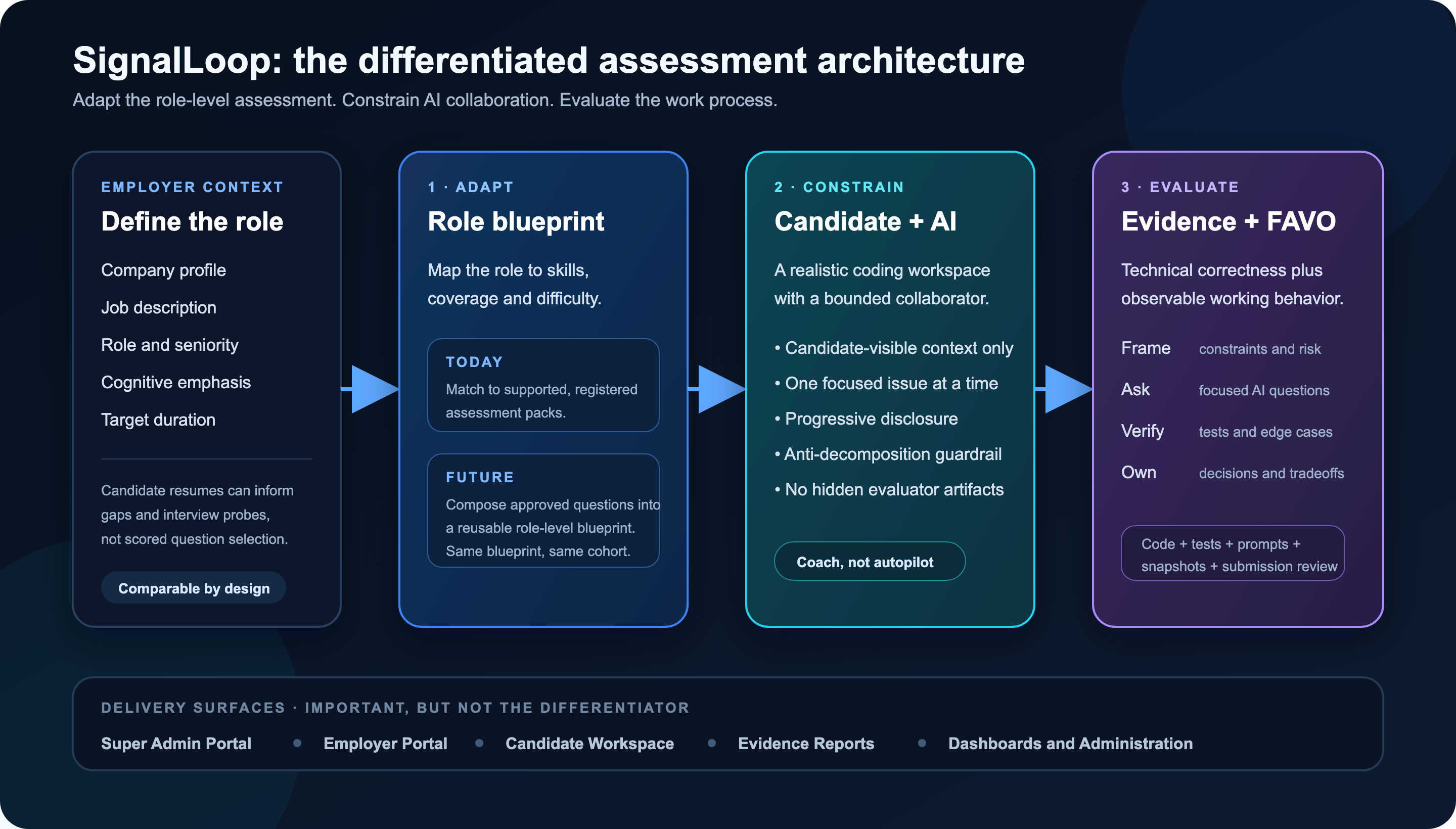
The differentiated part of SignalLoop rests on three design choices:

  1. Constrain AI collaboration without pretending AI does not exist.
  2. Adapt the assessment to the company and role while preserving comparability across candidates.
  3. Evaluate how the candidate worked, not only the final output.

We think of these as Constrain, Adapt, and Evaluate.

SignalLoop is also a work in progress. Some parts of this model are implemented and running today. Others are foundations or future directions that we are actively exploring. This article describes both, because the open questions are as important as the software already built.

The architecture behind the three ideas

The portals and dashboards are delivery surfaces around a deeper assessment loop:

Company context + role + JD
โ†“
Comparable role-level assessment blueprint
โ†“
Candidate works with a constrained AI collaborator
โ†“
Code, tests, prompts, snapshots and decisions are captured
โ†“
Technical evaluation + FAVO interpretation
โ†“
Evidence-based employer report

Each layer is designed to preserve a different kind of signal: relevance, candidate ownership, and evidence about the engineering process.

1. Constrain: allow AI collaboration without allowing AI delegation

There are two easy positions to take on AI in coding assessments.

The first is to prohibit it. That preserves the familiar assessment format, but it increasingly creates an artificial environment. A candidate may be evaluated under conditions that no longer resemble how the employer expects engineers to work.

The second is to allow an unrestricted assistant. That is realistic in one sense, but it can erase the distinction between a candidate who directs and verifies the work and one who delegates the entire task.

SignalLoop takes a position between these extremes. The candidate receives an AI collaborator inside the assessment workspace, but that collaborator is designed to be a coach, not an autopilot.

The assistant can:

  • explain candidate-visible code and public test output,
  • clarify concepts,
  • suggest a general debugging approach,
  • help reason through one candidate-identified issue,
  • compare tradeoffs the candidate has already framed,
  • provide bounded implementation help as the candidate demonstrates understanding.

It cannot:

  • enumerate every defect in the assessment,
  • produce the complete solution,
  • rewrite whole files,
  • reconstruct hidden tests,
  • reveal scoring internals or evaluator material,
  • make the candidate’s design decisions,
  • write the final explanation on the candidate’s behalf.

This boundary is enforced in multiple layers. A deterministic pre-gate catches obvious protected requests. A policy-classification component evaluates the intent of the interaction. A separate response-generation component produces help within the allowed boundary. Progressive disclosure lets the assistant become more specific when the candidate has identified the problem and articulated an approach.

SignalLoop also applies an anti-decomposition rule. A candidate should not be able to turn one disallowed request into a full solution by splitting it into a sequence of smaller prompts such as โ€œlist every issue,โ€ followed by โ€œgive me the code for each issue,โ€ followed by โ€œwrite every missing test.โ€ The system considers the combined effect of the interaction, not only each message in isolation.

There is another boundary that matters just as much: the AI receives only candidate-visible information. Hidden tests, seeded issue lists, reference solutions, evaluator notes, and scoring internals are never part of the assistant’s context.

This constrained collaborator is implemented today. It is not perfect, and policy evaluation will require continued testing and calibration, but it lets us ask a more useful question than โ€œDid the candidate use AI?โ€

The better question is:

How did the candidate divide responsibility between themselves and the AI?

A prompt such as โ€œFind every bug and fix the projectโ€ tells us something different from โ€œThe duplicate-email test is failing; I think normalization is missing. What should I inspect before I change the behavior?โ€

The interaction itself becomes evidence.

2. Adapt: tailor the assessment to the role, not arbitrarily to each candidate

Most engineering assessments face a relevance problem. A single generic coding exercise is easy to administer and compare, but it may be only loosely related to the role. A fully personalized assessment may be more relevant, but it can destroy comparability.

SignalLoop’s design principle is:

Adapt across companies and roles. Preserve consistency within a hiring cohort.

The intended role-level blueprint is derived from inputs that belong to the hiring decision:

Company context
+ hiring area
+ role and seniority
+ job description
+ cognitive areas to emphasize
+ target duration
โ†’ role-level assessment blueprint

Company context matters because the same job title can imply very different engineering work.

A backend engineer at a fintech company may need stronger evidence around authorization, auditability, data boundaries, and failure handling. A backend engineer at an AI-infrastructure company may need more emphasis on control-plane APIs, observability, reliability, deployment tradeoffs, and safe AI-assisted debugging.

The JD may be similar, but the assessment emphasis should not necessarily be identical.

Once the employer reviews and approves a blueprint, however, every candidate for that role should receive the same scored assessment. This creates a stable evidence surface for comparison. An employer can create a new version of the role assessment, but SignalLoop should not silently generate an easier or harder scored task for each applicant.

Candidate resumes can still add value. They can inform:

  • skill gaps to probe during an interview,
  • claims that require validation,
  • candidate-specific follow-up questions,
  • report caveats and interviewer notes.

They should not initially determine:

  • which scored questions the candidate receives,
  • the scoring rubric,
  • the time allocation,
  • the required coverage for the role.

This distinction is important. Personalization is not automatically fairness. A candidate-specific test may look intelligent while making employer comparisons less defensible.

What exists today

SignalLoop currently implements guided role matching. An employer can provide the role, JD, seniority, team or domain context, expected AI usage, and an optional resume. The system maps the inputs to a versioned skill taxonomy, recommends the closest supported assessment pack, and explains:

  • directly tested skills,
  • partially tested skills,
  • unsupported skills,
  • the rationale for the match,
  • suggested interview follow-ups.

The current executable coverage is deliberately narrow: SignalLoop can recommend a Standard or Advanced FastAPI assessment. If a frontend or data-engineering JD is outside current executable coverage, the product says so instead of pretending that a backend score evaluated those skills.

The project therefore demonstrates the role-matching model today; it does not yet claim to be a complete dynamic question composer. The consolidated roadmap later in this article explains that next layer.

3. Evaluate: measure the engineering process, not only the output

Traditional coding assessments typically emphasize the final artifact:

  • Did the tests pass?
  • Is the code readable?
  • Was the task completed on time?
  • What was the final score?

Those signals remain important. AI-assisted engineering, however, introduces additional questions.

  • Did the candidate understand the problem before changing code?
  • Did they recognize ambiguity and risk?
  • Did they ask AI focused questions or delegate wholesale?
  • Did they verify AI-assisted changes?
  • Did they add meaningful tests?
  • Can they explain and defend the final result?

SignalLoop organizes this process evidence through FAVO: Frame, Ask, Verify, Own.

Frame

Did the candidate understand the problem, constraints, risks, and ambiguous requirements? Did their implementation reflect deliberate prioritization and product judgment?

Ask

How did the candidate use AI? Were the questions focused and grounded in an identified behavior, or did the candidate attempt to outsource the complete solution?

Verify

Did the candidate run tests, add tests, inspect edge cases, revisit assumptions, and validate changes after receiving AI assistance?

Own

Could the candidate explain what changed, why they made particular tradeoffs, what remains uncertain, and what they would improve next?

Candidates do not manually write a FAVO score. SignalLoop derives the interpretation from captured evidence such as:

  • code snapshots,
  • public and hidden test runs,
  • candidate-written tests,
  • AI conversations and policy redirects,
  • large code-paste signals,
  • final submission-review answers,
  • the consistency between the explanation and submitted code.

The Engineering Evidence Report combines this with the technical evaluation. FAVO is not intended to replace correctness, and it is not a personality or psychometric score.

The technical score tells the employer what worked. FAVO helps explain how the candidate got there and whether the process is trustworthy.

An initial deterministic version of this interpretation is implemented today. Some signals are necessarily simple proxies: prompt counts, test runs, candidate test files, feature behavior, hidden-test status, and submission-review completeness. Improving and validating those mappings is part of the consolidated roadmap below.

What exists today and what comes next

Rather than scatter the project status across the three ideas, here is the boundary in one place.

Constrain

Implemented today: A constrained assistant, candidate-visible context boundary, policy classification, progressive disclosure, anti-decomposition behavior, interaction logging, and evidence capture.

Next: Stronger adversarial testing, policy-evaluation datasets, progressive-disclosure calibration, and better measures for distinguishing productive coaching from disguised delegation.

Adapt

Implemented today: Guided role matching from role, JD, seniority, team or domain context, and optional resume information to the closest registered assessment pack. The result includes tested, partially tested, and unsupported skill coverage. The question-bank governance foundation also supports provenance, draft review, and approval.

Next: Compose role-level assessments from approved and calibrated questions:

Role/company/JD/cognitive requirements
โ†“
Required assessment slots
โ†“
Approved question bank
โ†“
Reviewable role-level blueprint
โ†“
Employer approval or same-slot swaps
โ†“
Reusable assessment for the candidate cohort

This requires connecting the question bank to employer blueprint creation, candidate delivery, and evidence-report scoring while preserving the same scored assessment for candidates in the same cohort.

Evaluate

Implemented today: Deterministic technical scoring, public and hidden test evidence, AI-interaction evidence, submission review, timeline capture, and an initial FAVO interpretation.

Next: Better evidence mappings, evaluator calibration, longitudinal validation, clearer evidence limits, and research into which signals are reliable, useful, fair, and resistant to superficial gaming.

Seeing the complete workflow

The short demo below shows the current end-to-end SignalLoop experience: super-admin visibility, employer assessment setup, the candidate workspace with constrained AI, and the resulting evidence report.

What SignalLoop deliberately does not claim

Being explicit about the boundaries is important.

SignalLoop does not treat AI use itself as misconduct. It evaluates how the candidate uses it.

It does not allow the embedded assistant to complete the assessment or access evaluator-only artifacts.

It does not currently give every candidate a different scored test. The role-level assessment is intended to remain comparable across the cohort.

It does not convert unsupported skills into implied evidence. If the current assessment cannot test an area, the report should identify the gap.

It does not reduce a hiring decision to one number. The report is evidence for employer review, not an autonomous hiring decision.

And it does not yet implement the entire adaptive question-composition vision described here.

From proof of concept to production-grade system

The distinction between a working reference implementation and a production system matters, especially in hiring.

SignalLoop began as a POC to explore whether constrained AI collaboration and process evidence could produce a better assessment signal. The current system demonstrates the complete workflow: employers can create invites, candidates can work in a browser with a constrained assistant, tests and interactions are captured, and evidence reports can be generated.

That proves the product loop. It does not complete the production journey.

A production-grade version would still need work in areas such as:

  • isolated and hardened execution infrastructure for untrusted candidate code,
  • private, calibrated assessment content rather than public demo packs,
  • production authentication, secrets management, monitoring, backups, and incident response,
  • explicit data-retention, consent, privacy, and compliance policies,
  • accessibility, abuse testing, rate-limit hardening, and operational support,
  • evaluator calibration and studies of reliability, validity, bias, and adverse impact,
  • question effectiveness analytics and ongoing assessment-version governance,
  • human review processes appropriate for consequential hiring decisions.

Some technical scaffolding and product foundations for these areas exist in the repository. Others remain design and validation work. We would not recommend using the current project as an autonomous hiring system, and we do not believe any evidence report should replace accountable human judgment.

How you can help

The project is a working reference implementation and a foundation for further exploration. The roadmap above is intentionally open. We are particularly interested in privacy, fairness, question effectiveness, assessment versioning, policy evaluation, and methods for evaluating AI-assisted engineering without rewarding superficial activity.

SignalLoop is available on GitHub. It is joint work by Sreenivas Makam and Ritesh Dhoot, and the next phase of the project is intentionally open to a wider community of contributors and critics.

If you are working on technical hiring, assessment design, AI safety, developer tools, or evidence-based evaluation, we would value your feedback. Contributions, critique, experiments, question-bank ideas, evaluator studies, and help with any of these future directions would be genuinely appreciated.

The central idea is simple:

Do not ask whether candidates used AI. Design the assessment so that their use of AI produces meaningful evidence.

Constrain the collaboration. Adapt the assessment. Evaluate the process.

Try It Yourself

Explore the hosted SignalLoop application to experience the assessment flow firsthand. SignalLoop is fully open sourceโ€”you can inspect the implementation, run it locally, contribute, or adapt it to your own hiring process in the GitHub repository.

Prescribed Enterprise AI Architectures for Small, Mid-Size, and Large Organizations

The first article in this series, Enterprise AI Adoption: Requirements for Security, Governance, and Scale, defined the problem: enterprises consume AI through coding tools, standalone hosted applications, custom agents, and enterprise knowledge systems, but need consistent controls across identity, credentials, data, cost, providers, and operations.

The second article, A Reference Architecture for Governed Enterprise AI, translated those requirements into architectural building blocks and described the available implementation choices.

This article makes the opinionated decisions. It recommends what to implement, what to defer, and which representative products to consider for three enterprise profiles.

Product recommendations reflect the market as of July 2026 and should be revalidated before implementation.

Scope and Assumptions

Company size is the primary organizing variable because adding industry, geography, regulation, data sensitivity, cloud provider, and AI maturity as independent dimensions would make a simple prescription impossible.

The recommendations assume a software-enabled company with moderate data sensitivity, one primary public cloud, an existing corporate identity provider, both employee and custom AI usage, and a preference for managed services unless scale or control justifies ownership.

Size remains a proxy. Move to the next architecture tier when regulation, data sensitivity, AI expenditure, workload volume, geographic isolation, or operational complexity exceeds what is typical for the company profile.

ProfileWorking definitionOperating reality
Small5โ€“50 engineersNo dedicated AI platform team; CTO or engineering lead owns AI
Mid-size50โ€“500 engineersEmerging platform team; shared security and FinOps responsibilities
Large500+ engineersDedicated platform, security, data, and FinOps teams; multiple business units

Engineering scale is more useful than total employee count because it better predicts the number of custom workloads and the organizationโ€™s ability to operate platform components.

Small Enterprise: Prefer Simplicity

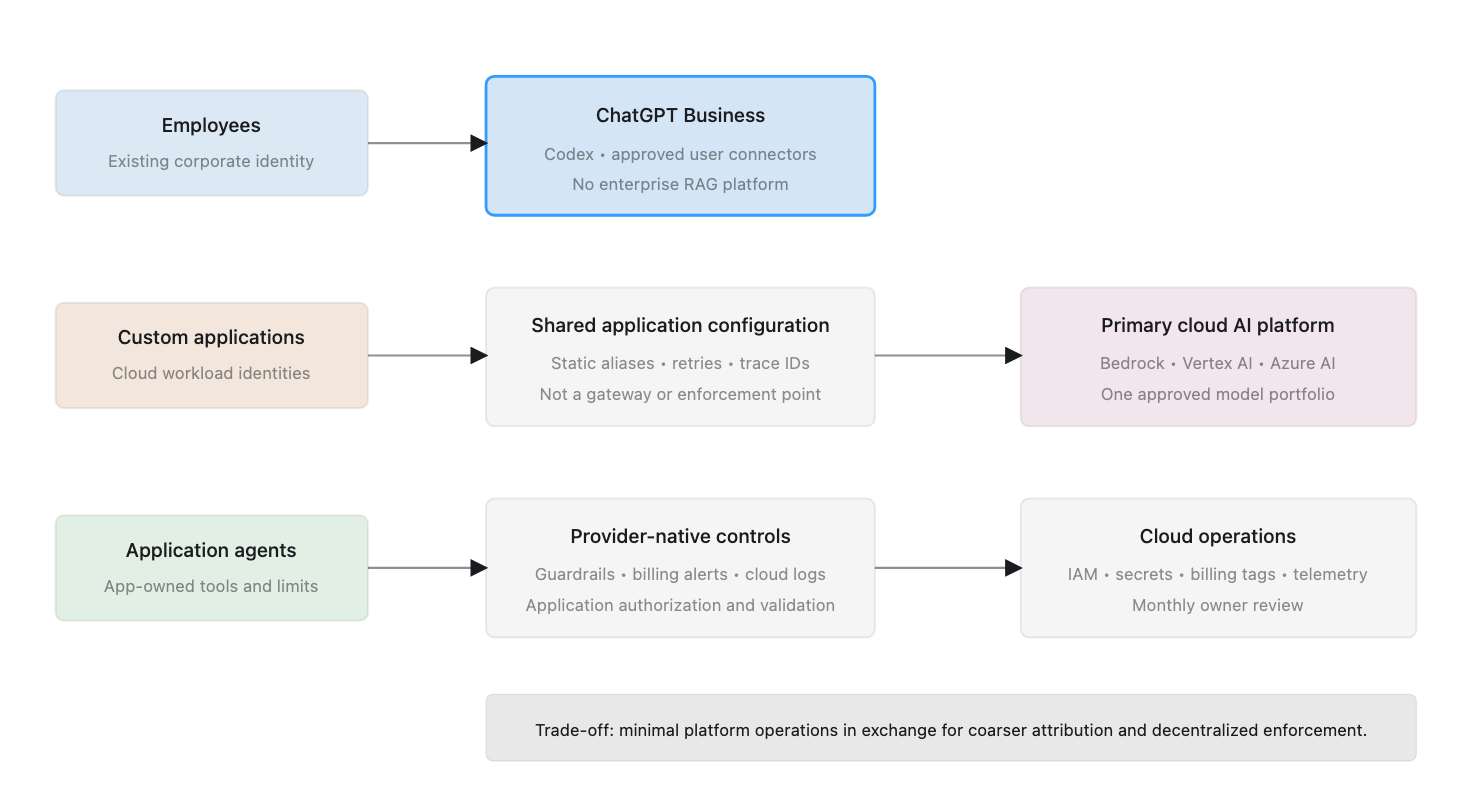
The small-enterprise architecture deliberately accepts coarser attribution and fewer centralized controls in exchange for low operating overhead.

Prescription

CapabilityRecommendation
Employee AIChatGPT Business
Coding assistantCodex under the managed company workspace
Human identityExisting Google Workspace or Microsoft Entra ID
Workload identityPrimary-cloud IAM and secrets services
Model inferenceExisting cloudโ€™s managed AI platform
Model gatewayNone initially
Model selectionStatic aliases in shared application configuration
RoutingNo dedicated intelligent router
GuardrailsProvider-native controls plus application validation
Agent frameworkApplication-selected SDK; no enterprise standard
Agent runtimeExisting application infrastructure
KnowledgeApproved user connectors; no enterprise RAG platform
ObservabilityCloud telemetry and application traces
FinOpsProvider budgets, cloud billing, and monthly review
Self-hosted inferenceDo not implement

Hosted AI and coding

Use ChatGPT Business as the company-managed employee workspace and Codex as the standard coding assistant. Codex is included in ChatGPT Business, although usage limits and credit options depend on the plan. This reduces unmanaged subscriptions and keeps general AI and coding under one commercial and administrative relationship. OpenAI documents current Codex plan availability here.

Use SSO where available, central billing, approved data terms, and an explicit user-removal process. ChatGPT Business supports SSO but does not provide SCIM directory synchronization, so lifecycle management remains partly administrative. OpenAI documents the Business and Enterprise identity differences here.

Model access without a gateway

Applications call the primary cloudโ€™s managed model platform directly using distinct workload identities. AWS-centric organizations use Amazon Bedrock, Google Cloud organizations use Vertex AI, and Microsoft-centric organizations use Azure AI Foundry. A company without meaningful cloud alignment may use a direct OpenAI or Anthropic API organization.

A shared client library may standardize model aliases, metadata, timeouts, retries, and trace identifiers. It is not a gateway and cannot guarantee centralized enforcement.

Attribution is therefore based on separate cloud projects or accounts, workload identities, billing tags, provider reports, and application logs. This is adequate while the workload portfolio is small, but it may not support reliable per-user or per-feature allocation.

Routing and guardrails

Use static model aliases such as general-fast, general-quality, and sensitive-approved. A centrally maintained configuration maps each alias to an approved cloud model deployment. Cloud IAM should restrict workloads to eligible deployments where supported.

Use provider-native guardrails and application controls. The application remains responsible for user authorization, tool permissions, structured output, agent limits, and approval of consequential actions.

Agents and knowledge

Do not standardize an agent framework yet. The first application can use an appropriate SDK and run within existing application infrastructure. Every agent still needs narrow tool permissions, least-privilege credentials, step and cost limits, and human approval for irreversible actions.

Do not build an enterprise knowledge platform. Employees can use administrator-approved connectors in the hosted workspace, subject to source permissions. Build retrieval only for a product workflow with a measurable requirement.

Graduation trigger

Introduce a managed gateway when the organization has several production AI applications, more than one provider, duplicated integrations, shared credential problems, or a need for centralized budgets, guardrails, routing, and detailed attribution.

Mid-Size Enterprise: Introduce a Shared Control Plane

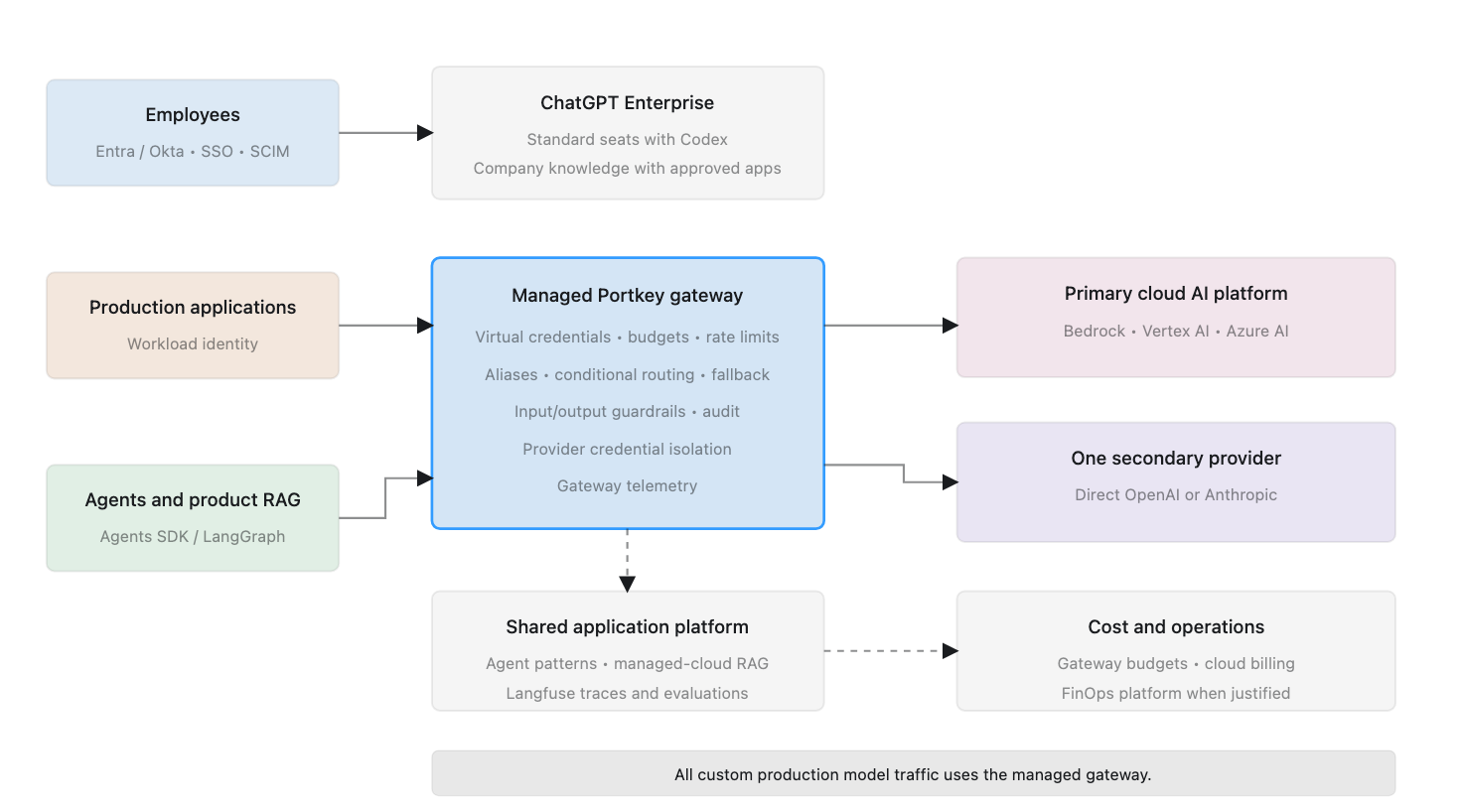
The mid-size architecture requires all custom production model traffic to pass through a dedicated gateway. The platform remains primarily managed because the organization has an emerging platform team rather than a large AI infrastructure organization.

Prescription

CapabilityDefault recommendationAlternative
Employee AI and codingChatGPT Enterprise standard seats, including CodexCodex-only seats for restricted populations
Human identityEntra ID or Okta with SSO and SCIMGoogle Workspace
Workload identityCloud IAM plus gateway virtual credentialsVault where already established
Model gatewayManaged PortkeySelf-hosted LiteLLM
InferencePrimary cloud model platform plus one direct providerTwo approved cloud platforms
RoutingGateway aliases, conditional rules, and fallbackLiteLLM routing
GuardrailsProvider-native, Portkey, and application controlsCheck Point Lakera for higher-risk workloads
Agent frameworkOpenAI Agents SDKLangGraph for durable workflows
Agent runtimeExisting container or serverless platformDedicated runtime when volume justifies it
KnowledgeCompany knowledge in ChatGPT plus application RAGEnterprise search when justified
ObservabilityPortkey plus Langfuse CloudLiteLLM plus self-hosted Langfuse
FinOpsGateway budgets plus cloud billingFinout or CloudZero
Self-hosted inferenceGenerally deferWorkload-specific exception

Enterprise workspace

Use standard ChatGPT Enterprise seats for employees and engineers. A standard seat includes ChatGPT and Codex and offers the greatest flexibility. Codex-only seats should be reserved for people who need coding access but should not receive the broader ChatGPT workspace. OpenAIโ€™s current Enterprise documentation describes both seat types and their access boundaries.

Use enforced SSO, SCIM, groups, and role-based access. Separate groups should cover general AI users, Codex users, AI developers, production operators, platform administrators, and sensitive-data users.

Gateway and model portfolio

Use managed Portkey as the default gateway. It provides multi-provider access, virtual credentials, routing, budgets, rate limits, retries, circuit breaking, observability, and integrated guardrails without requiring the emerging platform team to operate the full gateway stack. Portkey documents these gateway capabilities and deployment options.

Use the primary cloud model platform as the main backend and one approved direct provider as a secondary path. All production applications authenticate to the gateway; provider credentials remain with the platform team.

Use logical model aliases, policy restrictions, availability fallbacks, and controlled model-version rollout. Do not add a dedicated intelligent router until expenditure is material and evaluation data can prove that dynamic routing preserves quality.

Guardrails, agents, and tools

Apply provider-native controls, gateway input/output guardrails, and application-specific rules. Portkey guardrails support checks and actions on gateway requests and responses. Add Check Point Lakera only for public-facing or higher-risk workloads that justify specialized prompt-injection and data-leakage protection.

Adopt the OpenAI Agents SDK as the default for straightforward tool-using agents. Allow LangGraph for durable, stateful, resumable, or human-in-the-loop workflows. Run agents on the existing container or serverless platform and provide shared standards for identity, tool registration, MCP servers, traces, execution limits, approvals, and action logs.

Knowledge, observability, and FinOps

Use company knowledge in ChatGPT Enterprise with administrator-approved apps for employee search. Build a shared managed-cloud retrieval foundation only when multiple production applications need common ingestion, permissions, citations, and evaluation.

Use Portkey for gateway-level telemetry and Langfuse Cloud for multi-step traces and evaluations where deeper analysis is required. Use gateway budgets for enforcement and the existing cloud-finance process for reporting. Add Finout or CloudZero when model and supporting cloud costs span providers and require formal allocation or forecasting.

Graduation trigger

Move to the large-enterprise pattern when the company needs regional isolation, multiple business-unit control, formal chargeback, private deployment, dedicated AI security, a shared agent runtime, or self-hosted inference.

Large Enterprise: Central Policy, Federated Delivery

The large-enterprise architecture supports multiple providers, regions, business units, and control teams. Policy and visibility are centralized, while application ownership remains federated.

Prescription

CapabilityDefault recommendationAlternative
Employee AI and codingChatGPT Enterprise standard seats, including CodexCodex-only seats for restricted populations
IdentityEntra ID or Okta with SSO, SCIM, groups, and RBACExisting enterprise IdP
Workload identityCloud workload federation plus gateway virtual keysVault where standardized
Model gatewayRegional self-hosted LiteLLM EnterpriseManaged or self-hosted Portkey Enterprise
InferenceCloud AI platforms plus direct OpenAI and AnthropicAdditional approved providers
RoutingGateway policy routing plus evaluated intelligent routingApplication-directed routing
GuardrailsProvider controls, gateway policy, and Check Point LakeraNVIDIA NeMo Guardrails
Agent frameworkOpenAI Agents SDK plus LangGraph where justifiedApproved framework by exception
Agent runtimeShared Kubernetes-based runtimeManaged cloud agent runtime
KnowledgeCompany knowledge in ChatGPT plus shared product RAGGlean for dedicated enterprise search
ObservabilitySelf-hosted Langfuse Enterprise plus OpenTelemetryManaged enterprise platform
FinOpsCloudZeroFinout
Self-hosted inferencevLLM for selected stable workloadsNVIDIA NIM

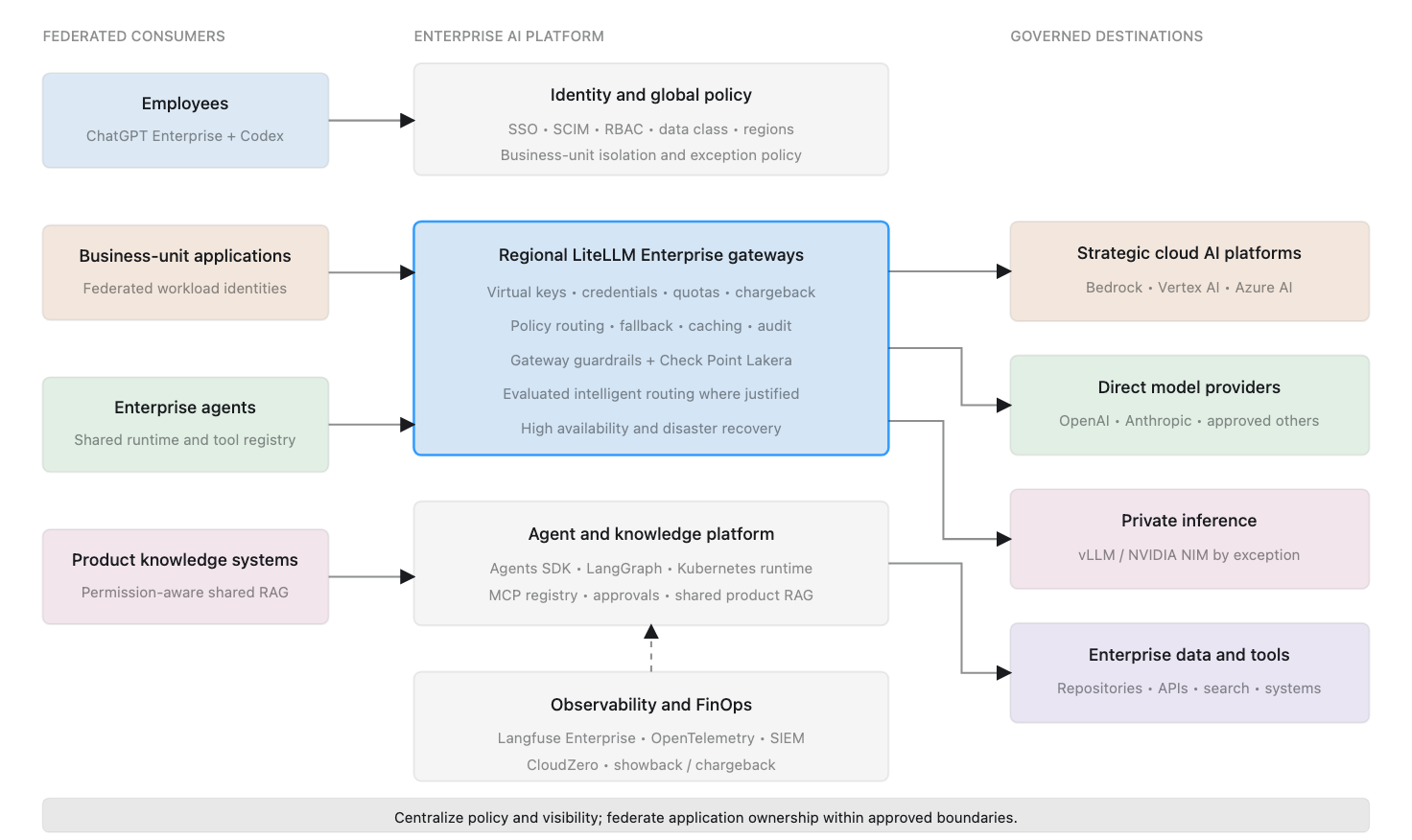
Regional gateway and inference platform

Deploy LiteLLM Enterprise in approved regions as the standard model-access plane. Each deployment should provide high availability, business-unit isolation, local credentials, virtual keys, budgets, quotas, model aliases, audit records, guardrail integration, and approved fallback policies. LiteLLM documents virtual-key, authentication, SSO, and enterprise gateway capabilities in its product overview.

Applications should not receive direct provider credentials except through documented exceptions. The model portfolio can include strategic cloud AI platforms, direct OpenAI and Anthropic access, selected inference providers, and self-hosted open-weight models for justified workloads.

Expose internal capability aliases such as enterprise-fast, enterprise-reasoning, enterprise-code, regulated-region, and open-weight-private rather than embedding provider model names throughout applications.

Routing and guardrails

Apply policy routing to every request. Region, data classification, business unit, provider approval, and budget determine the eligible model set before performance or cost optimization.

Use intelligent routing only for workloads with evaluation datasets and measurable quality thresholds. RouteLLM or another router may select among eligible models, but the gateway remains the enforcement point.

Use four guardrail layers: provider-native safety, gateway policy, Check Point Lakera for high-risk workloads, and application business controls. Measure false positives, latency, and bypass resistance rather than treating guardrails as absolute security boundaries.

Agent platform

Provide an approved framework portfolio and a shared runtime. Use the OpenAI Agents SDK for the default tool-using pattern and LangGraph for durable workflows. The runtime should provide workload and delegated identity, queues, resumability, isolated code execution, an approved tool and MCP registry, secrets injection, limits, approvals, traces, cancellation, and kill switches.

The gateway governs model inference. The agent runtime governs execution and tools. Deterministic services should verify authorization and execute consequential actions proposed by a model.

Enterprise knowledge

Use company knowledge in ChatGPT Enterprise with approved apps for employee search and synthesis. This is a ChatGPT feature, not a separate product and not a backend for custom applications.

Operate a shared permission-aware RAG platform for product applications. It should provide connectors, ingestion, permission synchronization, deletion, retrieval APIs, citations, evaluation, and regional isolation.

Consider Glean when dedicated cross-enterprise search is a strategic requirement that company knowledge in ChatGPT does not satisfy. Do not deploy both without defining their distinct user populations and responsibilities.

Observability and FinOps

Use self-hosted Langfuse Enterprise for traces, evaluations, prompt management, datasets, RBAC, retention policies, and audit logs. These self-hosted enterprise controls are described in Langfuseโ€™s deployment and pricing documentation. Export platform telemetry through OpenTelemetry and security events to the enterprise SIEM.

Use gateway budgets for real-time enforcement and CloudZero for allocation, anomaly detection, forecasting, unit economics, and showback or chargeback across inference and supporting infrastructure.

Self-host models through vLLM only for workloads with stable demand, demonstrated economics, suitable model quality, and an operations team able to own serving and upgrades.

How the Three Architectures Progress

CapabilitySmallMid-sizeLarge
Employee workspaceChatGPT BusinessChatGPT EnterpriseChatGPT Enterprise with enterprise policy
CodingCodexCodex in standard seatsCodex with role and spend controls
GatewayNoneManaged PortkeyRegional LiteLLM Enterprise
ProvidersOne primary platformPrimary plus one secondaryGoverned multi-provider portfolio
RoutingStatic configurationGateway rules and fallbackPolicy plus evaluated intelligent routing
GuardrailsProvider plus applicationProvider, gateway, applicationProvider, gateway, dedicated security, application
AgentsApplication-selected SDKStandard SDK and shared patternsFramework portfolio and shared runtime
KnowledgeUser connectorsCompany knowledge plus application RAGCompany knowledge plus shared product RAG
ObservabilityCloud and application logsPortkey plus Langfuse CloudSelf-hosted Langfuse Enterprise plus OTel
FinOpsBudgets and monthly reviewGateway budgets and optional FinOps platformCloudZero with showback or chargeback
Self-hosted inferenceNoUsually noSelected workloads only

When Size Is Not Enough

Use a stronger architecture tier when any of the following applies:

  • Regulated or highly sensitive data
  • Mandatory data residency or private networking
  • High AI expenditure or customer-facing AI cost of revenue
  • Many autonomous agents with consequential tools
  • Multiple cloud providers or geographic regions
  • Formal business-unit isolation or chargeback
  • Strict availability requirements
  • A large portfolio of production AI applications

A small healthcare or financial company may need large-enterprise security controls. A large company with limited AI use may begin with the mid-size platform. Size determines the default, not the exception policy.

Final Recommendation

The prescribed progression is intentionally conservative:

  • Small: one managed employee workspace, Codex, one model platform, no gateway, no enterprise RAG, and no dedicated FinOps platform.
  • Mid-size: ChatGPT Enterprise and Codex, a managed gateway, two inference paths, shared guardrails and tracing, and application-focused RAG.
  • Large: regional gateways, a governed provider portfolio, layered AI security, a shared agent runtime, enterprise retrieval, formal observability, and chargeback.

The architecture should become more sophisticated only when usage, risk, cost, or organizational scale creates a concrete reason. The objective is not to deploy every available AI platform component. It is to provide the minimum architecture that enables adoption without losing control.

A Reference Architecture for Governed Enterprise AI

In the first article in this series, Enterprise AI Adoption: Requirements for Security, Governance, and Scale, we identified four ways enterprises consume AI and seven requirements that apply across them. Those requirements cover identity, non-human credentials, cost governance, security and data controls, model flexibility, optimization, and observability.

This article translates those requirements into a reference architecture. It defines the architectural building blocks, their responsibilities, and the implementation choices available to an enterprise. The third article in the series will use these building blocks to prescribe specific architectures for small, mid-size, and large organizations.

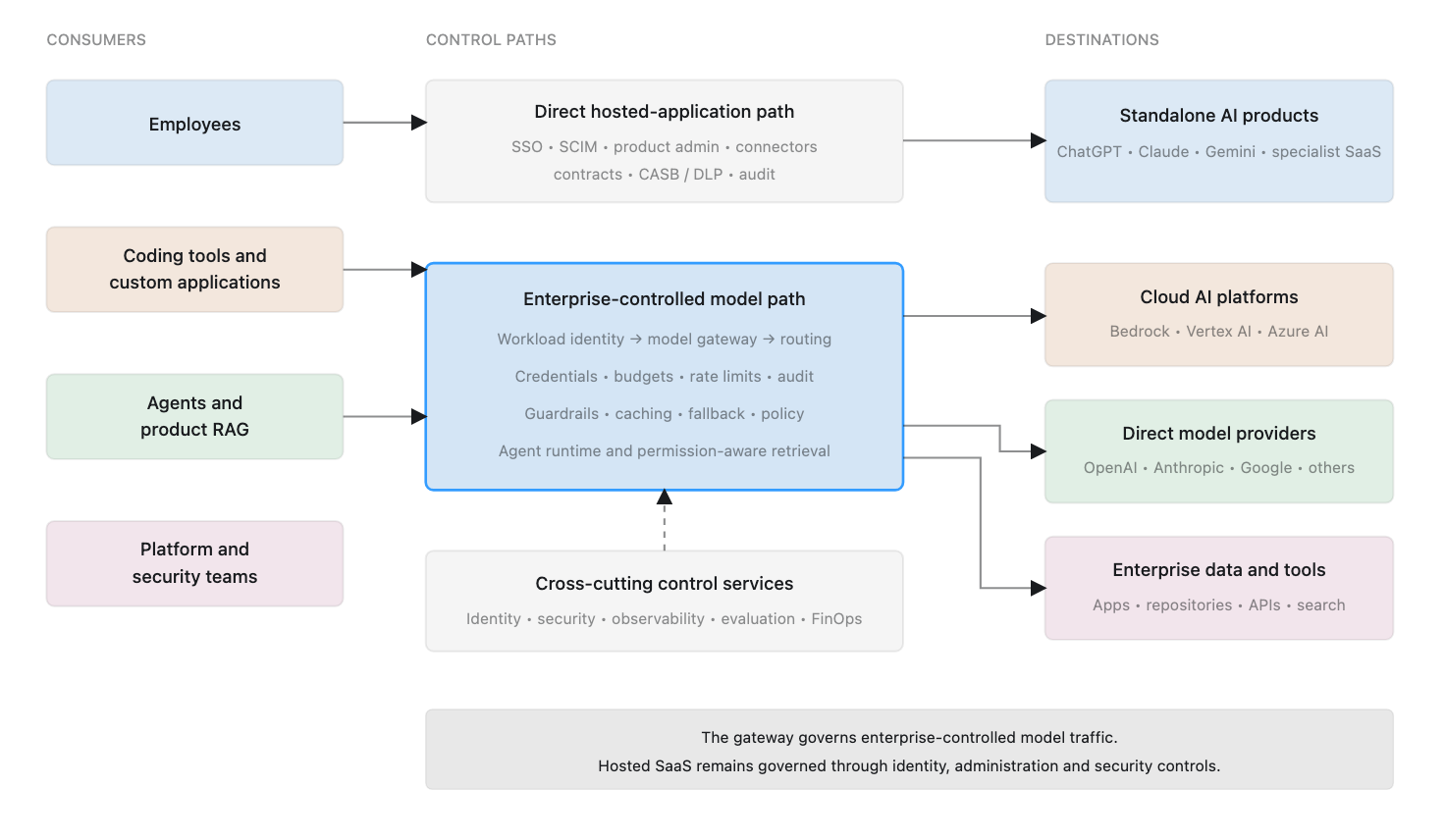
One Architecture, Two Control Paths

Enterprise AI cannot be governed through a single product because not all AI traffic follows the same path.

Custom applications, agents, retrieval systems, and compatible coding tools can access models through an enterprise-controlled model gateway. The gateway can authenticate workloads, protect provider credentials, enforce policies, route requests, attribute cost, apply common guardrails, and record telemetry.

Standalone hosted applications such as ChatGPT, Claude, Gemini, and specialized cloud tools normally communicate directly with their providers. Their requests do not pass through the enterprise model gateway. They must instead be governed through corporate identity, provisioning, product administration, contracts, connector controls, SaaS security, data-loss prevention, and audit integrations.

This distinction is fundamental. A model gateway is an important control point, but it is not a universal control plane for every form of enterprise AI consumption.

Fig: Enterprise AI requires separate control paths for hosted applications and enterprise-controlled model traffic.

Architecture Principles

The reference architecture follows five principles.

Centralize policy without centralizing every decision

The enterprise needs common boundaries for identity, credentials, approved models, data, cost, and auditability. Application teams should remain free to select models and implementation patterns within those boundaries. The central platform should provide a governed path rather than become a manual approval queue.

Separate human, workload, and delegated identities

Employees authenticate through the corporate identity provider. Applications and agents use workload identities. When an agent acts for a person, the trace should preserve both the agent identity and the initiating user identity.

Keep provider credentials away from applications

Applications should authenticate to an enterprise-controlled gateway. The gateway protects and rotates provider credentials, maps workload identities to policies, and issues virtual credentials where needed.

Make data policy part of routing

Not every model or provider is approved for every data class. The eligible destination should be constrained by data sensitivity, contractual terms, region, retention policy, and workload risk before cost or performance optimization is considered.

Allow complexity to grow with need

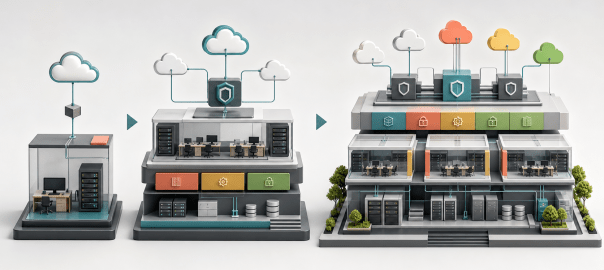
The logical architecture can remain consistent while its implementation grows from cloud-native services to managed gateways, regional control planes, dedicated security tools, and self-hosted inference.

The Technology Landscape

The following table identifies representative implementation choices. These are examples, not recommendations for every organization.

Building blockImplementation choicesRepresentative examples
Human identityEnterprise identity providerMicrosoft Entra ID, Okta, Google Workspace
Workload identity and secretsCloud IAM, workload federation, secrets platformAWS IAM, Azure Managed Identities, Google Cloud IAM, HashiCorp Vault
Model gatewayCloud-native, managed, self-hostedAmazon Bedrock, Vertex AI, Azure AI Foundry, Portkey, LiteLLM, Kong, Cloudflare AI Gateway
RoutingGateway rules, intelligent router, application-directed routingGateway policies, RouteLLM, Not Diamond, Martian, OpenRouter
Guardrails and AI securityProvider-native, gateway-integrated, dedicated platform, open-source frameworkAmazon Bedrock Guardrails, Azure AI Content Safety, Google Model Armor, Portkey, Kong, Cloudflare, Check Point Lakera, NVIDIA NeMo Guardrails
First-party inferenceDirect model-provider APIOpenAI, Anthropic, Google, Cohere, Mistral
Cloud inferenceManaged cloud model platformAmazon Bedrock, Google Vertex AI, Azure AI Foundry
Hosted open-model inferenceManaged inference providerTogether AI, Fireworks AI, GroqCloud, Cerebras
Self-hosted inferenceEnterprise-operated model servingvLLM, NVIDIA NIM, Hugging Face TGI
Agent frameworkSDK, graph framework, managed agent serviceOpenAI Agents SDK, LangGraph, cloud-native agent services
AI observabilityGateway telemetry, specialized tracing, open telemetryLangfuse, LangSmith, Helicone, Arize Phoenix, OpenTelemetry
AI cost governance and FinOpsGateway budgets, attribution, forecasting, showback and chargebackLiteLLM, Portkey, CloudZero, Finout, Vantage
Enterprise knowledgeHosted knowledge feature, enterprise search, managed or custom RAGCompany knowledge in ChatGPT, Glean, cloud search services, vector and search platforms

1. Enterprise Identity and User Lifecycle

The corporate identity provider is the starting point for human access. Hosted AI products, coding applications, gateway consoles, observability platforms, and internal applications should use SSO wherever supported. Automated provisioning should create, update, suspend, and remove accounts as employees change roles or leave.

Groups and roles should represent approved populations such as general AI users, coding users, sensitive-data users, platform administrators, and model approvers. Identity establishes accountability and lifecycle control, but it does not determine what data a user may enter into an AI product. Data policy and product-specific administration remain necessary.

2. Governance for Standalone Hosted AI Applications

Standalone hosted applications sit outside the model-gateway path. The enterprise should maintain an approved product portfolio and evaluate each product for SSO, provisioning, administrative controls, retention, training terms, audit logs, regional processing, sharing, and connectors.

Connectors require particular care. When a hosted application connects to email, files, source code, or collaboration systems, it gains a new authorization path into enterprise information. Administrators must control which connections are available, which OAuth permissions are granted, and how access is revoked.

This is an architectural concern, but not a separate deployable product. It is implemented through identity, SaaS administration, procurement, CASB or DLP controls, connector governance, and organizational policy.

3. Workload Identity and Secrets

Every production workload should have an identity independent of the developer who created it. Production and non-production environments should not share identities or unrestricted credentials.

Where possible, use short-lived cloud workload credentials. When secrets are necessary, keep them in an enterprise secrets platform and rotate them through an established process. Applications should receive gateway credentials or virtual keys instead of underlying provider keys.

This allows a compromised application to be revoked independently, enables per-workload budgets and model permissions, and permits provider credentials to change without application redeployment.

4. Model Gateway

The model gateway is the shared access layer between enterprise-controlled workloads and model providers. It should authenticate the caller and evaluate attributes such as application, team, environment, data classification, use case, cost center, region, and requested capability.

The gateway capability set may include:

  • Workload authentication and model authorization
  • Provider credential protection and virtual keys
  • Standard request and response interfaces
  • Model aliases and provider abstraction
  • Usage metering, budgets, quotas, and rate limits
  • Routing, fallback, retries, and circuit breaking
  • Audit events and trace propagation
  • Caching where authorization permits it
  • Input and output guardrails
  • Sensitive-data detection and redaction
  • Model and use-case allowlists
  • Request-size and context limits
  • Schema and structured-output validation

The gateway should not contain all business logic. End-user authorization, prompt construction, tool selection, and domain rules normally belong in the application or agent runtime.

5. Model Providers and Inference Platforms

Behind the gateway, the enterprise may use direct model-provider APIs, public-cloud AI platforms, specialized inference providers, or self-hosted open-weight models.

Cloud-native platforms are a practical starting point for companies already standardized on a cloud because they integrate with cloud identity, networking, billing, and regional controls. Direct providers may expose capabilities earlier but create an additional contract, credential, billing path, and data boundary. Self-hosted inference offers deployment control but transfers responsibility for scaling, security, availability, upgrades, and model serving to the enterprise.

The reference architecture permits these options to coexist behind a controlled access path.

6. Policy, Data Controls, and Guardrails

Policy connects enterprise requirements to runtime decisions. It may consider workload, user, environment, data class, model, provider, region, and budget before allowing or routing a request.

Guardrails should be layered:

LayerResponsibility
Application or agentUser authorization, business rules, tool permissions, transaction limits, output validation
GatewayCommon input/output policies, data detection, model restrictions, schema checks, centralized enforcement
Model platformProvider-native content and model safety controls
Dedicated AI securityPrompt-injection defense, data-leakage controls, adversarial detection for higher-risk workloads

Guardrail actions may block, redact, warn, log, retry, or reroute. No guardrail product can determine domain-specific correctness or eliminate the need for least-privilege application design.

7. Routing, Resilience, and Portability

Routing is a logical architecture block even when it is implemented inside the gateway.

Three patterns are available:

  1. Gateway-integrated routing: The gateway selects a deployment using aliases, policy, cost, latency, availability, or region.
  2. Dedicated intelligent routing: A router such as RouteLLM selects between eligible models based on predicted quality, complexity, or cost. The gateway remains the enforcement point.
  3. Application-directed routing: The application selects a capability because it has the best task context, while the gateway verifies that the selection is allowed.

Fallbacks must satisfy the same data and compliance policy as the original destination. A technically available model is not automatically an approved fallback.

8. Agent Framework, Runtime, and Tool Governance

An agent framework defines agents, tools, handoffs, state, and execution flow. The runtime operates those workflows, including long-running execution, retries, queues, isolation, and resumability. The gateway controls model access but does not govern every action an agent can take.

The agent layer should provide:

  • An approved framework or supported framework portfolio
  • Workload and delegated user identity
  • Tool and MCP-server registry
  • Per-agent tool permissions
  • Step, time, cost, and concurrency limits
  • Isolated code execution
  • Action-level audit logs
  • Human approval for consequential actions
  • Retry, cancellation, and kill-switch behavior

For high-impact actions, the model should propose the action while deterministic code verifies authorization and performs the operation.

9. Cost Governance and FinOps

The gateway should record application, team, environment, provider, model, usage, and estimated cost. This enables real-time budgets, alerts, quotas, and rate limits.

Enterprise FinOps has a broader responsibility. It must reconcile provider invoices and include supporting costs such as retrieval, databases, queues, agent compute, and self-hosted inference. As maturity increases, the progression is:

Metering โ†’ budgets and alerts โ†’ attribution โ†’ forecasting โ†’ optimization โ†’ showback or chargeback.

Optimization may include smaller-model routing, caching, prompt reduction, agent-loop limits, batching, or self-hosted inference. Quality and cost must be measured together.

10. Enterprise Knowledge and Retrieval

Employee knowledge access and application RAG are separate architectural needs.

Company knowledge in ChatGPT can search approved connected apps for employee questions and return cited answers while respecting source permissions. It is a feature inside ChatGPT Business and Enterprise, not a separate product or a reusable backend for custom applications.

Product applications require a retrieval architecture with ingestion, change detection, classification, permission synchronization, authorized retrieval, citations, and evaluation. Permission checks should occur before unauthorized content is provided to the model or written to traces.

Organizations may use a dedicated enterprise-search product, managed cloud services, or a custom shared platform depending on scale and requirements.

11. Monitoring, Tracing, Audit, and Evaluation

The architecture produces four kinds of operational evidence:

  • Infrastructure monitoring for availability, latency, failures, and resource health
  • AI traces across retrieval, model calls, and tool actions
  • Security and compliance audit records
  • Quality evaluations using test datasets, production feedback, automated scoring, and human review

Telemetry requires its own data policy. Prompts, responses, retrieved documents, and tool output may contain sensitive information. The enterprise must define redaction, retention, encryption, regional storage, and operator access.

Cloud-Native Access or a Dedicated Gateway?

A cloud-native model platform may be sufficient when most workloads use one cloud, the model portfolio is limited, cloud identity and billing provide enough control, and cross-provider routing is unnecessary.

A dedicated gateway becomes valuable when applications use multiple providers, credentials must be isolated centrally, budgets and policies must apply across teams, or common routing, guardrails, and audit records are required.

The two approaches are complementary: a dedicated gateway can use cloud-native model platforms as backends.

Managed, Self-Hosted, or Built Internally?

Managed products reduce operating effort. Self-hosted products increase deployment and data control but require upgrades, security maintenance, scaling, and availability ownership. Internal development should be reserved for requirements that available products cannot satisfy.

A model proxy or RAG demonstration may be simple. A production platform with identity, policy, streaming, retries, accounting, permissions, deletion, tracing, and high availability is not.

From Reference Architecture to Prescription

The architecture is intentionally broader than any one organization should deploy immediately. A small company may need only an approved employee assistant, one cloud model platform, and basic budgets. A mid-size organization may need a managed gateway, shared tracing, and application-level RAG. A large enterprise may require regional gateways, multi-provider routing, dedicated guardrails, chargeback, a shared agent runtime, and self-hosted components.

The next article, Prescribed Enterprise AI Architectures for Small, Mid-Size, and Large Organizations, selects a coherent implementation and representative vendors for each profile.

Enterprise AI Adoption: Requirements for Security, Governance, and Scale

AI adoption inside enterprises rarely begins with a coordinated platform strategy. It usually starts with individuals and teams selecting tools that solve immediate problems.

A developer subscribes to an AI coding assistant. Another team builds an application using a foundation-model API. Employees begin using standalone cloud applications such as ChatGPT, Claude, Gemini, or Codex. A business unit connects an AI application to internal documents. Eventually, the organization considers an enterprise-wide knowledge assistant or retrieval-augmented generation system.

Each decision may be reasonable on its own. Together, however, they create a fragmented operating environment.

Users authenticate differently across tools. Applications depend on provider API keys. Usage is billed through unrelated subscriptions and cloud accounts. Sensitive data may pass through systems with different retention and training policies. Security teams have limited visibility into what is being used, while finance teams struggle to determine which teams, applications, or business outcomes are responsible for the expenditure.

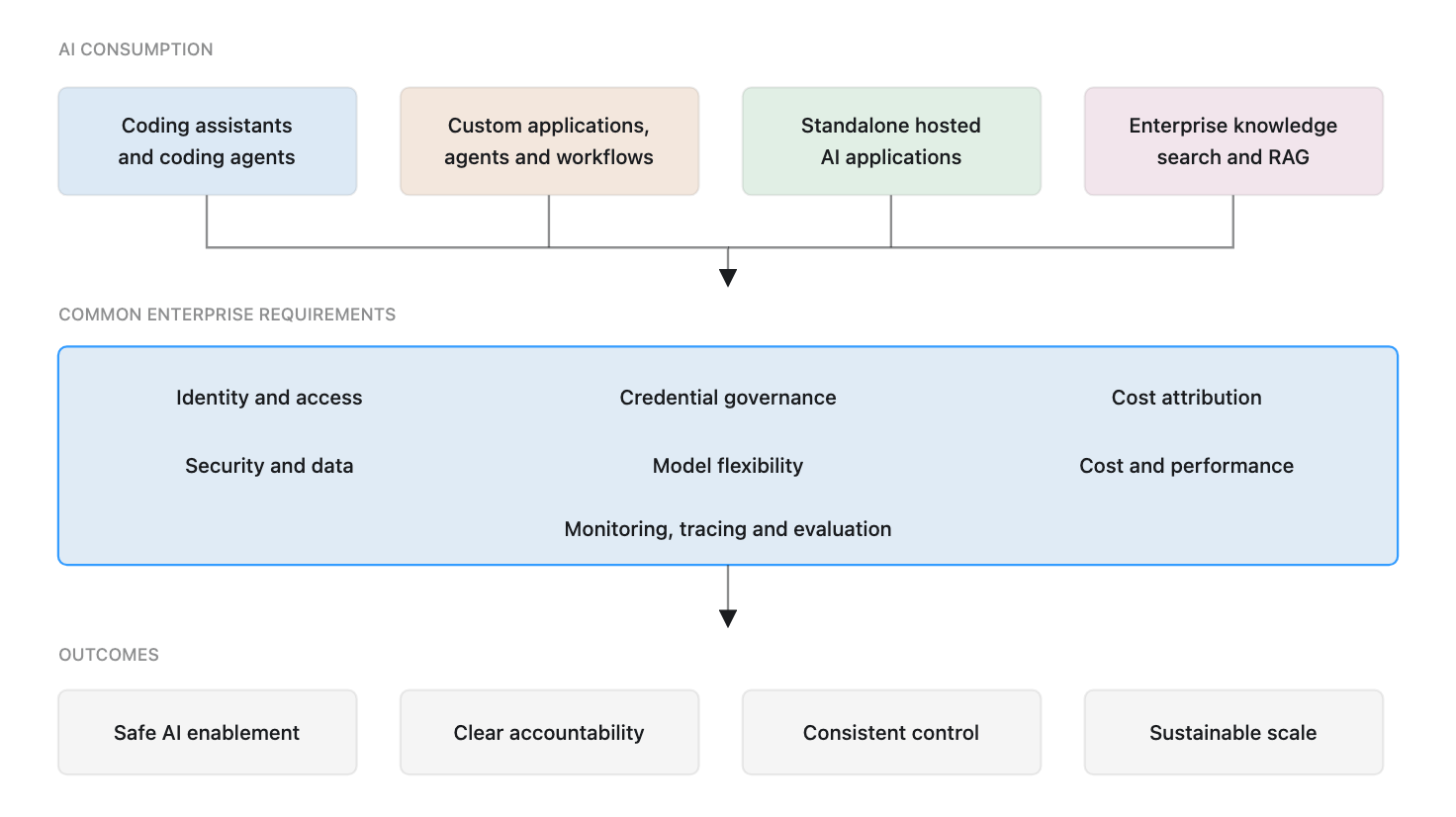
The enterprise AI problem is therefore not simply about selecting the best model or application. It is about enabling several forms of AI consumption while maintaining consistent control over identity, credentials, data, cost, providers, and operations.

Fig: Different AI consumption paths require one consistent set of enterprise controls

Four Ways Enterprises Consume AI

Enterprise AI adoption can be organized into four broad consumption patterns. These patterns overlap, but their ownership, identity, billing, and data-flow characteristics differ enough to require separate consideration.

1. AI-assisted software development

The first pattern is the use of AI by software-development teams. It includes IDE assistants, command-line tools, coding agents, code-review assistants, and autonomous development applications.

Some products are purchased as per-user subscriptions. Others allow users to connect a model-provider account or consume models through API credentials. More autonomous tools may execute commands, inspect repositories, modify files, or interact with development infrastructure.

The enterprise must determine whether users authenticate through corporate identity, which repositories and environments the tool may access, how source code is handled, how expenditure is attributed, and whether agent actions are logged and auditable.

The risk is not limited to source-code disclosure. Coding agents can access credentials, execute commands, change infrastructure, or introduce dependencies. Their permissions and actions require greater scrutiny than conventional autocomplete.

2. Custom AI applications, agents, and workflows

The second pattern consists of applications built or operated by the enterprise. Examples include customer-service assistants, document-processing workflows, incident-response agents, internal copilots, and automated business processes.

These systems usually consume foundation models through APIs. They may retrieve enterprise data, invoke tools, call internal services, maintain state, and perform actions on behalf of users.

Unlike a standalone application, the enterprise owns much of the operating responsibility. It must manage application identities, API credentials, authorization, model selection, usage limits, monitoring, and failure handling.

Agents make this especially important. A traditional application normally follows a path defined in code. An agent can dynamically choose a model, call tools, retrieve information, and take several steps to complete a task. The architecture must govern both model access and access to data and tools.

3. Standalone hosted AI applications

The third pattern is the direct use of cloud-hosted AI applications by employees. This includes general-purpose assistants and specialized applications for coding, research, writing, design, analytics, and productivity.

The provider operates the application and normally controls the interface, model selection, data handling, and underlying infrastructure. The enterprise consumes the product through user accounts, team subscriptions, or an enterprise agreement.

These products may be introduced through centralized procurement, but they can also enter through individual subscriptions and expense claims. This creates shadow AI: employees using services that the organization has not reviewed or cannot administer.

The enterprise must evaluate SSO, automated provisioning, administrative controls, retention and training terms, audit logs, sharing, and connections to internal systems. A model gateway cannot normally intercept these interactions because the application communicates directly with its provider.

4. Enterprise knowledge search and RAG

The fourth pattern is enterprise knowledge search, often implemented using retrieval-augmented generation, or RAG.

These systems search enterprise data sources and provide relevant content as context for a model response. Sources may include document repositories, collaboration systems, source-code platforms, ticketing systems, knowledge bases, or business applications.

An organization can purchase enterprise search, use knowledge features within a hosted assistant, build a custom RAG platform, or combine managed services with internal components.

The difficult part is rarely retrieving a document and sending it to a model. The harder requirements are preserving source permissions, keeping indexes current, removing content when permissions change, recording citations, preventing unauthorized retrieval, and measuring retrieval and answer quality.

Why Fragmentation Becomes a Governance Problem

The four patterns do not share a common operating model.

Coding applications may be licensed per user. Custom applications consume APIs based on tokens or requests. Hosted applications may use individual, team, or enterprise subscriptions. Knowledge platforms may combine licenses, indexed-content charges, infrastructure costs, and model consumption.

Identity is similarly fragmented. Employees authenticate interactively, while applications and agents use non-human identities. Some products support enterprise federation and automated provisioning; others rely on independently managed accounts. One employee may also connect several applications to internal data using separate authorization grants.

Data may be entered into a hosted application, sent to an API by an internal workload, retrieved from enterprise repositories, recorded in traces, or stored in provider logs.

Managing every product independently leads to predictable problems:

  • Former employees retain access to tools that were not centrally provisioned.
  • Provider API keys are shared between developers or embedded in applications.
  • Teams cannot identify which application caused an increase in expenditure.
  • Sensitive information is sent to models that are not approved for that data class.
  • Security teams cannot reconstruct which prompt, context, model, or tool produced an action.
  • Applications become tightly coupled to provider-specific interfaces.
  • Different teams build duplicate integrations and governance mechanisms.

A scalable AI program requires one set of enterprise requirements, even when those requirements are implemented differently across consumption patterns.

Seven Requirements for Enterprise AI Adoption

1. Identity and access governance

Human access should connect to the corporate identity system wherever the product permits it. This includes SSO, multi-factor authentication, role-based access, centralized provisioning, and timely deprovisioning.

Access decisions should reflect the sensitivity of the tool and the data it can reach. A general assistant with no internal connections does not present the same risk as an agent that can access source code, customer records, or production systems.

The organization also needs clear ownership. Someone must approve the product, determine who may use it, review access, and remove access when it is no longer required.

2. Non-human identity and credential governance

Applications and agents should not depend on personal API keys or shared provider credentials.

They require non-human identities with narrowly scoped permissions. Credentials should be issued through an approved process, stored in a secrets-management system, rotated, and revoked without disrupting unrelated applications.

Where possible, applications should receive virtual or intermediary credentials rather than direct provider keys. This allows application-specific limits and provider changes without redistributing credentials to every workload.

3. Cost attribution and financial governance

AI cost is variable and can grow quickly as applications gain users, agents perform more steps, or teams select more capable models.

Enterprises need visibility beyond the provider invoice. Usage should be attributable to a user, application, team, environment, or business unit. Budgets, quotas, alerts, and rate limits should operate at the same levels.

Small organizations may need only visibility and spending alerts. Larger organizations may require forecasting, showback or chargeback, unit-cost measurements, and formal FinOps ownership.

Where possible, expenditure should be connected to outcomes such as completed tasks, resolved cases, generated documents, or developer workflows. Token counts alone do not indicate whether an application is successful.

4. Security and data governance

The enterprise must define what data can be processed by which products, models, providers, and regions.

This requires consistent review of retention, provider-training terms, encryption, residency, subprocessors, auditability, and incident-response commitments. It must also cover information stored outside the primary request, including traces, prompts, retrieved context, cached responses, evaluation datasets, and application memory.

Controls should be proportional to data sensitivity. Public information, internal documents, source code, personal data, and regulated records should not automatically follow the same approval path.

5. Model and vendor flexibility

Model capabilities, prices, performance, and availability change rapidly. An application unnecessarily coupled to one provider becomes difficult to optimize or migrate.

Enterprises should use stable internal interfaces where the benefits justify the effort. Provider-specific features can still be used, but the dependency should be intentional and documented.

Vendor flexibility does not mean every request must switch dynamically between providers. It means the architecture preserves a practical path to compare, route, replace, or add models without redesigning every application.

6. Cost and performance optimization

Not every task requires the most capable or expensive model.

Applications should select models according to task complexity, latency, quality, privacy, and cost. Repeated requests may benefit from caching. High-volume and predictable workloads may eventually justify self-hosted open-weight models.

Optimization should follow measurement. A cheaper model is not cheaper if poor outputs cause repeated calls, human correction, or failed workflows. Cost, latency, and quality must be evaluated together.

7. Monitoring, tracing, and evaluation

Traditional infrastructure metrics are necessary but insufficient for AI systems.

Teams need to understand which model was used, how much was consumed, how long each step took, which context was retrieved, which tools were called, and where failures occurred. Agent traces may span multiple model calls and actions within one task.

Operational monitoring must be complemented by evaluation. An application can remain technically available while quality deteriorates because of a model change, prompt update, retrieval problem, or altered data source.

A Shared Control Point for Model Access

For custom applications, agents, and compatible coding workflows, many requirements can be enforced through a shared model-access layer.

This layer sits between enterprise workloads and model providers. Depending on the organization’s needs, it can authenticate applications, protect provider credentials, enforce model policies, route requests, apply quotas, attribute cost, record audit events, collect traces, and provide a consistent interface across providers.

It is often described as a model gateway or AI gateway.

The gateway is an important architectural control point, but it is not the entire governance solution. Standalone hosted applications generally operate outside it. Knowledge systems require source authorization and retrieval controls. Agents require tool and action governance. Coding tools require safeguards for source code, credentials, local execution, and development infrastructure.

Requirements Change with Enterprise Context

The requirements are broadly consistent, but implementation should reflect scale, risk, and operating maturity.

A small company may prioritize a limited set of approved tools, centralized billing, basic SSO, and managed model access. A mid-size organization may need a dedicated gateway, per-application credentials, team budgets, audit logs, and shared observability. A large enterprise may require multiple providers, regional deployments, formal data classifications, policy enforcement, business-unit isolation, chargeback, advanced evaluation, and self-hosted components.

Employee count alone is not enough. A smaller company handling regulated data may require stronger controls than a larger organization working mainly with public information. AI expenditure, data sensitivity, number of applications, regulation, and platform-team capability are often better indicators of architectural need.

Questions the Reference Architecture Must Answer

These requirements lead to concrete architectural questions:

  • Where should model access be centralized?
  • How should human users, applications, and agents authenticate?
  • How should provider credentials be isolated?
  • Which controls belong in the identity provider, gateway, application, or provider?
  • How should standalone hosted applications be governed?
  • Where should prompts, traces, retrieved context, and evaluation data be stored?
  • How should costs be attributed and controlled?
  • When is a cloud provider’s model platform sufficient?
  • When does an organization need a dedicated gateway?
  • When should enterprise knowledge search be purchased, built, or deferred?
  • How should the architecture evolve as usage, risk, and maturity increase?

There is no single product that answers every question. The solution is an architecture that combines identity, model access, security, cost management, observability, and application-level controls.

The next article, A Reference Architecture for Governed Enterprise AI, develops that architecture and explains the available implementation choices.

VLAs Are Winning. World Models Will Win.

A perspective from the data layer of humanoid robot training

I recently spent time working on egocentric video data โ€” first-person footage of humans doing everyday things with their hands โ€” and how it could be used to train humanoid robots. It’s a narrow problem, but it forced me to answer a bigger question: what do these models actually need to learn, and why is it so hard to give it to them?

That work pulled me into the two architectures competing to become the brain of the next generation of robots: Vision-Language-Action models and world models. I’m not a researcher in either. But sitting at the data layer gives you a particular vantage point โ€” you see what these models consume, where they’re data-hungry, and where more data stops helping. This post is my read on where the field is heading, from that vantage point.


What Comes After LLMs?

LLMs learned the statistical structure of text. The next wave of AI has to learn the statistical structure of the physical world โ€” how objects move, how forces act, what happens when you push, pour, or grasp. The vehicle for that transition is the humanoid robot.

For sixty years, robotics meant programming a machine to do one thing precisely, in a cage, because it couldn’t adapt to anything outside its parameters. What changed is the same thing that changed everything else: transformers that generalize across modalities, vision-language models that reason jointly over what they see and what they’re told, and compute cheap enough to train at scale. Teaching a robot a task used to be a years-long research project. Companies are now doing it in months.

From LLM to VLM to VLA

The path to today’s robot brains is a straight line through three architectures:

LLM โ†’ VLM โ†’ VLA

An LLM takes text in and produces text out. A VLM (vision-language model) adds a vision encoder โ€” now the model takes images and text in, and produces text out. It can describe what it sees, answer questions about a scene, reason about spatial relationships.

A VLA takes the final step: images and language instructions in, robot actions out. The key insight โ€” first demonstrated at scale by Google’s RT-2 in 2023 โ€” is that robot actions can be treated as just another token type. Discretize continuous motor movements into tokens, and the same transformer that predicts words can predict actions. Everything the model learned from web-scale image data transfers into control: a robot that never saw a banana in its training demonstrations can still pick it up, because it knows what bananas look like from the internet.

The lineage since then: RT-1 proved robotics transformers work at scale (2022), RT-2 brought web-scale generalization (2023), OpenVLA open-sourced the recipe (2024), and Physical Intelligence’s ฯ€0 pushed it furthest with diffusion-based action generation (2024).

And the results are genuinely impressive. Physical Intelligence’s demos are the ones that made me stop and pay attention: a robot folding laundry โ€” deformable objects, one of the classically hard problems in manipulation โ€” and clearing a table into a dishwasher. Most striking, doing this in homes it had never seen. That last part matters more than the tasks themselves: the promise of a VLA is precisely that it generalizes to environments outside its training data, the way an LLM answers questions it was never explicitly trained on.

Where VLAs Hit a Wall

But working at the data layer, you start to see the shape of the ceiling. Three failure modes show up consistently:

Long-horizon tasks. Compound errors are brutal: 95% per-step reliability gives you 60% success on a ten-step chain. Folding a shirt is one skill; cooking a meal is a sequence of dozens, and today’s VLAs degrade sharply as the chain grows.

Instruction drift. As a task progresses, irrelevant observations dilute the model’s attention to the original instruction. The robot does things that are locally reasonable but globally wrong โ€” it forgets what it was trying to do.

Generalization limits. The environment generalization is real but shallow. Change the physics of the task โ€” not just the room โ€” and success rates collapse. More demonstrations help less and less.

The common thread: a VLA is fundamentally reactive. It maps what it sees to what it should do next. It has no mechanism for asking “what happens if I do this?” before doing it. And that question, I’ve come to believe, is the whole game.


World Models: Learning to Predict, Not Just React

A world model learns to simulate: given the current state of the world and an action, predict what the world looks like next. Where a VLA asks “what should I do given what I see?”, a world model asks “what will happen if I do this?” โ€” and can plan through imagined futures before committing to real ones.

Yann LeCun has been arguing for this direction longer than almost anyone, and his JEPA architecture is worth understanding because it’s a genuinely different bet from the transformer lineage above.

The obvious way to build a predictive model is to predict the future in pixel space โ€” generate the next video frame. JEPA (Joint Embedding Predictive Architecture) rejects this. Its core idea: most of the pixel-level future is unpredictable and irrelevant. The exact ripple pattern of spilling water, the flutter of a curtain โ€” no model can predict these, and no robot needs to. JEPA instead predicts inย representation space: it learns abstract embeddings of world state and predicts how those embeddings evolve. It learns that the glass will fall without simulating every photon of the falling. That’s much closer to how humans model the world โ€” we predict consequences, not video frames. LeCun’s blunt version of the argument: you cannot get to physical intelligence by scaling next-token prediction, because the world is not made of tokens. JEPA is now the foundation of his post-Meta startup, AMI Labs.

Fei-Fei Li’s World Labs comes at it from a different angle: spatial intelligence. Her June 2026 taxonomy splits world models into three functions โ€” renderer (generate visual representations), simulator (model how objects respond to forces), and planner (reason over action sequences). Their product Marble generates persistent, navigable 3D environments: a robot training in one can approach the same shelf from different angles and find the same objects in the same places, because the geometry is consistent rather than regenerated per frame.

NVIDIA’s Cosmos attacks the problem I lived inside: data. Nobody has enough real robot demonstrations. Cosmos uses video world models to generate physically plausible synthetic training data. The model problem and the data problem become the same problem โ€” better world models generate better data, which trains better robots.


The Philosophical Fork

Underneath the company logos, the field has split on one question: where does world understanding live?

The structure camp โ€” LeCun, World Labs, Cosmos โ€” says you must build it explicitly. A separate, inspectable model of how the world works, with policies plugged into it.

The scale camp โ€” Physical Intelligence and the VLA lineage โ€” believes world understanding emerges inside the weights if you train on enough diverse data, the same way LLMs developed reasoning nobody explicitly built. Some researchers claim to find world-model-like internal representations when they probe VLAs. I’m skeptical of how far that goes. A VLA translates observations into motions; nothing in its architecture simulates the world or checks a plan against predicted consequences. Calling that an implicit world model is, for now, the scale camp’s hope more than a demonstrated fact.

Google DeepMind’s Gemini Robotics is the most interesting data point, because it splits the difference architecturally. It pairs two models: Gemini Robotics-ER, an embodied reasoning model that plans multi-step tasks, calls tools, and can pull live context (their demo: sorting trash into bins using recycling rules fetched from the web), and the Gemini Robotics VLA, which turns each planned step into motor commands. To be precise, ER isn’t a world model โ€” it doesn’t simulate physics; in Fei-Fei Li’s taxonomy it’s a planner, not a simulator. But the design concedes the structural point: reactive execution alone isn’t enough, and the reasoning layer has to be explicit and separate.

The open ecosystem is converging the same way. Hugging Face’s LeRobot has become the de facto open toolkit, NVIDIA’s GR00T models are openly available for post-training, and Cosmos integration is bringing world-model-generated synthetic data to teams that can’t collect real data at scale.


My Take: VLAs Are the Present, World Models Are the Future

VLAs work today and will keep improving. For well-defined tasks over short horizons, they’re a real solution now, and the laundry-folding demos aren’t tricks.

But the ceiling is structural, not incremental. Long-horizon planning, genuine generalization, acting safely in novel situations โ€” these require predicting consequences before acting, and a reactive observation-to-action mapping has no place to put that capability. You can’t fine-tune your way to a simulator.

World models have their own hard problems โ€” sim-to-real gaps, compute cost, learning accurate physics from video. But these look to me like engineering problems on the right path, whereas the VLA ceiling looks like the wrong abstraction for the long game.

My prediction: world models won’t replace VLAs โ€” they’ll become the layer underneath them. World models handle prediction, planning, and synthetic data generation; VLAs handle dexterous real-time execution. Gemini Robotics’ reasoner-plus-executor split is an early, partial version of this stack, and I expect the rest of the field to converge on it whether or not anyone names it.

Watching what these models need from their training data is what convinced me. VLAs are data-hungry in a way that suggests they’re memorizing behavior rather than understanding the world โ€” and the physical world is too varied to memorize. At some point, a robot has to stop pattern-matching and start predicting.

That’s what world models are built to do. That’s why I think they win.


AI Assistants Have Many Interfaces. Context Is the Real Product.

AI assistants are no longer just chat windows. The same assistant now appears as a web app, desktop app, mobile app, browser extension, IDE extension, command-line tool, local agent, and cloud worker.

That is powerful, but it creates a new problem: deciding which interface to use, and keeping context alive when moving between them.

This post is based mostly on my experience with OpenAI and Anthropic products: ChatGPT, Codex, Claude, Claude Code, and their web, desktop, IDE, CLI, mobile, browser, and cloud interfaces. I also touch briefly on Gemini and browser-extension-style workflows, because they represent another way people are starting to interact with AI.

The question I am interested in is not just which model is better. It is: which interface should I use, when should I use it, and why does context still get lost when I move between them?

The OpenAI Interfaces

InterfaceHow I think about it
ChatGPT webBest for general thinking, writing, research, analysis, and normal assistant workflows.
ChatGPT mobileUseful when I am away from my laptop. Also useful as a controller for connected Codex hosts.
ChatGPT Voice ModeExcellent for brainstorming. It feels like a real-time conversation, not just dictation.
Codex desktop appMy default for local agent work. Best when the task needs local files, terminal commands, browser sessions, or writing changes on my Mac.
Codex VS Code extensionUseful for bigger projects inside the IDE, especially when I want to work across multiple agents or keep the workflow inside one editor.
Codex CLIPowerful for terminal-native workflows, but I do not use it much because I prefer seeing code and diffs visually.
Codex Web / CloudUseful when the repo is on GitHub and I want a small bounded change, PR-style task, or cloud execution without relying on my laptop.

The Codex desktop app is the OpenAI interface I use most for local work. For anything that needs access to local files, local folders, terminal commands, browser sessions, or writing changes on my Mac, the desktop app is my default.

It gives me a practical local agent environment where I can see what is happening, approve actions, inspect changes, and let the assistant work inside my machine.

The Codex VS Code extension is useful when I am already inside the IDE, especially for bigger projects where I want a single editor surface and may work across multiple agents or threads.

The Codex CLI is powerful, but I personally do not use it much. I prefer the feel of seeing the work visually while changes are being made.

The Codex Web / Cloud mode is different. It is useful when the work is already in GitHub and I want to make a small change, run a bounded task, or delegate something in a PR-style workflow.

In this mode I do not need a local workspace, and execution does not happen on my laptop. The assistant works in the cloud against the repository.

That has obvious advantages. If my laptop is not available, or if I want something long-running to continue without depending on my machine staying awake, cloud execution makes sense. It also works well when the task is self-contained and the repository can build and test cleanly in a cloud environment.

But cloud is not a replacement for local work in every case. If the task depends on unpushed local files, local credentials, desktop apps, browser sessions, local databases, or my Mac setup, the desktop app is still more convenient.

The Anthropic Interfaces

InterfaceHow I think about it
Claude webGood for general Claude chat, writing, thinking, analysis, and projects.
Claude mobileUseful for mobile access and remote workflows, but not a full replacement for desktop/project context.
Claude desktop appUseful, but the experience feels split across Chat, Cowork, and Code.
CoworkUseful for local desktop-style tasks, especially for non-technical users, but I do not fully understand why it needs to be separate from Chat.
Claude Code CLIMy main serious Claude coding workflow, especially inside VS Code.
Claude Code in VS CodeUseful when I want Claude close to the code editor.
Claude Code web/cloudGood when I want execution to happen in the cloud rather than on my local machine.
Dispatch / Remote ControlUseful ideas, but they do not feel like one unified control layer yet.
Browser extensions / browser usageUseful, but not the best long-term workflow yet because the integration does not feel smooth enough.

Claude has a similar spread of interfaces, but the experience feels more fragmented to me.

There is Claude web for general chat and projects. There is the Claude mobile app. There is the Claude desktop app, which separates the experience into areas like Chat, Cowork, and Code. There is Claude Code CLI, Claude Code in VS Code, and Claude Code on the web.

For serious coding, my main Claude workflow is Claude Code CLI inside VS Code. That combination feels powerful because I get the capabilities of the CLI while still keeping the editor open and visible.

Claudeโ€™s other modes are useful too. Cowork can help with local desktop-style tasks. Claude Code web provides a cloud coding mode when I want the execution to happen away from my machine. Dispatch and Remote Control are useful ideas for sending or steering work from another device.

But the product feels more split. The pieces are good, but I often feel the boundaries between them.

Voice Is Another Interface

One interface I do not want to ignore is voice.

ChatGPT Voice Mode is one of the most useful non-coding interfaces for me. It is especially good for brainstorming. Speaking to the assistant and getting a real-time spoken response feels very different from typing, or even from using a dictation tool.

Tools like Wispr Flow are useful because they let me speak instead of type. But that is still mostly a better input method for a text conversation. It is not the same as a real-time voice conversation.

ChatGPT Voice Mode feels closer to a true conversational interface. It feels less like โ€œgenerate text, then read the text aloud,โ€ and more like a direct voice interaction.

Claude also has voice capabilities, but in my usage it does not feel as natural as ChatGPT Voice Mode. It feels more like speech-to-text followed by a spoken response. That may not be the exact implementation, but from a user experience standpoint the difference is noticeable. The delay and response style make it less useful for live brainstorming.

I would also like to see this kind of voice experience inside the Codex app. If I am already working in a local agent workspace, being able to brainstorm with Codex by voice would be very useful. I may not want voice for every coding task, but for planning, debugging, architectural discussion, and reviewing tradeoffs, it would be a natural interface.

Mobile As A Controller Interface

Another interface that I find useful is ChatGPT mobile as a controller for Codex.

From the ChatGPT mobile app, I can connect to Codex running on my Mac or Windows machine and access the projects and threads available on that connected host. I can continue work, send follow-up instructions, approve actions, and review results from my phone.

That is a powerful pattern. The phone is not trying to become the full development environment. It is controlling the Codex environment already running on my machine.

As long as that host is awake, online, paired, and signed in, I can continue threads, approve actions, and inspect results. The permissions still belong to the host-side Codex session.

This is different from Codex Web, where the work happens in the cloud against GitHub. Both are useful, but they solve different problems.

Claude has related ideas through Dispatch and Remote Control, but it does not feel the same to me. Dispatch is more like sending work from mobile to desktop. Remote Control is useful for steering a running Claude Code session. But the experience still feels more split between Claude mobile, Claude desktop, Claude Code, Cowork, and Claude Code web.

What I would like is a more unified control layer: mobile, web, desktop, local machines, and cloud environments should feel like different surfaces over the same underlying work context.

Local vs Cloud

The way I think about local and cloud is simple.

Use local when the machine matters.

Use cloud when the shared repository or online workspace is the source of truth.

Local is better when I need my files, my terminal, my browser, my desktop apps, my local setup, or visual feedback. This is why I use the Codex desktop app so much.

Even though it runs with sandboxing and permissions, once I allow the right operations, it can work with my Mac and browser fairly smoothly. Compared with some other local agent experiences, this makes Codex feel more convenient for my daily workflow.

Cloud is better when the task is centered around a shared online source such as GitHub. If the code is pushed, the task is bounded, and the assistant can work in a clean environment, cloud agents are very useful.

They are especially good for small fixes, dependency updates, tests, review follow-ups, PR-style tasks, and background work that should not depend on my laptop staying awake.

The hybrid model is probably the most realistic. I may explore and develop locally, push a branch, then ask a cloud agent to do a bounded follow-up. Or I may use cloud for a small GitHub change while continuing deeper work locally.

The key is discipline: local and cloud workflows work best when the shared source of truth is clean and the assistant is given a clear task.

My Current Workflow

My personal workflow today is roughly this.

For OpenAI, I mostly use the Codex desktop app when the task needs local access or local file changes. It gives me the best balance of visibility, control, and convenience.

For bigger projects inside the editor, I use the Codex VS Code extension, especially when I want to work across multiple agents or keep the whole workflow inside one IDE.

I use Codex Web / Cloud selectively. If something is already on GitHub and I want a small change or a bounded task, it is a good fit. I do not use it as my main development environment, but I see the value clearly.

For general thinking, writing, research, and brainstorming, I use ChatGPT web, mobile, and Voice Mode. Those are still very useful interfaces. But they are separate from the local Codex app context, and that separation matters.

For Claude, I primarily use Claude Code CLI inside VS Code for bigger coding projects. That feels like the strongest Claude coding workflow for me right now.

I also use browser-based tools across Claude, Gemini, and Codex-style workflows, but I see room for improvement there. The browser is important, but the current extension-style experience does not yet feel like the final form.

What OpenAI Gets Right

What I like about Codex is that it feels like a unified local agent workspace.

In the Codex desktop app, I can ask questions about the project, inspect files, make changes, run commands, review diffs, manage threads, and use local browser/computer tools from one place. That reduces the number of decisions I have to make before starting work.

The local desktop app is especially useful because it works with my actual machine. It is sandboxed, and permissions still matter, but once I approve the right operations, it can interact with my Mac and browser smoothly enough for real work.

ChatGPT mobile controlling connected Codex projects is also a strong pattern. It shows what a good cross-device AI interface can look like. The mobile app becomes a control surface over the environment where the work is actually happening.

ChatGPT Voice Mode is another strong interface. For brainstorming, it is one of the best ways to interact with an AI assistant.

What Anthropic Gets Right

Claude Code CLI is very strong. Used inside VS Code, it gives me a powerful workflow while still letting me see the project in the editor. For bigger projects, this works well.

Claude also has powerful separate modes. Chat, Cowork, Code, CLI, web, mobile, Dispatch, Remote Control, and IDE integration all have a reason to exist. The pieces are good.

Claude Code web/cloud is useful when I want execution to happen in the cloud rather than on my machine. Dispatch and Remote Control are also interesting because they recognize that users want to start or steer work from different devices.

What I Would Like To See Improved In Claude

My issue with Claude is not capability. It is product shape.

As a user, I would prefer one universal Claude experience where chat, cowork, and code feel like modes of the same workspace rather than separate places.

I can understand Code being a specialized mode because coding has its own environment, tools, permissions, and workflows. But the separation between Chat and Cowork is less obvious to me.

Claude Cowork seems designed to make agentic desktop work easier for non-technical users. That makes sense. Not everyone wants to use a terminal or think in terms of repositories, branches, commands, and diffs.

But if I am chatting with Claude and the discussion turns into a task, why should I need to move into a different mode? Ideally, Cowork would feel like a capability inside the same Claude workspace rather than a separate place. The assistant should be able to move from discussion to action naturally, while still asking for the right permissions when it needs to touch files, apps, or the computer.

I would also like Claudeโ€™s voice experience to feel more natural for live brainstorming. In my usage, ChatGPT Voice Mode feels closer to a real-time conversation, while Claude voice feels more like speech-to-text followed by a spoken response.

Where The Interfaces Still Break Down

The issue is not that there are many interfaces. Different interfaces are useful for different jobs.

Voice is good for brainstorming. Desktop is good for local work. IDE is good for deep project work. Cloud is good for background execution. Mobile is good for steering work.

The problem is that the context does not always travel with me.

A few examples:

ChatGPT voice to Codex

If I brainstorm an idea in ChatGPT Voice Mode on mobile or web, that conversation does not naturally appear inside the Codex desktop app. If the brainstorming leads to an implementation task, I need to manually restate the context in Codex.

Codex desktop to ChatGPT mobile

This works better. If Codex is running on my Mac and the machine is awake, online, paired, and signed in, I can access those Codex projects and threads from ChatGPT mobile. This is one of the best examples of a useful cross-device AI interface.

Codex desktop to ChatGPT web

This is where the continuity feels incomplete. I can control connected Codex hosts from ChatGPT mobile, but I do not get the same connected-host control surface from ChatGPT web. Since I often work from a browser too, I would like the web interface to become another control surface for the same Codex host context.

ChatGPT web or mobile to Codex desktop

The reverse direction is also incomplete. General ChatGPT conversations, projects, and voice brainstorms do not automatically become available as working context inside Codex. That matters because many tasks start as thinking or planning before they become implementation.

Claude Chat, Cowork, and Code

In Claude, the fragmentation feels different. Claude has Chat, Cowork, Code, Claude Code CLI, Claude Code web, mobile, Dispatch, and Remote Control. Dispatch is useful because I can send work from mobile to desktop, and Remote Control is useful for steering a session. But it does not feel like one shared workspace where the same context naturally follows me across Claude web, desktop, mobile, and Code.

Claude Code local vs cloud

Claude Code has both local and cloud-style workflows. Local Claude Code is useful when I want the work to happen inside my own machine or IDE. Claude Code web/cloud is useful when I want the task to run away from my machine, usually against a GitHub-backed environment.

That separation makes sense technically. Local work and cloud work have different permissions, files, tools, and execution environments. But from a user experience standpoint, I still want the context to move more naturally between them. If I plan something in Claude chat, start work in Claude Code CLI, and later move to Claude Code web, I do not want to reconstruct the whole task manually.

The Real Problem Is Context Continuity

The missing piece is not one universal interface. I actually want multiple interfaces.

What I want is a shared context layer underneath them.

If I brainstorm in voice, I should be able to continue in desktop. If I start work in a local agent, I should be able to inspect it from mobile and web. If I delegate work to the cloud, the result should be easy to pull back into the local or conversational context.

If I switch from Claude web to Claude Code, or from ChatGPT to Codex, I should not have to reconstruct the entire task history manually.

The best current example of this working is ChatGPT mobile controlling Codex projects on a connected machine. That shows the direction I want: mobile is not replacing the desktop environment; it is becoming a control surface for it.

The next step is making that idea more universal across web, desktop, mobile, voice, IDE, local agents, and cloud agents.

At the same time, permissions should remain local to the right environment. I do not want every interface to have every permission. Local files, desktop apps, browser sessions, and computer control should stay tied to the machine where permissions were granted. Cloud work should stay in the cloud. Mobile should control what it is allowed to control.

But the reasoning context, project context, and user intent should travel better across these surfaces.

Where I Think This Is Going

The future of AI tools is not just better models. The models will keep improving, but the interface and context layer may matter just as much.

The winning product will be the one that lets me move between local, cloud, IDE, web, browser, desktop, mobile, and voice without constantly re-explaining what I am doing.

For me, that is the real product: not just the assistant, not just the model, and not just another interface.

The real product is context continuity.

My Multi-Agent Coding Setup to Lower LLM Cost

AI coding tools are now good enough that the question is no longer “Should I use them?” For me, the more useful question is: how do I use them without letting LLM cost grow unnecessarily?

The obvious answer is to use cheaper models. That helps, but it is not the full answer. In practice, the bigger unlock is designing the coding workflow so that I can switch between tools and models without changing the way I work.

My setup is based on separating three things that often get blurred together:

  • Editor: where I view and manually edit code.
  • Harness: the coding agent layer that reads files, edits code, runs commands, applies patches, and manages repo context.
  • Model: the LLM doing the reasoning underneath the harness.

Once these are separated, I can optimize cost more intelligently. I can use premium models when reasoning quality matters, and use lower-cost models for exploration, boilerplate, summarization, first-pass refactors, or less risky changes.

The Architecture

At a high level, my setup looks like this:

The important part is that the editor, harness, and model are not the same thing.

VS Code is usually my editor. Codex, Claude Code, OpenCode, Copilot, and VS Code extensions are the harness layer or harness-like coding environments. Claude, GPT/Codex models, GLM, Qwen, DeepSeek, and other models are the reasoning engines underneath.

That distinction matters because cost optimization becomes easier when the harness is portable and the model is replaceable.

Shared Project Context

The foundation of the setup is shared project context.

I try to keep repo-specific guidance in files such as:

  • AGENTS.md
  • CLAUDE.md
  • architecture notes
  • test commands
  • coding conventions
  • reusable task prompts

This avoids re-explaining the project every time I switch tools. The goal is simple: if I move from Claude Code to Codex, or from Codex to OpenCode, the new harness should still understand the important repo conventions.

This also saves tokens. Instead of dumping long explanations repeatedly into every chat, I keep durable instructions close to the codebase.

Approach 1: VS Code as Editor, Harnesses Through Extensions

This is the setup I use most often for complex projects.

Here, VS Code is the editor. It is where I read code, navigate files, review diffs, and make manual edits.

The AI harness is usually provided through VS Code extensions or integrations.

Examples:

Editor: VS Code
Harness: Copilot extension / Codex extension or CLI integration / Claude extension / OpenCode extension
Model: OpenAI / Claude / Copilot-supported models / OpenRouter-supported models
Context: AGENTS.md / CLAUDE.md / repo docs / prompts

This setup works well for me because I still want to see the code clearly. I like reviewing changes in the editor, understanding the file structure, and staying close to the diff. Maybe that is old-fashioned, but for larger projects it helps me avoid blindly accepting agent output.

The cost benefit comes from keeping VS Code constant while changing the harness or model depending on the task.

For example:

  • I may use Copilot for quick inline completions.
  • I may use Claude through a VS Code extension for complex reasoning-heavy changes.
  • I may use Codex for agentic repo work.
  • I may use OpenCode when I want more model flexibility.

The key point is that VS Code is not the whole AI coding system. It is the editor. The harness and the model can still vary underneath.

Approach 2: Harness-First Workflow

The second setup is when I work directly inside the harness.

This applies to tools like:

  • Codex CLI
  • Claude Code
  • OpenCode app

In this workflow, there may not be a separate editor involved at every step. The harness becomes the main interface. It inspects files, proposes changes, applies patches, runs tests, and iterates.

Editor: Optional / secondary
Harness: Codex CLI / Claude Code / OpenCode app
Model: Native model for that harness, or configurable provider if supported
Context: AGENTS.md / CLAUDE.md / repo docs / prompts

I use this less for complex projects because I prefer to look at the code and review changes directly in the editor. But it works well for smaller modifications, scripts, quick utilities, and contained tasks where I can verify the output easily.

For small projects, the harness-first approach can be efficient because the agent can inspect files, make changes, run commands, and iterate without needing much manual navigation.

Cost-wise, this also helps because the harness can do local exploration. It can search files, inspect only what matters, and avoid loading unnecessary context.

Approach 3: Harness Plus OpenRouter for Model Flexibility

The third setup is where the harness/model separation becomes most explicit.

Some harnesses can be configured to talk to OpenRouter or other compatible model providers. That means I can keep the same coding workflow but change the model underneath.

Editor: Optional
Harness: Codex CLI / Claude Code / OpenCode
Model: OpenRouter-routed models
Context: AGENTS.md / CLAUDE.md / repo docs / prompts

For example:

Codex CLI harness
|
v
OpenRouter provider
|
v
z-ai/glm-5.2, Claude, Qwen, DeepSeek, etc.

This is useful for experimentation and lower-cost first passes. I do not need every task to use the strongest model. Some tasks are mostly repo search, summarization, simple code generation, or mechanical refactoring. Those are good candidates for cheaper models.

Then, when I need better reasoning, I can move back to a premium model.

That said, I do not personally rely on this approach much for daily coding. It may be stable enough for some workflows, but the interface between a coding harness and a third-party model router can change. Codex, Claude Code, or OpenRouter can update their API behavior, headers, tool-calling assumptions, or model compatibility. If that breaks, the workflow breaks.

So for me, Approach 3 is useful to know and useful for experiments, but it is not my default daily setup.

Using OpenRouter with Codex CLI

Codex can be configured with profiles. That lets the default codex command keep using the normal OpenAI/Codex setup, while a separate command uses OpenRouter.

Create:

~/.codex/openrouter.config.toml

Example config:

model_provider = "openrouter"
model = "z-ai/glm-5.2"
model_reasoning_effort = "medium"
[model_providers.openrouter]
name = "OpenRouter"
base_url = "https://openrouter.ai/api/v1"
env_key = "OPENROUTER_API_KEY"
wire_api = "responses"
http_headers = { "HTTP-Referer" = "https://chatgpt.com/codex", "X-Title" = "Codex" }

Add your OpenRouter key:

echo 'OPENROUTER_API_KEY=your_key_here' >> ~/.codex/.env

Add a shell alias:

alias codex-openrouter='codex --profile openrouter'

Now:

codex

uses the normal Codex/OpenAI setup, while:

codex-openrouter

starts Codex through OpenRouter using the configured model.

Inside Codex, verify the active configuration with:

/status

To use a different OpenRouter model for one run:

codex --profile openrouter -m anthropic/claude-sonnet-4.6

The important point is that I do not have to replace my main setup. I keep the default Codex workflow intact and add OpenRouter as a separate profile.

Claude Code with OpenRouter

At a high level, the idea for Claude Code is similar: configure the harness to talk to an OpenAI-compatible endpoint or route requests through OpenRouter, where supported.

The exact setup depends on how Claude Code exposes provider configuration at that time. This is one reason I treat this approach as experimental rather than my default daily workflow.

The pattern is:

Claude Code harness
|
v
OpenRouter or compatible endpoint
|
v
Selected model

If you use this path, I would treat it as a flexible experiment rather than a guaranteed stable interface. The harness, provider, or model compatibility can change.

How I Think About Model Routing

I do not try to use the cheapest model for everything. That can backfire. A cheap model that creates bad code, misses context, or causes extra cleanup may cost more in time than it saves in tokens.

Instead, I route tasks by risk and complexity.

For example:

TaskModel Strategy
Inline completionsCopilot or editor-native tools
Repo explorationLower-cost model or configurable harness
BoilerplateLower-cost model
Simple refactorStart with lower-cost model
Complex debuggingPremium model
Architecture decisionsPremium model
Final reviewStrongest available model

The pattern is:

Use cheaper models for reversible work. Use stronger models when mistakes are expensive.

That single rule handles most cases.

My Actual Usage Pattern

My own usage looks roughly like this.

Approach 1 is my default for complex projects.

I use VS Code as the editor and switch between harnesses through extensions or integrations. I prefer this because I can inspect code, review diffs, and stay oriented.

Approach 2 is useful for smaller changes.

I use harness-first tools like Codex CLI, Claude Code, or OpenCode for scripts, contained edits, and smaller projects where the blast radius is low.

Approach 3 is mostly experimental for me.

OpenRouter gives useful model flexibility, but I do not depend on it heavily for daily coding because the connection between the harness and the model provider can change.

Where the Savings Come From

The savings are not just from cheaper tokens.

They come from a few habits:

  • keeping project context reusable
  • avoiding repeated explanations
  • using harnesses that can inspect the repo directly
  • starting with cheaper models for low-risk work
  • reserving premium models for hard reasoning
  • avoiding huge chat histories when a fresh session with repo instructions is enough
  • choosing the right harness for the task

The most expensive workflow is often the one where I paste too much context into a chat, ask an unclear question, get a partial answer, then spend more tokens correcting it.

A good harness plus good project context reduces that waste.

What about smaller Models That can run locally?

One more workflow I am watching closely is smaller models that can run locally.

I have tried a few Qwen and DeepSeek models through Ollama. My Mac has 48 GB RAM, so it can run some reasonably capable local models. But for the coding tasks I care about, the quality has not yet been strong enough for me to use them as a primary workflow.

That said, I expect this to improve. Smaller models are getting better, and coding harnesses like OpenCode can make this workflow practical if they integrate cleanly with local runtimes such as Ollama.

If this becomes good enough, the stack could look like this:

Editor: VS Code or optional
Harness: OpenCode
Model: Smaller coding-capable model running through Ollama
Cost: No per-token API cost

That would be a meaningful cost-saving path. It would not be completely free in an absolute sense, because there is still hardware cost, electricity, latency, memory pressure, and quality tradeoff. But the marginal API cost per coding task could be zero.

For now, I see this as promising but not yet my default for serious coding work. I expect that to change as smaller coding models improve.

The Tradeoffs

This setup is not free.

There are tradeoffs:

  • Different harnesses support different features.
  • Some models are better at tool use than others.
  • OpenRouter compatibility can vary by model and API behavior.
  • Cheaper models may need tighter prompts and smaller tasks.
  • Switching tools too often can hurt flow.

So I do not treat this as a rigid system. It is a practical routing strategy.

If a task is important, ambiguous, or risky, I use a stronger model. If a task is routine, exploratory, or easy to verify, I am comfortable using a cheaper model.

Final Thought

My approach to lowering LLM coding cost is not just “use cheaper models.”

It is:

Make the harness portable, make the project context reusable, and make the model replaceable.

Once those layers are separated, I can choose the right level of spend for each coding task.

VS Code can remain my editor. Codex, Claude Code, OpenCode, or Copilot can act as the harness. OpenAI, Anthropic, OpenRouter, or other providers can supply the model.

Over time, smaller models that can run locally may become another important part of this setup. If a model running through Ollama can provide good enough coding quality through a harness like OpenCode, then some workflows could move from lower-cost API models to zero marginal API cost local inference.

That flexibility is what lowers cost without forcing me to give up the benefits of high-quality AI coding tools.

๐Ÿ–ฅ๏ธ Running Local LLMs: Experiments and Insights

โœจ Summary

Large Language Models (LLMs) have powered the AI wave of the last 3โ€“4 years. While most are closed-source, a vibrant ecosystem of open-weight and open-source models has emerged.

As a long-time AI user, I wanted to peek under the hood: how do GenAI models work, and what happens when you actually run them locally on your laptop?

In this blog, Iโ€™ll cover:

  • How GenAI models are built โš™๏ธ
  • Why local inference matters ๐Ÿš€
  • My experiments with Qwen, Llama, and GPT-OSS on my Mac ๐Ÿ’ป

๐Ÿ”„ Hybrid Model Inference

Computing has gone through cycles: centralized โ†’ decentralized โ†’ hybrid. I believe AI inference is following the same path:

  • Early computing โ†’ Mainframes (centralized)
  • PCs/laptops โ†’ Decentralized
  • Today โ†’ Cloud + Edge (hybrid)

๐Ÿ‘‰ Most model inference currently happens in the cloud (huge infra needed).
๐Ÿ‘‰ But smaller, specialized models now run on edge devices (laptops, even mobiles).

โš ๏ธ Training wonโ€™t realistically move to the edge โ€” itโ€™s too compute-heavy and usually a one-time process.
โœ… Inference is moving local โ€” itโ€™s repeated, latency-sensitive, and can benefit from privacy/cost savings.


๐Ÿ’ก Use Cases of Running Models Locally

  • โšก Reduce latency: Voice assistants, live translation, autonomous vehicles
  • ๐Ÿ’ฐ Reduce cost: Developer workflows, consumer electronics
  • ๐ŸŒ Offline use: Remote fieldwork, disaster response
  • ๐Ÿ”’ Privacy: Healthcare, enterprise security
  • ๐Ÿ› ๏ธ Customization: LoRA adapters, RAG integration

๐Ÿ—๏ธ How GenAI Models Are Created

LLMs typically follow the Transformer architecture and are built in two stages:

  1. Pre-training: Learn general language patterns from massive datasets
  2. Post-training (fine-tuning): Teach task-specific skills (chat, reasoning, coding, etc.)

Result โ†’ A model ready for inference.


๐Ÿงฉ What an AI Model Contains

  • Weights: Learned numerical parameters (quantized models = smaller + faster)
  • Tokenizer & Vocabulary: Convert text โ†” tokens
  • Config: Architecture, layer counts, hidden sizes, etc.

๐Ÿ—‚๏ธ Common formats: Hugging Face / Transformers, GGUF, ONNX, Apple MLX.


๐Ÿ” How Generation Works (Simplified)

  1. Tokenization โ†’ Text โ†’ tokens
  2. Forward pass โ†’ Model processes tokens โ†’ probability distribution
  3. Decoding โ†’ Pick next token (greedy, sampling, top-k/top-p, etc.)
  4. Loop โ†’ Append token โ†’ repeat until done
  5. Detokenize โ†’ Tokens โ†’ final response

๐Ÿ“Š Comparing Models

Common Evaluation Axes

  • Technical specs: Parameters, memory, speed, context length
  • Quantitative benchmarks: MMLU (knowledge), ARC (science), HumanEval (coding)
  • Qualitative: Creativity, domain knowledge, licensing

๐Ÿ” Open-Weights Model Comparison

I installed these 3 models in my mac, more details on it further down…

FeatureQwen2.5:7B-InstructLlama3:latestGPT-OSS:20B
Model Size7B8B20B
File Size4.7 GB4.7 GB13 GB
Key AdvantageMultilingual (29+), strong structured outputReasoning + code gen optimizedLarge, strong reasoning
Hardware Need8GB+ GPU8GB+ GPU16GB+ GPU
Typical UseMultilingual chat, summarizationGeneral-purpose, coding, creative writingAdvanced reasoning, tool use
LicenseApache 2.0Meta custom (check site)Apache 2.0

๐Ÿ”“ Open Weights vs Open Source models

Often confused! Hereโ€™s the difference ๐Ÿ‘‡

ActionOpen SourceOpen Weights
Run inferenceโœ…โœ…
Fine-tune (adapters)โœ…โœ…
Full retrainingโœ…โŒ
Audit code/dataโœ…โŒ
Commercial useUsually allowedOften restricted
RedistributionUsuallyRestricted
Modify & republishโœ…โŒ

๐Ÿ‘‰ Takeaway: Open weights let you use and adapt, but open source lets you rebuild.


๐Ÿ’ป Using Open Weight Models Locally

On my MacBook Pro (32 GB RAM) I installed models using Ollama:

  • Qwen2.5:7B-Instruct
  • Llama3:latest
  • GPT-OSS:20B
ollama list
NAME                   ID              SIZE      MODIFIED    
qwen2.5:7b-instruct    845dbda0ea48    4.7 GB    3 weeks ago    
llama3:latest          365c0bd3c000    4.7 GB    3 weeks ago    
gpt-oss:20b            aa4295ac10c3    13 GB     3 weeks ago   

Install Ollama:

brew install ollama

Download a model:

ollama pull gpt-oss:20b

Run it:

ollama run llama3

โ€ฆand you can start chatting!


๐Ÿงช My Experiments

โš–๏ธ Use Case 1: Local LM Arena

Inspired by lmarena, I built a local version:

  • User query โ†’ Sent to multiple models
  • A โ€œjudgeโ€ model scores responses
  • Models get ranked

Following is a screenshot of the application:

The 2 models compared here are qwen and llama and gpt-oss is grading the response.

๐Ÿ’ก Example: Qwen scored 9/10, Llama scored 7/10, as judged by GPT-OSS.


๐ŸŽ›๏ธ Use Case 2: Tuning Model Parameters

I tested how model parameters affect their responses:

ParameterRoleBest Use
TemperatureControls randomness0.1โ€“0.3 โ†’ factual, 0.7+ โ†’ creative
Top-PRestrict to top probability massLower โ†’ focused, Higher โ†’ diverse
Top-KConsider top K tokensLow (10โ€“40) โ†’ predictable, High (100+) โ†’ diverse
Repeat PenaltyDiscourage repetition1.05โ€“1.1 โ†’ natural
Stop SequencesCut off responsePrevent drift/hallucination
SeedFix randomnessDebugging / reproducibility

๐Ÿ‘‰ Lowering temperature/top-p/top-k + good prompts = fewer hallucinations.

I created an application where we can specify these model input parameters and check how the responses vary. I used another model to evaluate if the responses provided are inline with the model parameters.

I was able to experiment and get the parameter combinations for providing consistent response or for reducing hallucinations. 

Following is a screenshot of the application:


Following is the response evaluation output:


๐Ÿ› ๏ธ Use Case 3: Modifying Base Models

Tried LoRA adapters โ†’ freeze base model + insert tiny trainable matrices.
โš ๏ธ Didnโ€™t fully succeed due to library issues, but worth exploring for cheap fine-tuning.


๐Ÿ“– Glossary (Quick Reference)

  • Parameters: Learned weights/biases
  • Tokens: Atomic input/output units
  • Context length: Max tokens a model can process at once
  • Embedding: Numeric vector for tokens/context
  • Transformer: Model architecture with self-attention
  • Pre-training: Large-scale language learning
  • Fine-tuning: Specialization for tasks
  • Quantization: Lower precision โ†’ smaller, faster models

๐Ÿš€ Closing Thoughts

Local LLMs are moving from curiosity to practical tools. With tools like Ollama and LM Studio, you can:

  • Experiment with models directly on your laptop ๐Ÿ’ป
  • Balance privacy, latency, and cost ๐ŸŒ
  • Customize outputs for your own use cases ๐Ÿ› ๏ธ

And with ongoing advances in quantization and small yet powerful models, local inference is only going to get better.

AI Browsers Are Here โ€” My Experience with Perplexityโ€™s Comet

I have been using Perplexityโ€™s Comet browser for the past two weeks, and it has completely changed the way I use browsers ๐ŸŒ. Iโ€™ve been a Chrome user for as long as I can remember, but after trying out Comet for two weeks, I finally made it my default browser โœ….

Comet functions not just as a browser, but also as an AI assistant/agent ๐Ÿค– that automates many browser-based tasks. In this blog, Iโ€™ll share what AI browsers are, my experiences with Comet, and the use cases where I found it most useful.


โ“ What is an AI Browser?

An AI browser integrates an AI agent directly into the browsing experience. This agent is aware of the activity in your tabs ๐Ÿ—‚๏ธ and provides recommendations and automations โšก.

In addition to Comet from Perplexity, there are other AI browsers like Dia, Brave, and Opera. While I havenโ€™t tried them personally, my research suggests that Comet offers much deeper AI integration ๐Ÿ”—.

Compared to ChatGPTโ€™s agent, Comet runs locally on your machine ๐Ÿ’ป and can directly control the browser. This makes it more secure ๐Ÿ”’ than agents like ChatGPT, where credentials are sent to external servers.


๐ŸŒŸ Why Did Perplexity Enter the Browser Space?

  • Most of us spend 60โ€“70% of our workday inside browsers ๐Ÿ–ฅ๏ธ.
  • Browsers are no longer just for websites; theyโ€™re the front door to SaaS apps and even AI IDEs like Replit.
  • By embedding AI into a browser, Perplexity ensures โ€œstickinessโ€ ๐Ÿ“Œ โ€” youโ€™ll keep coming back.

Building on top of Chromium (open source) was a smart move ๐Ÿง , making migration from Chrome relatively easy.


๐Ÿ“ฅ Getting Comet

I joined the waitlist ๐Ÿ“ as soon as it opened. Currently, Comet is available to Max customers ($200/month ๐Ÿ’ธ) and a limited set of Pro users. Luckily, through Airtel, I got access as a Pro subscriber ๐ŸŽ‰.

Installed it on my MacBook ๐ŸŽ, and ran it side-by-side with Chrome for two weeks.


๐Ÿ”„ Migration from Chrome to Comet

The migration experience was mixed:

  • โœ… Extensions came through (though not all worked perfectly).
  • โœ… Some Chrome settings migrated.
  • โŒ Bookmarks didnโ€™t import properly.
  • โŒ Passwords, sessions, cookies, and profiles were not migrated ๐Ÿ”‘.
  • โš ๏ธ Web3 wallets had to be re-imported manually.

๐Ÿ’ก Use Cases

The more I used Comet, the more possibilities I discovered. The simplest one? โ€œSummarize this page for meโ€ ๐Ÿ“.

๐Ÿ›’ Shopping

  • Bigbasket
    • Query: Order toor dal (ยฝkg), guava juice (6), almonds (200g), walnuts (200g), cilantro (100g), carrots (ยฝkg).
    • โœ… Comet found them and added to cart. If multiple options exist, it picks randomly unless you specify (โ€œpick cheapestโ€ ๐Ÿ’ฐ).
  • Amazon: Show me all sports-related purchases I made last year ๐Ÿ
  • Comparison: Find cheapest price for Sony Bravia 55โ€ TV across Amazon & Flipkart ๐Ÿ“บ

โ˜๏ธ SaaS

  • GCP Console: Find logs with errors between 6 PM and 10 PM
  • Firebase: Check if anonymous authentication is enabled ๐Ÿ”
  • YouTube: Show the videos with most views from my subscriptions in last 30 days โ–ถ๏ธ
    • It auto-scrolls, gathers stats ๐Ÿ“Š, and summarizes.
  • Gmail: Find important unanswered emails โœ‰๏ธ
  • Google Calendar: Schedule a 30-min meeting with <X> tomorrow ๐Ÿ“…
  • Google Sheets: Create a pivot table ๐Ÿ“ˆ (took retries, but worked).

๐ŸŒ Social

  • X (Twitter): Show me which people I follow are from India ๐Ÿ‡ฎ๐Ÿ‡ณ
  • LinkedIn: Make a chart of my posts vs. view counts ๐Ÿ“Š

๐Ÿ”— Multi-Tool Workflows

  • Amazon.in โ†’ List vegan chocolates ๐Ÿซ that deliver in 1 day โ†’ Export to Google Sheets
  • Flipkart โ†’ Find laptops under โ‚น50,000 ๐Ÿ’ป with 16GB RAM โ†’ Compare specs โ†’ Export to Sheets
  • Swiggy โ†’ Find vegan restaurants near Indiranagar ๐Ÿฅ— โ†’ Filter for 30-min delivery โ†’ Export menu highlights to Sheets
  • The Times โ†’ Summarize top 3 EV policy articles this month โšก๐Ÿš— โ†’ Export to Google Docs

โœ… Pros vs โŒ Cons

Pros
โœจ Easy migration (based on Chromium)
โœจ AI โ€œsuperpowersโ€ while browsing
โœจ No switching between browser โ†” AI agents
โœจ Tab grouping & multi-agent parallelism
โœจ Can search across multiple tabs ๐Ÿ”

Cons
โš ๏ธ Partial/inaccurate outputs (AI issue)
โš ๏ธ Slow on complex websites ๐Ÿข
โš ๏ธ Weak compared to Chrome in syncing & performance
โš ๏ธ Doc editing in Google Docs is buggy
โš ๏ธ Not available for mobiles ๐Ÿ“ฑ
โš ๏ธ Security risks from prompt injection attacks ๐Ÿ›ก๏ธ


๐Ÿ Final Thoughts

I love the Comet browser for its AI-driven, agentic capabilities ๐Ÿค–. After two weeks, I switched my default from Chrome to Comet.

I still keep Chrome as backup ๐Ÿ”™ for extensions and performance, but Comet shines in automation and research workflows ๐ŸŒŸ.

Security remains a concern โš ๏ธ โ€” malicious websites could hijack the AI agent โ€” but as Comet integrates with more tools, its superpowers will only grow stronger ๐Ÿ’ช.