Tag Archives: DevOps & Automation

Arista EoS and vEoS

I had heard some good things about Arista EoS(Extensible Operating System). I have never used Arista switches before. I did some reading on Arista EoS and I also tried their VEoS which is their Virtual machine offering for running Arista switch as VM. In this blog, I will share some of my experiences.

EoS Overview:

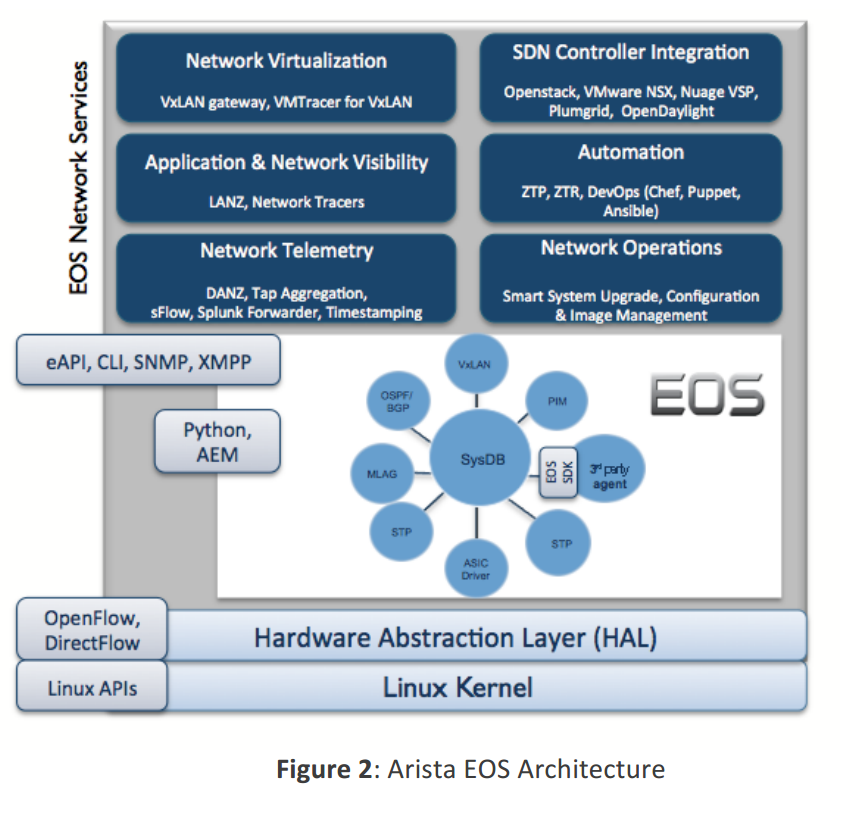
I found this block diagram in Arista White paper:

arista1

Following are the things that I liked:

Continue reading Arista EoS and vEoS

Cisco NXAPI

Earlier, I had written about Cisco NXOS device configuration/monitoring using Python and OnePK. Recently, I came across NXAPI approach to configure and monitor NXOS  devices. NXAPI uses either http/https to connect to NXOS devices and talk using NXOS CLI. For configuration, CLI is encoded in XML/JSON. For monitoring, CLI is encoded in XML/JSON and the results are returned in similar format that makes it easy to parse. I also saw this blog and nxos-ansible project from Jason where he has created Ansible modules using NXAPI. In this blog, I will cover NXAPI basics and my experience in trying Pycsco library and nxos-ansible modules from Jason. Thanks to Jason, he has done a nice job abstracting the NXAPI into higher level functions and Ansible modules and this can help others to build up on top of it rather than working from scratch.

Enabling NXAPI:

NXAPI is available on Nexus 3k and 9k devices. I have access to N3K device and I tried this there. To enable NXAPI, we need to execute “feature nxapi” from config prompt. NXAPI also provides a sandbox environment which can be accessed using http from the management ip address. With the sandbox environment, we can execute NXOS CLI commands and get output in JSON or XML format. Following image is a snapshot of the sandbox. Continue reading Cisco NXAPI

Cisco UCS Platform Emulator

Earlier, I had written a blog on Cisco UCS automation using Python SDK. At that time, I used real UCS system to test my scripts. Cisco UCS PE(Platform Emulator) emulates UCSM(UCS Manager) software and we can run this as a VM. Different types of hardware(Fabric Interconnect, FEX/IOM, Servers, adapters, power supply) can be added to create a complex UCS system. We can do majority of the configurations and can trigger different conditions to see how UCSM reacts. Obviously, traffic related testing cannot be done with this. For scripting, UCS PE is a perfect solution. In this blog, I will cover what I did to get UCS PE up and running.

Environment:

VMWare Player 6.05 running on Windows 7.

Installation:

Download the PE zip files. I used version 2.2(3a). Unzip them and import into VMplayer. Choose the default configurations, 3 NAT interfaces are created by default.

Basic configuration:

Continue reading Cisco UCS Platform Emulator

Ansible for Network Automation – Part 2

This blog is part of my series on Devops for Networking. In the previous blog, I covered basics of Ansible and how to get started with it. In this blog, I will cover a sample application that I wrote with Ansible. This Ansible application builds on UCS sdk utility that I covered in a previous blog. The UCS python utility displays the inventory of UCS system. I have made that utility as an Ansible module and extended the application to display the inventory of a list of UCS systems that are defined in the host list. This project is more to illustrate the usecase for Ansible.

The source code for the project can be found here. There are 3 files listed here:

getucs.yml - YAML file that defines the playbook
getucsinfo - New module that is defined. This file needs to be in "usr/share/ansible"
getUcsProp.py - getucsinfo module uses functions in this library. This file needs to be in PYTHONPATH.The library provides utility functions to get UCS inventory.

Continue reading Ansible for Network Automation – Part 2

Ansible for Network automation – Part 1

This blog is part of my series on Devops for Networking. Ansible is a very popular Devops tool and serves similar purposes as Puppet, Chef etc. Ansible has the unique feature that there is no need to install agent on the device side and this makes it very popular for Network device configuration since Network devices are still predominantly a closed system which does not allow agent installation in the device. In this blog, I will cover how to get started with Ansible and in the next blog, I will cover a sample application that I have written.

Ansible basics:

Ansible modules can be run locally or remotely. With the local approach, the module runs locally using apis to talk to remote devices. In remote scenario ,modules are pushed to remote devices, executed as python script and results are returned. Even though there is no need to install remote agent, remote device should allow execution of Python script. Ansible can either be run in command-line for simple tasks or can be executed using a playbook.

Continue reading Ansible for Network automation – Part 1

Network device configuration using templates with Jinja2 and YAML

This blog is part of my series on Devops for Networking. Typically, Network device configurations for CLI based systems are stored as text files and when its necessary to change parameters like gateway address, vlan, ntp server etc, the script is manually edited and then reapplied to the device. This process is manual and prone to errors. In this blog, I will cover how to automate generation of configuration scripts using Jinja2 and YAML. I will also provide an sample application that I created. For more details, please refer to the references section below.

Tools overview:

Jinja2:

Jinja2 is a Python library for creating configuration based on templates. Jinja2 defines a templating language with which templates are created. The templates can be as simple as a hostname variable that needs to be updated or it can be an array of vlans that needs to be populated. Jinja2 also provides complex templates to cover different scenarios. Following is a very simple example of a template which says ntp_server is a variable that needs to be updated dynamically. We will see later how we can feed in the dynamic values to update.

ntp server {{ ntp_server }}

Continue reading Network device configuration using templates with Jinja2 and YAML

Cisco device configuration using OnePK

This blog is part of my series on Devops for Networking. onePK is Cisco’s attempt to expose a standard set of APIs to configure and monitor across multiple different Cisco devices. Orchestration and automation applications can use these standard APIs to talk to Cisco devices. In this blog, I will cover a brief overview of onePK and how to get started with onePK to write applications on top of it.

OnePK overview:

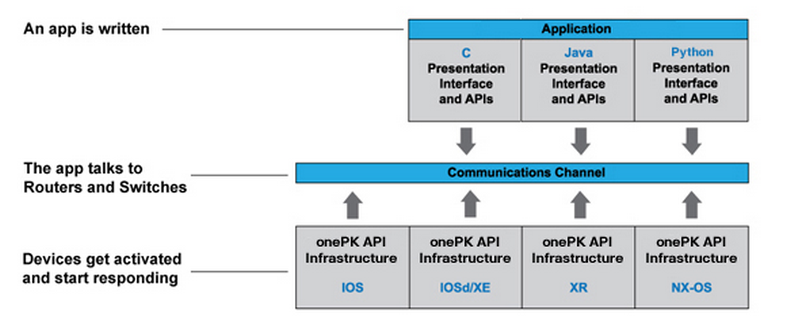
Following block diagram from Cisco gives different blocks involved in onePK.

devops6

Continue reading Cisco device configuration using OnePK

Nexus devices CLI parsing using Python, XML and JSON

This blog is part of my series on Devops for Networking. As I indicated in 1 of my earlier blog, majority of Network devices still have CLI as the only means of configuration and monitoring. CLI is not automation friendly because of obvious reasons. In the last few years, Cisco NXOS devices provides CLI output in XML and JSON format. This allows much easier ways to parse the CLI output which aids in automation. In this blog, I will cover some examples of monitoring Cisco NXOS devices using Python interface to interact with the device and get useful information.

Prerequisites:

Continue reading Nexus devices CLI parsing using Python, XML and JSON

Cisco UCS automation using Python SDK

This blog is part of my series on Devops for Networking. In this blog, I will cover a brief overview of UCS management model, management tools and how to automate configuration and monitoring of Cisco UCS using Python SDK. UCS is Cisco’s Unified computing system that provides a tightly integrated compute, networking and storage solution.

UCS Management

Cisco UCS management information model is a hierarchical tree with each node in the tree representing either physical or logical entity. The node is referred to as MO(Managed object). Physical entities could be chassis, servers, switches and logical entities could be policies, service profiles etc. XML based interface is provided to set and get managed objects. Following picture shows a sample Management tree with Chassis, blades and adapters.

Continue reading Cisco UCS automation using Python SDK

DevOps and Network Automation

Devops is now a widely used term. I recently read few articles on Devops in relation to Network Automation and that prompted me to do some research on this topic. In this blog, I will cover what I think comprises the Devops Networking domain and in the next series of blogs, I will try to explore individual areas in more detail. Devops allows infrastructure to be treated as a code and it makes the infrastructure programmable. The term Devops refers to a merger between Development and Operations role and it encourages Developer to look at Operations angle and Network operator to look from Developer angle. As everyone knows, automating infrastructure deployment improves efficiency, removes operator error and allows us to scale. Server automation has been present for quite some time and Network Automation is still very much in infancy stage at this point. Following article from Ivan describes Devops as a lifestyle or mindset on how infrastructure is treated rather than as tools associated with Devops.

How is Network Automation different from Server automation?

Continue reading DevOps and Network Automation